Customer account information changes frequently. Customers request updates for contact details, billing information, account preferences, service plans, and compliance-related records. However, when these requests are handled through emails, calls, or unstructured spreadsheets, teams face delays, data errors, and poor visibility.Customer Account Update Tracker in Google Sheets
That is exactly why a Customer Account Update Tracker in Google Sheets becomes an essential operational tool.
This ready-to-use tracker helps customer support, operations, and account management teams record, track, and analyze all customer account update requests in one centralized place. It provides real-time visibility, visual insights through charts, and a powerful search feature for fast access.Customer Account Update Tracker in Google Sheets
In this article, we explain how the tracker works, what charts it includes, its advantages, opportunities for improvement, best practices, and frequently asked questions.Customer Account Update Tracker in Google Sheets
What Is a Customer Account Update Tracker in Google Sheets?
Click to Buy Customer Account Update Tracker in Google Sheets
A Customer Account Update Tracker is a structured system that records and monitors all customer-initiated or internal account update requests. These updates may include:
-
Contact information changes
-
Billing or payment updates
-
Account type changes
-
Service or subscription updates
-
Compliance or verification updates
Because this tracker is built in Google Sheets, it allows teams to collaborate in real time, update statuses easily, and maintain a clear audit trail—without additional software.
Key Features of the Tracker
This tracker is designed as a ready-to-use solution with:
-
A centralized Tracker Sheet Tab
-
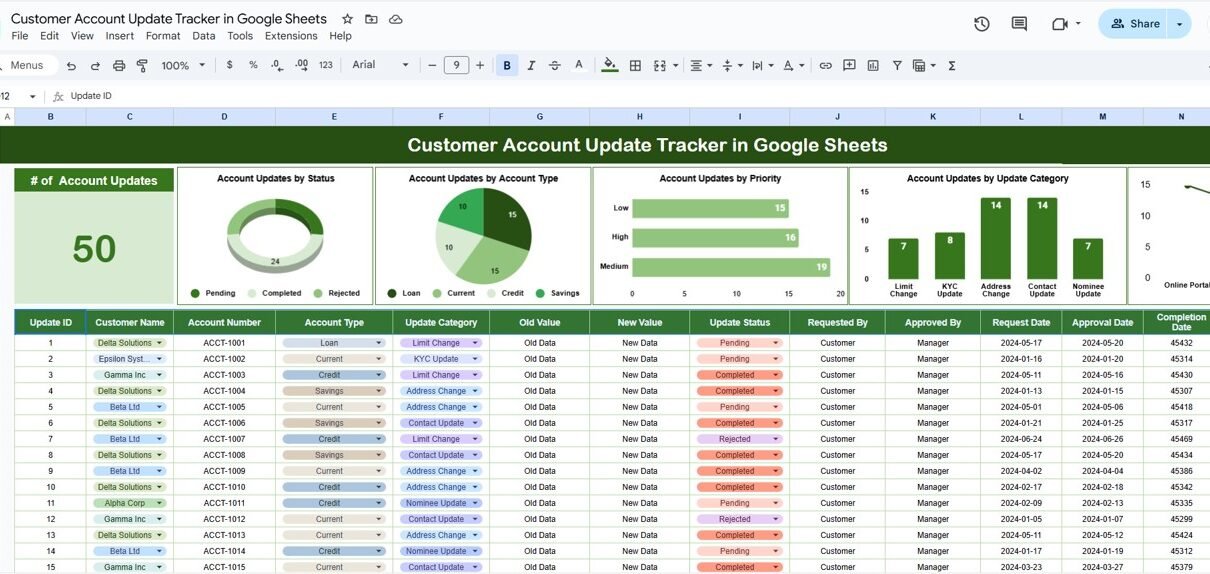
Five insightful charts for analysis
-
A smart Search by Keyword and Field Name feature
-
A clean and scalable structure
Each feature helps teams manage customer updates efficiently and transparently.
Tracker Sheet Tab
The Tracker Sheet Tab is the core data-entry and management area.
Typical fields include:
-
Request ID
-
Request Date
-
Customer Name / Account ID
-
Account Type
-
Update Category
-
Request Priority
-
Update Channel (Email, Phone, Portal, Support Ticket, etc.)
-
Request Status (Pending, In Progress, Completed, Rejected)
-
Assigned To
-
Completion Date
-
Remarks or Notes
Whenever data changes, all charts update automatically.
Charts Included in the Tracker Dashboard
Click to Buy Customer Account Update Tracker in Google Sheets
The dashboard includes five visual charts that provide instant insights into account update activity.
1. Account Updates by Status
This chart shows how many requests are:
-
Pending
-
In Progress
-
Completed
-
Rejected
It helps managers identify bottlenecks and ensure timely resolution of customer requests.
2. Account Updates by Account Type
This chart categorizes update requests based on account type, such as:
-
Individual
-
Business
-
Enterprise
-
Premium
It helps teams understand which customer segments generate the most update requests.
3. Account Updates by Priority
This chart groups requests by priority level:
-
Low
-
Medium
-
High
-
Urgent
It ensures high-priority customer updates receive immediate attention.
4. Account Updates by Update Category
This chart shows the distribution of updates by category, such as:
-
Contact Details
-
Billing Information
-
Account Preferences
-
Service Changes
-
Compliance Updates
It highlights recurring update types and helps improve processes.
5. Account Updates by Channel
This chart analyzes how customers submit update requests:
-
Email
-
Phone
-
Customer Portal
-
Support Ticket
It helps organizations optimize customer communication channels.

Click to Buy Customer Account Update Tracker in Google Sheets
Search Functionality – Search by Keyword and Field Name
One of the most powerful features of this tracker is the Search option.
Users can search by:
-
Customer name
-
Account ID
-
Status
-
Priority
-
Account type
-
Update category
This feature allows teams to:
-
Find specific requests instantly
-
Respond to customer inquiries faster
-
Prepare reports for audits or reviews
-
Track historical account changes easily

Click to Buy Customer Account Update Tracker in Google Sheets
Why Organizations Need a Customer Account Update Tracker
Without a structured tracking system, customer updates often result in delays and errors. This tracker helps organizations:
-
Improve customer satisfaction
-
Reduce data inconsistencies
-
Maintain compliance records
-
Increase operational efficiency
-
Enhance transparency and accountability
Advantages of Using This Tracker in Google Sheets
Click to Buy Customer Account Update Tracker in Google Sheets
-
Centralized account update management
-
Real-time collaboration
-
Clear visibility of request status
-
Faster turnaround time
-
Easy customization and scalability
-
No additional software costs
Opportunities for Improvement
Organizations can enhance the tracker further by:
-
Integrating Google Forms for request submission
-
Adding SLA timelines for updates
-
Automating email notifications
-
Tracking update resolution time
-
Linking updates to CRM systems
Best Practices for Using the Tracker
Click to Buy Customer Account Update Tracker in Google Sheets
-
Define clear update categories and priorities
-
Review pending requests daily
-
Assign ownership for each request
-
Maintain data accuracy and confidentiality
-
Analyze charts weekly to identify trends
-
Communicate updates clearly with customers
Conclusion
A Customer Account Update Tracker in Google Sheets provides a simple yet powerful way to manage customer account changes. It replaces manual follow-ups with structured tracking, visual insights, and fast search capabilities.
Because the tracker is easy to use, collaborative, and scalable, it becomes a valuable long-term tool for customer operations and support teams focused on accuracy, speed, and customer satisfaction.
Frequently Asked Questions (FAQs)
Click to Buy Customer Account Update Tracker in Google Sheets
1. Who should use this tracker?
Customer support teams, account managers, operations teams, and compliance teams.
2. Can this tracker handle a high volume of requests?
Yes, it scales easily with structured data and filters.
3. Is Google Sheets secure for customer data?
Yes, when access permissions and sharing controls are configured properly.
4. Can update categories be customized?
Yes, all fields and categories can be modified.
5. Does it support audit tracking?
Yes, it maintains a clear history of updates and status changes.
Visit our YouTube channel to learn step-by-step video tutorials
Youtube.com/@NeotechNavigators
Watch the step-by-step video tutorial:
Click to Buy Customer Account Update Tracker in Google Sheets