Managing customer requests efficiently plays a critical role in customer satisfaction and service quality. However, many teams still rely on emails, shared inboxes, or unstructured spreadsheets to track requests. As a result, requests get delayed, priorities remain unclear, and accountability suffers.
That is exactly why the Customer Request Resolution Tracker in Google Sheets becomes a powerful and practical solution.
This ready-to-use tracker helps service teams monitor customer requests, track resolution progress, analyze workload distribution, and improve response efficiency—all from a single Google Sheets file.
What Is a Customer Request Resolution Tracker in Google Sheets?
A Customer Request Resolution Tracker in Google Sheets is a structured tracking and analytics tool designed to manage customer service requests from creation to resolution.
Instead of handling requests across multiple tools, this tracker centralizes all request data and converts it into meaningful charts and insights. As a result, support managers, service teams, and operations leaders gain complete visibility into request volume, status, priority, and resolution trends.
Most importantly, Google Sheets keeps the tracker simple, collaborative, and accessible without complex software.
Why Do Teams Need a Customer Request Resolution Tracker?
Click to Buy Customer Request Resolution Tracker in Google Sheets
Customer service teams handle requests coming from multiple channels such as phone, email, chat, and in-store interactions. Therefore, without a proper tracker, teams struggle to answer questions like:
-
How many requests are currently open?
-
Which requests are high priority?
-
Are requests getting resolved on time?
-
Which agents handle the most workload?
-
Which channels generate the most requests?
The Customer Request Resolution Tracker solves these challenges by providing structure, visibility, and accountability.
Key Features of Customer Request Resolution Tracker in Google Sheets
This tracker is ready to use and combines data tracking, visual analytics, and intelligent search in one sheet tab.
Tracker Sheet Tab – Central Dashboard & Analysis
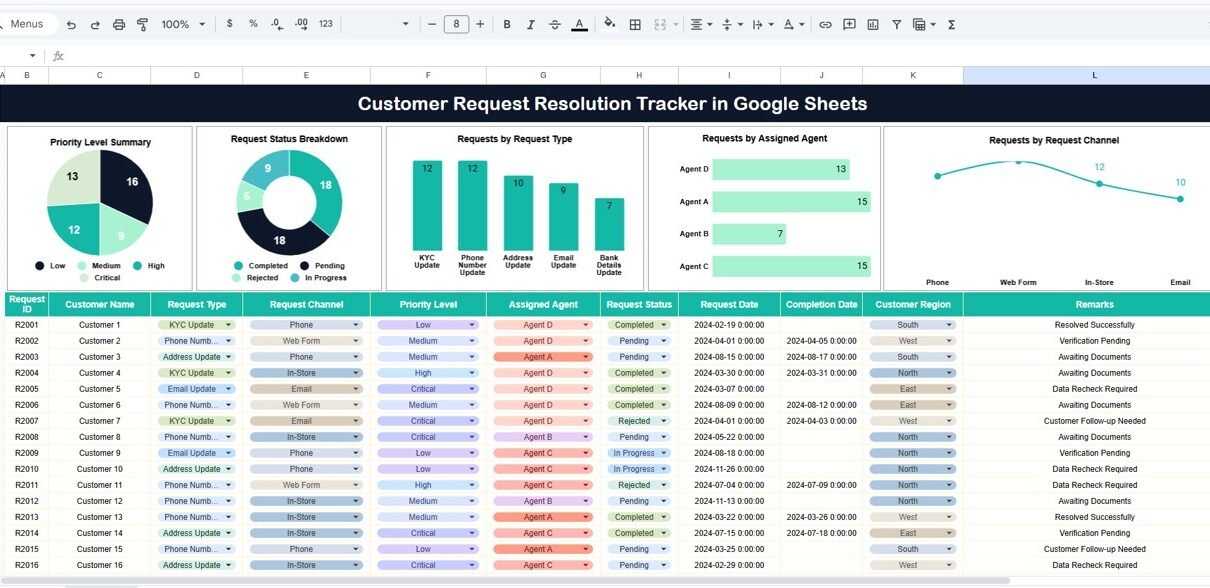
The Tracker Sheet acts as the main dashboard of the file. It includes interactive charts and a search feature that help users analyze requests quickly.
Charts – Visual Insights into Customer Requests
Click to Buy Customer Request Resolution Tracker in Google Sheets
The tracker includes the following key charts:
Priority Level Summary
Displays the number of requests by priority level (Critical, High, Medium, Low).
This chart helps teams focus on urgent requests first.
Request Status Breakdown
Shows the distribution of requests by status such as Pending, In Progress, Resolved, or Rejected.
This gives instant clarity on backlog and resolution progress.
Requests by Request Type
Categorizes requests based on type (e.g., address update, service query, complaint).
This helps identify common customer issues.
Requests by Assigned Agent
Shows workload distribution across agents.
This supports fair task allocation and performance monitoring.
Requests by Request Channel
Displays requests by channel such as Phone, Email, Chat, or In-Store.
This helps teams understand where most customer interactions originate.
All charts update automatically whenever request data changes.

Click to Buy Customer Request Resolution Tracker in Google Sheets
Search Functionality – Find Requests Instantly
The tracker includes a Search section that allows users to:
-
Enter a Search Keyword
-
Select a Field Name (Request ID, Customer Name, Agent, Status, or Channel)
This feature makes it easy to locate specific customer requests without manually filtering data.

Click to Buy Customer Request Resolution Tracker in Google Sheets
How This Tracker Improves Customer Service Performance
This tracker helps teams:
-
Reduce response and resolution delays
-
Prioritize high-impact requests
-
Balance agent workload
-
Identify recurring customer issues
-
Improve overall service efficiency
As a result, organizations deliver faster and more consistent customer support.
Advantages of Customer Request Resolution Tracker in Google Sheets
-
Ready-to-use structure
-
No expensive support software required
-
Real-time request visibility
-
Easy collaboration across teams
-
Clear accountability and tracking
Best Practices for Using the Customer Request Resolution Tracker
Click to Buy Customer Request Resolution Tracker in Google Sheets
-
Update request status regularly
-
Define clear priority rules
-
Assign ownership for every request
-
Review dashboard charts daily or weekly
-
Use search instead of manual filtering
Conclusion
The Customer Request Resolution Tracker in Google Sheets offers a simple yet powerful way to manage customer service operations. Instead of juggling emails and disconnected logs, teams gain a single source of truth for tracking, analyzing, and resolving customer requests effectively.
Because the tracker combines charts, search functionality, and structured data, it supports faster resolutions, better prioritization, and improved customer satisfaction.
Watch the step-by-step video tutorial:
Visit our YouTube channel to learn step-by-step video tutorials
Youtube.com/@NeotechNavigators
Click to Buy Customer Request Resolution Tracker in Google Sheets