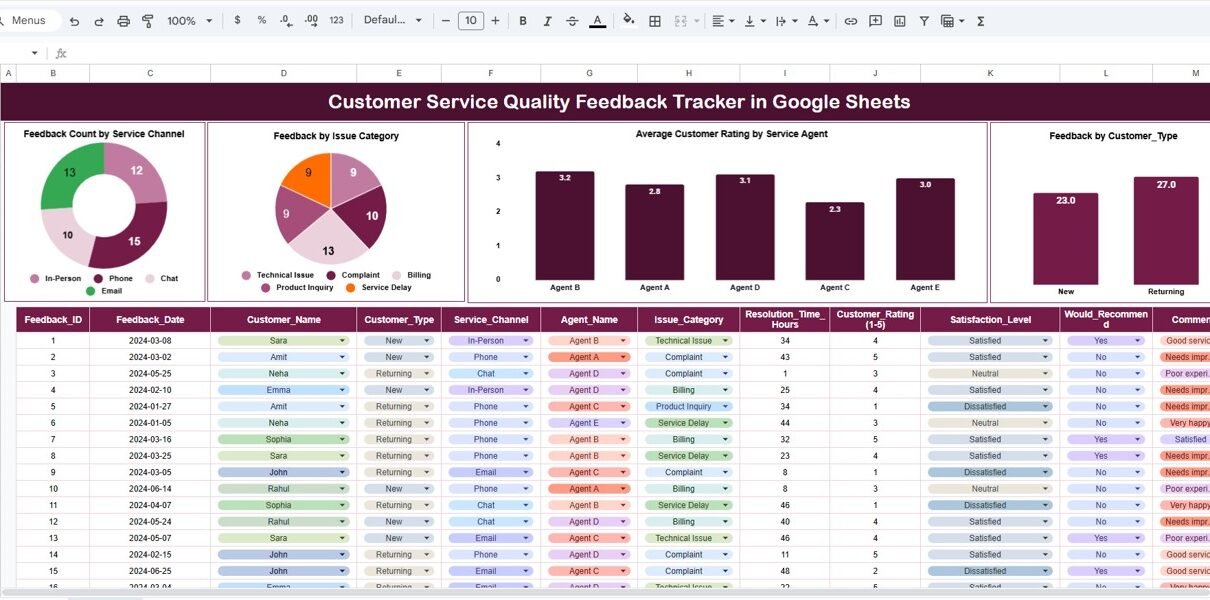
Customer service quality directly impacts customer retention, brand reputation, and business growth. However, many organizations still struggle to track customer feedback in a structured and actionable way. Feedback often comes from multiple channels, stays scattered across emails or tools, and never turns into meaningful insights.Customer Service Quality Feedback Tracker in Google Sheets
A Customer Service Quality Feedback Tracker in Google Sheets solves this challenge effectively. It provides a centralized, ready-to-use system to capture customer feedback, analyze service performance, and identify improvement areas using clear charts and a smart search feature.Customer Service Quality Feedback Tracker in Google Sheets
What Is a Customer Service Quality Feedback Tracker in Google Sheets?
Click to Buy Customer Service Quality Feedback Tracker in Google Sheets
A Customer Service Quality Feedback Tracker is a structured Google Sheets solution that records, analyzes, and visualizes customer feedback data. It allows organizations to measure service quality across channels, agents, issue categories, and customer types.
Because it runs in Google Sheets, the tracker offers:
- Real-time collaboration
- Easy data entry
- Automatic chart updates
- Zero software cost
- High flexibility
The tracker helps customer service managers, quality teams, and leadership monitor service performance with confidence.
Tracker Sheet Tab – Central Feedback Repository
The Tracker Sheet Tab acts as the foundation of the entire system. All customer feedback records get entered here in a clean and standardized format.
Typical fields include:
- Feedback ID
- Customer Name
- Customer Type (New / Existing / VIP)
- Service Channel (Call, Email, Chat, Web, Social Media)
- Service Agent Name
- Issue Category
- Customer Rating (1–5)
- Feedback Comment
- Feedback Date
- Resolution Status
Once you enter or update any record, all charts refresh instantly. This real-time behavior makes the tracker reliable for daily operations and management reviews.
Charts Included in the Feedback Tracker
Click to Buy Customer Service Quality Feedback Tracker in Google Sheets
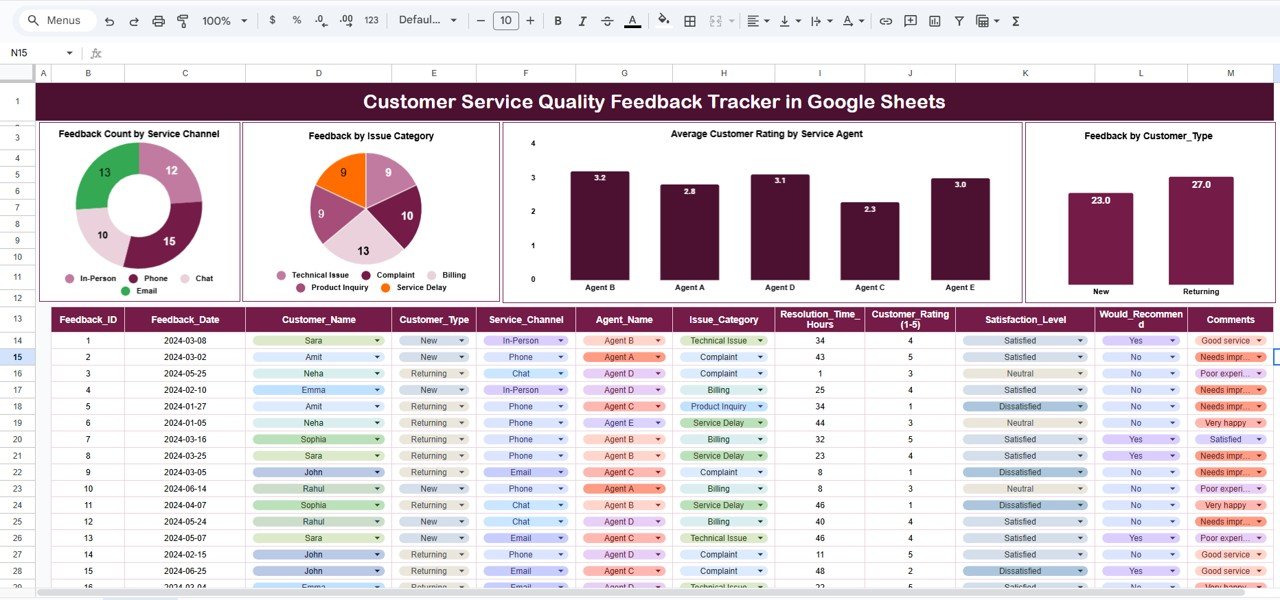
The dashboard includes four powerful charts, each designed to answer specific service-quality questions.
Feedback Count by Service Channel
This chart shows how many feedback entries come from each service channel, such as:
-
Phone support
-
Email support
-
Live chat
-
Website forms
-
Social media
This insight helps teams understand where customers interact most and where service quality needs improvement. For example, high feedback volume from chat may signal staffing or response issues.
Feedback by Issue Category
This chart groups feedback by issue category, such as:
-
Billing issues
-
Technical problems
-
Delivery delays
-
Account access
-
Product quality
This view helps managers quickly identify recurring service problems. When one category dominates, teams can take corrective action at the root cause level.
Average Customer Rating by Service Agent
This chart shows average customer ratings for each service agent. It helps organizations:
-
Identify top-performing agents
-
Detect training needs
-
Reward consistent performers
-
Improve accountability
Because the rating updates dynamically, managers can track performance trends over time.
Feedback by Customer Type
This chart displays feedback distribution across customer types, such as:
-
New customers
-
Existing customers
-
Premium or VIP customers
This insight ensures high-value customers receive the service quality they expect. It also helps teams design personalized service strategies.
Click to Buy Customer Service Quality Feedback Tracker in Google Sheets
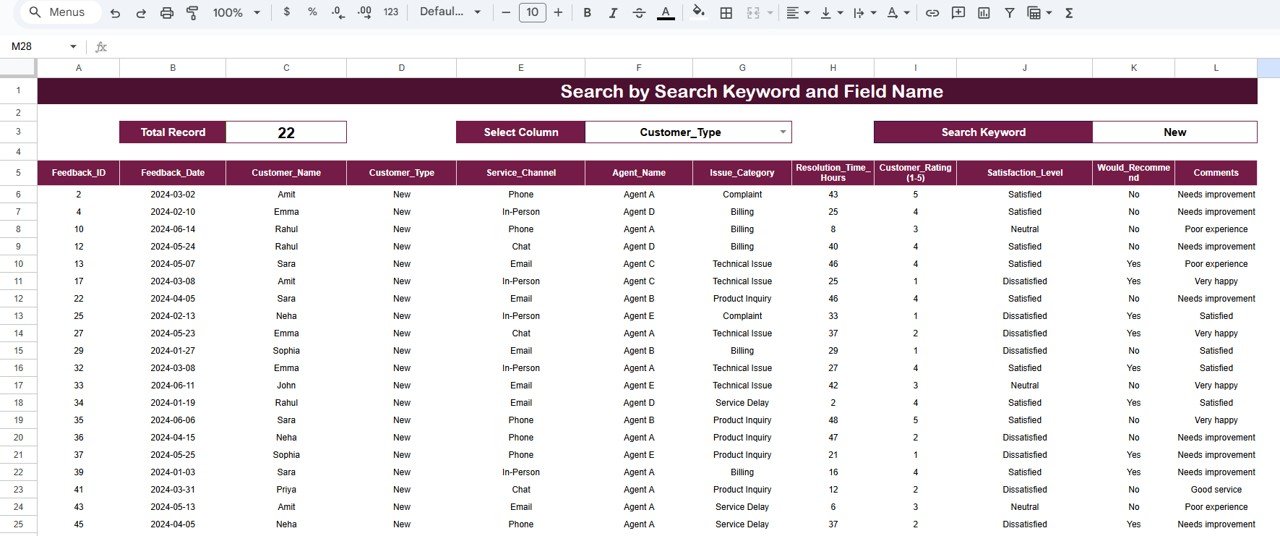
Smart Search Functionality – Search by Keyword and Field Name
The tracker includes a dedicated Search section that allows users to find records instantly.
You simply enter:
-
Search Keyword (example: agent name, customer name, issue type)
-
Field Name (example: Service Agent, Issue Category, Channel)
The tracker instantly filters matching records without manual sorting or filtering.
This feature helps teams:
- Answer customer queries faster
- Review agent-specific feedback
- Prepare audit reports
- Investigate complaints quickly
- Save hours of manual effort
Click to Buy Customer Service Quality Feedback Tracker in Google Sheets
Why Do Organizations Need a Customer Service Feedback Tracker?
Customer expectations increase every year. Without structured feedback tracking, organizations struggle to improve service quality.
This tracker helps because it:
- Centralizes all feedback in one place
- Converts raw comments into insights
- Improves agent accountability
- Identifies service bottlenecks early
- Supports data-driven decisions
Customer service teams gain clarity, confidence, and control.
Advantages of the Customer Service Quality Feedback Tracker
- Centralized Feedback Management: All customer feedback stays organized in one Google Sheet.
- Real-Time Performance Visibility: Charts update instantly as data changes.
- Improved Agent Performance: Agent-wise ratings highlight strengths and gaps.
- Faster Issue Resolution: Recurring issues become visible quickly.
- Better Customer Experience: Insights lead to targeted improvements.
- Easy to Use: No technical or coding skills required.
- Cost-Effective Solution: No paid software or licenses needed.
Opportunities for Improvement in the Feedback Tracker
Click to Buy Customer Service Quality Feedback Tracker in Google Sheets
Although the tracker is powerful, organizations can enhance it further:
Add SLA Tracking
Measure response and resolution times.
Integrate Automated Surveys
Pull feedback automatically from forms or CRM tools.
Add Sentiment Analysis
Categorize feedback as positive, neutral, or negative.
Include Action Status
Track whether feedback leads to improvement actions.
Add Monthly Trend Analysis
Monitor service quality improvement over time.
These improvements elevate the tracker into a complete service quality management system.
Best Practices for Using the Feedback Tracker
Click to Buy Customer Service Quality Feedback Tracker in Google Sheets
- Update feedback daily: Fresh data improves accuracy.
- Standardize rating definitions: Ensure consistency across agents.
- Review charts weekly: Spot trends before problems grow.
- Share insights with agents: Transparency improves motivation.
- Combine qualitative and quantitative data; Comments add context to ratings.
- Protect customer data: Use Google Sheets access controls properly.
Conclusion
A Customer Service Quality Feedback Tracker in Google Sheets provides a simple yet powerful way to measure, analyze, and improve customer service performance. It transforms scattered feedback into meaningful insights through structured data, dynamic charts, and a smart search system.
Because the tracker is ready to use, flexible, and cloud-based, it fits organizations of all sizes. When teams use this tracker consistently, they improve service quality, boost customer satisfaction, and build long-term trust.
Frequently Asked Questions (FAQs)
Click to Buy Customer Service Quality Feedback Tracker in Google Sheets
1. Who should use this feedback tracker?
Customer service teams, quality analysts, support managers, and leadership.
2. Can I customize issue categories and channels?
Yes, the tracker is fully customizable.
3. Does it support multiple service teams?
Yes, you can track unlimited agents and departments.
4. Is Google Sheets secure for feedback data?
Yes, when access permissions are configured correctly.
5. Can I add more charts?
Yes, additional charts can be created easily.
6. Does it work for remote teams?
Yes, Google Sheets supports real-time collaboration from anywhere.
Visit our YouTube channel to learn step-by-step video tutorials
Youtube.com/@NeotechNavigators
Click to Buy Customer Service Quality F
Watch the step-by-step video tutorial:
eedback Tracker in Google Sheets