Every organization needs a smooth and well-organized system for issuing employee ID cards. When requests come through emails, handwritten notes, or chats, delays happen and records get lost. Employees wait longer, admin teams struggle with follow-ups, and tracking becomes difficult. Because of this, a Employee Identification Card Request Tracker in Google Sheets becomes one of the most efficient and easy-to-use tools for managing ID card requests.Employee Identification Card Request Tracker in Google Sheets
This tracker helps you receive, organize, monitor, and analyze ID card-related requests in one place. Whether you need to issue new cards, replace damaged ones, or upgrade to a new design, this Google Sheets tracker keeps everything structured and easy to manage.Employee Identification Card Request Tracker in Google Sheets
In this article, we will explain the complete structure, features, benefits, best practices, and FAQs for the Employee Identification Card Request Tracker in Google Sheets.Employee Identification Card Request Tracker in Google Sheets
What Is an Employee Identification Card Request Tracker?
An Employee Identification Card Request Tracker is a digital tool that helps organizations record and manage all ID card requests submitted by employees. It keeps track of request details and ensures that the admin or HR team processes them without delays.
Because it is built in Google Sheets, the tracker becomes:
-
Easy to update
-
Collaborative
-
Cloud-based
-
Accessible from any device
-
Simple to manage even for beginners
It also includes charts to visualize the request trends and helps the team improve their ID issuance process.
Why Use Google Sheets for ID Card Request Tracking?
Click to Buy Employee Identification Card Request Tracker in Google Sheets
Google Sheets is one of the best platforms for simple tracking systems because:
-
It supports real-time updates
-
It allows multiple users to collaborate
-
Data stays stored in the cloud
-
It offers built-in charts and filters
-
It does not require any installation
-
It is cost-effective
Because of these advantages, organizations choose Google Sheets for request management tools.
Tracker Structure & Features
Your Employee Identification Card Request Tracker in Google Sheets includes two main sheet tabs:
1. Tracker Sheet Tab
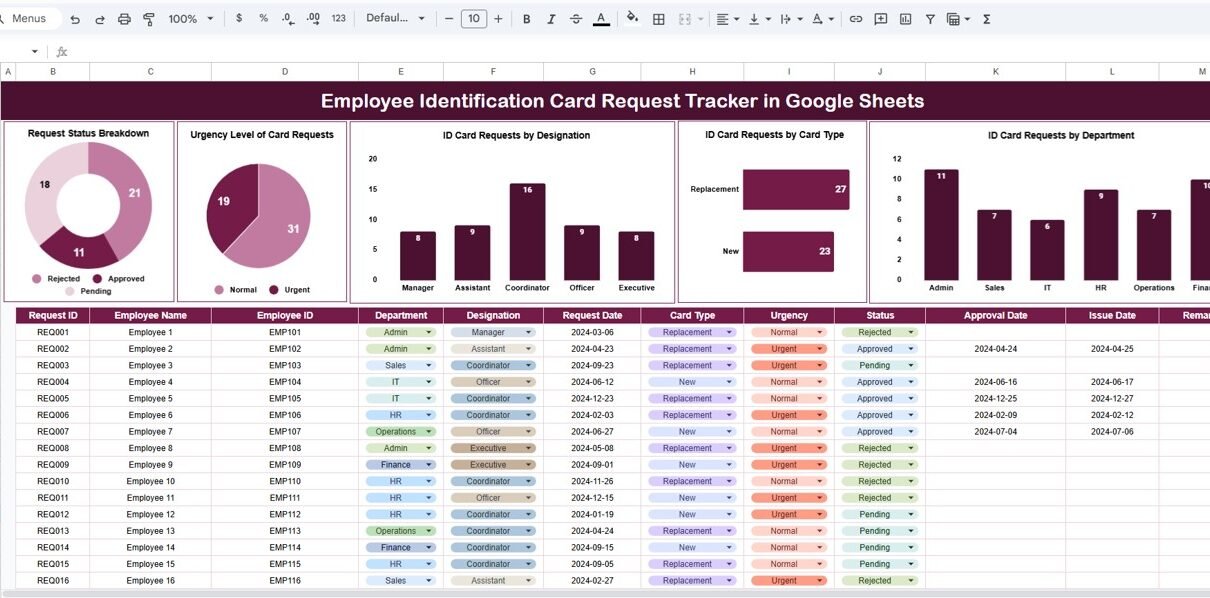
This is the main sheet where all card requests are recorded and analyzed. It contains well-designed charts that give a clear overview of ID card activities in the organization.
Charts Included in the Tracker Sheet:
Request Status Breakdown
Shows how many requests are pending, in progress, completed, or delayed.
Helps teams understand workload and processing speed.
Urgency Level of Card Requests
Displays the number of urgent, high, medium, and low-priority ID card requests.
This helps teams prioritize time-sensitive cases.
ID Card Requests by Designation
Shows the number of requests coming from managers, executives, interns, or other roles.
This analysis helps HR understand request patterns.
ID Card Requests by Card Type
Useful for organizations issuing:
-
New ID cards
-
Replacement cards
-
Temporary cards
-
Upgraded design cards
ID Card Requests by Department
Shows which department generates the highest number of ID card requests.
These charts allow the admin or HR team to view request distribution at a glance and take quick decisions.

Click to Buy Employee Identification Card Request Tracker in Google Sheets
2. Search Sheet Tab
This sheet allows you to search for any request using keywords or selected fields.
Features:
✔ Search by keyword
✔ Select field name (Designation, ID Type, Department, Status, etc.)
✔ Quickly find previous requests
✔ Reduce manual scrolling
✔ Increase processing speed
The search function saves time and helps teams find records instantly.

Click to Buy Employee Identification Card Request Tracker in Google Sheets
Advantages of Employee Identification Card Request Tracker
1. Streamlined Request Handling
All ID card requests stay organized in a single sheet.
2. Faster Processing
Charts help teams identify urgent cases and overloaded departments.
3. Better Transparency
Employees can see request updates when shared.
4. Real-Time Collaboration
HR and admin teams can update the tracker simultaneously.
5. Easy Analysis and Reporting
The visual charts make reporting simple and accurate.
6. Zero Technical Complexity
The tracker is easy to use even without technical knowledge.
Opportunities for Improvement
Click to Buy Employee Identification Card Request Tracker in Google Sheets
You can enhance the tracker with the following improvements:
1. Google Form Integration
Employees can submit ID card requests directly through a form.
2. Email Notifications
Send automatic email alerts for new requests or completed tasks.
3. QR Code Integration
Generate QR codes for ID cards directly from Google Sheets.
4. SLA Tracking
Track how long each request takes to process.
5. Request History Log
Maintain a complete timeline of request updates.
Best Practices for Using the Tracker
Click to Buy Employee Identification Card Request Tracker in Google Sheets
1. Maintain Clear Status Labels
Use labels like Pending, Processing, Completed, On Hold, Rejected.
2. Update Requests Daily
Keep the tracker fresh and accurate.
3. Keep Priority Labels Simple
Urgent, High, Medium, Low levels work best.
4. Share Tracker with Admin & HR Teams
Let the teams collaborate and track progress.
5. Review Charts Weekly
Identify bottlenecks and fix issues early.
6. Use Filters Regularly
Filters help manage large data sets easily.
Conclusion
The Employee Identification Card Request Tracker in Google Sheets is a practical, easy-to-use, and cost-effective solution for managing ID card requests in any organization. It helps you track request status, priority, card type, designation, and department with complete clarity. With built-in charts and a powerful search function, the tracker makes the ID issuing process faster, smoother, and more reliable.
Whether you run a small team or a large organization, this tracker gives you everything you need to manage ID card requests without delays or confusion.
Frequently Asked Questions (FAQs)
Click to Buy Employee Identification Card Request Tracker in Google Sheets
1. What does this tracker do?
It tracks all employee ID card requests in one centralized Google Sheet.
2. Who can use this tracker?
HR teams, admin staff, facility managers, and department heads.
3. Can I add custom fields?
Yes, you can add or modify columns anytime.
4. Does it support charts?
Yes, it includes charts for status, urgency, designation, card type, and departments.
5. Can employees search their requests?
Yes, the search tab helps locate any request instantly.
6. Is the tracker ready to use?
Yes, you can start using it immediately.
7. Can it be integrated with Google Forms?
Yes, employees can submit requests directly through a Google Form connected to the sheet.
Visit our YouTube channel to learn step-by-step video tutorials
Youtube.com/@NeotechNavigators
Watch the step-by-step video Demo:
Click to Buy Employee Identification Card Request Tracker in Google Sheets