Human Resource (HR) compliance plays a crucial role in every organization. Companies must follow various labor laws, workplace policies, and regulatory requirements to ensure fair treatment of employees and maintain legal compliance. However, monitoring compliance manually can become complicated because HR teams manage large volumes of employee data, policy records, audits, and regulatory updates.
Organizations must track several compliance indicators such as policy adherence, training completion rates, employee documentation, audit performance, and regulatory reporting. Without a structured monitoring system, HR managers may struggle to identify compliance risks and maintain transparency.
This is where the HR Compliance KPI Dashboard in Google Sheets becomes extremely valuable.
The HR Compliance KPI Dashboard in Google Sheets is a ready-to-use analytical tool designed to track HR compliance performance using structured KPIs. The dashboard displays each KPI along with its unit, aggregation formula, definition, and performance type (Lower the Better or Upper the Better). Because the dashboard uses automated calculations and visual indicators, HR managers can quickly evaluate compliance performance and take corrective action.
In this article, you will learn everything about the HR Compliance KPI Dashboard in Google Sheets, including its features, worksheets, advantages, best practices, and implementation strategies.
What Is an HR Compliance KPI Dashboard?
An HR Compliance KPI Dashboard is a performance monitoring system that tracks key HR compliance indicators in a visual and structured format.
Instead of reviewing multiple HR reports, the dashboard consolidates important compliance metrics into a single view. As a result, HR leaders can quickly evaluate compliance performance and identify areas that require attention.
Typical HR compliance metrics include:
Because compliance failures can lead to legal penalties and reputational damage, organizations must continuously monitor these indicators.
Why Do Organizations Need an HR Compliance KPI Dashboard?
Click to Buy HR Compliance KPI Dashboard in Google Sheets
HR compliance involves monitoring multiple legal and organizational requirements. Therefore, managing compliance without structured analytics becomes difficult.
Organizations use an HR Compliance KPI Dashboard to:
- Track compliance performance regularly
- Identify potential compliance risks early
- Monitor training and policy adherence
- Improve HR governance
- Ensure regulatory compliance
- Support data-driven HR decisions
- Consequently, organizations can reduce compliance risks and maintain a transparent HR environment.
Overview of the HR Compliance KPI Dashboard in Google Sheets
The HR Compliance KPI Dashboard in Google Sheets is a ready-to-use template designed to monitor HR compliance KPIs in an interactive and visual format.
The dashboard displays each KPI along with the following information:
- KPI Unit
- Aggregation Formula
- KPI Definition
- Performance Type (Lower the Better / Upper the Better)
These details help HR professionals clearly understand the importance and calculation method of each KPI.
The dashboard allows users to analyze both:
-
MTD (Month-to-Date) performance
-
YTD (Year-to-Date) performance
Additionally, the dashboard compares current performance with:
-
Target values
-
Previous year performance
As a result, HR teams can evaluate compliance trends effectively.
Worksheets Included in the HR Compliance KPI Dashboard
Click to Buy HR Compliance KPI Dashboard in Google Sheets
The template contains six worksheets, each designed to perform a specific function.
Dashboard Sheet Tab: The Main Compliance Monitoring Page
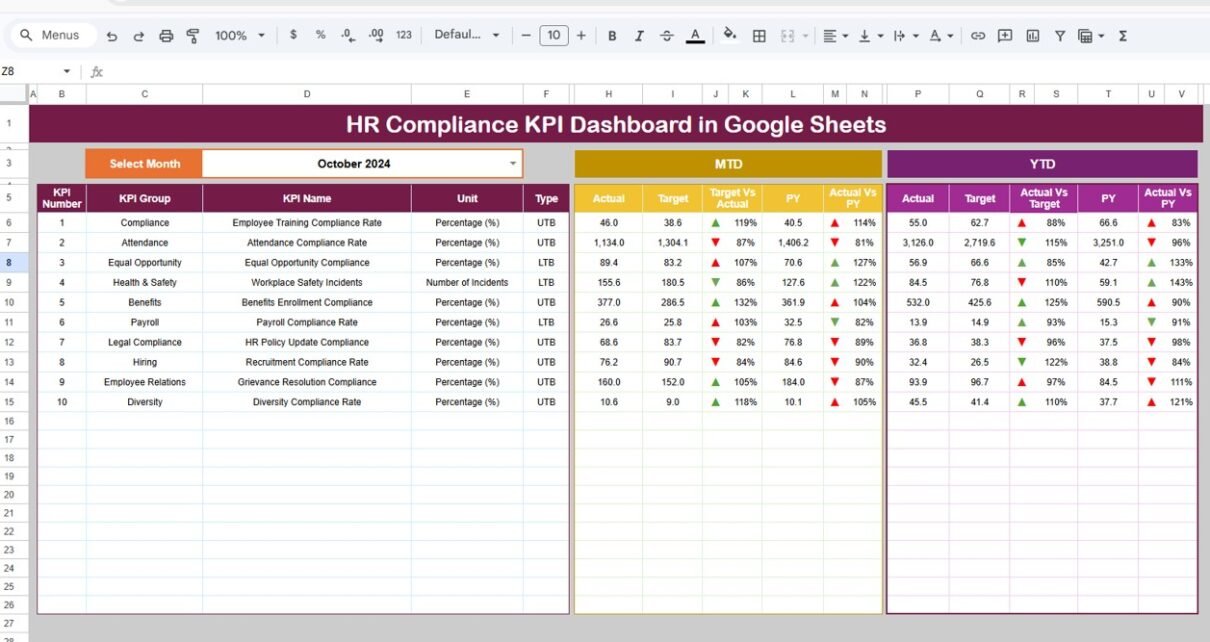
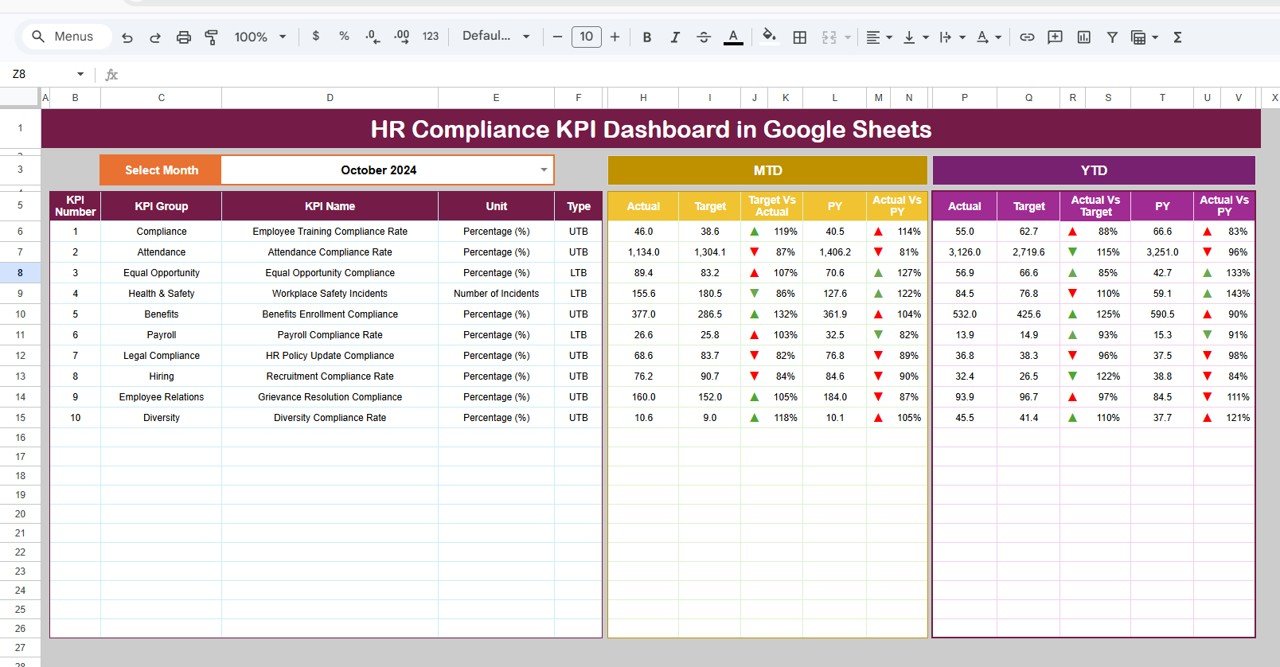
The Dashboard Sheet is the main interface of the template.
This sheet displays all KPI performance indicators in one place, allowing HR managers to review compliance performance quickly.
Month Selection
At the top of the dashboard, users can select the month from the dropdown located in cell D3.
Once a month is selected:
-
All KPI values update automatically
-
Performance comparisons update automatically
-
Visual indicators adjust automatically
This feature allows users to analyze monthly compliance performance instantly.
MTD Performance Monitoring
The dashboard displays the following MTD metrics:
-
MTD Actual Value
-
MTD Target Value
-
Previous Year MTD Value
The dashboard also shows:
-
Target vs Actual comparison
-
Previous Year vs Actual comparison
Conditional formatting uses up and down arrows to indicate performance changes.
These indicators help managers understand whether compliance performance is improving or declining.
YTD Performance Monitoring
The dashboard also displays Year-to-Date (YTD) performance.
YTD metrics include:
-
YTD Actual Value
-
YTD Target Value
-
Previous Year YTD Value
The dashboard again compares:
-
Target vs Actual
-
Previous Year vs Actual
These comparisons help HR teams evaluate long-term compliance performance.
Click to Buy HR Compliance KPI Dashboard in Google Sheets
KPI Trend Sheet Tab: How Can You Track KPI Trends?
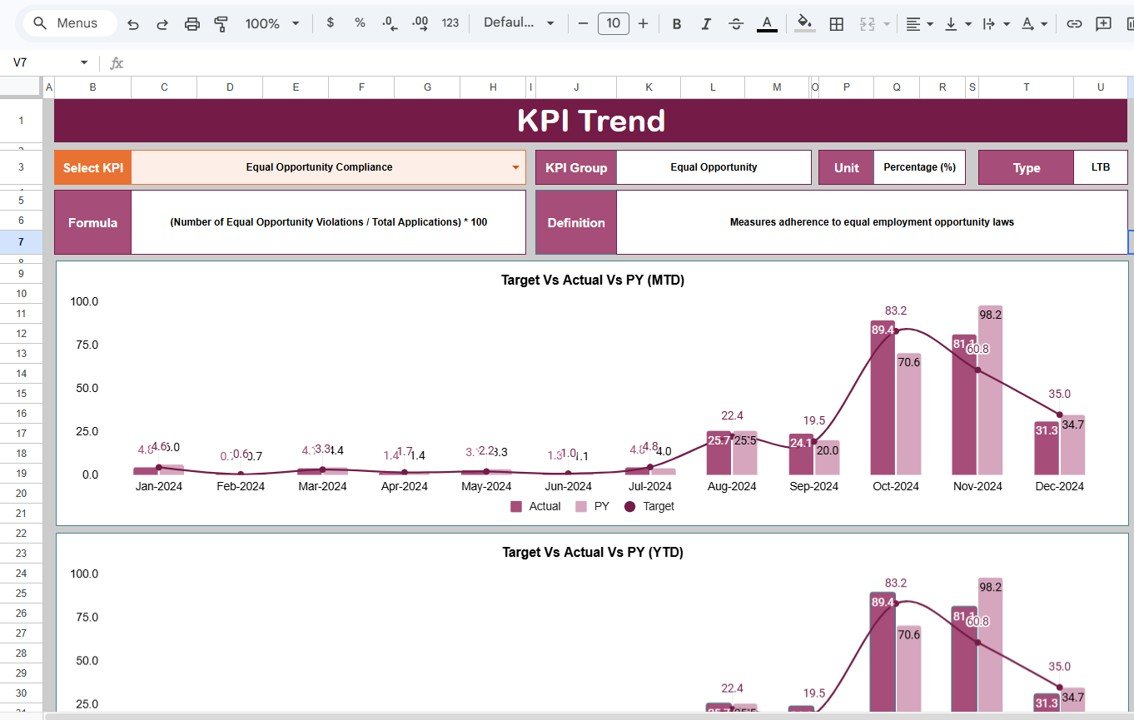
The KPI Trend Sheet helps users analyze the performance trend of individual KPIs.
Users can select a KPI name from the dropdown available in cell C3.
Once a KPI is selected, the sheet displays important details such as:
-
KPI Group
- KPI Unit
- KPI Type (Lower the Better / Upper the Better)
- KPI Formula
- KPI Definition
The trend chart then shows the KPI performance over time.
This feature allows HR teams to monitor how compliance metrics evolve throughout the year.
Click to Buy HR Compliance KPI Dashboard in Google Sheets
Actual Number Sheet Tab: Where Are Actual Values Entered?
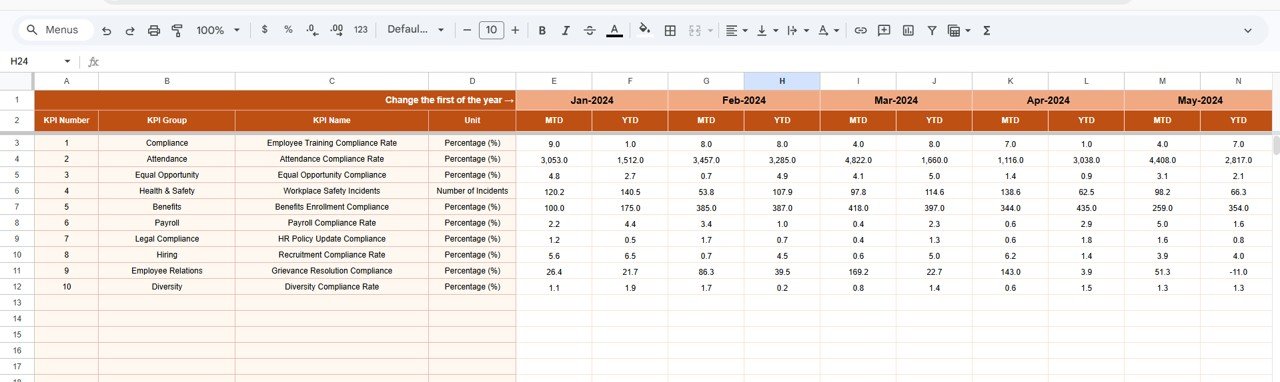
The Actual Number Sheet is where HR teams enter the actual performance values for each KPI.
In this sheet:
-
Users input MTD and YTD actual values for each KPI.
-
The month can be changed using the cell E1 dropdown.
To start the dashboard:
-
Enter the first month of the year in cell E1.
-
Then continue entering data for subsequent months.
Once the data is entered, the dashboard automatically updates.
Target Sheet Tab: Where Are KPI Targets Entered?
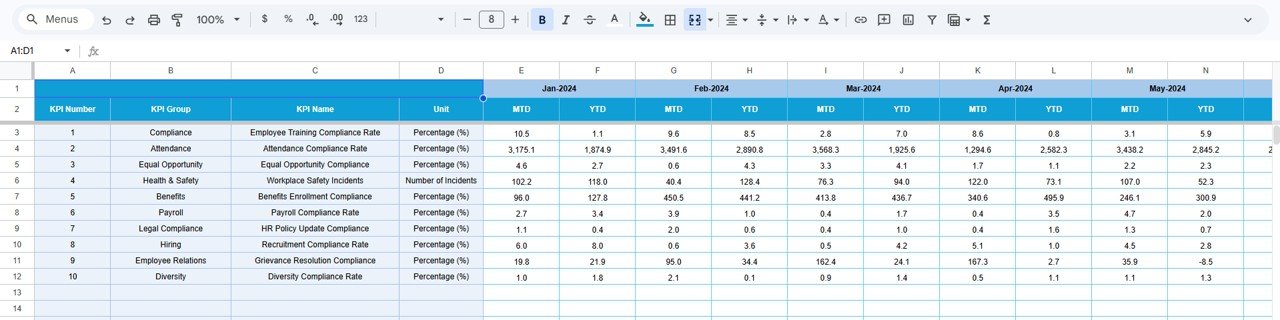
The Target Sheet contains the target values for each KPI.
HR teams must enter the target numbers for every KPI for each month.
The targets are entered for both:
-
MTD targets
-
YTD targets
Because targets define expected performance levels, they play a critical role in compliance monitoring.
Click to Buy HR Compliance KPI Dashboard in Google Sheets
Previous Year Number Sheet Tab: Historical Comparison
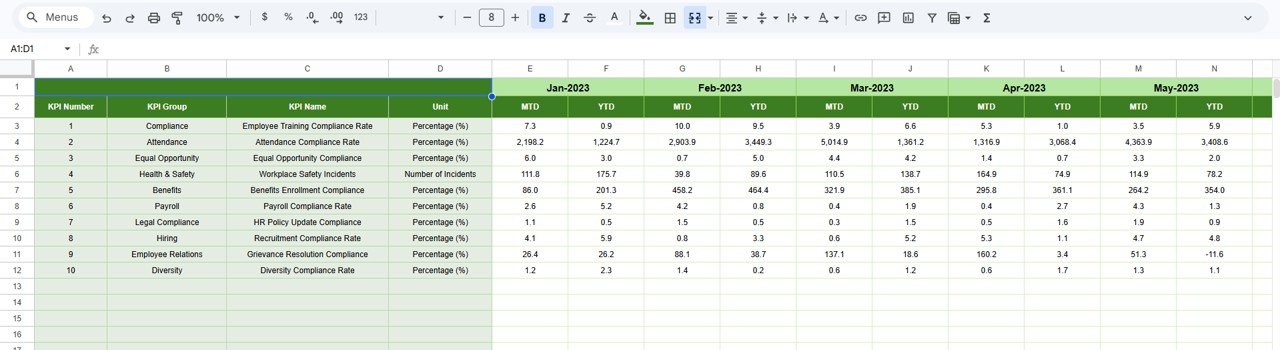
The Previous Year Number Sheet contains KPI data from the previous year.
Users should enter the historical values in the same format used for the current year.
This information allows the dashboard to perform:
-
Previous year comparisons
-
Performance trend analysis
Comparing current performance with historical data helps HR teams identify improvement opportunities.
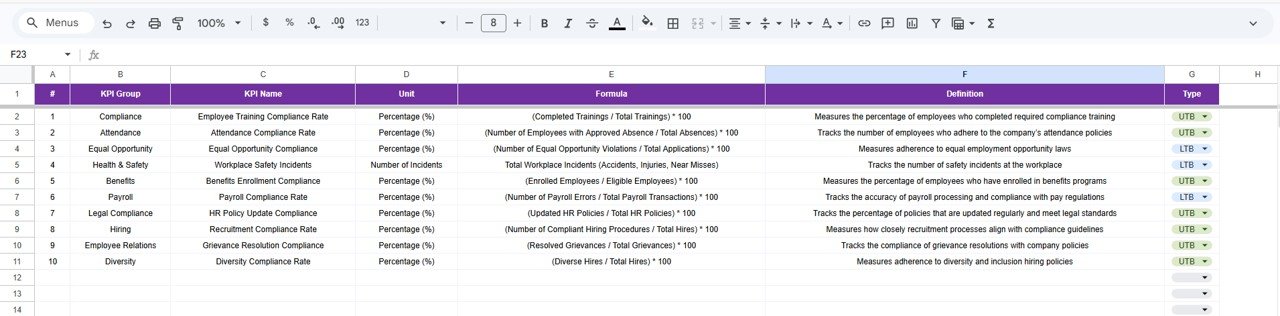
KPI Definition Sheet Tab: KPI Reference Information
The KPI Definition Sheet stores important information about each KPI used in the dashboard.
In this sheet, users must enter:
-
KPI Name
-
KPI Group
-
KPI Unit
-
KPI Formula
-
KPI Definition
This sheet acts as the documentation and reference guide for all KPIs in the dashboard.
Because HR teams can easily review KPI definitions, they can ensure consistent KPI interpretation.
Click to Buy HR Compliance KPI Dashboard in Google Sheets
Advantages of the HR Compliance KPI Dashboard in Google Sheets
The dashboard offers several benefits for organizations.
Improved Compliance Monitoring
HR managers can track compliance performance easily.
Better Risk Management
Organizations can identify compliance risks early.
Data-Driven HR Decisions
Visual dashboards simplify complex HR data.
Performance Transparency
All compliance indicators appear in one centralized dashboard.
Cloud Collaboration
Because Google Sheets operates in the cloud, HR teams can collaborate easily.
Opportunities for Improvement in HR Compliance Analytics
Click to Buy HR Compliance KPI Dashboard in Google Sheets
Although the dashboard is powerful, organizations can further enhance compliance monitoring.
Integrate HR Systems
Connect the dashboard with HR software platforms.
Automate Data Collection
Use automation tools to update compliance data.
Add Compliance Risk Scores
Include risk indicators for better decision-making.
Monitor Employee Behavior Metrics
Track ethical behavior and policy adherence.
These improvements can strengthen compliance monitoring.
Best Practices for Using the HR Compliance KPI Dashboard
Click to Buy HR Compliance KPI Dashboard in Google Sheets
Organizations should follow several best practices.
Choose Relevant KPIs
Select KPIs that truly represent compliance performance.
Update Data Regularly
Ensure accurate and timely data updates.
Monitor Compliance Trends
Track performance trends to detect issues early.
Train HR Teams
Ensure HR professionals understand KPI definitions.
Maintain Data Accuracy
Validate data before using it for analysis.
Conclusion
Click to Buy HR Compliance KPI Dashboard in Google Sheets
HR compliance plays a vital role in protecting organizations from legal risks and maintaining ethical workplace standards. However, monitoring compliance performance without structured analytics can be extremely challenging.
The HR Compliance KPI Dashboard in Google Sheets provides an effective solution for tracking compliance indicators in a clear and visual format. Because the dashboard combines KPI definitions, performance comparisons, and visual indicators, HR managers can easily evaluate compliance performance.
As organizations continue to focus on governance, transparency, and employee wellbeing, implementing a data-driven HR compliance monitoring system becomes essential.
Visit our YouTube channel to learn step-by-step video tutorials
Youtube.com/@NeotechNavigators
Watch the step-by-step video tutorial: