Password reset requests are one of the most common IT support activities in any organization. Employees forget passwords, accounts get locked, systems change, and access issues arise daily. However, when IT teams manage password reset requests through emails, calls, or chat messages, tracking becomes messy and inefficient.IT Password Reset Request Tracker in Google Sheets
That is why an IT Password Reset Request Tracker in Google Sheets becomes extremely useful.
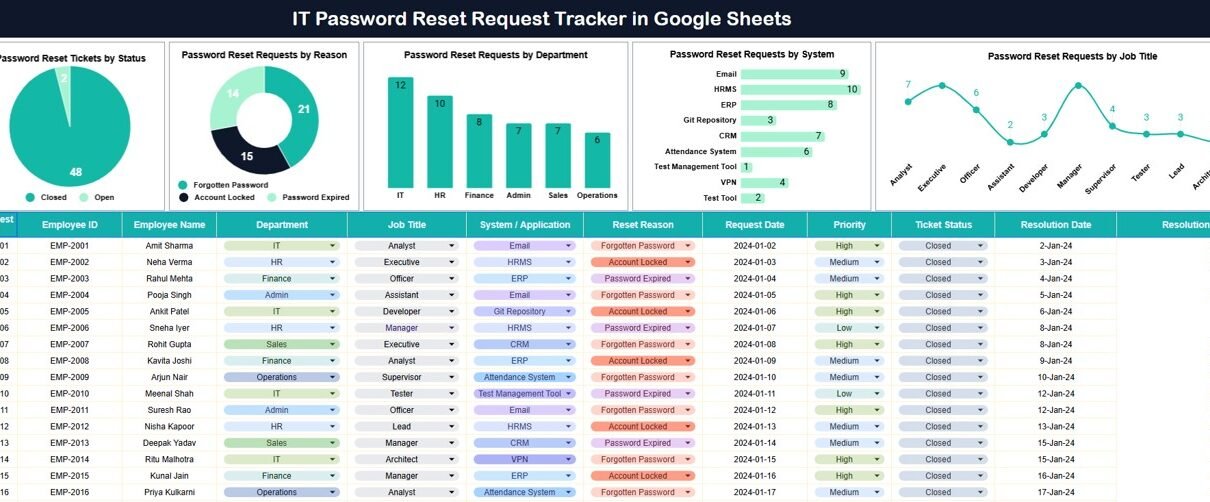
This ready-to-use tracker helps IT teams log, analyze, and manage password reset requests in one centralized location. It provides clear visibility into request status, reasons, departments, systems, and job roles—along with a powerful search feature.IT Password Reset Request Tracker in Google Sheets
In this article, we explain how the tracker works, the charts it includes, and why it is essential for IT operations.IT Password Reset Request Tracker in Google Sheets
What Is an IT Password Reset Request Tracker in Google Sheets?
Click to Buy IT Password Reset Request Tracker in Google Sheets
An IT Password Reset Request Tracker is a structured tracking tool that records and monitors all password reset requests raised by employees. It helps IT teams improve response time, reduce repeated issues, and maintain audit-ready records.IT Password Reset Request Tracker in Google Sheets
Because this tracker is built in Google Sheets, it offers:
- Centralized request tracking
- Real-time collaboration
- Automatic chart updates
- Easy sharing and access control
- No need for expensive ITSM tools
This tracker suits IT support teams, helpdesk teams, system administrators, and IT managers.
Tracker Sheet Tab – Central Request Log
The Tracker Sheet Tab acts as the main data entry and storage area.
Typical fields include:
- Request ID
- Employee Name / ID
- Department
- Job Title
- System / Application Name
- Password Reset Reason
- Request Date
- Ticket Status
- Resolution Date
- Remarks
Once data is entered or updated, all charts refresh automatically.
Charts in the IT Password Reset Request Tracker
Click to Buy IT Password Reset Request Tracker in Google Sheets
The tracker includes five insightful charts that convert raw request data into actionable insights.
Password Reset Tickets by Status
This chart shows the distribution of password reset tickets by status, such as:
- Open
- In Progress
- Completed
- On Hold
It helps IT teams:
- Monitor workload
- Identify pending requests
- Improve turnaround time
Password Reset Requests by Reason
This chart categorizes requests by reason, such as:
- Forgotten password
- Account locked
- Password expired
- System change
It helps organizations:
- Identify common access issues
- Improve password policies
- Reduce repeat requests
Password Reset Requests by Department
This chart shows department-wise password reset requests.
It helps management:
- Identify departments with frequent access issues
- Plan user training programs
- Improve system usability
Password Reset Requests by System
This chart analyzes requests by system or application.
It helps IT teams:
- Detect systems causing frequent login issues
- Improve authentication processes
- Prioritize system improvements
Password Reset Requests by Job Title
This chart breaks down requests by job title.
It helps organizations:
- Identify role-based access challenges
- Improve onboarding and access provisioning
- Strengthen IT governance

Click to Buy IT Password Reset Request Tracker in Google Sheets
Search Feature – Search by Keyword and Field Name
The tracker includes a smart search feature that allows users to quickly find specific records.IT Password Reset Request Tracker in Google Sheets
You can search by:
- Employee Name
- Department
- Job Title
- System Name
- Ticket Status
- Reset Reason
By entering a Search Keyword and selecting the Field Name, the tracker filters matching records instantly.
This feature proves extremely useful during:
- IT audits
- Security reviews
- Management reporting
- Incident investigations

Click to Buy IT Password Reset Request Tracker in Google Sheets
Why Organizations Need a Password Reset Tracker
Without a structured tracker, password reset requests become difficult to manage and analyze. This tracker helps organizations:
- Reduce password reset response time
- Maintain request history
- Improve IT support efficiency
- Identify recurring access problems
- Support compliance and audits
A centralized tracker improves both productivity and security.
Advantages of the IT Password Reset Request Tracker
Centralized request management
All password reset requests stay in one place.
Better visibility
Charts highlight trends and problem areas.
Faster issue resolution
Clear status tracking improves response time.
Improved security oversight
Request history supports audits and investigations.
Easy collaboration
IT teams work together in real time.
Cost-effective solution
No need for complex ITSM tools.
Opportunities for Improvement
Click to Buy IT Password Reset Request Tracker in Google Sheets
You can enhance this tracker further by adding:
-
SLA tracking
-
Resolution time calculation
-
Priority-based request handling
-
Automatic escalation alerts
-
Cost or effort tracking
-
Integration with ticketing systems
These enhancements make IT operations even more efficient.
Best Practices for Using the Tracker
-
Log every password reset request
-
Standardize reset reasons
-
Review department-wise trends monthly
-
Train employees on password best practices
-
Restrict edit access to IT admins
-
Back up data regularly
Following these practices ensures accurate and reliable tracking.
Conclusion
Click to Buy IT Password Reset Request Tracker in Google Sheets
An IT Password Reset Request Tracker in Google Sheets provides a simple yet powerful way to manage one of the most frequent IT support activities. It centralizes requests, improves response time, highlights trends, and strengthens security oversight. With built-in charts and a smart search feature, IT teams gain complete control over password reset operations without technical complexity.IT Password Reset Request Tracker in Google Sheets
For organizations focused on efficient IT support and secure access management, this tracker becomes an essential operational tool.
Frequently Asked Questions (FAQs)
1. Who should use this tracker?
IT support teams, helpdesk teams, and system administrators.
2. Can it handle large volumes of requests?
Yes, Google Sheets supports large datasets.
3. Is the tracker customizable?
Yes, you can add or modify fields and charts.
4. Does it support audits and compliance?
Yes, it provides a clear and searchable request history.
5. Is the data secure?
Yes, with proper Google Sheets sharing permissions.
6. Does it require technical skills?
No, basic Google Sheets knowledge is enough.
Visit our YouTube channel to learn step-by-step video tutorials
Youtube.com/@NeotechNavigators
Watch the step-by-step video tutorial:
Click to Buy IT Password Reset Request Tracker in Google Sheets