Legal compliance is one of the most important responsibilities for any organization. Companies must follow laws, regulations, internal policies, industry standards, and audit requirements to avoid penalties, legal issues, and operational risk. But managing compliance manually quickly becomes overwhelming—especially when tasks involve multiple departments, owners, and deadlines.
The Legal Compliance Tracker in Google Sheets provides a simple, ready-to-use solution for monitoring compliance tasks, tracking high-risk items, and ensuring every compliance requirement is completed on time.
In this article, we will explain the full structure of the tracker, its features, advantages, and best practices—along with frequently asked questions.
What Is the Legal Compliance Tracker in Google Sheets?
Click to Buy Legal Compliance Tracker in Google Sheets
The Legal Compliance Tracker is a cloud-based tool that helps organizations:
-
Track all compliance tasks
-
Monitor completion status
-
Identify overdue or high-risk tasks
-
Assign responsibilities to compliance owners
-
View task distribution by department and compliance area
-
Maintain updated compliance records
This tracker simplifies compliance management and ensures organizations stay audit-ready at all times.
Why Use Google Sheets for Compliance Tracking?
Google Sheets is a powerful choice for compliance teams because it provides:
-
Real-time collaboration
-
Simple updates from any location
-
Customizable fields and workflows
-
Visual charts and automated insights
-
Zero software cost
This makes it ideal for legal, HR, operations, and audit teams.
Tracker Structure and Features
Click to Buy Legal Compliance Tracker in Google Sheets
The Legal Compliance Tracker includes two major components:
1. Tracker Sheet Tab
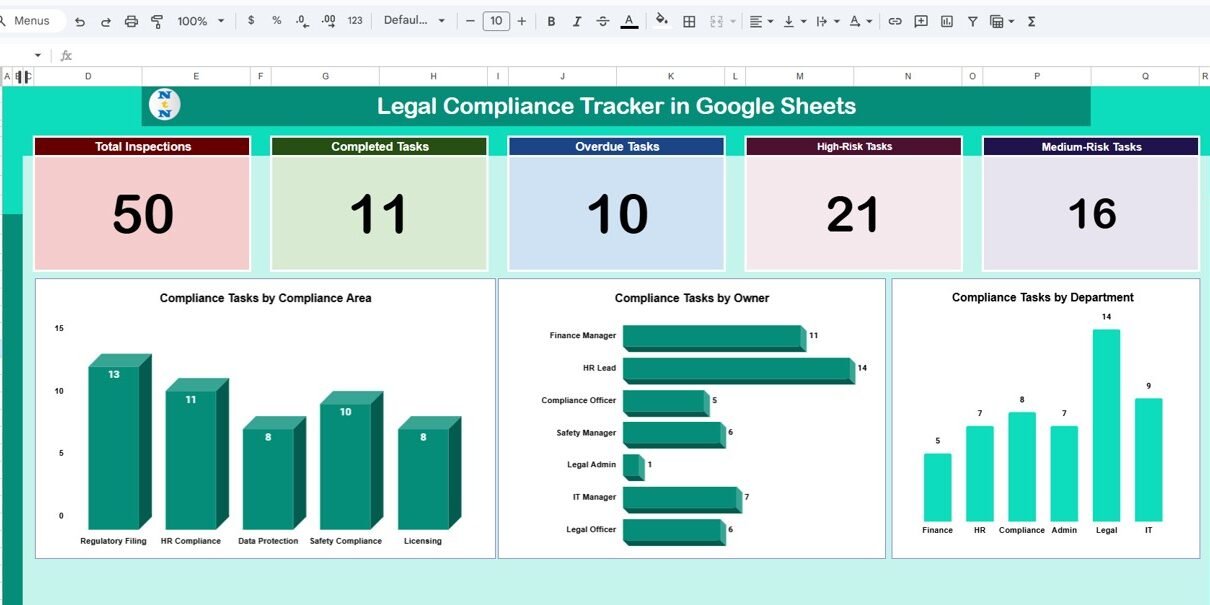
This is the dashboard view where you can analyze compliance status.
Card Metrics Include:
-
Total Inspections – Total number of compliance checks or reviews
-
Completed Tasks – Total tasks successfully completed
-
Overdue Tasks – Tasks past their due date
-
High-Risk Tasks – Tasks that pose major compliance risk
-
Medium-Risk Tasks – Tasks with moderate compliance risk
These KPIs help identify urgent issues immediately.
Charts Included:
-
Compliance Tasks by Compliance Area
Shows how tasks are distributed across categories (e.g., Safety, HR, Regulatory, Legal, Finance). -
Compliance Tasks by Owner
Helps identify which employees or managers have the most compliance responsibilities. -
Compliance Tasks by Department
Shows department-wise distribution and helps pinpoint departments that need more focus.
These charts help compliance teams make informed decisions quickly.

Click to Buy Legal Compliance Tracker in Google Sheets
2. Search Sheet Tab
This tab helps users locate specific compliance tasks instantly.
Search Features:
-
Search by Keyword
-
Search by Field Name (Task Name, Owner, Department, Status, Risk Level, Compliance Area)
This makes reviewing compliance records fast and efficient.

Click to Buy Legal Compliance Tracker in Google Sheets
3. Data Sheet
This sheet stores all compliance entries, such as:
-
Compliance Task Name
-
Task ID
-
Compliance Area
-
Assigned Owner
-
Department
-
Due Date
-
Status (Pending, Completed, Overdue)
-
Risk Level (High, Medium, Low)
-
Compliance Type
-
Inspection Date
-
Notes
The entire dashboard reads data directly from this sheet.

Click to Buy Legal Compliance Tracker in Google Sheets
Advantages of Using the Legal Compliance Tracker
-
Centralized Compliance Oversight
All compliance tasks are stored in one organized location. -
Better Risk Management
Identify high-risk and overdue tasks before they turn into legal problems. -
Improved Accountability
Each task has an assigned owner and department. -
Faster Audit Readiness
Makes audits smoother with proper documentation and tracking. -
Real-time Visibility
Charts and KPIs update automatically when new data is added. -
Easy Customization
Add new compliance categories, owners, and departments easily. -
Remote Collaboration
Perfect for teams working across multiple locations.
Opportunities for Improvement
Click to Buy Legal Compliance Tracker in Google Sheets
You can enhance the tracker with:
-
Automated reminder emails using Google Apps Script
-
Compliance severity scoring
-
Document attachment links for SOPs, certificates, or evidence
-
Audit trail log to track changes and updates
-
Risk heatmap dashboard
-
Integration with Google Forms for automated data capture
Best Practices for Using the Tracker
-
Update the tracker regularly
Enter new tasks and update completed ones promptly. -
Assign clear ownership
Avoid duplicate responsibilities. -
Review high-risk tasks weekly
Focus on risk reduction. -
Standardize compliance categories
Use consistent labels for accurate analysis. -
Use filters and search
Quickly identify overdue or department-specific tasks. -
Share the dashboard with leadership
Ensures everyone stays aligned with compliance goals.
Conclusion
Click to Buy Legal Compliance Tracker in Google Sheets
The Legal Compliance Tracker in Google Sheets is a powerful yet simple tool for managing compliance effectively. It helps organizations stay ahead of deadlines, reduce compliance risks, assign responsibilities clearly, and maintain accurate audit-ready records.
With real-time charts, KPI cards, and a built-in search tool, HR, legal, audit, and operations teams can streamline compliance management with ease.
Frequently Asked Questions (FAQs)
1. What does the tracker monitor?
It tracks compliance tasks, risk levels, departments, owners, due dates, and completion.
2. Can I add my own compliance categories?
Yes—add, edit, or delete categories anytime.
3. Does it track overdue tasks automatically?
Yes, based on due dates.
4. Can multiple users collaborate?
Yes, Google Sheets fully supports multi-user editing.
5. Is this tracker beginner-friendly?
Yes, no technical skills are required.
Visit our YouTube channel to learn step-by-step video tutorials
Youtube.com/@NeotechNavigators
Watch the step-by-step video Demo: