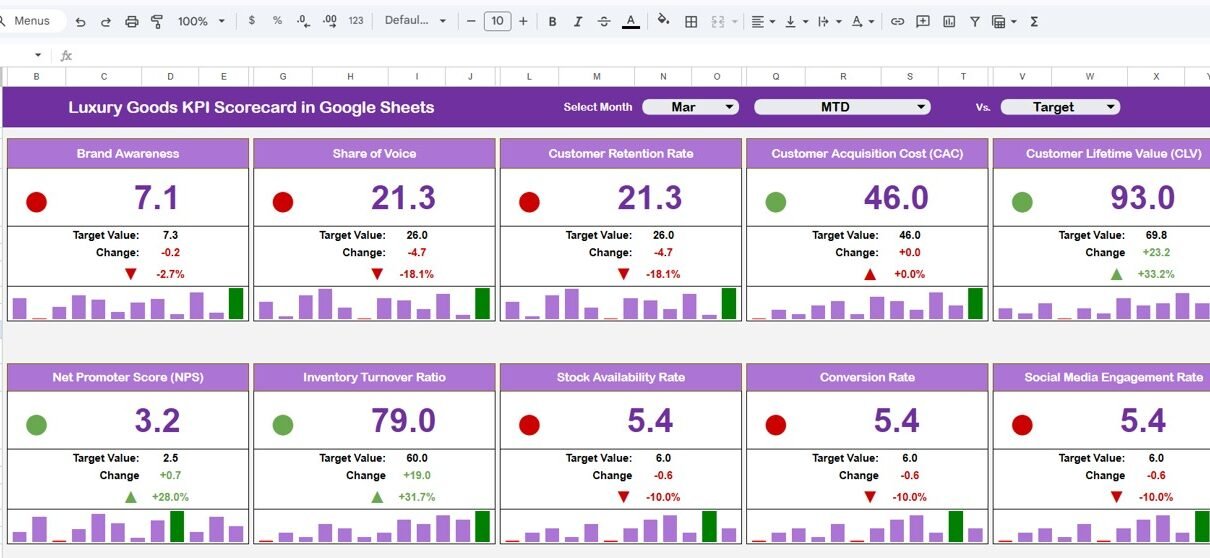
The luxury retail market is projected to surpass $400 billion globally by 2027, yet 68% of mid-market luxury brands still rely on scattered spreadsheets and manual reports to track performance. The Luxury Goods KPI Scorecard in Google Sheets consolidates 15+ KPIs across 4 interactive worksheets with built-in MTD and YTD analysis, trend charts, and conditional formatting — turning raw data into actionable insights in under 10 minutes.
Whether you manage a fashion house, jewelry brand, or watch retailer, tracking the right KPIs determines whether you identify profit leaks, customer churn, or marketing inefficiencies before they impact your bottom line. This Google Sheets-based template gives your team a shared, cloud-accessible scorecard without monthly SaaS fees.
Get the Luxury Goods KPI Scorecard in Google Sheets
Key Features of Luxury Goods KPI Scorecard in Google Sheets
The Luxury Goods KPI Scorecard in Google Sheets includes 4 dedicated worksheets — Scorecard, KPI Trend, Input Data, and KPI Definition — that work together to deliver a 360° view of your luxury brand performance. Each worksheet auto-updates when you enter new data, eliminating manual chart rebuilding.
Dropdown menus let you switch between Month-to-Date and Year-to-Date views instantly. Color-coded conditional formatting with arrows highlights whether each KPI is on track, needs attention, or underperforming. The KPI Trend sheet generates line charts comparing Actual, Target, and Previous Year values for any selected KPI.
All KPIs are fully customizable through the KPI Definition sheet — add, rename, or remove metrics to match your specific luxury business model. The template tracks revenue, profitability, customer retention, marketing ROI, and supply chain performance out of the box.
Worksheets Explanation
1. Scorecard Sheet
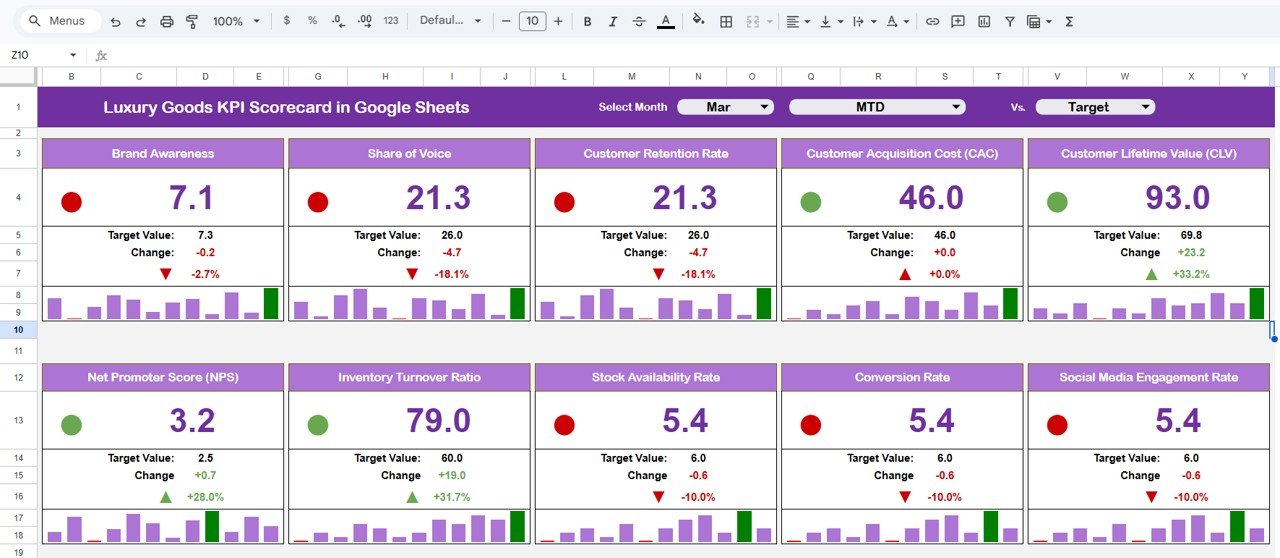
Luxury Goods KPI Scorecard in Google Sheets
The Scorecard sheet is the main interface where you can view KPI performance. Key features include dropdown menus to select the month, MTD (Month-to-Date), or YTD (Year-to-Date) for performance analysis. Compare actual performance against targets for each KPI using color-coded visual indicators and conditional formatting. This sheet provides a complete KPI overview including MTD and YTD comparisons, making it the go-to view for management reviews and stakeholder presentations.
2. KPI Trend Sheet
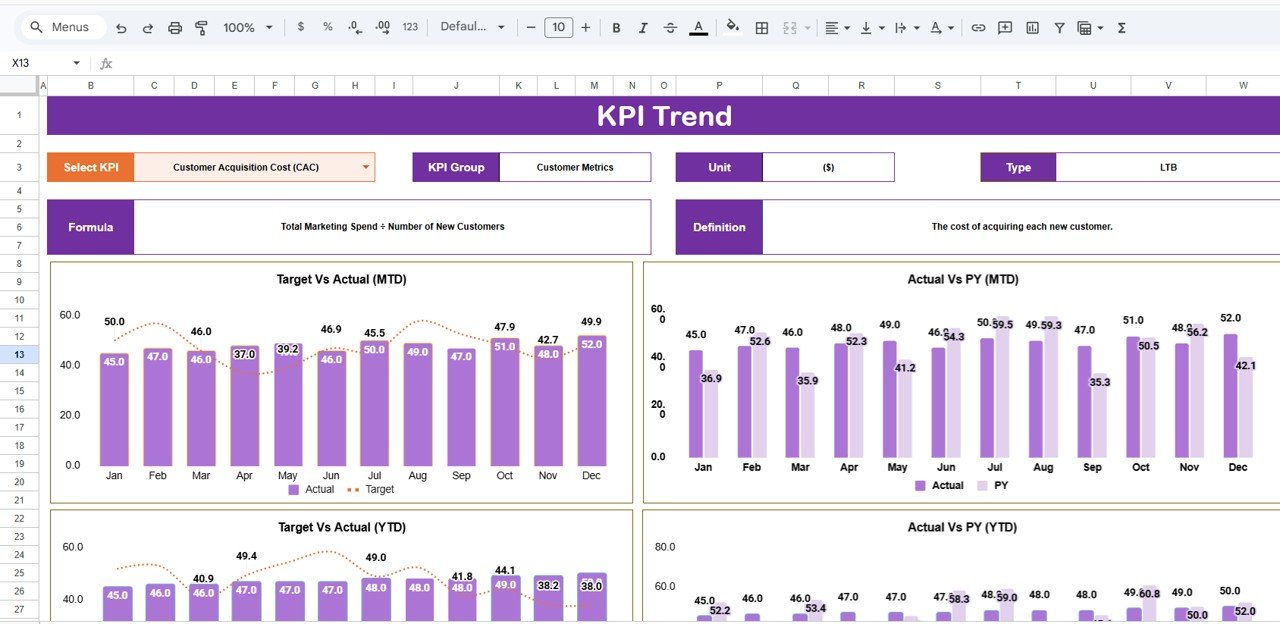
KPI Trend Sheet
Here you can select the KPI name from the dropdown available on range C3. The sheet displays the KPI Group, Unit of KPI, Type of KPI (Lower the Better or Upper the Better), Formula of the KPI, and Definition of the KPI. MTD and YTD trend charts for Actual, Target, and PY numbers are displayed side by side, enabling deeper analysis of performance patterns over time.
3. Input Data Sheet
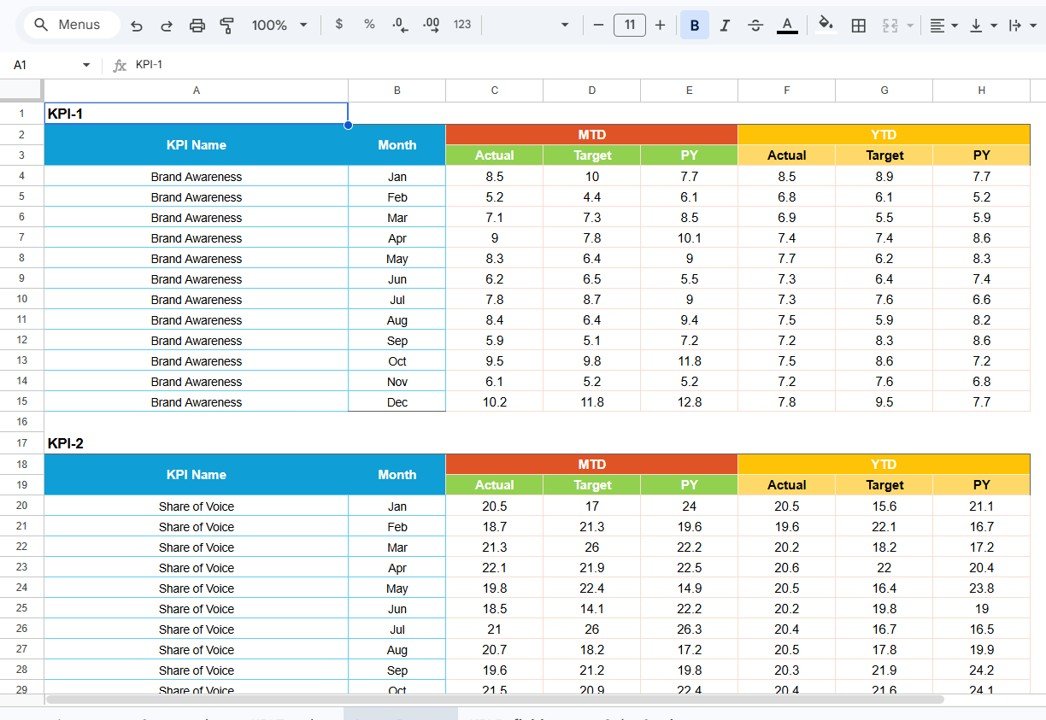
Input Data Sheet
The Input Data sheet is where you enter all KPI data. Record actual values, targets, and other metrics for each KPI on a monthly basis. Data entry is structured with clear column headers for each month. Easily update data as new results become available, ensuring the scorecard remains current and accurate at all times.
4. KPI Definition Sheet
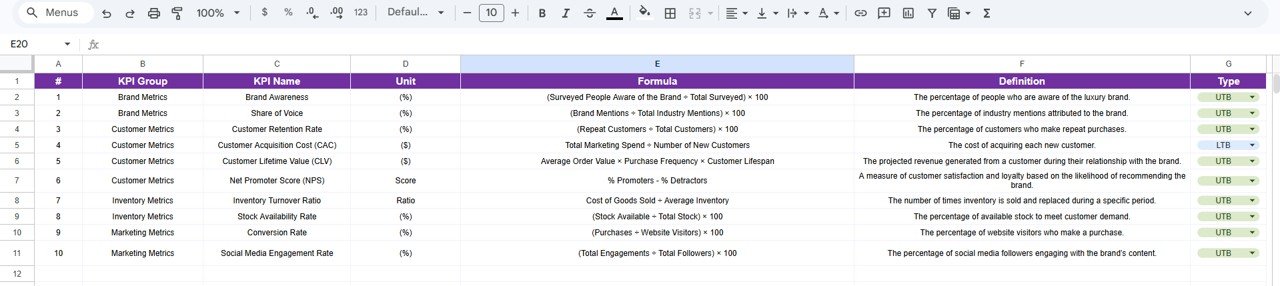
KPI Definition Sheet
In this sheet, you enter the KPI Name, KPI Group, Unit, Formula, and KPI definition. This reference sheet ensures every team member understands each metric consistently, which is critical for luxury brands operating across multiple regions and departments. Define whether each KPI is “Upper the Better” or “Lower the Better” to drive correct conditional formatting throughout the scorecard.
Luxury Goods KPI Scorecard in Google Sheets vs. Microsoft Excel Dashboard vs. Paid SaaS — Feature Comparison
| Feature | Luxury Goods KPI Scorecard in Google Sheets | Microsoft Excel Dashboard | NetSuite / Salesforce |
|---|---|---|---|
| Cost | $8.99 one-time | $14.99+ one-time | $25–150/user/month |
| Platform | Google Sheets (browser-based) | Desktop Excel required | Cloud SaaS |
| Setup Time | Under 10 minutes | Under 10 minutes | Days to weeks |
| Real-time Collaboration | ✅ Built-in via Google Drive | Limited (OneDrive) | ✅ Yes |
| Mobile Access | ✅ Any browser | ❌ Desktop only | ✅ Mobile app |
| Customizable KPIs | ✅ Fully editable | ✅ Fully editable | Limited by plan |
| Share with Link | ✅ One-click share | ❌ Email attachment | ✅ Role-based |
| Year-1 Cost (5 users) | $8.99 total | $14.99 total | $1,500–$9,000+ |
| Offline Access | Limited | ✅ Full offline | Limited |
For luxury brands that want structured KPI tracking without paying monthly SaaS fees, the Luxury Goods KPI Scorecard in Google Sheets sits in the sweet spot between free-form spreadsheets and enterprise platforms.
Who Should Use This Template
Perfect for:
- Luxury brand managers at fashion houses, jewelry firms, and watch retailers tracking 10–20 KPIs monthly
- Retail executives at high-end boutiques and department stores who need quick visual performance summaries
- Marketing teams monitoring campaign ROI, customer acquisition cost, and brand engagement rates
- Operations managers tracking inventory turnover, stock-out rates, and order fulfillment times
Not a fit if:
- You need enterprise-grade ERP integration with SOC 2 compliance and SSO (consider NetSuite or Salesforce)
- You require real-time POS or CRM data sync — this template uses manual data entry
- You manage 500+ KPIs across multiple business units simultaneously
Real-World Use Cases
Isabella manages a luxury handbag brand with 8 retail locations across Europe. She uses the Luxury Goods KPI Scorecard in Google Sheets to track monthly gross profit margin, average transaction value, and customer retention rate across all stores. The MTD/YTD toggle lets her compare seasonal performance without switching between multiple reports — saving her 4 hours each month that she previously spent building manual presentations for the board.
Raj runs marketing for a Swiss watch retailer with both online and brick-and-mortar presence. He tracks campaign ROI, brand engagement rate, and customer acquisition cost in the Scorecard sheet. The KPI Trend charts help him identify which quarterly campaigns drove the highest repeat purchase rates, guiding budget allocation for the next season without waiting for quarterly reviews.
Sophie oversees operations at a luxury jewelry brand. She monitors inventory turnover, stock-out rate, and order fulfillment time. The color-coded indicators immediately flag when any metric falls below target, allowing her team to take corrective action before it impacts customer experience or revenue.
Advantages of Luxury Goods KPI Scorecard in Google Sheets
The template costs $8.99 one-time — a fraction of what enterprise KPI platforms charge monthly. Since it runs on Google Sheets, your entire team can access and collaborate on the same file simultaneously from any device with a browser. No software installation or IT support is needed.
Setup takes under 10 minutes. The predefined KPI structure covers the most common luxury retail metrics out of the box, so you can start tracking performance immediately. The KPI Definition sheet lets you customize everything without breaking any formulas or charts.
The visual design is presentation-ready. Color-coded indicators, trend charts, and structured layouts mean you can share the scorecard directly in stakeholder meetings without reformatting.
Opportunities for Improvement
The template relies on manual data entry, which means someone needs to update the Input Data sheet each month. Teams with automated data pipelines from POS or CRM systems may find this extra step less efficient than direct API integrations offered by platforms like Salesforce.
The template is designed for tracking 15–25 KPIs effectively. Organizations managing hundreds of metrics across multiple divisions may need a dedicated BI platform. Additionally, there is no built-in alerting system — you’ll need to visually check the scorecard rather than receiving automated notifications when a KPI drops below threshold.
Best Practices
Align your KPIs with strategic objectives before entering them into the KPI Definition sheet. Focus on 10–15 key metrics rather than tracking everything — fewer metrics with clear ownership drive better accountability. Update data monthly at the same time to maintain consistency and enable accurate trend analysis.
Use the KPI Type field (Upper the Better / Lower the Better) correctly so conditional formatting highlights performance accurately. Share the scorecard via Google Drive link with view-only access for stakeholders and edit access only for data owners. Review results quarterly to refine targets and KPI definitions based on evolving business priorities.
For more guidance on setting up Google Sheets templates, see Google’s official Sheets documentation.
Explore Relevant Templates
👉 Luxury Goods KPI Scorecard in Excel — Same KPI structure in Microsoft Excel for offline desktop tracking.
👉 Distribution KPI Scorecard in Google Sheets — Track supply chain and distribution performance metrics.
👉 Transportation Safety KPI Scorecard in Google Sheets — Monitor safety and logistics KPIs.
👉 Inventory Tracker in Google Sheets — Manage stock levels and inventory movement.
Browse the full collection of Google Sheets Dashboard Templates and KPI Dashboard Templates for every industry.
Want to build skills like this step by step? The Excel Pivot Tables & Dashboards course on NextGenTemplates Academy walks you through KPI reporting with practice files.
Get the Luxury Goods KPI Scorecard in Google Sheets
Frequently Asked Questions
What KPIs does the Luxury Goods KPI Scorecard in Google Sheets track?
The Luxury Goods KPI Scorecard in Google Sheets tracks 15+ KPIs including total sales revenue, gross profit margin, average transaction value, customer retention rate, inventory turnover, and campaign ROI. All metrics update automatically when you replace the sample data with your own.
Can I customize the KPIs for my specific luxury brand?
Yes. The KPI Definition sheet lets you add, rename, or remove any KPI. You can define custom formulas, units, and groupings to match your fashion house, jewelry brand, or watch retailer operations exactly.
How does this compare to Salesforce or NetSuite for KPI tracking?
The Luxury Goods KPI Scorecard in Google Sheets costs $8.99 one-time versus $25–150/user/month for SaaS platforms like Salesforce or NetSuite. It tracks the same core KPIs with MTD/YTD analysis but uses manual data entry instead of automated CRM integration.
Does this scorecard work on mobile devices?
Yes. Google Sheets runs in any modern browser on desktop, tablet, or phone. Your team can view and update KPIs from anywhere without installing software or purchasing additional licenses.
How long does initial setup take?
Setup takes under 10 minutes. Make a copy to Google Drive, enter your KPI definitions in the Definition sheet, fill in 1–2 months of data in the Input Data sheet, and the Scorecard populates with all charts and visual indicators automatically.
Can multiple team members collaborate on the scorecard?
Yes. Google Sheets supports real-time collaboration natively. Share the file via Google Drive link and multiple team members can view or edit simultaneously with customizable role-based permissions.
Is the Excel version also available?
Yes. The Luxury Goods KPI Scorecard in Excel is available separately for teams that prefer desktop-based tracking with full offline access and VBA macro support.
About the Author
Built by PK — Microsoft Certified Professional with 15+ years of Excel, Google Sheets, and Power BI experience. Founder of NextGenTemplates, reaching 300K+ subscribers across YouTube channels. Every template is hand-built and tested before release.
Conclusion
The Luxury Goods KPI Scorecard in Google Sheets gives luxury brand managers, retail executives, and operations teams a structured, visual way to track the metrics that drive profitability and customer experience. With 4 interactive worksheets, MTD/YTD analysis, trend charts, and full KPI customization — all for a one-time $8.99 payment — it replaces monthly SaaS fees with a permanent, shareable solution.
✅ Instant download · One-time payment · No subscription · Lifetime access