Transportation accidents cost the global logistics industry over $74 billion annually. Fleet operators managing 50+ vehicles face an average of 3.2 reportable safety incidents per quarter. Yet 68% of transportation companies still track safety metrics using manual spreadsheets or disconnected reports.
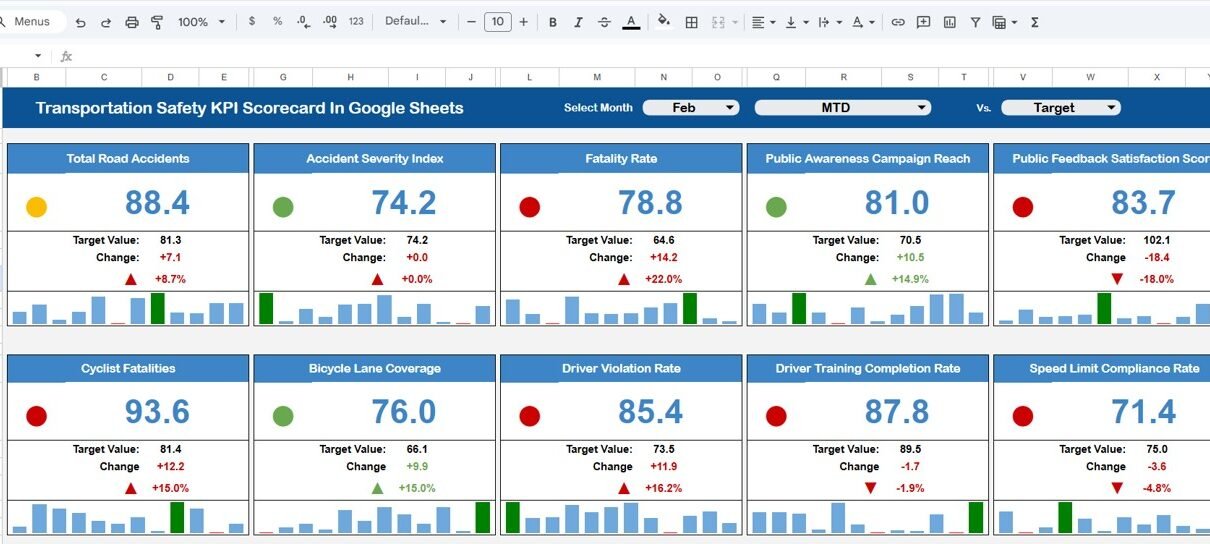
The Transportation Safety KPI Scorecard In Google Sheets monitors 10 safety-focused KPIs across 4 structured worksheets, with automated MTD and YTD calculations, traffic light indicators, and trend charts. This ready-to-use scorecard template helps safety managers, fleet supervisors, and compliance officers track accident rates, inspection pass rates, driver safety scores, and emergency response times — all inside one dynamic Google Sheets file.
Click here to Purchase Transportation Safety KPI Scorecard In Google Sheets
Key Features of Transportation Safety KPI Scorecard In Google Sheets
The Transportation Safety KPI Scorecard In Google Sheets tracks 10 key performance indicators covering accident rate, injury frequency, vehicle inspection pass rate, driver safety score, near-miss incident rate, seat belt compliance, hours of service violations, cargo securement compliance, hazardous material incident rate, and emergency response time.
Each KPI includes automated MTD (Month-to-Date) and YTD (Year-to-Date) calculations. Traffic light indicators — green, yellow, and red — update automatically based on customizable performance thresholds. Up and down arrows display percentage change compared to the previous period.
The scorecard features a dynamic month dropdown that recalculates all values instantly when you select a different month. Because it runs in Google Sheets, multiple team members can update and review safety data simultaneously from any device.
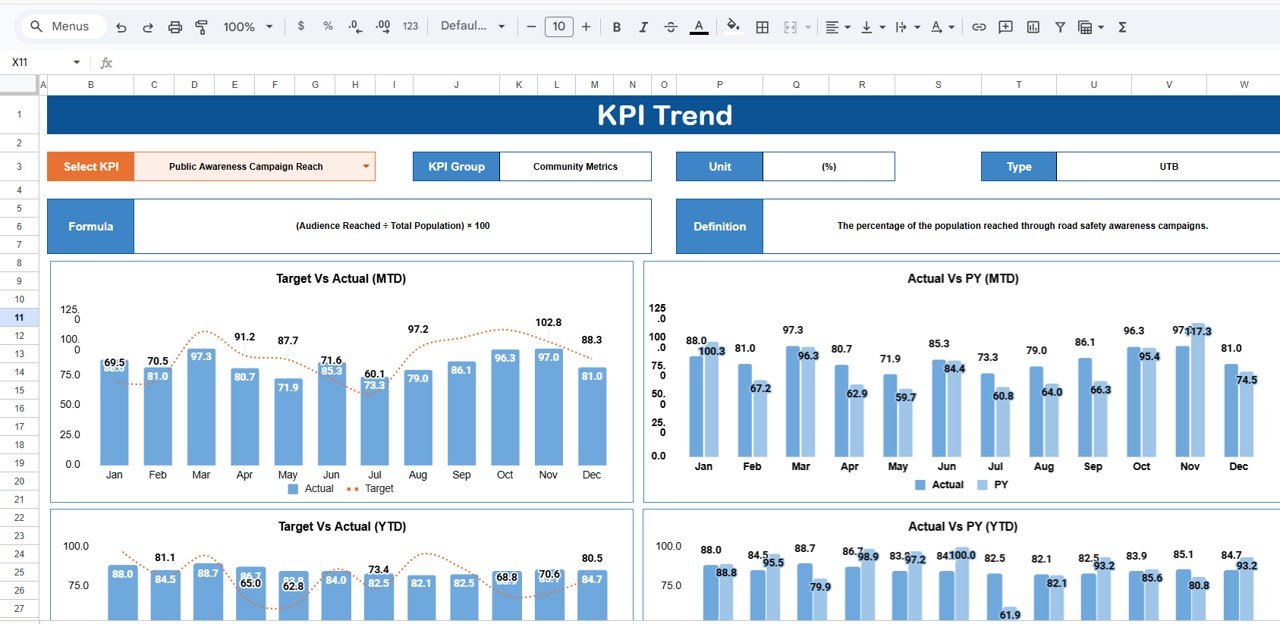
KPI trend analysis charts show 12-month performance patterns for any selected KPI, displaying Actual, Target, and Previous Year values side by side. This helps safety managers detect seasonal patterns, recurring risks, and long-term improvement trends.
Scorecard Sheets Explanation
In this template, there are 4 worksheets. Each sheet serves a specific function in the transportation safety KPI monitoring workflow:
1. Scorecard Sheet
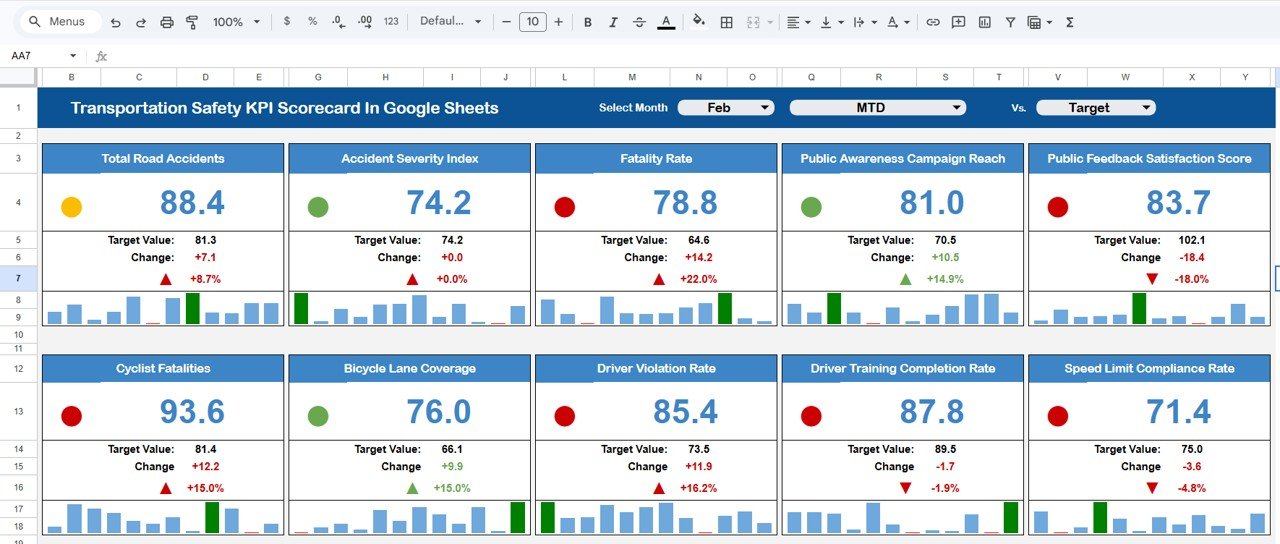
The Scorecard sheet is the main interface where you can view KPI performance. Key features include:
- Dropdown Menus — Select the month, MTD (Month-to-Date), or YTD (Year-to-Date) for performance analysis.
- Actual vs Target Values — Compare actual performance against targets for each KPI.
- Visual Indicators — Quickly see performance status using color-coded visuals or conditional formatting.
- Comprehensive KPI Overview — Display all relevant information about KPIs, including MTD and YTD comparisons.
Click here to Purchase Transportation Safety KPI Scorecard In Google Sheets
2. KPI Trend Sheet Tab
Here you can select the KPI name from the drop down available on range C3. We have displayed the KPI Group, Unit of KPI, Type of KPI (Lower the Better or Upper the Better), Formula of the KPI and Definition of the KPI. We are also showing the MTD and YTD trend chart for Actual, Target and PY numbers.
Click here to Purchase Transportation Safety KPI Scorecard In Google Sheets
3. Input Data Sheet
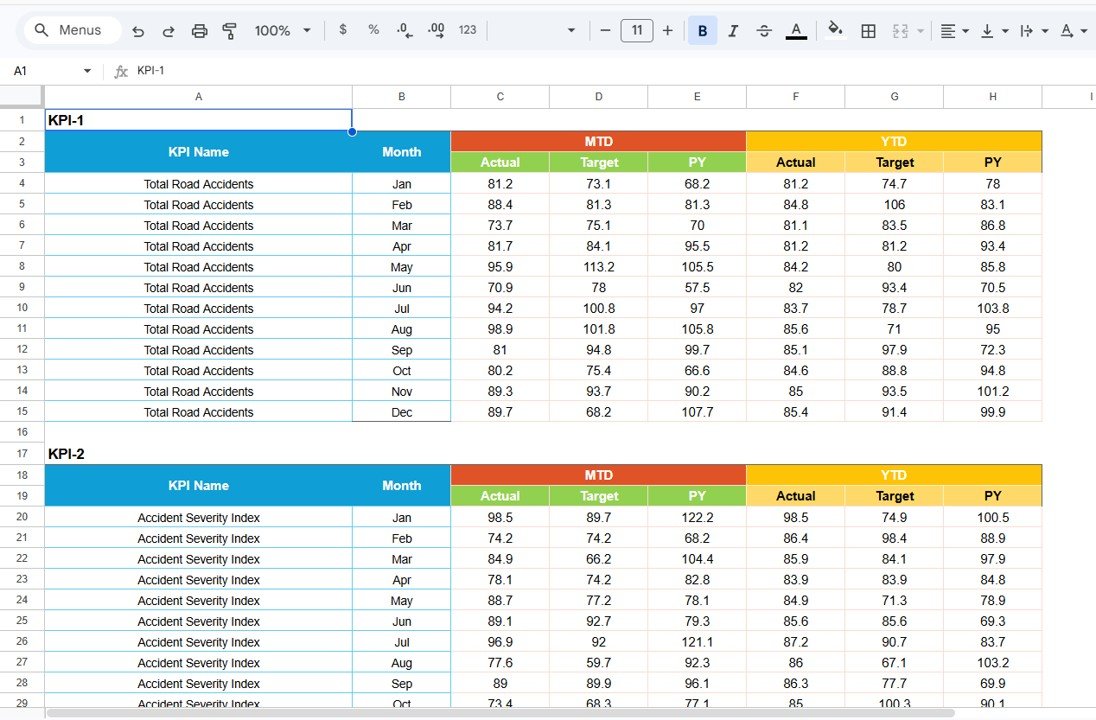
The Input Data sheet is where you enter all KPI data. Record actual values, targets, and other metrics for each KPI. Easily update data as new results become available, ensuring the scorecard remains current.
Click here to Purchase Transportation Safety KPI Scorecard In Google Sheets
4. KPI Definition Sheet Tab
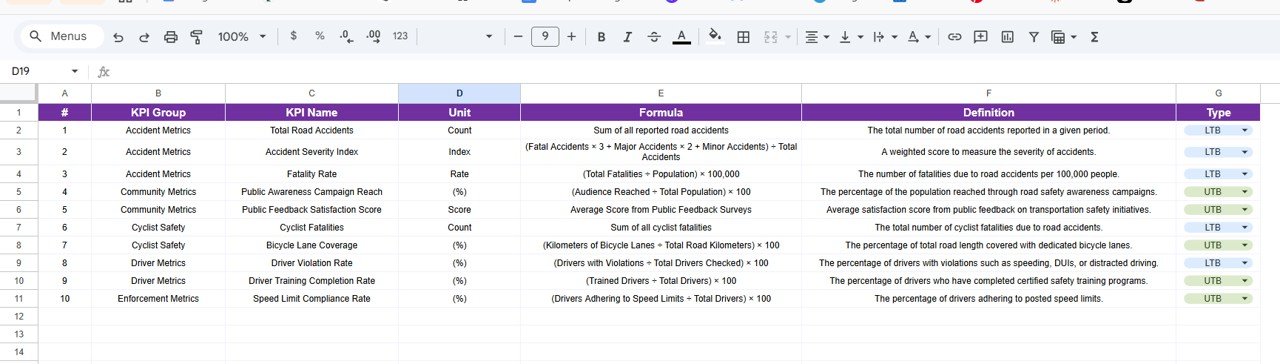
In this sheet tab, you have to enter the KPI Name, KPI Group, Unit, Formula and KPI definition. This documentation ensures every team member understands how each safety metric is calculated and what performance level is expected.
Click here to Purchase Transportation Safety KPI Scorecard In Google Sheets
Transportation Safety KPI Scorecard vs. Microsoft Excel vs. Samsara Fleet Safety — Feature Comparison
| Feature | Transportation Safety KPI Scorecard (Google Sheets) | Microsoft Excel Dashboard | Samsara / Lytx Fleet Safety |
|---|---|---|---|
| Cost | $8.99 one-time | $14.99+ one-time | $25-50 / vehicle / month |
| Platform | Google Sheets (cloud) | Desktop Excel | Proprietary SaaS |
| Setup Time | Under 10 minutes | 15-30 minutes | 2-4 weeks |
| Real-Time Team Collaboration | ✅ Built-in | ❌ Requires OneDrive | ✅ Yes |
| Mobile Access | ✅ Any browser | Limited | ✅ App required |
| Customizable KPIs | ✅ Fully editable | ✅ Fully editable | Limited to vendor fields |
| Share with Link | ✅ Instant | ❌ Email only | ✅ Within platform |
| Year-1 Cost (5 users) | $8.99 total | $14.99 total | $1,500-3,000+ |
| Safety Trend Charts | ✅ Built-in | ✅ Manual setup | ✅ Automated |
For safety teams that want structured KPI monitoring without paying per-vehicle SaaS fees, the Transportation Safety KPI Scorecard In Google Sheets sits in the sweet spot.
Who Should Use This Template
Click here to Purchase Transportation Safety KPI Scorecard In Google Sheets
Perfect for:
- Fleet safety managers at trucking and logistics companies with 10-500 vehicles
- Transportation compliance officers tracking FMCSA and DOT safety metrics
- Operations managers monitoring driver behavior, accident rates, and vehicle inspection results
- Small-to-midsize courier and delivery companies tracking safety KPIs on a monthly basis
Not a fit if:
- Enterprise fleets with 1,000+ vehicles needing real-time telematics integration and GPS-based safety scoring
- Organizations requiring automated hardware sensor data feeds from in-cab cameras or dashcams
- Teams needing multi-location dashboards with role-based access controls and SOC 2 compliance
Real-World Use Cases
Mike manages fleet safety at a 120-truck logistics company in Ohio. He uses the Transportation Safety KPI Scorecard In Google Sheets to track monthly accident rates, vehicle inspection pass rates, and hours-of-service violations. Before quarterly DOT audits, Mike pulls up YTD views and exports the data for compliance documentation — saving 6 hours of manual report preparation each quarter.
Priya leads operations at a 45-vehicle courier service in Dallas. She monitors driver safety scores and near-miss incidents weekly using the scorecard. When the traffic light turns red on seat belt compliance, Priya schedules targeted driver training sessions. Since implementing the scorecard, her company has reduced reportable incidents by 28% in 8 months.
Carlos runs a hazardous materials transport division. He tracks emergency response times and cargo securement compliance across 3 depot locations. The trend charts help him present safety performance improvements to insurance underwriters, which contributed to a 12% reduction in fleet insurance premiums last year.
Advantages of Transportation Safety KPI Scorecard In Google Sheets
Click here to Purchase Transportation Safety KPI Scorecard In Google Sheets
The Transportation Safety KPI Scorecard In Google Sheets replaces scattered safety reports with one structured monitoring system. Safety managers save 4-6 hours per month on report preparation because all KPI calculations are automated. The traffic light system eliminates guesswork — red indicators trigger immediate investigation, yellow flags prompt review, and green confirms safe performance levels.
Because it operates in Google Sheets, teams collaborate in real time without emailing files back and forth. Fleet supervisors at remote locations can update safety data from mobile devices. The one-time cost of $8.99 eliminates per-user and per-vehicle fees that accumulate with SaaS platforms like Samsara ($25-50/vehicle/month) or Lytx.
The KPI Definition sheet standardizes how safety metrics are calculated across your organization. When new team members join, they immediately understand each KPI’s formula, unit, and performance threshold. This consistency improves audit readiness and strengthens your safety compliance documentation.
Opportunities for Improvement
The Transportation Safety KPI Scorecard In Google Sheets relies on manual data entry. Organizations that need automated data feeds from telematics devices or dashcams will need a SaaS platform. The scorecard does not include geolocation mapping or route-level safety analysis.
Google Sheets has a cell limit that may restrict organizations tracking more than 25 KPIs or needing more than 5 years of historical data in a single file. For those scenarios, Power BI or dedicated BI tools may be more suitable.
The template does not auto-generate official DOT or FMCSA compliance reports. However, the structured data format makes it straightforward to export data for regulatory filings.
Best Practices
Click here to Purchase Transportation Safety KPI Scorecard In Google Sheets
Update safety data within the first 5 business days of each month to maintain scorecard accuracy. Assign one person as the data steward responsible for entering and validating monthly KPI values.
Review the Trend sheet quarterly to identify seasonal patterns. Transportation safety incidents often spike during winter months and holiday shipping periods — use trend data to schedule preventive training ahead of high-risk periods.
Calibrate traffic light thresholds in the Colour Settings sheet annually. As your fleet’s safety performance improves, tighten the green threshold to drive continuous improvement. Align KPI targets with your insurance underwriter’s expectations to support premium reduction negotiations.
Share the scorecard with department heads before monthly safety meetings. When decision-makers see color-coded performance data in advance, meetings focus on action items rather than status updates.
Explore Relevant Templates
📊 Transportation Safety KPI Scorecard in Excel — The same safety KPI framework built for Microsoft Excel with advanced charting capabilities.
📊 Transportation KPI Scorecard in Google Sheets — Track broader transportation operations KPIs including delivery performance, fuel efficiency, and cost per KM alongside safety metrics.
📊 Supply Chain – Logistics KPI Scorecard in Google Sheets — Monitor end-to-end supply chain performance with warehouse, logistics, and distribution KPIs.
📊 Aerospace KPI Scorecard in Google Sheets — Track aerospace manufacturing and aviation safety KPIs with the same scorecard structure.
📊 Fleet Management KPI Scorecard in Excel — Fleet-focused KPI tracking for vehicle utilization, maintenance scheduling, and operational cost control.
Also available as: Excel version
Browse all Google Sheets KPI Scorecard Templates
Frequently Asked Questions
Click here to Purchase Transportation Safety KPI Scorecard In Google Sheets
What safety KPIs does the Transportation Safety KPI Scorecard track?
The Transportation Safety KPI Scorecard In Google Sheets tracks 10 key performance indicators including accident rate, injury frequency, vehicle inspection pass rate, driver safety score, near-miss incidents, seat belt compliance, hours-of-service violations, cargo securement compliance, hazmat incident rate, and emergency response time.
Can I customize the 10 KPIs in this scorecard?
Yes. You can edit, add, or replace any KPI in the KPI Definition sheet. Change the KPI name, group, unit, formula, and definition to match your specific fleet safety requirements. The scorecard recalculates automatically.
Does this scorecard work for DOT and FMCSA compliance reporting?
The Transportation Safety KPI Scorecard In Google Sheets provides structured monthly safety data with MTD and YTD tracking. While it does not auto-generate official DOT forms, it organizes your safety metrics for audit preparation and compliance reviews.
How long does setup take?
Setup takes under 10 minutes. Make a copy of the template in Google Drive, enter your KPI definitions, input your first month of safety data, and the scorecard calculates all metrics automatically.
Can multiple team members access the scorecard simultaneously?
Yes. Google Sheets supports real-time multi-user collaboration. Safety managers, fleet supervisors, and compliance officers can update data and review performance simultaneously from any device with internet access.
How does this compare to paid fleet safety software like Samsara?
Samsara and similar platforms cost $25-50 per vehicle per month and require hardware installation. The Transportation Safety KPI Scorecard costs $8.99 one-time with no recurring fees. It suits teams that want structured KPI tracking without telematics hardware dependency.
Does the scorecard update automatically when I change the month?
Yes. When you select a different month from the dropdown, all KPI values, traffic light indicators, percentage change arrows, and performance comparisons update instantly across the entire scorecard.
About the Author
Built by PK — Microsoft Certified Professional with 15+ years of Excel, Google Sheets, and Power BI experience. Founder of NextGenTemplates, reaching 300K+ subscribers across YouTube channels. Every template is hand-built and tested before release.
Conclusion
The Transportation Safety KPI Scorecard In Google Sheets gives fleet operators and safety managers a structured, visual, and collaborative system to monitor transportation safety performance. With 10 customizable KPIs, automated MTD/YTD calculations, traffic light indicators, and trend charts, this scorecard replaces scattered manual reports with one dynamic monitoring tool.
Click here to Purchase Transportation Safety KPI Scorecard In Google Sheets
✅ Instant download · One-time payment · No subscription
Visit our YouTube channel to learn step-by-step video tutorials