A clean office directly affects employee productivity, health, and overall workplace satisfaction. However, many organizations struggle to manage office cleaning feedback because data remains scattered across emails, verbal complaints, or unstructured forms. As a result, cleaning issues remain unresolved, feedback gets ignored, and employee dissatisfaction increases.
That is exactly why an Office Cleaning Feedback Tracker in Google Sheets becomes an essential workplace management tool. This ready-to-use tracker helps organizations capture cleaning feedback, track issues, monitor action status, and analyze trends using clear charts and a powerful search feature.
In this article, we will explain how the Office Cleaning Feedback Tracker works, its tracker sheet structure, included charts, search functionality, advantages, improvement opportunities, best practices, and frequently asked questions.
What Is an Office Cleaning Feedback Tracker in Google Sheets?
Click to Buy Office Cleaning Feedback Tracker in Google Sheets
An Office Cleaning Feedback Tracker is a centralized system that records employee feedback related to office cleanliness. It allows facilities teams, administration, and HR departments to track cleaning issues by area, department, issue type, and action status.
Because the tracker runs in Google Sheets, teams benefit from:
- Real-time updates
- Easy collaboration
- Zero software installation
- Simple customization
- Cloud-based access
Instead of relying on manual follow-ups, teams gain full visibility into cleaning performance and issue resolution.
Tracker Sheet Tab – Core of the System
The Tracker Sheet Tab acts as the main data entry and management layer of the tracker. Here, you record every cleaning feedback entry with structured fields such as:
- Feedback ID
- Feedback Date
- Employee Name (optional)
- Department
- Office Area (Restroom, Pantry, Meeting Room, Workstation, Lobby, etc.)
- Issue Type (Dust, Odor, Waste, Hygiene, Floor Cleaning, Sanitization)
- Feedback Description
- Action Status (Open, In Progress, Resolved)
- Assigned To
- Action Taken
- Resolution Date
- Comments
As soon as you enter or update any record, all charts and insights update automatically.
This structured approach ensures nothing gets missed and every cleaning concern receives proper attention.
Charts Included in the Office Cleaning Feedback Tracker
Click to Buy Office Cleaning Feedback Tracker in Google Sheets
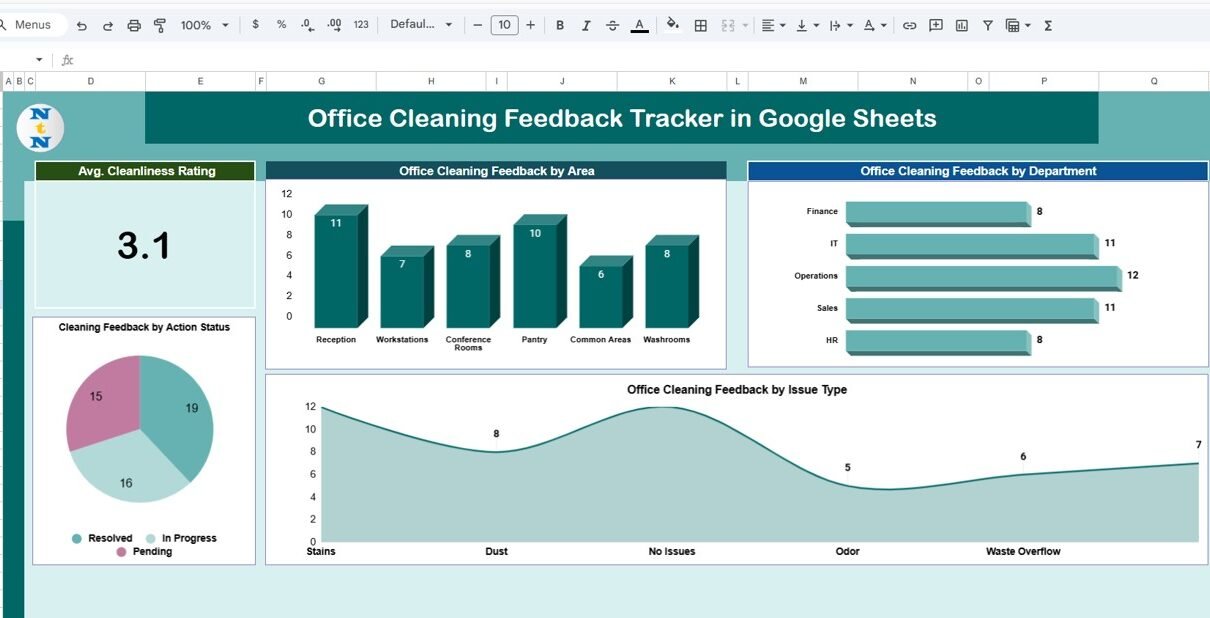
The tracker includes four insightful charts that help teams analyze feedback patterns and cleaning performance easily.
1. Office Cleaning Feedback by Area
This chart displays feedback count by office area, such as:
- Restrooms
- Pantry
- Workstations
- Meeting Rooms
- Reception
- Common Areas
It helps identify problem zones that require frequent cleaning or better supervision. For example, if restroom feedback remains consistently high, teams can revise cleaning schedules immediately.
2. Office Cleaning Feedback by Department
This chart shows which departments submit the most cleaning feedback. It helps facilities teams understand:
- Department-specific cleaning needs
- High-traffic areas
- Usage patterns
When combined with area data, this insight improves cleaning resource allocation.
3. Office Cleaning Feedback by Issue Type
This chart categorizes feedback based on issue type, such as:
- Dust and dirt
- Odor issues
- Waste management
- Hygiene problems
- Floor cleaning
- Sanitization gaps
It allows teams to focus on recurring issues and address root causes instead of temporary fixes.
4. Cleaning Feedback by Action Status
This chart shows feedback distribution by status:
- Open
- In Progress
- Resolved
It helps managers track backlog, resolution speed, and service efficiency. A high number of open issues highlights immediate attention needs.

Click to Buy Office Cleaning Feedback Tracker in Google Sheets
Search Functionality – Search by Keyword and Field Name
The tracker includes a powerful search feature that allows users to find specific records instantly.
You simply enter:
-
Search Keyword (e.g., “Restroom”, “Dust”, “Resolved”)
-
Field Name (Area, Department, Issue Type, Status, Assigned To)
The tracker filters matching records automatically.
This feature helps teams:
- Respond quickly to complaints
Prepare audit or compliance reports
Review past actions
Track recurring issues
Save time during reviews

Click to Buy Office Cleaning Feedback Tracker in Google Sheets
Why Do Organizations Need an Office Cleaning Feedback Tracker?
A clean workplace creates a positive employee experience. However, without a structured tracking system, organizations face:
- Missed feedback
- Delayed resolutions
- Repeated complaints
- Low accountability
An Office Cleaning Feedback Tracker solves these problems by providing transparency, ownership, and actionable insights.
Advantages of Using the Office Cleaning Feedback Tracker
Click to Buy Office Cleaning Feedback Tracker in Google Sheets
Centralized Feedback Management
All cleaning feedback stays in one place.
Improved Response Time
Teams resolve issues faster with clear status tracking.
Better Cleaning Quality
Recurring issues become visible and manageable.
Data-Driven Facility Decisions
Charts help prioritize resources and schedules.
Higher Employee Satisfaction
Employees feel heard when issues get resolved.
Easy to Use
No technical knowledge required.
Cost-Effective Solution
Runs entirely in Google Sheets.
Opportunities for Improvement in the Tracker
Click to Buy Office Cleaning Feedback Tracker in Google Sheets
Although the tracker works effectively, organizations can enhance it further by adding:
SLA Tracking
Measure resolution time against targets.
Automated Alerts
Notify teams when issues remain open too long.
Cleaning Vendor Performance Metrics
Track contractor efficiency and response quality.
Location-Wise Trend Analysis
Compare feedback across office branches.
Employee Satisfaction Score
Capture post-resolution feedback.
These improvements transform the tracker into a complete facilities performance system.
Best Practices for Using the Office Cleaning Feedback Tracker
Click to Buy Office Cleaning Feedback Tracker in Google Sheets
Encourage employees to submit feedback regularly
More feedback leads to better cleanliness.
Update action status daily
Accurate status improves trust.
Assign clear ownership
Every issue must have a responsible person.
Review charts weekly
Trends reveal long-term issues.
Maintain consistent issue categories
Consistency improves reporting accuracy.
Use search during inspections
Quick lookup saves time.
Conclusion
Click to Buy Office Cleaning Feedback Tracker in Google Sheets
An Office Cleaning Feedback Tracker in Google Sheets helps organizations maintain a clean, healthy, and productive workplace. It provides structured feedback collection, real-time visibility, and actionable insights through easy-to-read charts. Because it is cloud-based, simple, and ready to use, it becomes an ideal solution for facilities teams, HR departments, and office administrators.
By tracking cleaning feedback systematically, organizations improve service quality, boost employee satisfaction, and create a better working environment.
Frequently Asked Questions (FAQs)
1. Who should use this tracker?
Facilities teams, HR departments, office admins, and operations managers.
2. Can employees submit feedback anonymously?
Yes, you can keep employee name optional.
3. Can I customize issue types and areas?
Yes, the tracker is fully customizable.
4. Does it support multiple office locations?
Yes, you can add a location column easily.
5. Is Google Sheets secure for this data?
Yes, with proper access control.
6. Can I automate reminders?
Yes, using Google Apps Script.
Visit our YouTube channel to learn step-by-step video tutorials
Youtube.com/@NeotechNavigators
Watch the step-by-step video tutorial:
Click to Buy Office Cleaning Feedback Tracker in Google Sheets