Fire safety is not optional in modern workplaces. Every organization must conduct regular fire drills to ensure employee safety, regulatory compliance, and emergency preparedness. However, many offices still track fire drills using scattered registers, emails, or manual reports. Because of this, records become inconsistent, insights remain unclear, and compliance audits become stressful.Office Fire Drill Log Tracker in Google Sheets
An Office Fire Drill Log Tracker in Google Sheets solves these problems. It provides a ready-to-use, centralized system to log all fire drills, analyze participation, track compliance, and identify improvement areas using visual charts and a smart search feature.
In this article, we will explain how this tracker works, its key charts, search functionality, benefits, improvement opportunities, and best practices for effective fire drill management.Office Fire Drill Log Tracker in Google Sheets
What Is an Office Fire Drill Log Tracker in Google Sheets?
Click to Buy Office Fire Drill Log Tracker in Google Sheets
An Office Fire Drill Log Tracker is a structured Google Sheets tool designed to record, monitor, and analyze all fire drill activities conducted in an organization. It stores drill dates, locations, departments involved, drill type, issues observed, ratings, and compliance details.
Because the tracker is built in Google Sheets, it offers:
-
Real-time updates
-
Easy collaboration
-
Automatic chart refresh
-
Cloud accessibility
-
Zero software cost
As a result, safety teams and facility managers gain complete visibility into fire drill performance.
Tracker Sheet Tab – Central Fire Drill Log
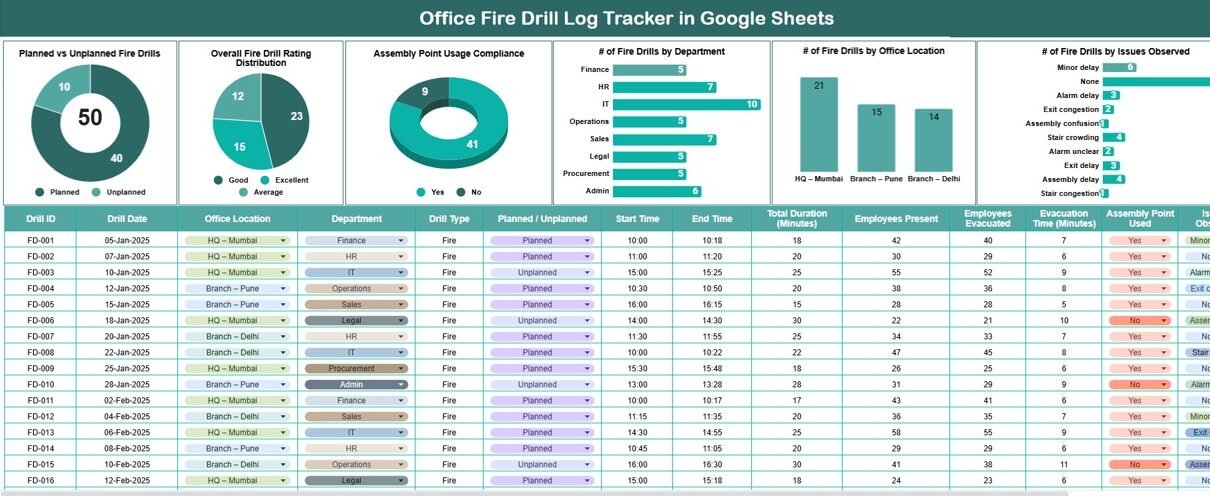
The Tracker Sheet Tab is the foundation of this system. All fire drill data gets entered here.
Typical fields include:
-
Drill Date
-
Office Location
-
Department
-
Drill Type (Planned / Unplanned)
-
Assembly Point Used (Yes / No)
-
Drill Rating (1–5)
-
Issues Observed
-
Drill Coordinator
-
Remarks
Once you enter data, all charts update automatically. This ensures accurate and consistent reporting across the organization.
Charts Included in the Fire Drill Log Tracker
Click to Buy Office Fire Drill Log Tracker in Google Sheets
The tracker includes six powerful charts that provide instant insights into fire drill effectiveness and compliance.
Planned vs Unplanned Fire Drills
This chart compares planned drills against unplanned drills.
It helps you:
-
Verify compliance with safety schedules
-
Identify gaps in planned preparedness
-
Ensure drills follow safety policies
Organizations with more planned drills usually show stronger emergency readiness.
Overall Fire Drill Rating Distribution
This chart shows the distribution of drill ratings across all drills.
It helps safety teams:
-
Measure overall drill quality
-
Identify low-rated drills
-
Track improvement over time
Consistently high ratings indicate strong emergency response awareness.
Assembly Point Usage Compliance
This chart shows whether employees followed proper assembly point procedures.
It helps you:
-
Monitor evacuation discipline
-
Identify departments ignoring protocols
-
Improve evacuation training
High compliance reduces risk during real emergencies.
Number of Fire Drills by Department
This chart displays how many drills each department participated in.
It helps management:
-
Ensure equal coverage
-
Identify departments missing drills
-
Improve departmental compliance
Departments with fewer drills may need additional focus.
Number of Fire Drills by Office Location
This chart shows drill frequency across office locations.
It helps:
-
Compare safety readiness by location
-
Identify under-covered offices
-
Support multi-location compliance audits
This is especially useful for organizations with multiple branches.
Number of Fire Drills by Issues Observed
This chart highlights recurring issues such as:
-
Delayed evacuation
-
Poor communication
-
Blocked exits
-
Assembly confusion
By tracking issues visually, safety teams can fix problems faster.

Click to Buy Office Fire Drill Log Tracker in Google Sheets
Search Functionality – Find Any Drill Instantly
The tracker includes a smart search system that allows users to search by:
-
Search Keyword
-
Field Name (Department, Location, Drill Type, Issue, Coordinator)
This feature helps users:
-
Retrieve specific drill records instantly
-
Prepare audit reports quickly
-
Investigate past issues
-
Respond to safety inspections confidently
Instead of scrolling through rows, teams get answers in seconds.

Click to Buy Office Fire Drill Log Tracker in Google Sheets
Why Use an Office Fire Drill Log Tracker?
Fire drills protect lives. However, tracking them properly ensures consistency, improvement, and compliance.
This tracker helps organizations:
-
Maintain regulatory readiness
-
Improve emergency response behavior
-
Reduce safety risks
-
Identify training needs
-
Document safety efforts clearly
Because everything stays in one place, safety management becomes simpler and more effective.
Advantages of the Office Fire Drill Log Tracker
Click to Buy Office Fire Drill Log Tracker in Google Sheets
Centralized safety records
All drill data stays in one structured system.
Real-time insights
Charts update instantly after data entry.
Audit-ready documentation
Perfect for fire safety audits and inspections.
Easy collaboration
HR, safety officers, and facility teams work together.
Better compliance monitoring
Departments and locations remain accountable.
Zero learning curve
Anyone familiar with Google Sheets can use it.
Opportunities for Improvement
You can enhance this tracker further by adding:
-
Drill response time tracking
-
Automated reminders for upcoming drills
-
Severity classification for issues
-
Photo or document links
-
Fire marshal or coordinator performance tracking
-
Monthly compliance scorecards
These enhancements transform the tracker into a complete safety management system.
Best Practices for Using the Fire Drill Tracker
Click to Buy Office Fire Drill Log Tracker in Google Sheets
-
Conduct fire drills regularly
-
Log every drill immediately
-
Use consistent rating standards
-
Review issue trends monthly
-
Share insights with department heads
-
Train teams based on past drill results
-
Secure access to prevent data tampering
Consistent usage ensures long-term safety improvement.
Conclusion
An Office Fire Drill Log Tracker in Google Sheets helps organizations manage fire safety activities with clarity and confidence. It centralizes records, highlights compliance gaps, and improves emergency preparedness through actionable insights. Because it includes visual charts and a powerful search feature, safety teams save time while improving effectiveness.
With this ready-to-use tracker, organizations strengthen workplace safety culture and remain fully prepared for audits and real emergencies.
Frequently Asked Questions (FAQs)
Click to Buy Office Fire Drill Log Tracker in Google Sheets
1. Who should use this fire drill tracker?
Safety officers, HR teams, facility managers, and compliance teams.
2. Can it track multiple office locations?
Yes, it supports unlimited locations and departments.
3. Is Google Sheets secure for safety records?
Yes, when access permissions are configured properly.
4. Can I customize drill ratings or issues?
Yes, all fields are fully customizable.
5. Does the tracker support audits?
Yes, it provides clear, structured, and searchable records.
6. Can I add automated alerts?
Yes, using Google Apps Script.
Visit our YouTube channel to learn step-by-step video tutorials
Youtube.com/@NeotechNavigators
Watch the step-by-step video tutorial: