Lighting issues create discomfort, reduce productivity, and slow down work across departments. When employees struggle with flickering lights, dim workspaces, or delayed fixes, overall efficiency drops. Because of this, organizations must track lighting-related requests in a simple and organized system.Office Lighting Change Request Tracker in Google Sheets
An Office Lighting Change Request Tracker in Google Sheets helps teams manage every lighting issue in one place. It records each request, assigns priority, monitors status, and displays trends through clear charts. Since it runs inside Google Sheets, the tracker works online, updates instantly, and becomes accessible to the entire workplace.Office Lighting Change Request Tracker in Google Sheets
What Is an Office Lighting Change Request Tracker in Google Sheets?
An Office Lighting Change Request Tracker in Google Sheets is a ready-to-use maintenance tracker that helps companies record, manage, and monitor lighting-related issues raised by employees. These issues may include:
- Flickering lights
- Bulb replacement
- Brightness problems
- Power fluctuations
- Light fixture faults
- Location-wise lighting concerns
The tracker organizes all requests into a structured format. You only enter new tasks, update their status, and review progress through automated charts.
It becomes a single source of truth for Facility Management teams, Office Admin teams, Operations staff, and Maintenance technicians.
Key Features of the Office Lighting Change Request Tracker in Google Sheets
Click to Buy Office Lighting Change Request Tracker in Google Sheets
This tracker includes multiple sheets and charts that simplify monitoring:
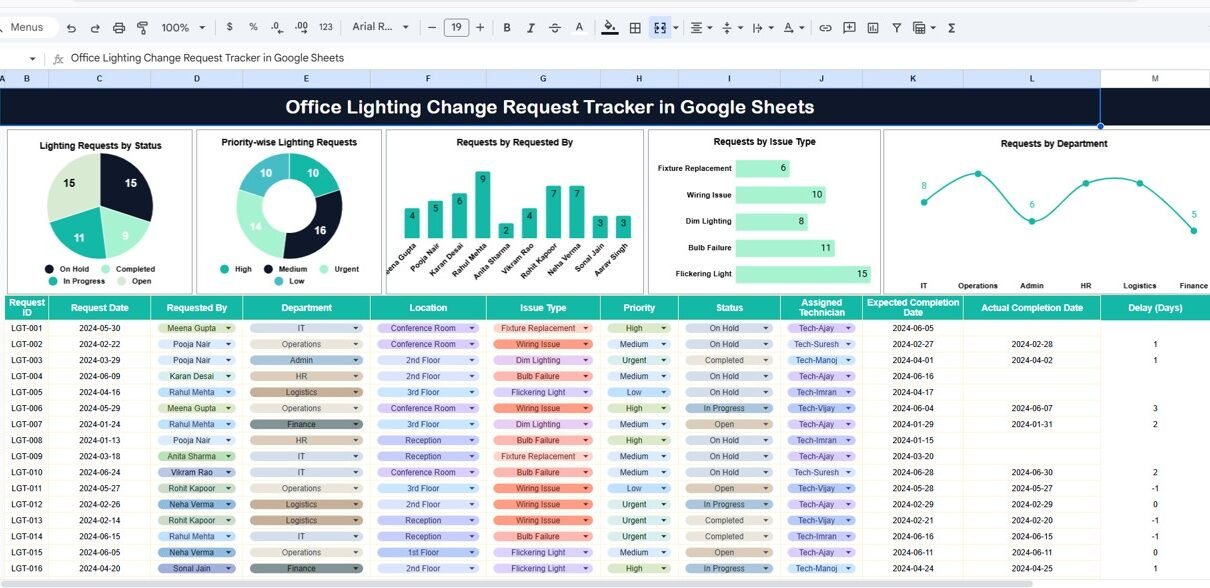
1. Tracker Sheet Tab
This is the main sheet where you manage all requests. You can enter details such as:
- Request ID
- Requested By
- Department
- Issue Type
- Priority
- Request Date
- Assigned Person
- Status
- Remarks
The sheet updates automatically when you modify any request. You track pending, resolved, and high-priority issues in real time.
2. Charts for Instant Insights
The tracker includes built-in charts that visualize request patterns. These charts help you understand workload, frequent issue types, and department needs.
Lighting Requests by Status
Shows the distribution of Open, In Progress, Resolved, Cancelled, or On Hold requests.
Priority-Wise Lighting Requests
Displays how many High, Medium, or Low priority issues employees raise.
Requests by Requested By
Helps identify departments or individuals submitting the most requests.
Requests by Issue Type
Shows the categories like bulb failure, flickering lights, wiring issues, low brightness, etc.
Requests by Department
Allows management to analyze which teams face the most lighting problems.

Click to Buy Office Lighting Change Request Tracker in Google Sheets
3. Smart Search Feature
The tracker includes a dedicated Search section where you can:
-
Enter a Search Keyword
-
Select a Field Name (e.g., Requested By, Department, Status, Issue Type)
The tracker displays filtered records instantly. This makes it very easy to find specific requests without scrolling through long lists.

Click to Buy Office Lighting Change Request Tracker in Google Sheets
Why Does Every Office Need a Lighting Change Request Tracker?
Lighting issues seem small, but they create major workplace challenges:
-
Employee discomfort
-
Low visibility and reduced productivity
-
Increased safety risks
-
Higher maintenance costs when issues go unnoticed
-
Poor planning for future lighting upgrades
With a centralized tracker, you fix issues faster and prevent unnecessary delays.
How the Tracker Improves Workplace Efficiency
Click to Buy Office Lighting Change Request Tracker in Google Sheets
Faster Request Handling
Teams identify pending or aging requests quickly.
Clear Communication
Everyone knows the status of each issue—no follow-up emails required.
Prioritized Action
High-priority issues get immediate attention due to color coding and filters.
Data-Driven Maintenance Planning
Charts show which departments need more lighting upgrades.
Easy Collaboration
Since Google Sheets is cloud-based, multiple users update and track issues together.
Advantages of Using an Office Lighting Change Request Tracker in Google Sheets
1. Ease of Use
The interface stays simple, and anyone can update it without technical training.
2. Real-Time Availability
Employees, supervisors, and the maintenance team view updates instantly.
3. Improves Turnaround Time
Clear visibility of pending tasks helps managers allocate resources faster.
4. Reduces Missed or Overlooked Requests
No issues slip through the cracks due to structured tracking.
5. Supports Continuous Improvement
Patterns reveal recurring problems and help plan preventive actions.
6. Helps with Resource Planning
You can identify the departments or floors that require frequent lighting maintenance.
7. Cost-Effective
Since the tracker uses Google Sheets, you avoid software expenses.
Best Practices for Using the Office Lighting Change Request Tracker
Click to Buy Office Lighting Change Request Tracker in Google Sheets
1. Update Every Request Immediately
Enter a new request as soon as employees report it.
2. Use Consistent Status Categories
Stick to terms like Open, In Progress, Resolved, etc., to maintain clarity.
3. Assign Each Request to a Responsible Person
This avoids confusion and improves accountability.
4. Review Charts Weekly
Regular reviews help detect early patterns and prevent delays.
5. Maintain Clear Naming Conventions
Use simple, consistent issue types and department names for easy filtering.
6. Encourage Employees to Report Lighting Problems Early
Early reporting prevents bigger electrical issues.
7. Track Priority Properly
Use High, Medium, and Low levels to schedule work efficiently.
Conclusion
Click to Buy Office Lighting Change Request Tracker in Google Sheets
An Office Lighting Change Request Tracker in Google Sheets brings order, transparency, and accuracy to your office maintenance process. It reduces delays, improves communication, and gives every team the clarity they need to manage lighting issues smoothly. With its charts, search tool, and structured data entry system, this tracker becomes an essential tool for organizations of all sizes.
When workplaces stay well-lit and comfortable, employees stay productive, happy, and engaged. This tracker helps you maintain that standard effortlessly.
Frequently Asked Questions (FAQs)
1. What is an Office Lighting Change Request Tracker?
It is a Google Sheets-based tool that helps offices track, manage, and analyze lighting-related maintenance requests.
2. Who uses this tracker?
Office Admin teams, Facility Managers, and Maintenance Teams use it to monitor and resolve lighting issues efficiently.
3. Can multiple people use the tracker at the same time?
Yes. Google Sheets supports real-time collaboration for multiple users.
4. Does the tracker include charts?
Yes. It includes multiple charts such as Requests by Status, Priority-wise Requests, and Issue Type Analysis.
5. Can I search for a specific request?
Yes. The built-in search section helps users filter requests using keywords and field names.
6. What types of issues can I track?
You can track bulb failures, dim lights, flickering, wiring problems, and any other lighting-related concerns.
7. Is this tracker beginner-friendly?
Yes. The interface is simple, and anyone can use it without technical skills.
Visit our YouTube channel to learn step-by-step video tutorials
Youtube.com/@NeotechNavigators
Watch the step-by-step video tutorial:
Click to Buy Office Lighting Change Request Tracker in Google Sheets