Office noise is one of the most common yet overlooked workplace issues. Continuous background noise, loud conversations, construction sounds, equipment noise, or meeting disruptions can significantly affect employee productivity, concentration, and well-being. When organizations do not track noise complaints properly, small issues often grow into major dissatisfaction problems.Office Noise Level Complaint Tracker in Google Sheets
An Office Noise Level Complaint Tracker in Google Sheets provides a simple, structured, and ready-to-use solution to capture, monitor, and analyze noise complaints across the workplace. It helps HR teams, facility managers, and office administrators identify problem areas, resolve complaints faster, and improve the overall work environment.Office Noise Level Complaint Tracker in Google Sheets

Click to Buy Office Noise Level Complaint Tracker in Google Sheets
What Is an Office Noise Level Complaint Tracker in Google Sheets?
An Office Noise Level Complaint Tracker is a centralized system used to log and manage employee complaints related to excessive or disruptive noise in the workplace. Built in Google Sheets, this tracker allows teams to record complaint details, track status, analyze trends, and take corrective action.
Because the tracker runs on Google Sheets, it offers:
- Easy access from anywhere
- Real-time updates
- Simple data entry
- Automatic charts and analysis
- Zero software installation
This tracker works well for corporate offices, shared workspaces, co-working spaces, campuses, and large organizations with multiple departments or locations.
Why Tracking Office Noise Complaints Is Important
Click to Buy Office Noise Level Complaint Tracker in Google Sheets
Noise complaints directly affect employee satisfaction and productivity. Without proper tracking:
- Complaints get lost or ignored
- Repeat issues remain unresolved
- Managers lack data to take action
- Employees feel unheard
A structured noise complaint tracker helps organizations:
- Identify high-noise locations
- Monitor complaint resolution status
- Understand common noise sources
- Improve workplace comfort
- Reduce conflict between teams
Ultimately, it supports a healthier and more focused work environment.
Key Features of the Office Noise Level Complaint Tracker
This tracker is a ready-to-use Google Sheets solution with a clean layout, automated charts, and a powerful search feature.
The tracker includes:
- A centralized Tracker Sheet Tab
- Multiple analytical charts
- A smart Search by Keyword and Field Name
- Real-time updates as data changes
Let’s explore each component in detail.
Tracker Sheet Tab – Central Complaint Log
Click to Buy Office Noise Level Complaint Tracker in Google Sheets
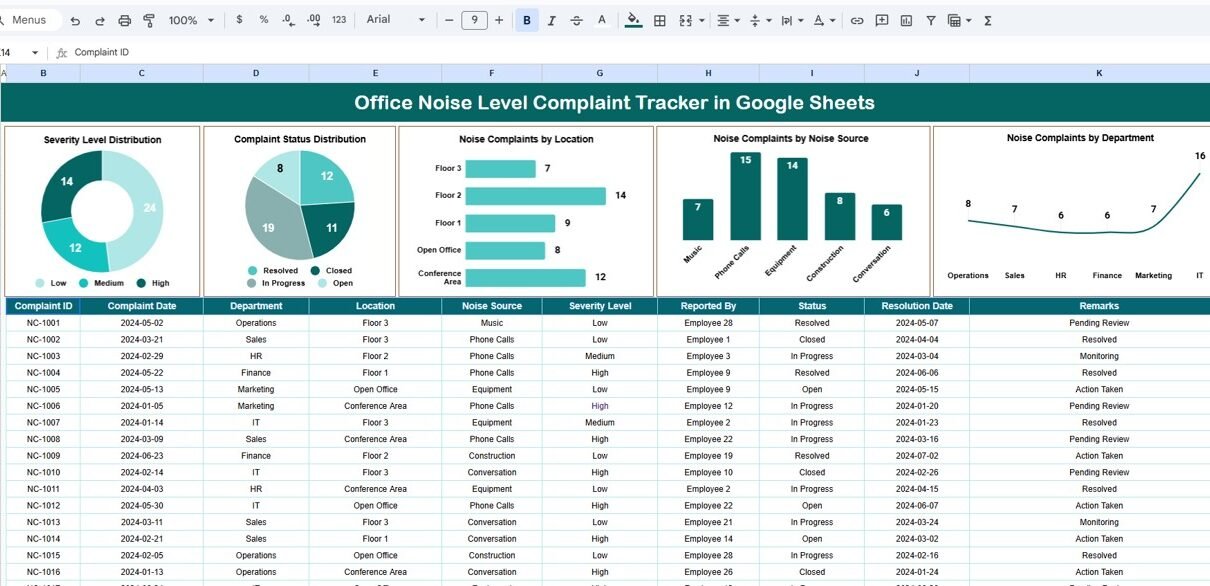
The Tracker Sheet Tab is where all noise complaints are recorded. It typically includes fields such as:
- Complaint ID
- Complaint Date
- Employee Name (or Anonymous option)
- Department
- Location / Floor / Area
- Noise Source (Conversation, Construction, Equipment, Music, Meetings, etc.)
- Severity Level (Low, Medium, High)
- Complaint Status (Open, In Progress, Resolved, Closed)
- Assigned To
- Resolution Date
- Remarks or Action Taken
This sheet acts as the single source of truth. Once data is entered here, all charts update automatically.
Charts Included in the Noise Complaint Tracker
Visual analysis plays a key role in understanding complaint patterns. The tracker includes multiple charts to provide quick and meaningful insights.
1. Severity Level Distribution
This chart shows the number of complaints by severity level:
-
Low
-
Medium
-
High
It helps identify how serious noise issues are across the office. A high number of high-severity complaints indicates urgent workplace problems that need immediate action.
2. Complaint Status Distribution
Click to Buy Office Noise Level Complaint Tracker in Google Sheets
This chart displays complaints by status, such as:
-
Open
-
In Progress
-
Resolved
-
Closed
It helps managers monitor pending complaints and ensure timely resolution. A large number of open complaints signals process delays or resource gaps.
3. Noise Complaints by Location
This chart highlights which office locations or floors receive the most noise complaints.
It helps facilities teams:
-
Identify noise hotspots
-
Adjust seating arrangements
-
Improve soundproofing
-
Review office layout design
This insight supports data-driven facility improvements.
4. Noise Complaints by Noise Source
This chart breaks down complaints based on the source of noise, such as:
-
Loud conversations
-
Office equipment
-
Construction or maintenance
-
Music
-
Meeting rooms
-
External traffic
By understanding noise sources, management can apply targeted solutions rather than generic rules.
5. Noise Complaints by Department
This chart shows which departments experience or raise the most complaints.
It helps HR teams:
-
Identify department-specific issues
-
Improve inter-department coordination
-
Introduce department-level noise guidelines
-
Plan awareness sessions
This chart promotes fairness and transparency in complaint handling.
Click to Buy Office Noise Level Complaint Tracker in Google Sheets
Search Functionality – Find Complaints Instantly
The tracker includes a Search by Search Keyword and Field Name feature that allows users to locate specific complaints instantly.
Users can search by:
- Employee Name
- Department
- Location
- Noise Source
- Status
- Assigned Person
This feature saves time and improves efficiency during audits, reviews, or follow-ups. Instead of filtering manually, users get instant results with minimal effort.

Click to Buy Office Noise Level Complaint Tracker in Google Sheets
Who Can Use This Noise Complaint Tracker?
This tracker works well for:
-
HR Teams
-
Facility Management Teams
-
Office Administrators
-
Workplace Experience Teams
-
Compliance and Audit Teams
-
Co-working Space Managers
It suits both small offices and large enterprises.
Advantages of Using an Office Noise Level Complaint Tracker
1. Centralized Complaint Management
All noise complaints remain in one organized place.
2. Improved Employee Satisfaction
Employees feel heard when complaints are tracked and resolved.
3. Faster Resolution
Status tracking ensures timely follow-ups.
4. Data-Driven Decisions
Charts highlight recurring problems and trends.
5. Transparency and Accountability
Assigned responsibility ensures clear ownership.
6. Easy Collaboration
Google Sheets allows multi-user access.
7. Cost-Effective Solution
No additional software or licenses required.
Opportunities for Improvement in the Tracker
Click to Buy Office Noise Level Complaint Tracker in Google Sheets
Although the tracker is powerful, organizations can enhance it further by adding:
-
SLA tracking for resolution time
-
Automated email alerts for high-severity complaints
-
Integration with internal ticketing systems
-
Noise level measurement data (dB readings)
-
Monthly or quarterly trend dashboards
-
Anonymous complaint submission links
These improvements make the tracker even more robust.
Best Practices for Managing Office Noise Complaints
-
Log complaints as soon as they are reported
-
Use consistent severity definitions
-
Assign responsibility clearly
-
Review complaint status weekly
-
Communicate resolutions to employees
-
Use charts during workplace review meetings
-
Maintain confidentiality where required
Following these practices ensures the tracker delivers maximum value.
Conclusion
Click to Buy Office Noise Level Complaint Tracker in Google Sheets
An Office Noise Level Complaint Tracker in Google Sheets is a simple yet powerful tool to improve workplace comfort and employee satisfaction. By tracking complaints systematically, analyzing trends through charts, and resolving issues promptly, organizations can create a quieter, healthier, and more productive work environment.
Because the tracker is ready to use, cloud-based, and highly customizable, it fits seamlessly into any office operations workflow. With proper usage, it becomes a valuable asset for HR and facility management teams.
Frequently Asked Questions (FAQs)
1. Is this tracker suitable for large offices?
Yes, it works for both small and large organizations.
2. Can employees submit complaints anonymously?
Yes, you can include an anonymous option.
3. Does the tracker update charts automatically?
Yes, charts update as soon as data changes.
4. Can we customize noise categories?
Yes, all categories are fully editable.
5. Is Google Sheets secure for complaint data?
Yes, access controls and permissions ensure data security.
6. Can we track resolution time?
Yes, by adding resolution date fields and formulas.
Visit our YouTube channel to learn step-by-step video tutorials
Youtube.com/@NeotechNavigators
Watch the step-by-step video tutorial:
Click to Buy Office Noise Level Complaint Tracker in Google Sheets