When employees travel for business, organizations must ensure that every trip is insured, approved, and properly documented. Tracking travel insurance requests manually through emails or scattered spreadsheets often leads to delays, missing information, or incorrect premium calculations.Travel Insurance Request Tracker in Google Sheets
To make this process smooth and error-free, the Travel Insurance Request Tracker in Google Sheets provides a complete, ready-to-use solution. It helps teams monitor insurance requests, premium amounts, approvals, and department-wise usage — all inside a clean, interactive dashboard.Travel Insurance Request Tracker in Google Sheets
In this article, we explain all features of this tracker including dashboard cards, charts, search capabilities, data structure, benefits, and best practices.
What Is a Travel Insurance Request Tracker in Google Sheets?
A Travel Insurance Request Tracker is a Google Sheets-based tool that centralizes all employee insurance requests and converts them into actionable insights. It simplifies the process of reviewing, approving, and analyzing travel insurance performance across destinations and departments.
This ready-to-use tracker provides:
-
Request monitoring
-
Premium amount tracking
-
Approval status analysis
-
Department & destination charts
-
Searchable insurance records
-
Intuitive dashboard visuals
It is ideal for HR teams, travel coordinators, finance departments, and administrative teams.
Dashboard Overview – KPI Cards
Click to Buy Travel Insurance Request Tracker in Google Sheets
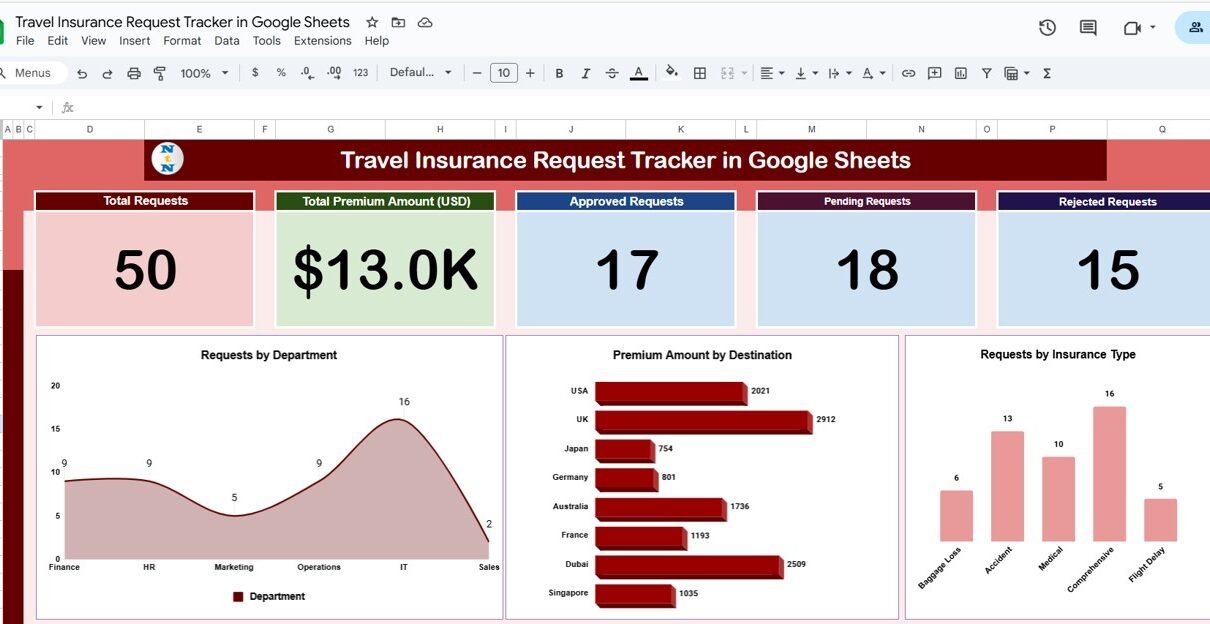
The dashboard includes summary cards that instantly show the overall insurance performance.
Dashboard Cards:
-
Total Requests – number of all insurance requests
-
Total Premium Amount (USD) – total premium paid for all trips
-
Approved Requests – count of accepted insurance requests
-
Pending Requests – requests awaiting approval
-
Rejected Requests – declined requests
These KPIs help organizations understand the volume and approval pattern of travel insurance.
Dashboard Charts – Visual Insights
This tracker includes multiple charts to analyze travel insurance behavior across departments, destinations, and insurance types.
Requests by Department
Shows how many travel insurance requests were submitted by each department.
This helps identify:
- High-travel departments
- Budget-intensive divisions
- Frequent travelers
Premium Amount by Destination
Click to Buy Travel Insurance Request Tracker in Google Sheets
Displays which destinations carry higher premium expenses.
Useful for:
- Travel cost planning
- High-risk country analysis
- Budget forecasting
Requests by Insurance Type
Categorizes requests by:
- Single-trip insurance
- Multi-trip insurance
- International coverage
- Domestic coverage
- Medical coverage
- Corporate group coverage
This chart helps teams understand which type of insurance is needed most often.

Click to Buy Travel Insurance Request Tracker in Google Sheets
Search Sheet Tab
The Search Tab allows users to quickly locate any insurance request.
You can search by:
- Employee Name
- Department
- Destination
- Insurance Type
- Premium Amount
- Request Status
- Date
- Any keyword or field name
This is useful during audits, approvals, or monthly reporting.

Click to Buy Travel Insurance Request Tracker in Google Sheets
Data Sheet Tab
The Data Sheet contains all travel insurance request records in a tabular format.
Common Data Columns Include:
- Employee Name
- Department
- Destination
- Trip Purpose
- Travel Start & End Dates
- Insurance Type
- Premium Amount (USD)
- Status (Approved/Pending/Rejected)
- Request Date
- Approver
- Notes
Once data is updated in this sheet, the dashboard refreshes automatically.

Click to Buy Travel Insurance Request Tracker in Google Sheets
Advantages of the Travel Insurance Request Tracker
-
Provides complete visibility into insurance request workflow
-
Helps reduce request delays
-
Tracks approval status effectively
-
Reduces premium overspending
-
Helps analyze destinations with high insurance cost
-
Useful for compliance and audit purposes
-
Fully cloud-based and collaborative
-
Requires no technical skills to operate
Opportunities for Improvement
You can enhance the tracker with many additional features:
-
Auto-email notifications for pending approvals
-
Google Forms integration for employee requests
-
Limit alerts for high-cost premium requests
-
Multi-currency support
-
Year-over-year premium analysis
-
Policy document link storage
Best Practices for Using This Tracker
Click to Buy Travel Insurance Request Tracker in Google Sheets
-
Update data immediately after each insurance request
-
Review pending requests weekly
-
Analyze high-cost destinations quarterly
-
Use filters to compare departments
-
Maintain uniform naming for destinations and insurance types
-
Keep approver comments updated for audit clarity
Conclusion
The Travel Insurance Request Tracker in Google Sheets is a complete solution for recording, monitoring, and analyzing insurance requests. With its dashboard cards, approval tracking, premium analysis, and department-wise charts, it ensures that organizations manage travel insurance efficiently and without errors.
Whether your organization handles 10 or 500 travel requests a year, this tracker simplifies the entire workflow and improves accuracy.
Frequently Asked Questions (FAQ)
Click to Buy Travel Insurance Request Tracker in Google Sheets
1. Can employees submit requests through a form?
Yes, you can link this tracker with Google Forms.
2. Does the dashboard auto-update?
Yes, all visuals refresh instantly when data changes.
3. Can I add more insurance types?
Yes, the tracker is fully customizable.
4. Can I track premium by employee?
Yes, add an employee-wise chart if needed.
5. Is this suitable for multi-location companies?
Absolutely — just add more location fields.
Visit our YouTube channel to learn step-by-step video tutorials
Youtube.com/@NeotechNavigators
Watch the step-by-step video Demo:
Click to Buy Travel Insurance Request Tracker in Google Sheets