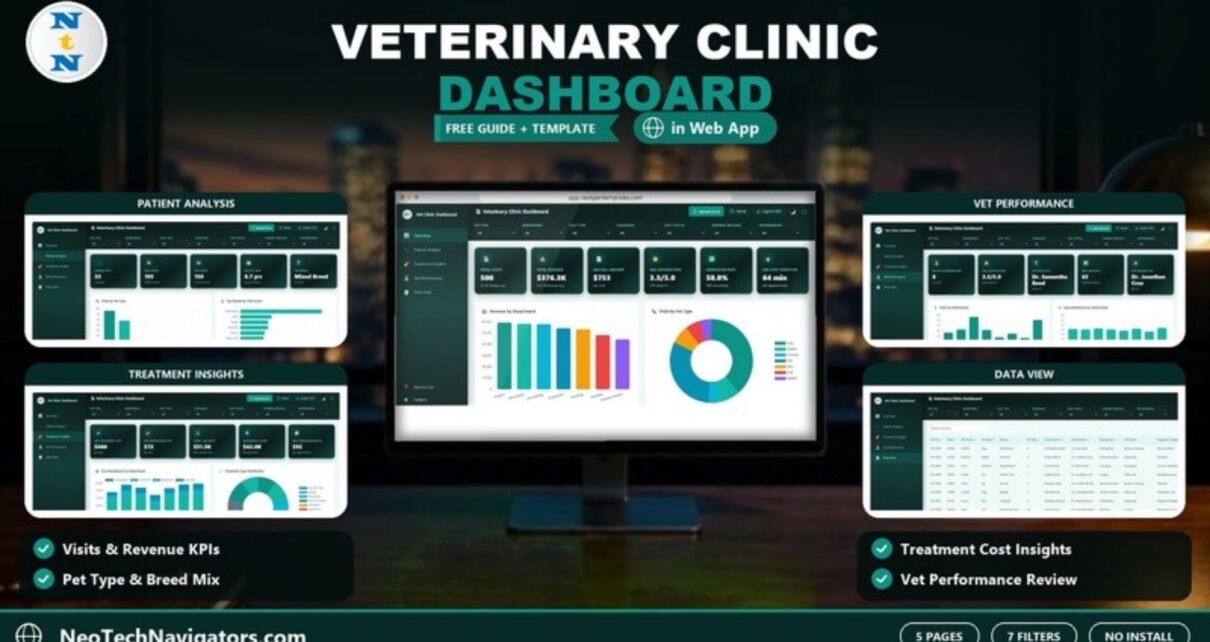
The Veterinary Clinic Dashboard in HTML is a browser-based analytics template for vet clinics, animal hospitals and pet care practices. It turns visit records into five interactive pages: Overview, Patient Analysis, Treatment Insights, Vet Performance and Data View. You can see visits, revenue, satisfaction, pet mix, treatment costs and each veterinarian’s workload without installing any software.
This guide is for practice owners, clinic managers and the analysts who support them. It walks through every page using the template’s own screenshots and sample figures: the 21 KPI cards across the four analysis pages, the seven filters, the charts, and the Upload Excel, Reset and Export CSV controls. It then shows how to load your own clinic data and where the dashboard fits, and where it does not.
🎥 Watch the Video Tutorial
Get the Veterinary Clinic Dashboard
What Problem Does It Solve?
Most practice management systems are good at recording appointments and invoices but weak at answering management questions. Which department earns the most? Are we seeing more cats or dogs this year? Which treatments cost the most per visit? Is one vet carrying far more cases than the others? Getting those answers usually means exporting data and building charts by hand.
This dashboard does that analysis for you. Export your visit records to Excel, load them, and every card and chart updates. Seven filters let you narrow the view to one pet type, department, visit type, diagnosis, status, payment method or veterinarian.
Dashboard Controls
- Seven filters: Pet Type, Department, Visit Type, Diagnosis, Visit Status, Payment Method and Veterinarian.
- Upload Excel to load your clinic’s visit data.
- Reset to clear all filters.
- Export CSV to download the records.
- A dark/light toggle and a full-screen button.
- A sidebar with the five pages, a How to Use guide and a Collapse option.
Veterinary Clinic Dashboard in HTML: Page-by-Page Walkthrough
1. Overview
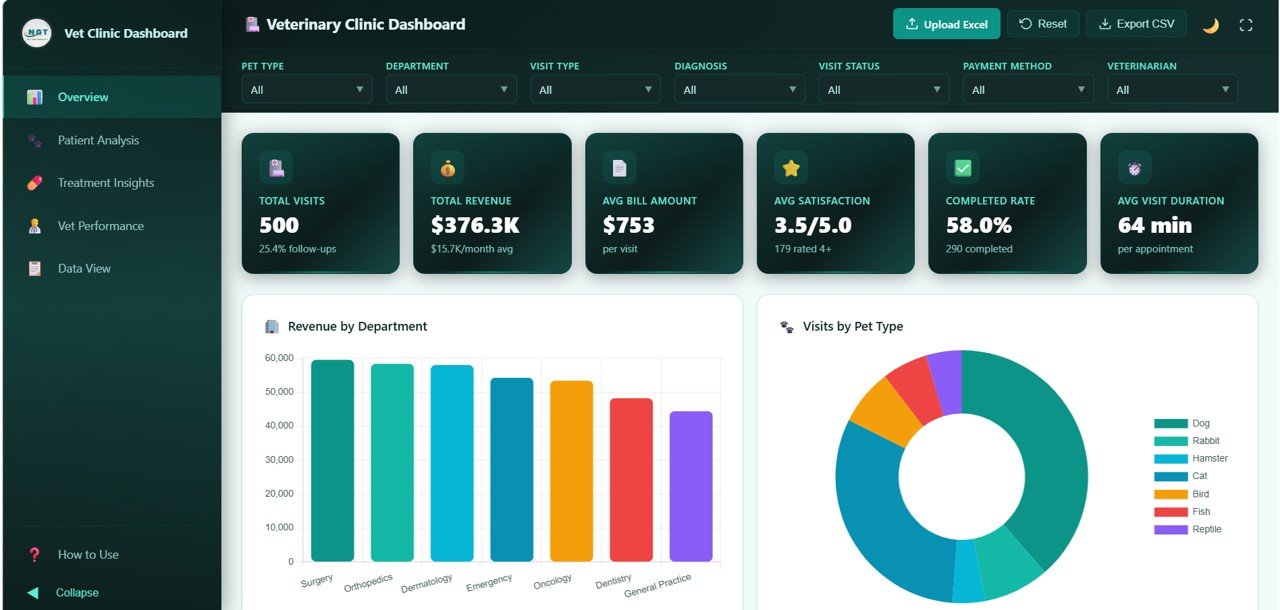
Six KPI cards summarise the clinic. The sample values below are for all 500 sample visits:
| KPI card | Sample value | Supporting detail on the card |
|---|---|---|
| Total Visits | 500 | 25.4% follow-ups |
| Total Revenue | $376.3K | $15.7K/month average |
| Avg Bill Amount | $753 | per visit |
| Avg Satisfaction | 3.5/5.0 | 179 rated 4+ |
| Completed Rate | 58.0% | 290 completed |
| Avg Visit Duration | 64 min | per appointment |
The charts are Revenue by Department (Surgery, Orthopedics, Dermatology, Emergency, Oncology, Dentistry and General Practice), Visits by Pet Type (Dog, Rabbit, Hamster, Cat, Bird, Fish and Reptile), plus Visit Status Distribution, Monthly Revenue Trend and Top Diagnosis Categories further down the page.
2. Patient Analysis
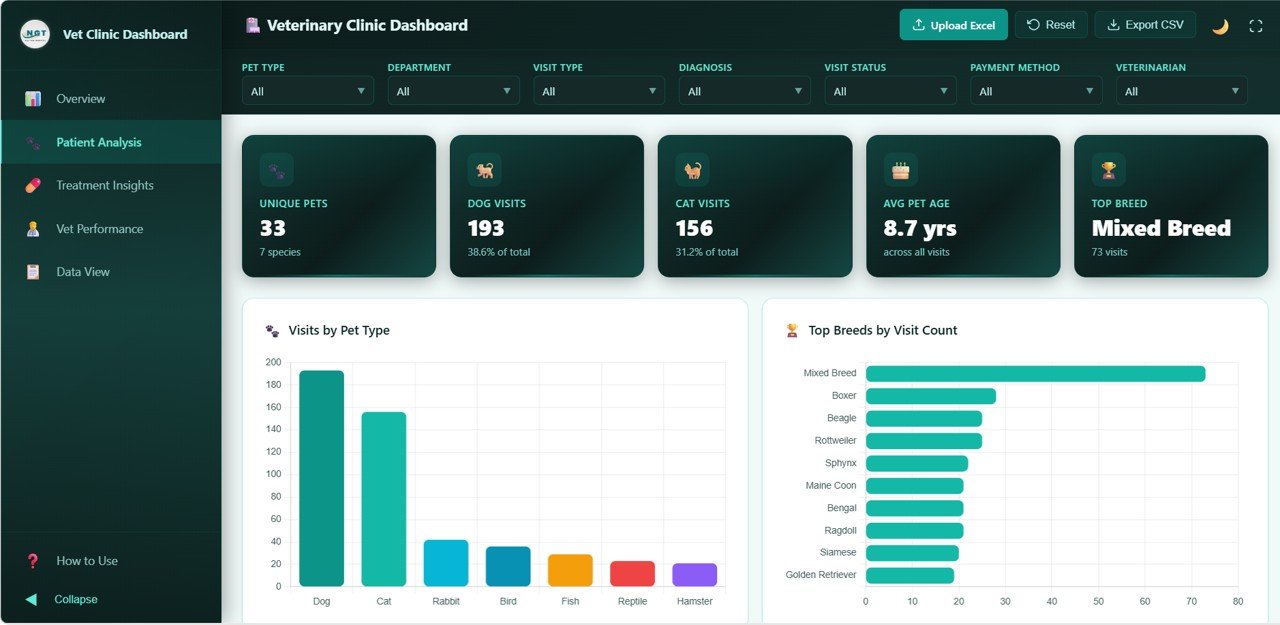
The cards show Unique Pets (33 across 7 species), Dog Visits (193, or 38.6% of the total), Cat Visits (156, 31.2%), Avg Pet Age (8.7 years) and Top Breed (Mixed Breed, 73 visits). The charts are Visits by Pet Type, Top Breeds by Visit Count (Mixed Breed, Boxer, Beagle, Rottweiler, Sphynx, Maine Coon and others), Pet Age Distribution, Pet Type by Visit Type and Diagnosis by Pet Type.
This page helps with stock planning, staffing for species-specific skills and targeted reminders, such as senior-pet check-ups when the average age is high.
3. Treatment Insights
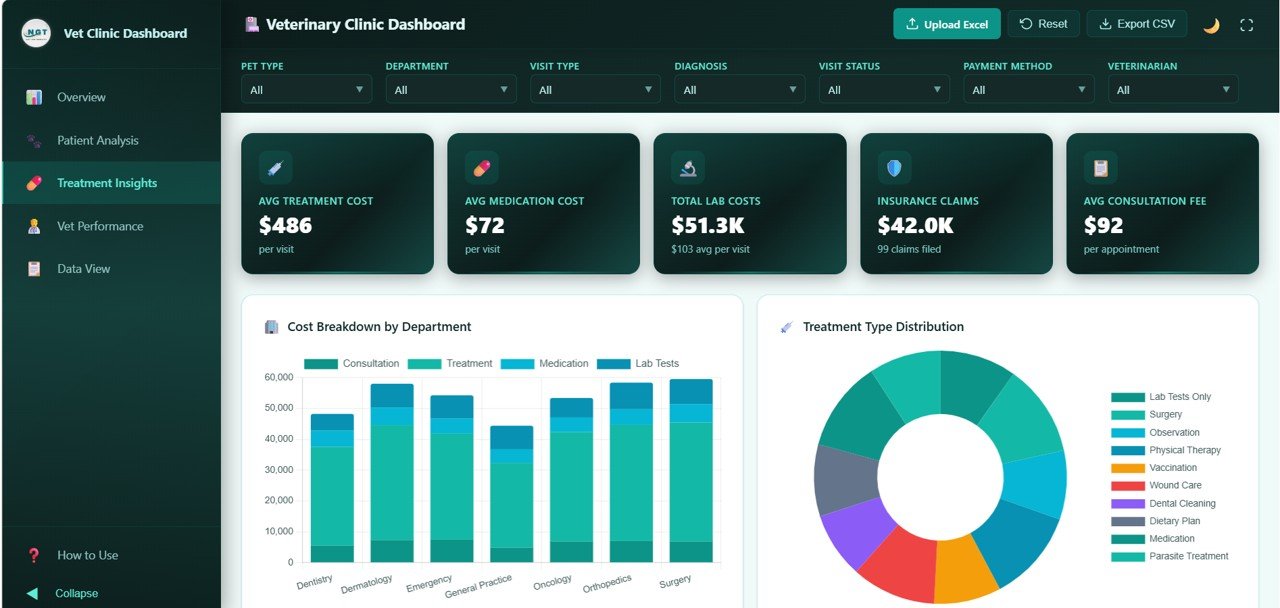
The cards show Avg Treatment Cost ($486 per visit), Avg Medication Cost ($72 per visit), Total Lab Costs ($51.3K, about $103 per visit), Insurance Claims ($42.0K from 99 claims) and Avg Consultation Fee ($92 per appointment).
Cost Breakdown by Department is a stacked chart with Consultation, Treatment, Medication and Lab Tests segments. Treatment Type Distribution covers Lab Tests Only, Surgery, Observation, Physical Therapy, Vaccination, Wound Care, Dental Cleaning, Dietary Plan, Medication and Parasite Treatment. Diagnosis Category Distribution, Average Cost by Treatment Type and Payment Method Distribution complete the page.
4. Vet Performance
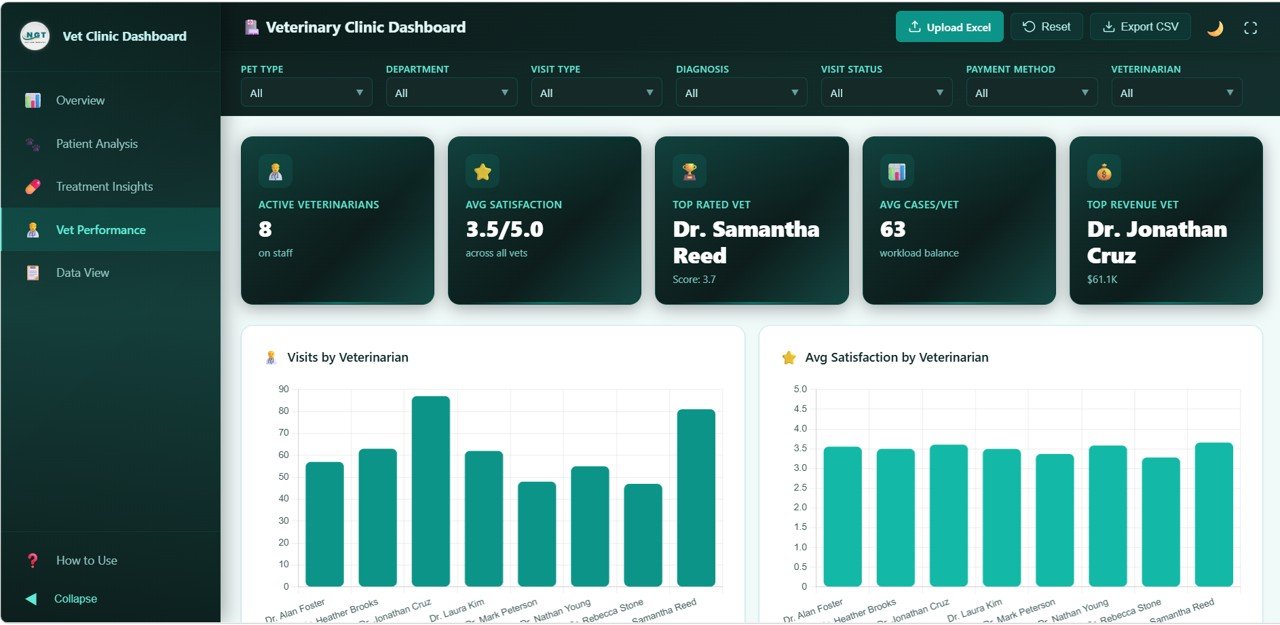
The cards show Active Veterinarians (8 on staff), Avg Satisfaction (3.5/5.0 across all vets), Top Rated Vet (Dr. Samantha Reed, score 3.7), Avg Cases/Vet (63) and Top Revenue Vet (Dr. Jonathan Cruz, $61.1K). The charts compare the eight sample vets on Visits by Veterinarian, Avg Satisfaction by Veterinarian, Revenue by Veterinarian, Avg Visit Duration by Veterinarian and Department Distribution by Veterinarian.
5. Data View
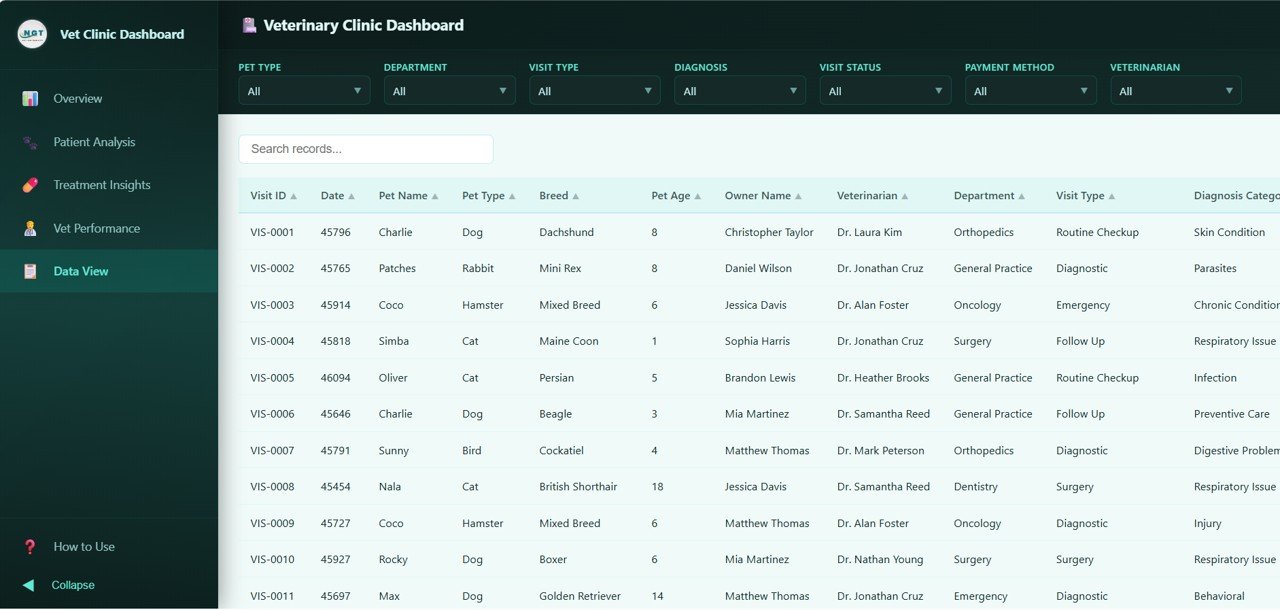
This page is the full visit table, with a Search records box and sortable columns. The visible columns are Visit ID, Date, Pet Name, Pet Type, Breed, Pet Age, Owner Name, Veterinarian, Department, Visit Type and Diagnosis Category, with more to the right. Visit types in the sample include Routine Checkup, Diagnostic, Emergency, Follow Up and Surgery.
Worked Example: How the Overview Numbers Fit Together
The cards are consistent with each other, which is a good way to sanity-check your own data after loading it:
Avg Bill Amount  = Total Revenue / Total Visits     = 376,300 / 500 ≈ $753
Completed Rate   = Completed Visits / Total Visits  = 290 / 500     = 58.0%
Dog share        = Dog Visits / Total Visits        = 193 / 500     = 38.6%
Avg Cases/Vet    = Total Visits / Active Vets       = 500 / 8       = 62.5 ≈ 63
If one of these checks looks wrong after you upload your file, the cause is usually inconsistent labels, such as “Completed” and “completed”, or missing values in a column.
How to Use It With Your Own Data
- Download and unzip the package, then open index.html in Chrome, Edge, Firefox or Safari.
- Read How to Use in the sidebar and look at the sample data so you know which columns the dashboard expects.
- Export your visits from your practice software to Excel and match the column headers to the sample.
- Clean the categories: one spelling for each pet type, department, visit status and payment method.
- Click Upload Excel and select your file. All five pages refresh with your data. You can also replace the sample data in the included data file and reload the page in your browser.
- Use the filters for focused reviews, for example Veterinarian for one-to-ones or Department for budget meetings. Use Export CSV to share the underlying list.
If you would like to build dashboards like this in Excel yourself, the Excel Pivot Tables & Dashboards course on NextGenTemplates Academy covers the steps from raw data to interactive report.
Real-World Use Cases
- Single-site clinic owner: Checks Revenue by Department and Average Cost by Treatment Type every month to decide which services to promote and whether prices need reviewing.
- Multi-vet animal hospital: Uses Vet Performance to balance caseloads. If one vet is far above the Avg Cases/Vet figure while satisfaction drops, appointments get redistributed.
- Practice manager preparing for an insurer or accountant: Filters by Payment Method, reviews Insurance Claims and exports the filtered records as CSV.
Prefer working in a spreadsheet? Read the walkthrough of the Veterinary Clinic Dashboard in Google Sheets. For monthly target tracking, see the Veterinary Clinic KPI Dashboard in Google Sheets.
Comparison: Which Format Should You Pick?
| Point | HTML dashboard | Google Sheets dashboard | Power BI dashboard |
|---|---|---|---|
| Software needed | Web browser only | Google account | Power BI Desktop |
| Data loading | Upload Excel button | Replace the rows in the data sheet | Point the report at your data and refresh |
| Customising | HTML/CSS/JavaScript | Formulas and charts | DAX and visuals |
| Best for | Presenting and quick sharing | Team editing in the cloud | Organisations already on Power BI |
Related templates: The Veterinary Clinic Dashboard in Power BI covers the same topic for Power BI users.
Best Practices
- Standardise categories first. Clean pet type, breed, department and diagnosis names before you upload. Messy labels split the charts.
- Filter before you conclude. Set the filters to the department or vet you are discussing before you read a KPI.
- Keep sensitive files internal. Owner names and pet records belong on a clinic computer or secure intranet, not a public web host.
- Archive monthly. Export a CSV at each month-end so you have a dated record to compare against.
Limitations: Who Should Not Use It
- It does not book appointments, send reminders or produce invoices. It analyses data you already have.
- Data does not refresh by itself. You upload a new file when you want updated numbers.
- Satisfaction is only as good as the scores you collect. If you do not survey owners, those cards will be empty or misleading.
- Clinics that need real-time, multi-branch reporting tied directly to their practice software will need a database-backed BI setup.
For other pet-sector and healthcare views, see the Pet Care Business Dashboard in Google Sheets and the Hospital Patient Flow Dashboard in HTML.
Frequently Asked Questions
What pages are in the Veterinary Clinic Dashboard in HTML?
Five: Overview, Patient Analysis, Treatment Insights, Vet Performance and Data View, plus a How to Use guide in the sidebar.
Which KPIs does the Overview page show?
Total Visits, Total Revenue, Avg Bill Amount, Avg Satisfaction, Completed Rate and Avg Visit Duration. The other pages add cards such as Unique Pets, Avg Treatment Cost, Insurance Claims, Top Rated Vet and Avg Cases/Vet.
Can I filter by veterinarian or department?
Yes. There are seven filters: Pet Type, Department, Visit Type, Diagnosis, Visit Status, Payment Method and Veterinarian.
How do I add my own clinic data?
Prepare an Excel file with the same columns as the sample data, then click Upload Excel in the header. The cards, charts and Data View update to your records.
Do I need to install software?
No. Unzip the download and open index.html in a modern browser.
Can I export records?
Yes. The Export CSV button downloads the visit records for use in Excel or for sharing with your accountant.
Wrapping Up
The Veterinary Clinic Dashboard in HTML gives a practice a clear, filterable view of visits, revenue, patients, treatment costs and vet workload, all in the browser. Clean your export, load it with Upload Excel, and start your next management meeting from the Overview page instead of a stack of reports.
Get the Veterinary Clinic Dashboard
📅 Last updated: October 2026