Every organization creates policies to maintain consistency, security, compliance, professionalism, and smooth operations. Although policies guide daily activities, situations sometimes demand flexibility. Teams often request exceptions for rules related to technology, operations, HR, finance, procurement, and governance. Because exceptions need approval, tracking them becomes a major challenge when teams use emails, chats, or scattered spreadsheets. A Corporate Policy Exception Request Tracker in Google Sheets solves this problem with a structured, transparent, and easy-to-use system.Corporate Policy Exception Request Tracker in Google Sheets
This article explains everything about this ready-to-use tracker. You will learn how it works, why organizations use it, how to track requests, how to view insights through charts, and how the search feature improves efficiency. You will also explore advantages, improvement opportunities, best practices, and answers to common questions.Corporate Policy Exception Request Tracker in Google Sheets
Let’s understand this powerful tracker in simple terms.
What Is a Corporate Policy Exception Request Tracker in Google Sheets?
Click to Buy Corporate Policy Exception Request Tracker in Google Sheets
A Corporate Policy Exception Request Tracker in Google Sheets is a smart tool that allows teams to record, track, monitor, and analyze all exception requests within the organization. Every time a department wants a temporary exception to a policy, the tracker records the request details, approval flow, priority level, status, department, policy type, requester name, and approval dates.Corporate Policy Exception Request Tracker in Google Sheets
Because the tracker is built in Google Sheets, it stays:
- Online
- Real-time
- Highly accessible
- Easy to use
- Simple to customize
With this system, companies manage exception requests in a structured and transparent manner. It eliminates confusion, centralizes all data, and helps leadership understand patterns.Corporate Policy Exception Request Tracker in Google Sheets
Tracker Sheet Tab
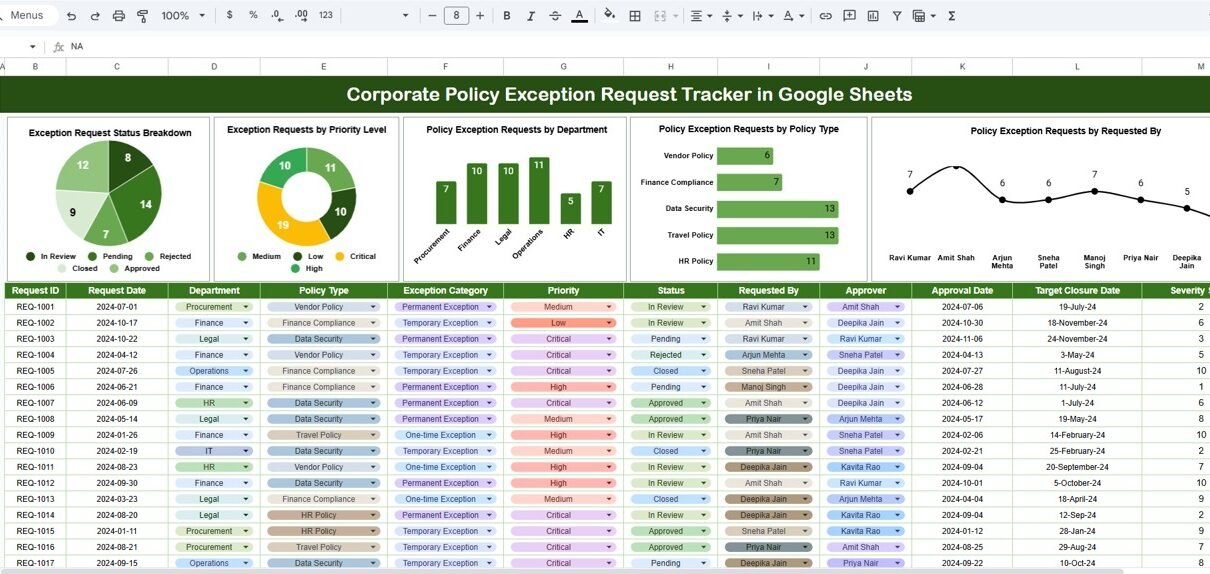
The Tracker sheet tab is the core of the entire system. This sheet stores every policy exception request.
It includes fields like:
- Request ID
- Requested By
- Department
- Policy Type
- Exception Description
- Reason for Exception
- Priority Level
- Status (Pending / Approved / Rejected / Closed)
- Request Date
- Review Date
- Final Decision Date
Teams enter data here, and the dashboard updates automatically.
Charts in the Tracker Dashboard
Click to Buy Corporate Policy Exception Request Tracker in Google Sheets
The dashboard includes four powerful charts that help managers understand exception patterns quickly. Every chart updates automatically whenever new requests are entered.
1. Exception Request Status Breakdown
This chart shows the count of requests in each status category:
- Pending
- Approved
- Rejected
- Closed
- Escalated
2. Exception Requests by Priority Level
This chart shows how many requests fall under:
- Low Priority
- Medium Priority
- High Priority
- Critical Priority
This helps leadership understand urgency levels across departments, which improves resource planning and decision-making.
Policy Exception Requests by Department
This visual breaks down all requests by department:
- HR
- Finance
- IT
- Procurement
- Sales
- Marketing
- Operations
- Legal
4. Policy Exception Requests by Policy Type
This chart shows which policy areas receive the most exception requests:
- IT Security
- Data Privacy
- HR Rules
- Procurement Policies
- Vendor Management
- Finance Approvals
- Travel Policies
- Operational Procedures
This helps identify patterns and discover policies that need updates, simplification, or training programs.

Click to Buy Corporate Policy Exception Request Tracker in Google Sheets
Search Feature: Search by Keyword and Field Name
The tracker includes an advanced search system that filters results instantly.
You enter:
-
Search Keyword → for example: “IT”, “Pending”, “High Priority”
-
Field Name → such as “Department”, “Status”, “Policy Type”, “Requested By”
The tracker displays matching data instantly.
This feature improves:
- Speed
- Accuracy
- User experience
- Productivity
Teams find records faster without scrolling through long lists.

Click to Buy Corporate Policy Exception Request Tracker in Google Sheets
Advantages of Using the Corporate Policy Exception Request Tracker
- Improves approval speed: Managers quickly identify pending cases.
- Reduces compliance risk: Tracking exceptions prevents misuse or policy violations.
- Gives real-time insights: Charts help teams understand patterns immediately.
- Increases accountability: You track who requested, who approved, and when.
- Supports audits easily: Auditors get all details in organized format.
- Works online with no software installation: Google Sheets makes it simple for all teams.
Opportunities for Improvement in the Tracker
Click to Buy Corporate Policy Exception Request Tracker in Google Sheets
Even though the tracker is powerful, you can enhance it further.
- Add automated email notifications: Use Apps Script to notify approvers instantly.
- Add SLA tracking: Track how long each request remains pending.
- Add comments and discussion logs: Allow teams to record review notes.
- Link with forms for automatic entry: Use Google Forms to standardize request submission.
- Add color-coded priorities: Improve visibility for high-priority requests.
- Add workflow automation: Route exceptions to different approvers based on policy type.
Best Practices for Using the Tracker
- Enter data daily: Keep the tracker updated to avoid delays.
- Use consistent naming formats: Departments and policy types should follow standard naming.
- Review charts weekly: Charts show performance trends clearly.
- Provide access based on role: Limit edit rights to maintain data accuracy.
- Record complete details: Clear descriptions help approvers make better decisions.
- Train teams frequently: Help new employees understand how exceptions are logged.
- Update policy types regularly: Add new policy categories when required.
Conclusion
Click to Buy Corporate Policy Exception Request Tracker in Google Sheets
A Corporate Policy Exception Request Tracker in Google Sheets helps organizations manage exception requests with clarity and control. It organizes all requests, tracks approvals, highlights bottlenecks, and offers real-time analysis through charts. Because it runs on Google Sheets, teams use it without any technical setup. With strong search features, structured data fields, and powerful visual insights, this tracker becomes an essential tool for governance, compliance, operations, and risk management. When used consistently, it improves decision speed, transparency, and policy compliance across the organization.Corporate Policy Exception Request Tracker in Google Sheets
Frequently Asked Questions (FAQs)
1. What is a policy exception request?
It is a request to bypass a specific company policy for a valid reason.
2. Why do companies track policy exceptions?
They track exceptions to reduce risk, improve compliance, and maintain transparency.
3. Why use Google Sheets for tracking?
Because it is simple, online, and updates instantly for all users.
4. Can I add custom fields?
Yes, you can add new columns anytime.
5. Which departments use this tracker?
All departments request exceptions: HR, IT, Finance, Operations, and more.
6. Can I automate approvals?
Yes, using Google Apps Script.
7. Does it help in audits?
Yes, it provides structured records that auditors love.
Visit our YouTube channel to learn step-by-step video tutorials
Youtube.com/@NeotechNavigators
Watch the step-by-step video tutorial:
Click to Buy Corporate Policy Exception Request Tracker in Google Sheets