Measuring corporate impact has become just as important as tracking financial performance. Today, organizations must monitor social, environmental, and operational impact initiatives with clarity and transparency. However, managing this information across emails, documents, and disconnected spreadsheets often leads to incomplete insights.
That is exactly why the Corporate Impact Intelligence Tracker in Google Sheets is a powerful and practical solution.
This ready-to-use tracker helps organizations centralize project data, monitor budgets, analyze impact levels, and measure performance across teams, locations, and departments—all within an easy-to-use Google Sheets file.
Get the Corporate Impact Intelligence Tracker in Google Sheets
What Is a Corporate Impact Intelligence Tracker in Google Sheets?
A Corporate Impact Intelligence Tracker in Google Sheets is a structured tracking and analytics tool designed to manage corporate impact projects and initiatives from one centralized location.
Instead of using multiple reports or manual summaries, this tracker converts raw project data into clear KPIs, cards, charts, and searchable insights. As a result, leadership teams, CSR managers, sustainability officers, and strategy teams gain instant visibility into impact performance.
Most importantly, Google Sheets keeps the tracker collaborative, flexible, and accessible without requiring any advanced BI tools.
Why Do Organizations Need an Impact Intelligence Tracker?
Corporate impact programs often involve multiple departments, budgets, locations, and stakeholders. Therefore, without a centralized tracker, teams struggle to answer even basic questions such as:
-
How many impact projects are currently active?
-
How much budget have we allocated versus spent?
-
Which departments drive the most impact?
-
Who owns which initiatives?
-
Where are projects geographically concentrated?
The Corporate Impact Intelligence Tracker solves these challenges by bringing structure, visibility, and accountability into one dashboard.
Key Features of Corporate Impact Intelligence Tracker in Google Sheets
This tracker is ready to use and built with a clear separation between data entry, performance indicators, and analysis visuals.
Tracker Sheet Tab – Central Control & Insights
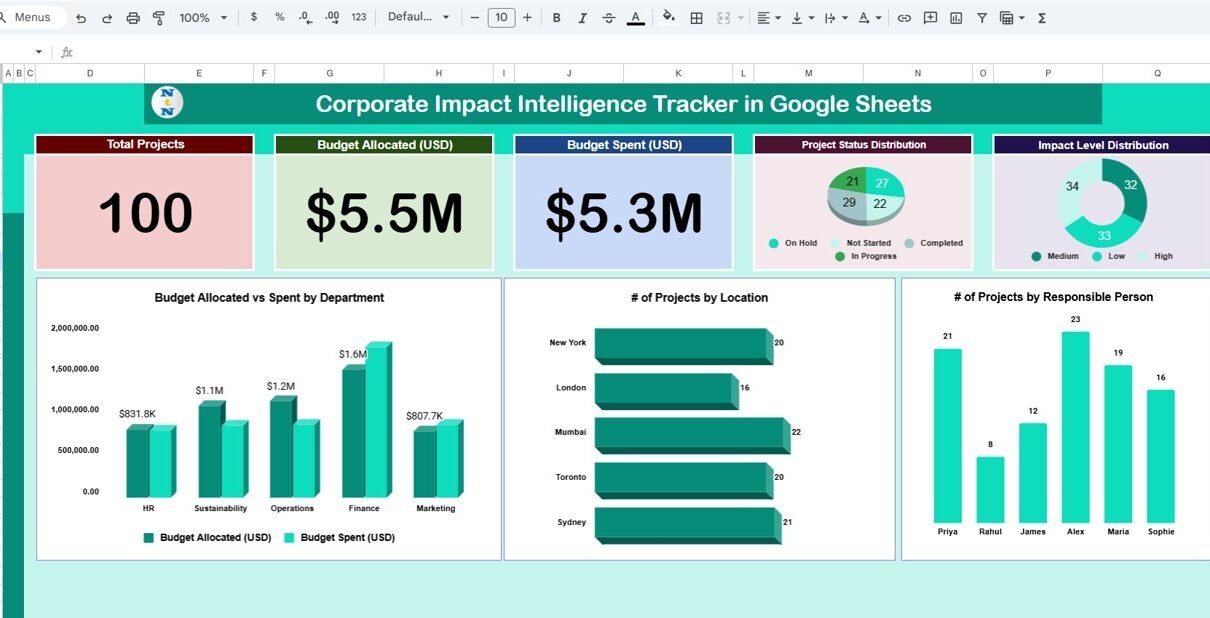
The Tracker Sheet is the main working and visualization area of the file. It combines KPI cards, analytical charts, and search functionality for quick insights.
KPI Cards – High-Level Impact Snapshot
At the top of the tracker, you will find three summary cards that provide instant clarity:
-
Total Projects
Displays the total number of corporate impact initiatives being tracked. -
Budget Allocated (USD)
Shows the total approved budget across all projects. -
Budget Spent (USD)
Reflects how much budget has already been utilized.
These cards help decision-makers quickly assess scale, investment, and financial progress.
Charts – Visual Impact Intelligence
The tracker includes multiple charts that convert project data into meaningful insights:
Project Status Distribution
Displays the number of projects by status (Planned, In Progress, Completed, On Hold).
This view helps managers track execution progress clearly.
Impact Level Distribution
Shows how projects are distributed across impact levels such as High, Medium, or Low.
This enables organizations to evaluate impact intensity.
Number of Projects by Responsible Person
Highlights accountability by showing how many projects each owner manages.
Number of Projects by Location
Provides geographical visibility, making it easy to identify regional focus areas.
Budget Allocated vs Spent by Department
Compares planned versus actual spending by department to identify underutilization or overspending.
All charts update automatically as data changes, ensuring real-time insights.

Search Functionality – Find Projects Instantly
The tracker includes a Search feature that allows users to:
-
Search by keyword
-
Select a field name (such as Project Name, Department, Responsible Person, or Location)
This makes it easy to filter and retrieve specific projects without scrolling through large datasets.

Data Section – Structured Project Information
The Data section forms the foundation of the tracker. Here, users enter project-level details such as:
- Project Name
- Department
- Responsible Person
- Location
- Project Status
- Impact Level
- Budget Allocated
- Budget Spent
- Start Date and End Date
- Remarks or Notes
Because the tracker uses structured tables, all KPI cards, charts, and searches update automatically.

How This Tracker Supports Smarter Decisions
This tracker helps organizations:
-
Monitor progress of impact initiatives
-
Track budget utilization accurately
-
Improve accountability across teams
-
Identify high-impact focus areas
-
Support transparent impact reporting
As a result, leadership teams can align impact goals with strategic priorities more effectively.
Advantages of Corporate Impact Intelligence Tracker in Google Sheets
-
Ready-to-use structure
-
No advanced tools or licenses required
-
Real-time KPI updates
-
Easy collaboration across teams
-
Strong visual storytelling for impact data
Best Practices for Using the Impact Intelligence Tracker
-
Keep project data consistent and standardized
-
Update budget figures regularly
-
Review charts monthly in leadership meetings
-
Assign clear ownership for each project
-
Use impact levels thoughtfully for accurate prioritization
Conclusion
The Corporate Impact Intelligence Tracker in Google Sheets provides a simple yet powerful way to manage, analyze, and communicate corporate impact initiatives. Instead of relying on fragmented updates and manual summaries, organizations gain a single source of truth for impact performance.
Because the tracker combines KPI cards, visual analytics, search functionality, and structured data, it supports better governance, transparency, and data-driven decision-making.
If you want to build trackers like this yourself, the NextGenTemplates Academy learning paths walk you through the spreadsheet skills step by step.
Get the Corporate Impact Intelligence Tracker in Google Sheets