Modern organizations depend heavily on secure and controlled network access. Employees, contractors, and vendors require different levels of access to internal systems, applications, VPNs, and shared resources. However, when access requests arrive through emails or informal messages, security incidents increase, approvals delay, and compliance weakens.Office Network Access Request Tracker in Google Sheets
An Office Network Access Request Tracker in Google Sheets provides a structured and transparent way to manage network access requests. It helps IT and security teams track requests, measure provisioning time, analyze risk, control access levels, and monitor costs—all in one centralized tracker.Office Network Access Request Tracker in Google Sheets
Get the Office Network Access Request Tracker in Google Sheets
What Is an Office Network Access Request Tracker in Google Sheets?
An Office Network Access Request Tracker is a centralized system used to log, approve, and analyze user requests for network access. It records details such as request type, priority, risk level, access level, department, approval status, and provisioning time.Office Network Access Request Tracker in Google Sheets
Because this tracker is built in Google Sheets, it provides:Office Network Access Request Tracker in Google Sheets
- Real-time collaboration
- Automated summaries
- Easy customization
- Secure sharing controls
- Zero dependency on complex IAM software
This tracker supports:
- IT operations teams
- Network administrators
- Cybersecurity teams
- Compliance teams
- Office administrators
Key Features of the Office Network Access Request Tracker
This ready-to-use tracker includes:
A structured Tracker Sheet Tab
Executive-level KPI cards
Multiple analytical charts
A powerful Search Sheet Tab
Cost, risk, and provisioning insights
Each feature strengthens security governance and operational efficiency.
Tracker Sheet Tab
The Tracker Sheet Tab is the main data entry area. Every network access request gets recorded here.
Dashboard Cards – Quick IT Overview
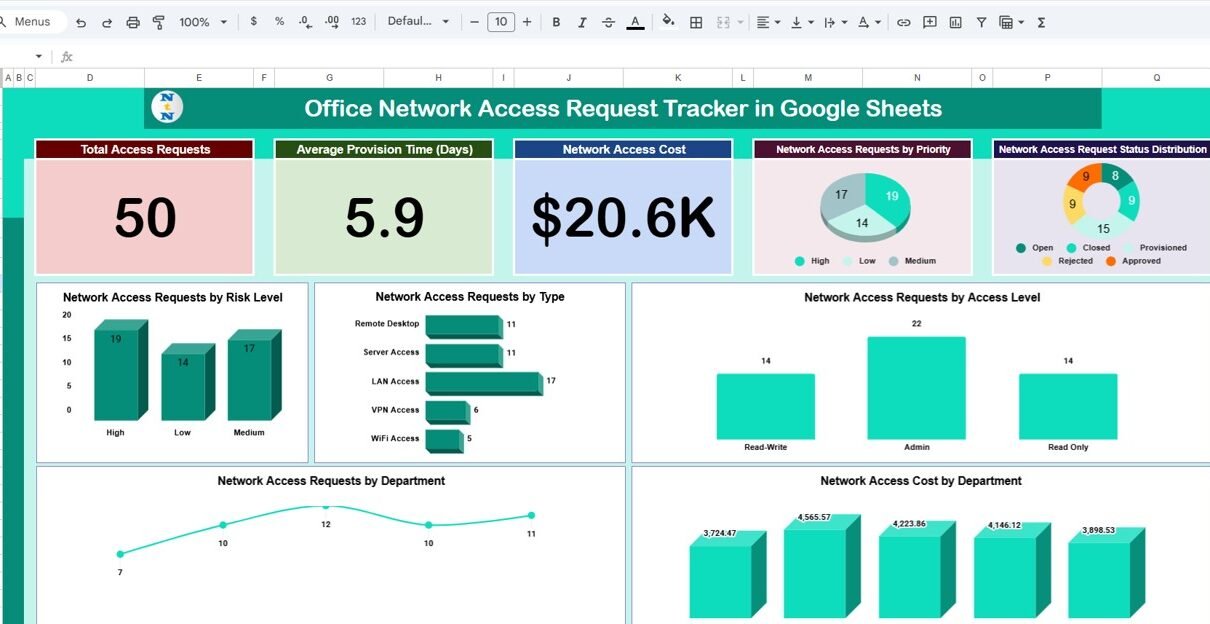
The dashboard includes four KPI cards that show the overall health of access management.
otal Access Requests
Displays the total number of network access requests received.
Average Provision Time (Days)
Shows the average time required to grant access.
Network Access Cost
Represents the total cost associated with network access provisioning.
Dashboard Charts – In-Depth Access Analysis
The tracker includes seven charts that provide deep analytical insights.
Network Access Requests by Priority
Shows how many requests fall under:
-
Low
-
Medium
-
High
-
Critical
Helps prioritize urgent access
Improves SLA compliance
Network Access Request Status Distribution
Displays request status such as:
-
Pending
-
Approved
-
Provisioned
-
Rejected
Tracks backlog
Improves approval efficiency
Network Access Requests by Risk Level
Groups requests by:
-
Low risk
-
Medium risk
-
High risk
Strengthens security oversight
Supports risk-based approvals
Network Access Requests by Type
Shows access demand by type:
-
VPN
-
Application
-
Server
-
Database
-
Wi-Fi
Helps capacity planning
Identifies high-demand resources
Network Access Requests by Access Level
Displays distribution of:
-
Read access
-
Write access
-
Admin access
Prevents excessive privilege assignment
Supports zero-trust principles
Network Access Cost by Department
Shows department-wise access cost.
Improves cost accountability
Supports budget planning
Network Access Requests by Department
Displays request volume from each department.
Identifies high-demand departments
Supports access policy review

Search Sheet Tab – Search by Keyword and Field Name
The tracker includes a dedicated Search Sheet Tab.
You enter:
-
Search Keyword (Department, user, access type, priority)
-
Field Name (Department, Access Level, Risk Level, Status)
The tracker instantly filters matching records.
Saves time
Helps during audits
Simplifies investigations
Improves reporting speed

Why Organizations Need a Network Access Request Tracker
Without structured tracking, organizations face:
-
Unauthorized access risks
-
Approval delays
-
Poor visibility into access demand
-
Excessive access privileges
-
Compliance challenges
This tracker enforces controlled, documented, and reviewable access management.
Advantages of the Office Network Access Request Tracker
✅ Centralized access request logging
✅ Improved security governance
✅ Faster provisioning through visibility
✅ Risk-based access evaluation
✅ Cost transparency by department
✅ Easy collaboration using Google Sheets
Opportunities for Improvement
Organizations can enhance this tracker by adding:
🔹 Automated approval workflows
🔹 Email alerts for high-risk requests
🔹 Integration with IAM tools
🔹 SLA breach indicators
🔹 Access expiry and review reminders
Best Practices for Using the Network Access Tracker
✔ Define access levels clearly
✔ Review high-risk requests regularly
✔ Track provisioning time weekly
✔ Enforce approval accountability
✔ Audit access records monthly
✔ Restrict edit access for security
Conclusion
An Office Network Access Request Tracker in Google Sheets gives IT and security teams complete visibility over access requests, risks, costs, and provisioning timelines. It transforms informal requests into a controlled, auditable, and data-driven process. Because the tracker is cloud-based, flexible, and ready to use, it becomes an essential tool for secure IT operations.
To learn the spreadsheet skills behind trackers like this, explore the NextGenTemplates Academy learning paths, which include practice files.
Get the Office Network Access Request Tracker in Google Sheets
Frequently Asked Questions (FAQs)
1. Who should use this tracker?
IT operations teams, network admins, and security teams.
2. Can we customize access types and risk levels?
Yes, all fields are fully editable.
3. Does it track provisioning time automatically?
Yes, provisioning time calculates using start and end dates.
4. Is this tracker suitable for compliance audits?
Yes, it maintains a complete access history.
5. Can automation be added later?
Yes, using Google Apps Script.