Employee well-being plays a critical role in organizational productivity, engagement, and retention. Employees often face personal, emotional, financial, or workplace challenges that affect their performance. Because of this, many organizations offer an Employee Assistance Program (EAP) to provide professional support and guidance.Employee Assistance Program Request Tracker in Google Sheets
However, when HR teams manage EAP requests through emails, phone calls, or unstructured spreadsheets, tracking becomes difficult. Requests may get delayed, confidentiality may weaken, and reporting becomes time-consuming.Employee Assistance Program Request Tracker in Google Sheets
Get the Employee Assistance Program Request Tracker in Google Sheets
An Employee Assistance Program Request Tracker in Google Sheets solves this problem by providing a centralized, structured, and visual system to manage EAP requests efficiently. It helps HR teams track priorities, response times, satisfaction levels, costs, and trends—while maintaining transparency and control.Employee Assistance Program Request Tracker in Google Sheets
What Is an Employee Assistance Program Request Tracker in Google Sheets?
An Employee Assistance Program Request Tracker is a centralized tool that records, monitors, and analyzes all EAP requests raised by employees. It captures key information such as:Employee Assistance Program Request Tracker in Google Sheets
- Request ID
- Request Date
- Request Type
- Priority Level
- Employee Location
- Department
- Assigned Counselor or Vendor
- Response Time
- Request Status
- Program Cost
- Satisfaction Rating
Because the tracker uses Google Sheets, HR teams collaborate in real time and generate instant insights without complex systems.
This tracker supports:
- HR teams
- Employee relations teams
- Wellness coordinators
- Compliance teams
- Management
Key Features of the EAP Request Tracker
This ready-to-use tracker includes:
A structured Tracker Sheet Tab
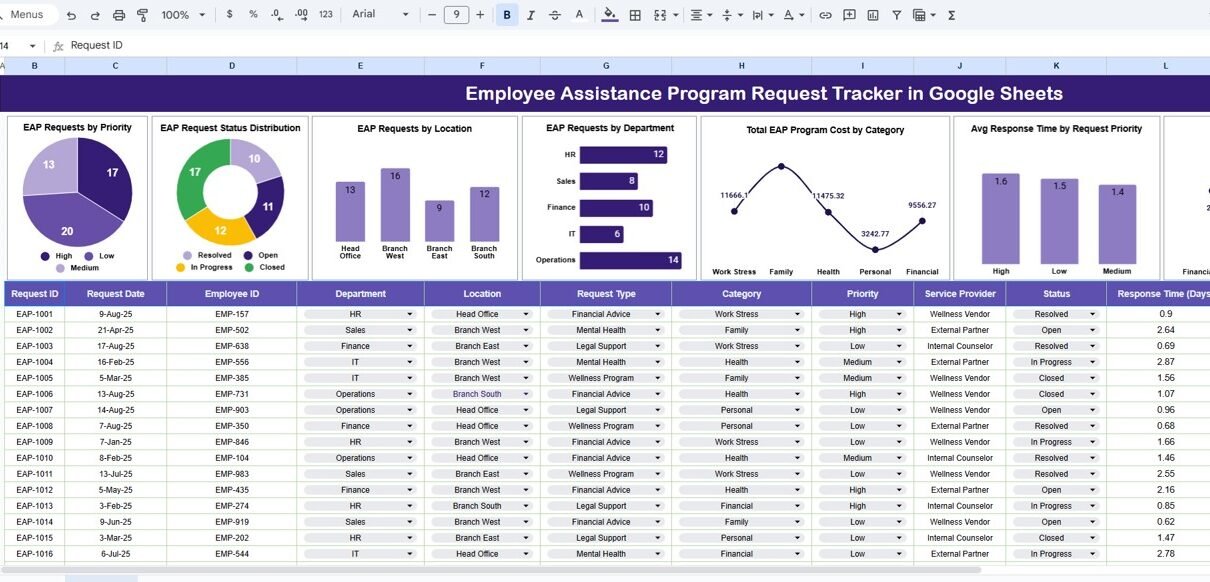
Seven insightful charts
A powerful Search Sheet Tab
Cost and satisfaction tracking
Priority-based response monitoring
Each feature helps HR teams improve employee support effectiveness.
Tracker Sheet Tab
The Tracker Sheet Tab is the primary data-entry area. HR teams log every EAP request here.
Typical columns include:
- Request ID
- Request Date
- Employee ID (or Anonymous ID)
- Department
- Location
- Request Type (Counseling, Mental Health, Legal, Financial, Family Support)
- Request Priority (Low, Medium, High, Critical)
- Assigned To
- Response Time (Hours – Auto Calculated)
- Request Status (Open, In Progress, Resolved, Closed)
- Program Category
- Program Cost (USD)
- Satisfaction Rating (1–5)
- Remarks
Once the data updates, all charts refresh automatically.
Dashboard Charts – HR Insights at a Glance
The EAP Request Tracker includes seven powerful charts that turn raw request data into actionable insights.
EAP Requests by Priority
This chart shows requests grouped by:
-
Low
-
Medium
-
High
-
Critical
Helps HR prioritize urgent employee needs
Improves response planning
Supports workload balancing
EAP Request Status Distribution
This chart displays requests by status:
-
Open
-
In Progress
-
Resolved
-
Closed
Tracks pending workload
Improves accountability
Supports audit readiness
EAP Requests by Location
This chart shows where requests originate.
Identifies high-need locations
Supports targeted wellness initiatives
Helps allocate counselor resources
EAP Requests by Department
This chart shows EAP usage by department.
Highlights departments under stress
Supports proactive intervention
Helps HR leadership planning
Total EAP Program Cost by Category
This chart shows cost distribution across categories:
-
Mental health
-
Legal support
-
Financial counseling
-
Family assistance
Helps control program spending
Improves vendor cost negotiations
Supports budget planning
Average Response Time by Request Priority
This chart compares response time for each priority level.
Ensures urgent requests receive faster responses
Monitors SLA compliance
Identifies process gaps
Average Satisfaction Rating by Request Type
This chart shows satisfaction ratings by request type.
Measures program effectiveness
Improves service quality
Supports vendor performance review

Search Sheet Tab – Search by Keyword and Field Name
The tracker includes a dedicated Search Sheet Tab for quick retrieval.
You enter:
-
Search Keyword (Department, location, request type, priority, status)
-
Field Name (Department, Priority, Location, Status, Request Type)
The tracker instantly filters matching records.
Saves time
Improves HR efficiency
Simplifies compliance checks
Supports management reporting

Why HR Teams Need an EAP Request Tracker
Without a structured tracker, organizations face:
-
Delayed employee support
-
Poor visibility of request trends
-
Inconsistent response handling
-
Inaccurate cost reporting
-
Weak wellness insights
This tracker ensures timely support, transparency, and data-driven decision-making.
Advantages of the Employee Assistance Program Request Tracker
Centralized EAP request management
Faster response handling
Better employee satisfaction tracking
Clear cost and budget visibility
Department-wise and location-wise insights
Easy collaboration in Google Sheets
Opportunities for Improvement
Organizations can enhance the tracker by adding:
Automated email alerts for high-priority requests
SLA-based escalation rules
Vendor-wise performance tracking
Integration with HR systems
Trend-based wellness risk indicators
Best Practices for Using the EAP Request Tracker
Protect employee confidentiality
Define priority levels clearly
Review response times weekly
Monitor satisfaction scores regularly
Analyze department trends monthly
Restrict editing access for data security
Conclusion
An Employee Assistance Program Request Tracker in Google Sheets helps organizations deliver timely, effective, and compassionate support to employees. It converts EAP data into meaningful insights while maintaining simplicity and flexibility. Because it is cloud-based and ready to use, HR teams gain full control over employee wellness programs without complex tools.
Want to learn how to build your own trackers? The NextGenTemplates Academy learning paths cover the spreadsheet skills behind them, with practice files.
Get the Employee Assistance Program Request Tracker in Google Sheets
Frequently Asked Questions (FAQs)
1. Who should use this tracker?
HR teams, employee relations teams, and wellness coordinators.
2. Does it support confidential tracking?
Yes, employee identifiers can remain anonymous.
3. Can the tracker measure satisfaction?
Yes, satisfaction rating charts are included.
4. Can we customize request categories?
Yes, all fields are fully editable.
5. Is Google Sheets secure for sensitive data?
Yes, with correct access permissions.
6. Can automation be added later?
Yes, Google Apps Script supports alerts and workflows.