Modern offices conduct meetings every day. These meetings require proper room allocation, seating layouts, audio-visual equipment, approvals, and timely setup. However, many organizations still manage meeting room setup requests through emails, chats, or manual registers. As a result, requests get missed, approvals delay, rooms double-book, and meetings start late.Office Meeting Room Setup Request Tracker in Google Sheets
An Office Meeting Room Setup Request Tracker in Google Sheets solves these issues efficiently. It provides a ready-to-use system to track meeting room setup requests, monitor approval status, analyze setup workload, and identify usage patterns through cards and charts. Moreover, because this tracker works in Google Sheets, teams collaborate easily and update data in real time.Office Meeting Room Setup Request Tracker in Google Sheets
Get the Office Meeting Room Setup Request Tracker in Google Sheets
In this article, we explain how this tracker works, its dashboard cards, charts, search functionality, advantages, improvement opportunities, and best practices for managing office meeting room setups smoothly.Office Meeting Room Setup Request Tracker in Google Sheets
What Is an Office Meeting Room Setup Request Tracker in Google Sheets?
An Office Meeting Room Setup Request Tracker is a centralized tracker used to log, monitor, and analyze meeting room setup requests. It captures all require details such as:Office Meeting Room Setup Request Tracker in Google Sheets
- Request ID
- Requester Name
- Department
- Meeting Room Name
- Layout Type
- Setup Date & Time
- Setup Duration
- Approval Status
- Setup Status
- Assigned Facility Team
- Cancellation Details
Because the tracker is built in Google Sheets, it ensures transparency, accuracy, and quick updates without additional tools.
This tracker helps:
-
Facility management teams
-
Office administrators
-
HR & admin departments
-
Operations managers
-
Front desk teams
It streamlines meeting room operations and improves office productivity.
Key Features of the Office Meeting Room Setup Request Tracker
This ready-to-use tracker includes:
Tracker Sheet Tab
The Tracker Sheet is the data entry backbone of the entire system. Every meeting room setup request gets recorded here.
Typical fields include:
- Request ID
- Request Date
- Requester Name
- Department
- Meeting Room
- Meeting Date
- Meeting Start & End Time
- Layout Type (Boardroom, Classroom, U-Shape, Theater)
- AV Required (Yes/No)
- Approval Required (Yes/No)
- Approval Status
- Setup Status (Pending, Completed, Cancelled)
- Setup Duration (Hours)
- Assigned To
- Comments
When users enter or update any request, all cards and charts refresh automatically.
Dashboard Cards – Instant Performance Snapshot
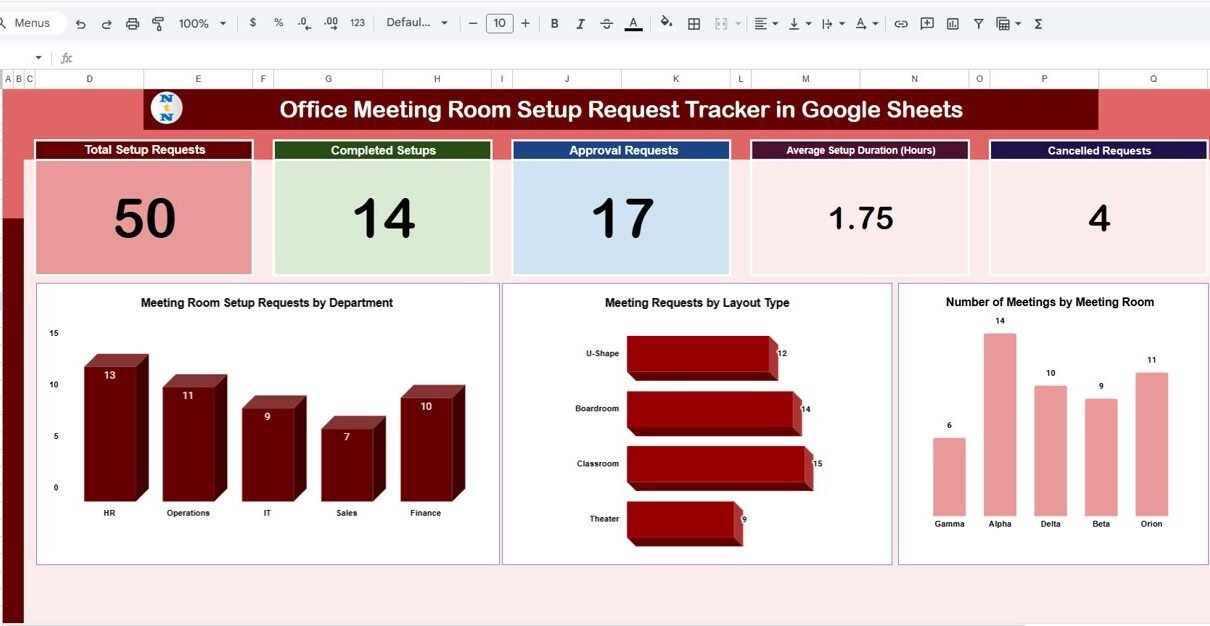
The dashboard includes five KPI cards that provide a quick summary of meeting room setup activity.
Total Setup Requests
Shows the total number of meeting room setup requests submitted in the selected period.
- Helps understand overall workload
Supports resource planning
Completed Setups
Displays how many meeting setups were completed successfully.
- Measures execution efficiency
Highlights operational performance
Approval Requests
Shows how many setup requests require approval.
- Helps monitor approval workload
Identifies potential process delays
Average Setup Duration (Hours)
Displays the average time taken to complete room setups.
- Helps optimize setup processes
Identifies complex setups
Cancelled Requests
Shows how many setup requests were cancelled.
- Highlights planning issues
Helps reduce last-minute cancellations
Dashboard Charts – Visual Insights
The dashboard includes three insightful charts to analyze meeting room utilization and setup demand.
Meeting Room Setup Requests by Department
This chart shows setup requests grouped by department.
- Identifies high-usage departments
Helps allocate setup resources fairly
Supports department-wise planning
Frequent requests from specific departments may indicate recurring meetings or project activity.
Meeting Requests by Layout Type
This chart shows how many requests use each layout type.
Common layout types include:
Boardroom
Classroom
Theater
U-Shape
- Helps standardize room layouts
Supports furniture and equipment planning
Improves setup efficiency
Number of Meetings by Meeting Room
This chart displays meeting frequency per room.
- Identifies most and least used meeting rooms
Helps optimize room allocation
Supports future office planning decisions

Search Functionality – Search by Keyword and Field Name
The tracker includes a smart search panel for quick record lookup.
You enter:
-
Search Keyword (Department, Room Name, Requester, Layout Type, Status)
-
Field Name (Department, Meeting Room, Setup Status, Assigned To)
The tracker instantly filters matching records.

Advantages of the Office Meeting Room Setup Request Tracker
Centralized Request Management
All setup requests remain in one location.
Real-Time Visibility
Admins always know request status and workload.
Improved Resource Planning
Cards and charts improve manpower allocation.
Better Approval Tracking
Approval-based requests stay visible and controlled.
Reduced Setup Delays
Average duration tracking improves efficiency.
Easy and Cost-Effective
Google Sheets removes software dependency.
Opportunities for Improvement in the Tracker
Organizations can enhance the tracker further by adding:
Automated Email Notifications
Notify facility teams when new requests arrive.
SLA Tracking
Monitor setup completion within defined time limits.
Equipment-Wise Tracking
Track usage of projectors, microphones, or displays.
Recurring Meeting Flag
Identify repeat meetings for faster setups.
Approval Aging
Highlight delayed approvals automatically.
Best Practices for Using the Meeting Room Setup Tracker
Enter requests in advance
Early requests reduce last-minute pressure.
Standardize layout definitions
Clear layouts improve setup accuracy.
Review dashboard daily
Daily checks prevent missed requests.
Track cancellations reasons
This helps reduce unnecessary bookings.
Limit edit access
Protect data accuracy using access controls.
Conclusion
An Office Meeting Room Setup Request Tracker in Google Sheets simplifies office operations by bringing clarity, structure, and visibility to meeting room setup processes. It ensures that every request gets tracked, approved, and completed on time. With clear KPI cards, insightful charts, and a strong search feature, office admins and facility teams manage meetings efficiently.
Because this tracker is ready-to-use, flexible, and easy to maintain, it becomes an essential tool for modern workplaces that conduct frequent meetings.
Ready to go beyond ready-made trackers? The NextGenTemplates Academy learning paths take you from spreadsheet basics to building your own systems, with practice files along the way.
Get the Office Meeting Room Setup Request Tracker in Google Sheets
Frequently Asked Questions (FAQs)
1. Who can use this tracker?
Office admins, facility teams, HR & operations departments.
2. Can we customize layout types and rooms?
Yes, the tracker is fully customizable.
3. Does the tracker support approvals?
Yes, approval status fields are included.
4. Can it work for multiple office locations?
Yes, simply add a location column.
5. Is Google Sheets secure for internal data?
Yes, with proper access permissions.
6. Can automation be added later?
Yes, Google Apps Script supports alerts and workflows.