Every project depends on timely approvals. Deliverables must move smoothly from creation to review and then to final approval. However, many teams still manage approvals through emails, chats, or unstructured spreadsheets. As a result, approvals get delayed, responsibilities become unclear, and projects miss deadlines.
That is exactly why a Project Deliverable Approval Tracker in Google Sheets becomes an essential project management tool.
Get the Project Deliverable Approval Tracker in Google Sheets
This ready-to-use tracker helps teams monitor deliverable approvals, priorities, departments, owners, and approvers from a single dashboard. Moreover, it provides visual insights and a powerful search option that improves transparency and speeds up decision-making.
In this article, you will learn what this tracker is, how it works, its advantages, opportunities for improvement, best practices, and answers to frequently asked questions.
What Is a Project Deliverable Approval Tracker in Google Sheets?
A Project Deliverable Approval Tracker in Google Sheets is a structured tracking system that records and monitors the approval status of project deliverables.
Instead of following up manually, this tracker allows teams to:
-
Track approval status in real time
-
Monitor priorities and ownership
-
Identify approval bottlenecks quickly
-
Maintain accountability across departments
-
Improve approval turnaround time
Because it runs in Google Sheets, it supports real-time collaboration, easy sharing, and fast updates.
Why Do Project Teams Need a Deliverable Approval Tracker?
Approval delays often slow down entire projects. Therefore, tracking approvals properly helps organizations:
-
Reduce approval cycle time
-
Improve project transparency
-
Avoid missed deadlines
-
Clarify ownership and responsibility
-
Strengthen governance and compliance
As a result, project delivery becomes faster and more predictable.
Key Features of the Project Deliverable Approval Tracker
This tracker is designed for simplicity, visibility, and efficiency.
Key Highlights
-
Ready-to-use tracker sheet
-
Visual charts for quick analysis
-
Department, owner, and approver views
-
Priority and status distribution
-
Smart search by keyword and field name
-
No complex formulas or tools required
Tracker Sheet Tab – Central Approval Tracking
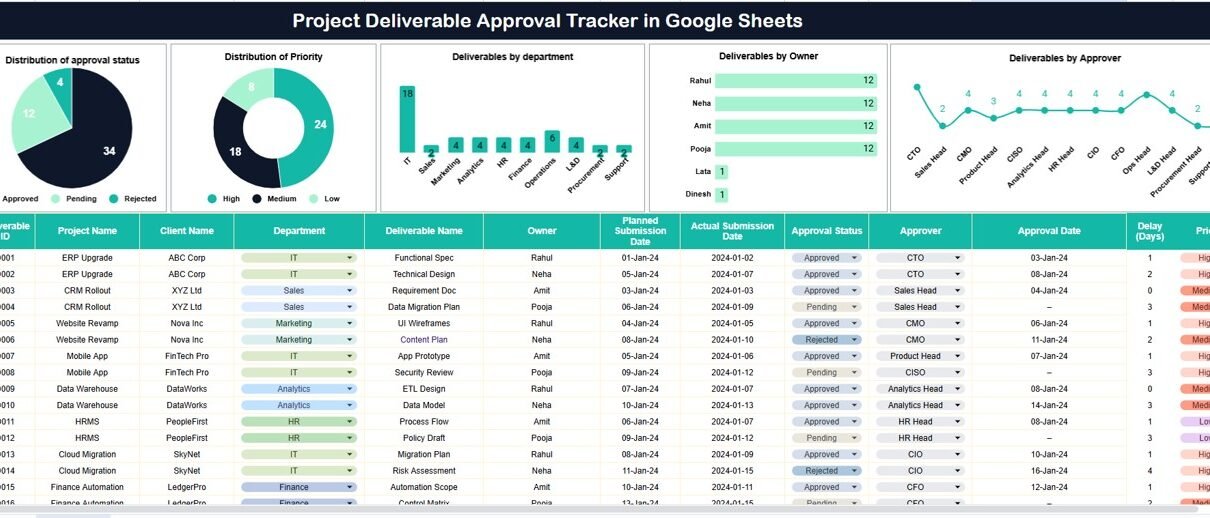
The Tracker Sheet acts as the single source of truth for all project deliverables.
Here, teams can record:
-
Project name
-
Deliverable name
-
Department
-
Owner
-
Approver
-
Priority
-
Approval status
-
Submission and approval dates
-
Remarks or comments
Because all information stays in one place, teams avoid confusion and duplicate follow-ups.
Approval Status Distribution
This chart shows how deliverables are distributed across approval stages such as:
-
Pending
-
In Review
-
Approved
-
Rejected
As a result, managers can instantly see approval backlogs and take corrective action.
Priority Distribution
Not all deliverables carry the same urgency. This chart highlights deliverables by priority level, such as:
-
High
-
Medium
-
Low
Therefore, teams can focus on critical approvals first and reduce project risk.
Deliverables by Department
This chart displays the number of deliverables submitted by each department.
It helps managers:
-
Identify departments with heavy approval loads
-
Balance workload across teams
-
Detect recurring delays by department
Deliverables by Owner
This view shows deliverables grouped by owner.
As a result, project leads can:
-
Track individual accountability
-
Identify overloaded team members
-
Ensure fair task distribution
Deliverables by Approver
This chart highlights how many deliverables each approver handles.
It helps organizations:
-
Detect approval bottlenecks
-
Balance approval responsibilities
-
Improve approval turnaround time

Search Functionality – Search by Keyword and Field Name
The tracker includes a powerful Search feature that allows users to filter records instantly.
Users can search by:
-
Project name
-
Deliverable name
-
Owner
-
Approver
-
Department
-
Status
-
Priority
This feature saves time, supports audits, and improves daily operational efficiency.

Advantages of Using Project Deliverable Approval Tracker in Google Sheets
-
Centralized approval tracking
-
Real-time collaboration
-
Clear accountability
-
Faster approval cycles
-
Improved project transparency
-
Easy customization
-
No additional software cost
Opportunities for Improvement
Organizations can enhance this tracker by:
-
Adding SLA or approval time KPIs
-
Introducing automated reminders using Google Apps Script
-
Integrating Google Forms for deliverable submission
-
Adding escalation rules for overdue approvals
-
Linking approval data to project timelines
Best Practices for Using the Project Deliverable Approval Tracker
-
Update approval status regularly
-
Define clear priority levels
-
Assign owners and approvers clearly
-
Review approval charts weekly
-
Use search for quick follow-ups
-
Share insights with project stakeholders
Conclusion
A Project Deliverable Approval Tracker in Google Sheets brings structure, clarity, and speed to approval workflows. It replaces manual follow-ups with visual insights and searchable records, ensuring that deliverables move forward without unnecessary delays.
Because the tracker is simple, flexible, and scalable, it fits teams of all sizes and industries. Ultimately, it helps organizations deliver projects on time and with confidence.
Looking to sharpen your spreadsheet skills for project trackers? The NextGenTemplates Academy learning paths guide you from the fundamentals onward, with practice files.
Get the Project Deliverable Approval Tracker in Google Sheets
Frequently Asked Questions (FAQs)
1. Who should use this tracker?
Project managers, PMOs, department heads, and approval authorities.
2. Can I customize approval statuses?
Yes, you can fully customize statuses, priorities, and fields.
3. Does this tracker support multiple projects?
Yes, it can track deliverables across multiple projects.
4. Is Google Sheets secure for approval data?
Yes, with proper access and sharing permissions.
5. Can this tracker scale for large teams?
Yes, it works for small teams and large organizations.