Employee health, comfort, and productivity depend heavily on workplace ergonomics. Poor posture, improper desk setup, and non-ergonomic workstations often lead to fatigue, musculoskeletal issues, and reduced efficiency. However, many organizations still manage ergonomics assessments using emails, paper forms, or unstructured spreadsheets. As a result, follow-ups become difficult and risks remain unresolved.Office Ergonomics Assessment Tracker in Google Sheets
That is exactly why an Office Ergonomics Assessment Tracker in Google Sheets becomes an essential workplace safety and HR tool.
This ready-to-use tracker helps organizations assess ergonomic risks, monitor assessment status, analyze trends by department and job role, and take corrective actions quickly. Moreover, it provides visual charts and a powerful search feature that improves visibility and compliance.Office Ergonomics Assessment Tracker in Google Sheets
In this article, you will learn what this tracker is, how it works, its advantages, opportunities for improvement, best practices, and frequently asked questions.Office Ergonomics Assessment Tracker in Google Sheets
What Is an Office Ergonomics Assessment Tracker in Google Sheets?
Click to Buy Office Ergonomics Assessment Tracker in Google Sheets
An Office Ergonomics Assessment Tracker in Google Sheets is a structured tracking tool used to record, monitor, and analyze ergonomic assessments conducted across an organization.
Instead of scattered records, this tracker allows teams to:
- Track ergonomic risk levels
- Monitor assessment completion status
- Identify high-risk departments and roles
- Improve workstation safety proactively
- Maintain audit-ready records
Because the tracker runs in Google Sheets, teams can collaborate in real time and update assessments easily.
Why Do Organizations Need an Ergonomics Assessment Tracker?
Workplace ergonomics directly affect employee well-being and productivity. Therefore, proper tracking helps organizations:
- Reduce work-related injuries
- Improve employee comfort and morale
- Ensure compliance with safety guidelines
- Identify recurring ergonomic issues
- Support data-driven workplace improvements
As a result, organizations create healthier and more productive work environments.
Key Features of the Office Ergonomics Assessment Tracker
Click to Buy Office Ergonomics Assessment Tracker in Google Sheets
This tracker is designed for simplicity, clarity, and scalability.
Key Highlights
- Ready-to-use tracker sheet
- Visual charts for risk and status analysis
- Department, job role, and workstation insights
- Smart search by keyword and field name
- Easy customization
- No additional software cost
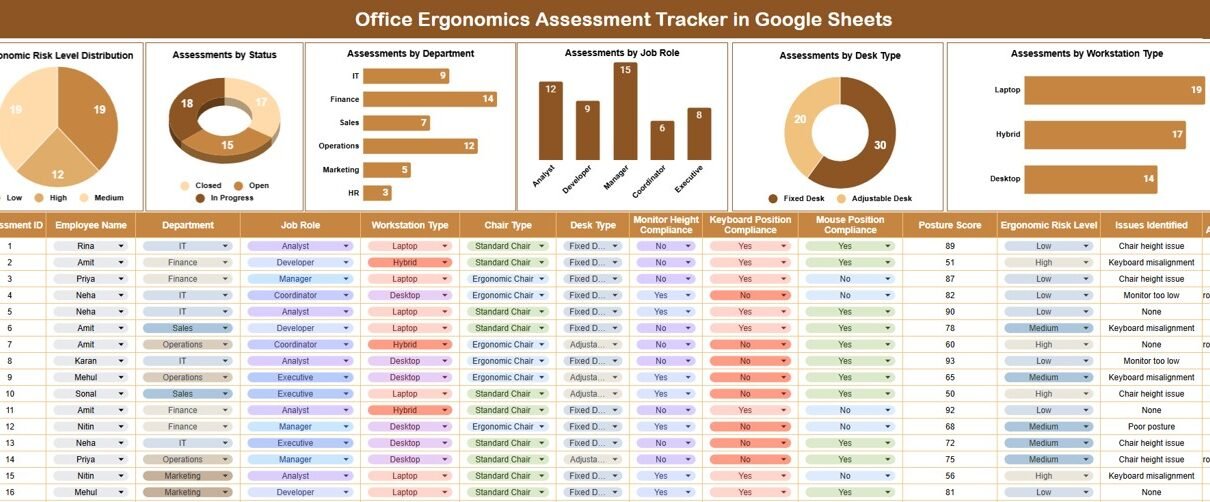
Tracker Sheet Tab – Central Assessment Repository
The Tracker Sheet acts as the main data entry and tracking area.
Here, teams can record:
- Employee name
- Department
- Job role
- Desk type
- Workstation type
- Ergonomic risk level
- Assessment status
- Assessment date
- Recommended actions
- Remarks or follow-up notes
This structured layout ensures consistency and clarity across all assessments.
Ergonomic Risk Level Distribution
This chart shows how assessments are distributed across risk levels, such as:
-
Low Risk
-
Medium Risk
-
High Risk
It helps safety and HR teams prioritize corrective actions effectively.
Assessments by Status
This chart highlights assessment progress, including:
-
Pending
-
In Progress
-
Completed
As a result, teams can quickly identify overdue or incomplete assessments.
Assessments by Department
This view displays the number of ergonomic assessments conducted in each department.
It helps organizations:
-
Identify departments with higher ergonomic risks
-
Allocate resources efficiently
-
Plan targeted workplace improvements
Assessments by Job Role
Different job roles face different ergonomic challenges. This chart helps analyze assessment volume by role and supports role-specific interventions.
Assessments by Desk Type
This chart shows how ergonomic risks vary by desk type, such as:
-
Fixed desk
-
Adjustable desk
-
Standing desk
It supports informed decisions on office furniture investments.
Assessments by Workstation Type
This view highlights assessment distribution across workstation setups, including:
-
Office workstation
-
Home office workstation
-
Shared workstation
It helps organizations manage hybrid and remote work ergonomics effectively.

Click to Buy Office Ergonomics Assessment Tracker in Google Sheets
Search Functionality – Search by Keyword and Field Name
The tracker includes a powerful Search feature that allows users to locate records instantly.
Users can search by:
- Employee name
- Department
- Job role
- Risk level
- Status
- Desk or workstation type
This feature saves time, supports audits, and improves daily operations.

Click to Buy Office Ergonomics Assessment Tracker in Google Sheets
Advantages of Using Office Ergonomics Assessment Tracker
-
Centralized ergonomic data management
-
Faster identification of high-risk areas
-
Improved employee health and safety
-
Better compliance and documentation
-
Easy collaboration in Google Sheets
-
Scalable for organizations of all sizes
Opportunities for Improvement
Click to Buy Office Ergonomics Assessment Tracker in Google Sheets
Organizations can enhance this tracker by:
-
Adding corrective action tracking
-
Linking ergonomic risks to injury reports
-
Integrating Google Forms for assessments
-
Automating reminders for reassessments
-
Including cost impact of ergonomic improvements
Best Practices for Using the Ergonomics Assessment Tracker
-
Conduct assessments regularly
-
Update status and recommendations promptly
-
Focus on high-risk roles and departments
-
Review charts monthly
-
Communicate findings with management
-
Use insights to improve workstation design
Conclusion
Click to Buy Office Ergonomics Assessment Tracker in Google Sheets
An Office Ergonomics Assessment Tracker in Google Sheets provides a structured, visual, and efficient way to manage workplace ergonomics. It helps organizations identify risks early, improve employee comfort, and maintain compliance with health and safety standards.
Because the tracker is simple, flexible, and collaborative, it fits perfectly into modern workplace management practices.
Frequently Asked Questions (FAQs)
1. Who should use this tracker?
HR teams, safety officers, facilities teams, and managers.
2. Can I customize risk levels and categories?
Yes, all fields and classifications are fully customizable.
3. Does the tracker support remote work assessments?
Yes, it supports both office and home workstation assessments.
4. Is Google Sheets secure for employee data?
Yes, with proper access permissions and sharing controls.
5. Can this tracker scale for large organizations?
Yes, it works well for small teams and enterprise-level organizations.
Visit our YouTube channel to learn step-by-step video tutorials
Youtube.com/@NeotechNavigators
Watch the step-by-step video tutorial:
Click to Buy Office Ergonomics Assessment Tracker in Google Sheets