Performance reviews play a critical role in employee development, promotion decisions, and organizational growth. However, many HR teams still manage reviews through emails, documents, or disconnected spreadsheets. As a result, review data becomes difficult to track, analyze, and report.
This is exactly where a Performance Review Tracker in Google Sheets becomes extremely useful.
This ready-to-use tracker helps HR teams and managers record performance reviews, analyze ratings, track promotion recommendations, and monitor review completion status—all from one centralized Google Sheets file.
In this article, we will explain how the tracker works, the charts it includes, how the search feature helps, and why organizations should use it for structured performance management.
What Is a Performance Review Tracker in Google Sheets?
A Performance Review Tracker is a structured system used to record, monitor, and analyze employee performance evaluation data. It helps organizations track ratings, review status, and promotion recommendations across departments and roles.
Because this tracker is built in Google Sheets, it offers:
-
Real-time updates
-
Easy collaboration between HR and managers
-
Automatic chart refresh
-
Cloud-based access
-
No additional software cost
This tracker suits HR teams, people managers, business leaders, and compliance teams.
Tracker Sheet Tab – Central Review Data
Click to Buy Performance Review Tracker in Google Sheets
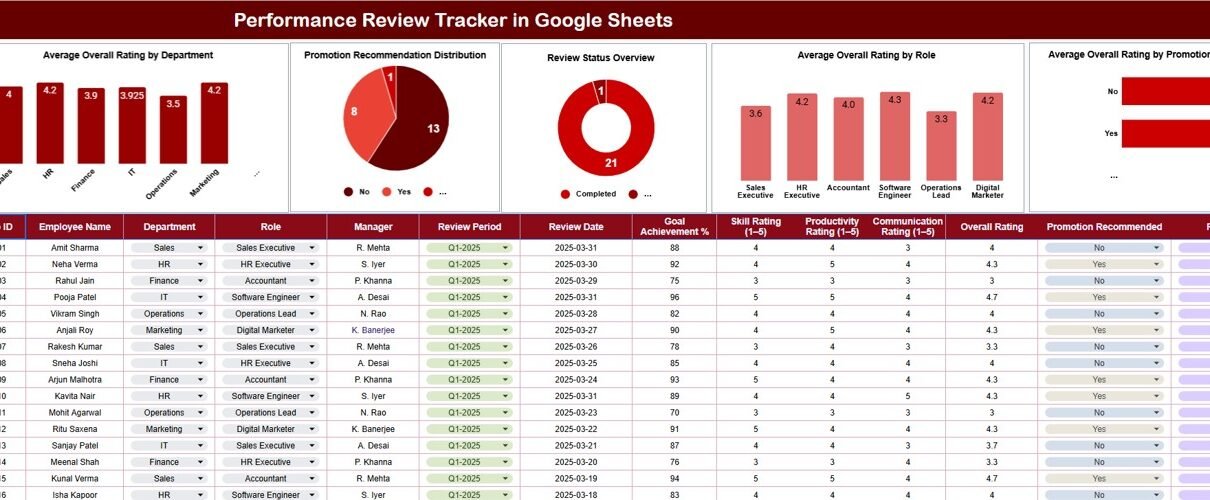
The Tracker Sheet Tab acts as the main data repository.
Here, HR teams and managers enter all performance review information, such as:
- Employee ID / Name
- Department
- Role / Designation
- Review Period
- Overall Performance Rating
- Promotion Recommendation (Yes / No)
- Review Status (Completed / Pending / In Progress)
- Reviewer Name
- Review Date
- Comments
Once data is updated, all charts and insights refresh automatically.
Charts in the Performance Review Tracker
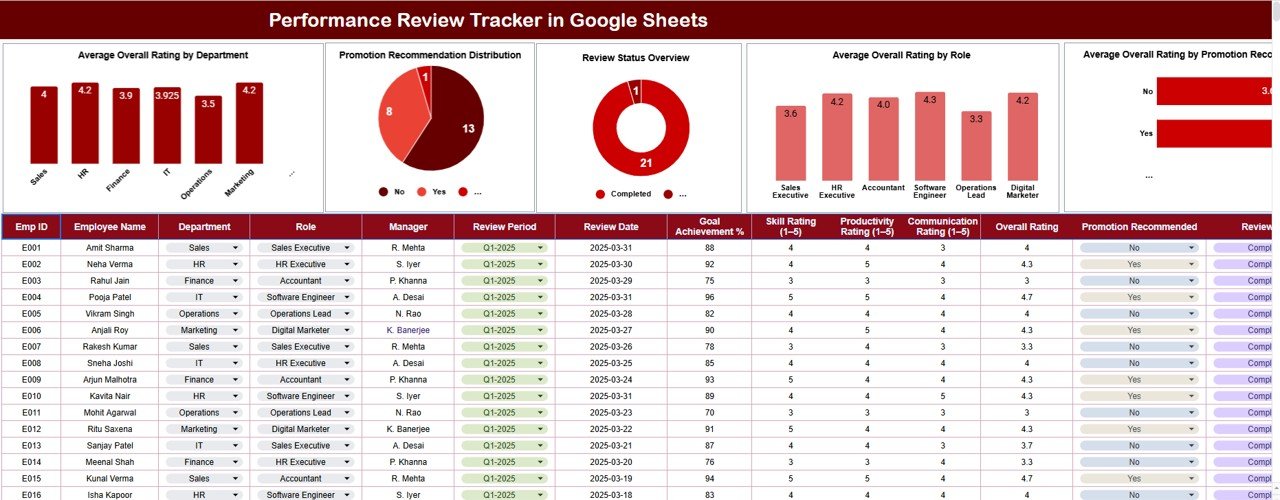
The tracker includes five insightful charts that transform review data into meaningful performance insights.
Average Overall Rating by Department
This chart shows the average performance rating for each department.
It helps organizations:
-
Compare department performance
-
Identify high-performing teams
-
Detect departments that need coaching or support
Promotion Recommendation Distribution
This chart displays the distribution of promotion recommendations.
It helps HR teams:
-
Understand promotion readiness
-
Ensure fairness and consistency
-
Support succession planning
Review Status Overview
This chart shows the status of performance reviews, such as:
-
Completed
-
Pending
-
In Progress
It helps HR teams:
-
Track review cycle completion
-
Send timely reminders
-
Avoid delays in appraisal processes
Average Overall Rating by Role
This chart analyzes performance ratings role-wise.
It helps organizations:
-
Compare expectations across roles
-
Identify skill gaps
-
Adjust training and development plans
Average Overall Rating by Promotion Recommended
This chart compares ratings for:
-
Employees recommended for promotion
-
Employees not recommended for promotion
It helps validate whether promotion decisions align with performance scores.
Click to Buy Performance Review Tracker in Google Sheets
Search Feature – Search by Keyword and Field Name
The tracker includes a smart search feature that allows users to quickly locate employee review records.
You can search by:
-
Employee Name
-
Department
-
Role
-
Review Status
-
Promotion Recommendation
By entering a Search Keyword and selecting the Field Name, the tracker instantly filters matching records.
This feature proves extremely useful during:
-
Performance calibration meetings
-
HR audits
-
Management reviews
-
Promotion discussions

Click to Buy Performance Review Tracker in Google Sheets
Why Organizations Need a Performance Review Tracker
Without a structured tracker, performance review processes often suffer from inconsistency and lack of transparency. This tracker helps organizations:
-
Centralize performance review data
-
Improve fairness and consistency
-
Track review completion status
-
Support data-driven promotion decisions
-
Improve employee development planning
A centralized tracker ensures clarity and accountability.
Advantages of the Performance Review Tracker
Centralized review management
All performance reviews stay in one place.
Better performance visibility
Charts highlight trends across departments and roles.
Improved promotion decisions
Data supports objective recommendations.
Easy collaboration
HR and managers work together seamlessly.
Faster reviews and reporting
No manual consolidation required.
Simple and cost-effective
Google Sheets keeps implementation easy.
Opportunities for Improvement
Click to Buy Performance Review Tracker in Google Sheets
You can enhance this tracker further by adding:
-
Goal-wise performance scoring
-
Competency-level ratings
-
360-degree feedback inputs
-
Reviewer calibration flags
-
Historical performance trends
-
Automated review reminders
These improvements strengthen long-term talent management.
Best Practices for Using the Performance Review Tracker
-
Standardize rating scales and definitions
-
Train managers on fair evaluation
-
Complete reviews within defined timelines
-
Review promotion recommendations collectively
-
Protect sensitive employee data
-
Archive completed review cycles
Following these practices ensures reliable and fair evaluations.
Conclusion
Click to Buy Performance Review Tracker in Google Sheets
A Performance Review Tracker in Google Sheets provides organizations with a simple yet powerful way to manage employee evaluations. It centralizes review data, highlights performance trends, tracks promotion recommendations, and improves review cycle completion. With built-in charts and a smart search feature, HR teams gain clarity and control without complexity.
For organizations aiming to build a performance-driven culture, this tracker becomes an essential HR management tool.
Frequently Asked Questions (FAQs)
Click to Buy Performance Review Tracker in Google Sheets
1. Who should use this tracker?
HR teams, managers, and leadership teams.
2. Can the tracker handle large teams?
Yes, Google Sheets supports large employee datasets.
3. Is the tracker customizable?
Yes, fields, ratings, and charts can be modified.
4. Can it support multiple review cycles?
Yes, by adding review period fields.
5. Is the data secure?
Yes, with proper Google Sheets access permissions.
6. Can this tracker support audits?
Yes, it provides a clear and searchable review history.
Visit our YouTube channel to learn step-by-step video tutorials
Youtube.com/@NeotechNavigators
Watch the step-by-step video tutorial: