If you are juggling credit cards, a car loan, a student loan and a medical bill, the hardest question is usually not whether to pay them off but in which order. The Debt Payoff Calculator Template in Google Sheets answers that question for you. You type each debt once, add any extra money you can spare each month, and the template builds two complete payoff plans side by side.
This guide is for anyone who wants a clear, spreadsheet-based repayment plan without learning complex finance formulas: individuals, couples sharing a budget, and coaches who help clients get out of debt. Inside you get five connected sheets: a Debt Input sheet, a Snowball plan, an Avalanche plan, a side-by-side comparison with a recommendation, and a balance-over-time chart.
🎥 Watch the Video Tutorial
Get the Debt Payoff Calculator Template
What Problem Does a Debt Payoff Calculator Solve?
Every debt has its own balance, interest rate and minimum payment. When you pay them without a plan, extra money tends to get spread thinly across all of them, interest keeps compounding on the expensive balances, and it is hard to see any progress. A debt payoff calculator fixes three things:
- Order – it tells you which debt should receive your extra money first.
- Timeline – it shows how many months each plan takes and the estimated payoff date.
- Cost – it compares the interest you would pay under each strategy, so the choice is based on numbers rather than guesswork.
Snowball vs Avalanche: The Two Strategies in the Template
| Strategy | Which debt gets extra money first | Main advantage | Trade-off |
|---|---|---|---|
| Debt Snowball | The smallest balance | Quick wins: small debts disappear early, which keeps you motivated | Can cost more interest if a large debt carries a high rate |
| Debt Avalanche | The highest interest rate | Usually the lowest total interest and often a slightly shorter timeline | The first debt may take longer to clear, so progress feels slower at the start |
In both methods you keep paying the minimum on every debt. When the target debt is paid off, the money that was going to it rolls over to the next debt in the order. That roll-over is what makes the plan accelerate over time.
Inside the Template: Sheet by Sheet
Sheet 1 – Debt Input (the only sheet you type in)
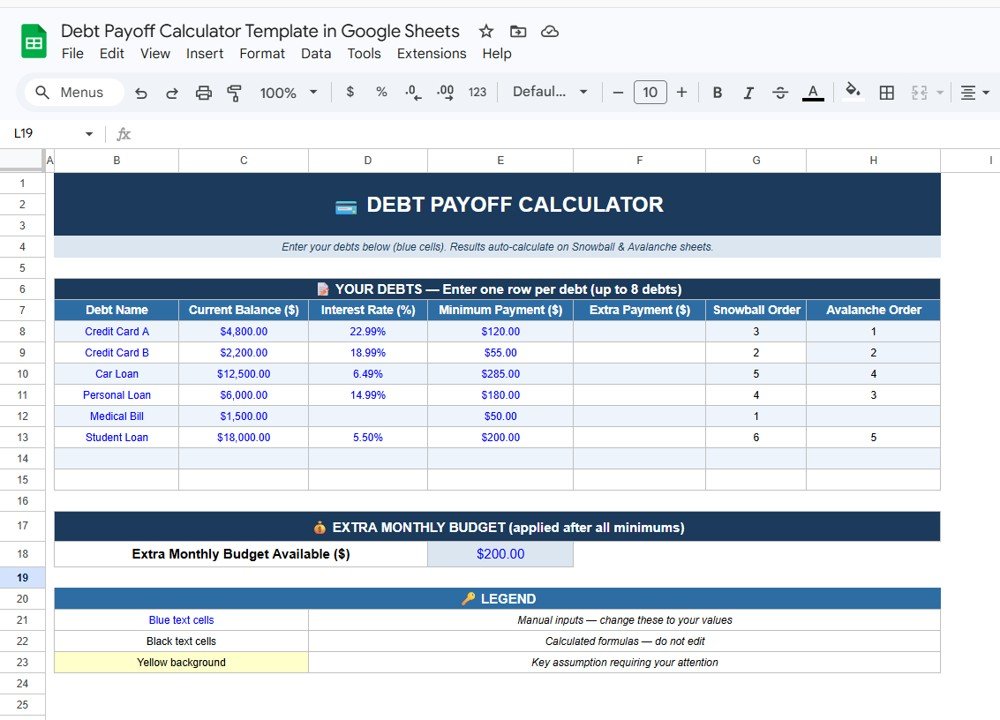
The DEBT PAYOFF CALCULATOR sheet has a “YOUR DEBTS” table with room for up to 8 debts, one row per debt. The columns are:
- Debt Name – for example Credit Card A or Car Loan
- Current Balance ($)
- Interest Rate (%) – the annual rate
- Minimum Payment ($)
- Extra Payment ($) – optional extra on a specific debt
- Snowball Order and Avalanche Order – calculated automatically
Below the table is an EXTRA MONTHLY BUDGET box (“applied after all minimums”) where you enter the Extra Monthly Budget Available ($). The sample file uses $200. A legend explains the colour code: blue text cells are manual inputs, black text cells are calculated formulas that you should not edit, and a yellow background marks a key assumption that needs your attention.
The sample data contains six debts: Credit Card A ($4,800 at 22.99%), Credit Card B ($2,200 at 18.99%), Car Loan ($12,500 at 6.49%), Personal Loan ($6,000 at 14.99%), Medical Bill ($1,500, no rate entered) and Student Loan ($18,000 at 5.50%), for a total of $45,000. The Snowball Order ranks Medical Bill first as the smallest balance, while the Avalanche Order ranks Credit Card A first as the highest rate.
Sheet 2 – Snowball Plan (Pay Lowest Balance First)
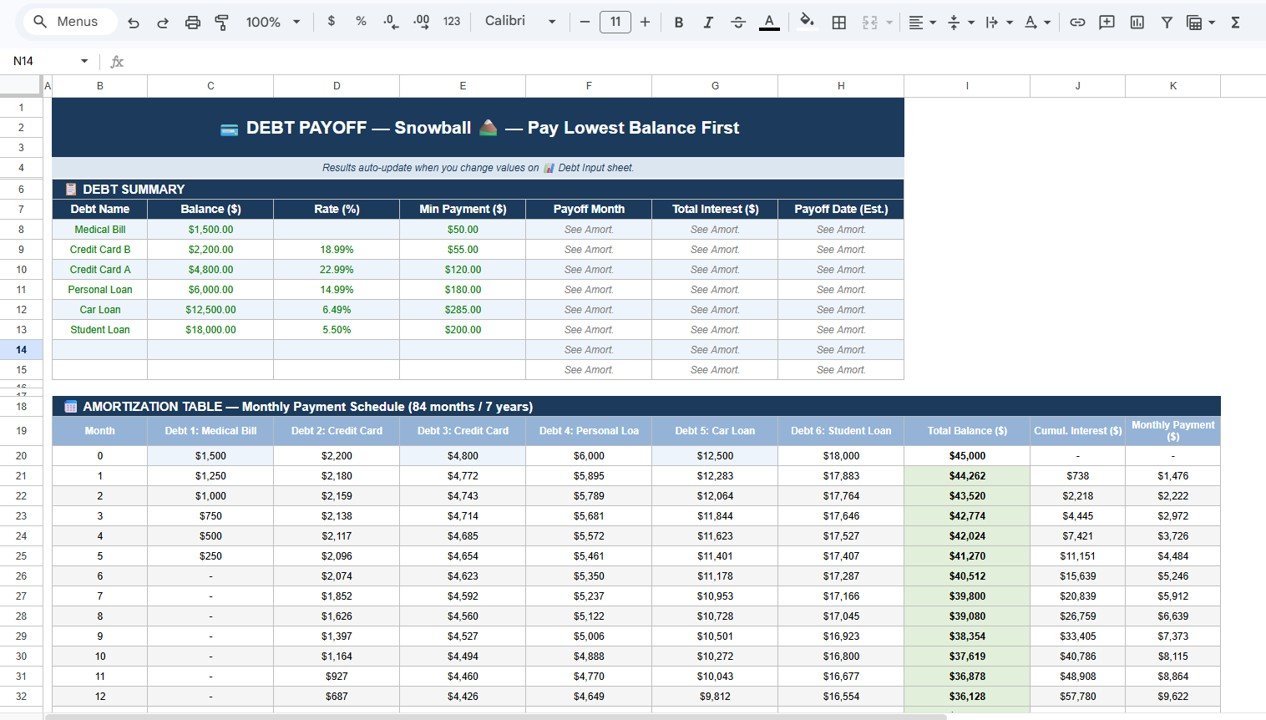
This sheet reads your inputs and sorts the debts from smallest to largest balance in a DEBT SUMMARY table (Debt Name, Balance, Rate, Min Payment, Payoff Month, Total Interest, Payoff Date). Underneath is an AMORTIZATION TABLE – a monthly payment schedule covering 84 months (7 years). Each row shows the remaining balance of every debt, the Total Balance, Cumulative Interest and the Monthly Payment.
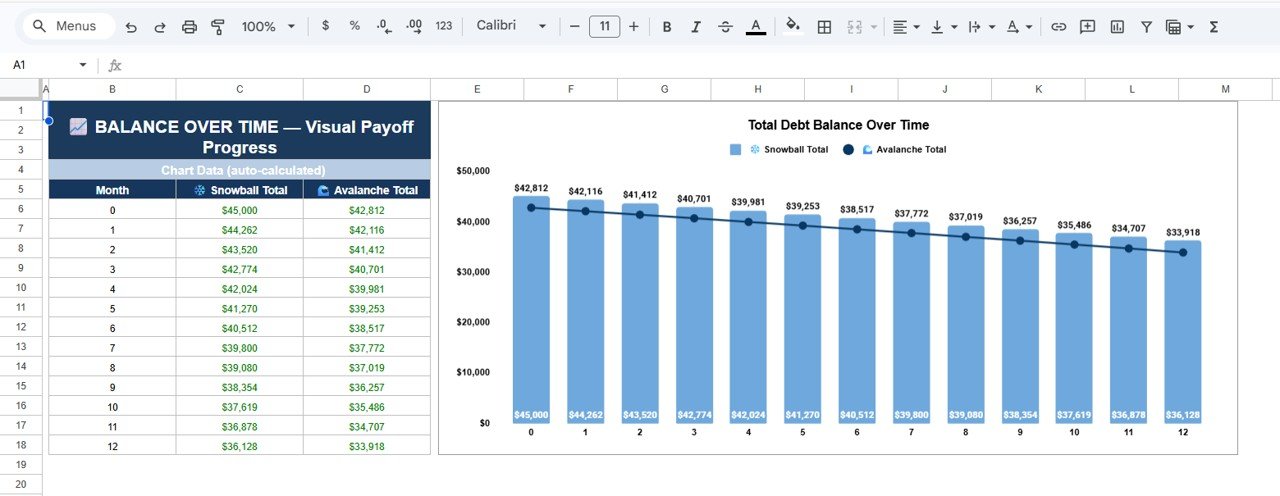
In the sample, the $1,500 Medical Bill drops by $250 a month and reaches zero in month 6, and the total balance falls from $45,000 at month 0 to $36,128 by month 12.
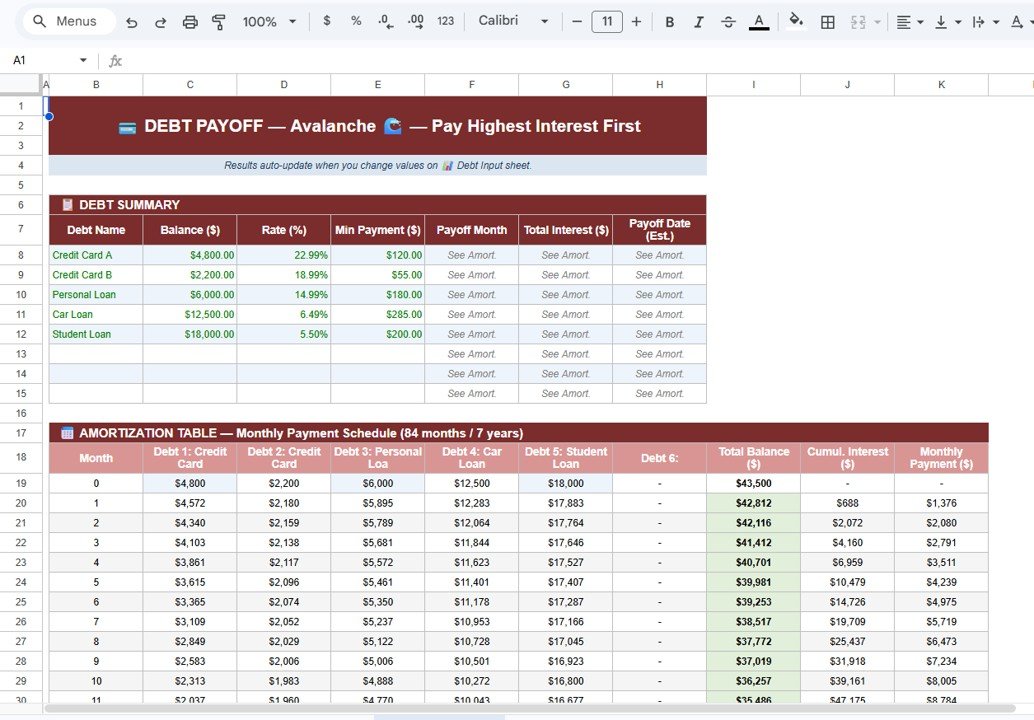
Sheet 3 – Avalanche Plan (Pay Highest Interest First)
The Avalanche sheet uses the same layout in a red theme but orders debts by interest rate, starting with Credit Card A at 22.99%. Its amortization table shows Credit Card A falling from $4,800 to $2,313 by month 10 while the other debts receive their minimums. Note that only debts with an interest rate entered are ranked here, so in the sample the Medical Bill (no rate) does not appear in the Avalanche summary.
Sheet 4 – Snowball vs Avalanche Side-by-Side Comparison
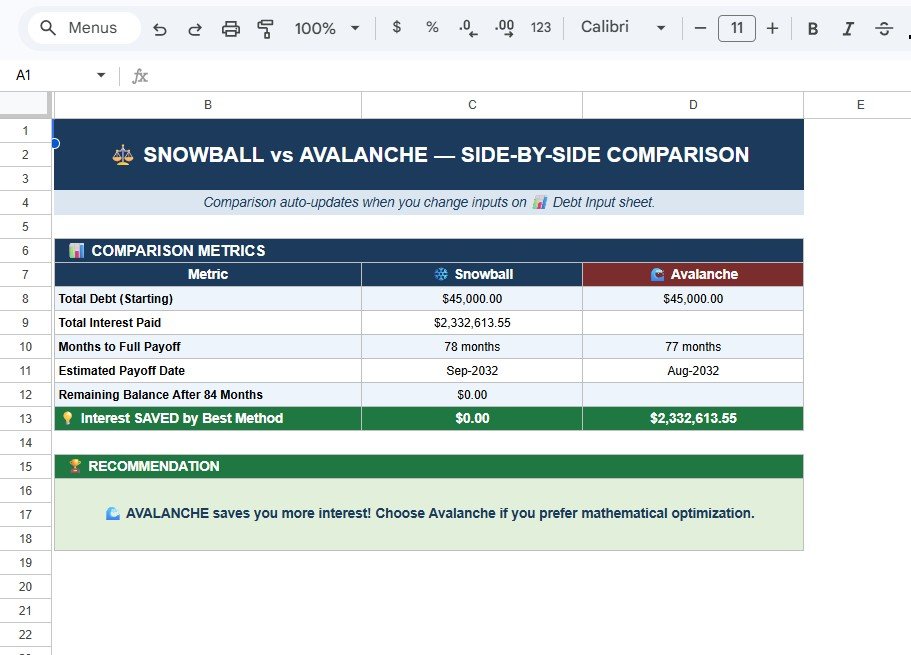
The comparison sheet lists six metrics for both strategies: Total Debt (Starting), Total Interest Paid, Months to Full Payoff, Estimated Payoff Date, Remaining Balance After 84 Months and Interest SAVED by Best Method. A RECOMMENDATION box then states which method to choose. With the sample data, Snowball takes 78 months (Sep-2032) and Avalanche 77 months (Aug-2032), and the recommendation reads that Avalanche saves more interest.
Sheet 5 – Balance Over Time Chart
The last sheet holds a small auto-calculated chart data table (Month, Snowball Total, Avalanche Total) and a Total Debt Balance Over Time chart. Snowball totals appear as blue columns and Avalanche totals as a dark line, so you can see at a glance which plan is ahead each month.
The Math Behind a Debt Payoff Plan
You do not need to write any formulas to use the template, but it helps to understand the logic it follows each month. For any single debt, the monthly interest is roughly:
Monthly interest = Balance x (Annual rate / 12)Using the sample Credit Card A: $4,800 x (22.99% / 12) = about $91.96 of interest in the first month. With a $120 minimum payment, only about $28 of that payment reduces the balance. That is why sending the $200 extra budget to a high-rate card makes such a difference, and why the Avalanche method normally costs less. If you want to check a single loan’s fixed monthly payment yourself, Google Sheets has a built-in function:
=PMT(rate/12, number_of_months, -loan_amount)Our guide on calculating monthly loan payments with the PMT function walks through it with examples.
How to Use It With Your Own Data
- Make your own copy of the file, then open the Debt Input sheet.
- Replace the sample rows with your debts: name, current balance, annual interest rate and minimum payment. Type only in the blue-text cells.
- Enter the interest rate for every debt. In the sample, the Medical Bill has no rate, so it gets no Avalanche Order and is left out of the Avalanche plan; check that every debt shows an Avalanche Order number after you type its rate.
- Enter your realistic Extra Monthly Budget Available ($). Start with an amount you can sustain every month.
- Open the Snowball and Avalanche sheets and review the summaries and amortization tables.
- Go to the comparison sheet, read the months to payoff, the payoff dates and the recommendation, then pick the method you will actually stick with.
- Once a month, update the balances from your statements so the plan stays accurate.
Real-World Use Cases
- A household paying off credit cards and a car loan can see whether the extra $200 a month should go to the smallest card (quick win) or the highest-rate card (lower cost).
- A recent graduate with a student loan and a personal loan can test how much sooner they become debt-free if they raise the extra budget from $100 to $300.
- A financial coach can fill the sheet with a client’s debts during a session and use the comparison sheet and chart to explain the trade-off visually.
Best Practices
- Never skip a minimum payment. Both plans assume every debt receives at least its minimum.
- Keep the extra budget consistent. A steady $150 every month beats $500 once and then nothing.
- Do not edit the black formula cells. Change only the inputs; the other four sheets update themselves.
- Re-check after a rate change. A new promotional rate or refinance can change the Avalanche order.
- Avoid adding new debt while the plan is running, or the timeline will keep moving.
Who Should Not Use This Template (Limitations)
- It handles up to 8 debts. If you have more, you will need to combine smaller ones or use a larger tool.
- The amortization schedule covers 84 months (7 years). Very large balances with small payments, such as a mortgage, need a dedicated loan amortization schedule.
- It assumes a fixed annual rate per debt. Variable-rate loans and promotional 0% periods that expire are not modelled automatically, so update the rate when it changes.
- It is a planning tool, not financial advice. For bankruptcy, consolidation or legal questions, speak with a qualified professional.
Related Guides and Templates
If you prefer a step-by-step action list alongside the calculator, the Debt Repayment Checklist in Google Sheets pairs well with it. To monitor debt at a higher level, see the Debt Management KPI Dashboard in Google Sheets and the Personal Finance KPI Dashboard in Google Sheets. And if your extra budget is still unclear, start with how to make a budget tracker in Google Sheets.
Prefer Excel? The same tool is available as the Debt Payoff Calculator Template in Excel. If you want to understand the formulas behind templates like this one, the Excel AI Mastery: 100 Formulas course on NextGenTemplates Academy covers lookups, financial functions and logic step by step.
Frequently Asked Questions
How many debts can I enter in the template?
Up to 8 debts, one row per debt on the Debt Input sheet. The sample file uses six.
Which saves more money, Snowball or Avalanche?
Avalanche usually saves more interest because the highest-rate balance shrinks first. Snowball can still be the better choice if quick wins keep you motivated. The comparison sheet shows the difference for your own numbers.
What happens when one debt is paid off?
The payment that was going to it rolls over to the next debt in the chosen order, so your monthly payoff power grows over time.
Why is one of my debts missing from the Avalanche sheet?
The Avalanche order is based on interest rate. In the sample file the Medical Bill has no rate entered, so it receives no Avalanche Order and is left out of the Avalanche plan. Enter the debt’s actual interest rate and check that an Avalanche Order number appears next to it.
Do I need to know formulas to use it?
No. You only type in the blue input cells. Every other sheet is calculated automatically.
Can I use it on my phone?
Yes. It runs in Google Sheets, so you can view and update it in the Google Sheets app, although editing is easier on a larger screen.
Wrapping Up
A debt-free date becomes much more believable once you can see it in a spreadsheet. The Debt Payoff Calculator Template in Google Sheets turns your list of debts into two complete plans, compares their cost and timeline, and recommends a method, so you can stop guessing and start paying with intent. Enter your debts, set a realistic extra budget, and revisit the plan each month.
Get the Debt Payoff Calculator for Google Sheets
📅 Last updated: October 2026