The Work-from-Home Schedule Calendar in Google Sheets organizes remote work events across 5 interactive worksheets, tracking 7 data fields per event with auto-generated IDs. With Annual, Monthly, and Daily views pulling from a centralized Events database, the template gives remote and hybrid teams a structured way to manage WFH days — for a one-time cost of $4.99 instead of $10–$16 per user per month on scheduling SaaS platforms.
According to a FlexJobs survey, 65% of workers now prefer remote or hybrid arrangements. Yet most teams still rely on scattered email threads and chat messages to coordinate who works from home on which days. This Work-from-Home Schedule Calendar in Google Sheets replaces that chaos with a single shared spreadsheet — editable by the entire team in real time.
Get the Work-from-Home Schedule Calendar in Google Sheets
Key Features of Work-from-Home Schedule Calendar in Google Sheets
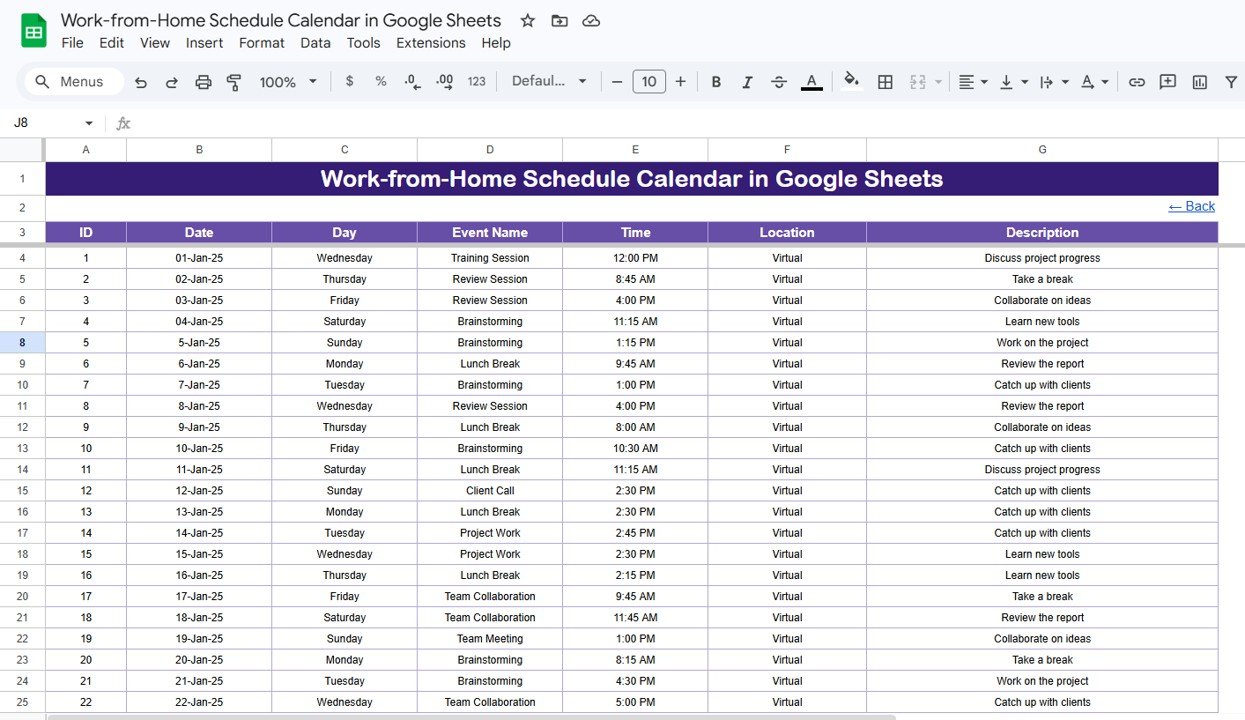
This calendar template tracks remote work events with 7 data fields — Date, Day, Event Name, Time, Location, Description, and auto-generated ID. The calendar includes Annual, Monthly, and Daily views that all pull from one centralized Events sheet.
- 5 Worksheets — Home (navigation hub), Annual View, Monthly View, Daily View, and Events database
- Auto-Generated Event IDs — Every event gets a unique sequential number for easy tracking
- Month & Year Selectors — Dropdown menus let you jump to any month and year instantly
- Date Range Filtering — Daily View supports Start Date and End Date for focused event lookups
- Event Preview on Calendar — Monthly View shows 1 event per cell with “more than 1…” overflow indicators
- Double-Click Date Picker — Google Sheets’ built-in calendar opens when you double-click a date cell
- Cloud-Based & Shareable — Real-time team collaboration via Google Drive sharing
Template Sheets Explanation
The Work-from-Home Schedule Calendar in Google Sheets contains 5 worksheets. Here is what each one does:
1. Home Sheet
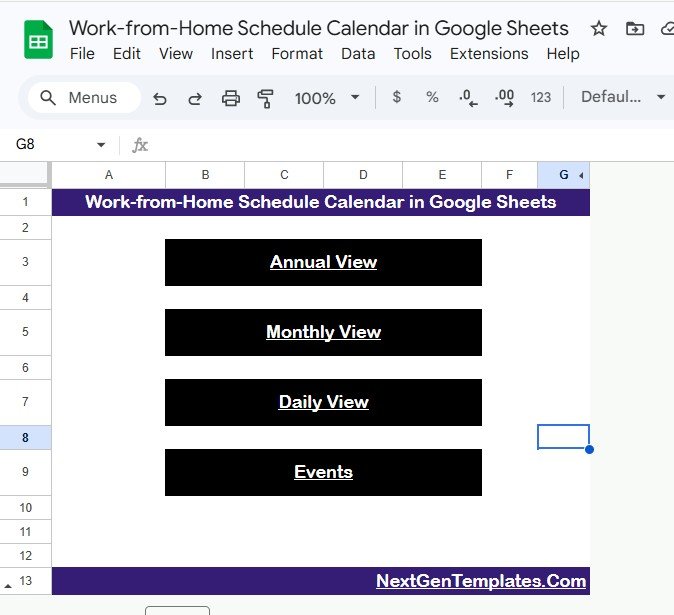
This is the navigation hub. It has 4 buttons — Annual View, Monthly View, Daily View, and Events — that jump you directly to the corresponding sheet. Think of it as the landing page for the template.
2. Annual View Sheet
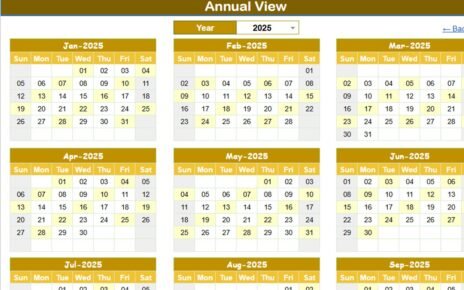
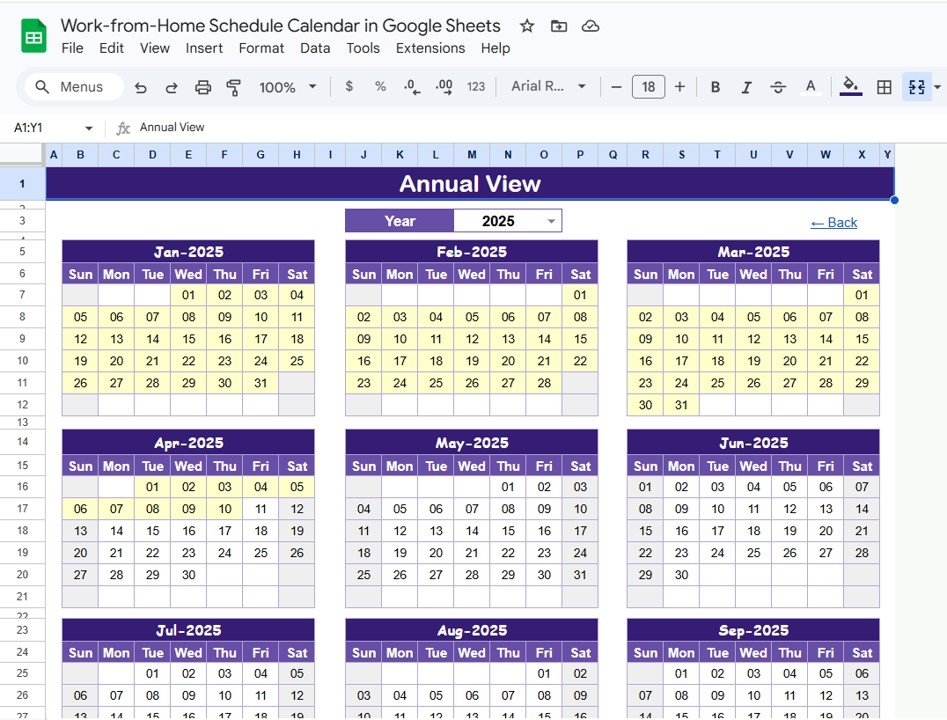
Displays all 12 months of the year in a single view. Scan the entire year at a glance to spot busy periods, plan ahead, and identify scheduling gaps. This is especially useful for HR teams planning quarterly reviews or office events around remote work patterns.
3. Monthly View Sheet
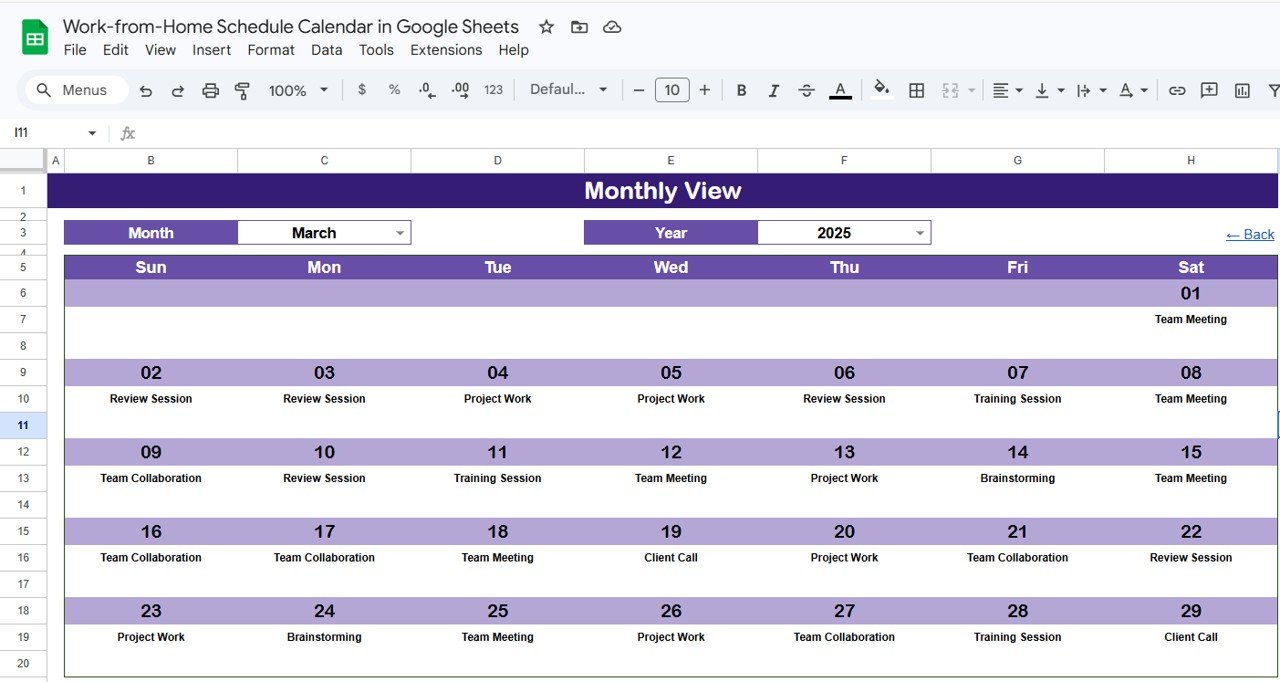
A focused single-month calendar. Select the month and year from dropdown menus at the top, and the calendar refreshes automatically. Each date cell shows 1 event name — if a date has more than 1 event, it displays “more than 1…” so you know to check the Events sheet for full details.
4. Daily View Sheet
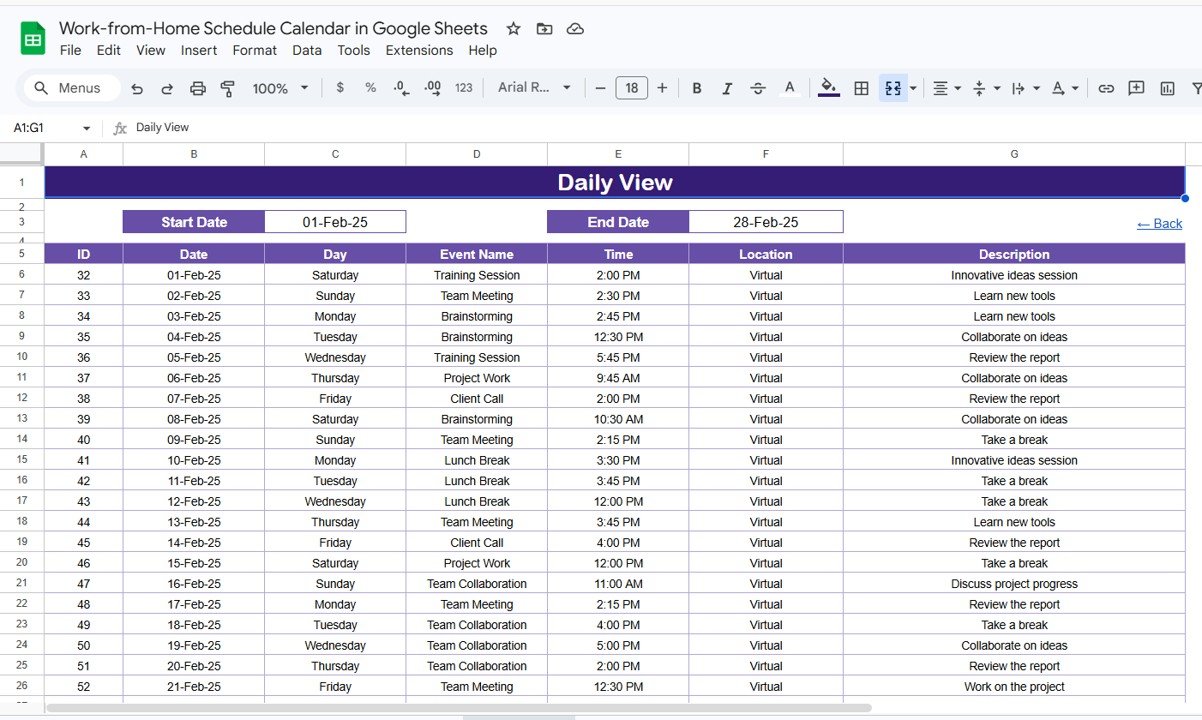
Lists all events with complete details for a selected date range. Set Start Date and End Date at the top — double-click any date cell to open Google Sheets’ native calendar for picking dates. The filtered list shows event names, times, locations, and descriptions within your chosen window.
5. Events Sheet
The master database. Every event record has 7 fields: ID (auto-generated), Date, Day (e.g., Monday), Event Name, Time, Location, and Description. You add data manually here — all three calendar views pull from this sheet automatically. You can also add extra columns for custom fields like Department or Priority.
Work-from-Home Schedule Calendar vs. Excel Calendar vs. Paid SaaS — Feature Comparison
| Feature | WFH Schedule Calendar (Google Sheets) | Excel Calendar Template | Calendly / Reclaim.ai |
|---|---|---|---|
| Cost | $4.99 one-time | $4.99–$14.99 one-time | $10–$16 / user / month |
| Platform | Google Sheets (any browser) | Desktop Excel only | Web app |
| Setup Time | Under 5 minutes | 5–10 minutes | 15–30 minutes |
| Real-Time Team Collaboration | Yes — Google Drive sharing | Single-user desktop | Yes |
| Mobile Access | Google Sheets app | Limited | Native app |
| Customizable Fields | Fully editable | Fully editable | Limited to plan tier |
| Annual + Monthly + Daily Views | All 3 included | Varies | Yes |
| Year-1 Cost at 5 Users | $4.99 total | $4.99–$14.99 total | $600–$960 |
| No Account Required | Just Google account | Just Excel | Account + setup required |
For teams that want structured WFH scheduling without monthly per-user fees, the Work-from-Home Schedule Calendar in Google Sheets sits in the sweet spot.
Who Should Use This Template
Perfect for:
- Remote and hybrid team leads managing WFH days for 5–50 team members
- HR coordinators tracking who works from home across departments
- Freelancers scheduling client calls, deep work blocks, and co-working days
- Small business owners who need a shared calendar without paying for Calendly or Monday.com
Not a fit if:
- You need enterprise-grade SSO, audit trails, and compliance logging — look at BambooHR or Workday
- You require automated shift rotation or AI-based scheduling — this is manual event entry
- You need push notifications or alerts — Google Sheets does not send reminders
Real-World Use Cases
Anita manages a 12-person marketing team across three cities. She logs which team members work remotely on Tuesdays and Thursdays. The Monthly View lets her quickly confirm who is in-office for client presentations — eliminating the weekly “who’s coming in?” email chain.
Raj is a freelance UX designer juggling 5 active clients. He records client calls, design review sessions, and focused deep-work blocks in the Events sheet. The Daily View filtered to the current week gives him a clear snapshot of his remote workday layout.
Emily runs HR at a 40-person fintech startup. She tracks hybrid schedules across Engineering, Sales, and Operations. The Annual View helps her plan quarterly all-hands meetings on days with the highest in-office attendance, reducing scheduling conflicts by roughly half.
Advantages of Work-from-Home Schedule Calendar in Google Sheets
- One-time $4.99 cost — saves $600+ annually compared to per-seat scheduling software for a 5-person team
- Instant collaboration — share the Google Sheets link and everyone can view and edit simultaneously
- No installation — works in any browser, on any device, with just a Google account
- Fully customizable — add columns, change labels, extend the Events sheet with new fields as your team grows
- All 3 calendar views — Annual for big-picture planning, Monthly for focus, Daily for detailed event lookups
Opportunities for Improvement
- Manual data entry — events must be typed into the Events sheet; there is no form-based input or automated import
- No notifications — Google Sheets does not send alerts or reminders for upcoming events
- Monthly View shows only 1 event per cell — dates with multiple events require checking the Events sheet for full details
- No recurring event support — each occurrence of a weekly WFH day must be entered as a separate row
Best Practices
- Use consistent event naming (e.g., “WFH – [Name]” or “Remote – [Department]”) so Monthly View labels are readable
- Color-code the Events sheet by department using Google Sheets’ conditional formatting for quick scanning
- Set Start Date and End Date in the Daily View to the current week every Monday for a focused weekly schedule view
- Share the file with “Editor” access for team members who need to log events, and “Viewer” for managers who only need to review
- Periodically archive completed months by duplicating the Events sheet and clearing old entries to keep the template fast
Explore Relevant Templates
Looking for more Google Sheets calendar and scheduling templates? These are popular picks from NextGenTemplates:
- Construction Project Schedule Calendar in Google Sheets — Plan construction timelines with annual, monthly, and daily views.
- Public Relations (PR) Outreach Calendar in Google Sheets — Schedule PR campaigns, media pitches, and press releases.
- Vendor Contract Renewal Calendar in Google Sheets — Track vendor agreements and renewal milestones.
- Inventory Audit Calendar in Google Sheets — Plan audit cycles and warehouse inspections.
- Content Creator Revenue Dashboard in Google Sheets — Track earnings, subscribers, and content performance.
Browse all Google Sheets Calendar Templates →
Want to build skills like this step by step? The NextGenTemplates Academy learning paths walk you through spreadsheet planners and trackers with practice files.
Get the Work-from-Home Schedule Calendar in Google Sheets
Frequently Asked Questions
What does the Work-from-Home Schedule Calendar track?
The Work-from-Home Schedule Calendar in Google Sheets tracks remote work events across 7 fields: auto-generated ID, Date, Day, Event Name, Time, Location, and Description. All three calendar views pull data from the centralized Events sheet automatically.
Can I share this calendar with my team?
Yes. Since it runs in Google Sheets, you share the file via Google Drive. Multiple team members can view and edit the same calendar simultaneously with real-time updates — no additional licenses needed.
How does the Monthly View handle multiple events on the same date?
The Monthly View displays 1 event name per date cell. If a date has more than 1 event, it shows “more than 1…” as an indicator. Check the Events sheet or Daily View for complete details.
How does this compare to Calendly or Reclaim.ai?
This calendar costs $4.99 one-time versus $10–$16 per user per month for Calendly or Reclaim. It gives you full customization and team collaboration through Google Sheets without recurring subscription fees.
Does this calendar work on mobile?
Yes. Google Sheets works on Android and iOS through the Google Sheets app. You can view and edit your WFH schedule from any device with a browser or the mobile app.
Can I customize the fields in the Events sheet?
Yes. The Events sheet is fully editable. You can add extra columns for Department, Priority, Meeting Link, or any other field your team needs.
How long does setup take?
Setup takes under 5 minutes. Open the PDF guide from your download, click the Google Sheets copy link, make a copy to your Drive, and start entering events. No installation or configuration needed.
About the Author
Built by PK — Microsoft Certified Professional with 15+ years of Excel, Google Sheets, and Power BI experience. Founder of NextGenTemplates, reaching 300K+ subscribers across YouTube channels. Every template is hand-built and tested before release.
Conclusion
The Work-from-Home Schedule Calendar in Google Sheets gives remote and hybrid teams a clean, structured way to manage WFH days without paying for scheduling SaaS. With 5 worksheets, 7 event fields, 3 calendar views, and real-time collaboration built into Google Sheets — it handles the job for $4.99 one-time.
✅ Instant download · One-time payment · No subscription
📅 Last updated: April 2026