Drop shipping businesses generate data across several sales channels, suppliers, product categories and countries at once, yet many operators still track performance in a plain spreadsheet with no charts, no filters and no clear view of which channel or supplier is actually making them money. The Drop Shipping Dashboard in Google Sheets solves that. It turns one order table into five connected views — Overview, Products, Channels, Suppliers and an Order Search sheet — with KPI cards, 13 pre-built charts and slicers on every dashboard page.
It is built for drop shippers who sell on Amazon, eBay, Etsy, Shopify, TikTok Shop and WooCommerce and want supplier-level profitability, a monthly revenue-vs-profit trend and order-level lookup in a one-time-purchase Google Sheets file instead of a monthly analytics subscription.
🎥 Watch the Video Tutorial
Get the Drop Shipping Dashboard in Google Sheets
Key Features of the Drop Shipping Dashboard in Google Sheets
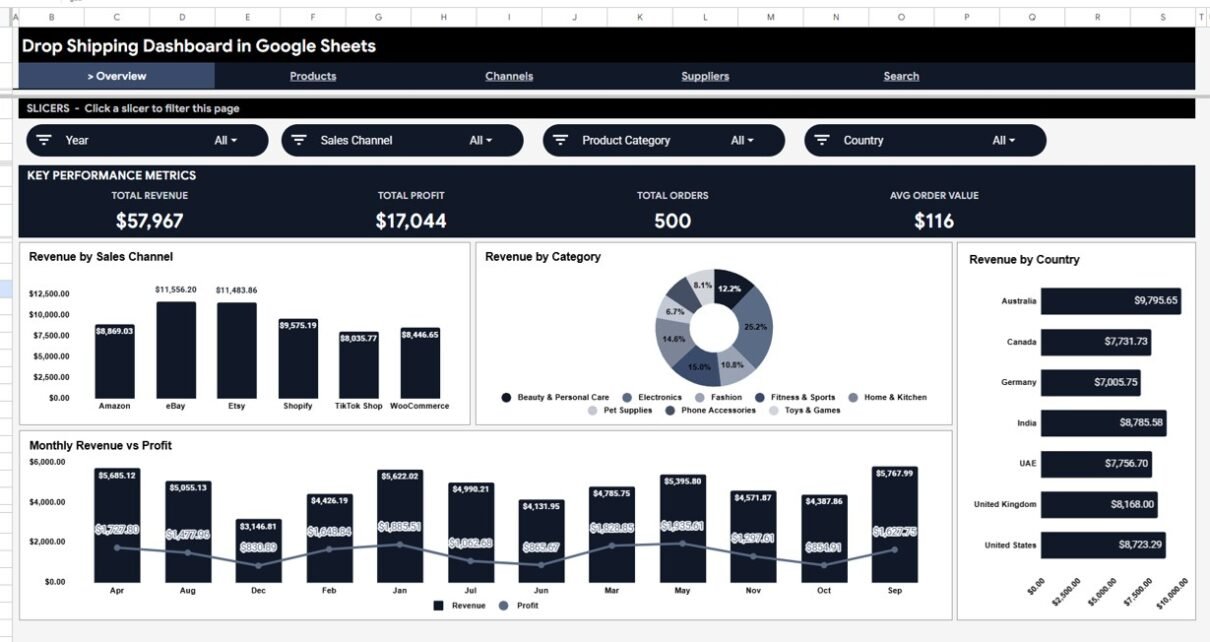
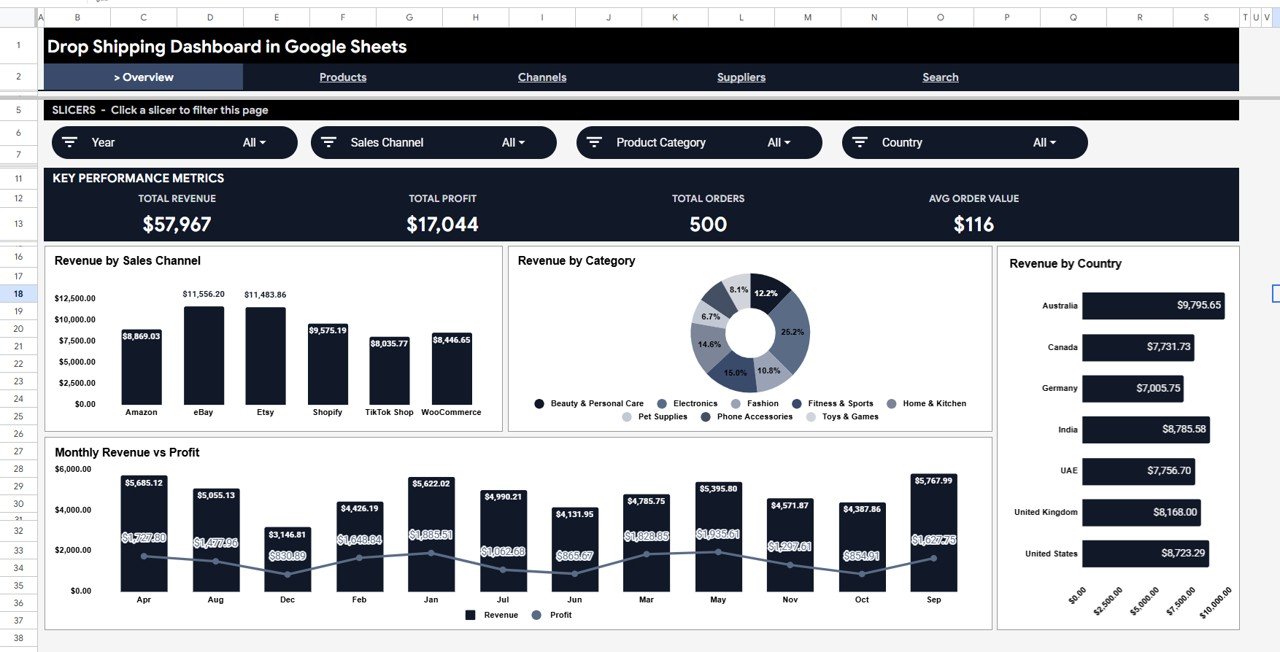
The Overview page shows Total Revenue, Total Profit, Total Orders and Avg Order Value as headline KPI cards. Below the cards, 4 charts give an instant multi-dimensional view: Revenue by Sales Channel shows which platform drives the most income, Revenue by Category reveals your best-performing product lines, Revenue by Country shows where your orders come from, and Monthly Revenue vs Profit tracks your margin trend over time.
Beyond the Overview, three analysis pages drill into Products (Units by Category, Revenue & Profit by Category, Top Products by Revenue), Channels (Revenue by Channel, Profit by Channel, Monthly Revenue by Channel) and Suppliers (Revenue & Profit by Supplier, Units by Supplier, Supplier Revenue by Category). Each of these pages has its own row of 4 metric cards and its own slicers. A Search sheet lets you pick an Order ID and see the complete order record. No add-ons, macros or third-party plugins are required.
- 4 headline KPI cards: Total Revenue, Total Profit, Total Orders, Avg Order Value
- 13 charts covering channel, category, country, supplier, product and monthly trend analysis
- Slicers on every dashboard page (for example Year, Sales Channel, Product Category and Country on the Overview)
- Order Search sheet: choose an Order ID to see the full order details
- 6 tabs: Overview, Products, Channels, Suppliers, Search, Data
- Works in any browser via Google Sheets — no software installation required
- One-time purchase, shareable via a Google Drive link
Dashboard Pages Explained
Page 1: Overview
The Overview page is the command center of the dashboard. It displays the 4 KPI cards (Total Revenue, Total Profit, Total Orders, Avg Order Value) and 4 charts: Revenue by Sales Channel, Revenue by Category, Revenue by Country and Monthly Revenue vs Profit. The slicer bar at the top — Year, Sales Channel, Product Category and Country — filters every chart on the page at once, with no formulas to update.
Page 2: Products
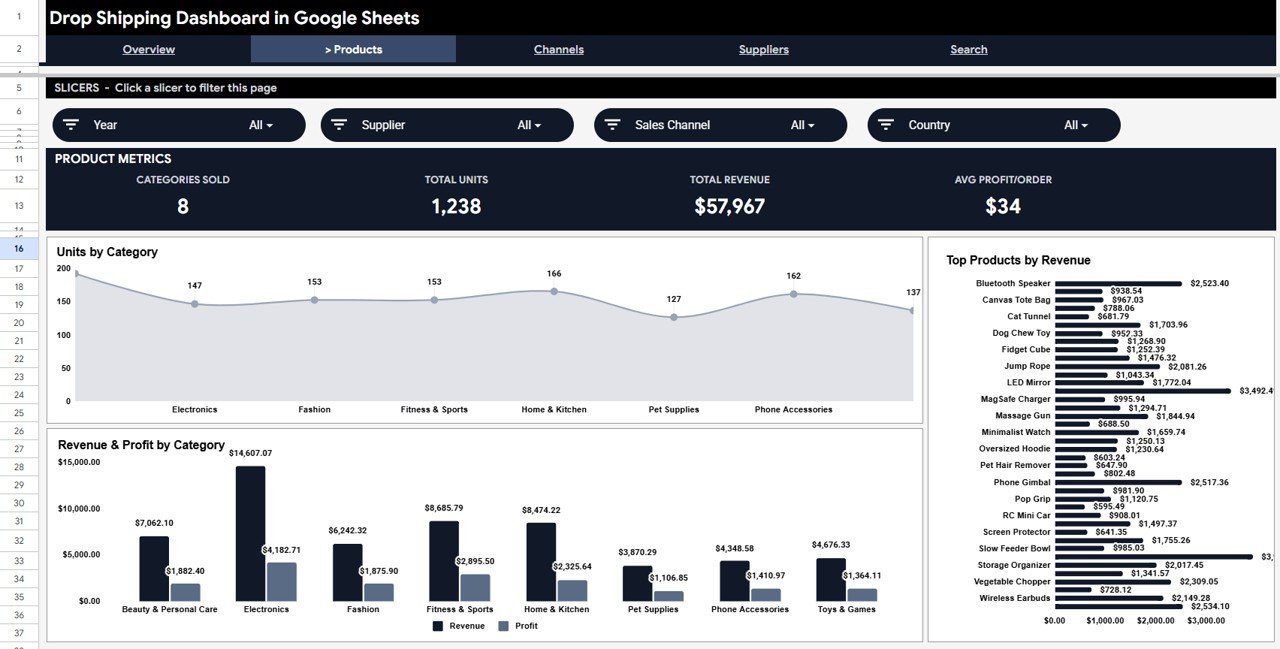
The Products page opens with four product metrics — Categories Sold, Total Units, Total Revenue and Avg Profit/Order — and slicers for Year, Supplier, Sales Channel and Country. Three charts follow: Units by Category shows volume distribution, Revenue & Profit by Category compares gross and net performance per product line, and Top Products by Revenue ranks individual products such as Bluetooth Speaker or Phone Gimbal. Use this page to spot margin winners and volume leaders at a glance.
Page 3: Channels
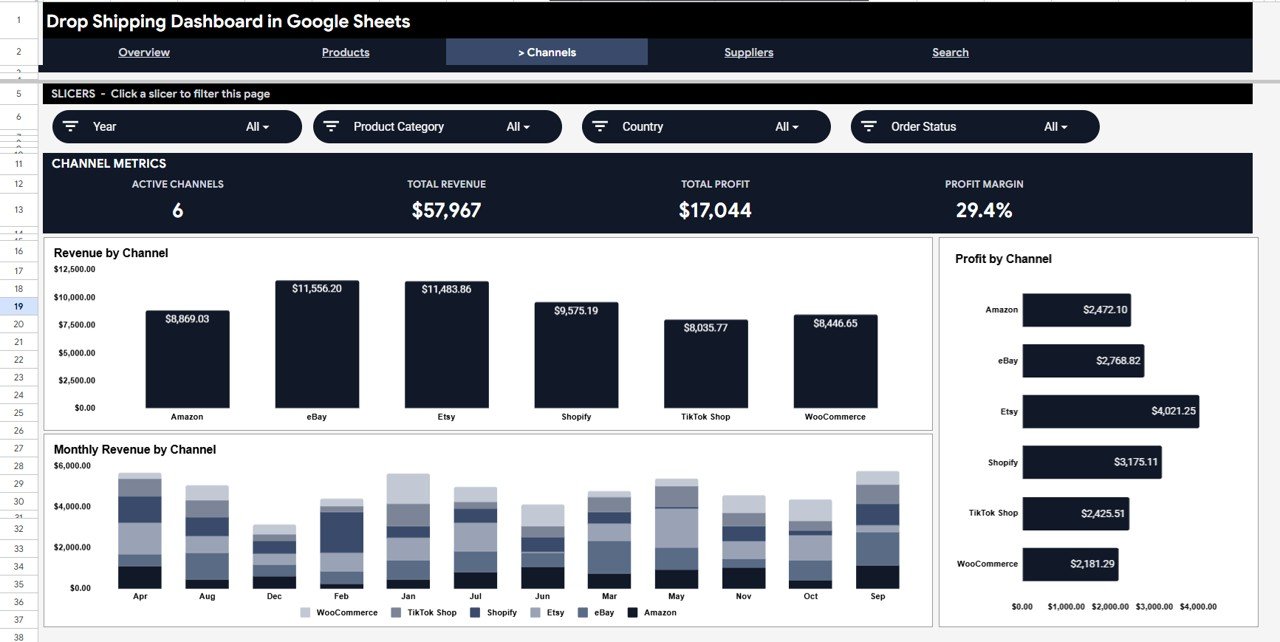
The Channels page shows Active Channels, Total Revenue, Total Profit and Profit Margin cards, with slicers for Year, Product Category, Country and Order Status. Its three charts — Revenue by Channel, Profit by Channel and Monthly Revenue by Channel — compare Amazon, eBay, Etsy, Shopify, TikTok Shop and WooCommerce side by side, so you can see which platform delivers the most profit (not just the most revenue) and how each one trends month by month.
Page 4: Suppliers
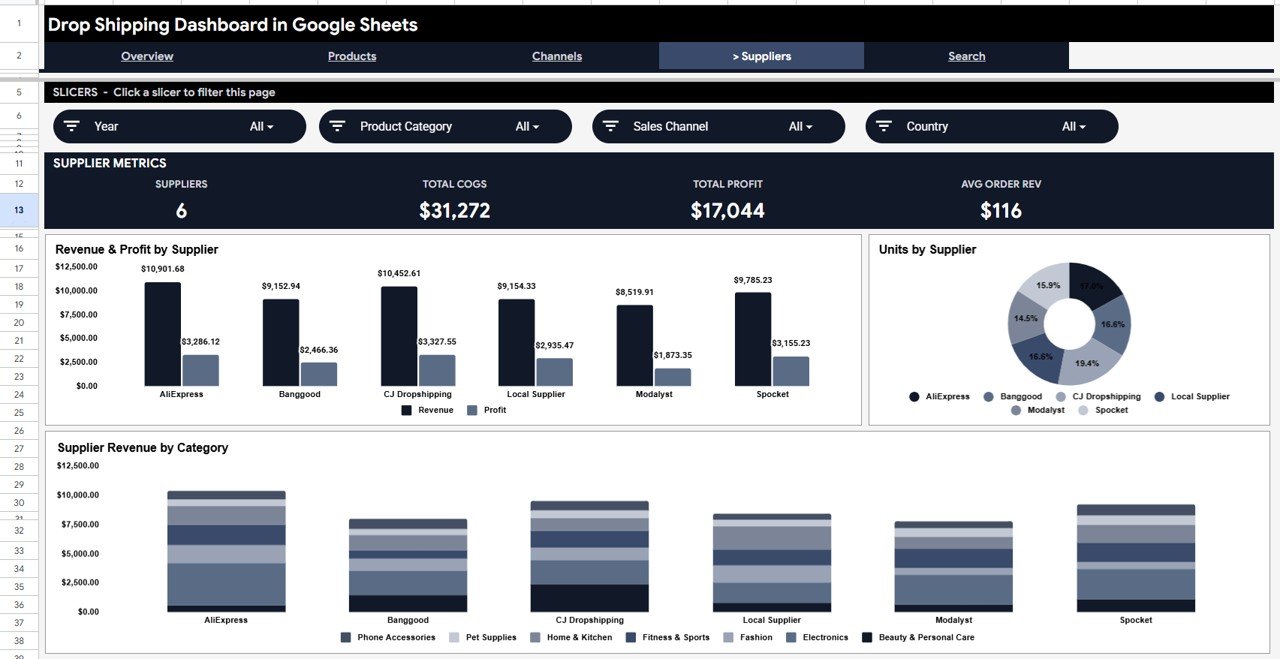
The Suppliers page shows which supplier relationships are most profitable. Its metric cards cover Suppliers, Total COGS, Total Profit and Avg Order Rev, and the slicers filter by Year, Product Category, Sales Channel and Country. Three charts follow: Revenue & Profit by Supplier, Units by Supplier and Supplier Revenue by Category, covering suppliers such as AliExpress, Banggood, CJ Dropshipping, Modalyst, Spocket and a Local Supplier in the sample data. This is the page to open before a supplier renegotiation.
Page 5: Order Search
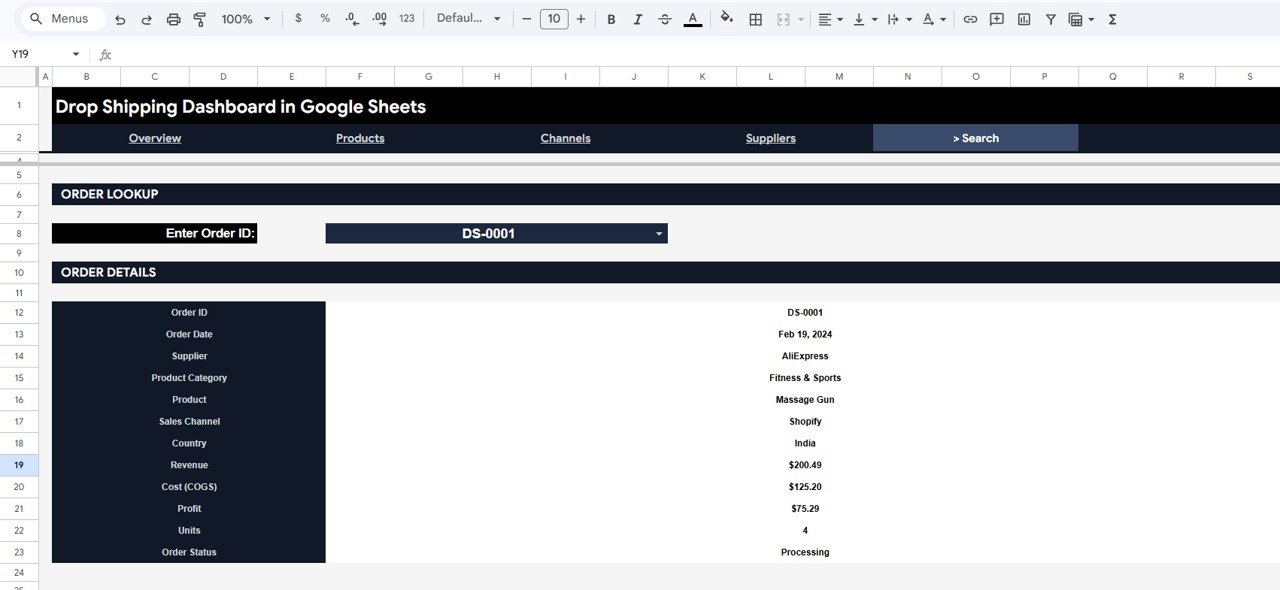
The Search sheet lets you pick an Order ID (for example DS-0001) from the Enter Order ID dropdown and instantly see the full order record — Order Date, Supplier, Product Category, Product, Sales Channel, Country, Revenue, Cost (COGS), Profit, Units and Order Status. It is handy for customer service queries, disputes or supplier reconciliation without scrolling through hundreds of data rows.
Data Sheet
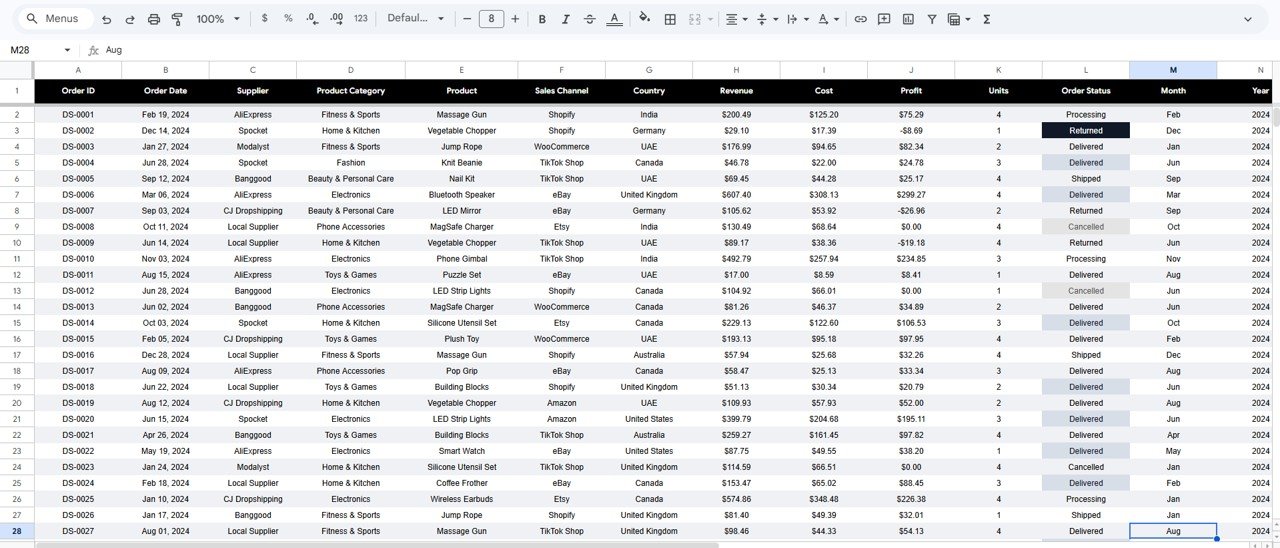
The Data sheet holds every order in one structured table with these columns: Order ID, Order Date, Supplier, Product Category, Product, Sales Channel, Country, Revenue, Cost, Profit, Units, Order Status, Month and Year. Order Status values in the sample data are Processing, Shipped, Delivered, Returned and Cancelled. Add new rows using the same column layout and the dashboard pages pick them up.
How to Use It With Your Own Data
- After purchase, open the PDF guide and use the link inside to make your own copy in Google Drive.
- Export your orders from each sales channel (Amazon, Shopify, eBay and so on) to CSV.
- Paste them into the Data sheet in the same column order, replacing the sample rows. Keep Revenue, Cost and Profit as numbers.
- Fill the Month and Year columns so the monthly charts and Year slicers group your orders correctly.
- Open the Overview page, check the KPI cards, then use the slicers to drill into a channel, category or country.
Google Sheets Dashboard vs. Excel Dashboard vs. Paid Analytics SaaS
| Feature | Drop Shipping Dashboard in Google Sheets | Excel Dashboard | Paid e-commerce analytics app |
|---|---|---|---|
| Pricing model | One-time purchase | One-time purchase | Monthly subscription |
| Platform | Google Sheets (any browser) | Microsoft Excel (desktop) | SaaS web app |
| Setup | Make a copy and paste your data | Open the file and paste your data | Account setup and store connections |
| Real-time team sharing | ✅ Google Drive link | File sharing | ✅ Built-in |
| Mobile access | ✅ Google Sheets app | Limited | Usually a native app |
| Customizable fields | ✅ Fully editable | ✅ Fully editable | Limited to the app’s schema |
| Supplier analysis | ✅ Dedicated Suppliers page | Varies | Varies |
| Automatic store sync | ❌ Manual or CSV import | ❌ Manual or CSV import | ✅ Usually included |
| Order-level lookup | ✅ Search sheet | Varies | ✅ Usually included |
For drop shippers who want channel, supplier and product analysis without a monthly fee, and who are comfortable importing data themselves, the Google Sheets dashboard sits in the sweet spot.
Who Should Use This Template
A good fit for:
- Drop shippers selling across Amazon, eBay, Etsy, Shopify, TikTok Shop or WooCommerce
- E-commerce owners who need supplier profitability analysis without an expensive BI tool
- Small businesses tracking order performance across several countries
- Virtual assistants preparing monthly drop shipping reports for clients
- Teams that share dashboards across devices without installing software
Not a fit if:
- You need automated real-time data pulls from Shopify or WooCommerce
- You need inventory sync or warehouse management features
- Your team requires enterprise-grade access controls or audit trails
Real-World Use Cases
A two-platform store owner. Someone selling on Amazon and Shopify can use the Channels page to compare monthly revenue and profit across both platforms, the Products page to find the categories with the best margins, and the Suppliers page to keep an eye on their main suppliers — without a monthly analytics subscription.
An operations manager at a small import business. Weekly order exports go into the Data sheet, and the Channels page becomes the basis of a quarterly platform report. Because it is Google Sheets, a director can view it in any browser without Excel installed.
A freelance e-commerce VA with several clients. One copy per client, the Suppliers page to flag suppliers whose profit is slipping, and the Search sheet to answer client questions about specific orders — all from one Google Drive folder.
Advantages of the Drop Shipping Dashboard in Google Sheets
- Page-level slicers let you filter each page by year, channel, category, country, supplier or order status — no formula editing required
- Supplier analysis on a dedicated page shows revenue, profit, COGS and unit share per supplier
- Google Sheets platform means browser-based access, link sharing and mobile viewing without a software license
- Order Search sheet replaces scrolling through rows — pick an ID, get the full record
- One-time purchase instead of a recurring per-month fee
- Clear tab structure separates Overview, Products, Channels, Suppliers, Search and Data, so everyone knows where to look
Limitations to Know
- Data entry is manual — there is no automatic sync from Shopify, Amazon Seller Central or other platforms. Technical users could add a Zapier or Google Apps Script import.
- The template is built around order-level data. If you track returns or refunds in detail, you would need to add your own sheet for that.
- Slicers work on mobile, but filtering is more comfortable in Google Sheets on a desktop browser.
Best Practices
- Use consistent channel names (always “Amazon”, not “AMZ” or “amazon.com”) so the Channels page groups correctly.
- Enter supplier names the same way every time so the Suppliers page aggregates correctly.
- Add new orders at the bottom of the Data sheet and keep every column filled, including Month and Year.
- Use the Search sheet for order-level spot checks rather than scrolling the Data sheet.
- Keep a monthly backup copy of the file in case of accidental overwrites.
Related Templates and Guides
If you prefer other tools, the same topic is available as the Dropshipping Dashboard in Excel and the Drop Shipping Dashboard in Power BI.
On NeoTech Navigators, you may also find these useful: the E-commerce Dashboard in Google Sheets, the Shopify Store Dashboard in Google Sheets, the Amazon FBA Seller Dashboard in Google Sheets, the Seller Analytics Dashboard in Google Sheets and the Ecommerce Conversion Rate KPI Dashboard in Google Sheets.
If you want to build dashboards like this yourself, the Excel Pivot Tables & Dashboards course on NextGenTemplates Academy walks through pivot-based reporting step by step.
Frequently Asked Questions
What KPIs does the Drop Shipping Dashboard in Google Sheets track?
The Overview shows Total Revenue, Total Profit, Total Orders and Avg Order Value. The other pages add Categories Sold, Total Units and Avg Profit/Order (Products), Active Channels and Profit Margin (Channels), and Suppliers, Total COGS and Avg Order Rev (Suppliers), plus 13 charts across revenue, profit, units, channels, categories, countries and suppliers.
Do I need Google Sheets experience to use this template?
No advanced experience is needed. Paste your order data into the Data sheet in the same column format and the KPI cards and charts update. Slicers work with a single click and require no formula knowledge.
How does this compare to a paid analytics app?
Analytics apps charge a monthly fee and connect to your store automatically. This dashboard is a one-time purchase, works with exports from any platform (Amazon, eBay, Etsy, Shopify, WooCommerce and others) and is fully editable, but you import the data yourself.
Can I track multiple sales channels and suppliers in the same file?
Yes. The sample data already covers six channels and six suppliers. The Channels page compares revenue and profit by channel, and the Suppliers page compares revenue, profit and units by supplier — all fed from the Data sheet.
How long does setup take?
The product page puts setup at under 10 minutes: open the PDF guide, make your Google Sheets copy, then paste your orders into the Data sheet in the same column format.
Can I rename categories, channels or suppliers?
Yes. Every value in the Data sheet is editable. Use your own channel, category and supplier names and the charts group by whatever names you enter.
About the Author
Built by PK — Microsoft Certified Professional with 15+ years of Excel, Google Sheets and Power BI experience and founder of NextGenTemplates. Every template is hand-built and tested before release. Follow the @NeoTechNavigators YouTube channel for Google Sheets tutorials and dashboard walkthroughs.
Wrapping Up
The Drop Shipping Dashboard in Google Sheets gives multi-channel drop shippers a filterable view of revenue, profit, channels, suppliers and individual orders in a single Google Sheets file with no subscription. Start by exporting last month’s orders, paste them into the Data sheet, and check which channel and supplier actually earn your profit.
Get the Drop Shipping Dashboard in Google Sheets
📅 Last updated: October 2026