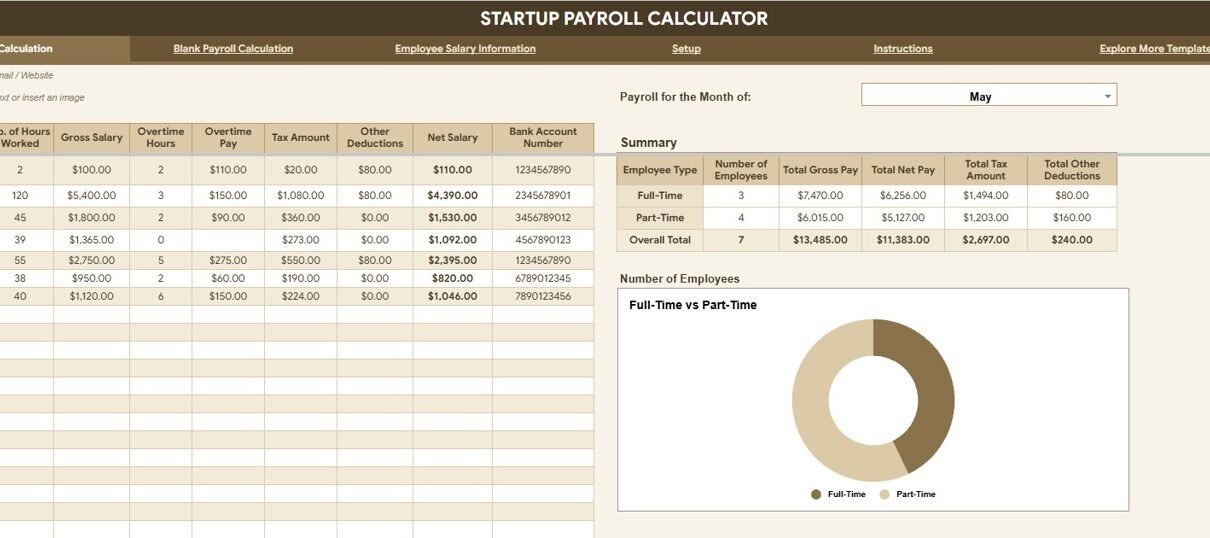
The Startup Payroll Calculator in Google Sheets is a ready-to-use payroll review template for startups that need to calculate employee count, gross pay, net pay, tax, deductions, and employee type splits before payroll approval. Payroll deserves this level of structure: the U.S. Bureau of Labor Statistics reported that private-industry compensation costs averaged $46.60 per hour worked in March 2026, with wages and salaries accounting for 69.9% of employer costs. For a startup, payroll mistakes do not just create spreadsheet cleanup; they affect runway, employee trust, founder decision-making, and monthly cash planning.
This Google Sheets template gives founders, HR admins, bookkeepers, and finance leads a shared place to review payroll numbers with cards, charts, slicers, salary information, and setup lists. Download the Startup Payroll Calculator in Google Sheets from NextGenTemplates.
Key Features of Startup Payroll Calculator in Google Sheets
- Payroll summary cards: Review Number of Employees, Total Gross Pay, Total Net Pay, Total Tax Amount, and Total Other Deductions at the top of the overview page.
- Employee type analysis: Compare headcount, gross pay, net pay, taxes, deductions, and employee split by employee type.
- Interactive slicers: Filter the dashboard quickly during payroll review without rebuilding formulas.
- Blank payroll calculation tab: Prepare a clean calculation view for a new month or payroll scenario.
- Employee salary information tab: Review full-time and part-time counts, employment status percentages, total employees, and salary details by position.
- Setup tab: Maintain position lists, month lists, and employee lists so dropdowns stay consistent.
- Google Sheets sharing: Collaborate with founders, HR, finance, and accountants through normal Google Drive permissions.
Dashboard Pages Explanation
1. Overview Page
The Overview Page shows five top cards: Number of Employees, Total Gross Pay, Total Net Pay, Total Tax Amount, and Total Other Deductions. These cards let a founder or payroll reviewer understand the month before looking at the detail rows.
Number of Employees by Employee Type: This chart separates employees by staffing group so you can see the workforce mix. Use it to check whether payroll growth is coming from full-time employees, part-time staff, contractors, or another employee type.
Total Gross Pay by Employee Type: This chart shows the payroll cost before deductions by employee type. It helps finance teams see where the largest compensation cost sits before taxes and deductions are applied.
Total Net Pay by Employee Type: This chart shows the take-home pay after taxes and deductions by employee type. It is useful when founders want to compare what the company pays out against gross payroll commitments.
Total Tax Amount by Employee Type: This chart breaks payroll tax amount by employee type. It helps reviewers identify which staffing group is driving the largest tax liability.
Total Other Deductions by Employee Type: This chart separates non-tax deductions by employee type. Use it to review benefit deductions, adjustments, or other payroll deductions before final approval.
Employee Split by Employee Type: This visual explains the share of employees in each staffing category. It gives a fast view of workforce structure before digging into salary details.
2. Blank Payroll Calculation
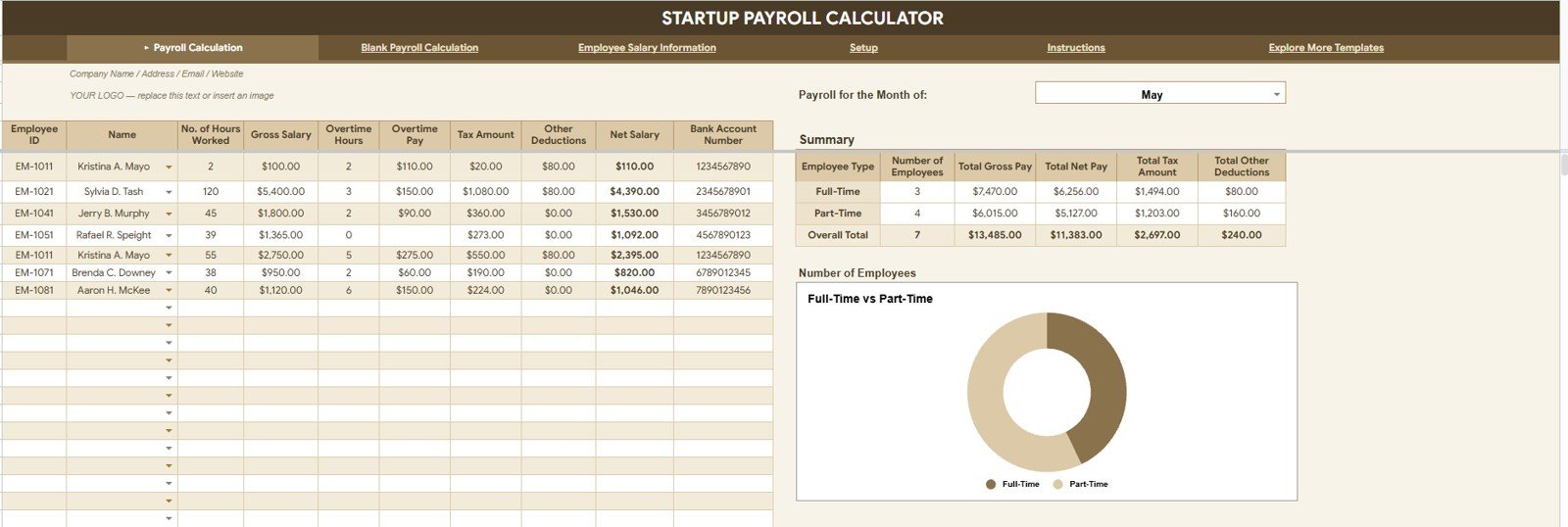
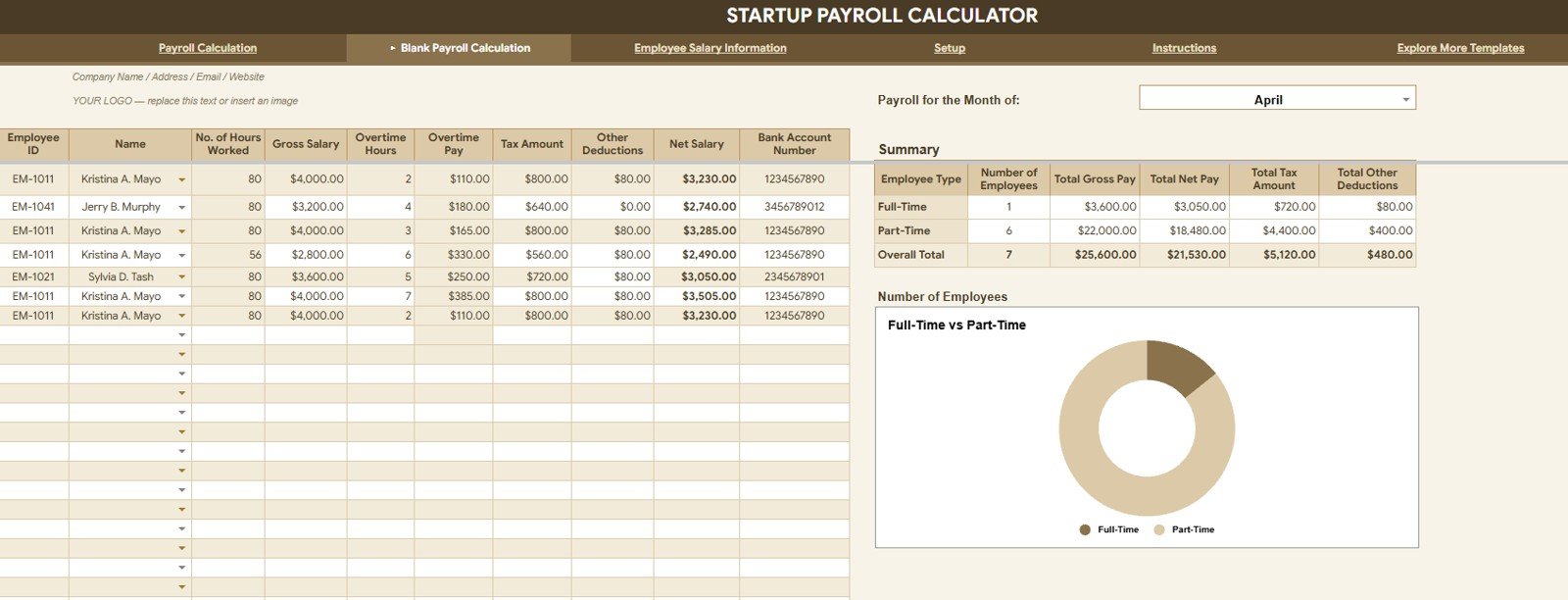
The Blank Payroll Calculation tab gives a clean payroll calculation workspace for the same core employee type analysis. It is useful when you want to prepare a new payroll month, test a staffing scenario, or review a blank version before copying in live payroll values.
Number of Employees by Employee Type: This view confirms the employee count included in the calculation sheet. It is the first check before reviewing payroll dollars.
Total Gross Pay by Employee Type: This view shows pay before tax and deduction calculations. It helps highlight whether one employee type is consuming more budget than expected.
Total Net Pay by Employee Type: This view shows what will actually be paid after deductions. Use it as a final sanity check before payroll approval.
Total Tax Amount by Employee Type: This view helps isolate the tax portion of payroll by staffing group. It is useful for bookkeepers who need a cleaner explanation of payroll tax movement.
Total Other Deductions by Employee Type: This view separates deductions that are not payroll tax. It makes payroll adjustments easier to explain to a founder or employee.
Employee Split by Employee Type: This chart shows the composition of the team in the calculation tab. It helps compare staffing structure against payroll cost structure.
3. Employee Salary Information
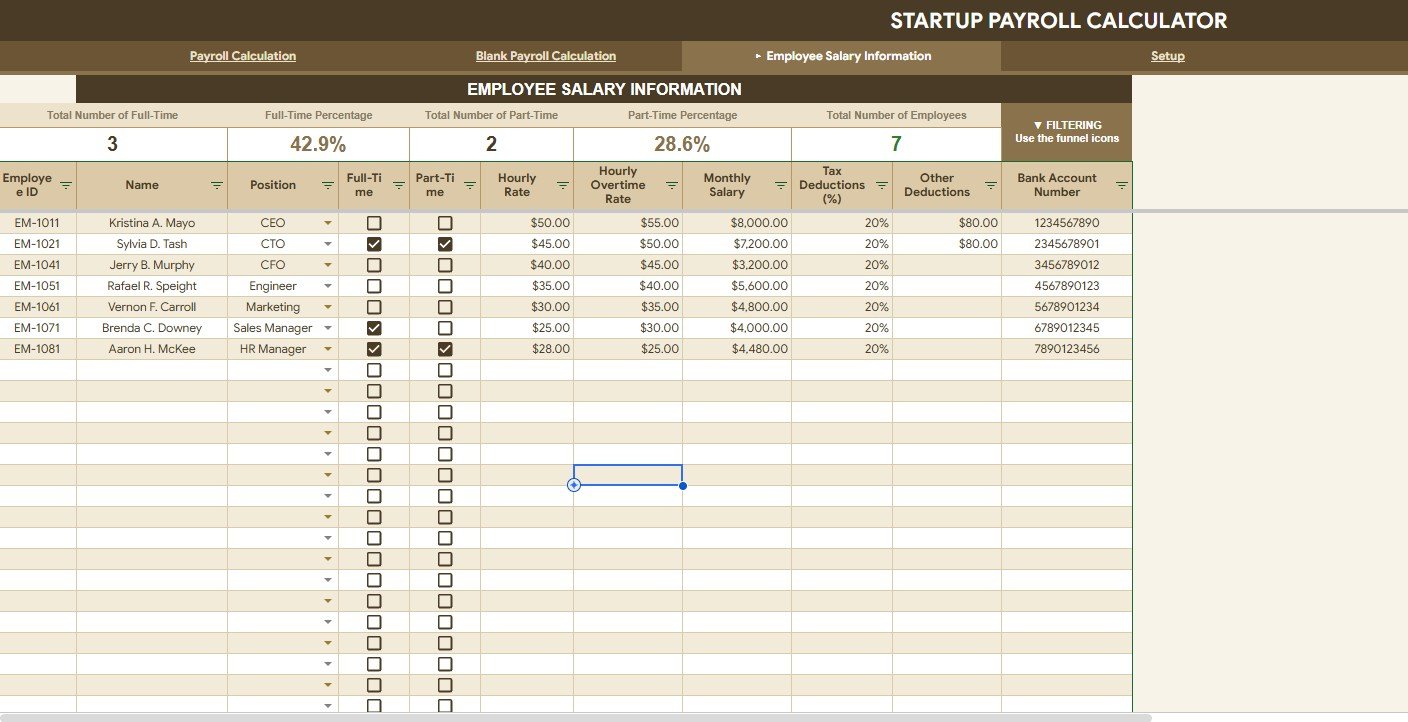
The Employee Salary Information tab is where the workbook explains salary and employment structure in more detail.
Total Number of Full-Time by Employment Status: This view shows how many full-time employees are active in each status. It helps founders separate committed payroll from temporary or inactive records.
Full-Time Percentage by Employment Status: This view turns full-time headcount into a percentage. It helps explain how much of the workforce is made up of full-time employees.
Total Number of Part-Time by Employment Status: This view shows the part-time staffing count. It is useful when part-time hours or flexible staffing are part of the payroll model.
Part-Time Percentage by Employment Status: This view shows part-time employees as a share of employment status. It gives a clearer view of workforce flexibility.
Total Number of Employees by Employment Status: This summary combines employee records by status. It helps ensure the payroll workbook is not counting inactive or incomplete records incorrectly.
Employee Salary Details by Position: This analysis groups salary details by position. It helps compare payroll budget across roles such as founders, managers, operations, finance, support, or sales.
4. Setup
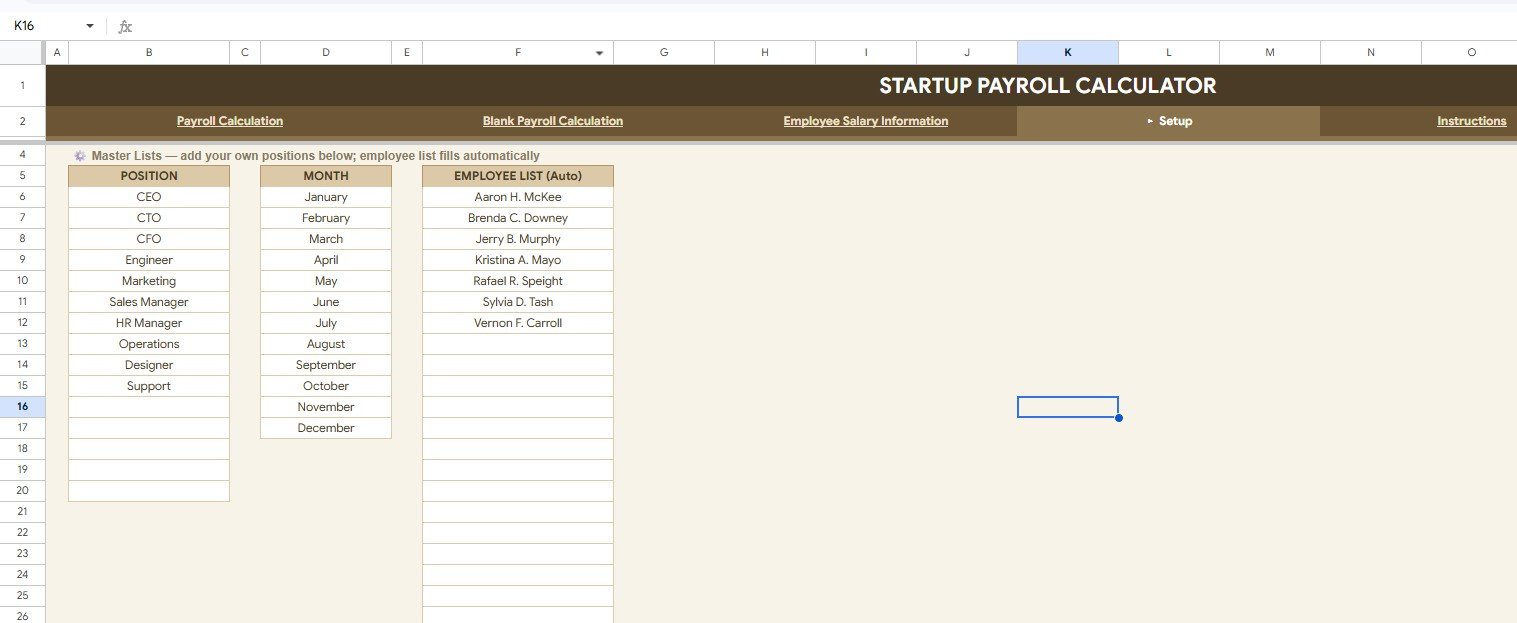
The Setup tab keeps the supporting lists that make the workbook easier to maintain. It includes Position List by Position, Month List by Month, and Employee List by Employee Name. Keeping these source lists clean prevents misspelled employee names, inconsistent month labels, and duplicate position values from distorting charts.
Startup Payroll Calculator in Google Sheets vs. Microsoft Excel Workbook vs. Paid HR SaaS – Feature Comparison
| Feature | Startup Payroll Calculator in Google Sheets | Microsoft Excel workbook | Paid HR SaaS |
|---|---|---|---|
| Cost | $6.99 one-time template cost | One-time template cost or existing Excel license | Monthly or per-employee subscription |
| Platform | Google Sheets in browser | Desktop Excel or Microsoft 365 | Vendor-hosted cloud platform |
| Setup time | Copy the file, update setup lists, enter payroll data | Download workbook and configure sharing | Longer onboarding and account setup |
| Real-time team collaboration | Strong through Google Drive sharing | Best with OneDrive or SharePoint | Usually included |
| Mobile access | Available through Google Sheets app or browser | Available through Excel mobile with limits | Usually included |
| Customizable fields | Editable sheets, formulas, lists, and charts | Editable workbook | Limited by vendor settings and plan |
| Share with link | Yes, with viewer, commenter, or editor access | Possible through Microsoft sharing | Usually user account based |
| Year-1 cost at 5 users | $6.99 before any workspace costs | Template cost plus Excel access | Often hundreds of dollars per year |
| Startup payroll review | Cards, charts, slicers, salary info, and setup lists | Depends on workbook design | Depends on payroll module and subscription level |
| Statutory filing | Not included | Not included unless custom built | Often included in country-specific payroll systems |
Who Should Use This Template
This template is a strong fit for startup founders, early HR teams, bookkeepers, fractional CFOs, finance admins, payroll assistants, consultants, agencies, clinics, small retail teams, and service businesses that need a shared payroll review workbook.
It is not the best fit if you need managed payroll filing, direct salary payments, bank integrations, biometric time clocks, employee self-service, complex approval chains, or country-specific statutory filing handled automatically.
Real-World Use Cases
Maya, founder of a 22-person SaaS startup, uses the Overview Page to review gross pay, net pay, tax, and deductions before approving each payroll run.
Daniel, a fractional CFO, compares gross pay and net pay by employee type before advising a founder on whether to hire full-time staff or rely on contractors for the next quarter.
Priya, an HR admin at a fast-growing agency, updates the Setup tab each month so names, months, and positions stay consistent across the workbook.
Advantages of Startup Payroll Calculator in Google Sheets
- It keeps payroll review in Google Sheets, where small teams can collaborate quickly.
- It separates gross pay, net pay, taxes, and other deductions so the payroll story is easier to explain.
- It gives founders employee type charts, which are useful for workforce planning.
- It avoids another recurring SaaS fee for teams that only need calculation and review.
- It includes setup lists so dropdown values stay consistent as the team grows.
Opportunities for Improvement
This template is built for payroll calculation and review, not end-to-end payroll compliance. Startups may still need a payroll provider, accountant, or country-specific tax filing tool for statutory submissions, direct deposits, year-end forms, benefits administration, or government reporting. Teams should also protect sensitive salary data carefully and limit edit access to trusted users.
Best Practices
- Update the Setup tab first so position, month, and employee names are consistent.
- Keep one master copy and make a separate copy for each payroll period.
- Restrict editing access to the people who maintain payroll data.
- Use viewer or commenter access for leadership review when numbers are sensitive.
- Check employee count before reviewing gross pay and net pay.
- Reconcile tax and deduction totals against your payroll provider before payment.
- Follow Google Support guidance for sharing files when assigning viewer, commenter, or editor access: Collaborate in Sheets.
Explore Relevant Templates
- Startup Payroll Calculator in Google Sheets – the product download for this walkthrough.
- Monthly Payroll Manager and Dashboard in Google Sheets – a broader payroll dashboard for monthly payroll tracking.
- Payroll Calculator and Payslip Generator in Excel – an Excel option for payslip generation.
- Attendance Tracker in Google Sheets – useful when attendance inputs affect payroll review.
- Employee Onboarding Tracker in Google Sheets – useful for tracking new hires before they enter payroll.
- Browse Google Sheets HR and Payroll templates.
Frequently Asked Questions
What is the Startup Payroll Calculator in Google Sheets?
It is a Google Sheets payroll calculation template for reviewing employee count, gross pay, net pay, tax amount, other deductions, employee type split, salary information, and setup lists.
Can I use it for startup founders and contractors?
Yes. You can adapt employee types to match your staffing model, including founders, full-time employees, part-time employees, contractors, or interns.
Does the template process direct payments?
No. It is a review and calculation workbook. Direct salary payments should be handled through your bank, payroll provider, or approved payment workflow.
Does it replace a payroll provider?
No. It helps organize internal payroll review, but statutory filing, taxes, direct deposit, benefits, and compliance should be handled by qualified payroll or accounting support.
Can several people work in the file?
Yes. Google Sheets supports sharing with viewers, commenters, and editors, so you can involve founders, finance, HR, and accountants with controlled permissions.
What should I update before using it?
Start with the Setup tab. Update the position list, month list, and employee list before entering payroll data.
About the Author
Built by PK – Microsoft Certified Professional with 15+ years of Excel, Google Sheets, and Power BI experience. Founder of NextGenTemplates, reaching 300K+ subscribers across YouTube channels. Every template is hand-built and tested before release.
Conclusion
The Startup Payroll Calculator in Google Sheets is built for teams that need payroll clarity without a complicated rollout. It brings cards, charts, slicers, employee type analysis, salary information, and setup lists into one editable workbook so founders and HR teams can review payroll more confidently.
Download the Startup Payroll Calculator in Google Sheets from NextGenTemplates.
For step-by-step Google Sheets tutorials, visit YouTube.com/@NeoTechNavigators.
Last updated: August 4, 2026.