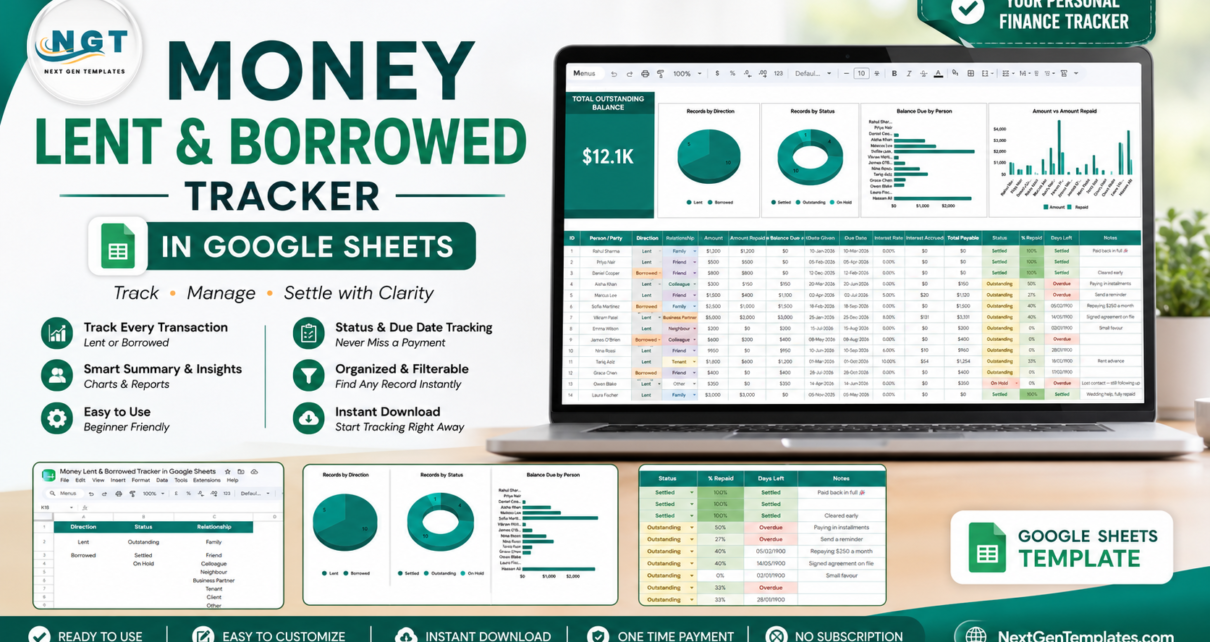
Informal lending is almost never written down. A friend covers a deposit, a cousin borrows for a car repair, an employee takes a salary advance, and the whole record lives in a chat thread that nobody wants to scroll back through. The Money Lent & Borrowed Tracker in Google Sheets exists to end that. It is a single page holding 16 tracked fields per record, 4 live charts, 8 relationship types and one headline figure: your total outstanding balance. Balance due, interest accrued, total payable, percentage repaid and days remaining are all calculated for you, so the only thing you ever type is what actually happened.
This article walks through what is in the template, how each page works, where it beats a hand-built spreadsheet, where it does not, and how to get the most out of it. If you want to skip ahead, the template itself is available here.
Get the Money Lent & Borrowed Tracker in Google Sheets
Key Features of the Money Lent & Borrowed Tracker
- Total Outstanding Balance card. One large KPI sums every unsettled balance so you can answer the only question that matters – how much is out there – without doing any arithmetic.Money Lent
- Records by Direction. A pie chart splitting your records into Lent and Borrowed, so a glance tells you which side of the ledger you are mostly on.
- Records by Status. A doughnut chart counting Settled, Outstanding and On Hold records. When the Outstanding slice starts growing month on month, you have a follow-up problem, not a memory problem.
- Balance Due by Person. A horizontal bar chart ranking every person or party by what is still owed, putting your largest exposure at the top of the list.Money Lent
- Amount vs Amount Repaid. A paired column chart showing the original amount beside what has come back, per person, which is how partial repayments become visible instead of vanishing into a single balance.Money Lent
- Automatic interest. Enter an annual rate and the sheet calculates Interest Accrued and Total Payable for that row. Leave the rate at 0.00% and the loan stays interest-free, which is how most family lending actually works.Money Lent
- Days Left with overdue flagging. The tracker compares the due date to today, marks a row Overdue in red once it passes, and switches it to Settled when the balance clears.
- Dropdown-driven entry. Direction, Status and Relationship are all data-validation lists fed from a separate List sheet, so a typo can never split a chart category.
Tracker Pages Explained
Page 1 – the Tracker
Everything you look at daily is on this one page. A branded title banner runs across the top. Directly under it, the Total Outstanding Balance card sits at the left with the four charts laid out beside it on the same row, so the visual summary fits on one screen without scrolling.
Below the visuals comes the record table with sixteen columns: ID, Person / Party, Direction, Relationship, Amount, Amount Repaid, Balance Due, Date Given, Due Date, Interest Rate, Interest Accrued, Total Payable, Status, % Repaid, Days Left and Notes. Five of those areMoney Lent calculated for you – Balance Due, Interest Accrued, Total Payable, % Repaid and Days Left – which means a normal entry is just a name, a direction, a relationship, an amount and two dates.Money Lent
Conditional formatting does the rest of the work. The Status column colours Settled green, Outstanding amber and On Hold red. The % Repaid column runs a colour scale from red at 0% to green at 100%, so a row that is nearly cleared looks different from one that has not moved. Days Left shows Overdue in red once a due date passes and Settled once the balance reaches zero. The Notes column carries the human context that no formula holds – repaying 250 a month, signed agreement on file, lost contact and still following up.
Page 2 – the List sheet
Three short columns feed every dropdown on the tracker: Direction (Lent, Borrowed), Status (Outstanding, Settled, On Hold) and Relationship (Family, Friend, Colleague, Neighbour, Business Partner, Tenant, Client, Other). Add a value here and the corresponding dropdown picks it up, which matters if you lend through a savings circle or want to distinguish two categories of client. Google’s own guide to data validation and drop-down lists covers the mechanics if you want to extend the ranges further.
Money Lent & Borrowed Tracker vs. an Excel Build vs. a Paid Finance App – Feature Comparison
| This Google Sheets tracker | A hand-built Excel sheet | QuickBooks Advanced / paid lending app | |
|---|---|---|---|
| Cost | Under 10 once | Free, plus your build time | 200+ per month |
| Platform | Google Sheets, any browser | Excel on desktop | Web plus mobile app |
| Setup time | Under 5 minutes | 4 to 8 hours | 1 to 2 days |
| Real-time collaboration | Yes, native sharing | Only via OneDrive co-authoring | Yes, per paid seat |
| Mobile access | Yes, free Sheets app | Limited | Yes |
| Customizable fields | Yes, every column and list | Yes, if you write the formulas | Only what the vendor exposes |
| Share with a link | Yes | No, you send a file | Invite-only per seat |
| Interest and total payable | Calculated per row | Build it yourself | Yes, on lending modules |
| Year-1 cost at 5 users | Under 10 | 0 plus a day of your time | 2,400 and up |
Who Should Use This Template
It suits anyone whose lending is real but informal: people who lend to family and friends and have lost the thread; landlords holding deposits and rent advances; small business owners issuing salary advances; members of a savings circle, chit fund or ROSCA; freelancers tracking client advances; and anyone repaying several informal debts who wants one honest picture rather than five partial ones.
It is not the right tool for a regulated lender who needs KYC records and statutory reporting, nor for amortised EMI loans that need a payment-by-payment schedule – the Loan EMI Repayment Tracker handles that case. Past a few thousand rows, any spreadsheet starts to feel slow, and a database is the better answer.
Real-World Use Cases
The family bank. Priya had lent to four relatives across two years and could not answer how much was out. Entering each loan with its date and relationship gave her the number in one afternoon, and the Balance Due by Person chart showed a single nephew accounted for nearly half of it – which turned a vague worry into one specific conversation.
The small workshop. Daniel issues salary advances to six staff and recovers them over following months. Each advance goes in as Lent with the relationship set to Colleague, and Amount Repaid is updated on payday. The % Repaid column shows which advances are nearly cleared; Days Left flags the two that have run past their agreed date.
Both sides at once. Aisha borrowed for a rental deposit and lends small amounts to two friends. Because Lent and Borrowed live in the same table, the Records by Direction chart shows her true net position instead of two half-pictures.
Advantages of the Money Lent & Borrowed Tracker
- Nothing to install. Native formulas, data validation, conditional formatting and charts only – no add-on, no macro, nothing for a workplace policy to block.
- One screen, one answer. The KPI card and four charts sit above the data, so the summary is never more than one glance away.
- Both directions in one table. Most lending sheets track only what you are owed. Holding borrowings in the same table is what makes the net position honest.
- Mobile-friendly. Log a repayment from the Google Sheets app the moment the transfer lands, rather than trusting yourself to remember it that evening.
- Shareable without exporting. Give a borrower view or comment access so they can confirm a repayment without touching your figures.
Opportunities for Improvement
Being straight about the limits: interest is calculated as simple interest on the outstanding amount, not as a compounding or amortising schedule, so a formal loan with a fixed instalment needs a different template. There is no repayment history sub-table – Amount Repaid is a single running figure, so if you want a dated log of every instalment you will need to add a second sheet and a SUMIF. Currency is formatted in dollars out of the box and needs a one-time format change for other currencies. And there are no automated reminders; the Days Left column tells you what is overdue, but you still have to look at it.
Best Practices
- Set up the List sheet before you enter anything. Fixing your Relationship values first means you never have to re-label rows later.
- Enter a loan the day it happens. The entire value of the tracker comes from it being current; a two-week-old memory of an amount is not a record.
- Always fill in the due date, even if you invent a reasonable one. Without it the Days Left column has nothing to work with and overdue loans stay invisible.
- Update Amount Repaid rather than deleting rows. A settled loan that stays in the table is your history, and the Amount vs Amount Repaid chart depends on it.
- Review the Days Left column weekly. Anything marked Overdue is that week’s follow-up list – it takes two minutes and replaces a reminder system.
- Use Notes for the awkward context. Paused repayments, verbal agreements and part-settlements all belong there, so you are not reconstructing them a year later.
Explore Relevant Templates
- Money Lent & Borrowed Tracker in Google Sheets – the template covered in this article.
- Loan EMI Repayment Tracker in Google Sheets – for formal loans with fixed instalments.
- Student Loan Repayment Tracker in Google Sheets – built around education debt.
- Bank Account Balance Tracker in Google Sheets – your balances beside your lending.
- Shared Expense Splitter Tracker in Google Sheets – for costs you split rather than lend.
If you want to get better at building trackers like this, the NextGenTemplates Academy learning paths cover the core spreadsheet skills with practice files.
Get the Money Lent & Borrowed Tracker in Google Sheets
Frequently Asked Questions
Do I need a paid Google account to use it?
No. A free personal Google account is enough. The download is a PDF containing a Make a copy link; one click puts an editable copy in your own Google Drive.
Can I track lending and borrowing in the same sheet?
Yes, and that is the design. The Direction column tags each row Lent or Borrowed, the Records by Direction chart splits them, and the outstanding balance card covers both.
How is interest calculated?
Enter an annual rate in the Interest Rate column. The sheet works out Interest Accrued for the elapsed period and adds it to the outstanding amount to produce Total Payable. A rate of 0.00% keeps the loan interest-free.
Can I change the currency?
Yes. Select the currency columns and use Format, then Number, then Custom currency. The sample data is in dollars purely as a placeholder.
Do the charts update automatically?
Yes. They read the record table directly, so new rows appear in the charts as you enter them.
Can I share the tracker with the person who owes me?
Yes, through the normal Share button. View access lets them see the balance; comment access lets them confirm a repayment without editing your figures.
Is anything installed or authorised?
No. There is no script, add-on or macro – only built-in Google Sheets features.
About the Author
Built by PK – Microsoft Certified Professional with 15+ years of Excel, Google Sheets, and Power BI experience. Founder of NextGenTemplates, reaching 300K+ subscribers across YouTube channels. Every template is hand-built and tested before release.
Conclusion
Informal lending goes wrong not because people are dishonest but because nobody writes it down. A single page with sixteen fields, four charts and one outstanding-balance figure is enough to fix that, and it takes under five minutes to set up. Enter the loan you are least sure about first – that is usually the one worth the most.Money LentMoney Lent
Get the template here: Money Lent & Borrowed Tracker in Google Sheets.