The Baby Products Store Management System is a Google Apps Script web app that runs an entire baby shop from one browser tab. It manages 24 database tables across 15 modules, tracks batch expiry on perishables such as formula and baby food, and prints GST-ready invoices in 3-inch, 4-inch and A4 formats. On first run it seeds 49 realistic sample baby products, so the dashboard and reports work within minutes of deployment.
Get the Baby Products Store Management System
🚀 Try the Live Demo Before You Buy
We have deployed this web app in our own Google account so you can test every page, every role and every module — including POS billing, stock, purchases and reports — with real sample data — before purchasing. No signup, no email required.
🔑 Test Login Credentials
Sign in as admin to see the complete system including User Management, Settings, Database Archive and Audit Log, as manager to run day-to-day store operations and all reports, or as cashier to see the restricted billing-only view. 💡 Log in with all three to see exactly how role-based access hides cost prices, profit and settings from junior staff.
| Role | Username | Password | Access |
|---|---|---|---|
| 👨💼 Admin | admin | Admin@123 | Full access to everything, including User Management, Settings, Database Archive, Audit Log and all reports. |
| 🏪 Store Manager | manager | Manager@123 | Everything except User Management and destructive Settings. Runs POS, manages products, stock, purchases, suppliers and customers, and views all reports. |
| 🧾 Cashier | cashier | Cashier@123 | POS / Billing, read-only products & stock, add or look up customers, and own daily sales. Cost prices, profit, purchases, suppliers, reports and settings are hidden. |
💡 What you get after purchase: The full source code (Code.gs + Index.html) plus a step-by-step deployment guide so you can deploy your own private instance in your own Google account in under 15 minutes.
🚀 Try the Live Demo Before You Buy
We have deployed this web app in our own Google account so you can test every page, every role and every module — with real sample data — before purchasing. No signup, no email required.
💡
Running a baby store means juggling fast checkout, tight stock control, expiry dates on consumables, supplier bills and customer loyalty all at once. This guide walks through every screen of the Baby Products Store Management System and shows how a single Google Sheets web app replaces paper registers and expensive monthly POS subscriptions.
Key Features of the Baby Products Store Management System
- Fast Point of Sale with barcode/SKU scanning, category selection, line and bill discounts, and Cash / Card / UPI / Split payments.
- Batch and expiry tracking (FEFO) that always sells the nearest-expiry stock first and flags Expiring Soon and Expired items.
- GST invoicing with per-product HSN codes, a CGST/SGST summary report and printable A4 tax invoices.
- Purchases and suppliers — purchase orders, goods receipt into batches, supplier payments and payables.
- Customers and loyalty with baby profiles, age-group tagging, birthday reminders and points.
- Role-based access for Admin, Store Manager and Cashier, hiding cost and profit from cashiers.
Because it is built on Google Apps Script and Google Sheets, there is no server to maintain and no monthly fee — you deploy once and copy it in a single click.
Dashboard Pages Explanation
Here is a walkthrough of every screen in the Baby Products Store Management System.
Login Page
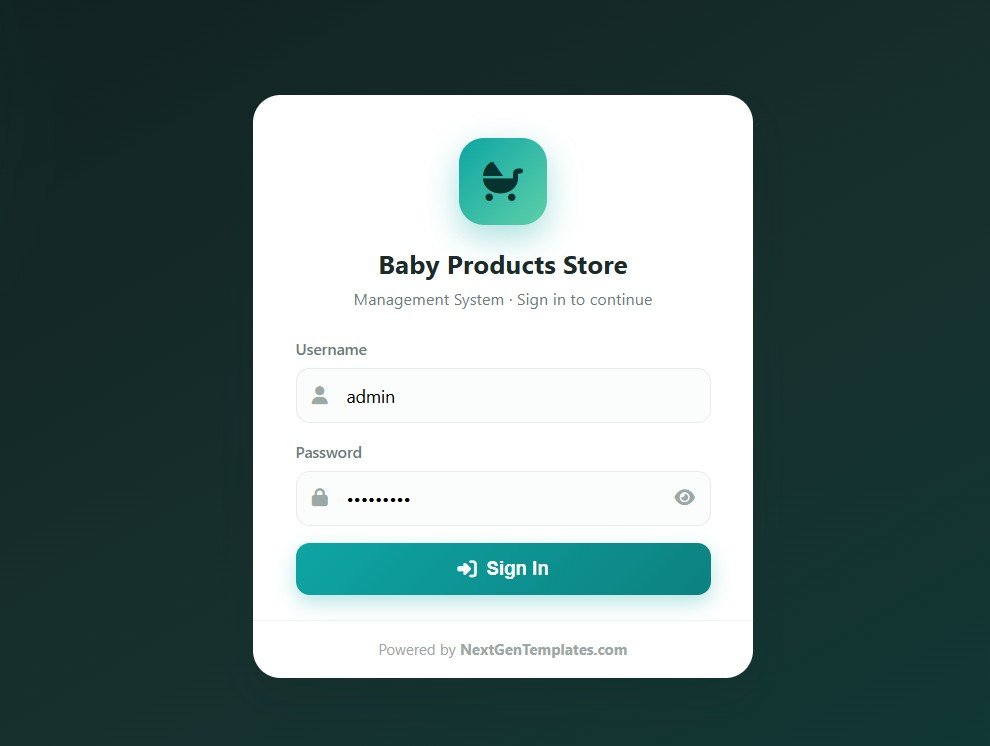
A secure sign-in screen with username and password, Baby Products Store branding and a Powered-by-NextGenTemplates footer. Default logins are role-based and never displayed on the screen.
Dashboard Overview
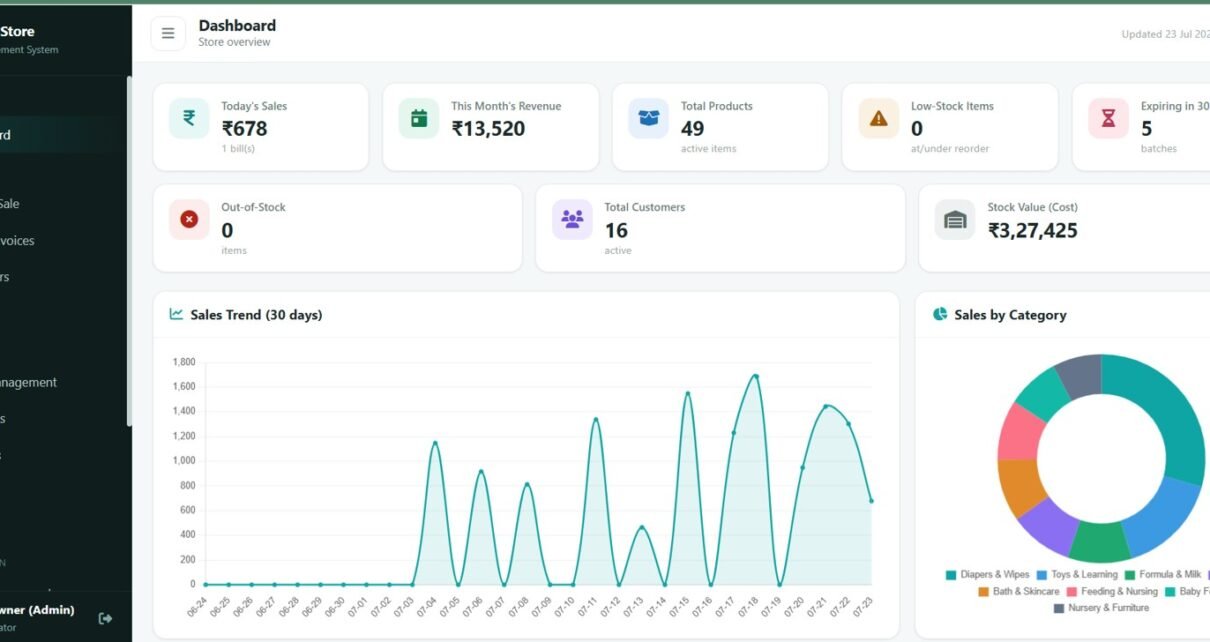
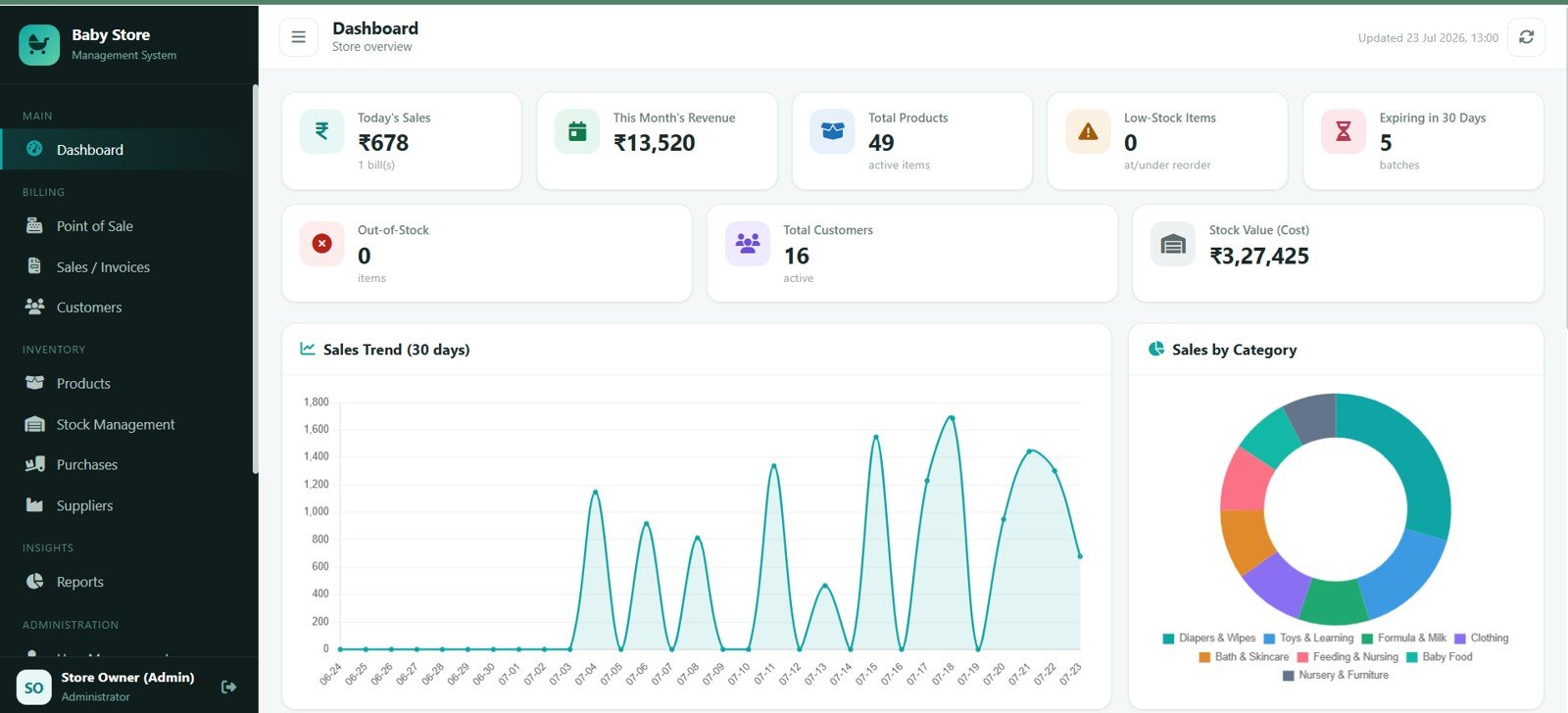
KPI cards show Today Sales, This Month Revenue, Total Products, Low-Stock Items, Expiring in 30 Days, Out-of-Stock, Total Customers and Stock Value at Cost. Charts include Sales Trend by Date and Sales by Category.
Point of Sale
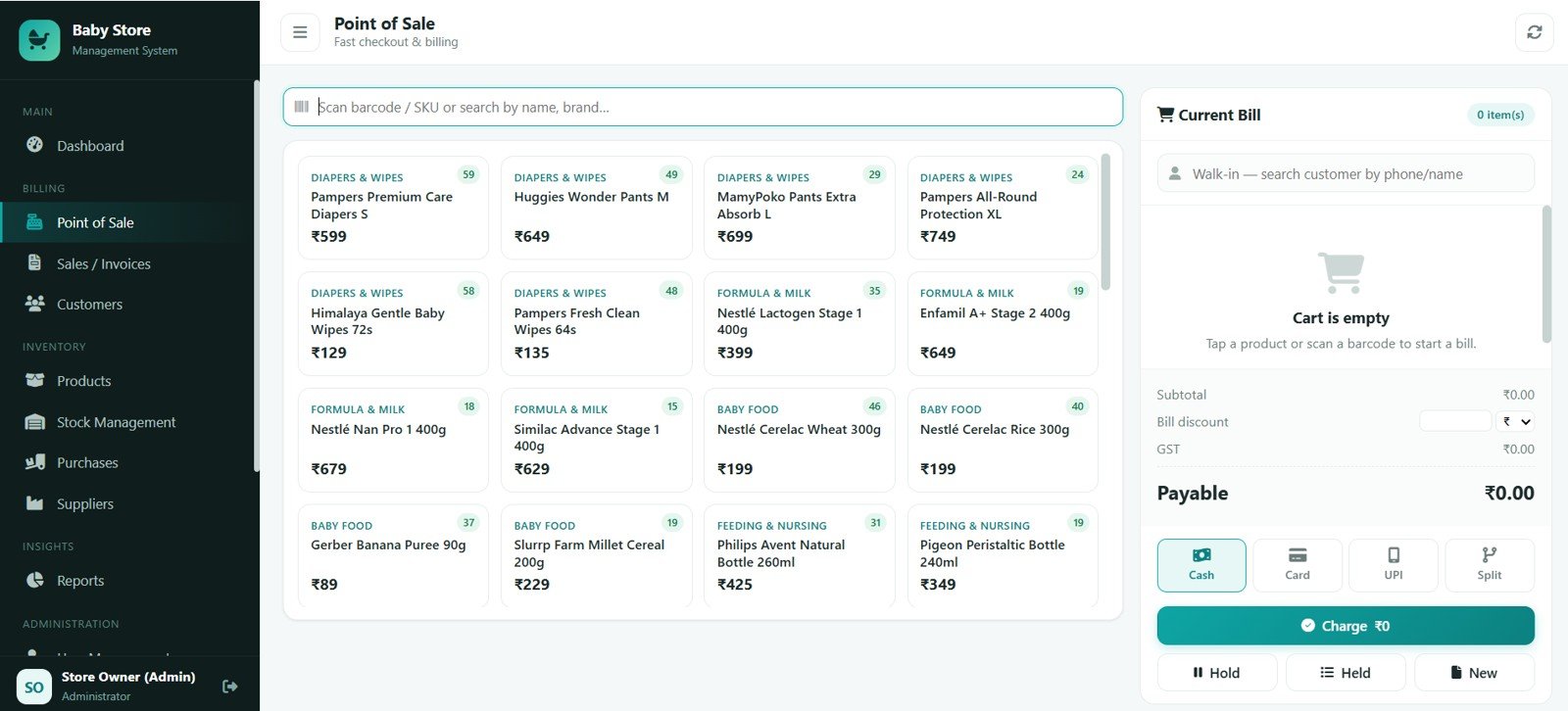
The primary billing screen offers product search by barcode or SKU, product selection by category, the current bill by customer, subtotal by cart items, GST on the current bill, the payable amount by payment method, and payment options for Cash, Card, UPI and Split.
Sales / Invoices
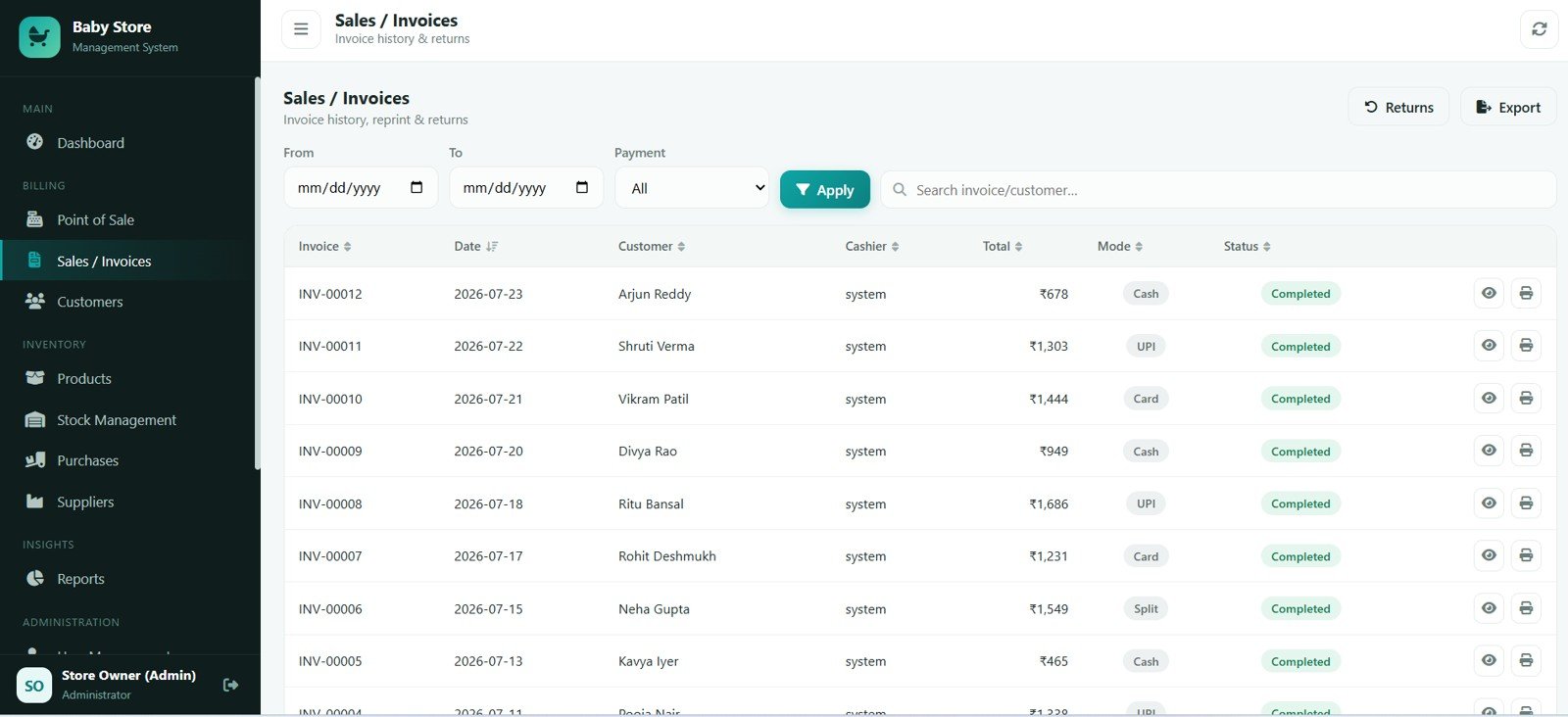
Review invoice history by date, invoice total by customer, payment mode by invoice, invoice status by record, returns by invoice and export by sales records.
Customers
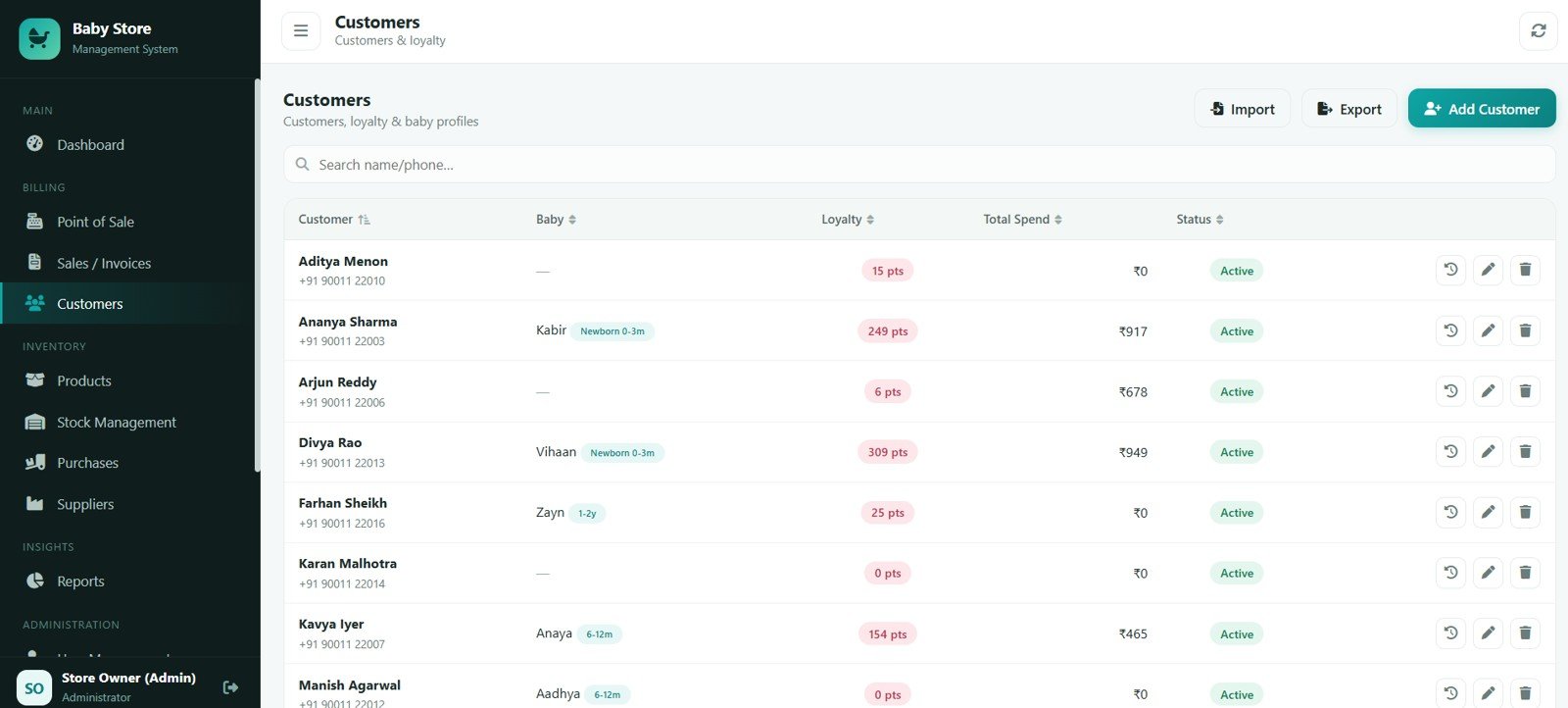
Manage customer details by phone, baby profile by customer, loyalty points by customer, total spend by customer and customer status by record.
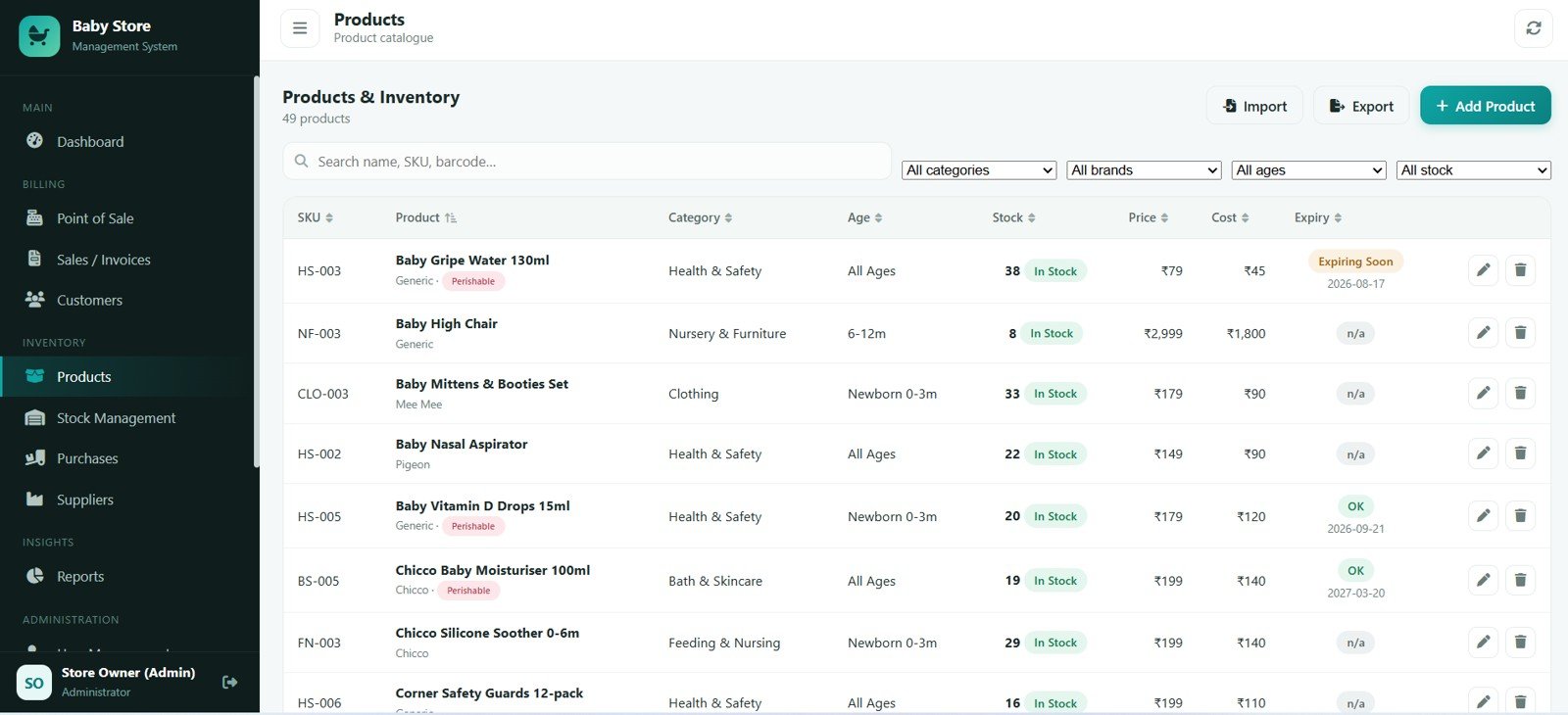
Products & Inventory
Organise products by SKU, products by category, products by age group, stock by product, price by product, cost by product and expiry status by product.
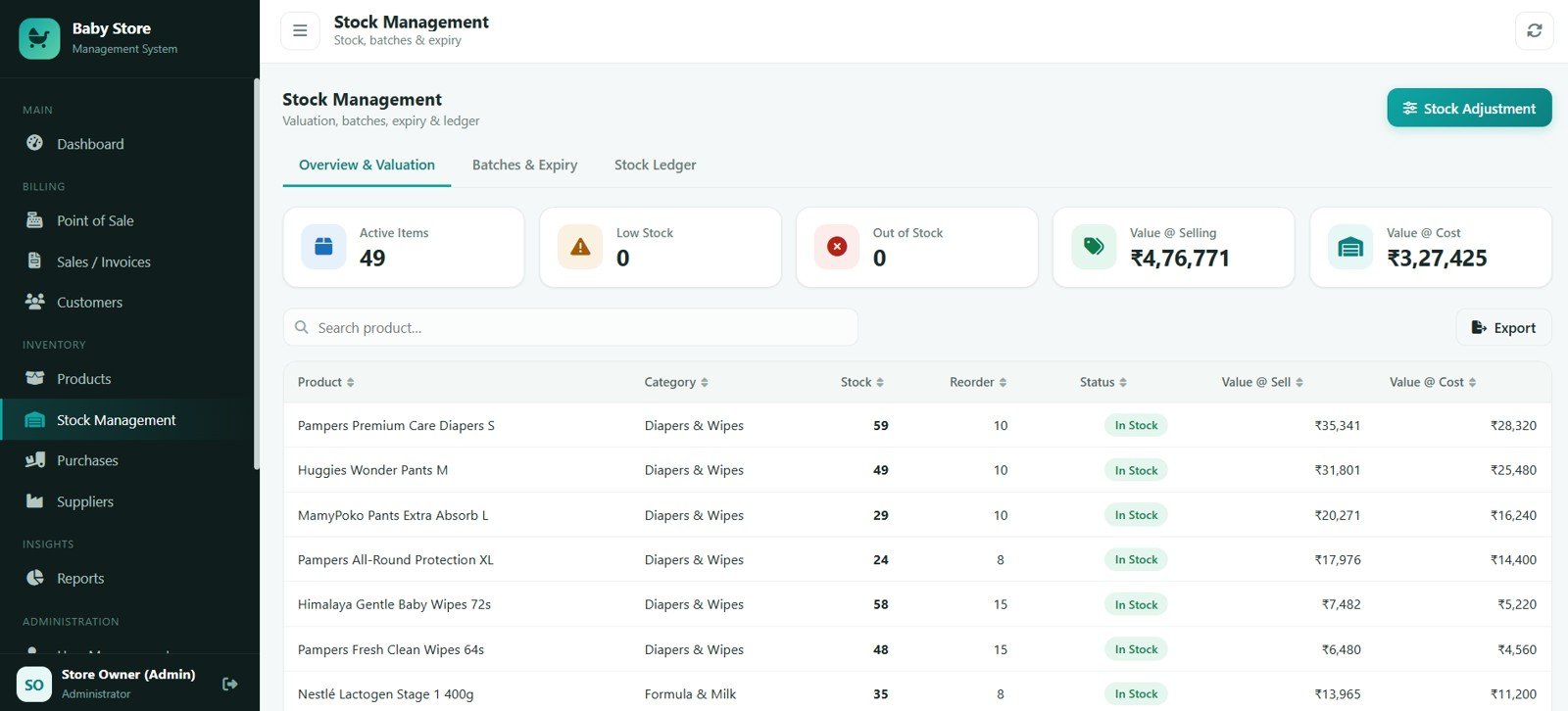
Stock Management
Track active items by product, low stock by reorder level, out of stock by product, value at selling by product, value at cost by product and stock status by product, alongside the batch and expiry register.
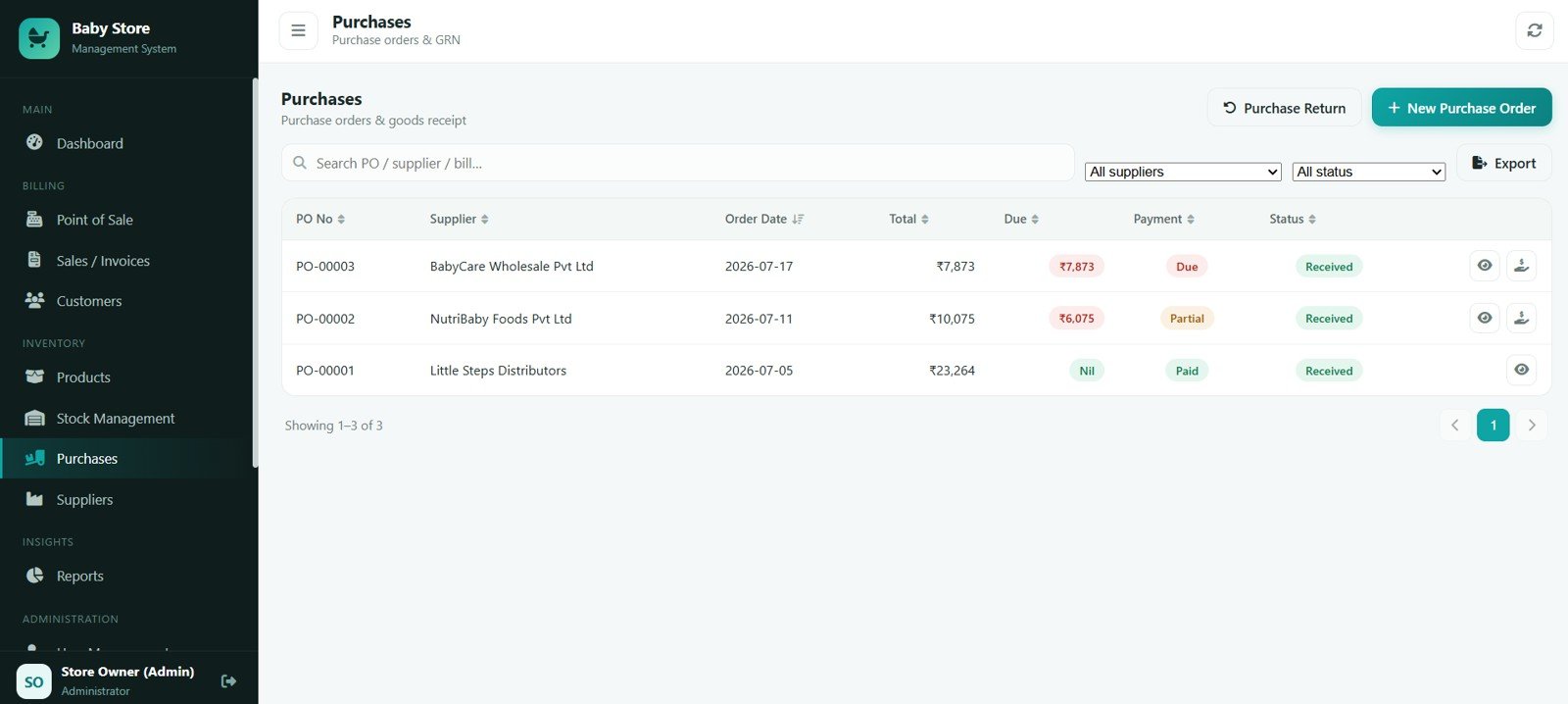
Purchases
Handle purchase orders by supplier, order total by purchase order, due amount by supplier, payment status by purchase order and receipt status by purchase order.
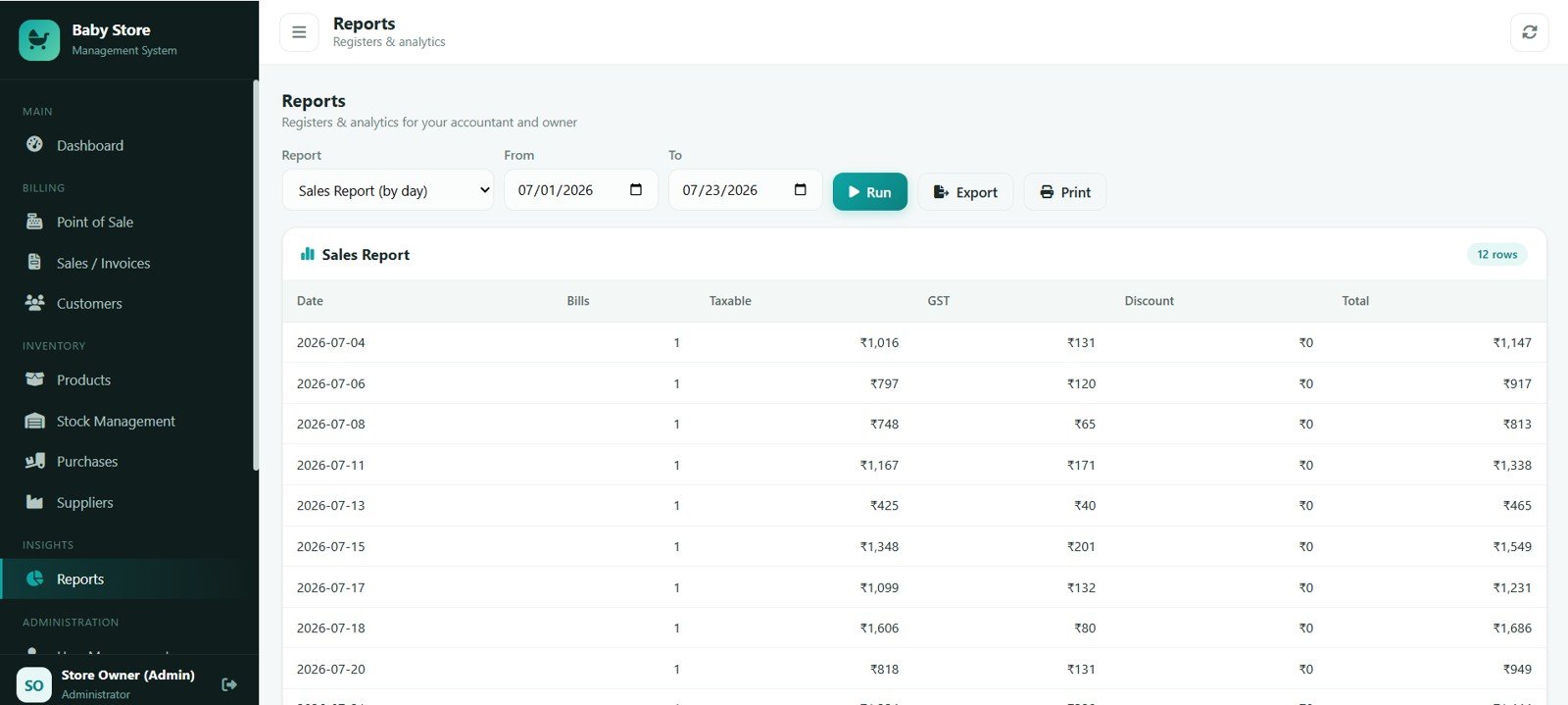
Reports
Generate a sales report by day, bills by date, taxable amount by date, GST by date, discount by date and total sales by date, each with a date filter and Excel/CSV export.
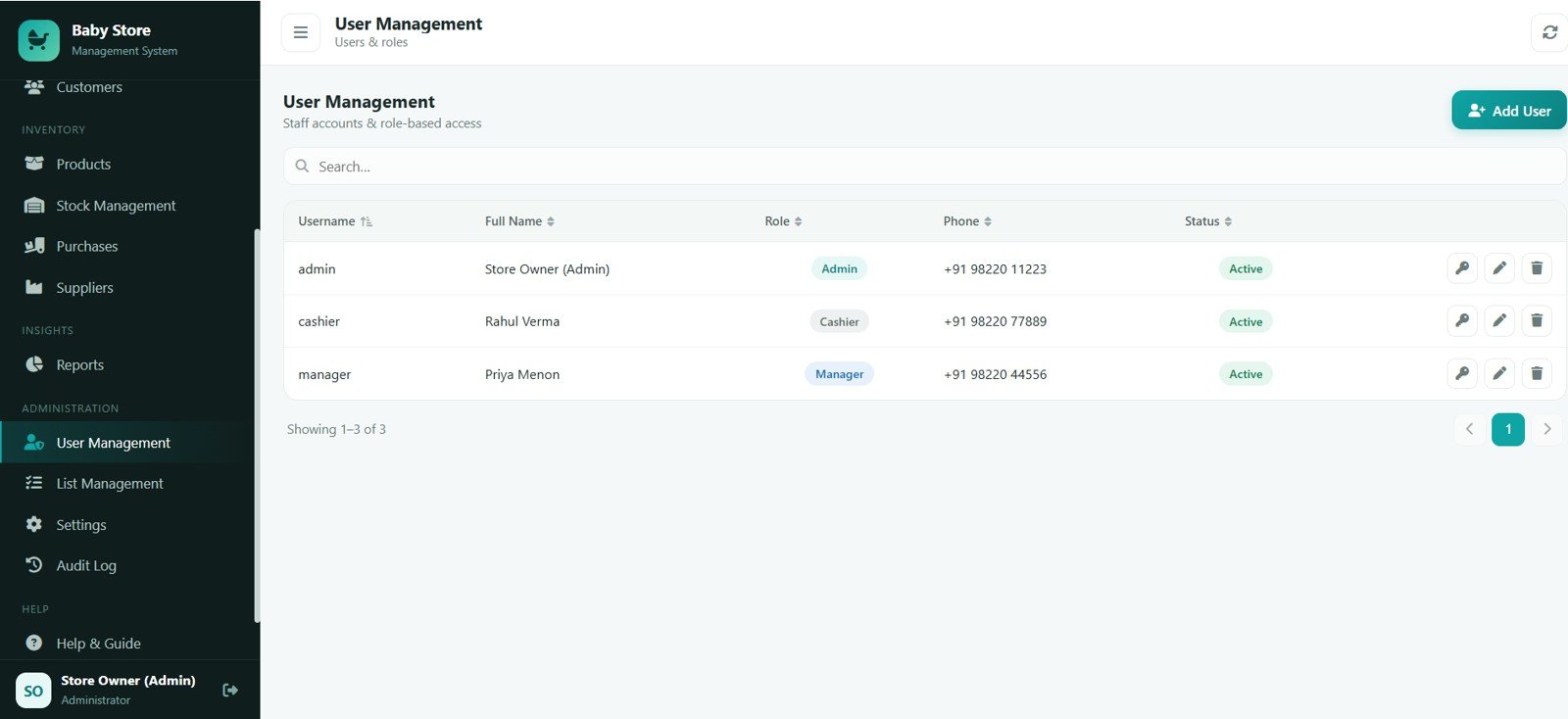
User Management
Control users by role, phone by user, status by staff account and role-based access by user — all managed by the Admin.
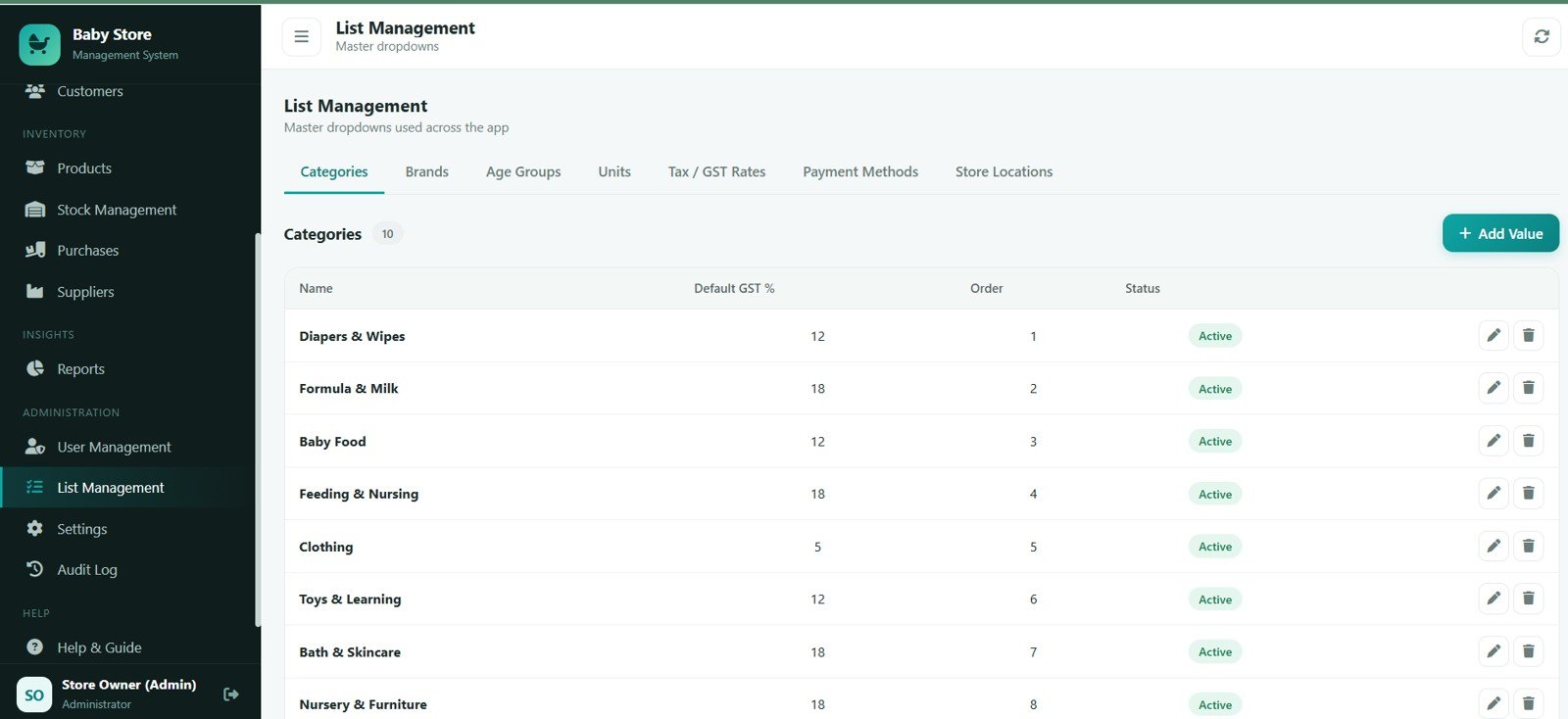
List Management
Maintain categories by name, default GST by category, display order by category, status by master value and master dropdowns by app section.
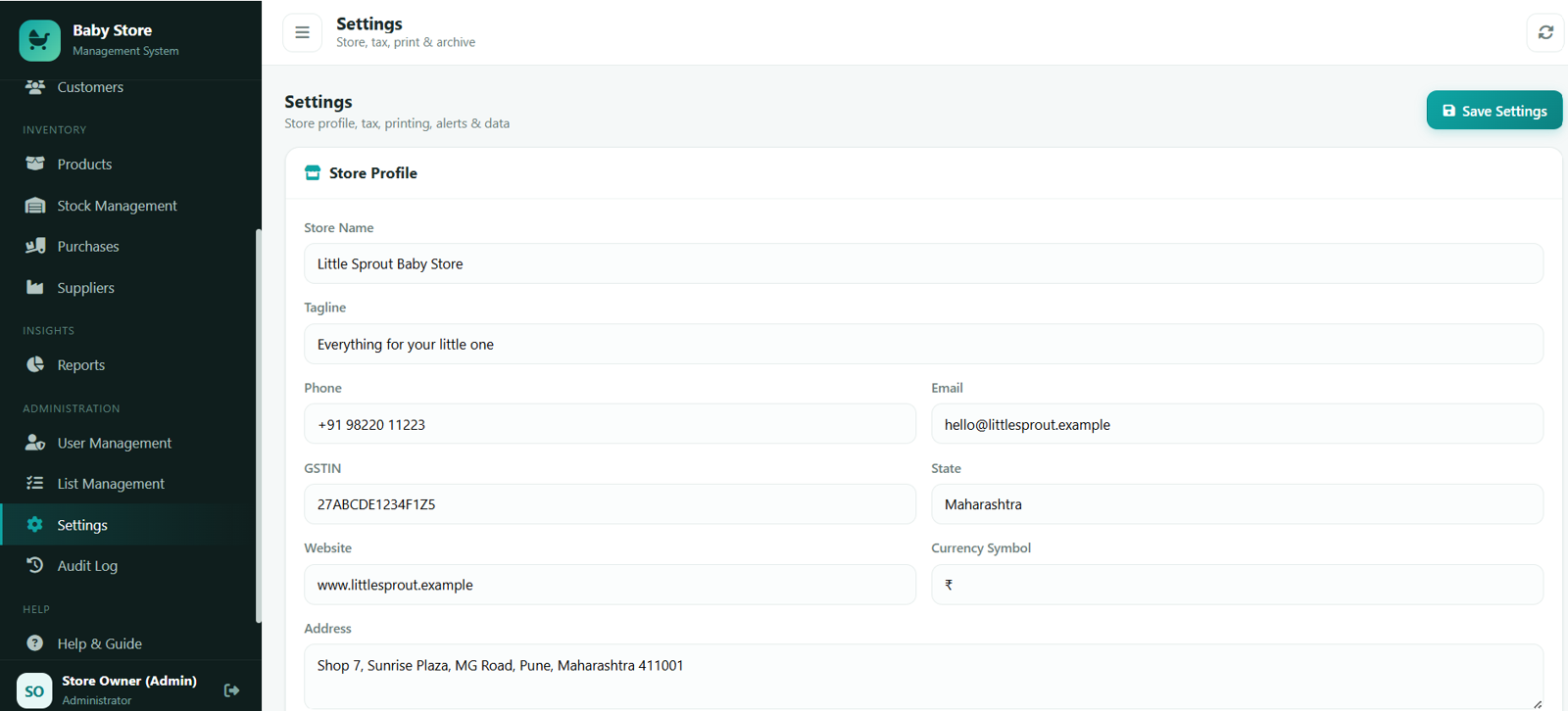
Settings
Configure store profile by business, tax settings by store, currency symbol by store, contact details by store and address by store, plus invoice, printing, alerts, backup and database archive options.
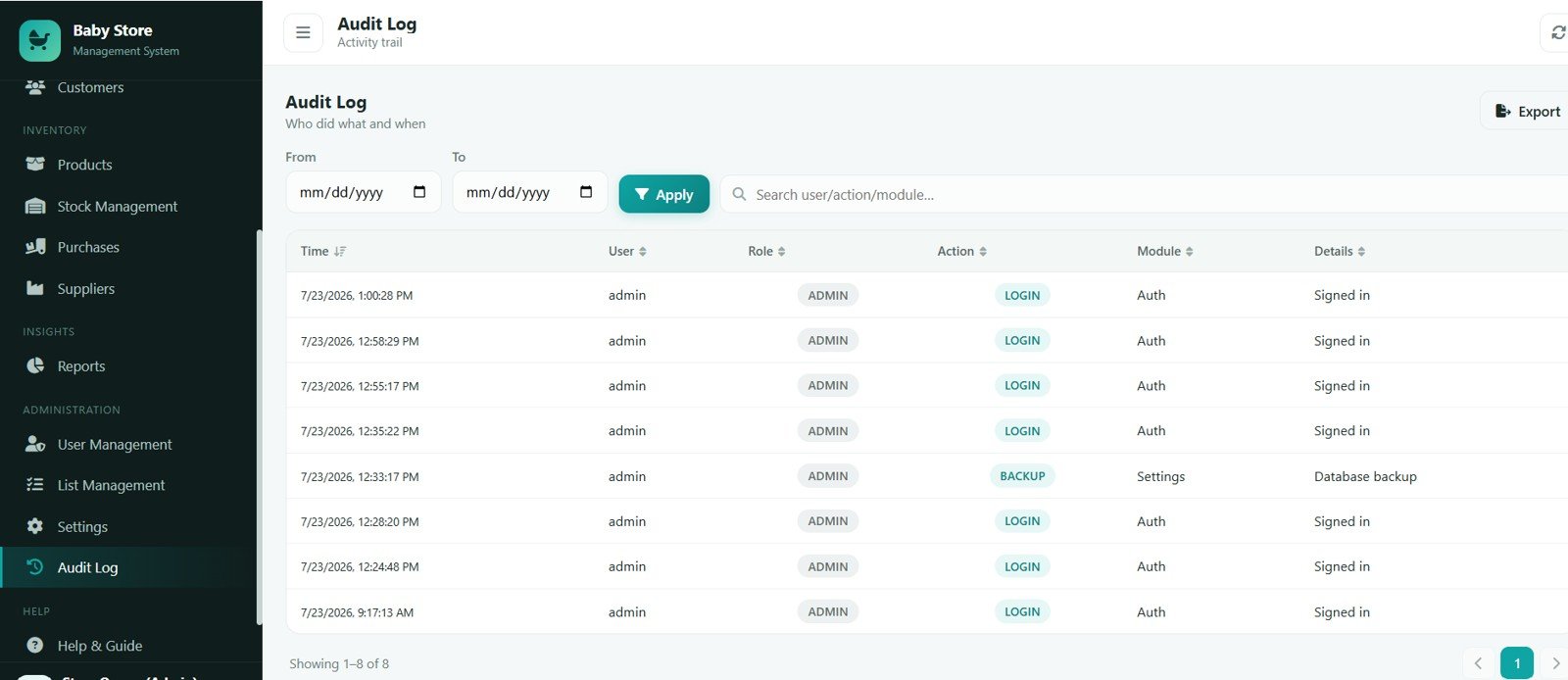
Audit Log
Follow activity by time, action by user, module by activity, details by system event and the audit trail by date range.
Baby Products Store Management System vs. Excel / Manual Register vs. Paid Retail POS
| Feature | Baby Products Store Management System | Excel / Manual Register | Paid Retail POS (Vend / Zoho / Petpooja) |
|---|---|---|---|
| Cost | $39.99 one-time | Free but manual | $25-90 / user / month |
| Platform | Google Sheets + Apps Script | Excel file | Cloud SaaS |
| Setup time | Under 15 minutes | Hours of formulas | Days + onboarding |
| Multi-counter login | Included | No | Paid per seat |
| Batch & expiry (FEFO) | Built in | No | Some plans |
| GST invoice + HSN | 3in / 4in / A4 | Manual | Yes |
| Loyalty points | Included | No | Add-on |
| Year-1 cost at 3 users | $39.99 total | Staff time | $900-3,240 |
For a baby store that wants real POS, expiry control and GST invoicing without paying per user every month, the Baby Products Store Management System sits in the sweet spot.
Who Should Use This Template
Perfect for:
- Independent baby, kids and maternity stores that need billing and stock in one tool.
- Shop owners selling perishables such as formula, baby food and medicines who must track expiry.
- Small retail chains that want multi-counter logins without monthly SaaS fees.
Not a fit if:
- You are an enterprise chain needing SOC 2, SSO and dedicated servers.
- You need fully offline billing with no internet connection.
- You want a native mobile app instead of a browser-based web app.
Real-World Use Cases
Meera owns a single baby store in Pune. She bills customers with barcode scanning, lets the Baby Products Store Management System pick the nearest-expiry formula tin automatically, and prints a 3-inch GST receipt without paying a monthly POS subscription.
Arjun runs a two-counter kids and maternity shop. He gives each cashier a Cashier login so cost and profit stay hidden, receives supplier stock into batches, and checks the daily Sales and GST reports from his phone every evening.
Priya manages an online-plus-store baby brand. She uses baby date-of-birth tagging to send birthday reminders and loyalty offers, then runs monthly profit and category reports to decide what to restock.
Advantages of the Baby Products Store Management System
- Lower cost: a one-time $39.99 purchase replaces recurring per-user POS fees that add up to hundreds of dollars a year.
- Expiry safety: FEFO batch logic and Expiring Soon alerts reduce dead stock and prevent selling expired baby consumables.
- Faster billing: barcode scanning, held bills and split payments keep the counter moving during busy hours.
- Ownership: the data lives in your own Google Sheet, which you can back up to Excel or archive at any time.
Opportunities for Improvement
The Baby Products Store Management System is honest about its boundaries. It needs an internet connection because it runs on Google servers, so it is not designed for fully offline counters. It is a browser-based web app rather than a native Android or iOS app, and very large chains that need SSO, dedicated infrastructure or thousands of daily invoices should consider enterprise software. For a single store or a small multi-counter shop, however, these limits rarely matter.
Best Practices
- Change all default passwords immediately after your first login.
- Set your real store profile, GSTIN and invoice prefix in Settings before you start billing.
- Enter accurate batch and expiry dates when receiving perishables so FEFO and alerts work correctly.
- Take a backup before large imports, and run the Database Archive periodically to keep the app fast.
Explore Relevant Templates
Browse the full Web Apps collection on NextGenTemplates, or read these related guides:
- Auto Parts Store Management System Web App
- HR Employee Management System Web App
- Auto Parts Inventory Management System Web App
- Auto Garage Job Card Management System Web App
Curious how systems like this are put together? The NextGenTemplates Academy learning paths teach the underlying spreadsheet skills with practice files.
Get the Baby Products Store Management System
Frequently Asked Questions
What does the Baby Products Store Management System track?
The Baby Products Store Management System tracks products, stock, batches and expiry, sales and invoices, purchases, suppliers, customers and loyalty across 24 database tables, with role-based access for Admin, Store Manager and Cashier.
How does batch and expiry (FEFO) work?
Perishable products carry batch numbers and expiry dates. On every sale the system deducts the nearest-expiry batch first, shows Expiring Soon and Expired alerts, and requires a manager override to sell expired stock.
Does the Baby Products Store Management System support GST invoices?
Yes. GST is calculated per line from each product rate, and the app prints 3-inch, 4-inch and A4 tax invoices plus a CGST/SGST GST Summary report for your accountant. It prepares GST data but does not file returns.
How long does setup take?
Under 15 minutes. Paste the two files, name the HTML file exactly Index, run setup once, and the app auto-creates all tabs and loads 49 sample baby products so the dashboard and reports work immediately.
How does it compare to a paid retail POS?
Paid retail POS tools such as Vend or Zoho charge $25-90 per user each month. The Baby Products Store Management System is a one-time $39.99 purchase with unlimited users, so it typically pays for itself within the first month.
Can cashiers see cost and profit?
No. Cost prices, profit figures, purchases, suppliers and full reports are restricted to Admin and Store Manager; cashiers only see selling prices and their own daily sales.
About the Author
Built by PK — Microsoft Certified Professional with 15+ years of Excel, Google Sheets, and Power BI experience. Founder of NextGenTemplates, reaching 300K+ subscribers across YouTube channels. Every template is hand-built and tested before release.
Conclusion
The Baby Products Store Management System gives a baby store everything it needs — fast POS, expiry-aware inventory, purchases, loyalty and GST reports — in one affordable Google Sheets web app.
Instant download · One-time payment · No subscription.
Last updated: July 2026