HR Employee Management System Web App is a ready-to-use Google Sheets and Google Apps Script based HR system for teams that need one place to manage employees, attendance, leave, payroll, payslips, documents, announcements, reports, settings, archives, and audit logs.
HR data is expensive to manage badly. The U.S. Bureau of Labor Statistics reported that private industry employer compensation costs averaged $46.60 per hour worked in March 2026, with wages and salaries making up 69.9% of that cost. When headcount, attendance, leave, and payroll data are scattered across separate files, HR teams spend too much time reconciling information instead of acting on it. A structured system helps keep those employee workflows visible, searchable, and easier to audit.
This template is designed as a practical web app experience for small businesses, consultants, HR departments, agencies, schools, clinics, warehouses, startups, and admin teams that want a lightweight alternative to complex HR software. It combines familiar spreadsheet storage with a browser-based interface, and it follows the deployment model Google documents for Apps Script web apps.
Get the HR Employee Management System Web App
Sources: BLS compensation cost data, March 2026 and Google Apps Script web app documentation.
🚀 Try the Live Demo Before You Buy
We have deployed this web app in our own Google account so you can test every page, every role, and the full attendance → leave → payroll flow — with real sample data — before purchasing. No signup, no email required.
🔑 Test Login Credentials
Sign in as admin to run payroll, set up salaries, manage users & settings and view the audit log; as rajesh (Manager) to approve your team’s leave, track attendance and pull department reports; or as priya (Employee) to mark attendance, apply for leave and view your own payslips.
💡 More test logins: sunita / Manager@123 (Sales Manager), and employees amit, deepa, neha — all with password Emp@123.
💡 What you get after purchase: The full source code (Code.gs + Index.html) plus a step-by-step deployment guide so you can deploy your own private instance in your own Google account in under 15 minutes.
Key Features of HR Employee Management System Web App
- Employee directory: Maintain employee records by department, designation, location, employment type, joining date, and status.
- Attendance tracking: Capture daily attendance records with date, employee, department, status, in time, out time, and remarks.
- Leave management: Track leave balances, leave request dates, request status, and approval actions.
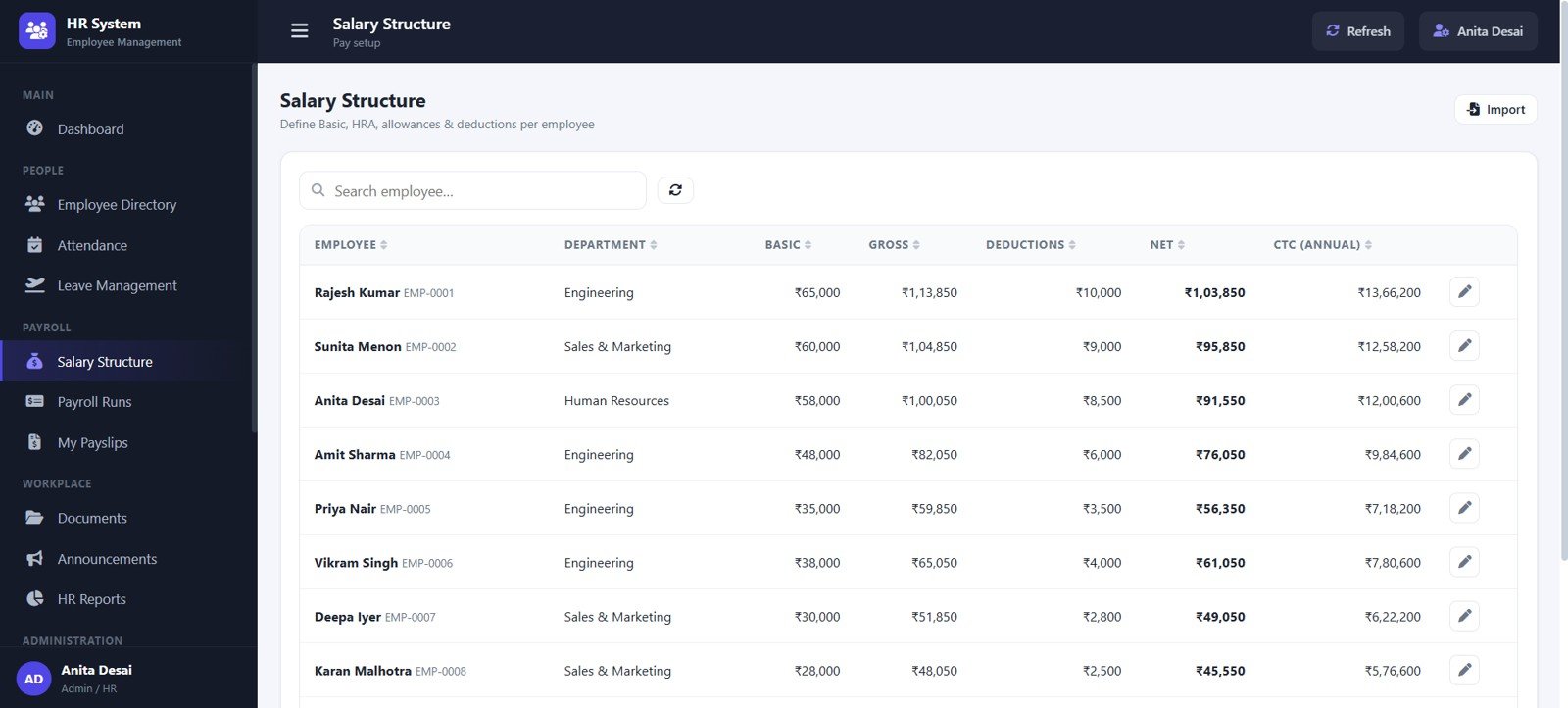
- Salary structure: Store basic pay, gross salary, deductions, net pay, annual CTC, employee department, and salary details.
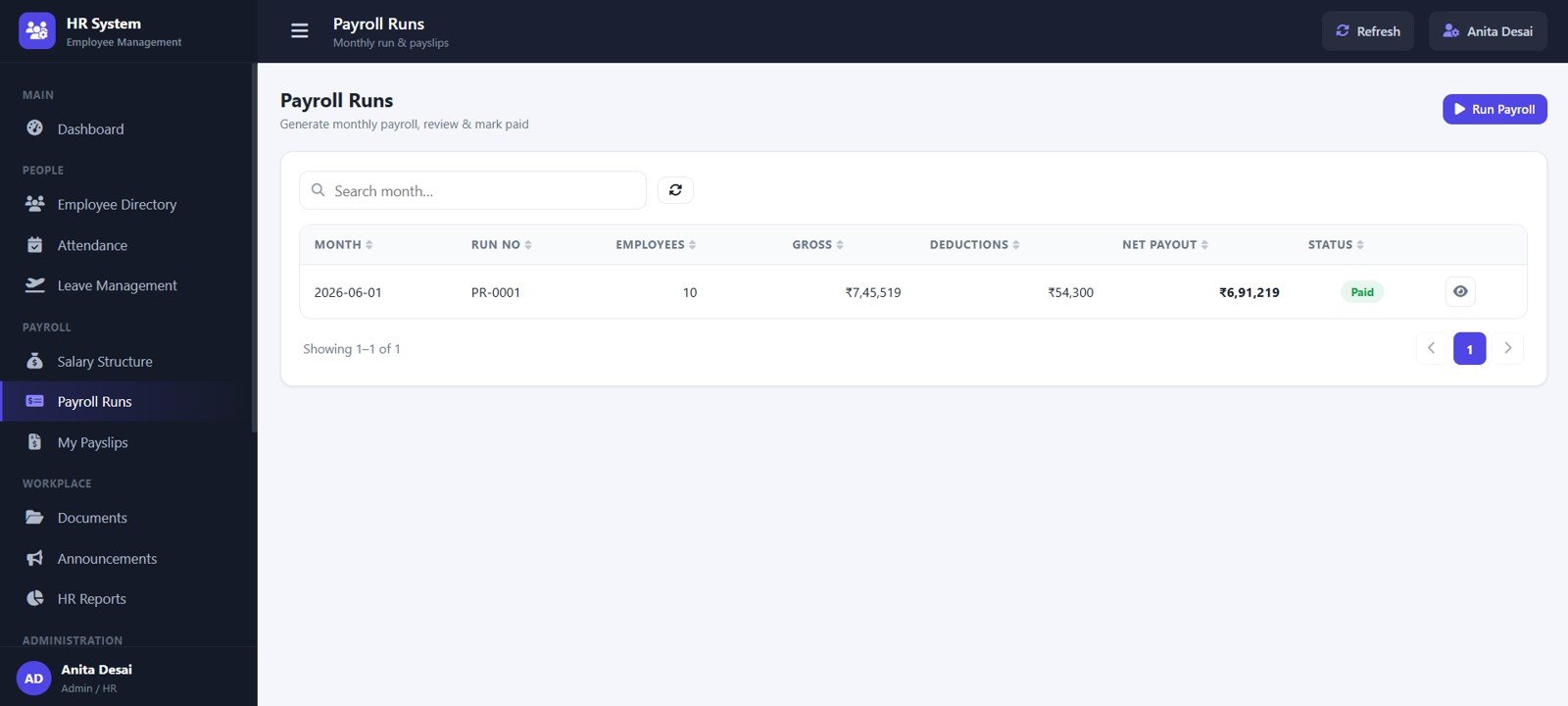
- Payroll runs: Review monthly payroll runs with employee count, gross pay, deductions, net payout, run number, and payroll status.
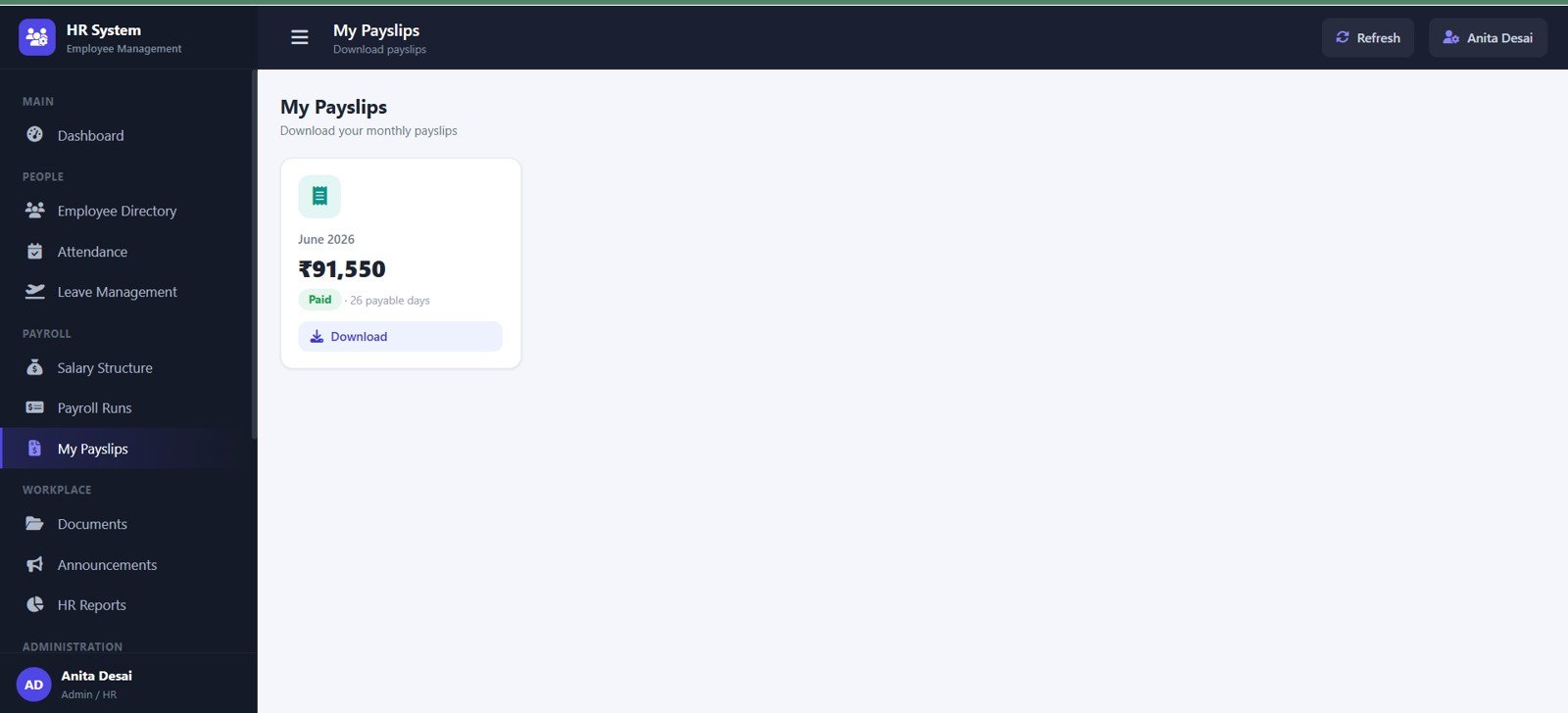
- Payslip access: Give users a structured payslip view by month, net salary, payable days, status, and download action.
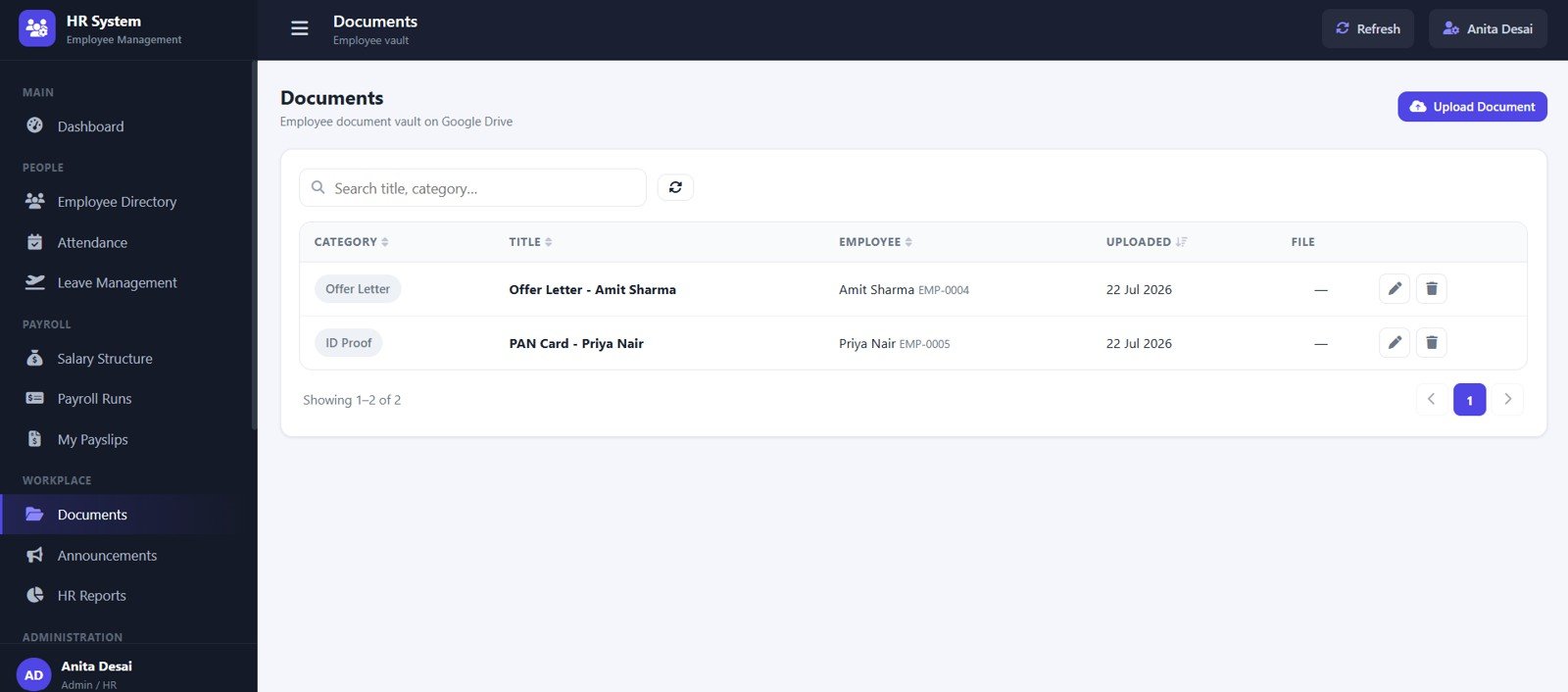
- Document management: Organize employee documents by category, title, employee, upload date, file, and actions.
- Announcements: Publish notices by title, department, audience, author, date, and action status.
- HR reports: Review directory, headcount, attendance, leave, payroll, joiner, and exit reports.
- Master data settings: Manage departments, designations, employment types, locations, document categories, banks, gender values, leave types, allowance heads, deduction heads, holidays, and active statuses.
- Audit log: Track user activity, module actions, record references, action details, and login activity.
Dashboard Pages Explanation
1. Login Page
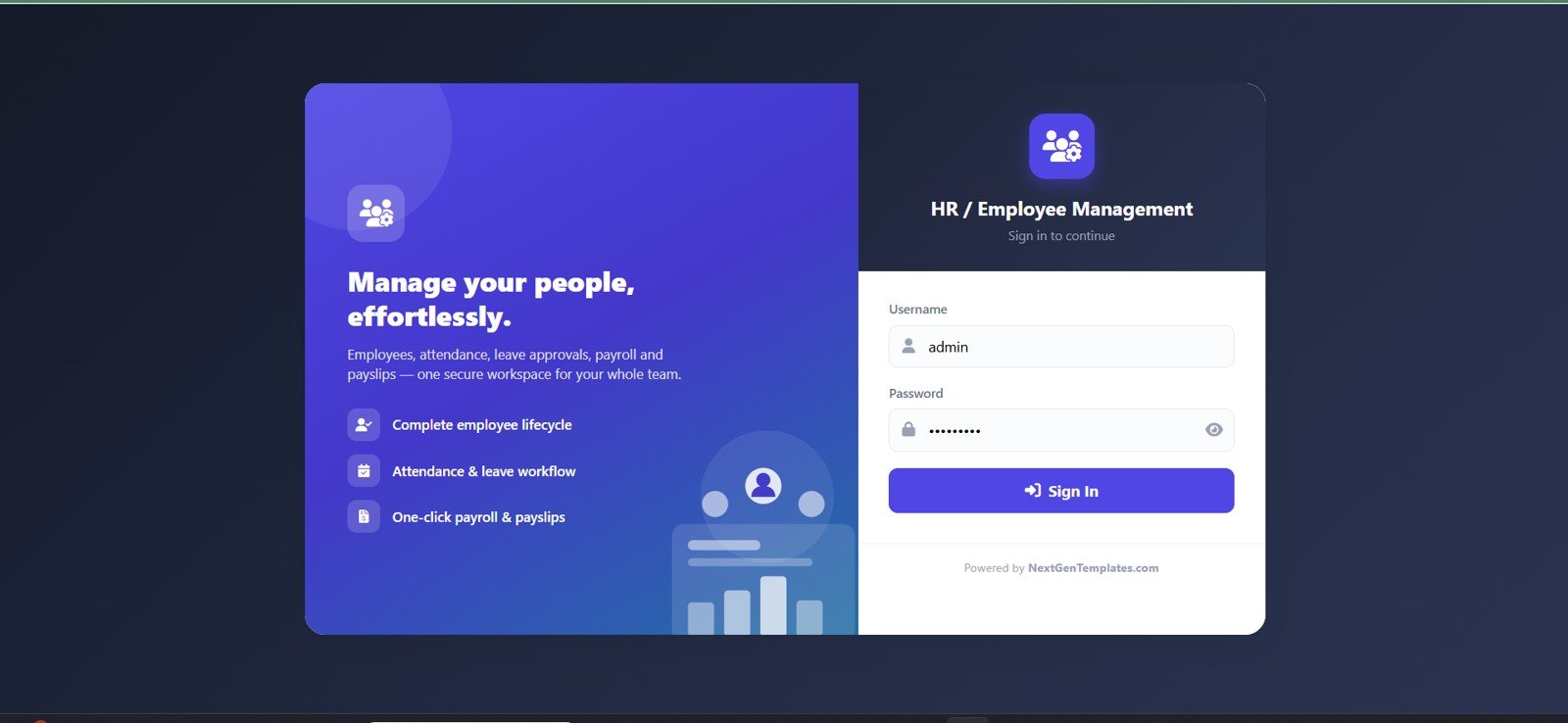
The login page gives the HR system a controlled entry point. It introduces the workspace with cards for managing people, employee lifecycle workflows, attendance and leave processing, payroll, payslips, and username-password sign in.
The page also frames the core system around secure login by user role, employee lifecycle features, and attendance, leave, and payroll workflows.
2. Dashboard Overview
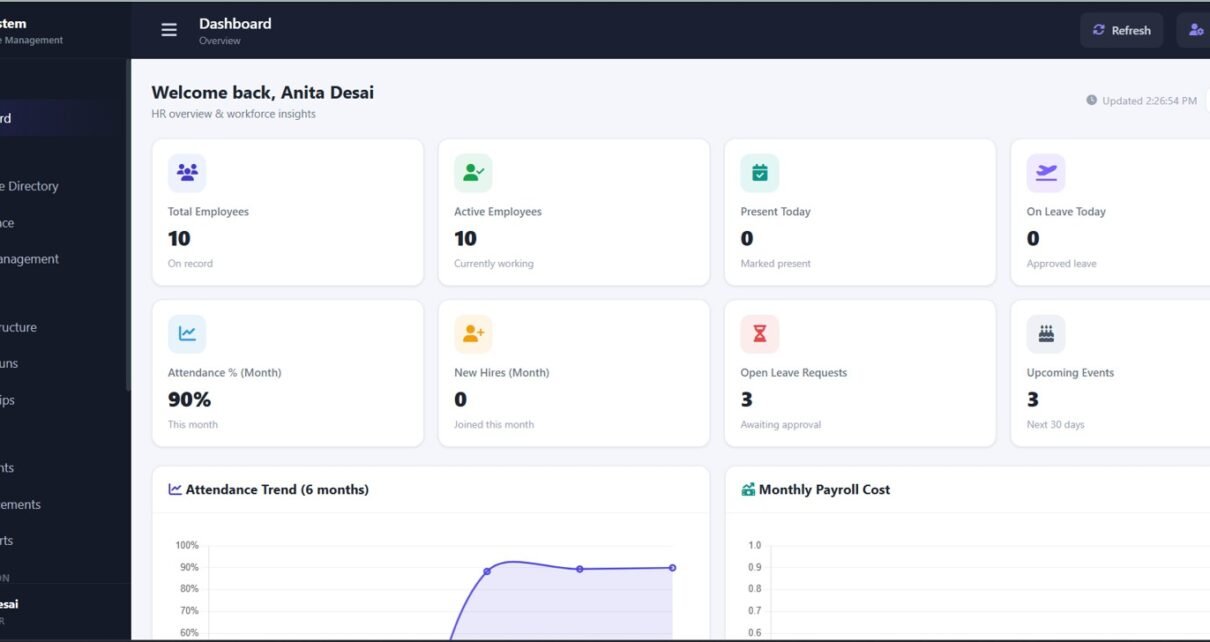
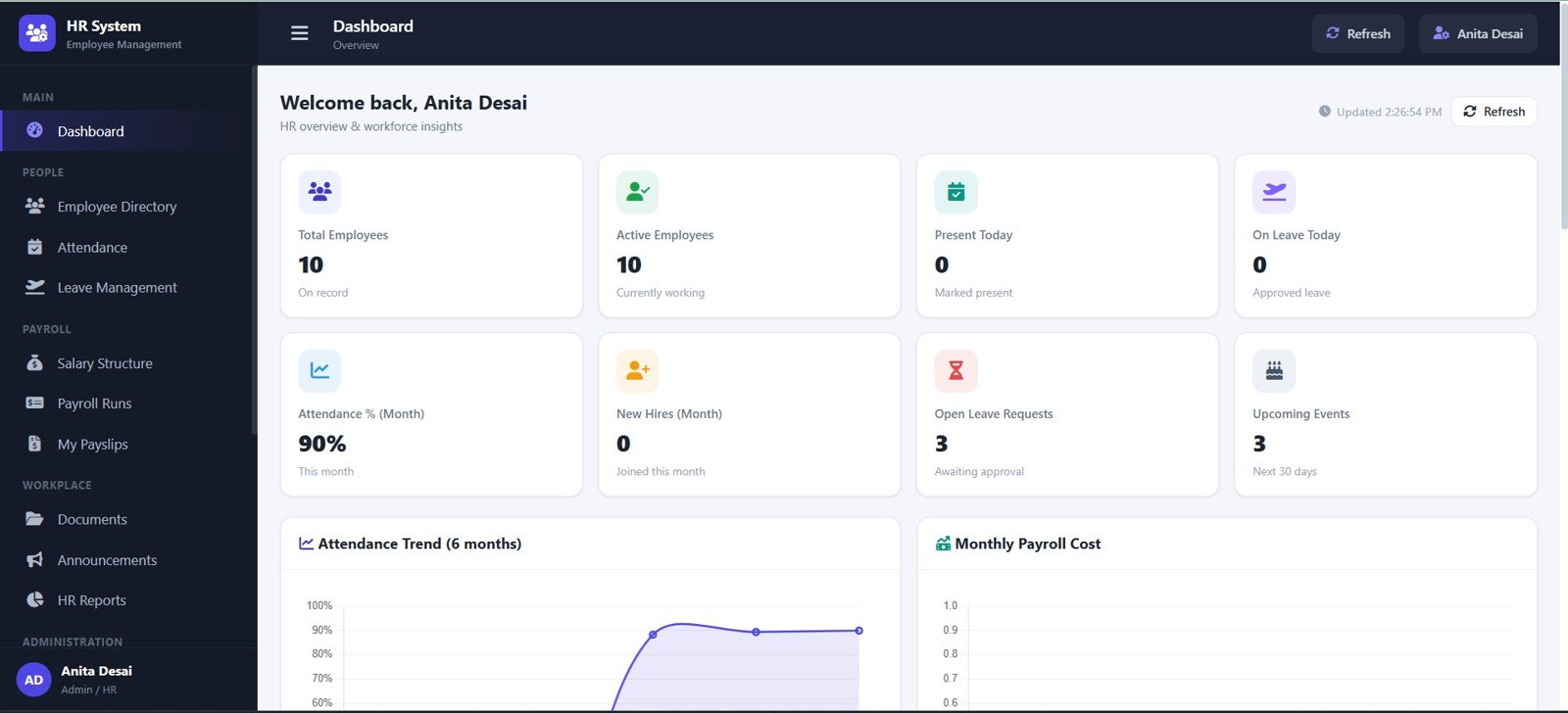
The dashboard overview is the executive landing page for HR operations. It highlights total employees, active employees, present today, on leave today, attendance percent by month, new hires by month, open leave requests, upcoming events, attendance trend, and monthly payroll cost.
This view is especially useful for HR managers who need a quick workforce pulse before moving into employee records, attendance, leave, or payroll details.
3. Employee Directory
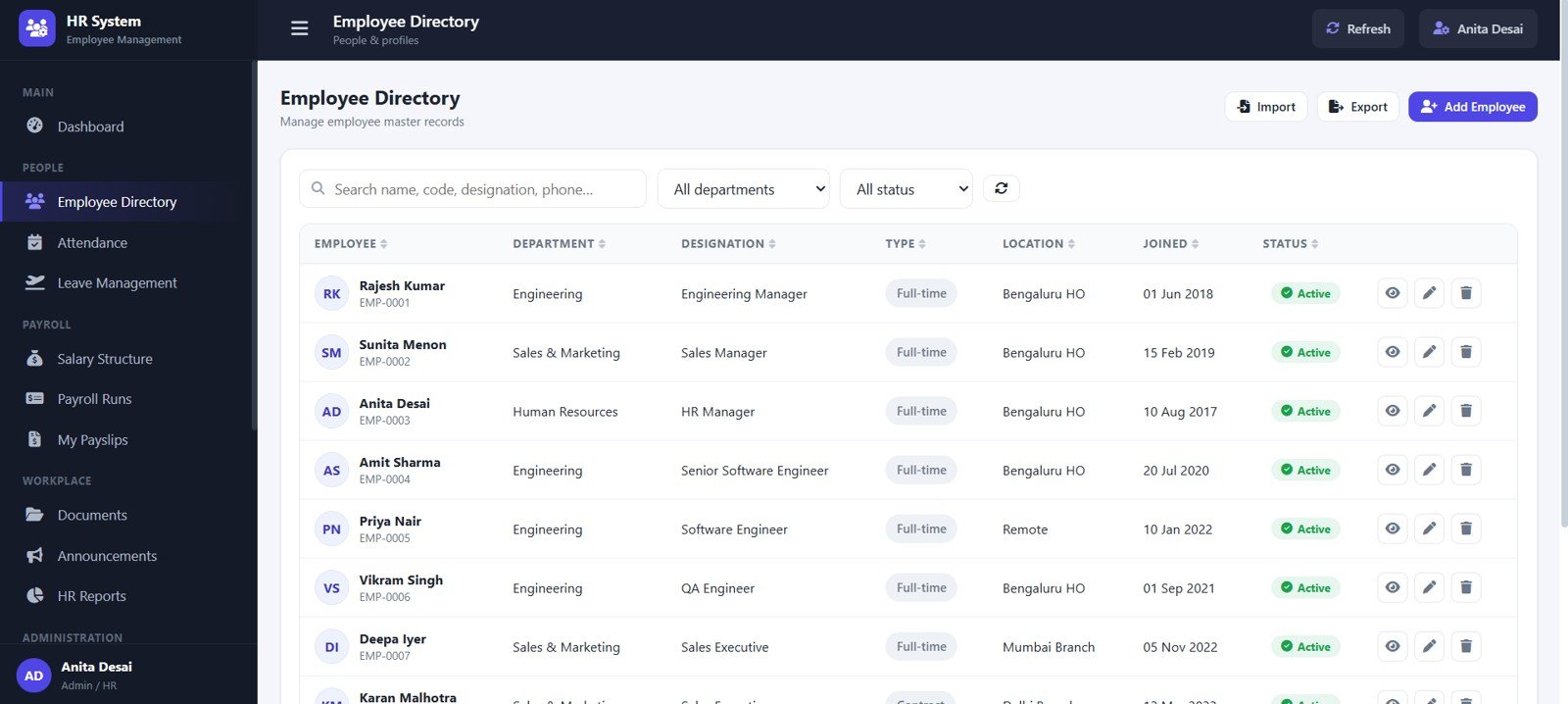
The employee directory centralizes employee records by department, designation, employment type, location, joined date, and status. Instead of maintaining separate lists for each department, the directory becomes the main employee master table.
Employee action controls help HR users view, edit, update, or manage the selected record from a structured interface.
4. Attendance
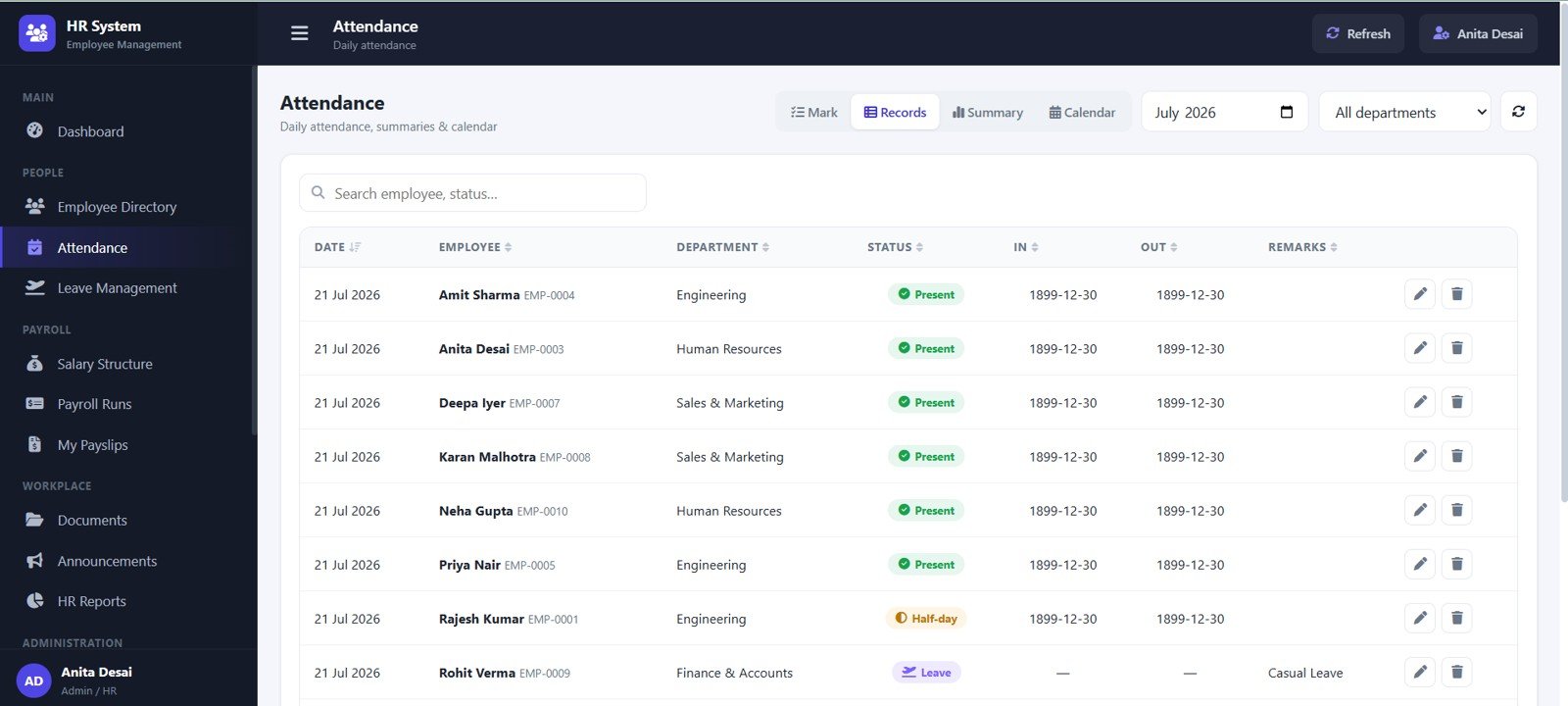
The attendance page records employee attendance by date, employee, department, attendance status, in time, out time, and remarks. It gives daily attendance a consistent structure so present, absent, late, remote, and other statuses can be tracked more cleanly.
For teams that depend on accurate attendance before payroll, this page helps connect daily records with downstream payroll and reporting workflows.
5. Leave Management
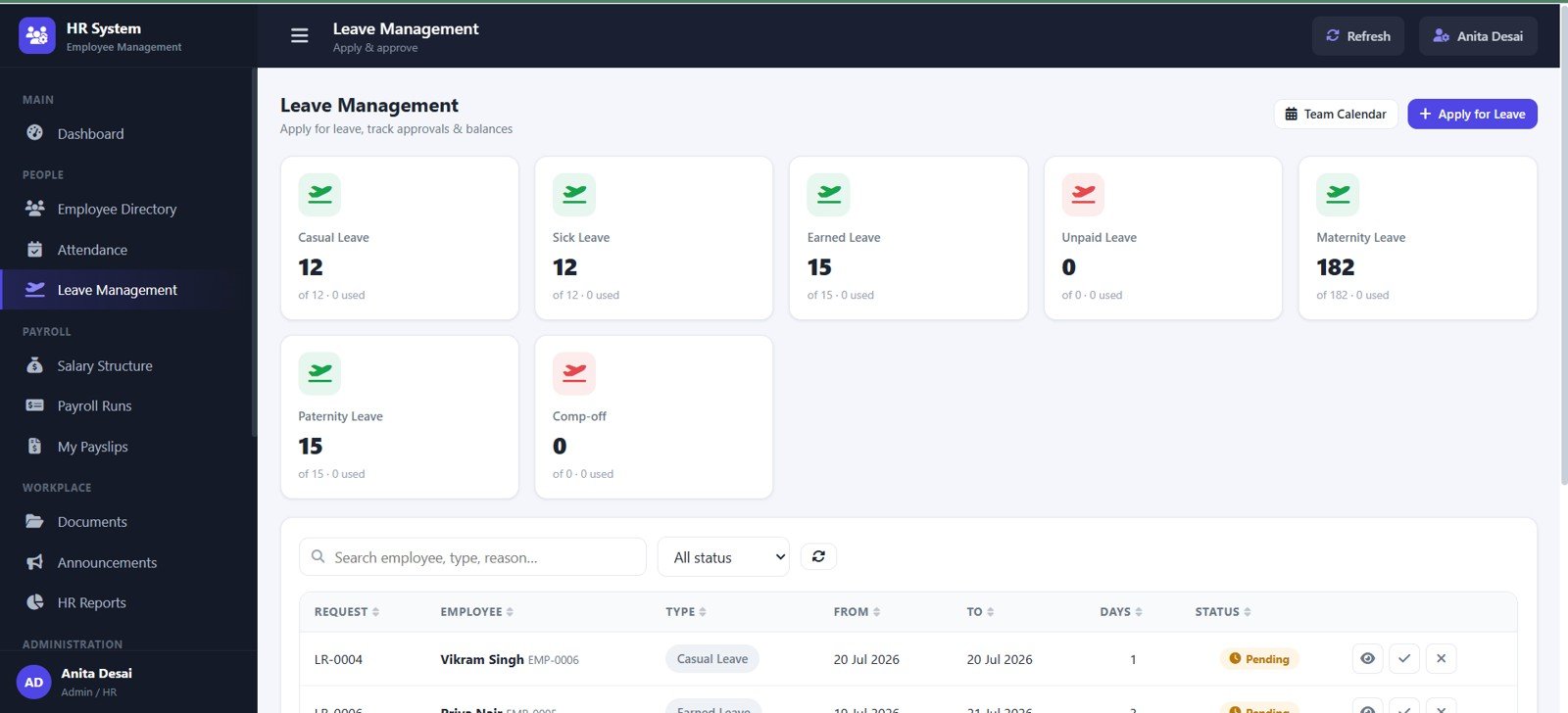
The leave management page tracks leave balance by leave type and leave requests by employee, leave type, date range, days, and approval status. HR users can manage leave actions by request instead of relying on scattered email approvals or informal message threads.
This view supports a cleaner leave workflow from request to approval to reporting.
6. Salary Structure
The salary structure page manages salary details by employee and department. It includes basic pay, gross salary, deductions, net pay, and annual CTC, giving payroll administrators a single reference point for compensation setup.
This page is useful when reviewing salary components before payroll runs or payslip generation.
7. Payroll Runs
The payroll runs page summarizes monthly payroll processing. It tracks payroll runs by month, run number, employee count, gross pay, deductions, net payout, and payroll status.
HR and finance users can use this page to check whether a payroll run is prepared, reviewed, finalized, or requires attention.
8. My Payslips
The My Payslips page gives users a focused view of payslips by month. It shows net salary by payslip, payable days, payslip status, and a download action.
This keeps employee-facing payroll information easier to access without exposing unrelated admin records.
9. Documents
The documents page organizes employee files by category, title, employee, upload date, document file, and record actions. It can support onboarding documents, identity records, policy acknowledgements, certificates, and other HR files.
Because document records are tied to employees and categories, teams can find the right file faster during audits, onboarding checks, or internal reviews.
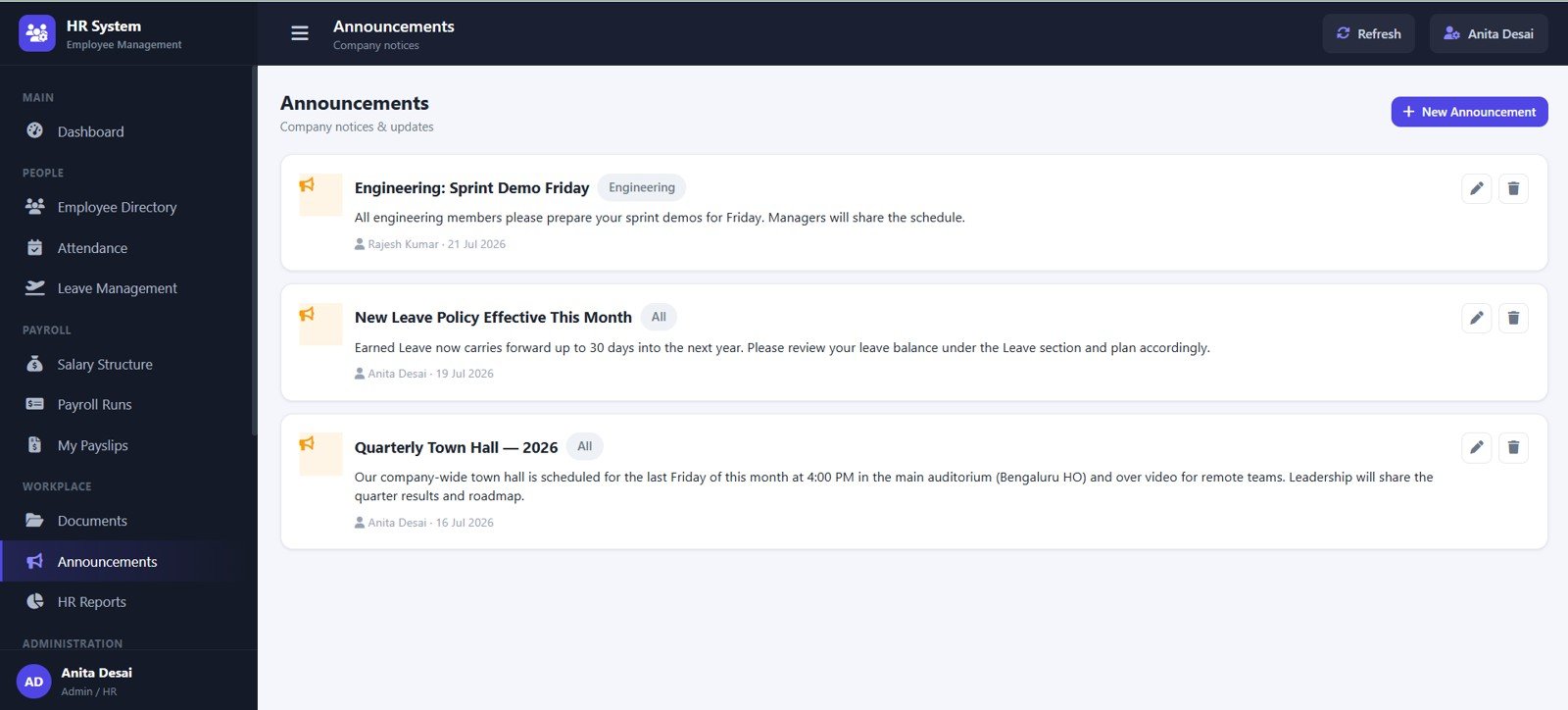
10. Announcements
The announcements page gives HR a structured place for notices. Announcements can be organized by title, department, audience, author, date, and action status.
This is useful for policy updates, holiday notices, internal events, payroll reminders, attendance instructions, or department-specific messages.
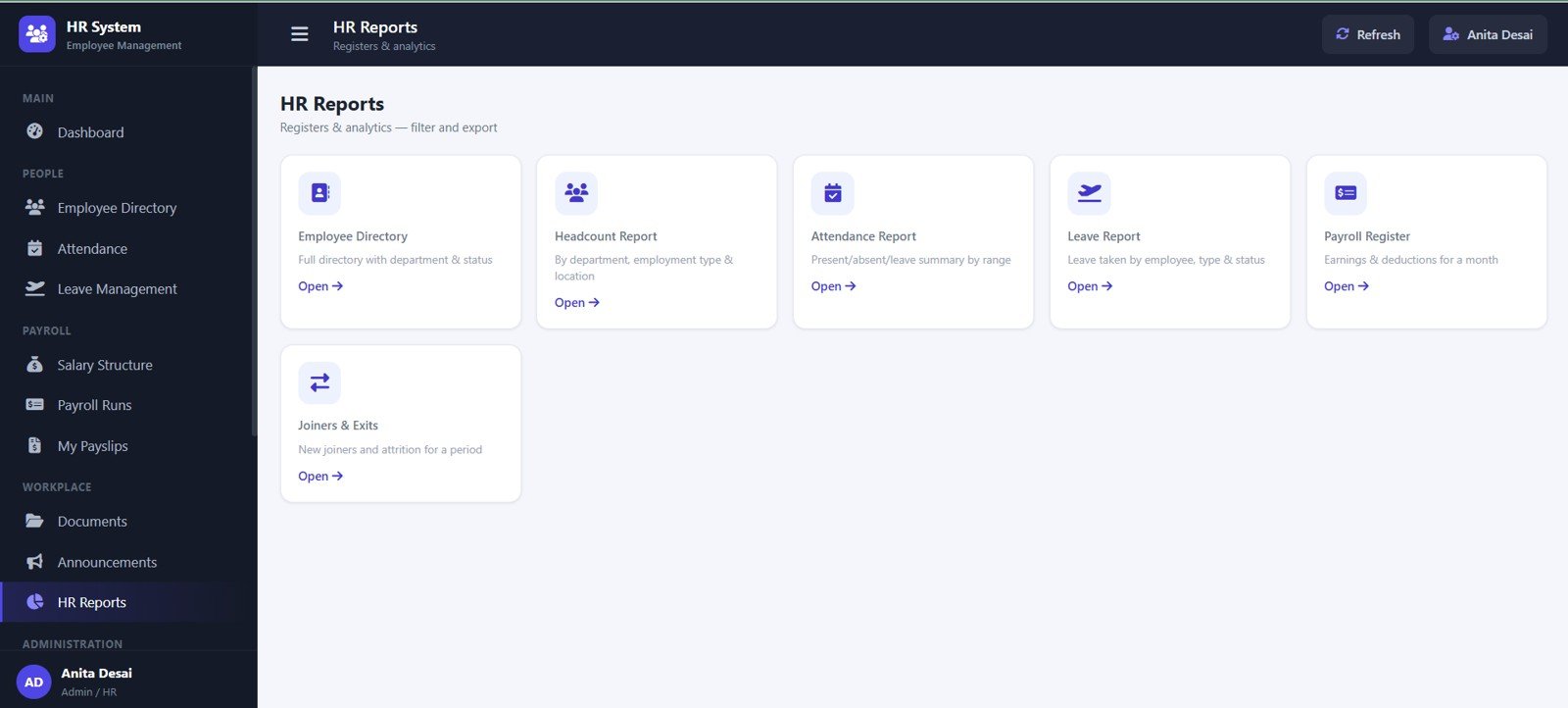
11. HR Reports
The HR reports page brings operational reporting into one place. It includes employee directory reporting by department and status, headcount reporting by department, type, and location, attendance reports by date range, leave reports by employee type and status, payroll register by month, and joiners and exits by period.
This view is designed for recurring HR reporting, management reviews, and compliance-ready summaries.
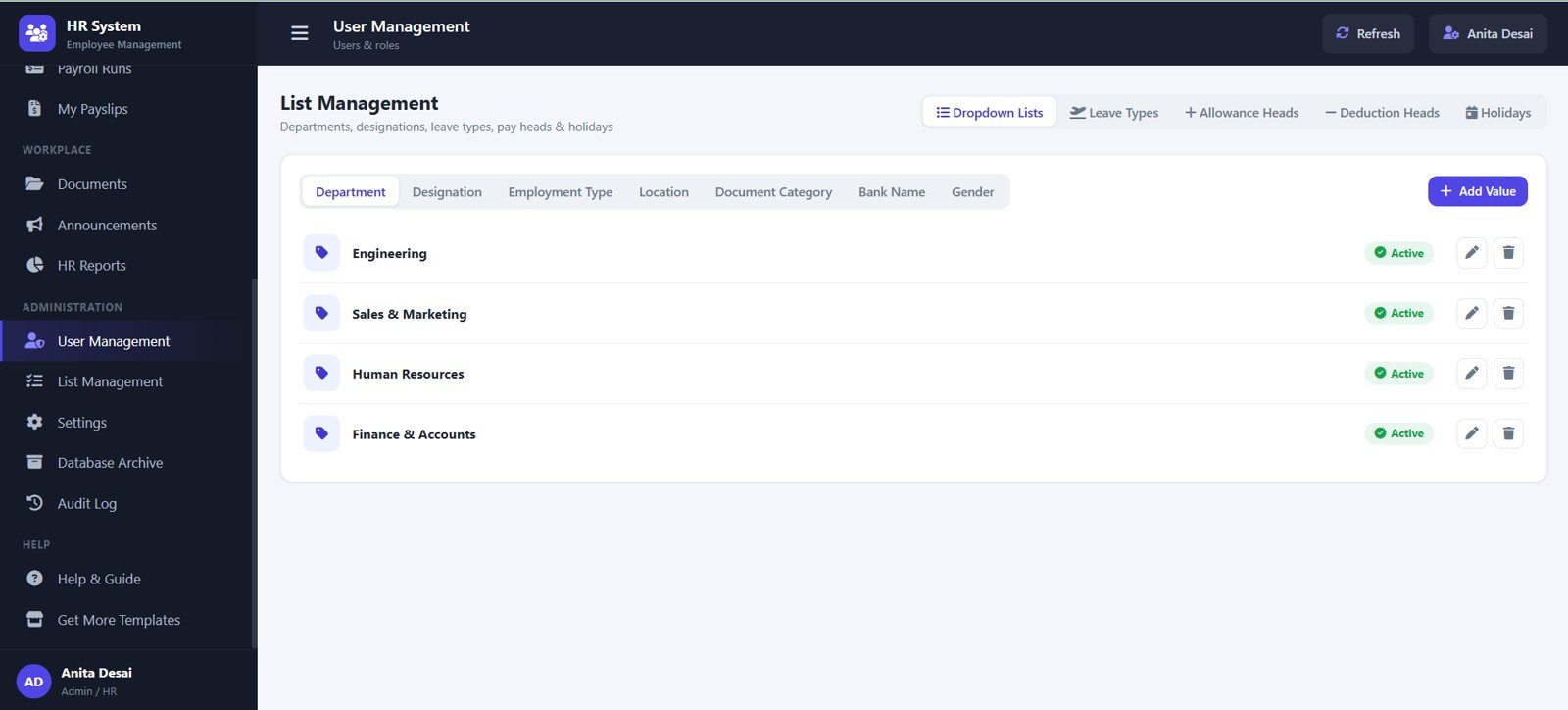
12. User Management
The user management page supports admin master values and controlled lists. It includes dropdown lists, leave types by status, allowance heads by status, deduction heads by status, holidays by calendar, and master values by active status.
Clean master data reduces inconsistency across employee records, attendance, payroll, reports, and settings.
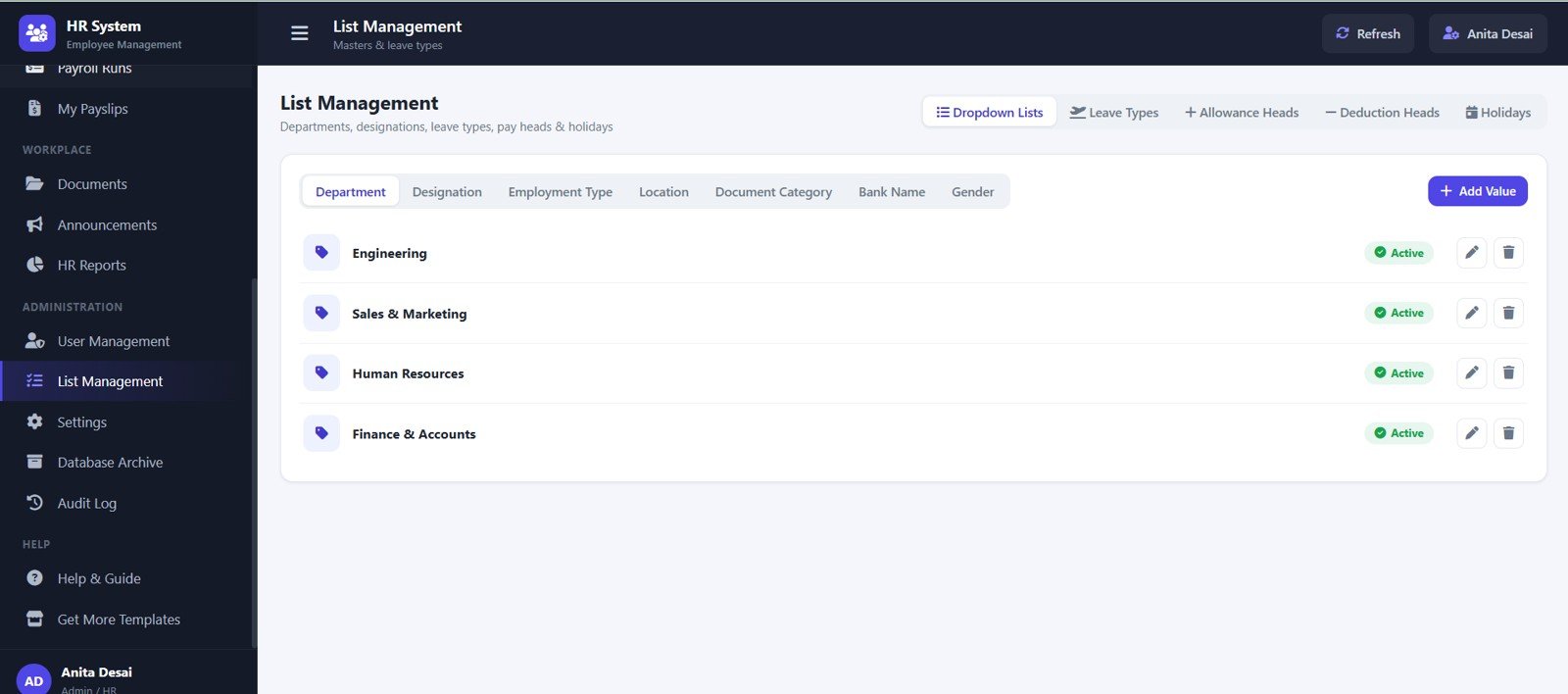
13. List Management
The list management page controls departments, designations, employment types, locations, document categories, bank names, and gender values. Each master list can support cleaner data entry across the app.
Teams can use this page to keep dropdown values consistent as the organization grows or changes.
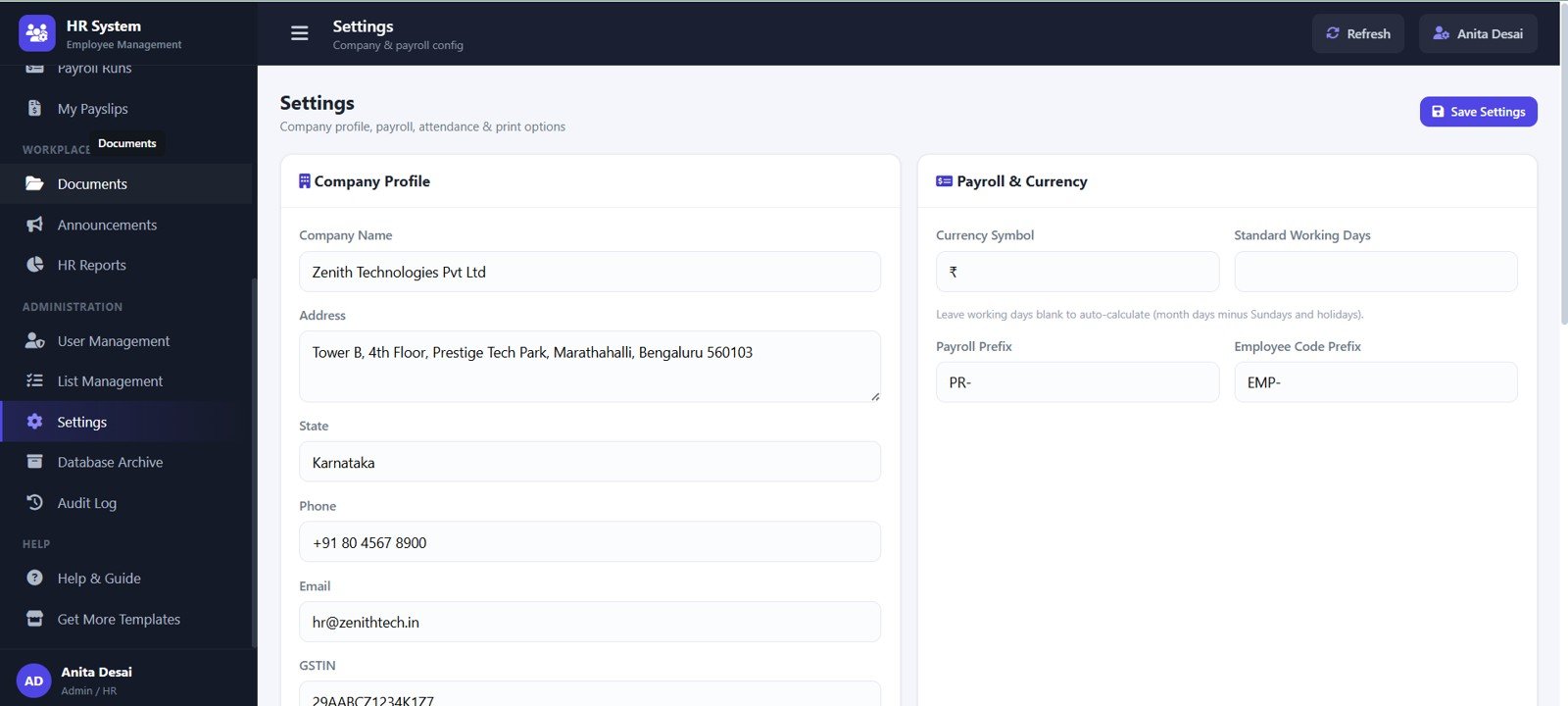
14. Settings
The settings page handles company-level configuration. It includes company profile details, payroll currency, working days, payroll prefix, employee code prefix, and GSTIN.
This gives admins a place to align the system with company identity and payroll conventions before teams start entering transactional records.
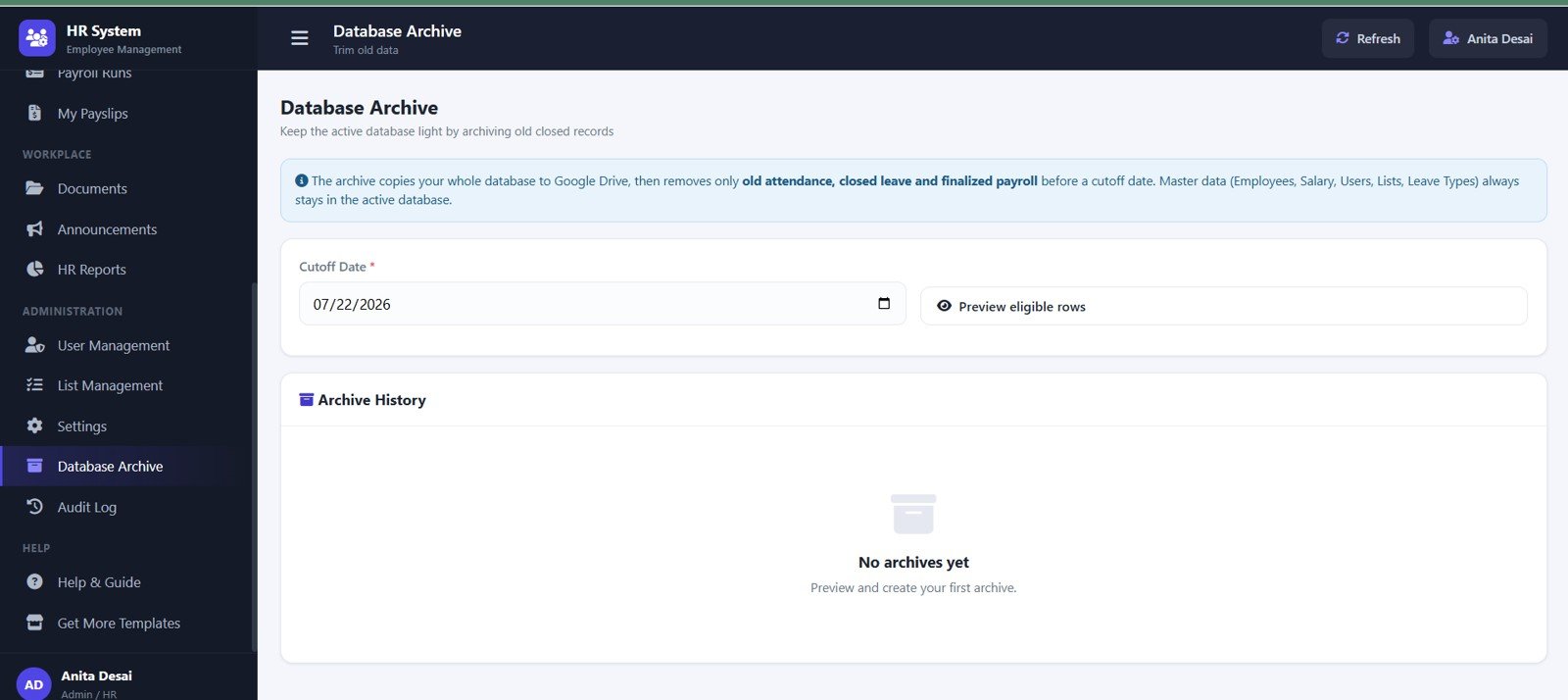
15. Database Archive
The database archive page helps administrators handle older operational data. It includes archive database by cutoff date, eligible rows by preview, old attendance by archive rule, closed leave by archive rule, finalized payroll by archive rule, and archive history by run.
This is valuable for keeping active working files lighter while retaining a structured archive trail.
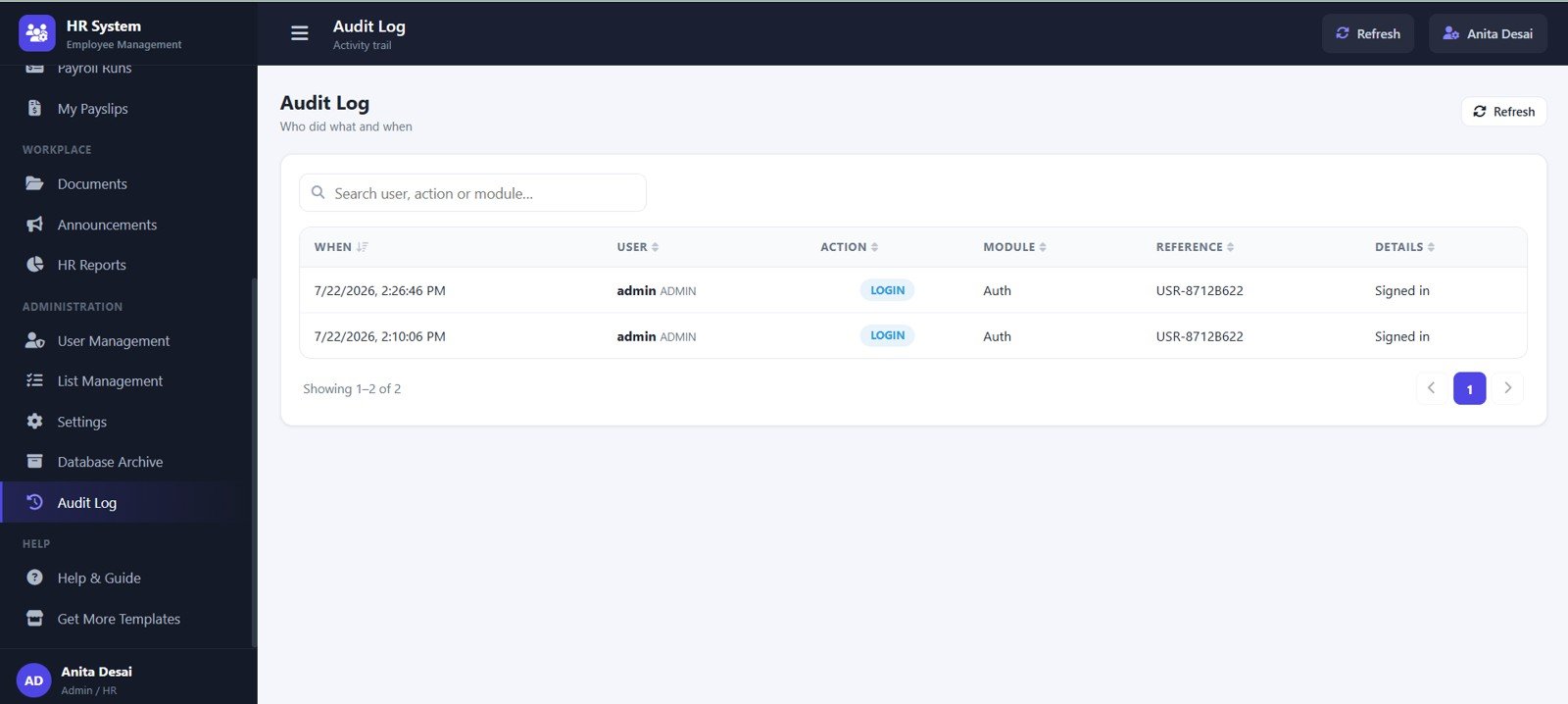
16. Audit Log
The audit log page records activity by date and time, user, module action, record reference, action details, and login activity. It gives administrators better traceability for changes made inside the HR system.
For growing teams, audit logs are important because they create visibility into who changed what and when.
HR Employee Management System Web App vs. Spreadsheet Tracker vs. Paid HR SaaS
| Feature | HR Employee Management System Web App | Basic Spreadsheet Tracker | Paid HR SaaS |
|---|---|---|---|
| Employee directory | Structured web app records with actions | Manual rows and filters | Usually included |
| Attendance workflow | Attendance by date, employee, department, status, time, and remarks | Manual daily sheet updates | Usually included |
| Leave management | Balances, request dates, days, status, and actions | Often separate tabs or emails | Usually included |
| Payroll support | Salary structure, payroll runs, payslips, and payroll reports | Manual calculations and reconciliations | Usually included, often subscription based |
| Document tracking | Documents by category, employee, upload date, file, and action | Folder links or manual notes | Often included |
| Audit trail | Audit log and login activity views | Limited unless manually maintained | Usually included |
| Cost model | One-time template purchase | Low cost but high manual effort | Recurring monthly or annual subscription |
| Customization | Editable Google Sheets and Apps Script foundation | Easy to edit but easy to break | Depends on vendor plan |
Who Should Use This Template
- Small and medium businesses that need a structured HR system without a full SaaS rollout.
- HR consultants who manage employee records for multiple clients.
- Schools, institutes, clinics, agencies, warehouses, and service businesses that need attendance and payroll visibility.
- Startup founders and operations managers who want a practical employee management system before moving to enterprise HR software.
- Google Workspace users who prefer a web app experience backed by Google Sheets.
Real-World Use Cases
- Monthly payroll preparation: Use attendance, leave, salary structure, and payroll runs together before generating payslip records.
- Employee onboarding: Add employee records, document categories, joining details, department, designation, and employment type from one system.
- Leave approvals: Track leave requests, leave types, date ranges, days, approval status, and leave actions.
- HR reporting: Prepare headcount, attendance, leave, payroll, joiner, and exit reports for management meetings.
- Compliance review: Use documents, archive history, and audit log records to review historical actions and employee file completeness.
Advantages of HR Employee Management System Web App
- One connected HR workflow: Employee records, attendance, leave, payroll, payslips, documents, announcements, reports, settings, archives, and audit logs sit in the same system.
- Spreadsheet-backed flexibility: Teams can benefit from Google Sheets data access while using a cleaner web app interface for daily work.
- Lower ownership cost: A one-time template can be easier to justify than recurring HR software fees for smaller teams.
- Manager-friendly reporting: The dashboard and HR reports summarize workforce status, attendance trends, payroll cost, leave requests, and upcoming events.
- Admin control: Master lists and settings help standardize departments, designations, locations, leave types, payroll values, and company profile details.
Opportunities for Improvement
- Policy customization: Every company has different leave policies, payroll rules, approval paths, and document requirements, so admins should review the setup before production use.
- Permission review: Before deploying to a live team, confirm that role access, sheet sharing, and Apps Script deployment settings match your internal security process.
- Data migration: Historical HR data should be cleaned before import so departments, designations, employee codes, leave types, and payroll fields remain consistent.
- Local compliance: Payroll, tax, labor, privacy, and record retention rules vary by country and company. Treat the template as an operational system, not legal or payroll advice.
Best Practices Before Using the Template
- Start by updating company profile, payroll currency, working days, employee code prefix, payroll prefix, and GSTIN if applicable.
- Clean master lists before adding employees so dropdown values stay consistent.
- Import employee records in small batches and review department, designation, location, employment type, joining date, and status.
- Test attendance, leave request, payroll run, payslip, document, announcement, report, archive, and audit workflows with sample data first.
- Keep a backup copy of your Google Sheets database before making major structural changes.
- Limit edit access to administrators who understand the workbook and Apps Script structure.
Explore Relevant Templates
- HR Employee Management System Web App – the full web app template covered in this review.
- HR & Workforce Analytics Bundle – a bundle for HR reporting, workforce analytics, and dashboard workflows.
- Employee Attendance Payroll Management System – a related HR web app focused on attendance and payroll management.
- Browse Web App Templates – explore more Google Sheets based web app systems.
To get more from the spreadsheet side of an HR system, the NextGenTemplates Academy learning paths offer guided lessons and practice files for trackers and templates.
Frequently Asked Questions
Is this an HR software subscription?
No. This is a downloadable web app template designed for a one-time purchase. It gives you a ready-made system that can be customized for your own HR workflow.
Does it use Google Sheets?
Yes. The system is designed around a Google Sheets and Google Apps Script style workflow, giving teams a browser-based app experience while keeping data accessible in spreadsheet form.
Can I manage attendance and leave in the same system?
Yes. The template includes attendance records, attendance status, in and out time, leave balances, leave requests, approval status, and leave request actions.
Does it include payroll and payslips?
Yes. It includes salary structure, payroll runs, payroll status, net payout, payslips by month, payable days, payslip status, and payslip download action.
Can I use it for multiple departments and locations?
Yes. The directory, reporting, and master data pages support departments, designations, employment types, locations, and other list values.
Is it ready for every country payroll rule?
No template can automatically cover every local payroll, tax, labor, and compliance requirement. Review and customize the setup before using it for live payroll decisions.
Author
Built by PK – Microsoft Certified Professional with 15+ years of Excel, Google Sheets, and Power BI experience. Founder of NextGenTemplates, reaching 300K+ subscribers across YouTube channels. Every template is hand-built and tested before release.
Conclusion
The HR Employee Management System Web App is built for teams that want a structured HR operating system without committing to a heavy subscription platform. It gives HR users practical pages for employee records, attendance, leave, payroll, payslips, documents, announcements, reporting, user management, list management, settings, archive control, and audit activity.
For small businesses and operations teams that already work in Google Workspace, it can be a strong middle ground between fragile spreadsheets and expensive HR software.
Get the HR Employee Management System Web App
Last updated: July 22, 2026.