Fuel tracking looks simple until the monthly review starts. A missing odometer reading, one inconsistent fuel type label or a few unreviewed driver entries can hide real fleet cost problems. Fuel is also one of the largest running costs for any fleet: ATRI’s 2025 operational cost update put average US motor-carrier fuel costs at 48.1 cents per mile in 2024.
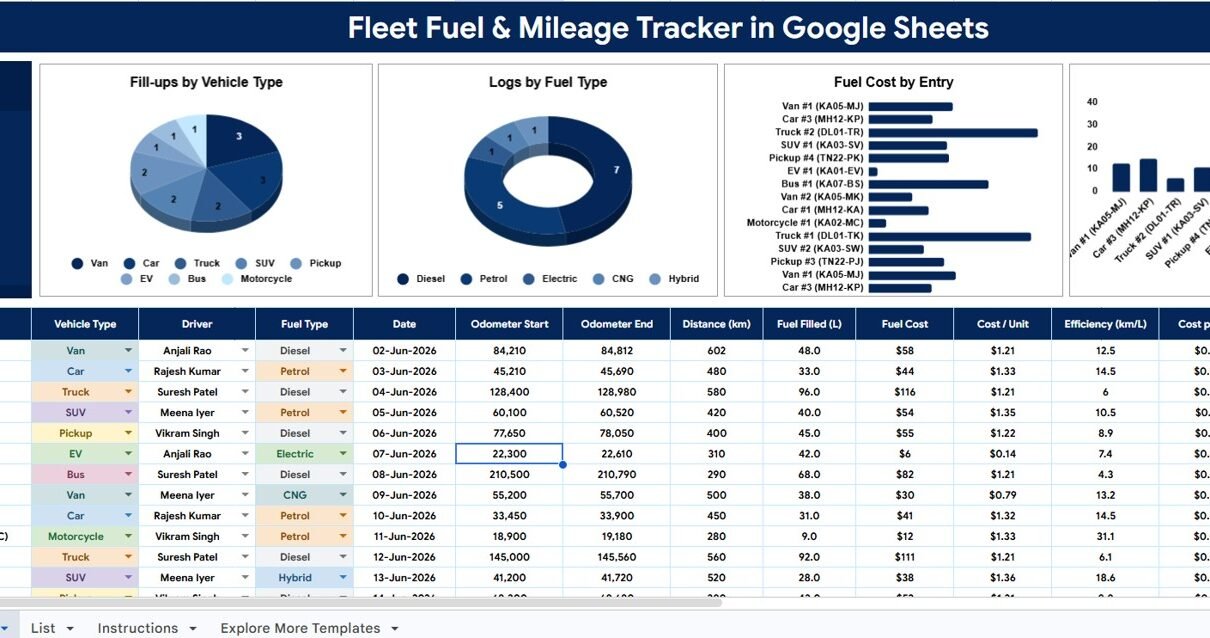
The Fleet Fuel and Mileage Tracker in Google Sheets gives small and mid-size fleet teams a practical way to log every fill-up and see fuel cost, distance, km/L efficiency and cost per km by vehicle, without paying for monthly fleet software. It combines a fuel log with four summary charts on the main tracker page, plus a List sheet that keeps vehicle types, drivers, fuel types and statuses consistent.
Get the Fleet Fuel and Mileage Tracker
Key Features of the Fleet Fuel and Mileage Tracker in Google Sheets
- Total Fuel Cost card: the headline fuel spend at the top of the tracker page.
- Fill-ups by Vehicle Type: compare refuelling activity across vans, cars, trucks, SUVs, pickups, EVs, buses, motorcycles and other vehicle types.
- Logs by Fuel Type: separate Diesel, Petrol, Electric, CNG and Hybrid entries (LPG is also in the list).
- Fuel Cost by Entry: spot unusually expensive fill-ups before they distort monthly reporting.
- Efficiency (km/L) by Vehicle: compare mileage across vehicles and flag low-efficiency units.
- Automatic calculations: distance, cost per unit, km/L and cost per km are worked out from each log row.
- Dropdown-driven entry: Vehicle Type, Driver, Fuel Type and Status use dropdowns fed by the List sheet.
- Google Sheets collaboration: share the file with finance, drivers, admin staff and operations managers using Drive permissions.
What the Tracker Calculates for Each Fill-Up
Each row in the fuel log records the vehicle, driver, fuel type, date, odometer readings, litres filled and fuel cost. The tracker then works out four columns. The examples below use the first sample row (Van #1, 48.0 L of diesel for $58):
| Column | Calculation | Example |
|---|---|---|
| Distance (km) | Odometer End − Odometer Start | 84,812 − 84,210 = 602 km |
| Cost / Unit | Fuel Cost ÷ Fuel Filled (L) | $58 ÷ 48.0 = $1.21 per litre |
| Efficiency (km/L) | Distance ÷ Fuel Filled (L) | 602 ÷ 48.0 = 12.5 km/L |
| Cost per km | Fuel Cost ÷ Distance | $58 ÷ 602 = $0.10 per km |
Because these columns are calculated for you, the only numbers anyone has to type are the two odometer readings, the litres filled and the amount paid.
Tracker Pages Explained
1. Fleet Tracker (Overview) Page
The main tab holds both the dashboard and the fuel log. At the top, the Total Fuel Cost card shows overall fuel spend, so managers know the cost position before they look at the charts. Below the charts sits the log table with Log ID, Vehicle / Reg No., Vehicle Type, Driver, Fuel Type, Date, Odometer Start, Odometer End, Distance (km), Fuel Filled (L), Fuel Cost, Cost / Unit, Efficiency (km/L), Cost per km and Status.
Fill-ups by Vehicle Type: shows how many fill-up records belong to each vehicle type. If one type has unusually high fill-up volume, the team can review route assignments, vehicle allocation and driver behaviour. It is especially useful for mixed fleets.
Logs by Fuel Type: groups logs by fuel type, which keeps mixed-fuel fleets readable and helps finance see the split of fuel activity. When fuel names are consistent, the summaries stay reliable from one review to the next.
Fuel Cost by Entry: shows fuel cost for each log entry, so managers can quickly spot fill-ups that look unusually high. Those entries may be valid, but they deserve a check: larger tanks, long routes, missed earlier logs, wrong quantities or data-entry mistakes can all cause them.
Efficiency (km/L) by Vehicle: compares mileage efficiency vehicle by vehicle. Low km/L values can point to maintenance issues, heavy loads, idling, poor routing, driving style or odometer errors. Because the chart is vehicle-specific, managers can see which units need attention instead of relying on one fleet average.

2. List Sheet
The List sheet is the setup tab behind the dropdowns. It stops inconsistent labels from damaging the analysis, because every option is maintained in one place.
Vehicle Type: Car, Van, SUV, Truck, Pickup, Bus, Motorcycle, EV, Tractor and Forklift by default. Replace or extend them to match your fleet.
Driver: keeps driver names consistent across records, which helps when finance or operations reviews fuel entries by person.
Fuel Type: Petrol, Diesel, CNG, Electric, Hybrid and LPG. Clear fuel labels make the Logs by Fuel Type chart easier to trust.
Status: Logged, Reimbursed and Pending, so the tracker supports both operations and reimbursement review.

The workbook also includes an Instructions tab with guidance on using the tracker.
Fleet Fuel and Mileage Tracker in Google Sheets vs. Excel Tracker vs. Fleet Software
| Feature | This Google Sheets Tracker | Microsoft Excel Tracker | Paid Fleet Software |
|---|---|---|---|
| Cost | One-time purchase | Template cost or internal build time | Usually recurring per vehicle or per user |
| Platform | Google Sheets in Drive | Excel desktop or Excel Online | Vendor-hosted web application |
| Setup time | Copy template, update lists, enter logs | Open workbook or build formulas | Account setup, data import, training |
| Real-time team collaboration | Native Google Sheets sharing | Depends on Microsoft 365 setup | Usually available by plan |
| Customizable fields | Edit lists, labels and columns | Editable if the workbook is unlocked | Often limited by vendor structure |
| km/L and cost per km by vehicle | Included | Requires formula setup | Usually included |
| GPS, telematics, fuel-card sync | No | No | Often included |
Who Should Use This Template
This template suits delivery companies, school transport offices, logistics teams, service fleets, field sales teams, construction vehicle coordinators, NGOs, facilities teams and small businesses that want better control over fuel spend.
It works best when the team is comfortable entering or pasting fuel logs into Google Sheets, and when managers want flexible analysis without asking a software vendor to change fields or reports.
It is not the right tool for fleets that need GPS tracking, live fuel-card integration, telematics, route optimisation or enterprise compliance controls. In those cases it can still serve as a lightweight review sheet for exports, but it should not replace a specialist system.
Real-World Use Cases
Ravi, delivery fleet coordinator: reviews Fuel Cost by Entry every Friday to find unusually expensive fill-ups before closing the weekly fuel report.
Meera, office admin: maintains driver names and vehicle types on the List sheet so monthly reimbursement records stay clean for finance, and marks paid entries as Reimbursed.
Daniel, school transport manager: checks Efficiency (km/L) by Vehicle each month and schedules inspections for buses that show lower mileage than expected.
Advantages of the Fleet Fuel and Mileage Tracker in Google Sheets
- Lower software cost: a one-time template instead of recurring fleet software fees.
- Fast implementation: copy the sheet, update the lists and start logging fuel.
- Shared visibility: managers and finance review the same file with controlled Drive access.
- Consistent dropdowns: List sheet values reduce spelling variations that break summaries.
- Vehicle-level insight: km/L and cost per km by vehicle point to possible maintenance or driving issues.
- Audit-friendly records: fuel logs, statuses, drivers and vehicle types stay in one structured file.
Limitations to Know
Like any spreadsheet tracker, it depends on accurate and timely data entry. Decide who logs fill-ups, who reviews unusual entries and how often the tracker page is checked.
Advanced teams may add columns for fuel station, payment method, receipt link, trip purpose, route or cost centre. Larger fleets could later connect a form or Apps Script automation, but the base template stays simple for day-to-day use.
Best Practices
- Log each fill-up as it happens instead of waiting until month end.
- Use one unit for quantity (litres) and one for distance (km) across every row.
- Look at the odometer readings for low km/L vehicles before blaming the driver or the vehicle.
- Let one person own the List sheet so dropdown values stay clean.
- Use the Status column (Logged, Pending, Reimbursed) to manage the reimbursement workflow.
- Protect the formula columns so accidental edits do not break the calculations.
Related Templates and Guides
For broader fleet analytics, see the Fleet Management Dashboard in Google Sheets, and for target tracking the Fleet Utilization KPI Dashboard in Google Sheets.
On NeoTech Navigators, you can read the full guides to the Fleet Management Dashboard and the Fleet Utilization KPI Dashboard. If your team also manages trip bookings, the Vehicle Reservation Tracker is a good companion, and the Fleet Maintenance Calendar helps you act on low-efficiency vehicles. For a full browser-based workflow, see the Vehicle Movement Register Management System Web App.
If you want to write calculations like km/L and cost per km yourself, the Excel AI Mastery 100 Formulas course on NextGenTemplates Academy covers the everyday formulas used in trackers like this.
Frequently Asked Questions
Does this tracker work in Google Sheets?
Yes. It is built for Google Sheets and is meant to be copied into your own Google Drive.
What pages are included?
The main Fleet Tracker page (the dashboard and fuel log), the List sheet for dropdown options, and an Instructions tab.
Which charts are included?
Fill-ups by Vehicle Type, Logs by Fuel Type, Fuel Cost by Entry and Efficiency (km/L) by Vehicle, plus a Total Fuel Cost card.
How is fuel efficiency calculated?
Distance divided by litres filled, where distance is Odometer End minus Odometer Start. For example, 602 km on 48.0 L gives 12.5 km/L.
Can I customize the vehicle type and fuel type lists?
Yes. The List sheet lets you edit vehicle types, driver names, fuel types and status options.
Does this replace fleet management software?
No. It is a spreadsheet tracker for fuel and mileage analysis. It does not include GPS, telematics, automatic fuel-card imports or route optimisation.
About the Author
Built by PK, a Microsoft Certified Professional with 15+ years of Excel, Google Sheets and Power BI experience. He founded NextGenTemplates, and its YouTube channels reach 300K+ subscribers. Every template is built by hand and tested before release.
Wrapping Up
The Fleet Fuel and Mileage Tracker in Google Sheets is a practical tool for teams that want clean fuel logs, mileage visibility, vehicle-level km/L comparison and better fuel cost review without a recurring software subscription. Set up your lists, log each fill-up with its odometer readings, and check the charts each week for unusual costs or falling efficiency.
Get the Fleet Fuel and Mileage Tracker
📅 Last updated: October 2026