Managing vehicle reservations manually can quickly become confusing, especially when multiple departments, drivers, and trip locations are involved. Organizations need a structured, automated, and easy-to-use system to handle requests, track status, monitor costs, and analyze vehicle usage.
The Vehicle Reservation Tracker in Google Sheets is a ready-to-use tool that simplifies this process. It provides real-time visibility into all reservations through automated charts, search features, and a clear, organized data structure.
Get the Vehicle Reservation Tracker in Google Sheets
In this article, we will explain everything about this tracker — its features, charts, benefits, improvement opportunities, best practices, and frequently asked questions.
What Is a Vehicle Reservation Tracker in Google Sheets?
A Vehicle Reservation Tracker is a centralized tool used to manage and monitor all vehicle booking activities. It helps organizations track reservation dates, departments, trip locations, assigned vehicles, trip costs, and reservation status — all inside Google Sheets.
With automated charts and a smart search function, it eliminates the need for manual tracking and makes fleet management smoother and more transparent.
Tracker Sheet Tab Overview
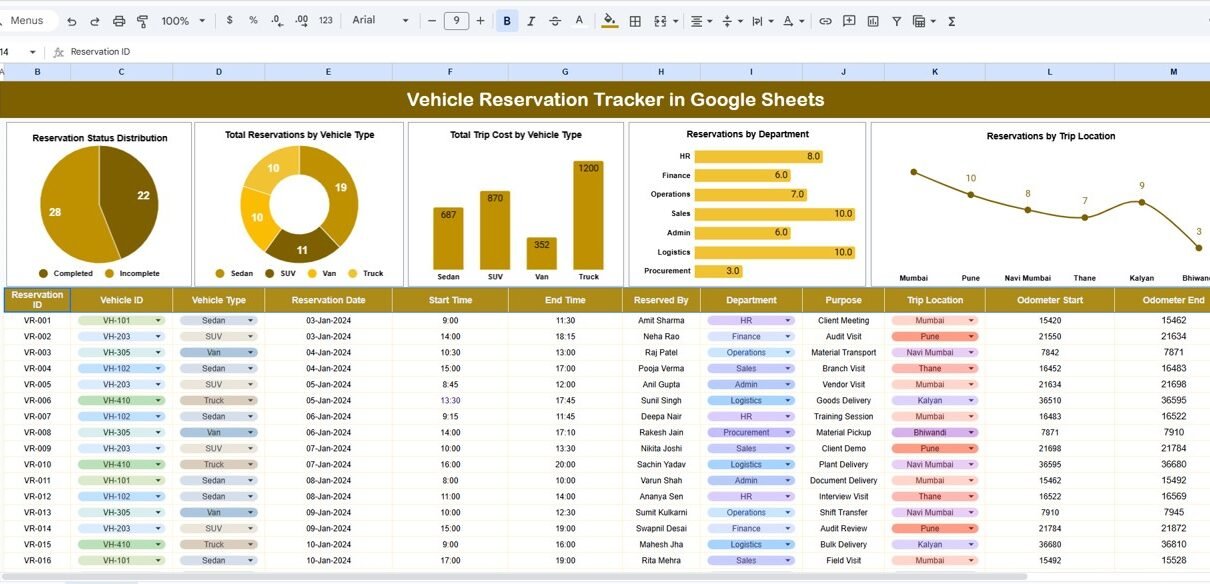
The Tracker Sheet Tab acts as the main dashboard of the tool. It provides visual insights into reservation patterns and vehicle usage.
It includes interactive charts that update automatically as you add or modify data in the Data Sheet.
The following charts help analyze vehicle reservation trends:
Reservation Status Distribution
Displays status categories such as:
-
Completed
-
Scheduled
-
Canceled
-
Pending
-
Rescheduled
This helps identify workload distribution and operational visibility.
Total Reservations by Vehicle Type
Shows how many reservations were made for different vehicle types such as:
-
Sedans
-
SUVs
-
Vans
-
Trucks
-
Motorbikes
Useful for understanding the demand and usage frequency of each vehicle category.
Total Trip Cost by Vehicle Type
Visualizes cost distribution by vehicle type.
This highlights high-cost vehicle categories and helps optimize budget allocation.
Reservations by Department
Shows which departments (HR, Sales, Operations, IT, Finance, etc.) use vehicles most frequently.
Helps plan budgets and allocate resources appropriately.
Reservations by Trip Location
Displays the number of trips to various locations such as:
-
Client Sites
-
Branch Offices
-
Warehouses
-
External Events
-
Field Work Areas
This helps track movement patterns and plan logistics more efficiently.

Search Sheet Tab
The Search Tab provides a convenient way to look up specific reservations quickly.
You can search by:
-
Vehicle Type
-
Driver Name
-
Department
-
Reservation Status
-
Trip Location
-
Reservation ID
-
Date
Simply type your keyword, and the tracker instantly displays matching records.
This is useful during audits, trip reviews, or scheduling meetings.

Advantages of the Vehicle Reservation Tracker
-
Centralized reservation management
-
Instant access to reservation trends
-
Cost analysis per vehicle type
-
Better planning for departments and fleet managers
-
Reduced scheduling conflicts
-
Improved transparency across teams
-
Real-time updates and cloud collaboration
-
Fully customizable and free to use
Opportunities for Improvement
Here are optional enhancements you can add to the tool:
-
Google Forms integration
Allow employees to submit reservation requests via a form. -
Email alerts
Auto-send notifications for approval or reminders for scheduled trips. -
Driver utilization report
Track how often each driver is assigned trips. -
Fuel cost tracking
Add columns for fuel consumption and cost per trip. -
Vehicle maintenance tracker
Link reservations with maintenance records to manage downtime. -
Geo-mapped trip visualization
Use Google Maps API for location plotting.
Best Practices for Using the Tracker
-
Update the Data Sheet after every trip or reservation.
-
Use consistent labels for departments and statuses.
-
Perform monthly reviews to analyze cost and resource allocation.
-
Protect the sheet with permissions for sensitive data.
-
Use color coding (conditional formatting) for overdue or canceled trips.
-
Assign a fleet manager to oversee the tracker.
Want to build skills like this step by step? The NextGenTemplates Academy learning paths walk you through spreadsheet tracker techniques with practice files.
Conclusion
The Vehicle Reservation Tracker in Google Sheets is a simple yet powerful tool for managing organizational travel and vehicle allocation. With dynamic charts, clear reservation statuses, and a smart search function, it helps teams optimize fleet usage, reduce delays, and improve operational efficiency.
This tracker is ideal for organizations that want a cost-effective, cloud-based, and real-time solution to manage vehicle bookings without investing in complex fleet software.
Get the Vehicle Reservation Tracker in Google Sheets
Frequently Asked Questions (FAQ)
1. Can I track mileage or fuel cost?
Yes, simply add new columns to the Data Sheet.
2. Does the tracker handle multiple vehicles?
Yes. It supports unlimited vehicle types and reservations.
3. Can employees request bookings through a form?
Yes, link a Google Form to your Data Sheet.
4. Does it support multiple departments?
Absolutely. The dashboard includes department-level charts.
5. Does the tracker update automatically?
Yes. Charts refresh instantly when data is added or modified.