Ensuring employee health, safety, and compliance has become a top priority for organizations. The Employee Health Declaration Tracker in Google Sheets is a ready-to-use tool that helps companies collect, monitor, and analyze health-related declarations submitted by employees.Employee Health Declaration Tracker in Google Sheets
This simple yet powerful tracker centralizes all health entries, shows real-time insights through automated charts, and makes it easy to search and filter records — all within Google Sheets.Employee Health Declaration Tracker in Google Sheets
Get the Employee Health Declaration Tracker in Google Sheets
What Is an Employee Health Declaration Tracker in Google Sheets?
The Employee Health Declaration Tracker is a Google Sheets–based system used to track daily or periodic employee health submissions.Employee Health Declaration Tracker in Google Sheets
It is designed for HR, Admin, and Safety teams to:
-
Monitor employee health trends
-
Track submission status
-
Identify potential risks early
-
Analyze department-wise health declarations
-
Maintain compliance with workplace health policies
The tool works with automated charts and search features, giving managers complete visibility into organizational health.
Structure of the Tracker
The tracker includes the following tabs:
Tracker Sheet Tab
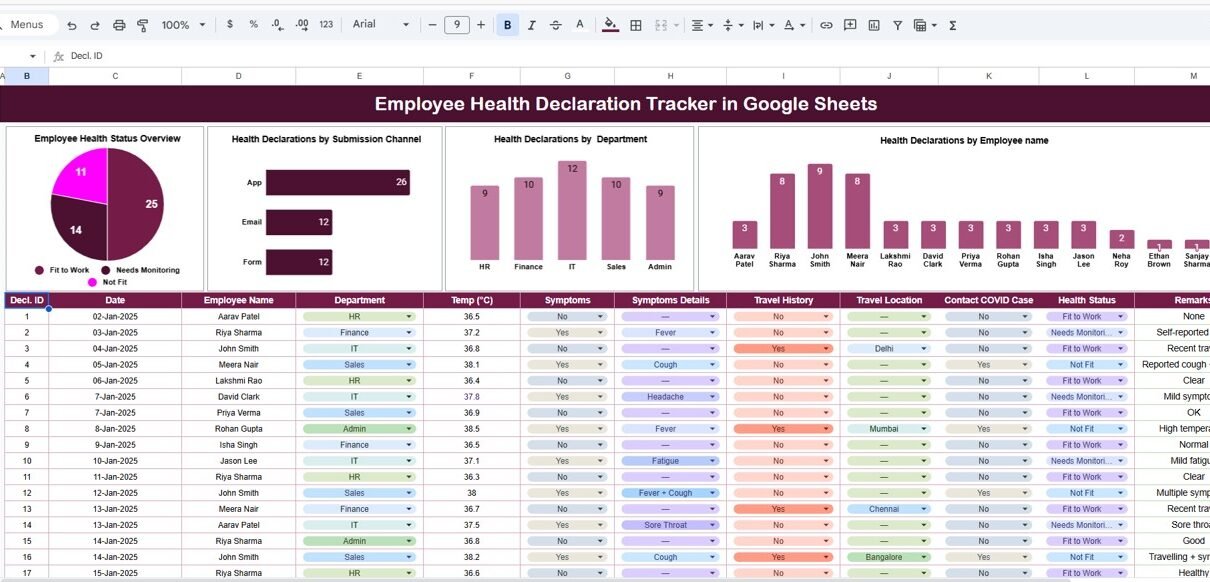
This is the dashboard view that displays key metrics using interactive, auto-updating charts.
Charts Included
1. Employee Health Status Overview
Shows the overall health status distribution across employees such as:
-
Healthy
-
Symptoms Reported
-
Tested Positive
-
Pending Submission
-
Recovered
This chart helps HR teams identify risk levels instantly.
2. Health Declarations by Submission Channel
Displays submissions received via different channels:
-
Google Form
-
Email
-
Manual Entry
-
App
-
HR/Manager
This helps evaluate which methods are efficient and widely used.
3. Health Declarations by Department
Breaks down health entries by departments such as:
-
HR
-
Finance
-
IT
-
Operations
-
Sales
-
Support
Useful for identifying department-level trends and potential clusters.
4. Health Declarations by Employee Name
Lists employees with their respective number of submissions — ideal for tracking compliance and follow-ups.
All charts update automatically as new data is entered into the Data Sheet.

Search Sheet Tab
The Search Tab is designed for quick data retrieval and smart filtering.
Search Capabilities
You can search by:
-
Search Keyword (e.g., “Symptoms”, “Positive”, “IT Department”)
-
Field Name (e.g., Employee Name, Health Status, Department, Submission Channel)
Examples:
-
Search “Symptoms Reported” → shows all related entries
-
Search “Marketing” → lists all health declarations from Marketing staff
This makes record retrieval fast and intuitive.

Advantages of This Tracker
-
✔ Easy to use and fully automated
-
✔ Helps maintain a safe and healthy workplace
-
✔ Supports real-time monitoring of employee health
-
✔ Enhances compliance with health declarations
-
✔ Enables data-driven decision-making during health risk situations
-
✔ Cloud-based and accessible to teams anytime
Opportunities for Improvement
-
Add automated email reminders for pending declarations
-
Integrate a Google Form for structured daily submissions
-
Add a risk scoring system based on symptoms
-
Include department-level trend analysis charts
-
Apply conditional formatting to highlight high-risk entries
Best Practices for Using This Tracker
-
Encourage employees to submit declarations daily or weekly
-
Train managers to verify submissions for accuracy
-
Review department-wise charts to catch early warning signs
-
Keep all data entries updated and error-free
-
Use Search Tab regularly for quick monitoring and audits
Want to build skills like this step by step? The NextGenTemplates Academy learning paths cover the spreadsheet techniques behind trackers like this one, with practice files.
Get the Employee Health Declaration Tracker in Google Sheets
Conclusion
The Employee Health Declaration Tracker in Google Sheets is an essential tool for HR and Workplace Safety teams.
It centralizes health declarations, provides real-time insights into employee wellness, and supports quick decision-making during health-related events.