Managing parking permit applications efficiently is a common challenge for office administrators and HR teams. The Office Parking Permit Request Tracker in Google Sheets simplifies the entire process — from logging requests to analyzing cost and approval trends — all within one interactive and automated spreadsheet.Office Parking Permit Request Tracker in Google Sheets
This ready-to-use tracker helps organizations ensure transparency, maintain parking allocation records, and track associated costs effortlessly.Office Parking Permit Request Tracker in Google Sheets
Get the Office Parking Permit Request Tracker in Google Sheets
What Is an Office Parking Permit Request Tracker in Google Sheets?
The Office Parking Permit Request Tracker is a smart and customizable tracking system designed to record and monitor all employee parking permit requests.Office Parking Permit Request Tracker in Google Sheets
Built entirely in Google Sheets, it includes automated charts, summary insights, and a search tab that enables users to filter requests by department, vehicle type, requester, or approval status — making it an ideal solution for HR and admin teams managing large office parking facilities.Office Parking Permit Request Tracker in Google Sheets
Tracker Structure
The tracker includes two main tabs for ease of use and visualization:
Tracker Sheet Tab — Visual dashboards and summaries of all parking permit requests.
Search Sheet Tab — Advanced search functionality to quickly find records.
Tracker Sheet Tab
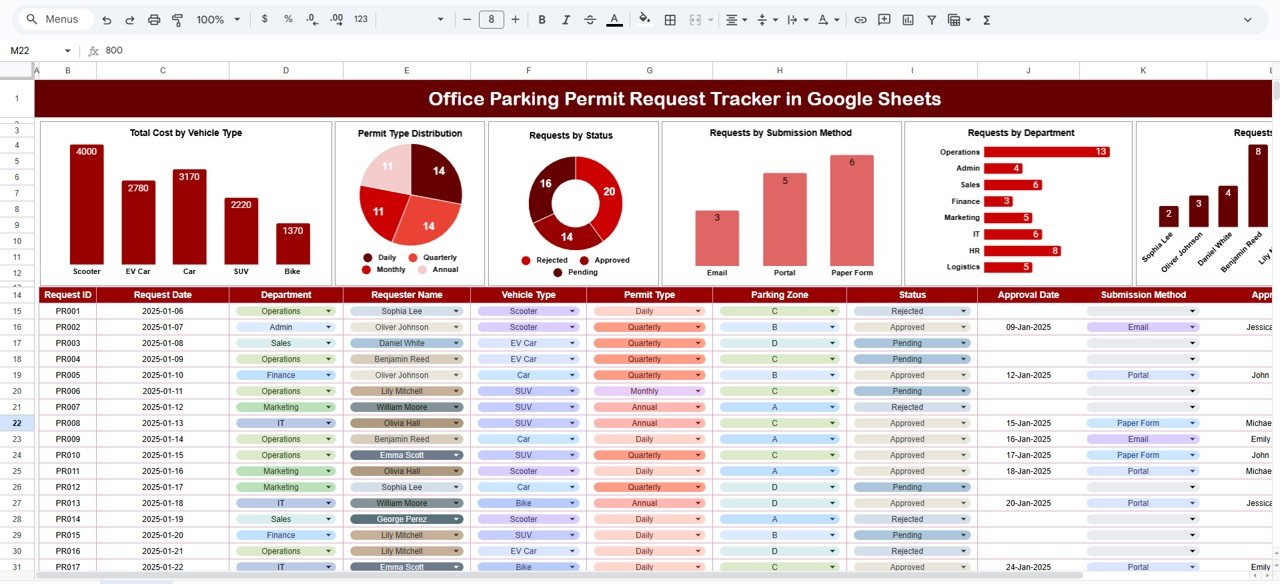
This tab is the visual summary and management hub of the tracker. It consolidates all key data into clear, auto-refreshing charts.
Charts Displayed:
-
Total Cost by Vehicle Type: See how much cost is associated with different vehicle types like cars, bikes, or electric vehicles.
-
Permit Type Distribution: Track the percentage of permanent, temporary, and visitor permits issued.
-
Requests by Status: Monitor how many permits are approved, pending, or rejected.
-
Requests by Submission Method: Identify whether requests were submitted via form, email, or in-person.
-
Requests by Department: Visualize which departments have the most parking requests.
-
Requests by Requester Name: See the count of parking permit applications by individual employees.
Search Sheet Tab
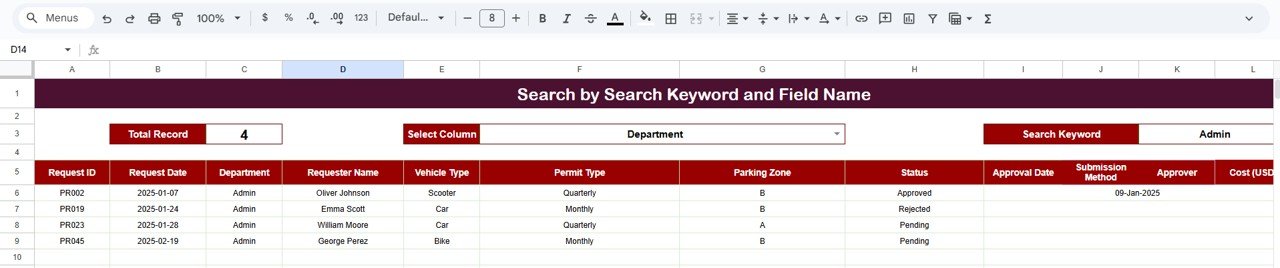
The Search tab is designed for quick lookups using specific fields or keywords.
For example:
-
Searching by “Finance” shows all parking permit requests from the Finance Department.
-
Searching “Bike” filters all requests for bike permits.
-
Searching “Approved” lists all approved parking permits.
This function makes it simple to retrieve and review any request without scrolling through long lists manually.
Key Functional Highlights
-
Auto-updating charts to visualize key insights dynamically.
-
Smart search functionality for fast and accurate lookups.
-
Cost analysis by vehicle and permit type for budget tracking.
-
Status tracking for approved, pending, and rejected applications.
-
Simple structure that can be customized for different office locations.
Advantages
-
Centralized Management: Maintain all parking requests in one location.
-
Visual Insights: Understand trends in cost, vehicle type, and department usage.
-
Automation Ready: Uses Google Sheets formulas and data validation for accuracy.
-
Improved Coordination: Enhances transparency between HR, Admin, and Security teams.
-
Budget Oversight: Track total parking expenses and identify cost-saving opportunities.
Opportunities for Improvement
-
Add automatic approval notifications via Google Forms or Gmail integration.
-
Include a permit expiration reminder system for renewals.
-
Implement QR code generation for approved parking permits.
-
Create a monthly summary sheet for management review.
-
Add departmental cost breakdown charts for internal billing.
Best Practices
-
Always record each request immediately to avoid data loss.
-
Use standardized permit type codes (e.g., TMP = Temporary, PRM = Permanent).
-
Update status fields regularly (Pending → Approved → Issued).
-
Review charts monthly to track approval trends and peak demand.
-
Protect data sheets to avoid accidental edits by multiple users.
Get the Office Parking Permit Request Tracker in Google Sheets
Conclusion
The Office Parking Permit Request Tracker in Google Sheets is a professional, easy-to-use, and fully automated tracking system designed for office administrators and HR departments.
It enhances operational efficiency, improves transparency, and helps organizations allocate parking resources effectively — ensuring a smooth, data-driven parking management process.
For more spreadsheet skills that help with trackers like this, browse the NextGenTemplates Academy learning paths, which include practice files.