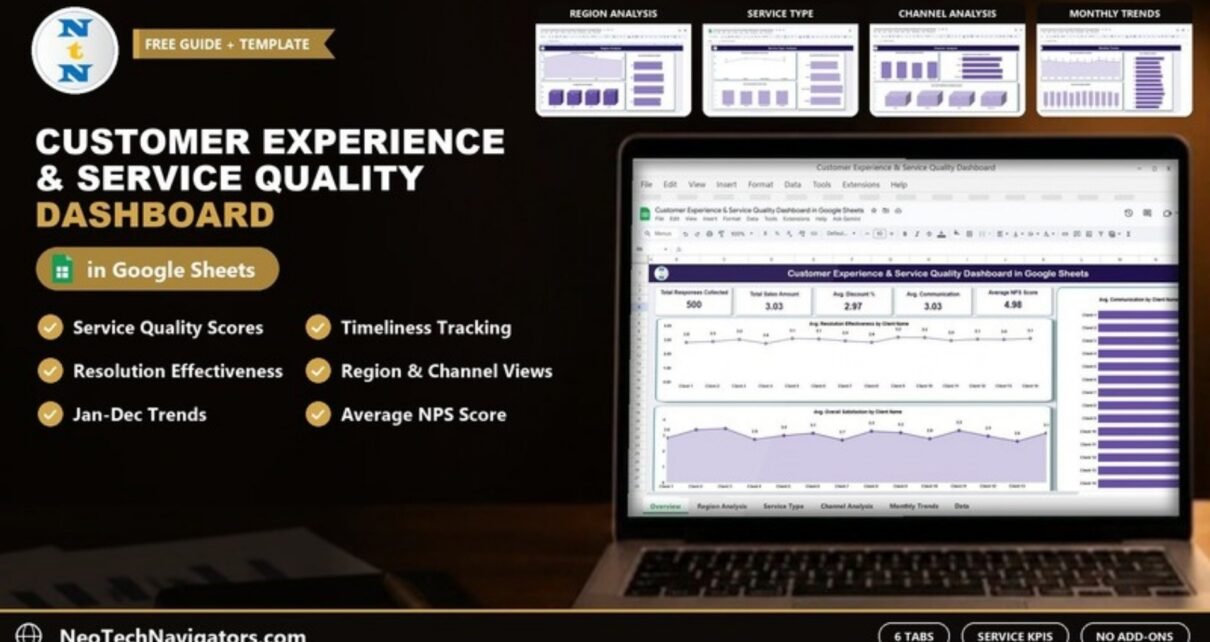
The Customer Experience & Service Quality Dashboard in Google Sheets helps service teams see how well they deliver, not just how happy customers feel. Alongside satisfaction and NPS, it puts service quality, timeliness, communication and resolution effectiveness side by side, broken down by client, region, service type, response channel and month.
It suits customer service managers, operations leads and agency owners who collect post-service ratings and want a clear monthly view without buying a CX platform. You enter one row per feedback response; the six tabs summarise everything for you.
This guide explains each tab with the real sample figures, the metrics behind the charts, how to load your own data and where the template is not the right fit.
Get the Customer Experience & Service Quality Dashboard
Why a Service Quality Dashboard Tracks More Than Satisfaction
A customer can be satisfied overall and still feel the service was slow, or that nobody explained what was happening. If you only track one satisfaction score, those details disappear. A service quality dashboard keeps them visible:
- Service Quality tells you whether the work itself met expectations.
- Timeliness shows whether you were fast enough.
- Communication captures how clearly your team kept the customer informed.
- Resolution Effectiveness shows whether the issue was actually fixed.
When one of these drops while overall satisfaction holds steady, you have an early warning before customers start leaving.
Dashboard Structure
| Tab | Charts and content |
|---|---|
| Overview | 5 KPI cards; resolution effectiveness, overall satisfaction and communication by Client Name |
| Region Analysis | Total responses, overall satisfaction and average NPS by region |
| Service Type Analysis | Total responses, resolution effectiveness and communication by service type |
| Channel Analysis | Service quality, average NPS and overall satisfaction by response channel |
| Monthly Trends | Overall satisfaction, timeliness and service quality by month |
| Data Sheet | One row per feedback response |
1. Overview Tab
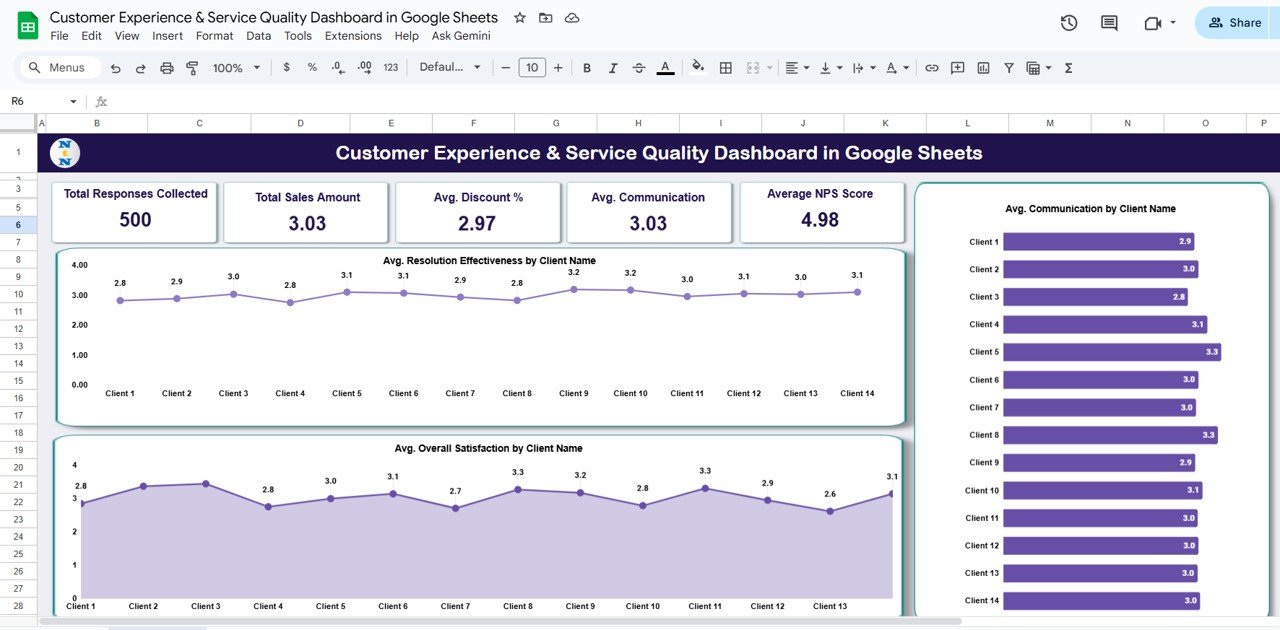
The top row has five cards. The product listing names them Total Responses Collected, Avg. Overall Satisfaction, Avg. Service Quality, Avg. Communication and Average NPS Score. In the sample file you see 500 responses, an Avg. Communication of 3.03 and an Average NPS Score of 4.98.
In the screenshot, the second and third cards carry the captions “Total Sales Amount” and “Avg. Discount %”. These are leftover labels, so check and rename them in your copy to match the listing.
Three charts sit below the cards, covering the sample clients Client 1 to Client 14:
- Avg. Resolution Effectiveness by Client Name: a line chart with scores between 2.8 and 3.2.
- Avg. Overall Satisfaction by Client Name: an area chart ranging from 2.6 to 3.3.
- Avg. Communication by Client Name: a bar chart where Client 3 is lowest at 2.8 and Clients 5 and 8 lead at 3.3.
2. Region Analysis
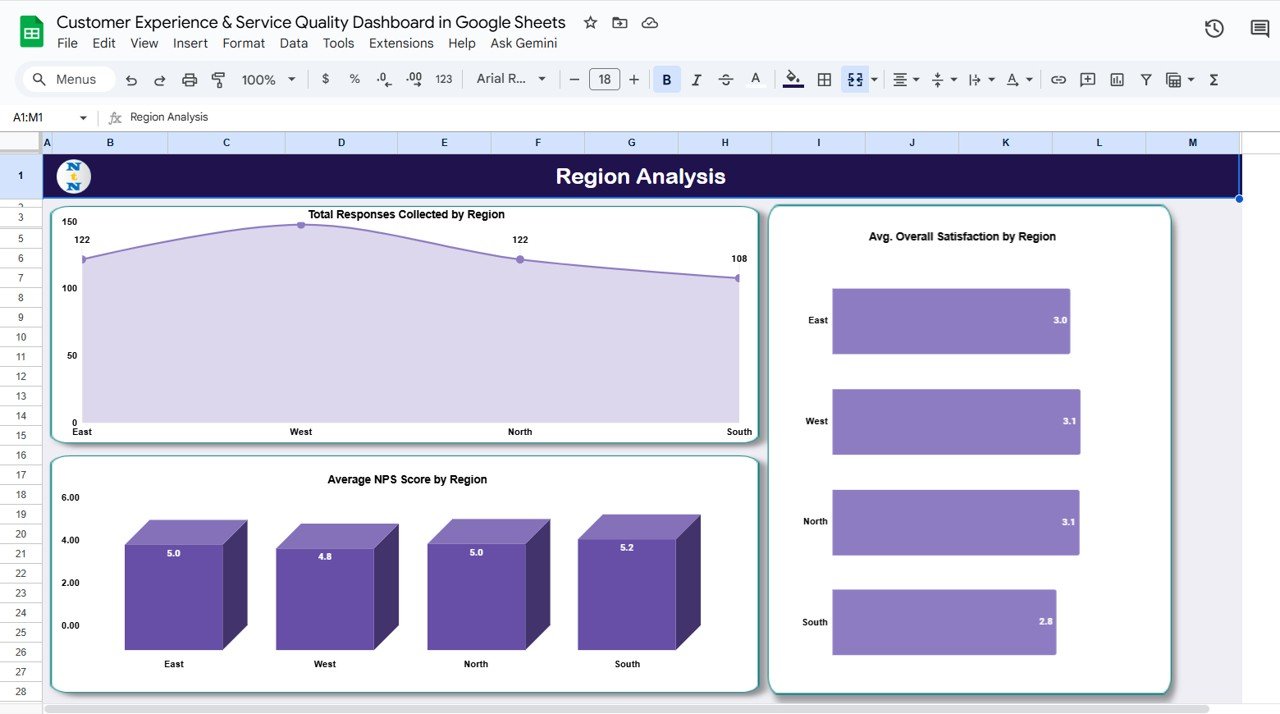
Four regions appear in the sample: East, West, North and South.
- Total Responses Collected by Region: East 122, North 122, South 108, with West the highest.
- Avg. Overall Satisfaction by Region: West and North 3.1, East 3.0, South 2.8.
- Average NPS Score by Region: South 5.2, East and North 5.0, West 4.8.
Notice that South has the lowest satisfaction but the highest NPS average. That kind of mixed signal is worth a closer look at the individual responses before drawing conclusions.
3. Service Type Analysis
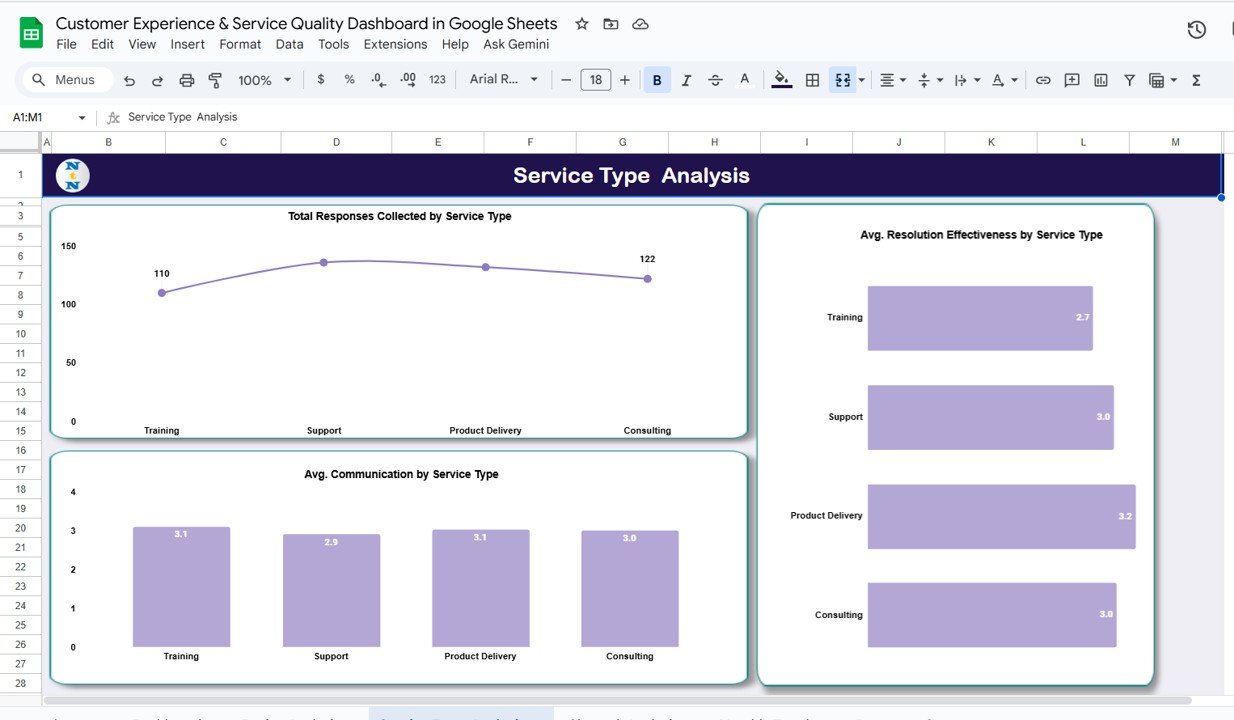
The sample covers four service types: Training, Support, Product Delivery and Consulting.
- Total Responses Collected by Service Type: Training 110 and Consulting 122 are labelled; Support and Product Delivery are slightly higher.
- Avg. Resolution Effectiveness by Service Type: Product Delivery 3.2, Support and Consulting 3.0, Training 2.7.
- Avg. Communication by Service Type: Training and Product Delivery 3.1, Consulting 3.0, Support 2.9.
In the sample, Training scores well on communication but lowest on resolution effectiveness. In a real team, a pattern like that would suggest clear explanations but weak follow-up on open questions.
4. Channel Analysis
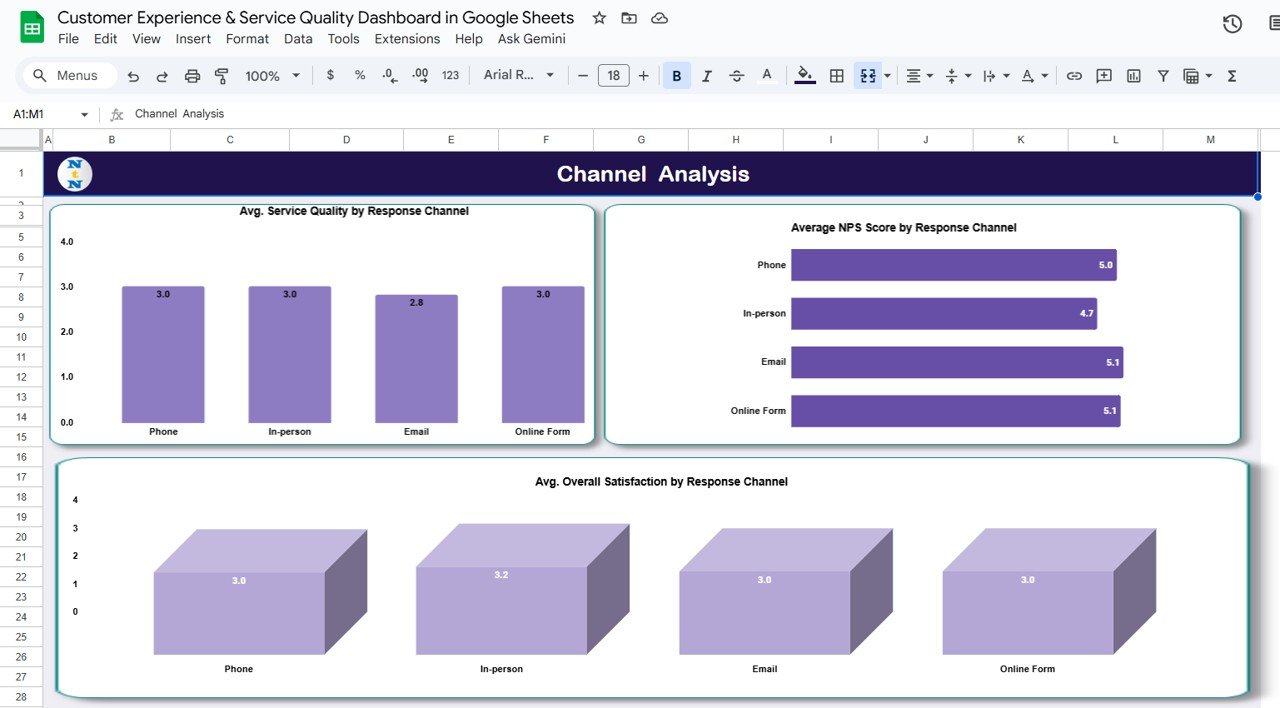
The response channels in the sample are Phone, In-person, Email and Online Form.
- Avg. Service Quality by Response Channel: Phone, In-person and Online Form 3.0, Email 2.8.
- Average NPS Score by Response Channel: Email and Online Form 5.1, Phone 5.0, In-person 4.7.
- Avg. Overall Satisfaction by Response Channel: In-person 3.2, the other three 3.0.
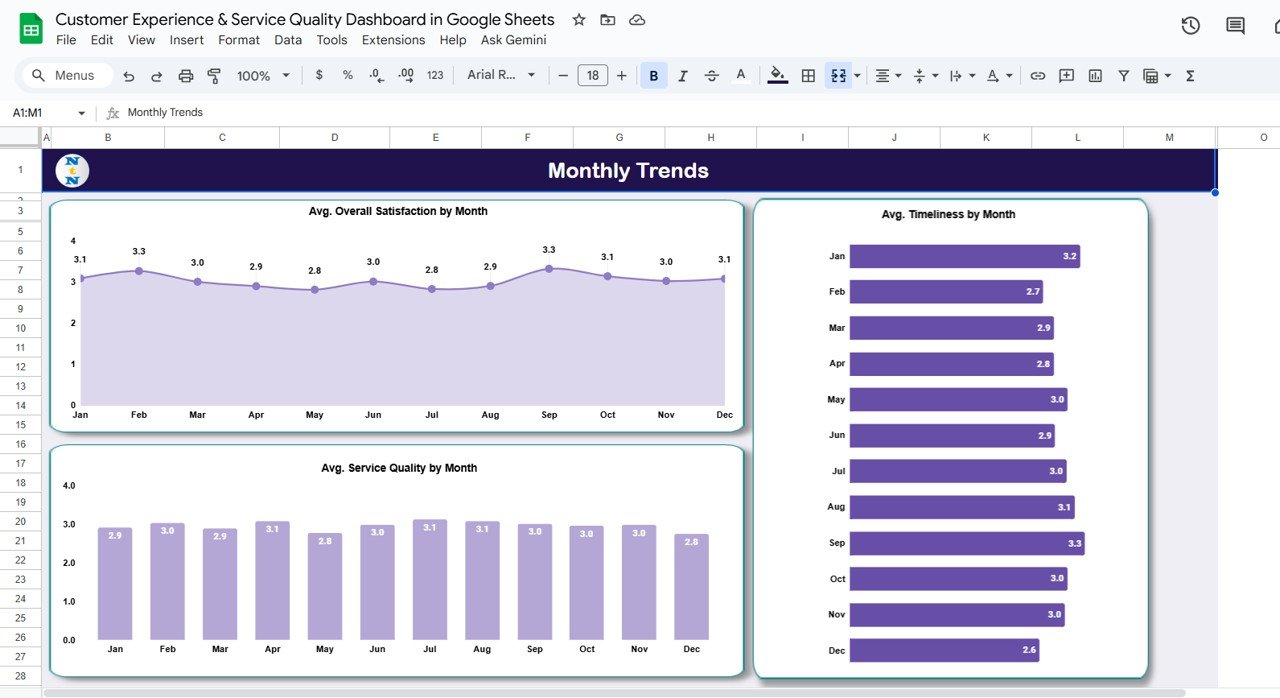
5. Monthly Trends
This tab runs January to December and shows three averages:
- Avg. Overall Satisfaction by Month: peaks of 3.3 in February and September, a low of 2.8 in May and July.
- Avg. Timeliness by Month: highest in September (3.3), lowest in December (2.6) and February (2.7).
- Avg. Service Quality by Month: steady between 2.8 and 3.1 all year.
If your own data shows a December timeliness dip like the sample, year-end leave is a common cause worth checking. Seeing it in a chart makes it easier to plan cover in advance.
6. Data Sheet Tab
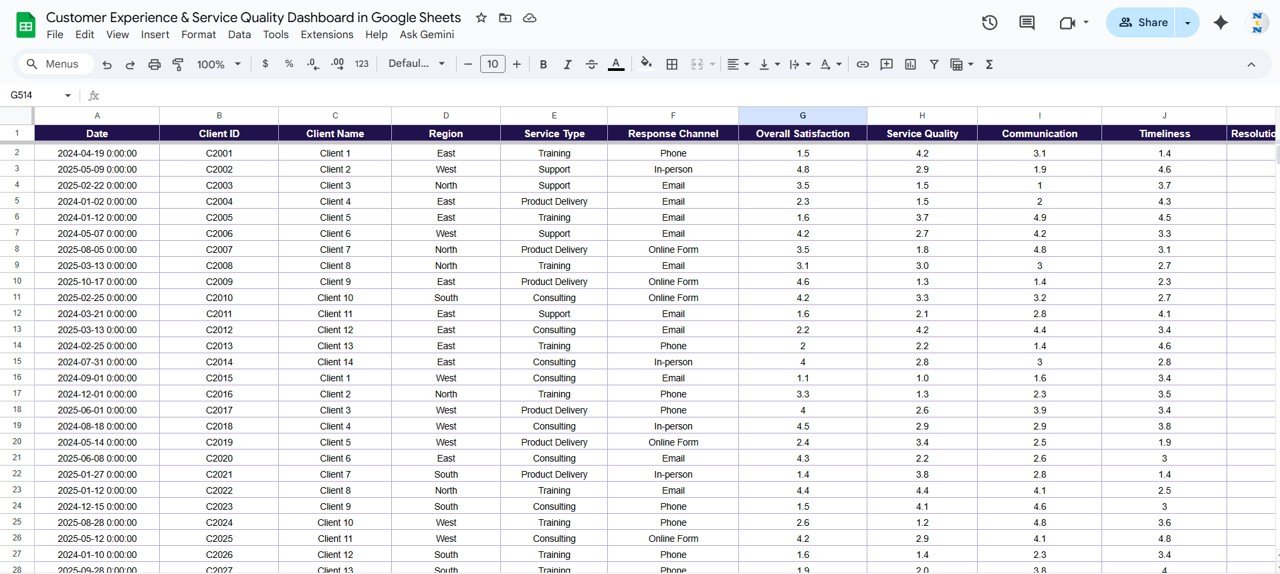
All charts read from this sheet. The visible columns are Date, Client ID, Client Name, Region, Service Type, Response Channel, Overall Satisfaction, Service Quality, Communication and Timeliness, followed by Resolution Effectiveness and the remaining score columns. Sample dates run from 2024 to 2025 and client IDs follow the pattern C2001, C2002 and so on.
Metrics Behind the Charts
| Metric | What it measures | How it is calculated | Better when |
|---|---|---|---|
| Total Responses Collected | Feedback volume | Count of rows in the Data Sheet | Higher |
| Avg. Overall Satisfaction | Overall rating of the experience | Average of Overall Satisfaction | Higher |
| Avg. Service Quality | Quality of the work delivered | Average of Service Quality | Higher |
| Avg. Communication | How well the customer was kept informed | Average of Communication | Higher |
| Avg. Timeliness | Speed of response and delivery | Average of Timeliness | Higher |
| Avg. Resolution Effectiveness | Whether the problem was solved | Average of Resolution Effectiveness | Higher |
| Average NPS Score | Willingness to recommend | Average of the NPS score column | Higher |
Other Service Metrics Worth Tracking (Not Included)
The template focuses on ratings. Many service teams also track operational measures such as first response time, average resolution time and repeat-contact rate. If your data includes an opened and closed date, a simple resolution time column looks like this:
=IF(Closed_Date="","",Closed_Date-Opened_Date)These are optional additions you would build yourself; the dashboard does not include them out of the box.
How to Use It With Your Own Data
- Copy the file to your Drive with File > Make a copy.
- Clear the sample rows in the Data Sheet, keeping the headers.
- Enter one feedback response per row. Use one rating scale for all score columns.
- Keep Region, Service Type and Response Channel values consistent; dropdowns via Data > Data validation help.
- Open the Overview tab, confirm the cards updated and rename any card captions that do not match your metrics.
- Review the Service Type and Monthly Trends tabs at each monthly service review.
If you would like to build similar summaries and charts from scratch, the pivot tables and dashboards course on NextGenTemplates Academy covers the same reporting ideas in structured lessons.
Three Real-World Use Cases
- IT support desk: compare Support against Product Delivery to see whether delivery issues or support handling drive low resolution scores.
- Field service company: watch the Timeliness by Month chart to plan staffing before seasonal dips.
- Consulting agency: use the client-level communication chart to decide which accounts need a status call this week.
Best Practices
- Ask for feedback right after each service interaction, while the experience is fresh.
- Define what each score means (for example, what a 3 versus a 5 for Timeliness looks like) and share it with the team.
- Compare months, not single days; short-term swings are normal.
- Protect the dashboard tabs so only the Data Sheet is edited.
- Close the loop: tell customers what you changed because of their feedback.
Limitations and Who Should Not Use It
The dashboard summarises ratings you already have. It does not send surveys, analyse written comments or calculate response and resolution times. If your service desk runs on a ticketing tool with built-in reporting, or you handle thousands of responses a day, a dedicated platform will serve you better. Small and mid-sized teams that want a clear, shareable monthly view are the right audience.
For related tools, see the customer service quality feedback tracker, the customer service KPI dashboard, the customer service request tracker and the satisfaction-focused Customer Experience & Satisfaction Dashboard.
Frequently Asked Questions
What is a service quality dashboard in Google Sheets?
It is a spreadsheet report that turns customer ratings into charts, so you can see service quality, timeliness, communication and resolution scores by client, region, service type, channel and month.
How is this different from the Customer Experience & Satisfaction Dashboard?
Both use the same six-tab layout. This version is presented with a service delivery focus and uses different sample data (Client 1 to Client 14, with January to December trends).
Can I use a 1 to 10 rating scale instead?
Yes. The averages work on any numeric scale. Just use the same scale in every score column so comparisons stay fair.
Does the dashboard calculate a standard NPS?
No. The Average NPS Score card averages the NPS column. A standard NPS (promoters minus detractors) can be added in a spare cell.
Can several people update it at once?
Yes. It is a normal Google Sheets file, so you can share it with editors and viewers.
Wrapping Up
The Customer Experience & Service Quality Dashboard in Google Sheets gives service teams a clear picture of how they deliver, with timeliness, resolution and communication alongside satisfaction and NPS. Load your own responses, rename any leftover card captions, and use the service type and monthly views to pick your next improvement.
Get the Customer Experience & Service Quality Dashboard
📅 Last updated: October 2026