A 28-lane centre on a Friday night sells three hundred game sessions, admits a thousand bowlers, rents shoes, sells nachos, honours season passes, takes cash at two counters and pays commission to five booking agents. Most independent centres run that on a paper diary, a whiteboard and one heroic spreadsheet — and at 11pm somebody is arguing about whether lane 14 was double-booked and where ₹700 went.
The Bowling Alley Management System Web App is a Google Apps Script application built to replace that stack. It is 27 screens across Operations, Center, Catalog, People, Money and Admin, backed by a 34-sheet Google Sheets database that the app builds and seeds itself with roughly 13,000 demo rows — 320 bookings, 4,279 tickets, 5,567 check-in scans, 547 lane sessions, 347 payments and 90 cashier shifts. It deploys into your own Google account in about fifteen minutes, costs a one-off fee instead of $150–$400 a month, and you get the source code.
This post is a screen-by-screen review of what it actually does, based on the real deployment — including the parts it deliberately does not do.
Get the Bowling Alley Management System Web App
🚀 Try the Live Demo Before You Buy
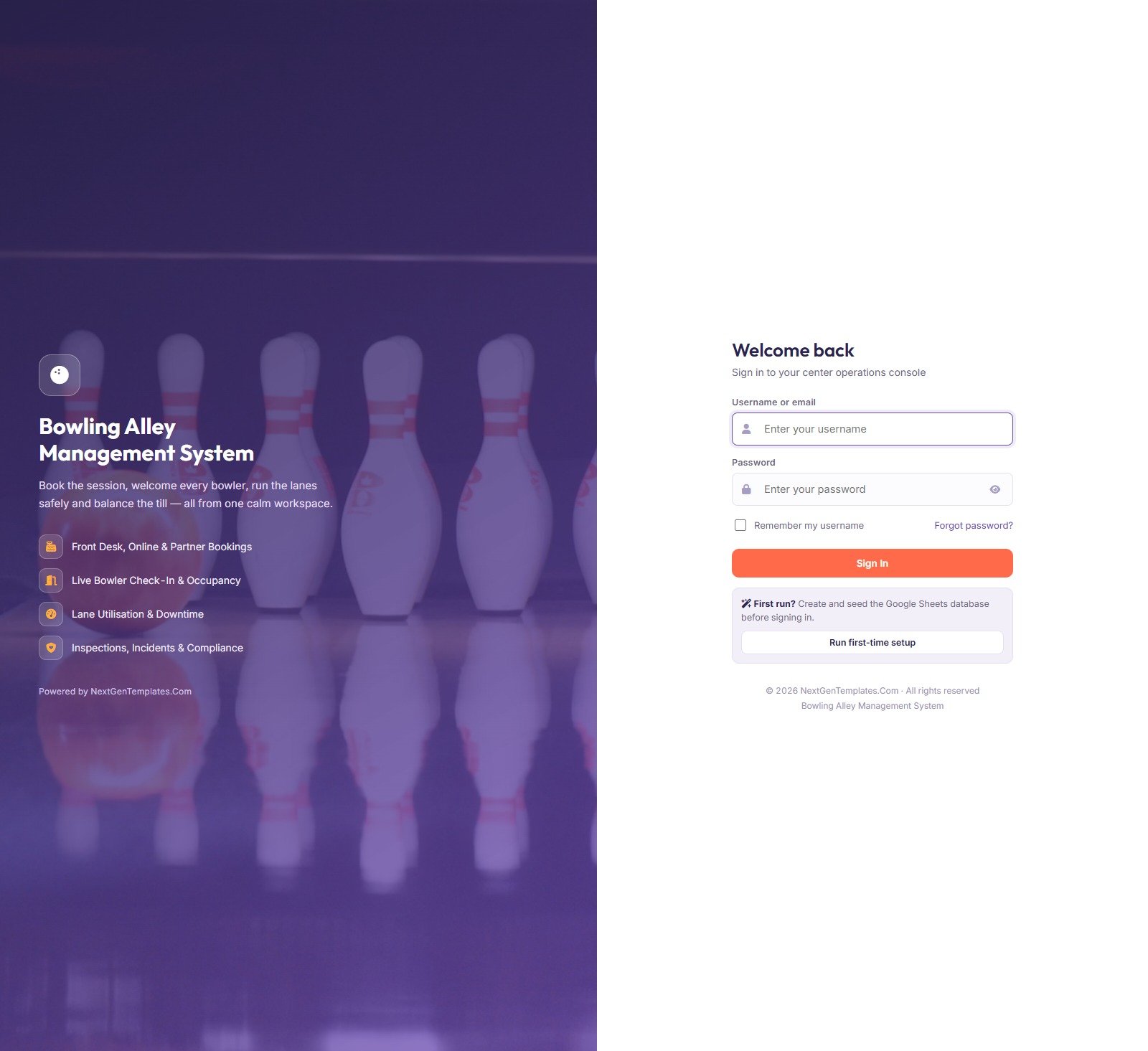
We have deployed this web app in our own Google account so you can test every page, every role and every report — with real sample data — before purchasing. No signup, no email required.
🔑 Test Login Credentials
Sign in as admin to see everything including Settings and the Audit Log, then sign out and come back as gate to see how little a check-in host can reach. All five seeded accounts are below — the role separation is the product.
💡 These credentials are public on purpose. This is a shared demo instance that we reset periodically, not anybody’s live centre. What you get after purchase: the full source code (Code.gs + Index.html) plus a step-by-step deployment guide, so you run your own private instance in your own Google account — with your own passwords — in under 15 minutes.
Key Features of the Bowling Alley Management System Web App
- Server-side pricing. The POS does not trust the browser. Tap a package and the weekday / weekend / holiday rate, the tax, the age rule and the capacity check are all resolved on the server before a ticket is issued.
- A check-in verdict, not a checkbox. Scanning a game pass returns Allowed or Denied with a reason and writes the scan to a permanent log. 5,567 scans sit in the demo.
- Multi-centre by default. Three centres, eight check-in stations, six zones and six selling counters, with an “All centers” roll-up and a date range in the top bar that every operational screen obeys.
- Memberships with real states. Active, Expired, Exhausted and Blocked, each with a visits-used bar the counter cannot override.
- Lane life-cycle tracking. 28 lanes with players-per-game, age and safety rules, next inspection dates, 547 logged sessions with downtime reasons, and an overdue-inspection counter that turns red.
- Cash reconciliation. Each of the 90 cashier shifts recomputes its expected takings from the payments actually recorded on that counter, then shows the variance against the counted cash. The demo is short by ₹600 across 13 shifts — which is the point.
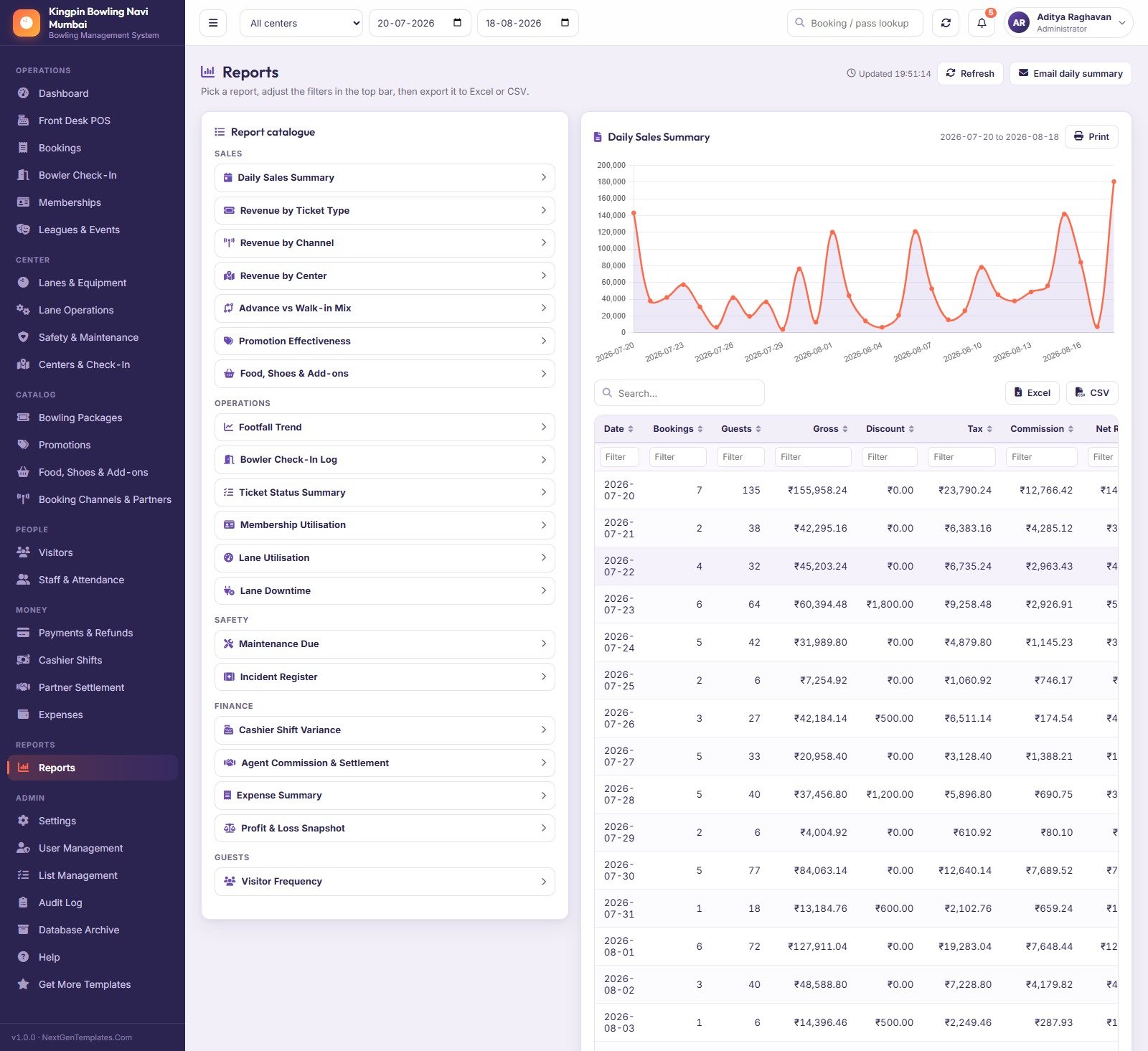
- 20 reports across Sales, Operations, Safety, Finance and Guests, each exportable to Excel or CSV.
- Five roles enforced on the server. A denied module cannot be reached by calling the backend directly. Passwords are salted SHA-256 digests, accounts lock after five failed sign-ins, sessions time out at 60 minutes.
- Configurable without code. 51 settings across ten tabs and 201 dropdown values you rename in List Management.
- Archiving built in. Database Archive copies the whole spreadsheet to Drive first, then moves only closed transactions older than your cutoff.
Module-by-Module Walkthrough
Dashboard
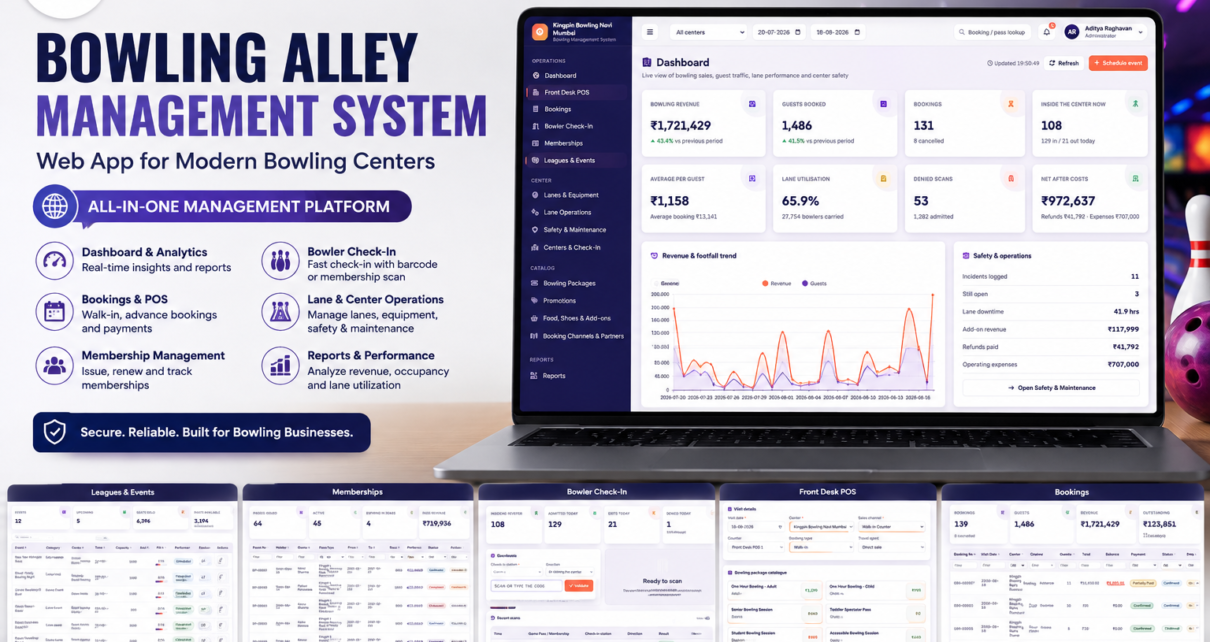
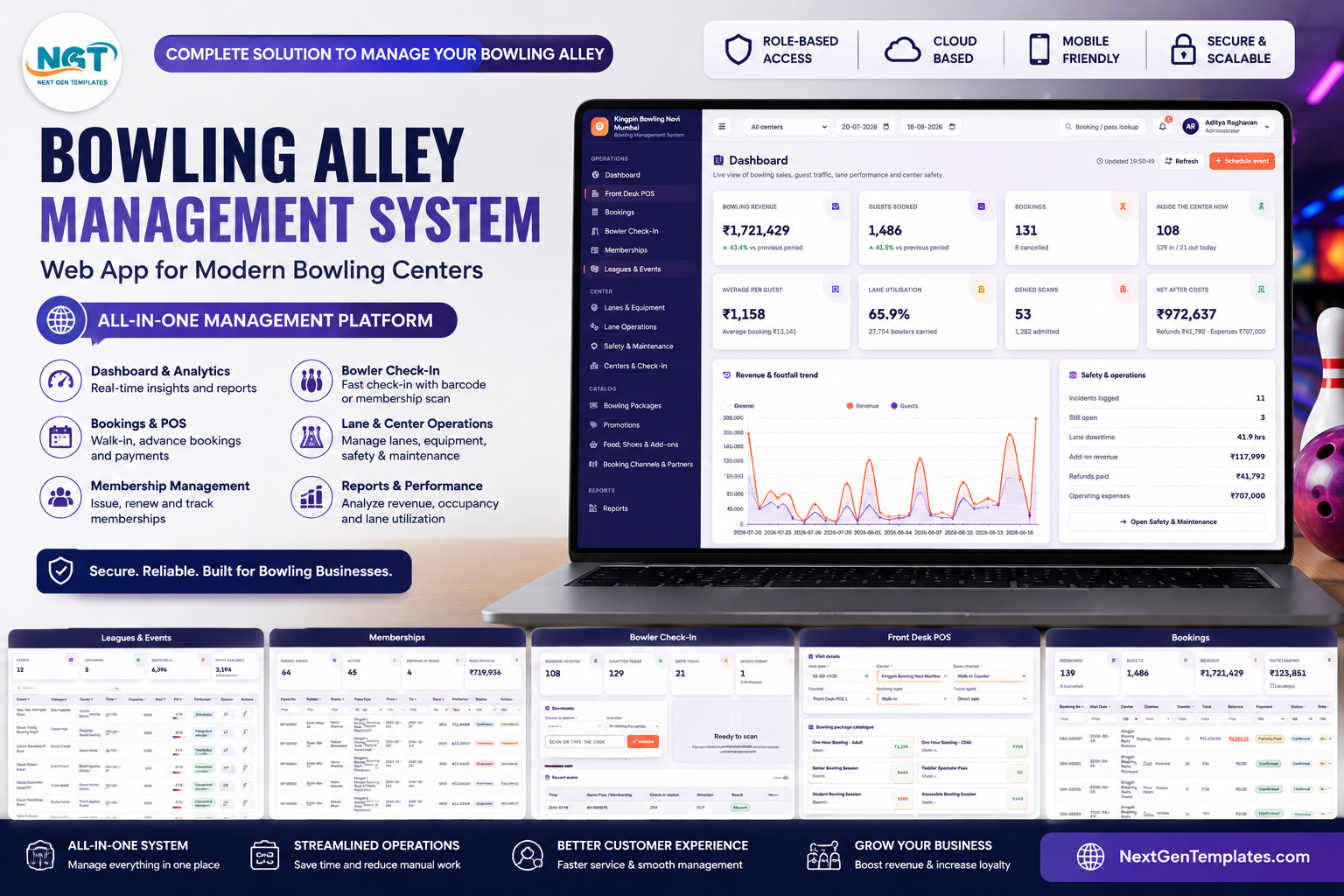
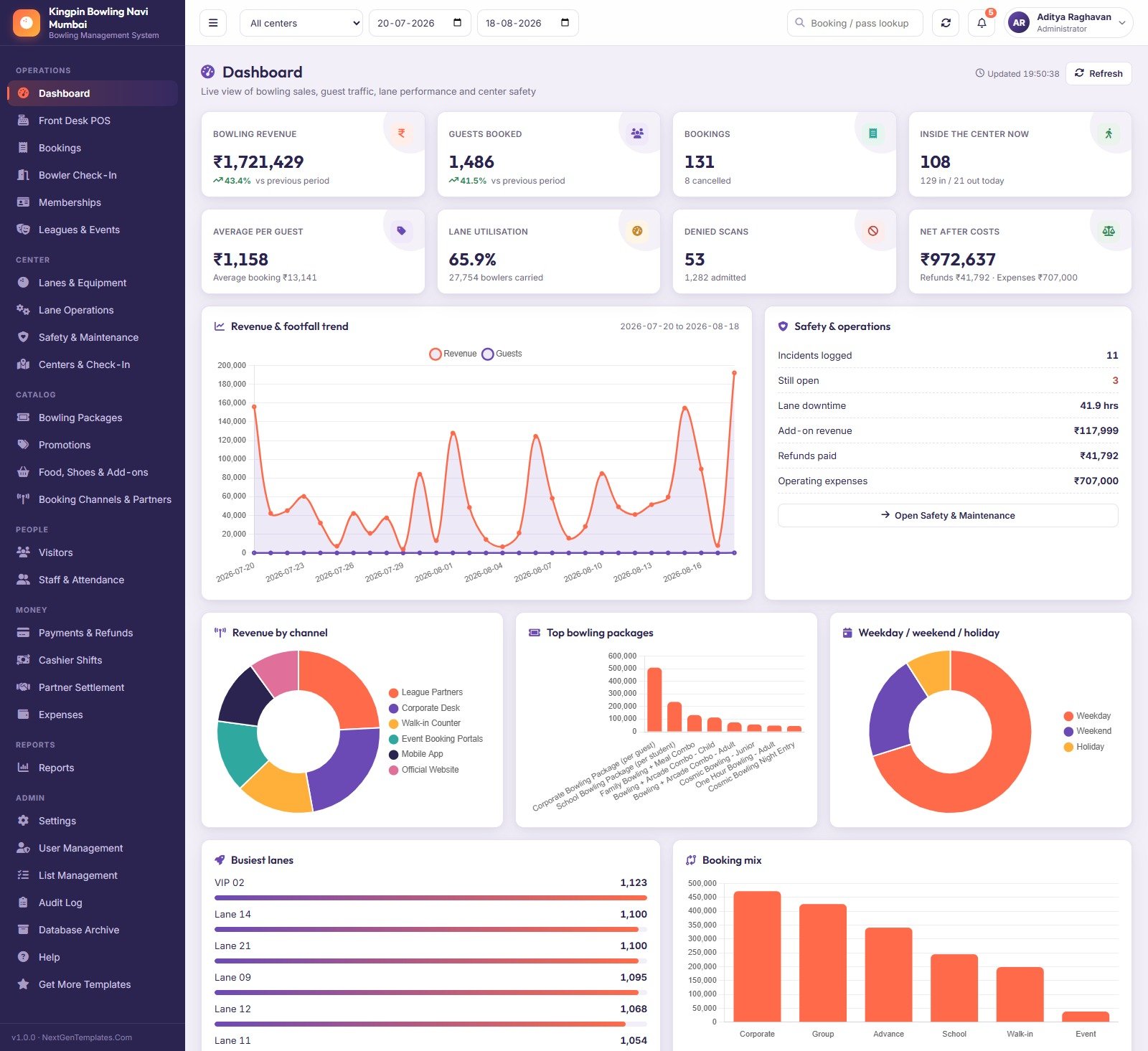
Eight KPI cards — Bowling Revenue, Guests Booked, Bookings, Inside the Center Now, Average per Guest, Lane Utilisation, Denied Scans and Net After Costs — with period-over-period deltas. Below them: a revenue-and-footfall trend line, revenue by channel, top bowling packages, a weekday / weekend / holiday split, busiest lanes and a booking mix chart, plus a Safety & Operations panel showing incidents logged, incidents still open, lane downtime and refunds paid.
Front Desk POS
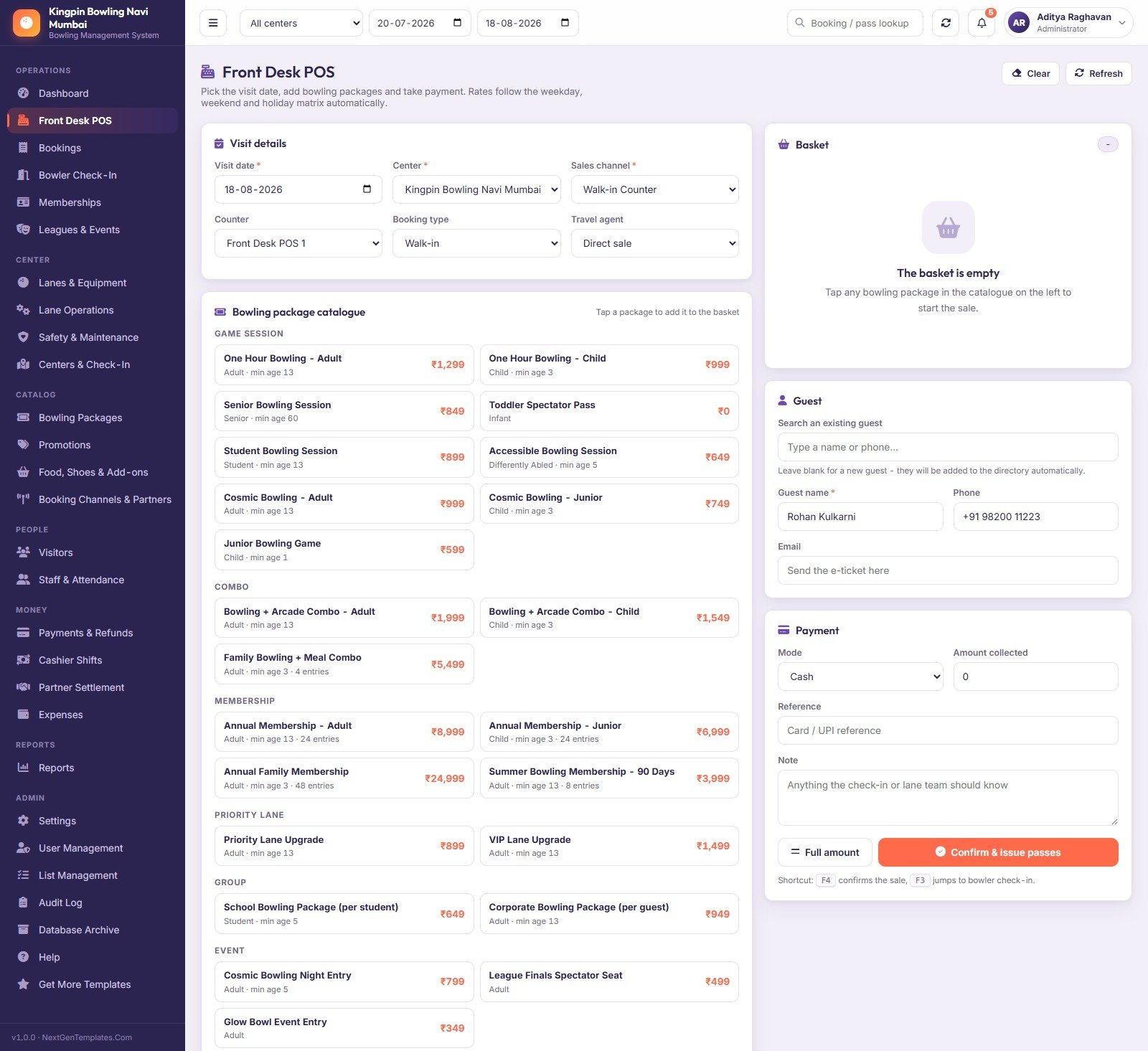
The selling screen. Pick the visit date, centre, sales channel, counter and booking type; tap packages from a catalogue grouped into Game Session, Combo, Membership, Priority Lane, Group and Event; search an existing guest or type a new one; take payment by cash, card, UPI, wallet or net banking with a reference. F4 confirms and issues passes, F3 jumps straight to the scanner.
Bookings and Bowler Check-In
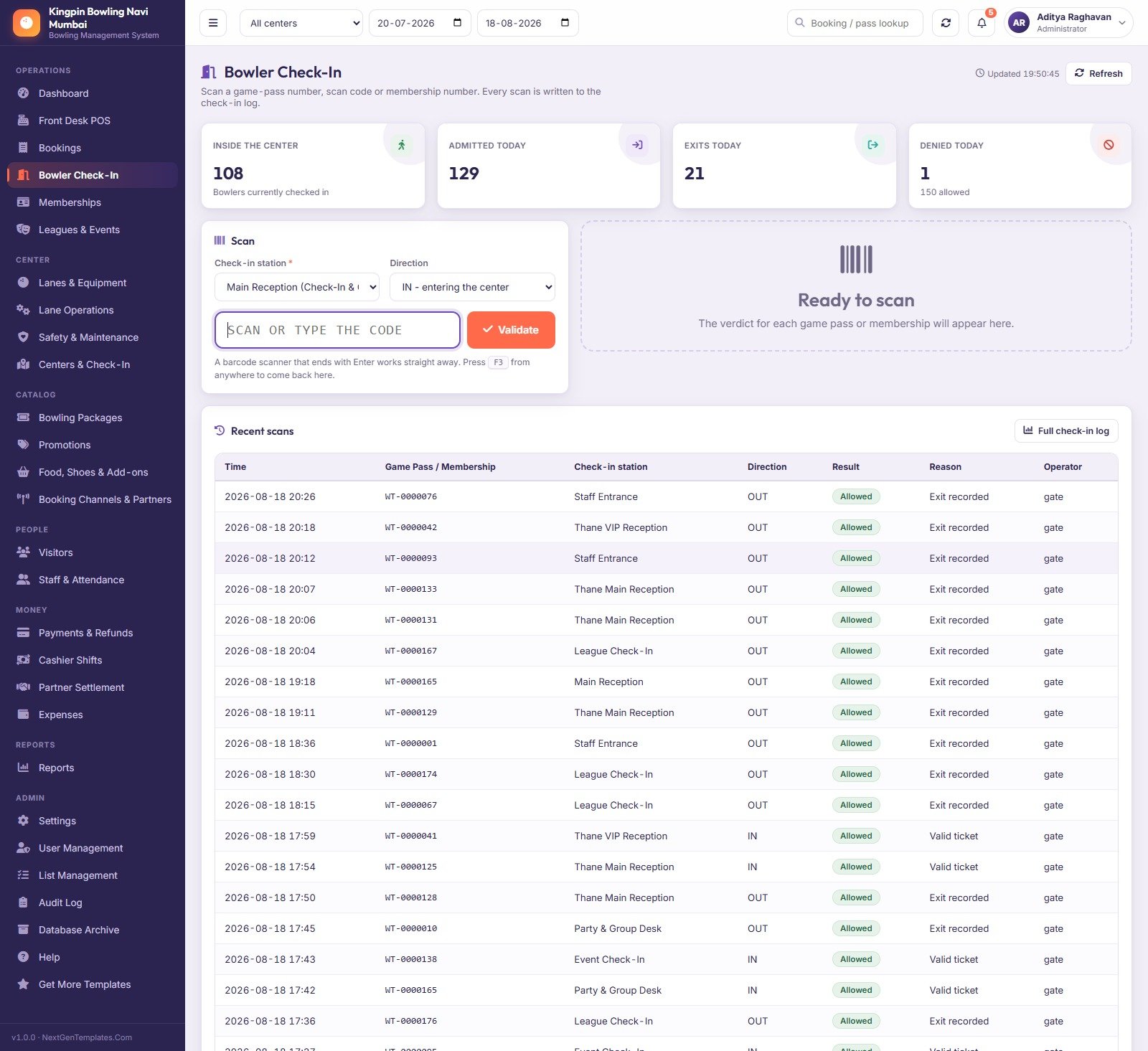
Bookings is the register: every booking with its lines, issued tickets, payment status, entry status and cancellation reason, filterable on every column. Bowler Check-In is the door: scan or type a pass, membership number or scan code, get the verdict, and watch the “Inside the center” figure move.
Memberships, Leagues and Events
Memberships issues, renews, blocks and tracks passes. Leagues & Events schedules tournaments, leagues, coaching clinics, family events and cosmic bowling nights with a capacity, a seats-sold count and a fill percentage per event — the demo shows 12 events, 6,396 seats sold against 10,350 capacity.
Lanes, Lane Operations and Safety
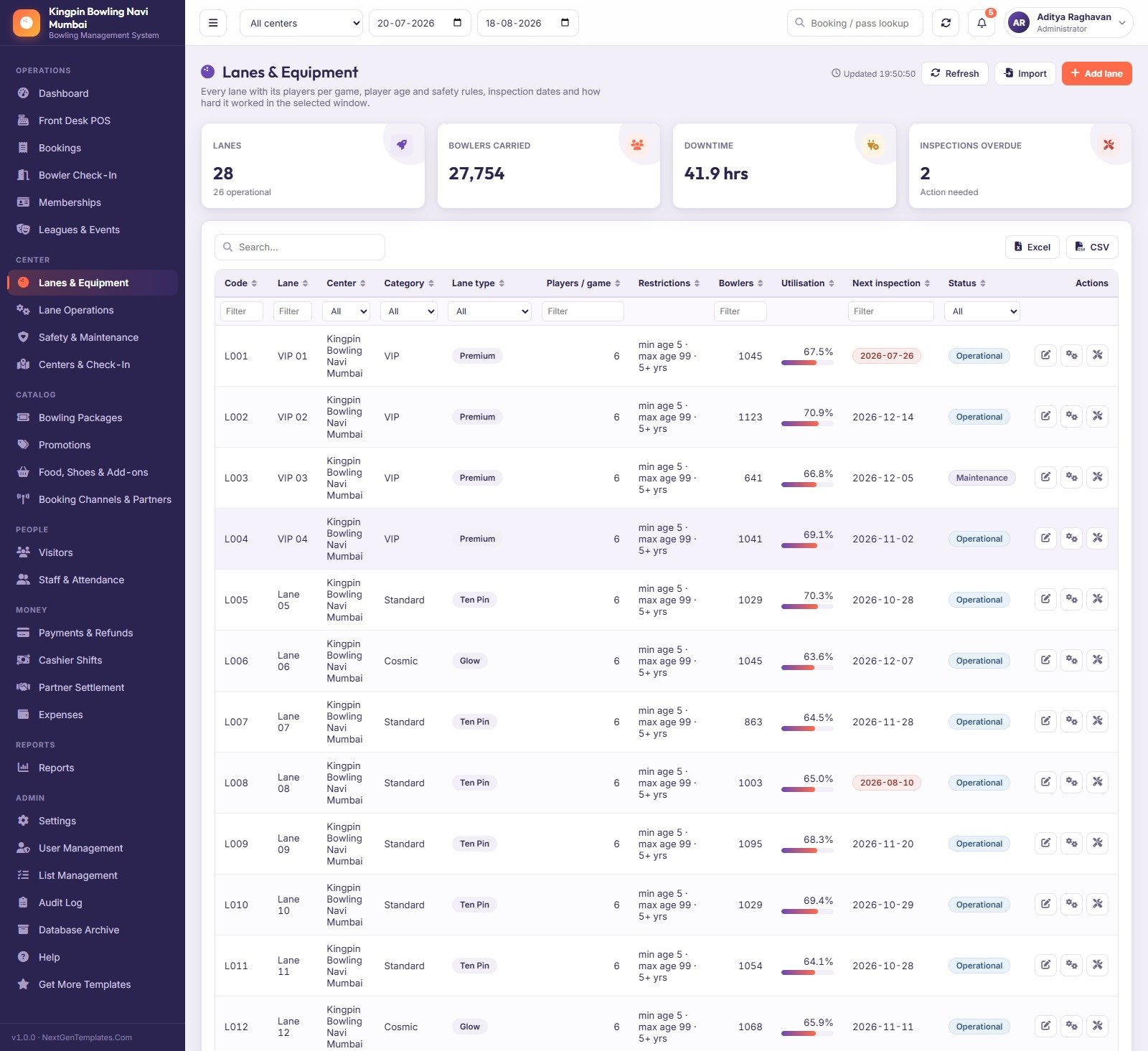
Lanes & Equipment lists every lane with its category, type, restrictions, bowlers carried, utilisation and next inspection date. Lane Operations logs one row per lane per shift with games completed, bowlers served, priority-lane bowlers and downtime with a reason. Safety & Maintenance carries three tabs — maintenance log, inspections due and the guest incident register.
Catalogue: packages, promotions, add-ons and partners
Bowling Packages is the pricing matrix — three rates per ticket plus tax, validity days, entry allowance and the age and safety rules the counter enforces. Promotions holds percent or flat codes with a minimum spend, a validity window, a channel restriction and a usage cap the server actually enforces. Food, Shoes & Add-ons covers shoe rental, pro shop, party add-ons, lockers, food, beverages and arcade cards. Booking Channels & Partners records each channel’s commission and settlement cycle alongside the agents who sell through it.
Money: payments, shifts, settlement and expenses
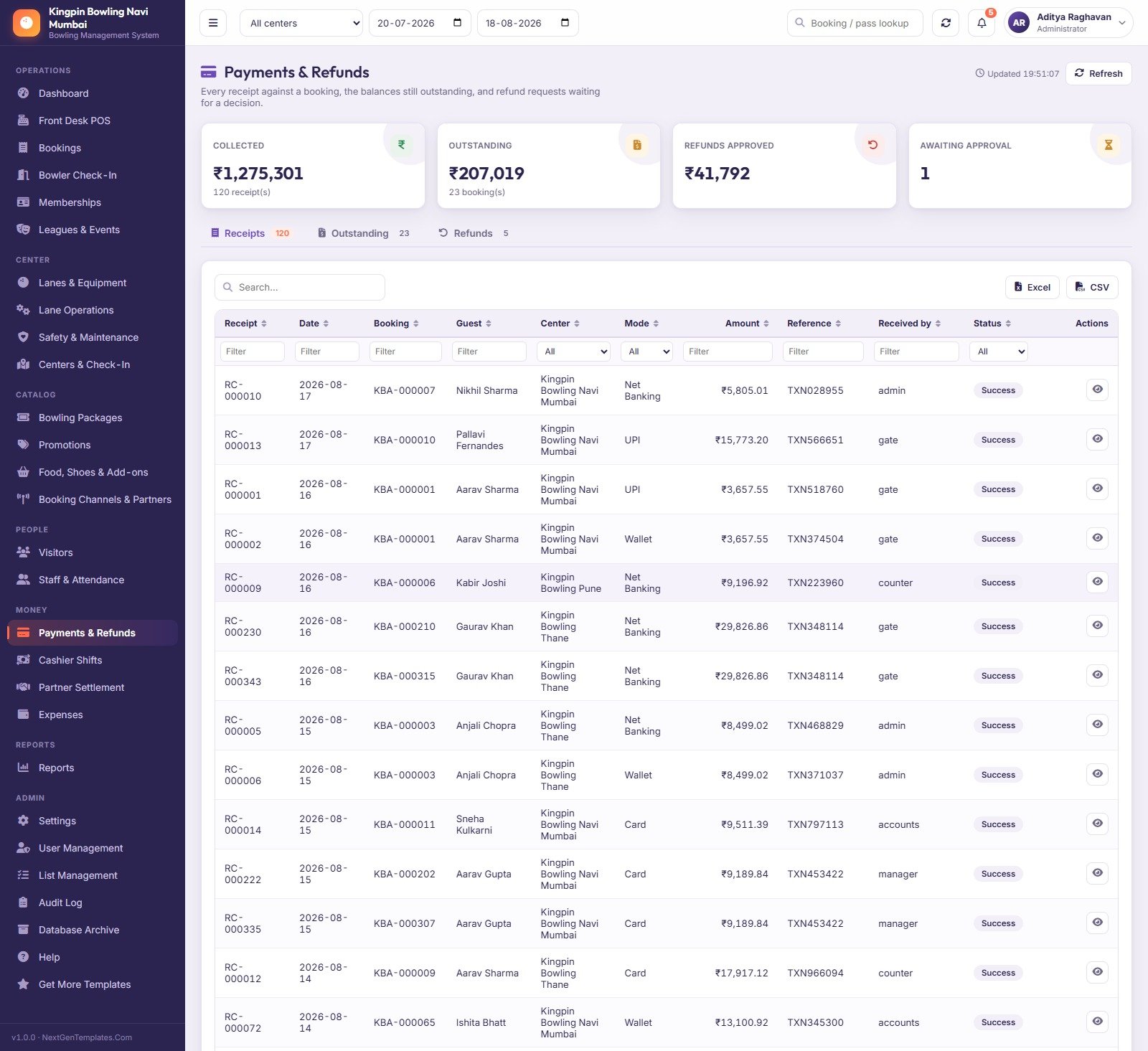
Payments & Refunds shows receipts, outstanding balances and refunds awaiting approval. Cashier Shifts opens a drawer with a float and closes it against counted cash. Partner Settlement rolls a month up per agent and marks it paid. Expenses categorises utilities, lane maintenance, pinsetter parts, food supplies, marketing and salaries.
Reports and Admin
Twenty reports, each honouring the top-bar centre and date range and each exporting to Excel or CSV. Admin adds Settings (ten tabs), User Management, List Management, a full Audit Log of every create, update, delete, approval and sign-in, Database Archive and a Help page that explains the whole system in five steps.
Bowling Alley Management System Web App vs. Spreadsheets vs. Paid Bowling SaaS — Feature Comparison
| This Web App | Spreadsheet / tracker | Paid bowling SaaS | |
|---|---|---|---|
| Cost | One-off, under $60 | One-off, $10–$20 | $150–$400 per month, per centre |
| Platform | Apps Script web app on your Google account | Google Sheets or Excel | Vendor cloud |
| Setup time | ~15 minutes, self-seeding | Minutes | Days to weeks |
| Real-time team collaboration | Yes, with server-side permissions | Yes, everyone sees everything | Yes |
| Mobile access | Yes, any browser | Yes, awkward | Yes, native app |
| Customisable fields | 51 settings, 201 list values, full source | Fully, by hand | Only what the vendor exposes |
| Share with link | Your own /exec URL |
Sheet link | Vendor login |
| Year-1 cost at 5 users | Under $60 | ~$15 | $1,800–$4,800 |
| Cash-drawer reconciliation | Yes, recomputed from payments | Manual | Yes |
| Pinsetter / scoring integration | No | No | Sometimes, at a price |
Who Should Use This Template
Independent bowling centres and two- or three-site chains that already have the lanes and the staff but no system — and family entertainment centres, corporate-event venues and coaching clubs that sell sessions, passes and add-ons the same way. If your busiest constraint is knowing what is booked, who is inside, which lane is down and whether the drawer balanced, this covers all four.
It is the wrong tool if you need hardware integration. It does not connect to pinsetters, automatic scorers, lane displays or bumper controls, and it does not read game scores. It records payments; it does not process cards. It is not a compliance authority: the Safety & Maintenance module is a register and a reminder, not a certification. Buy the SaaS if those matter more than owning the system.
Real-World Use Cases
The Friday-night double-booking. With bookings, lines and issued tickets in one register — and capacity checked on the server at the moment of sale — the diary argument stops happening. The Bookings screen shows entry status per booking (Entered, Partially Entered, Not Entered), so a duty manager can see mid-shift who has actually turned up.
The ₹700 that went missing. Cashier Shift Variance recomputes each drawer from the payments recorded on that counter and shows the gap per shift. Thirteen short shifts of ₹50, ₹250 and ₹400 are a coaching problem; one unexplained ₹700 at the end of the week is an argument.
The agent who says you owe them more. Partner Settlement rolls each agent’s month up from their own bookings, shows commission earned against commission paid, and marks it settled with a date. The demo carries 28 settlement rows, ₹272,157 of commission and ₹98,409 still to pay.
The lane that keeps going down. Lane Operations logs downtime with a reason per shift, and Lanes & Equipment shows utilisation and the next inspection date per lane. Two overdue inspections show in red on the demo — exactly the thing that gets forgotten until an incident.
Advantages of the Bowling Alley Management System Web App
- You own it. The database is a Google Sheet in your Drive; the code is yours to edit. There is no vendor account and nothing to cancel.
- It arrives populated. Every screen, chart and report has data on first sign-in, so you evaluate a working system rather than empty tables.
- The seeded numbers reconcile. Booking totals equal the sum of their lines, tickets equal the pax on the booking, visits used never exceed the allowance, settlements equal the commission on their own bookings.
- Permissions are real. Enforced on the server, not just hidden in the menu — which is the difference between a demo and something you let a seasonal hire use.
- Setup survives Google’s limits. The seeding routine works in stages and reschedules itself, so the six-minute execution cap on a free Gmail account cannot break the install.
Opportunities for Improvement
Honest notes from the review. The seeded demo is priced in Indian rupees — a single field under Settings changes the symbol, but the sample figures you first see are ₹, not $. There is no hardware integration, as covered above; if you want lane scores on the dashboard, that is a custom build. Reporting is tabular and chart-based rather than a full BI layer — twenty reports with Excel/CSV export cover the operational questions, but multi-year cohort analysis belongs in a dashboard tool. And because it runs on Apps Script, very large historical volumes eventually want archiving; the Database Archive module exists precisely for that, but it is a task somebody has to remember to run.
Best Practices
- Change all five passwords the moment setup finishes. The seeded ones are published in this post — that is fine for the shared demo and a disaster for your centre.
- Get Bowling Packages right before anything else. The POS, the tickets and half the reports all read from that pricing matrix. Fix the rates, tax, validity, entry allowance and age rules first and the rest looks after itself.
- Clear the demo transactions before your first real sale, but keep the masters. The Reseed Demo Data menu item is there for practice runs, not for live data.
- Give the door its own account. The check-in host role is read-only apart from the scan for a reason; do not hand the counter login to the person on the door.
- Close every shift. Cashier Shift Variance is only useful if drawers are actually opened with a float and closed against a count.
- Deploy a new version after any code change. Apps Script serves the last deployed version, not the last saved one — see Google’s web apps documentation if the URL seems stuck on old behaviour.
Explore Relevant Templates
- Bowling Alley Management System Web App — the system reviewed here.
- Amusement Park Ticketing Management System Web App — the closest sibling, built on the same architecture.
- Adventure Sports Booking Management System Web App — slot-based activity booking with instructors and equipment.
- Sports and Recreation Dashboard in Google Sheets — a lighter analytics-only option.
- Gym Membership Tracker in Google Sheets — if passes and renewals are all you need.
- Cold Storage Management System Web App — another Apps Script system on the same 34-sheet pattern.
Get the Bowling Alley Management System Web App
Curious how systems like this are put together? The NextGenTemplates Academy learning paths build the underlying spreadsheet skills step by step, with practice files.
Frequently Asked Questions
Can I try it before buying?
Yes. The green box above is a live deployment with all five roles and all ~13,000 seeded rows. The credentials are public by design because it is a shared demo instance we reset periodically — not a customer’s system.
Does it talk to my pinsetters or scoring system?
No. It does not read scores and does not control lane hardware. It manages the business around the lanes.
Does it take card payments?
No. It records that a payment happened — mode, amount and reference. Your terminal still takes the money.
Where does the data live?
In a Google Sheet created automatically in your own Google Drive on first setup. Nobody else has access.
Can it handle more than one centre?
Yes. The demo runs three, each with its own capacity, hours, check-in stations, zones and counters, plus an “All centers” roll-up.
What happens when the spreadsheet gets heavy?
Database Archive takes a full copy to Drive first, then moves only closed transactions older than your cutoff. Masters and open bookings stay live, and archives can be reconnected read-only.
Can I change the currency and the branding?
Yes, in Settings — 51 fields across Business, Finance, Center, Ticketing, Gate, Print, Email, Theme, Security and Archive tabs. Dropdown values live in List Management.
About the Author
Built by PK – Microsoft Certified Professional with 15+ years of Excel, Google Sheets, and Power BI experience. Founder of NextGenTemplates, reaching 300K+ subscribers across YouTube channels. Every template is hand-built and tested before release.
Conclusion
The Bowling Alley Management System Web App is not trying to be a lane-hardware platform. It is trying to be the operational and financial spine of a bowling centre — sell, admit, track the lanes, balance the drawer, settle the agents, read the numbers — for a one-off price you pay once and source code you keep. For an independent centre currently running on a diary and a spreadsheet, that is a very large step for a very small amount of money.
The honest way to decide is not to read a review. Open the live demo at the top of this post, sign in as admin, look at the Dashboard, the Front Desk POS and the Cashier Shift Variance report, then sign in as gate and see how tightly the door role is locked down. Ten minutes will tell you more than this whole article.
Get the Bowling Alley Management System Web App on NextGenTemplates.