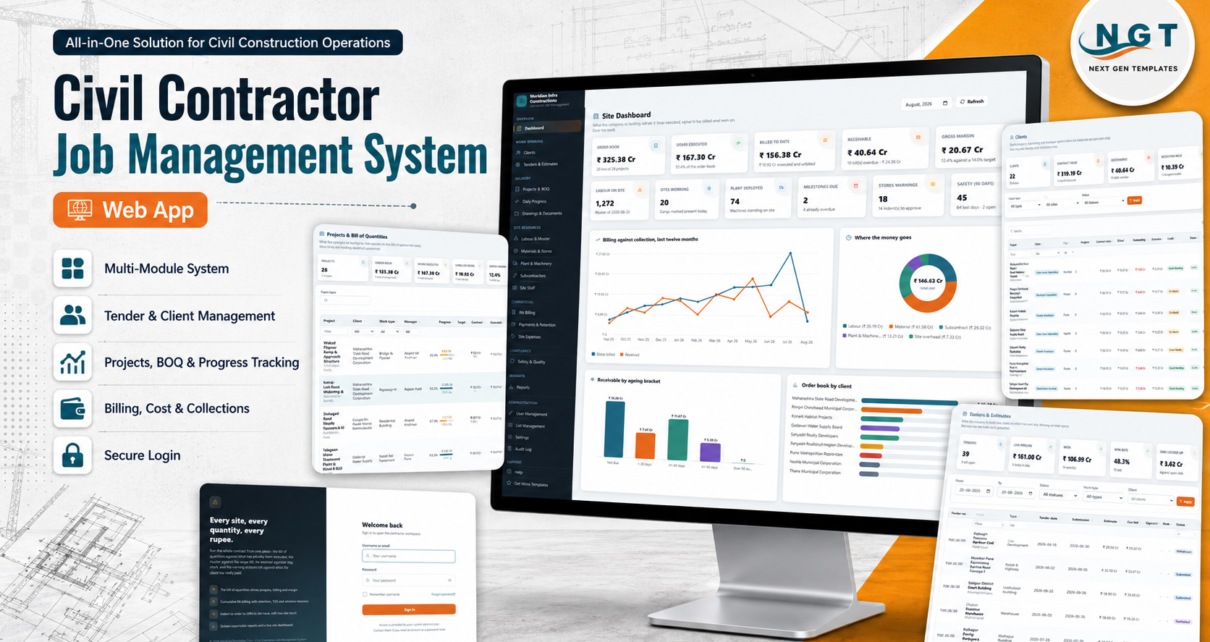
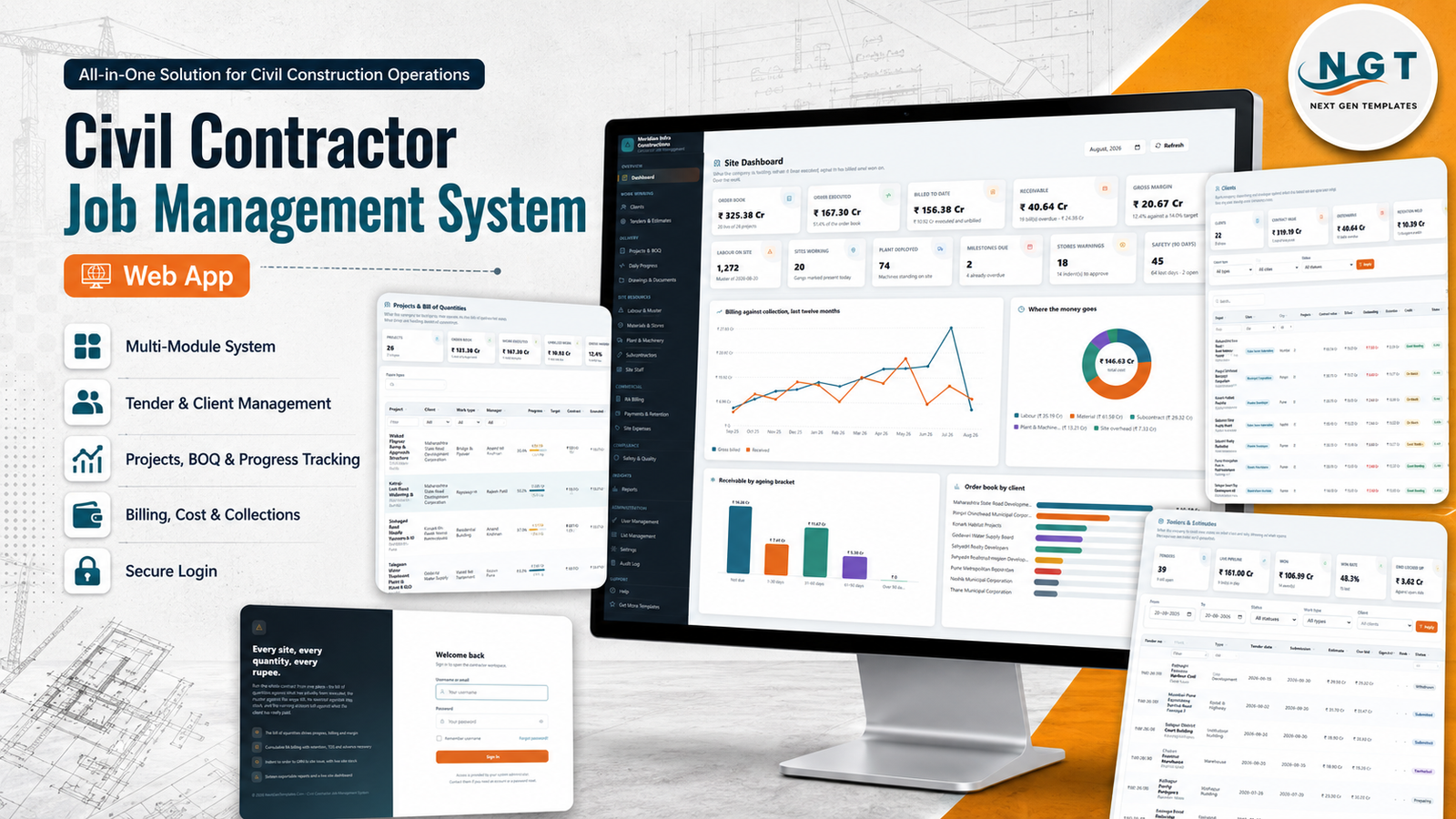
Ask a civil contractor where the truth about a job lives and you will get four answers: the bill of quantities is in one workbook, the muster is in a register at the site office, the stores ledger is on the storekeeper’s phone, and the running account bill is rebuilt from memory on the twenty-eighth of every month. The Civil Contractor Job Management System Web App puts all four in one place. It is a Google Apps Script system – two files and a Google Sheets database – that covers tenders, projects and their BOQ, daily site progress, the labour muster, stores, plant, subcontractors, running account billing, receipts and retention, across twenty working modules, six roles and sixteen exportable reports. Civil Contractor Job Management System Web App
It ships seeded. The first setup run builds 35 sheets and 10,869 rows of sample data for a fictional contracting company – 26 projects, 22 clients, 52 tenders, 352 BOQ lines, 1,757 daily progress reports, 2,188 muster lines, 234 purchase orders, 1,035 material issues, 114 machines, 104 subcontract work orders, 101 RA bills, 588 site expenses and 245 site inspections – so nothing is an empty screen while you are learning it. And because it runs inside your own Google account, the database is your spreadsheet and the uploads are in your Drive. Civil Contractor Job Management System Web App
Get the Civil Contractor Job Management System Web App
🚀 Try the Live Demo Before You Buy
We have deployed this web app in our own Google account so you can test every page, every role and every report – with real sample data – before purchasing. No signup, no email required.
🔑 Test Login Credentials
Sign in as admin to see everything, then sign out and return as engineer. The Site Engineer gets daily progress, the muster, material issues, documents and safety – and no rates, no bills and no margin at all. Ten seconds, and the role model explains itself.
💡 These credentials are public on purpose. They belong to a shared demo instance that resets – not to anybody’s live system. After purchase you get the full source code (Code.gs + Index.html) plus a deployment guide, and you deploy your own private instance in your own Google account in under 15 minutes.
Key Features of the Civil Contractor Job Management System Web App
- The BOQ is the spine. Contract value is the sum of the bill of quantities, progress is quantity executed against tendered quantity, billing is measured against the same lines, and cost is rebuilt from the muster, material issues, subcontract bills, the plant ledger and site expenses. Change one, and the rest follow.
- Cumulative running account billing with retention, tax deduction and advance recovery as separate columns, a net payable at the end, and a status trail from Submitted to Certified to Part Paid to Paid.
- A stores chain that cannot be short-circuited – indent, purchase order, goods receipt, site issue – with per-site live stock, reorder levels and a rebuildable ledger.
- Six roles enforced on the server, not merely hidden in the sidebar, plus five action rights: Create, Edit, Delete, Export and Approve.
- Sixteen filterable reports, each printing and exporting to CSV or Excel.
- An archive that preserves the numbers. Trimmed rows have their cost carried into the project’s brought-forward columns first, so cost to date and gross margin do not move.
- Drive-backed documents and seven optional notification emails, each switched on or off individually in Settings.
- A complete audit log of every create, change, deletion, approval, bill, receipt, sign-in and archive.
Module-by-Module Walkthrough
Site Dashboard
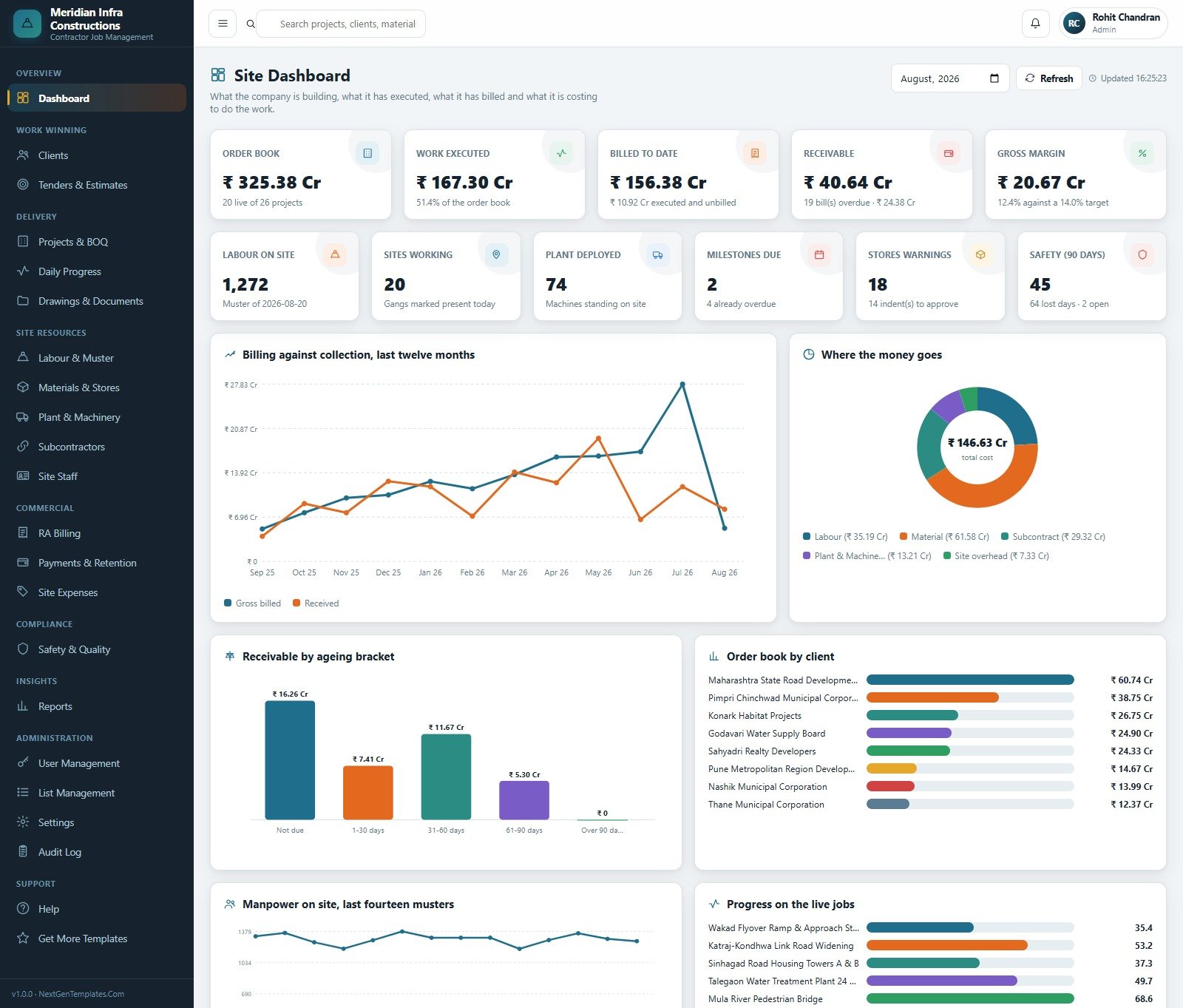
Eleven headline cards across two rows – order book, work executed, billed to date, receivable, gross margin, labour on site, sites working, plant deployed, milestones due, stores warnings and safety over ninety days – sitting above a twelve-month billing-against-collection chart, a cost-breakdown donut, receivables by ageing bracket, order book by client, a fourteen-muster manpower trend and progress on the live jobs. A month picker at the top re-runs the whole page. Civil Contractor Job Management System Web App
Tenders & Estimates
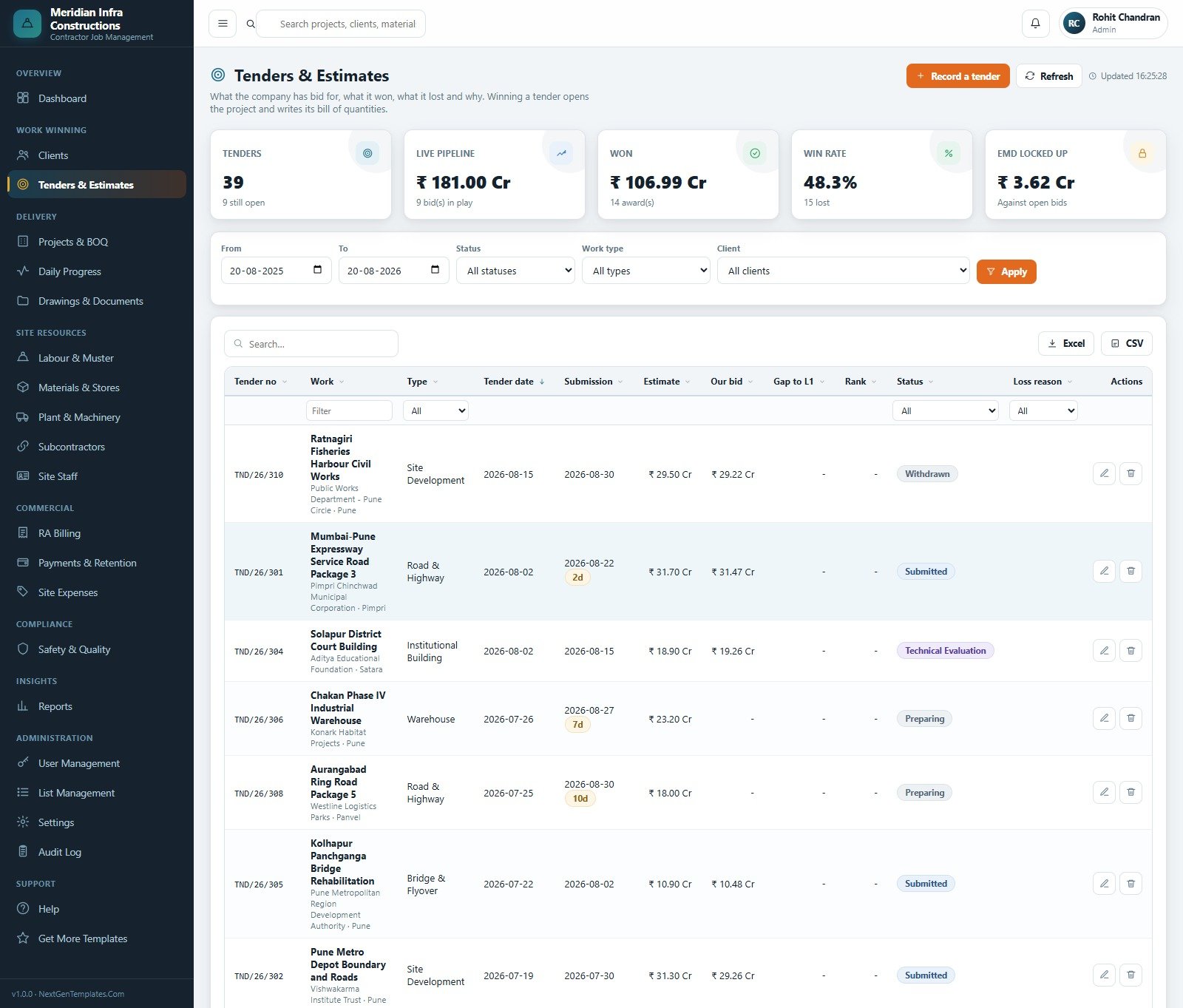
The bid book: tender number, work, type, tender and submission dates, your estimate, your bid, the gap to L1, rank, status and – where you lost – the loss reason. Cards summarise the live pipeline, what was won, the win rate and how much earnest money is locked up against open bids. Winning a tender opens the project and writes its bill of quantities.
Projects & Bill of Quantities
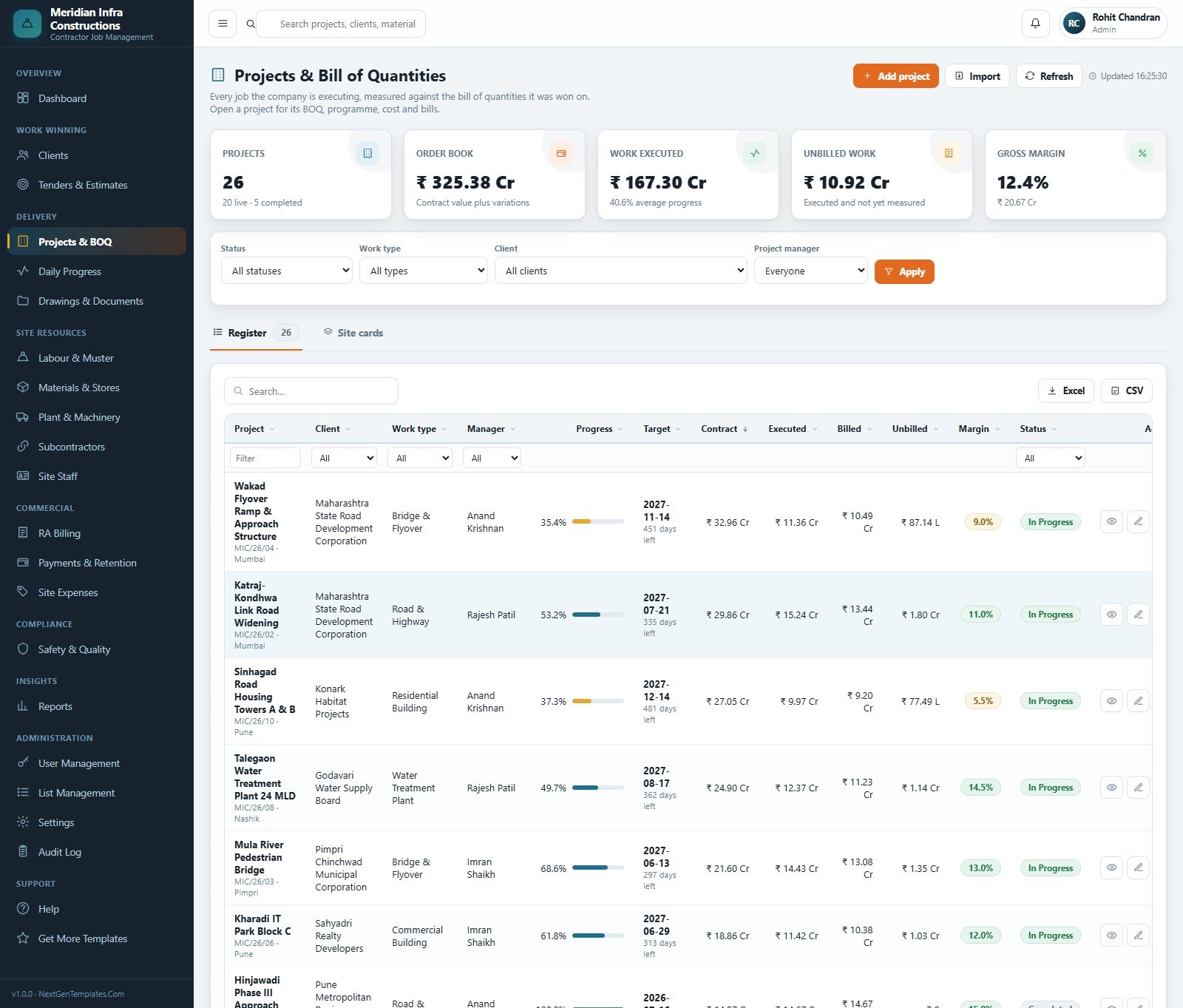
Every job on one register with client, work type, manager, progress bar, target date and days left, contract value, executed, billed, unbilled and margin, filterable by status, work type, client and project manager. A Site cards view gives the same set as tiles. Open a project for its BOQ, programme, cost and bills. Civil Contractor Job Management System Web App
Daily Progress
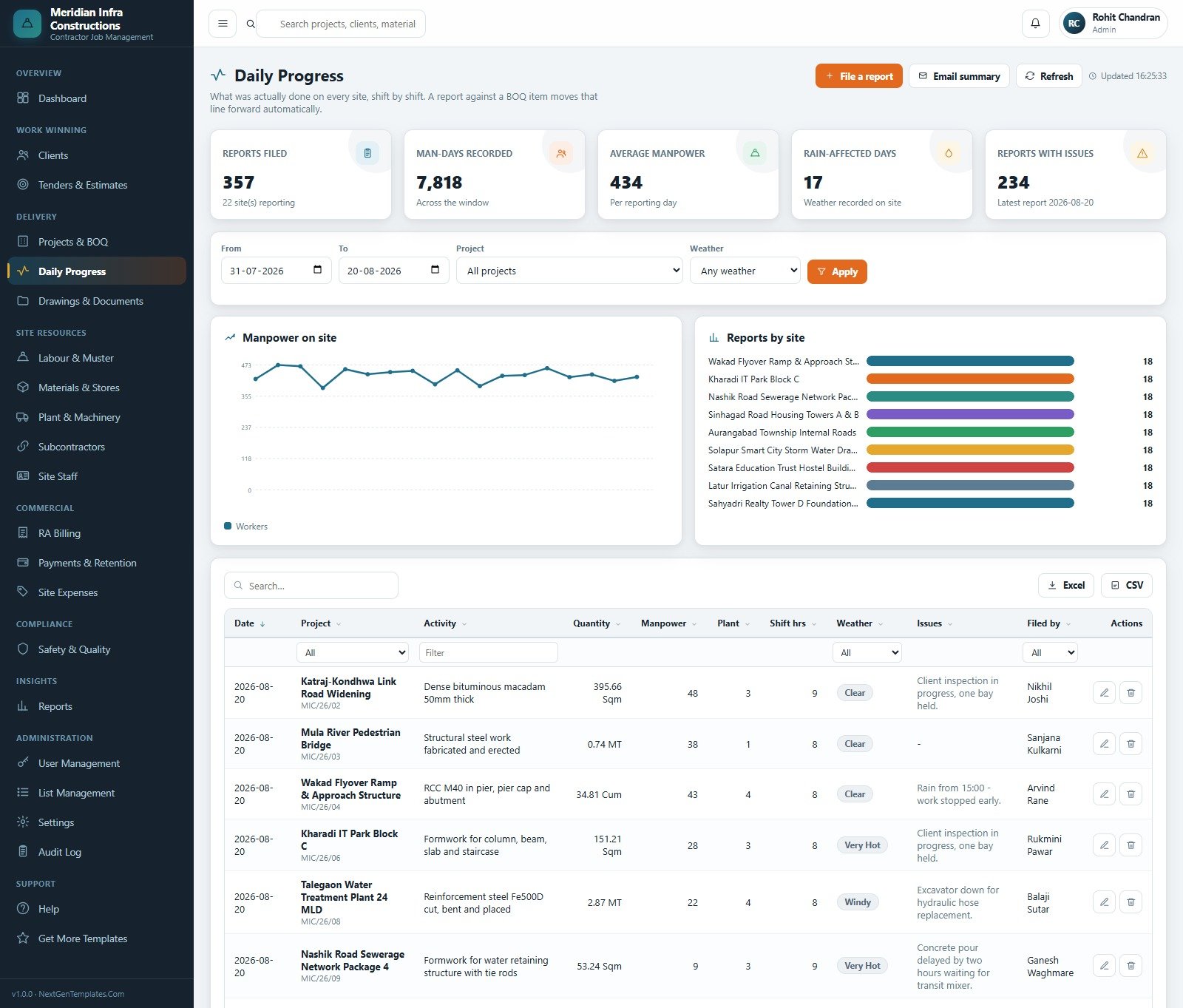
What was actually done on every site, shift by shift: activity, quantity with its unit, manpower, plant, shift hours, weather and an issues note. Filing a report against a BOQ item moves that line forward automatically. The header counts reports filed, man-days recorded, average manpower, rain-affected days and reports carrying issues.
Labour & Muster
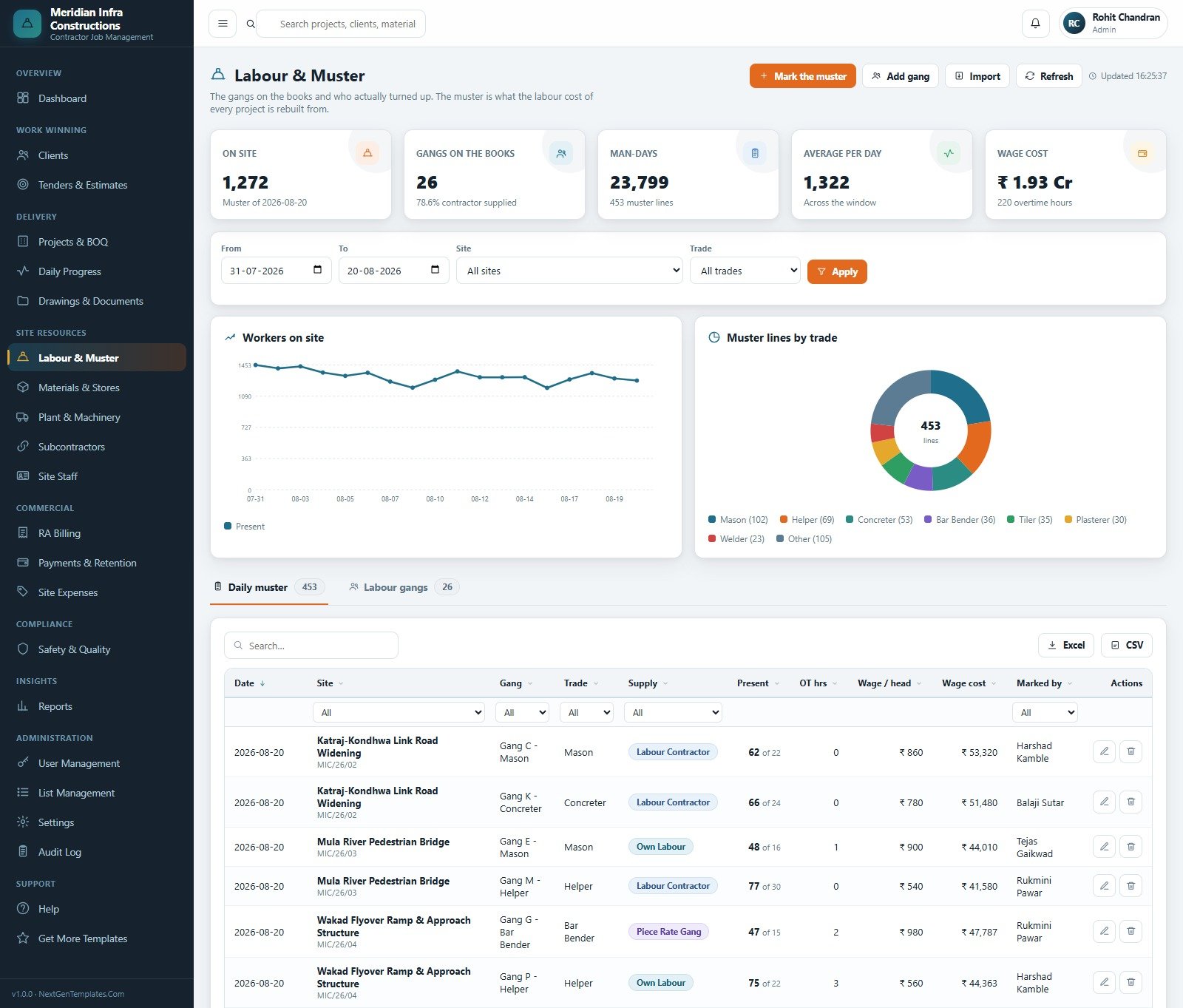
Gangs on the books against who actually turned up, by site and trade, with overtime hours, wage per head and wage cost per line, plus a trade-mix donut and a workers-on-site trend. This is the register the labour cost of every project is rebuilt from, which is why it is separate from Site Staff.
Materials & Stores
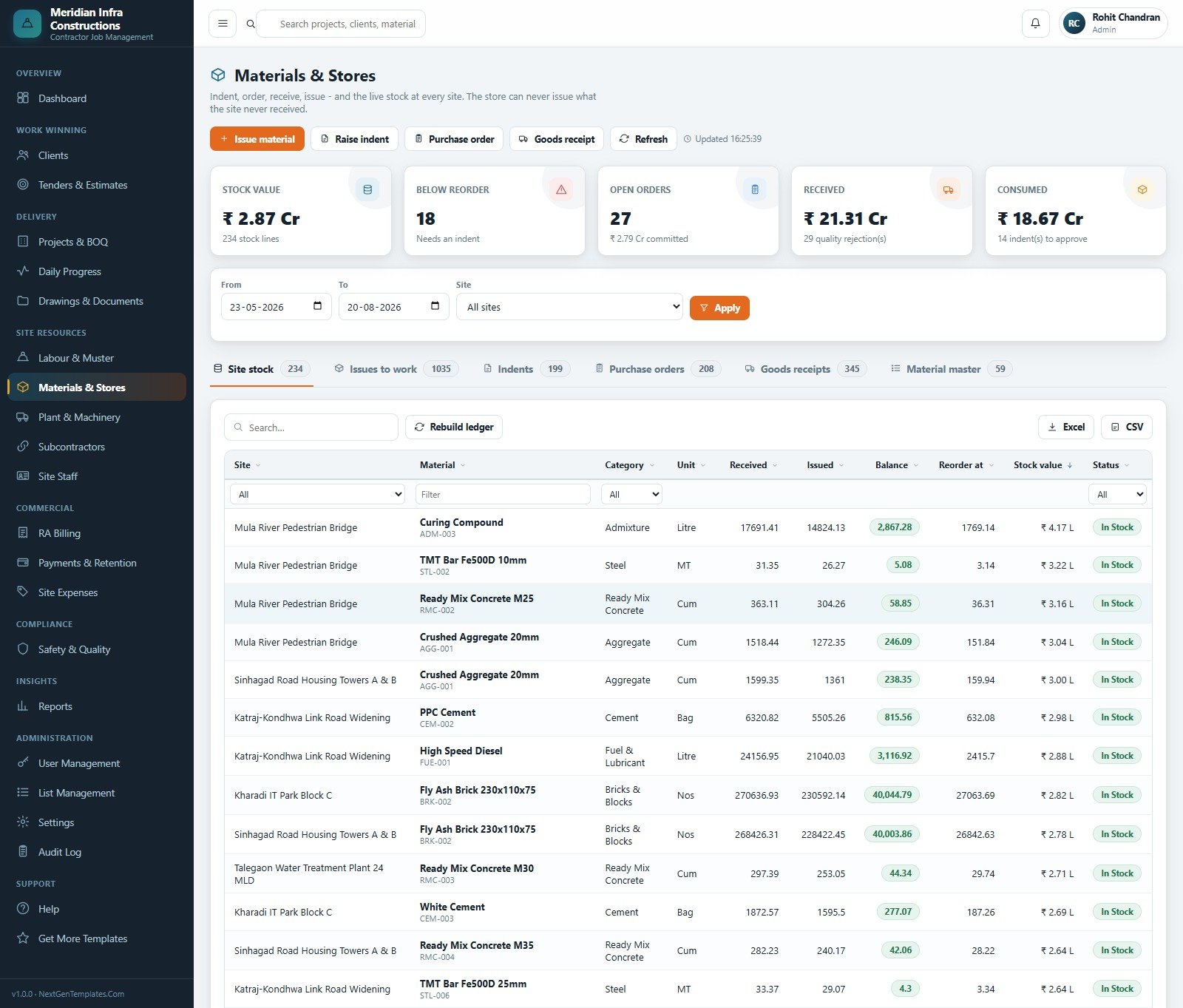
Six tabs – site stock, issues to work, indents, purchase orders, goods receipts and the material master – with received, issued, balance, reorder point and status per site and material. Cards flag how many lines are below reorder, how many orders are open and how many indents are waiting for approval. Civil Contractor Job Management System Web App
Plant & Machinery
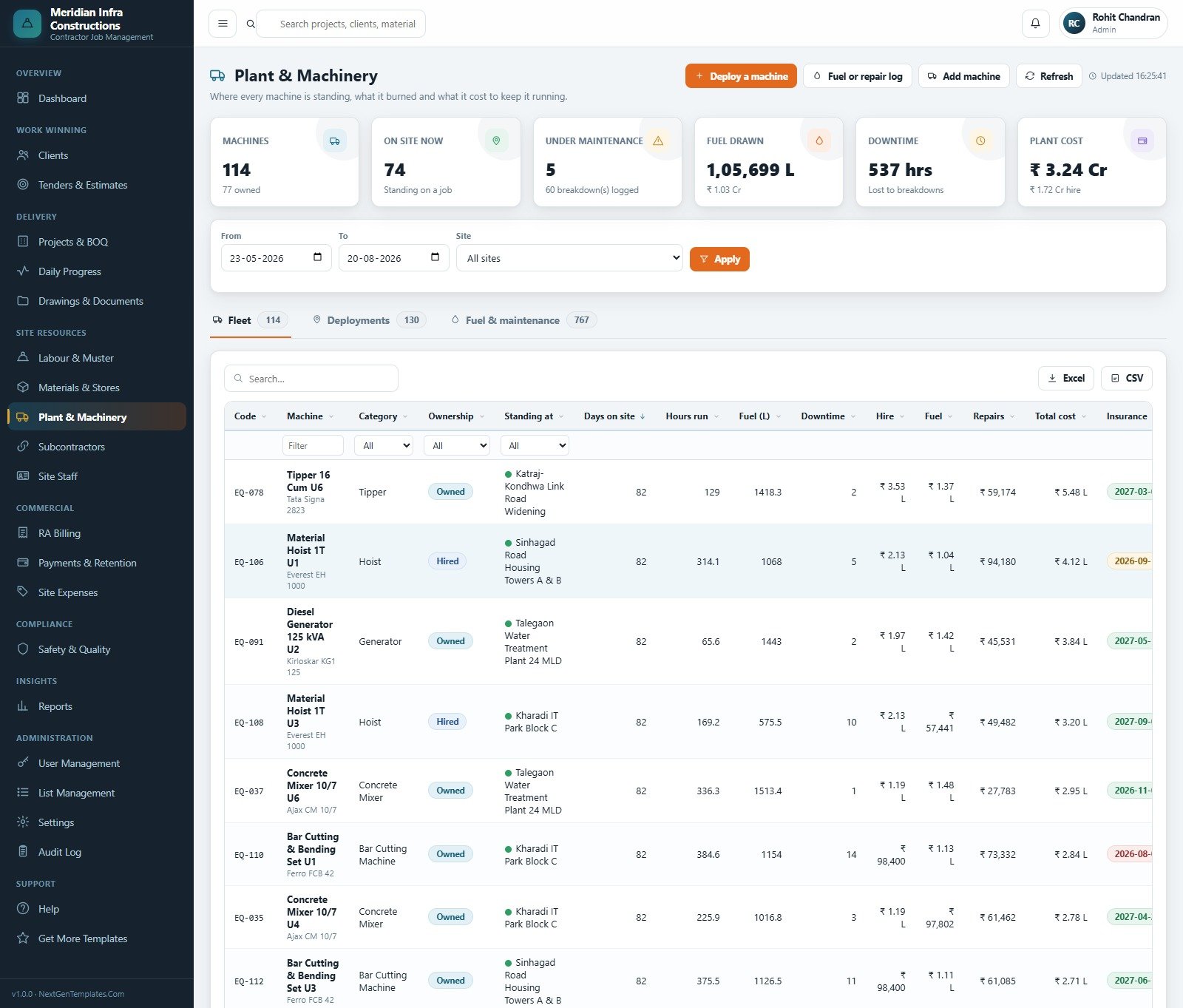
The fleet with ownership (owned or hired), where each machine is standing, days on site, hours run, fuel drawn, downtime, and hire, fuel and repair cost – plus deployment and fuel-and-maintenance tabs. The insurance column carries an expiry date that turns red as it approaches.
Subcontractors
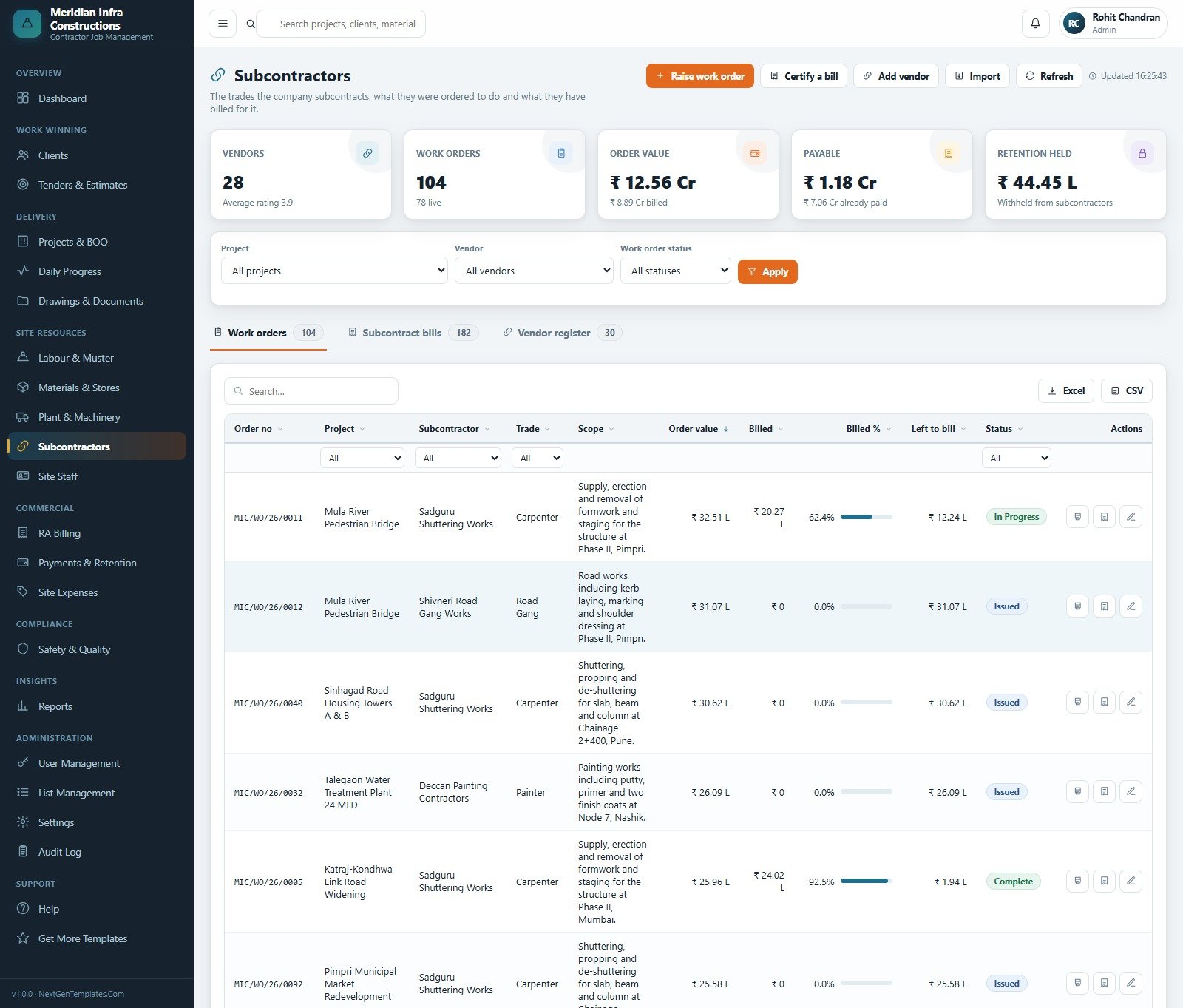
Work orders with scope and chainage, order value, billed, billed percentage and left to bill, alongside subcontract bills and a vendor register carrying an average rating. Retention withheld from subcontractors is tracked separately from retention your clients hold from you.
RA Billing
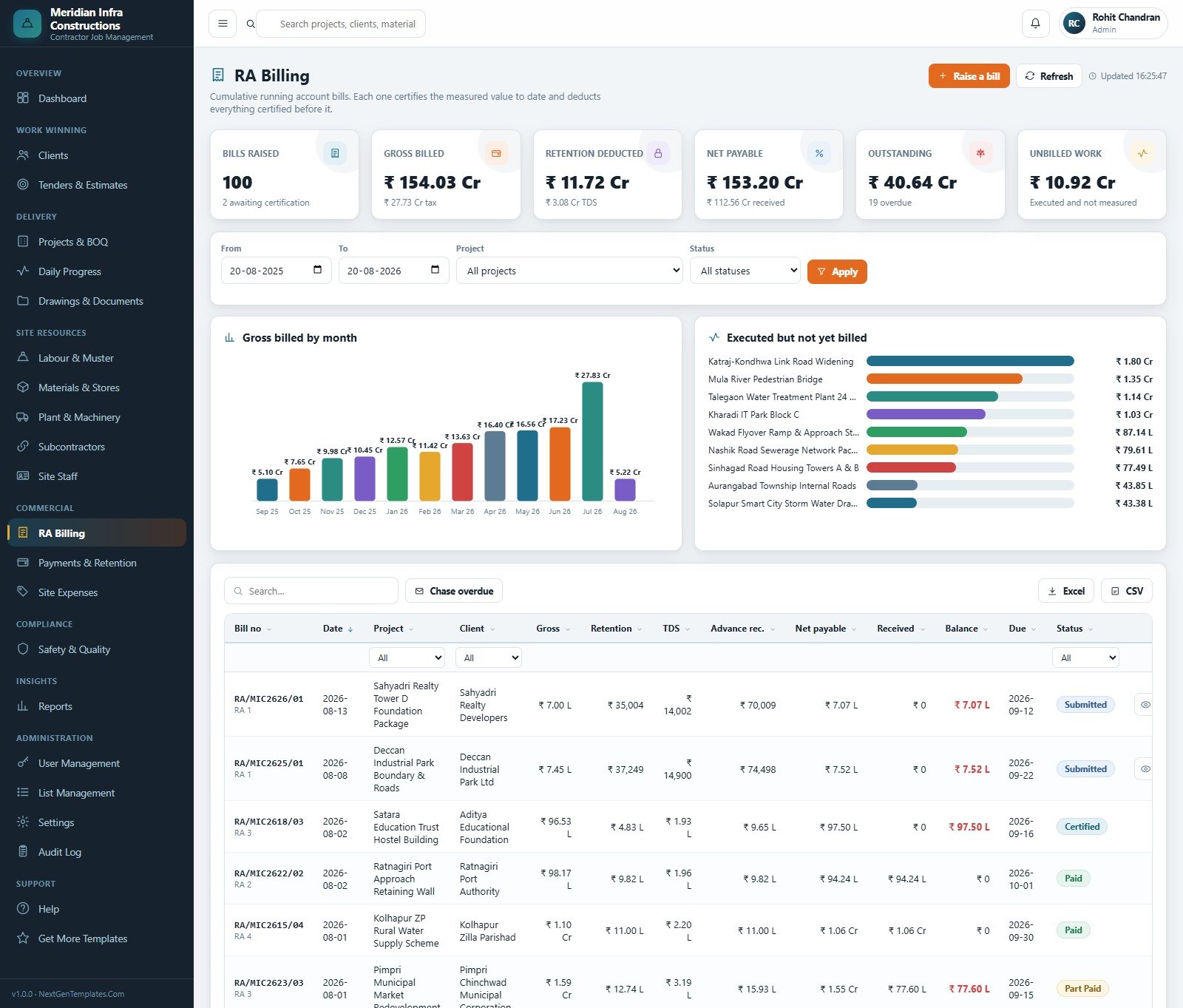
Each running account bill carries gross, retention, tax deducted, advance recovered, net payable, received, balance, due date and status. Beside the register sit a gross-billed-by-month bar chart and an “executed but not yet billed” panel that ranks the jobs carrying unbilled work – the single most useful screen in the month-end week.
Safety & Quality and Reports
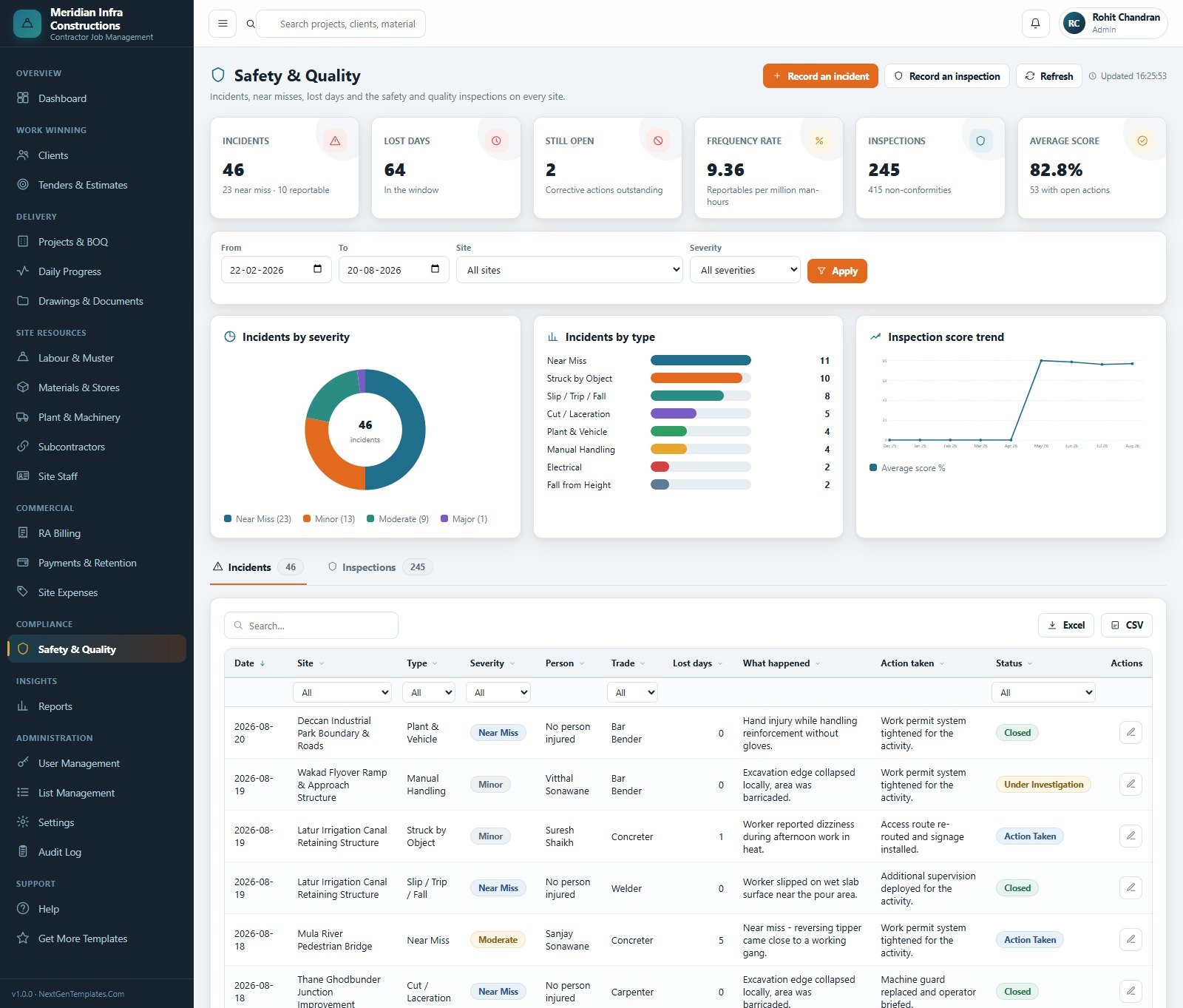
Safety & Quality is an incident, near-miss and inspection register: type, severity, person, trade, lost days, what happened, action taken and status, with severity and type breakdowns and an inspection score trend. Reports then offers sixteen named reports – Project Progress & Value, Project Profitability, BOQ Execution, RA Bill Register, Receivables Ageing, Retention Held & Due, Labour Cost & Attendance, Material Consumption, Material Stock Position, Purchase & GRN Summary, Machinery Utilisation, Subcontractor Bills, Site Expense Analysis, Safety & Inspection, Tender Pipeline & Win Rate and Milestone & Schedule – each with a date range, status, work type, project, client and manager filter, and CSV, Excel and Print buttons.
Civil Contractor Job Management System vs. a Spreadsheet Stack vs. Paid Construction SaaS – Feature Comparison
| This Web App | Excel / Sheets stack | Paid construction SaaS | |
|---|---|---|---|
| Cost | One-time purchase | Free, but you build and maintain it | Per-user subscription, billed monthly |
| Platform | Google Apps Script web app in your own account | Workbooks on a shared drive | Vendor-hosted cloud |
| Setup time | About 15 minutes plus one seeded setup run | Weeks to build, then constant repair | Days to weeks, often paid onboarding |
| Real-time team collaboration | Yes – six named roles at once | File locking and merge conflicts | Yes |
| Mobile access | Any browser, including a site phone | Awkward on phones | Yes, usually a native app |
| Customisable fields and lists | Yes – List Management plus the source code | Yes, if you maintain the formulas | Only what the vendor exposes |
| Share with a link | Yes – your deployment URL, role controlled | Share the file and hope | Yes, per seat |
| Year-1 cost at 5 users | The purchase price, once | Free plus your team’s time | Five seats, twelve months |
| BOQ-driven progress and RA billing | Built in and reconciled | Manual, and the first thing to drift | Usually yes, on higher tiers |
| Who holds the data | You – your Sheet, your Drive | You | The vendor |
Who Should Use This Template
Small and mid-sized civil contracting firms running several sites at once – roads, bridges, buildings, water works, industrial sheds, site development – where the BOQ, the muster, the stores register and the RA bill currently live in four separate files and only one person can reconcile them. It fits a firm of roughly 5 to 60 office and site staff who already work inside Google Workspace or a personal Google account, and it fits especially well where a quantity surveyor and an accounts officer need different slices of the same project without seeing each other’s screens.
It is not the right tool if you need engineering output. It does not perform structural or engineering calculation, does not check building codes or planning rules, and is not a CAD or BIM package – drawings are stored, versioned and issued from Drive, not drawn or marked up. It is not accounting or payroll software either: it records bills, receipts, retention, site expenses and wage cost against the muster, but it does not post to a ledger, file returns or run payroll. And it makes no claim about site-safety compliance, licensing or statutory certification; the Safety & Quality module is a register of incidents and inspections, nothing more.
Real-World Use Cases
A road and bridge contractor with nine live sites. Progress used to arrive on WhatsApp and the RA bill was rebuilt from photographs. Now each shift report is booked against a BOQ line as it happens, the measurement sheet feeds the bill, and Receivables Ageing names the clients to chase before month end rather than after it.
A quantity surveyor at a mid-sized building contractor. She lives in Projects & BOQ, the measurement sheet and RA Billing. Because every bill is cumulative and deducts what was certified before it, hand reconciliation stopped, and the “executed but not yet billed” panel shows exactly which jobs are carrying work that has not been invoiced. Civil Contractor Job Management System Web App
Advantages of the Civil Contractor Job Management System Web App
A project manager approving stores indents for four sites. The stores chain shows what was ordered, received, issued to the work and sitting below reorder level per site, while Machinery Utilisation exposes the hired plant standing idle that should go back off hire. Civil Contractor Job Management System Web App
- Everything reconciles. Because progress, billing and cost all trace back to the bill of quantities and the muster, the dashboard and the bill agree without a spreadsheet in between.
- You own the deployment. Your Google account, your Sheet, your Drive, your URL – no subscription and no vendor holding your project data.
- Role separation is real. Permissions are checked server-side, so a Site Engineer cannot reach rates or margins by guessing a URL.
- It arrives populated. The seeded database means you can evaluate the reports and the flow before entering a single record of your own.
- It scales down gracefully. The staged, resumable setup and the archive routine are both designed around a free Google account’s limits.
- Everything is editable. Lists, statuses and trades change in the UI; anything deeper changes in the source, which you own.
Opportunities for Improvement
Being honest about the edges is more useful than pretending there are none. Apps Script executions are capped – six minutes on a free account, thirty on Workspace – so the very largest imports are best done in batches, and the setup routine is staged for exactly that reason. Google Sheets is the database, so a firm booking thousands of muster lines a week will need the archive routine on a schedule rather than as an afterthought. There is no offline mode: a site with no signal cannot file its progress report until it has one. And while documents are stored and versioned in Drive, there is no in-browser drawing markup – reviewers still open the file. None of these are defects so much as the shape of the platform, and the archive and staged-setup design shows they were anticipated.
Best Practices
- Change all six seeded passwords on day one, in User Management, before anyone else signs in.
- Fill List Management before you enter jobs. Work types, trades, material categories and statuses are what every dropdown reads from, and fixing them later means editing records.
- Make the muster a daily habit, not a weekly catch-up. Labour cost, and therefore margin, is only as current as the last muster marked.
- Let the tender become the project. Converting a won tender writes the BOQ, which is what keeps progress and billing on the same lines.
- Preview before you archive, and take the backup copy the routine offers. Cost is carried forward automatically, but a copy costs nothing.
- Redeploy after every code change. Apps Script serves the last published version, so an edit is not live until Deploy > Manage deployments > New version. The Google Apps Script web apps documentation explains the versioning model in detail.Civil Contractor Job Management System Web App
Explore Relevant Templates
- Construction Project Management System Web App – the broader project-management sibling, for firms where programme and task management matter more than BOQ, muster and RA billing.
- Building Material Supplier Management System Web App – the merchant’s side of the same delivery note.
- Architecture Firm Project Management System Web App – for the design consultancy on the same job.
- Architect Drawing Approval Management System Web App – drawing issue and approval, a natural companion to the Drawings & Documents module. Civil Contractor Job Management System Web App
- Cement and Steel Dashboard in Google Sheets – a lighter, reporting-only view of material spend.
- A companion system, Cement & Concrete Supplier Management System Web App, is being prepared for release – materials supply where this one covers contracting jobs.
Get the Civil Contractor Job Management System Web App
Want to build skills like this step by step? The NextGenTemplates Academy learning paths walk you through spreadsheet and data skills with practice files.
Frequently Asked Questions
Can I try it before buying?
Yes. The demo above is a real deployment running the seeded database, and all six role logins are published. Sign in as admin for the full picture and as engineer to see how much a restricted role is denied. It is shared and resets periodically, so treat anything you type there as temporary.
Where does the data live?
In your own Google account. The first setup run creates the Google Sheets database in your Drive, and uploads land in a folder called “Civil Contractor Job Management System – Files” in the same account.
Does it work on a free Gmail account?
Yes. Free accounts stop any Apps Script run at six minutes, so setup is staged across fourteen named steps and schedules itself to continue – expect it to finish in two or three passes.
How many users can I add?
As many as you need. The seed creates six, one per role, and User Management adds more. Each role controls both what appears in the sidebar and what the server will answer.
Can I customise the modules and fields?
Lists, work types, trades, material categories and statuses are edited in List Management with no code. Company details, print size, currency and the seven email switches are in Settings. Beyond that you own the source, so the rest is editable in the Apps Script editor.
Is it an estimating or accounting package?
No. It records tenders, bids and outcomes but does not price work or perform engineering calculation, and it records bills, receipts and expenses but does not post to a ledger or run payroll.
What is in the download?
A ZIP containing Code.gs, Index.html and the user manual PDF – everything needed to deploy, with no external dependencies and no licence key.
About the Author
Built by PK – Microsoft Certified Professional with 15+ years of Excel, Google Sheets, and Power BI experience. Founder of NextGenTemplates, reaching 300K+ subscribers across YouTube channels. Every template is hand-built and tested before release.
Conclusion
The Civil Contractor Job Management System Web App is not trying to be a design tool or an accounting package. It is trying to be the one place where the bill of quantities, the site diary, the muster, the stores ledger and the running account bill agree with each other – and to be that in a Google account you already have, for a single payment, with the source code in your hands. Twenty modules, six roles, sixteen reports and a seeded database of nearly eleven thousand rows are there to be tested before you decide.
The honest next step is the demo, not the checkout. Launch the live demo, sign in as the Site Engineer and then as the Quantity Surveyor, and see whether the split matches how your office actually works. If it does, the full system is here: Civil Contractor Job Management System Web App.
For walkthroughs of this and other Google Apps Script systems, subscribe to NeoTech Navigators on YouTube. Civil Contractor Job Management System Web App