Ask anyone who runs a cold store what actually goes wrong, and it is never the refrigeration. It is that the lot register, the chamber allocation, the temperature log and the rent book are four separate things kept by four different people — and by the time a depositor disputes an invoice, nobody can prove how many days their goods really sat in Chamber 6.
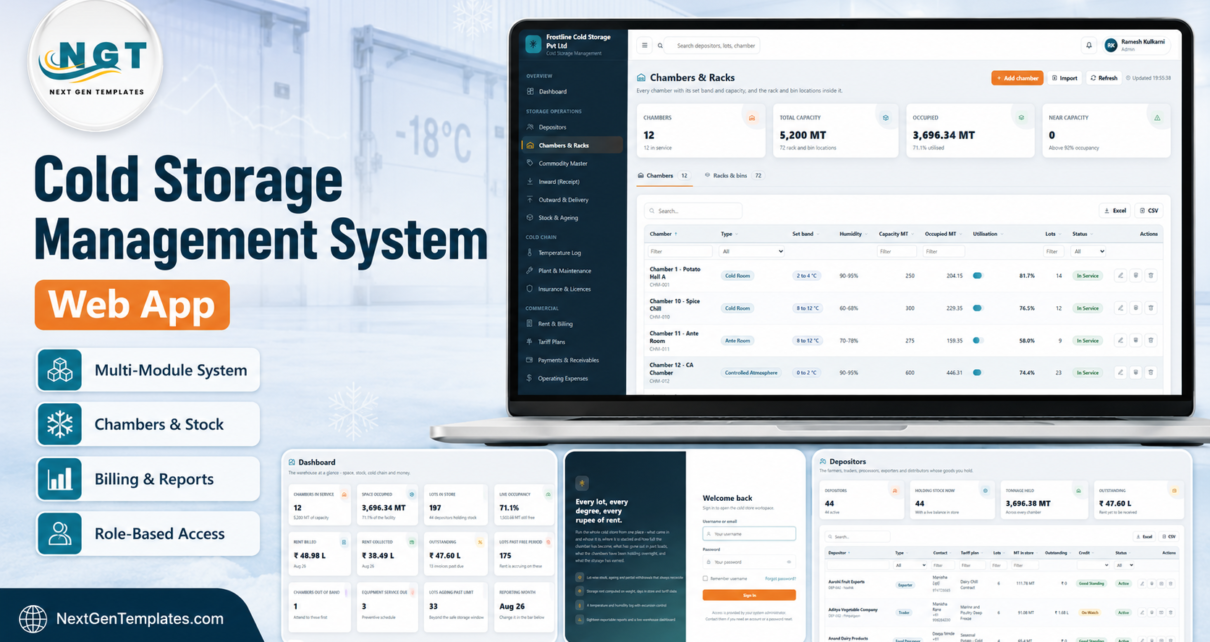
The Cold Storage Management System Web App is one system that holds all four. It is a complete Google Apps Script application — 22 modules, six roles, eighteen exportable reports — that runs on a Google Sheet in your own account, deploys in about fifteen minutes, and arrives with roughly 12,000 rows of seeded data so every screen is populated the first time you open it.
This walkthrough covers what is in it, how the rent engine works, where it genuinely helps, and — just as important — the things it deliberately does not do.
Get the Cold Storage Management System Web App
🚀 Try the Live Demo Before You Buy
We have deployed this web app in our own Google account so you can test every page, every role and every report — with real sample data — before purchasing. No signup, no email required.
🔑 Test Login Credentials
Sign in as admin to see every module including Settings, User Management and the Audit Log, then sign in again as storekeep to see how little a store keeper can reach — no rates, no invoices, no money at all. The role separation is the product. Six accounts are seeded and each one is worth ten seconds of your time.
These credentials are public on purpose. They are the seeded logins of a shared demo instance that resets periodically — not a customer’s live system. When you deploy your own copy you create your own accounts, and the first thing the Help page tells you to do is change every seeded password.
Key Features of the Cold Storage Management System Web App
- The lot is the unit of everything. Goods arrive as a lot — a lot number, a weight, a package count, a chamber, a rack. Rent, ageing, delivery and insurance all hang off it, and every outward movement is a partial withdrawal that can never take the balance below zero.
- Rent is computed, never typed. Units × rate × time, with a free period, a second slab, a long-stay rate and a minimum charge, plus separate handling-in, handling-out and insurance-recovery lines.
- Nine tariff plans across four charging bases — per MT per month, per quintal per month, per bag, and per day — because seed potato, dairy, frozen foods, marine, pharma and ripening fruit do not bill the same way.
- Twelve chambers, six chamber types, each with its own temperature band, humidity range, capacity in tonnes and rack or bin locations: cold room, deep freeze, ripening chamber, ante room, dock area and controlled atmosphere.
- Excursion control, not just a log. A reading outside a chamber’s set band becomes an excursion that has to be given a cause and an action and then closed by a named user.
- An ageing profile with a safe-storage window per commodity, so lots drifting past their limit surface on the dashboard rather than in a complaint.
- The plant carries the risk, so it carries a service clock. 28 compressors, condensers, evaporators and generators with running hours, next-due dates, breakdowns and cost.
- Six roles enforced twice — the browser draws only what a role holds, and the server refuses any endpoint the role is not entitled to even if it is called directly.
- Eighteen reports, each filtered, charted, printable and exportable to CSV and Excel.
- An idempotent staged setup that builds 26 sheets and ~12,000 seeded rows and resumes itself if it runs out of execution time.
Module-by-Module Walkthrough
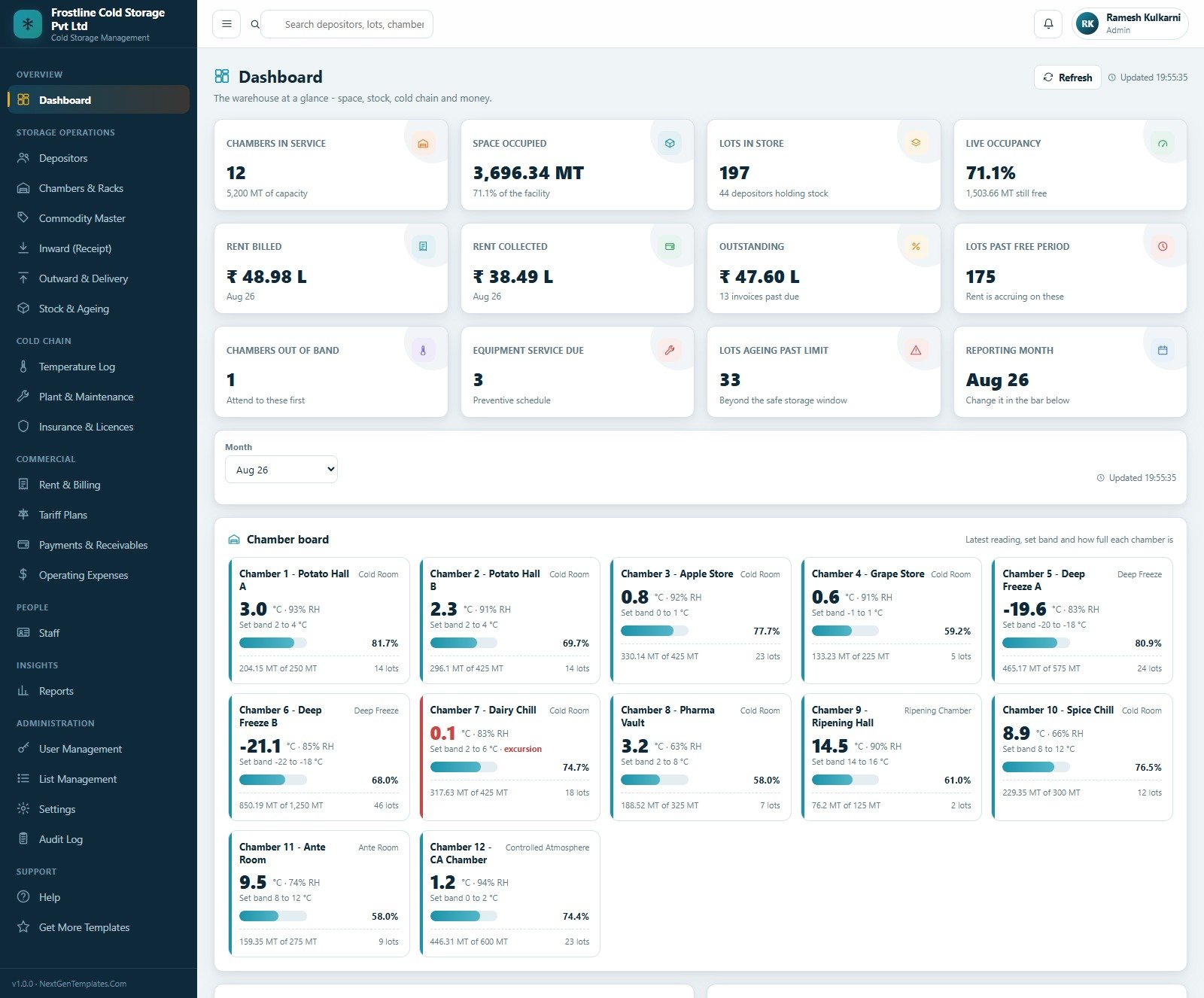
Dashboard. Twelve KPI cards over a chamber board. In the seeded facility: 12 chambers in service holding 3,696.34 MT of 5,200 MT capacity at 71.1% occupancy, 197 lots belonging to 44 depositors, 175 lots past their free period with rent accruing, 33 lots past the safe storage window, one chamber out of band and three pieces of equipment due for service. Each chamber tile shows its latest reading, its set band and how full it is.
Depositors. The farmers, traders, food processors, exporters, retail chains and pharmaceutical distributors whose goods you hold — each with a type, a contact, a tariff plan, lots held, MT in store, outstanding balance and a credit status of Good Standing or On Watch.
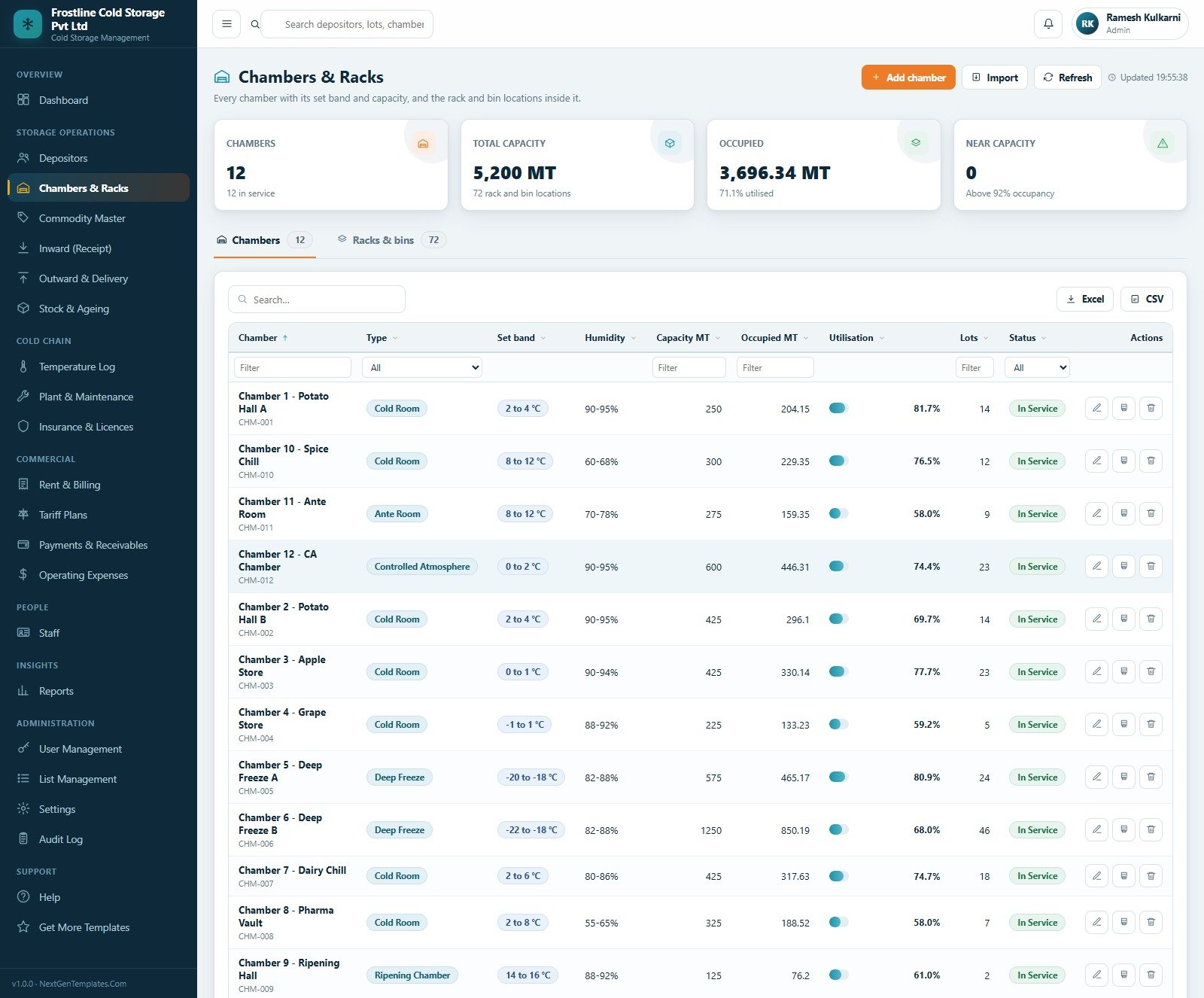
Chambers & Racks. Every chamber with its type, set band, humidity range, capacity, occupied tonnage, utilisation percentage and lot count, plus a second tab holding all 72 rack and bin locations. A “near capacity” card counts anything above 92%.
Commodity Master. 28 commodities across 9 categories, each carrying the band it needs, its humidity range, the safe days it can be held, a shrinkage percentage per month, its package type and pack weight, and its HSN code.
Inward (Goods Receipt). The gate entry. Every lot that comes in, with its gate pass number, depositor, commodity, chamber and rack, package count, net weight at the weighbridge, grade and status.
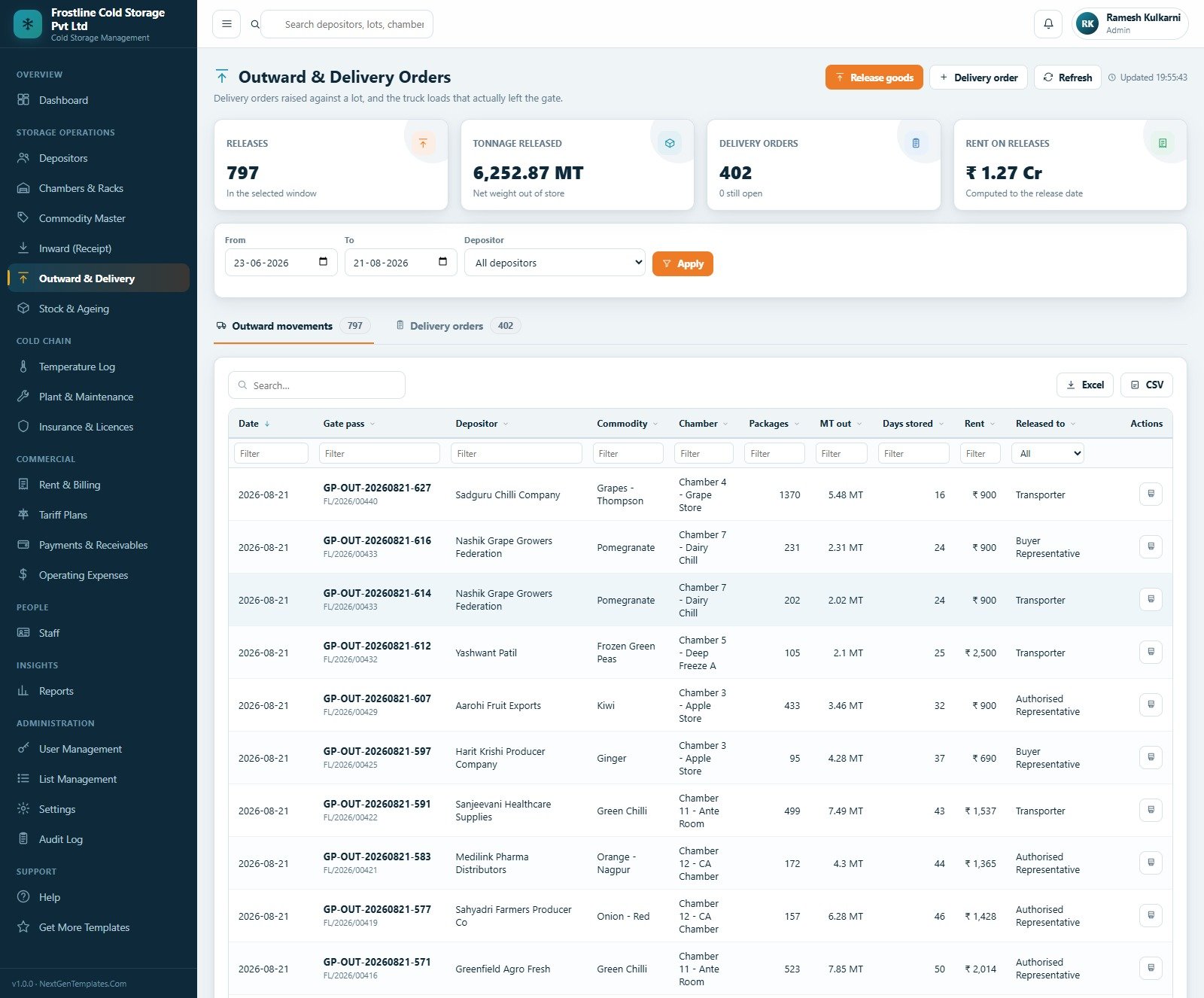
Outward & Delivery. Delivery orders raised against a lot, and the truck loads that actually left the gate — each with a gate pass, the packages and tonnage released, the days stored and the rent computed to the release date, and who it was released to.
Stock & Ageing. The live lot-wise balance: what came in, what has gone, what is left, how long it has been there, whether the free days are used up and what rent has accrued. An ageing profile bar splits the whole facility into 0-30, 31-60, 61-90, 91-180 and 180+ day buckets.
Temperature & Humidity Log. Readings per chamber with a compliance percentage, a per-chamber board of in-band bars with excursions marked in red, a full reading log and an excursion register. Each chamber has a “Print the log sheet” button for the paper record inspectors ask for.
Plant & Maintenance. Equipment with its category, the chamber it serves, its rating, running hours, last service, next due with a day countdown, breakdowns and cost — plus a maintenance jobs tab.
Insurance & Licences. Building, plant and machinery, stored goods and public liability cover alongside the FSSAI, factory, weights-and-measures, electrical inspectorate and pollution board consents — each with insurer or authority, sum insured, premium, validity dates and days remaining.
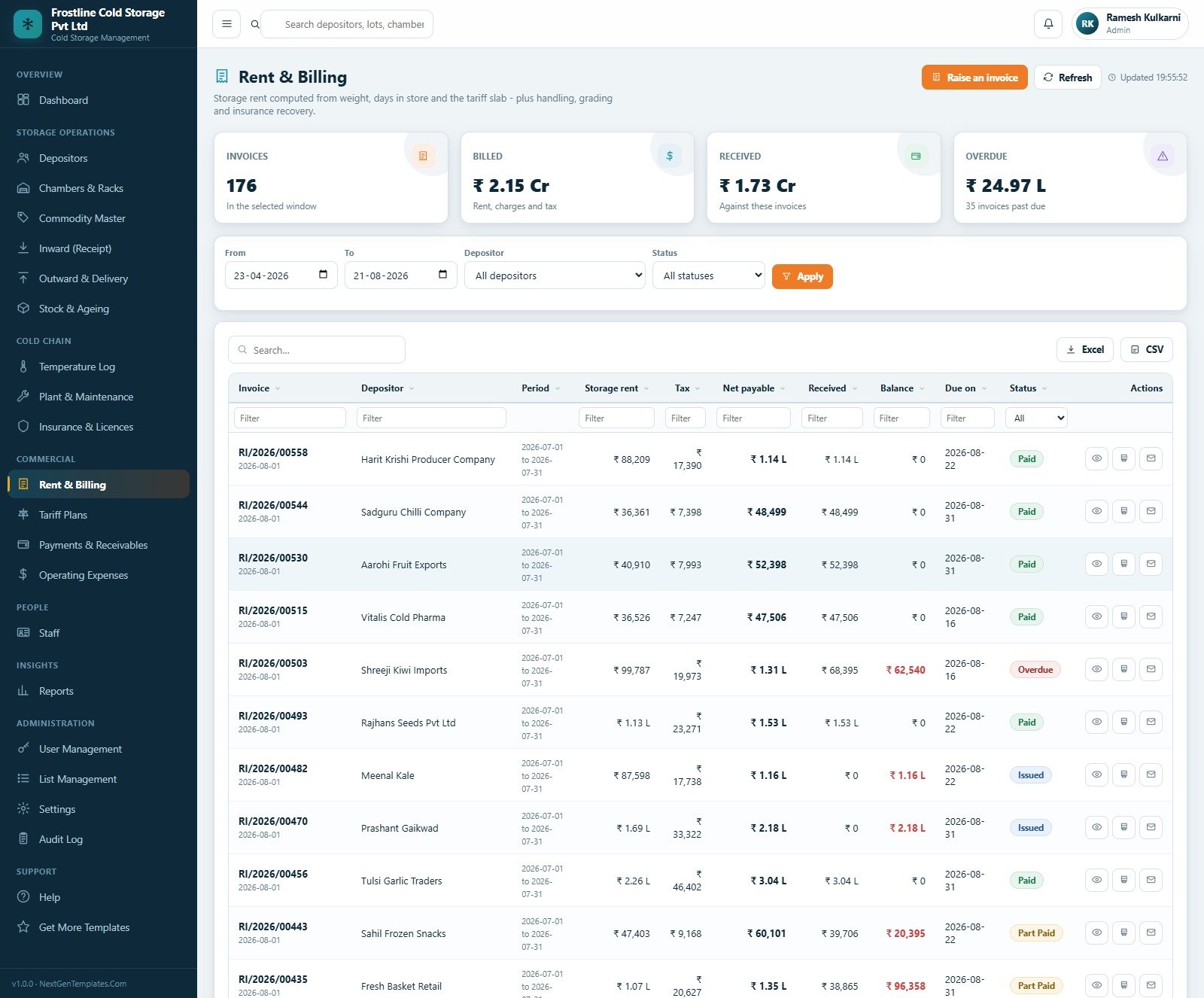
Rent & Billing. Invoices with the storage rent, tax, net payable, received and balance, and a status of Paid, Part Paid, Issued or Overdue. Tariff Plans is the rate card behind them, with an explainer panel spelling out exactly how rent is computed. Payments & Receivables records money in by cash, cheque, bank transfer, UPI and demand draft, with a receivables-ageing tab. Operating Expenses tracks what it costs to keep the chambers cold, with a cost-by-category donut and a biggest-lines bar chart — electricity is 48.2% of the total in the seeded facility.
Staff, Reports, and the administration group. 26 staff across 7 departments and 3 shifts; eighteen reports; user accounts and per-module role permissions; 24 dropdown lists holding 161 values that drive every form in the product; eight setting groups; and an audit log of every create, change, deletion, receipt, release, bill, sign-in and archive.
Cold Storage Management System Web App vs. Spreadsheets vs. Paid Cold Storage SaaS — Feature Comparison
| Capability | Spreadsheet registers | This web app | Paid cold storage SaaS |
|---|---|---|---|
| Cost model | Free | One payment, no renewal | Monthly, often per user or per chamber |
| Lot balance that cannot go negative | Manual, breaks on part loads | Enforced server side | Yes |
| Rent from weight × days × slab | Formulas someone must maintain | Computed from the rate card | Yes |
| Multi-user with real permissions | Sheet-level sharing at best | Six roles, enforced twice | Yes |
| Temperature log with excursion closure | A separate register nobody reconciles | Built in, with compliance % | Usually an add-on |
| Automatic capture from probes / data loggers | No | No — entered or imported | Often yes, at a hardware cost |
| Plant service scheduling | A wall calendar | Built in, with running hours | Sometimes |
| Audit trail | Version history, at best | Every action, with user and time | Yes |
| Source code ownership | n/a | Yours — rebrand and extend | No |
| Where your data lives | Your Drive | Your Google account | Vendor hosted |
| Time to running | Weeks of building | About 15 minutes | Vendor onboarding |
Who Should Use This Template
Independent and mid-size cold stores; potato and onion stores working a harvest peak; controlled-atmosphere fruit stores; dairy and frozen-food chill facilities; marine and poultry deep-freeze units; ripening chamber operators; and third-party cold chain warehouses that bill depositors for space rather than owning the goods.
The sweet spot is a facility with somewhere between four and thirty chambers, a handful of tariff structures, and enough depositors that a spreadsheet has started to hurt — but not enough head office budget to justify a per-chamber SaaS licence.
Real-World Use Cases
- Harvest-season intake at a potato store. Seed Potato Programme and Seasonal Potato tariffs bill per quintal per month with 21 and 15 free days respectively; the ageing profile shows what has passed its safe window before anyone complains.
- Frozen and marine deep freeze. Two chambers at −20 and −22 °C carry their own bands and their own tariff, and every drift becomes a named person’s excursion to close.
- Ripening chambers billed by the day. The Ripening Programme plan charges per MT per day with a 21-day second slab, against a 14-16 °C band.
- Settling a depositor dispute. The Depositor Stock Statement prints lots in, lots out, balance and rent for one depositor — the single document that ends most arguments.
- Going into season. Compressors past their service date show on the dashboard before the season starts, not after a breakdown has cost you 81 hours of downtime.
- Chasing money. Receivables ageing splits depositors by how overdue they are, with anything past 90 days on its own card.
Advantages of the Cold Storage Management System Web App
- No recurring cost and no per-seat fee. One payment, unlimited users, and the source is yours.
- Your data never leaves your Google account. The database is a Google Sheet you own and can open directly from Settings.
- It arrives full. Roughly 12,000 seeded rows mean you evaluate a working system, not an empty shell.
- Rent that can be defended. Because rent is derived from the rate card and the actual days in store, an invoice can always be traced back to a lot and a tariff line.
- Permissions that mean something. A store keeper genuinely cannot see rates or money, which is what makes it safe to give floor staff logins at all.
- It re-skins in a minute. Five theme colours, the company name, address, GSTIN, FSSAI number and document footer are all settings.
- An archive designed for the data volume a cold store actually produces — three readings per chamber per day adds up, and the archive trims only closed transactions while leaving open lots, unpaid invoices and open excursions alone.
Opportunities for Improvement
Being straight about the limits, because buying the wrong thing is expensive:
- No sensor or data-logger integration. Temperature readings are keyed in or imported from a file. The system records that someone observed a temperature; it will not alert you that a chamber is warming right now. If continuous automated monitoring is your requirement, you need monitoring hardware, and this is not a substitute for it.
- It does not confer compliance. It will not make a facility FSSAI, HACCP, GDP, WHO-GDP, ISO 22000 or 21 CFR Part 11 compliant, and it is not a validated or qualified system for pharmaceutical storage. It stores licence numbers and expiry dates you enter and reminds you when they approach; it does not obtain, renew or verify any of them.
- No weighbridge, barcode or plant-controller integration. Net weights and package counts are entered by hand.
- No tax filing. It prints a GSTIN and a tax line on an invoice. It does not file GST returns, generate e-invoices or raise e-way bills.
- It is not accounting software. It is the storage ledger that feeds your books, not a replacement for them.
- Apps Script quotas apply. It is built for a facility, not for a national network of hundreds of sites sharing one database.
- Two small things in the shipped build. The User Management page reports “Linked to staff: 0” because the seeded user accounts are not tied to their staff records — link them yourself as you create real logins. And on a few list pages the page-size selector reads “10 / page” while twelve rows render; it is a cosmetic label mismatch and the paging and totals are correct.
Best Practices
- Set the Tariff Plans before you receive a single lot. Nothing bills correctly until the rate card is right, because rent is never a number anyone types.
- Change every seeded password the day you go live, and give each member of staff their own login so the audit log means something.
- Log the temperature every shift. A log written on Saturday for the whole week is fiction, and an inspector can usually tell.
- Close every excursion the same day, with a real cause and a real action. An excursion register full of open items is worse than none.
- Never release goods without a delivery order, and never above the lot balance. The system enforces the second; the first is a discipline.
- Bill rent on a fixed day each month, not when somebody remembers.
- Service the compressors before the season, not during it.
- Watch the insurance and licence expiry report monthly, and take a backup before any bulk import.
Explore Relevant Templates
- Cold Storage Management System Web App — the system this article walks through.
- Cold Chain Logistics Dashboard in Power BI — the analytics companion for movement and temperature.
- Cold Chain Logistics KPI Dashboard in Excel — a month-by-month KPI scorecard for the same trade.
- Building Material Supplier Management System Web App — the same architecture applied to bulk stock and delivery.
- Cloud Kitchen Management System Web App and Catering Business Management System Web App — neighbouring food-trade systems.
- Browse every NextGenTemplates management system →
If you want to understand the spreadsheet skills that sit behind systems like this, the NextGenTemplates Academy learning paths cover them step by step, with practice files.
Get the Cold Storage Management System Web App
Frequently Asked Questions
Can I try it before buying?
Yes — the green box near the top of this article is a live deployment with all six roles seeded and a full database behind it. No signup, no email.
Does it read my temperature sensors or data loggers?
No. Readings are entered by staff or imported from a file, and no configuration will change that. If you need automatic capture from probes, you need monitoring hardware; this records observations, it does not take them.
Will it make my cold store FSSAI or HACCP compliant?
No. It is a record-keeping system. It holds the licence numbers and expiry dates you type in and warns you when they are close — it does not obtain, renew or verify a licence, and it is not a validated system for pharmaceutical storage.
How exactly is rent calculated?
Units × rate × time. Units come from the plan’s basis — quintals, tonnes or bags — and time is the days the lot actually spent in store once the free period is used up. The base rate applies until the lot crosses the second slab threshold, then the second slab rate, then the long-stay rate. A minimum charge covers very small or very short lots, and handling in, handling out and insurance recovery are separate lines.
Can more than one person use it at once?
Yes, with no per-seat cost. Six roles ship configured and you can edit the module permissions on any of them in User Management > Roles & permissions.
What happens when the database gets large?
Use the archive on the Settings page. It takes a full copy into Drive, registers it, then trims only closed transactions from the live file. Rent already billed is carried forward on to the depositor and the chamber so the earnings history never changes, and master data, lots still in store, unpaid invoices, open excursions and open maintenance jobs are never touched.
Can I change the currency and the branding?
Yes. Settings > Financial holds the currency symbol, tax label and rate; Settings > Company holds the business name, address, GSTIN, FSSAI number and the footer on every document; Settings > Theme holds all five brand colours. The demo is seeded as an Indian facility, so its sample figures display in ₹ — change the symbol once and every screen follows.
Do I need to be a developer?
No. Deployment is copy, paste, deploy, and the included Word user manual walks through it with screenshots. You do own the source, so a developer can extend it later if you want.
What if I get locked out of the admin account?
Five failed sign-ins lock an account and an administrator unlocks it from User Management. If the administrator account itself is locked, open the Apps Script editor and run resetAdminPassword('YourNewPassword').
About the Author
Written by the team at NextGenTemplates.Com, which builds production-ready Google Apps Script management systems, Excel and Power BI dashboards, and Google Sheets trackers. Every web app ships as working code with a seeded database, a full Word user manual and a deployment walkthrough — no subscriptions, no per-seat fees, and yours to rebrand.
Conclusion
A cold store’s real product is space, time and temperature, and all three have to be provable. The Cold Storage Management System Web App puts the lot register, the chamber board, the temperature log and the rent book in one place, computes rent from a rate card instead of somebody’s memory, and gives six roles exactly as much access as their job needs — on infrastructure you already pay for, with source code you own.
It is not a monitoring device and it will not hand you a certificate. What it will do is make sure that when a depositor questions an invoice, or an inspector asks for the log, or a compressor is about to fall over, the answer is already on a screen.
Get the Cold Storage Management System Web App on NextGenTemplates.Com → — or open the live demo first and sign in as storekeep. Two minutes will tell you more than any feature list.