Follow-ups are the appointments most likely to fall through the cracks. A first appointment has someone chasing it – a referral, a symptom, a worried patient on the phone. A three-month diabetes review has nobody chasing it except whoever remembers to write it down.
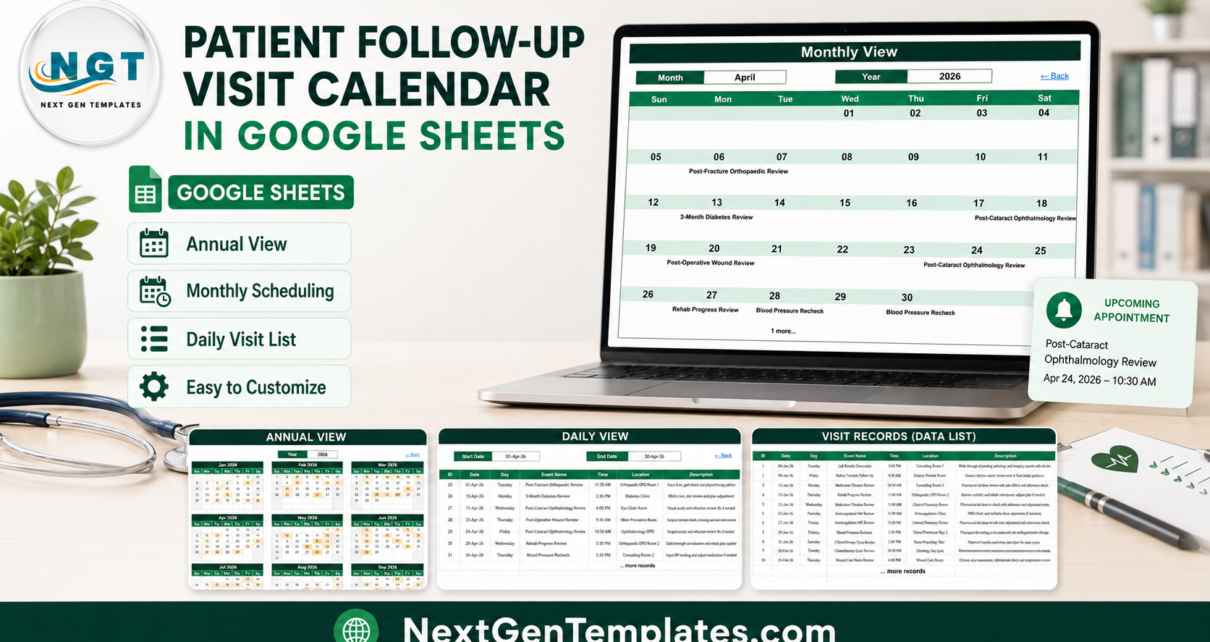
The Patient Follow-Up Visit Calendar in Google Sheets is a small, honest tool for the clinics that still write it down. It is a six-tab Google Sheets workbook with three linked calendar views over one table of appointments, and 100 sample follow-up visits already loaded across 2026 so you can see how it behaves before you type anything of your own. This walkthrough covers every tab, what the formulas do, and the five things it deliberately does not do – including the one people assume a follow-up calendar must have.
Get the Patient Follow-Up Visit Calendar in Google Sheets
What This Calendar Actually Is
It is a scheduling spreadsheet. One tab holds every booked review as a row; three other tabs read that table and display it at a different zoom level – a whole year, a single month, or a date range you choose. Change a review in one place and all three views follow, because they are formulas, not copies.
What you are paying $4.99 for is the plumbing rather than the idea: the twelve month grids on Annual View rebuild from a single Year cell, the Monthly View grid maps dates to review names without a helper column per day, and the year dropdown regenerates from today’s date so the file does not quietly expire in January.
It runs on native Google Sheets formulas – FILTER, VLOOKUP and DATE. No Apps Script, no macro, no add-on, nothing asking for permissions.
The Six Tabs, One at a Time
Home – the menu
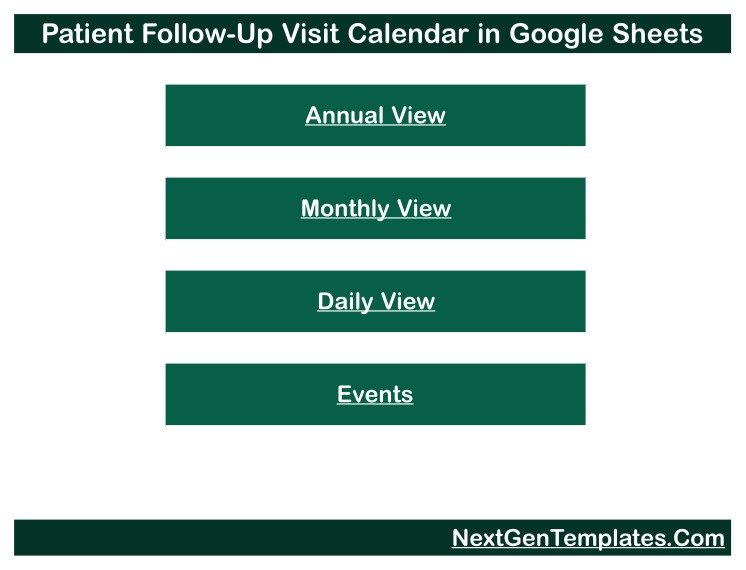
A title banner over four stacked buttons: Annual View, Monthly View, Daily View and Events. It is navigation and nothing more – no counters, no charts. Every view carries a “Back” link that returns here, which matters when several people are working the same file from the clinic desk.
Annual View – the year at a glance
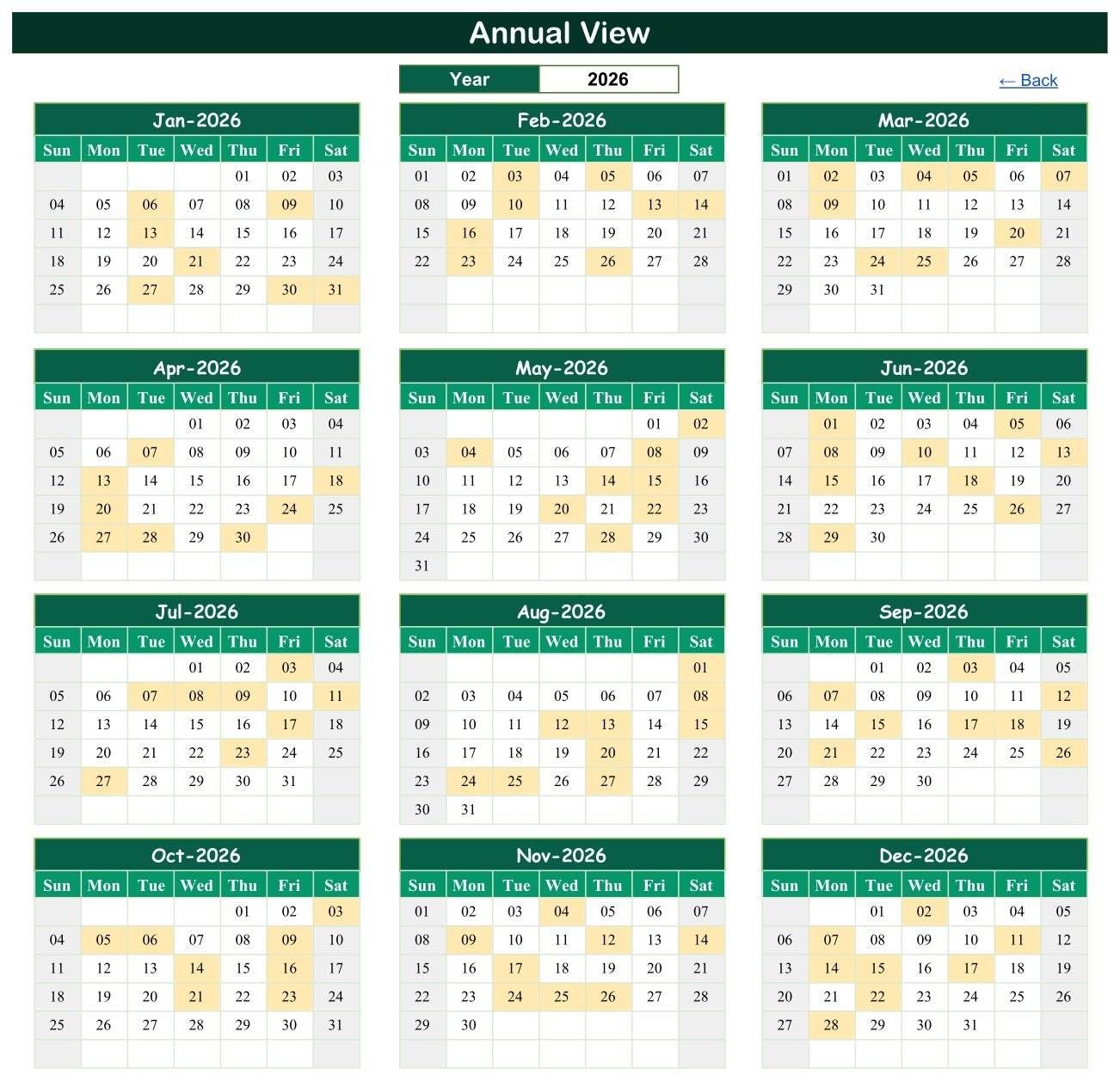
Twelve month grids, three across and four down, each Sunday to Saturday. One input: the Year cell. Type 2027 and all twelve grids rebuild – weekday alignment, month lengths, leap years, everything.
Days carrying a review are shaded. You are not reading review names on this tab, you are reading density. For follow-ups that matters more than it does for first appointments, because review load is something you create for yourself months in advance – and this is the tab that shows you what you have already committed to before you commit to more.
Monthly View – the working month
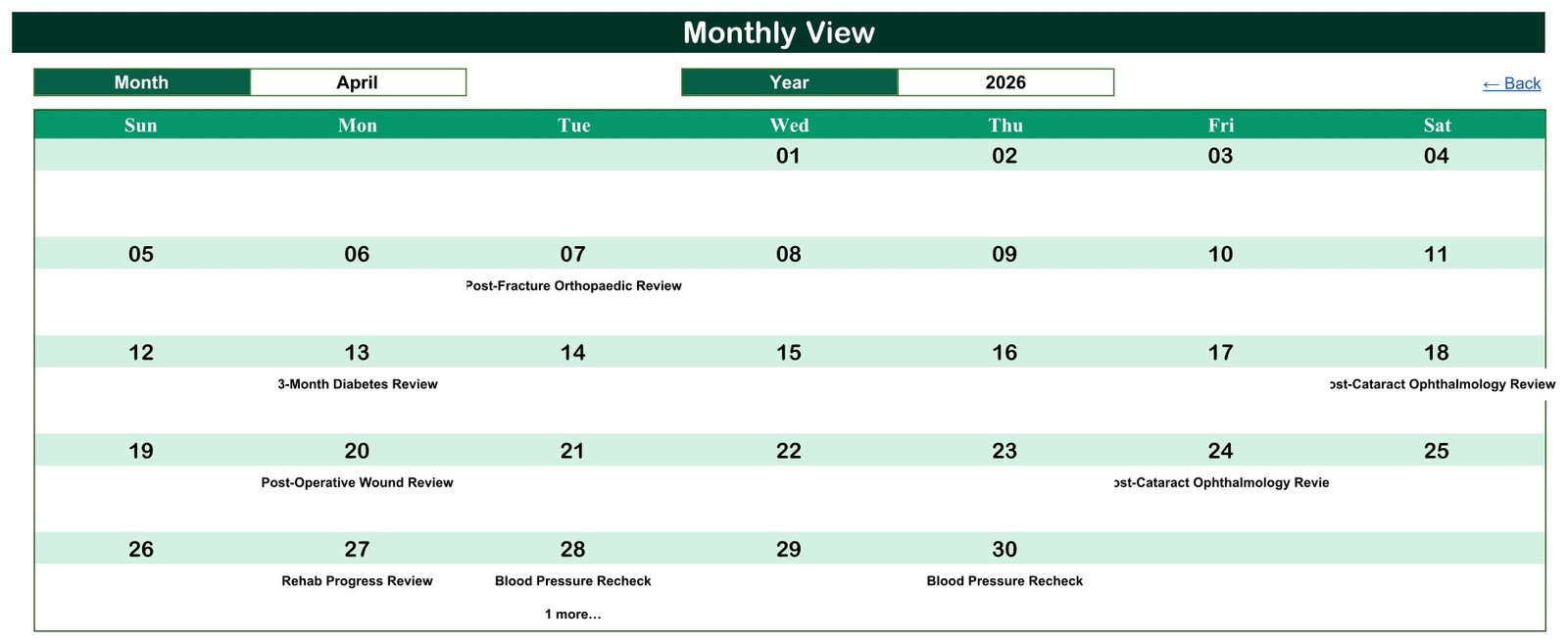
Month and Year dropdowns sit above a Sunday-to-Saturday grid. Pick April and 2026 and the grid fills with that month’s reviews by date: Post-Fracture Orthopaedic Review on the 7th, 3-Month Diabetes Review on the 13th, Post-Cataract Ophthalmology Review on the 18th and again on the 24th, Post-Operative Wound Review on the 20th, Rehab Progress Review on the 27th, Blood Pressure Rechecks on the 28th and 30th.
One behaviour to know before you rely on it. Where a day holds more than one review, the cell shows the first name with a “1 more…” note underneath. In the April sample that is Tuesday the 28th, which carries both a Blood Pressure Recheck at 3:30 PM in Consulting Room 2 and a Post-Stroke Neurology Review at 4:30 PM in Neurology OPD. The monthly grid is a summary by design – treat “1 more…” as a prompt to open Daily View, which shows everything.
Daily View – the printable list
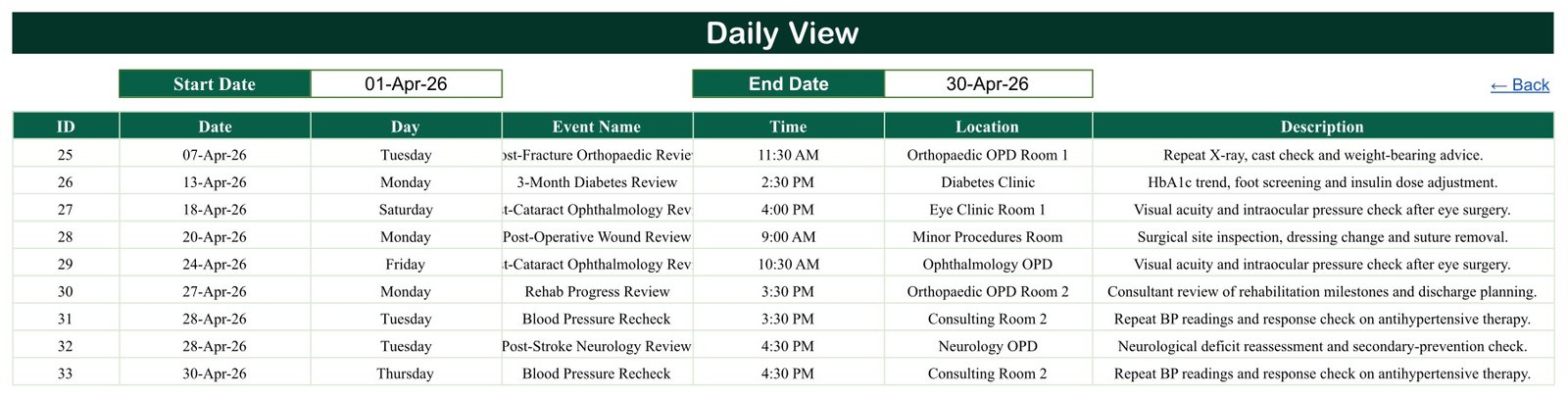
This is the tab the clinic desk will live in. Set a Start Date and an End Date and a FILTER formula returns every review in that window across all seven columns – ID, Date, Day, Event Name, Time, Location and Description.
Set 01-Apr-26 to 30-Apr-26 in the sample file and you get nine rows, IDs 25 to 33, each with the room and a one-line note: “HbA1c trend, foot screening and insulin dose adjustment” against the diabetes review, “Surgical site inspection, dressing change and suture removal” against the post-operative wound review, “Neurological deficit reassessment and secondary-prevention check” against the stroke review.
Narrow it to a day and you have the morning list. Narrow it to a week and you have something worth printing.
Events – the one table that matters
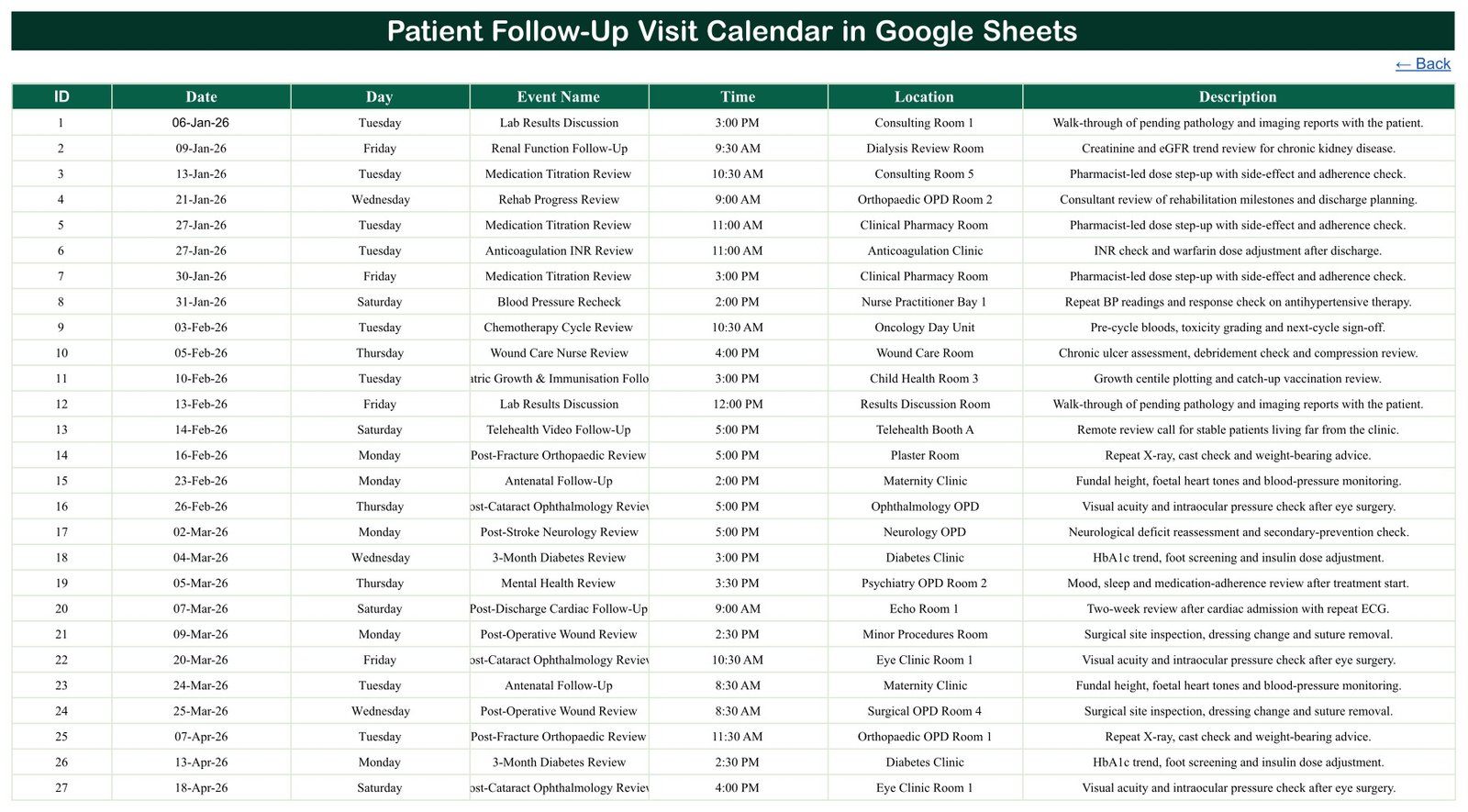
Every view above is a window onto this tab. Seven columns – ID, Date, Day, Event Name, Time, Location, Description – and 100 sample rows numbered 1 to 100, running from 06-Jan-2026 to 28-Dec-2026. Add a row here and all three views pick it up. There is no second place to update.
The sample data covers 20 review types spanning most of what an outpatient service actually recalls people for: 3-Month Diabetes Review, Post-Discharge Cardiac Follow-Up, Post-Operative Wound Review, Post-Stroke Neurology Review, Post-Fracture Orthopaedic Review, Post-Cataract Ophthalmology Review, Anticoagulation INR Review, Chemotherapy Cycle Review, Renal Function Follow-Up, Asthma & COPD Control Review, Medication Titration Review, Mental Health Review, Antenatal Follow-Up, Paediatric Growth & Immunisation Follow-Up, Wound Care Nurse Review, Dietitian Follow-Up, Rehab Progress Review, Blood Pressure Recheck, Lab Results Discussion and Telehealth Video Follow-Up.
They are spread across 38 named locations – Diabetes Clinic, Cardiology OPD, Neurology OPD, Nephrology OPD, Oncology Day Unit, Haematology Day Ward, Anticoagulation Clinic, Maternity Clinic, Antenatal Room B, Eye Clinic, Ophthalmology OPD, Plaster Room, Wound Care Room, two Dressing Rooms, two Nurse Practitioner Bays, Clinical Pharmacy Room, Psychiatry OPD, Counselling Room, Pulmonary Function Lab, Dietetics Office and more.
Worth noting: telehealth is scheduled like any other slot. Remote reviews sit in Telehealth Booth A and B alongside the in-person clinics, so a hybrid service runs one calendar rather than two.
List – the hidden one
The sixth tab is hidden and you will rarely open it. It holds the twelve month names and the year range behind the dropdowns. The range is 36 years long and rebuilds relative to the current year, so it rolls forward on its own rather than going stale.
What It Does Not Do – Read This Before You Buy
Being blunt about the ceiling saves everyone a refund request, and on a follow-up calendar there is one gap people genuinely do not expect.
- It does not generate the next review date for you. This is the big one. A row called “3-Month Diabetes Review” does not create another one three months later. There is no recall rule engine, no due-date logic, no overdue list. You enter every review date by hand. If you need recalls generated automatically, you need an EHR recall module and this is not it.
- It sends nothing. No SMS, no email, no notification. Nobody gets reminded of anything.
- Nobody can book through it. There is no form and no patient-facing page. Reviews are added by whoever edits the Events tab.
- It does not track did-not-attends. There is no attendance, outcome or status column, so it will not tell you who missed a review or needs re-booking.
- It does not stop you double-booking a room. Nothing validates a clash – two reviews in the same room at the same time both simply appear. You can see clashes via the “1 more…” note and Daily View, but you have to look.
And the one that matters most on this title. The word “Patient” is in the name because these are patient follow-up appointments – but this is a scheduling calendar, not a clinical or patient-records system. It is not an EHR or EMR, and it carries no HIPAA, GDPR or other compliance or certification claim. It holds only what you type into a file in your own Google account, with no access control, encryption or audit trail beyond Google’s own sharing settings.
The template is built so you do not have to fight that: across all 100 sample rows there is no patient name, no patient ID, no contact detail and no clinical-notes column anywhere in the workbook. Each row says what kind of review it is, when, and in which room. Schedule the appointment here; keep the person’s identity in whatever clinical system you already use.
Setting It Up for Your Clinic
- Open the PDF in your download and click the “Make a copy” link. The calendar is created in your own Google Drive. Nothing needs installing.
- Rename the rooms first. Replace the sample locations in the Location column with your own clinic rooms – it is the field you will scan most often.
- Trim the review types to yours. Twenty are supplied; most single-speciality clinics will use six or eight. Delete what you do not run.
- Replace the sample reviews. Keep the column order and use real dates – the views read dates, not text. Keep the content to review type, time and room.
- Check Monthly View. Pick your month and year from the dropdowns; the grid should fill from Events with no further work.
- Print the week from Daily View by setting Start Date and End Date to the coming week.
- Use Annual View before you promise anything. Change the Year cell and look at how full the target month already is before booking a review into it.
- Set sharing deliberately. Anyone with the link sees whatever the sheet contains, so choose the scope on purpose rather than accepting the default.
Three Ways Clinics Use It
The four-room outpatient clinic. The practice manager keeps Diabetes Clinic, Cardiology OPD and the two Nurse Practitioner Bays in the Location column, then opens Annual View each quarter. The weeks where diabetes reviews stack into a solid block are the weeks to push routine blood-pressure rechecks somewhere quieter. That is a five-minute decision with the picture in front of you.
The wound-care and dressings service. Every Friday the senior nurse sets Daily View to the coming week and prints the filtered list for the treatment room. The Description column carries the load: the team can see which slots are suture removals in the Minor Procedures Room and which are chronic-ulcer reviews needing compression in the Wound Care Room.
The telehealth-and-clinic hybrid. The coordinator books remote reviews into Telehealth Booth A and B in the same calendar as the in-person clinics, checks the Monthly View dropdowns before offering a Tuesday, and gives the two visiting consultants view-only access to the same file.
Google Sheets or Excel?
Choose Google Sheets if more than one person needs to edit the follow-up list at the same time, if the clinic desk uses tablets or shared machines, or if you want to give a visiting clinician view-only access with a link. Seats are free, so a five-person clinic pays $4.99 once, not five times.
Choose a desktop Excel calendar if the clinic works offline, or if IT policy keeps scheduling off cloud documents. NextGenTemplates builds the same six-tab layout as an Excel workbook across the calendar range – browse the calendar category for the desktop versions.
Planning to build your own tracker next? The NextGenTemplates Academy learning paths teach the spreadsheet skills behind calendars like this, with practice files.
Get the Patient Follow-Up Visit Calendar in Google Sheets
Frequently Asked Questions
Is this a patient-records or practice-management system?
No. It is a scheduling calendar in Google Sheets. It is not an EHR or EMR, it holds no patient records, results or notes, and it carries no HIPAA or GDPR certification. It stores only what you type into a file in your own Google account. Do not put identifying patient data in it.
It is called a Patient Follow-Up calendar – does it store patient details?
No, and that is deliberate. There is no patient name, patient ID, contact or notes column anywhere in the workbook. Each row records the type of review, the date and time, and the room.
Does it generate the next follow-up date automatically?
No. There is no recall rule engine and no overdue list. A three-month review does not create the next one. You enter each date yourself.
Does it send recall reminders to patients?
No. It sends nothing at all – no SMS, no email, no notification.
Does it track did-not-attends?
No. There is no attendance or status field, so it cannot tell you who missed a review.
Will it warn me if I double-book a room?
No. Nothing validates a clash. Monthly View flags a busy day with a “1 more…” note and Daily View lists everything in the range, so clashes are visible, but you have to check for them.
How many reviews can it hold?
The Events tab ships with 100 sample rows and has room for roughly 900 more before you would need to extend it, which is a straightforward copy-down of the last row.
What is in the download?
A PDF carrying the “Make a copy” link for the Google Sheet. There is no Excel file and no ZIP – the PDF is how the sheet gets into your Drive.
Can I change the review types and rooms?
Yes. All 20 review names and 38 locations are ordinary cells on the Events tab. Overwrite them and all three views follow automatically.
The sample data is 2026 – will it expire?
No. The Year cell accepts any year, and the hidden List tab rebuilds its 36-year range relative to the current year.
Related Templates
For first appointments rather than follow-up reviews, the Medical Appointment Calendar in Google Sheets uses the same six-tab layout. The single-speciality versions are the Dental Clinic Appointment Calendar in Google Sheets and the Physiotherapy Session Calendar in Google Sheets, and for imaging slots specifically there is the Radiology Slot Booking Calendar in Google Sheets.
To record what actually happened at a visit rather than only when it was booked, the Patient Visit Log Data Entry System in Excel and the Patient Appointment Data Entry System in Excel are the logging counterparts. For the medication side of a titration or anticoagulation review there is the Prescription Record Data Entry System in Excel, and the Doctor Duty Roster Data Entry System in Excel handles the staff rota beside the clinic diary.
When a spreadsheet genuinely is not enough any more – multiple users, permissions, recall automation, an audit trail – the Hospital Management System Web App is the step up.
Get The Template
The Patient Follow-Up Visit Calendar in Google Sheets is $4.99 – one payment, no subscription, no per-clinician licence. Open the PDF, click the copy link, and it is in your own Google Drive in about two minutes.
Built and tested by PK – Microsoft Certified Professional, 15+ years of Excel, Google Sheets and Power BI, and founder of NextGenTemplates, reaching 300K+ subscribers across our YouTube channels. If the file does not open or copy correctly, get in touch for a replacement or a refund.
Last updated: 24 August 2026.