Most small imaging centres do not lose slots because the scanner is broken. They lose them because the day list lives in three places at once – a paper book at the control desk, a WhatsApp thread with the radiologist, and somebody’s spreadsheet that only they know how to update. By Wednesday nobody is sure whether MRI Suite 2 is free at three o’clock.Radiology Slot Booking Calendar in Google Sheets
The Radiology Slot Booking Calendar in Google Sheets is a small fix for that specific problem. It is a six-tab Google Sheets workbook with three linked calendar views over one table of bookings, and 100 sample imaging slots already loaded across 2026 so you can see how it behaves before you type anything of your own. This walkthrough covers every tab, what the formulas actually do, and – just as importantly – the four things it deliberately does not do.Radiology Slot Booking Calendar in Google Sheets
Get the Radiology Slot Booking Calendar in Google Sheets

What the Radiology Slot Booking Calendar in Google Sheets Actually Is
It is a scheduling spreadsheet. One tab holds every booking as a row; three other tabs read that table and display it at a different zoom level – a whole year, a single month, or a date range you choose. Change a booking in one place and all three views follow, because they are formulas, not copies.Radiology Slot Booking Calendar in Google Sheets
What makes it worth $4.99 rather than an afternoon of your own time is the plumbing: the twelve month grids on Annual View rebuild from a single Year cell, the Monthly View grid maps dates to procedure names without a helper column per day, and the year dropdown regenerates from today’s date so the file does not quietly expire in January.
It runs on native Google Sheets formulas – FILTER, VLOOKUP and DATE. There is no Apps Script, no macro and no add-on, so nothing asks you for permissions and nothing runs in the background.
The Six Tabs, One at a Time
Home – the menu
Home is a title banner over four stacked buttons: Annual View, Monthly View, Daily View and Events. It is a navigation page and nothing more – no counters, no charts, no summary. Every view has a “Back” link that returns here, which matters more than it sounds when three people are using the same file on tablets at the control desk.Radiology Slot Booking Calendar in Google Sheets
Annual View – the year at a glance
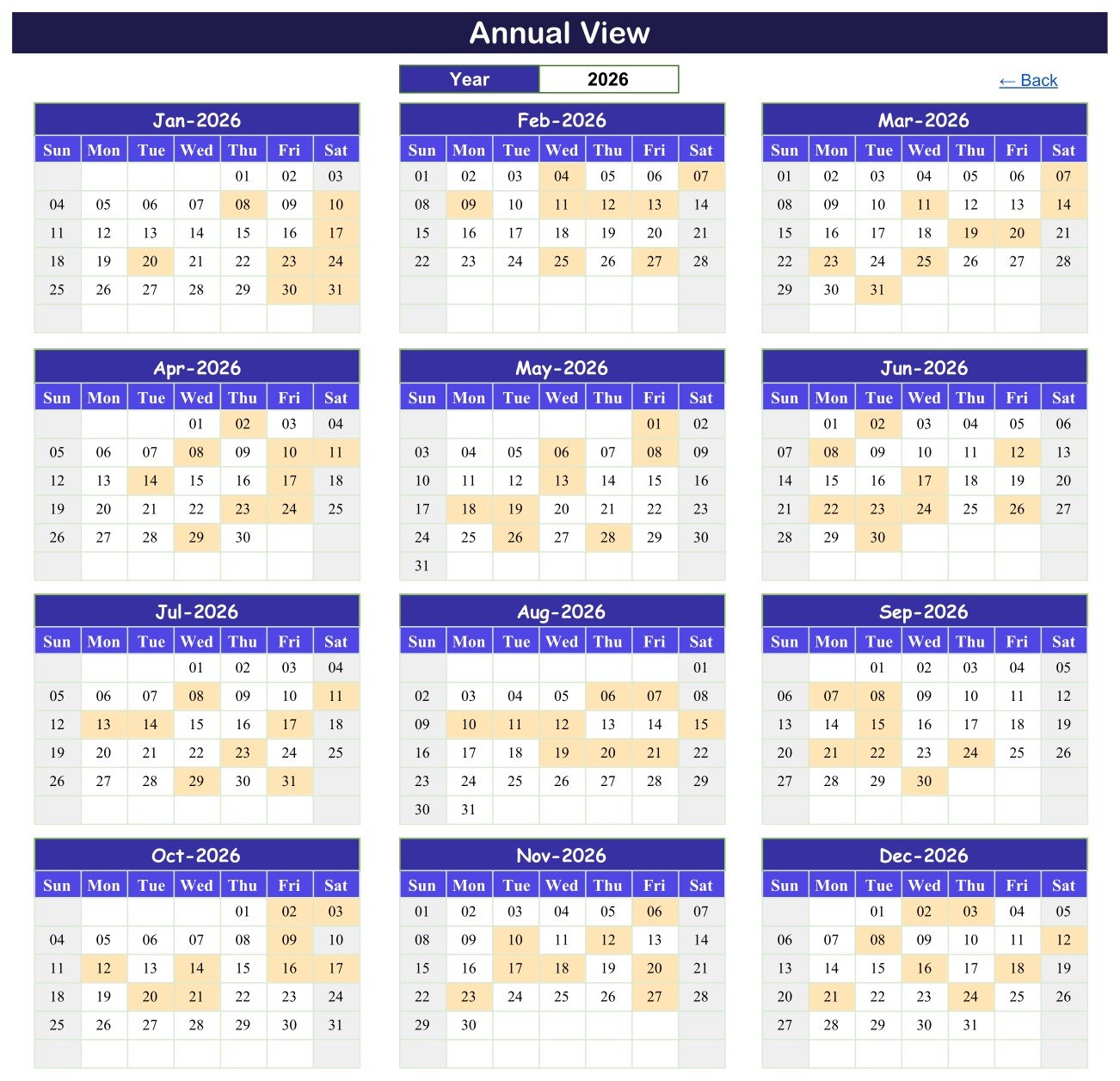
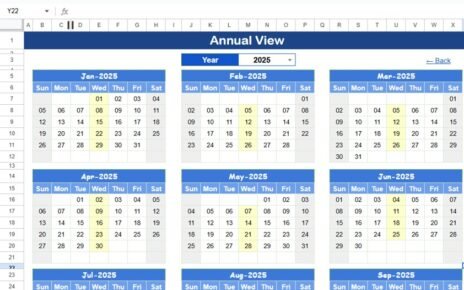
Twelve month grids, three across and four down, each running Sunday to Saturday. There is exactly one input: the Year cell at the top. Type 2027 and all twelve grids rebuild – the weekday alignment, the month lengths, the leap year, everything.
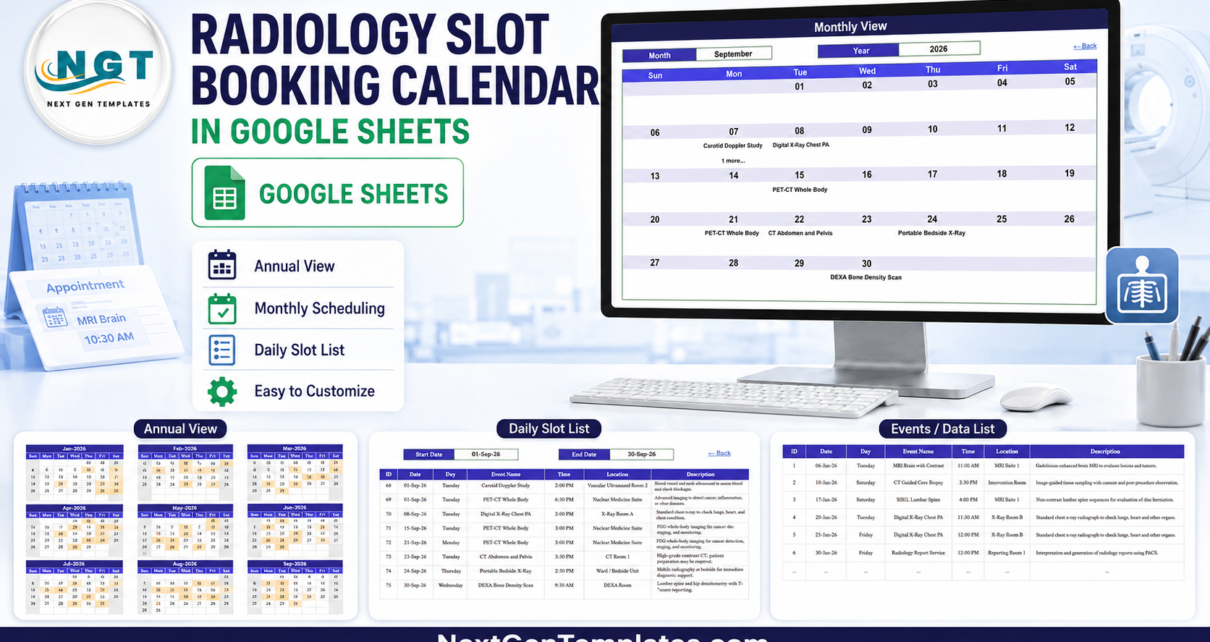
Days that carry a booking are shaded. That is the whole point of this tab: you are not reading procedure names here, you are reading density. Scroll down the twelve grids and the weeks where the department is saturated stand out as blocks of colour, and the quiet weeks show up as white. For anyone deciding whether to add a Saturday list or buy scanner time, that picture is the argument.Radiology Slot Booking Calendar in Google Sheets
Monthly View – the working month
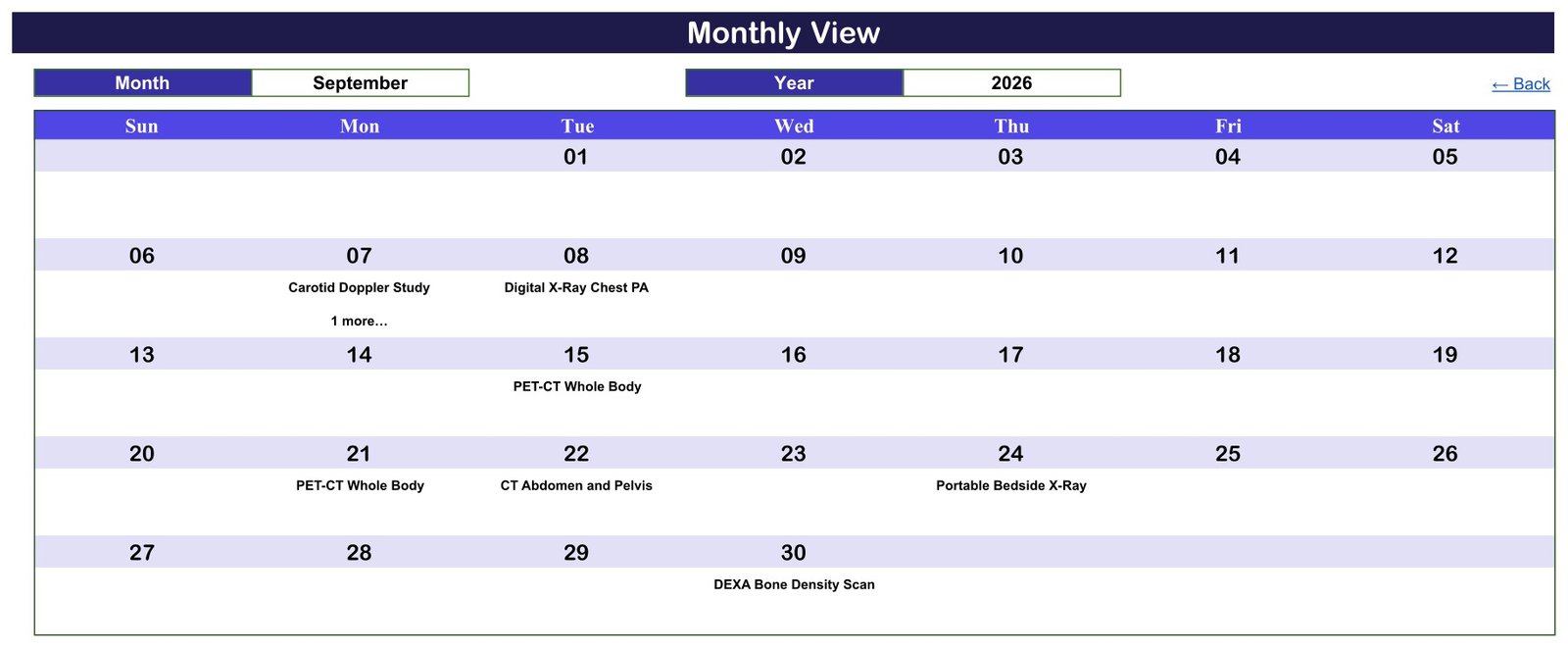
Two dropdowns – Month and Year – sit above a Sunday-to-Saturday grid. Pick September and 2026 and the grid fills with that month’s bookings by date: Carotid Doppler Study on Monday the 7th, Digital X-Ray Chest PA on Tuesday the 8th, PET-CT Whole Body on the 15th and again on the 21st, CT Abdomen and Pelvis on the 22nd, Portable Bedside X-Ray on the 24th, DEXA Bone Density Scan on the 30th.Radiology Slot Booking Calendar in Google Sheets
One behaviour to understand before you rely on it. Where a day holds more than one booking, the cell shows the first procedure and then a “1 more…” note underneath. In the September sample that happens on Monday the 7th, which carries both the Carotid Doppler Study at 2:00 PM and a PET-CT Whole Body at 6:30 PM. The monthly grid is a summary by design – a day cell is not big enough for a full list – so treat “1 more…” as a prompt to check Daily View, which shows everything.
Daily View – the printable list
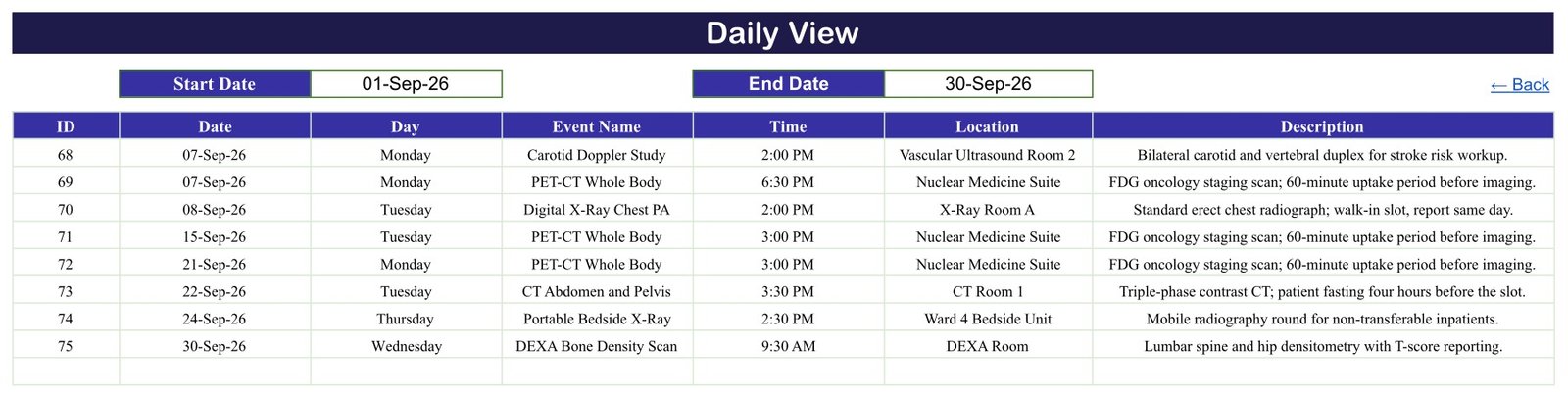
This is the tab the control desk will actually live in. Set a Start Date and an End Date and a FILTER formula returns every booking in that window across all seven columns – ID, Date, Day, Event Name, Time, Location and Description.
Set it to 01-Sep-26 and 30-Sep-26 in the sample file and you get eight rows, IDs 68 to 75, each with the room and a one-line note: “FDG oncology staging scan; 60-minute uptake period before imaging” against the PET-CT slots, “Triple-phase contrast CT; patient fasting four hours before the slot” against the CT Abdomen and Pelvis, “Mobile radiography round for non-transferable inpatients” against the bedside X-ray on Ward 4.
Narrow it to a single day and you have the morning list. Narrow it to a week and you have something worth printing for the noticeboard.
Events – the one table that matters
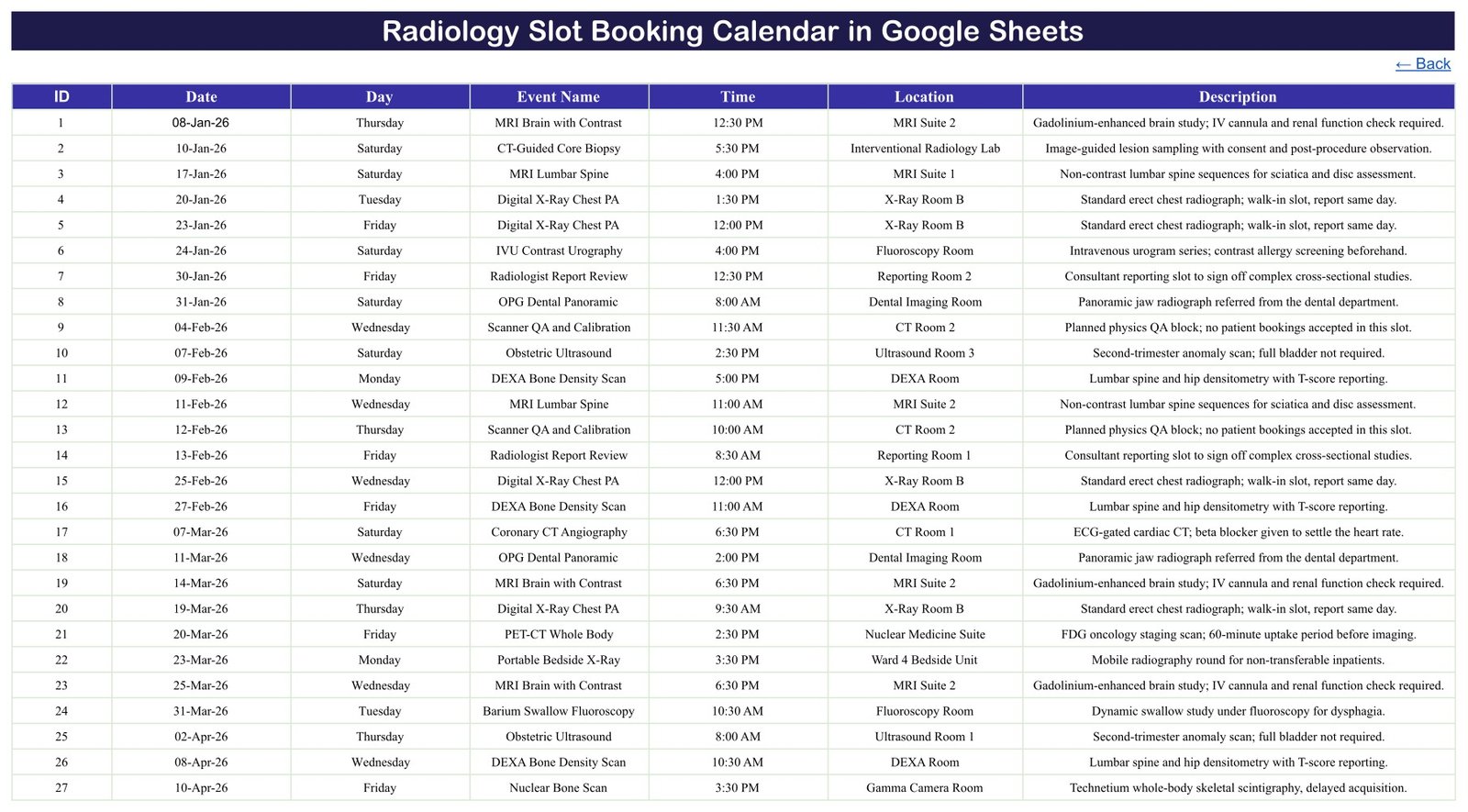
Every view above is a window onto this tab. Seven columns – ID, Date, Day, Event Name, Time, Location, Description – and 100 sample rows numbered 1 to 100, running from 08-Jan-2026 to 24-Dec-2026. Add a row here and all three views pick it up. There is no second place to update.
The sample data is worth reading rather than deleting immediately, because it demonstrates a habit worth copying. It contains 21 procedure types – MRI Brain with Contrast, MRI Lumbar Spine, MRI Knee Joint, CT Abdomen and Pelvis, Coronary CT Angiography, HRCT Chest, CT-Guided Core Biopsy, PET-CT Whole Body, Nuclear Bone Scan, Digital X-Ray Chest PA, Portable Bedside X-Ray, Screening Mammography, DEXA Bone Density Scan, Obstetric Ultrasound, Abdominal Ultrasound, Carotid Doppler Study, IVU Contrast Urography, Barium Swallow Fluoroscopy and OPG Dental Panoramic among them – spread across 21 named rooms: MRI Suite 1 and 2, CT Room 1 and 2, X-Ray Room A and B, Ultrasound Rooms 1 to 3, the Mammography Suite, DEXA Room, Nuclear Medicine Suite, Gamma Camera Room, Fluoroscopy Room, Interventional Radiology Lab, Dental Imaging Room, Reporting Rooms 1 and 2, and bedside units on Ward 4 and in ICU.
More usefully, it books the non-patient time too. “Scanner QA and Calibration” appears as a scheduled slot in CT Room 2 with the note “Planned physics QA block; no patient bookings accepted in this slot”, and “Radiologist Report Review” blocks out reporting rooms. That is the difference between a calendar that shows bookings and one that shows availability. Copy the habit.
List – the hidden one
The sixth tab is hidden and you will rarely open it. It holds the twelve month names and the year range that feed the Monthly and Annual View dropdowns. The year range is 36 years long and rebuilds relative to the current year, so the dropdown rolls forward on its own – the file does not go stale the way a hard-coded list would.
What It Does Not Do – Read This Before You Buy
This is a spreadsheet, and being honest about the ceiling saves everyone a refund request.
- It does not stop you double-booking a scanner. Nothing validates a clash. Put two studies in MRI Suite 2 at 3:00 PM on the same date and both simply appear. You can see clashes – the “1 more…” note flags a busy day and Daily View lists everything – but you have to look. There is no warning and no block.
- It sends nothing. No SMS, no email, no notification. The preparation notes in the Description column – “contrast allergy screening beforehand”, “patient fasting four hours before the slot” – are for the person reading the sheet. They do not reach the patient.
- Nobody can book through it. There is no form and no patient-facing page. Slots are added by whoever edits the Events tab.
- It is not a RIS or a PACS. It stores no images, no reports, no accession numbers, no contrast or dose records, and it talks to no other system – no DICOM, no HL7, no worklist.
And the important one. This is a scheduling calendar, not a clinical or patient-records system. It is not an EHR or EMR, and it carries no HIPAA, GDPR or other compliance or certification claim. It holds only what you type into a file in your own Google account, with no access control, encryption or audit trail beyond Google’s own sharing settings.
The template is built to keep you on the right side of that line: across all 100 sample rows there is no patient name, no patient ID, no accession number and no clinical-notes column anywhere in the workbook. The rows describe procedures, times and rooms. Keep it that way, and share the file deliberately.
Setting It Up for Your Department
- Open the PDF in your download and click the “Make a copy” link. The calendar is created in your own Google Drive. Nothing is shared back to us and nothing needs installing.
- Rename the rooms first. Go to the Location column on Events and replace the sample rooms with yours. Do this before anything else – it is the column you will filter and eyeball most.
- Block the QA and reporting time. Add your physics QA slots and reporting sessions as rows, exactly like the sample data does, so the calendar reflects real availability rather than only clinical bookings.
- Replace the sample bookings. Keep the column order and use real dates – the views read dates, not text. Keep the content to procedure, time and room.
- Check Monthly View. Pick your month and year from the dropdowns; the grid should fill from Events with no further work.
- Print the week from Daily View. Set Start Date and End Date to the coming week and print the filtered list for the control desk.
- Set sharing deliberately. Use Google’s Share button. Anyone with the link sees whatever the sheet contains, so choose the scope on purpose rather than accepting the default.
Three Ways Departments Use It
The two-scanner imaging centre. The superintendent radiographer keeps MRI Suite 1 and 2 in the Location column and opens Annual View once a quarter. The weeks where MRI is a solid block of shading while the DEXA Room is nearly white are the weeks to move the bone-density lists. That is a five-minute decision with the picture in front of you, and an argument without it.
The hospital CT department. Every Friday the lead radiographer sets Daily View to the coming week and prints it for the control room. The Description column does the work: the team can see at a glance which slots are contrast studies needing a cannula and renal function check, and which are walk-in chest films that will be reported the same day.
The private clinic across two sites. The practice manager adds each slot as it is booked and uses the Monthly View dropdowns to check a Tuesday is not already full before offering it. The referring practice that rents the second ultrasound room gets view-only access to the same file, so nobody phones to ask what is free.
Google Sheets or Excel?
The same calendar exists as a desktop workbook – the Radiology Slot Booking Calendar in Excel – and the choice is mostly about how your team works rather than which is better.
Choose Google Sheets if more than one person needs to edit the day list at the same time, if the control desk uses tablets or shared machines, or if you want to hand a referring practice view-only access with a link. Seats are free, so a five-person department pays $4.99 once, not five times.
Choose Excel if the department works offline, if IT policy keeps clinical scheduling off cloud documents, or if you are already living in desktop workbooks and want it to match.
Curious how calendars like this are built? The NextGenTemplates Academy learning paths teach the underlying spreadsheet skills step by step, with practice files.
Get the Radiology Slot Booking Calendar in Google Sheets
Frequently Asked Questions
Is this a RIS, PACS or patient-records system?
No. It is a scheduling calendar in Google Sheets. It is not a RIS, PACS, EHR or EMR, it holds no patient records and no images, and it carries no HIPAA or GDPR certification. It stores only what you type into a file in your own Google account. Do not put identifying patient data in it.
Will it warn me if I double-book a scanner?
No. Nothing validates a clash – two bookings in the same room at the same time will both appear. Monthly View flags a busy day with a “1 more…” note and Daily View lists everything in the range, so clashes are visible, but you have to check for them.
Does it send reminders or preparation instructions to patients?
No. It sends nothing at all. The preparation notes in the Description column are there for the staff member reading the sheet.
How many bookings can it hold?
The Events tab ships with 100 sample rows and has room for roughly 900 more before you would need to extend it, which is a straightforward copy-down of the last row.
What is in the download?
A PDF carrying the “Make a copy” link for the Google Sheet. There is no Excel file and no ZIP – the PDF is how the sheet gets into your Drive.
Can I change the procedures and room names?
Yes. All 21 procedure names and 21 room names are ordinary cells on the Events tab. Overwrite them and all three views follow automatically.
Do I need Apps Script, macros or an add-on?
No. It uses native formulas only – FILTER, VLOOKUP and DATE. Nothing requests permissions and nothing runs in the background.
The sample data is 2026 – will it expire?
No. The Year cell accepts any year, and the hidden List tab rebuilds its 36-year range relative to the current year, so the dropdown moves forward on its own.
Related Templates
If you want the same schedule on the desktop, the Radiology Slot Booking Calendar in Excel is the direct twin. For a general clinic rather than an imaging department, the Medical Appointment Calendar in Google Sheets uses the same six-tab layout, as do the Dental Clinic Appointment Calendar in Google Sheets and the Physiotherapy Session Calendar in Google Sheets.Radiology Slot Booking Calendar in Google Sheets
To record which investigations were requested rather than only when the scanner is free, the Lab Test Booking Data Entry System in Excel is the logging counterpart, and the Doctor Duty Roster Data Entry System in Excel handles the staff rota that sits alongside the slot book.
When the question changes from “what is booked” to “how are we performing”, the Radiology & Imaging KPI Dashboard in Excel and the Radiology and Imaging Dashboard in Excel cover throughput and utilisation reporting. And when a spreadsheet genuinely is not enough any more – multiple users, permissions, an audit trail – the Pathology Lab Management System Web App is the step up.
Get The Template
The Radiology Slot Booking Calendar in Google Sheets is $4.99 – one payment, no subscription, no per-user licence. Open the PDF, click the copy link, and it is in your own Google Drive in about two minutes.Radiology Slot Booking Calendar in Google Sheets
Last updated: 24 August 2026.