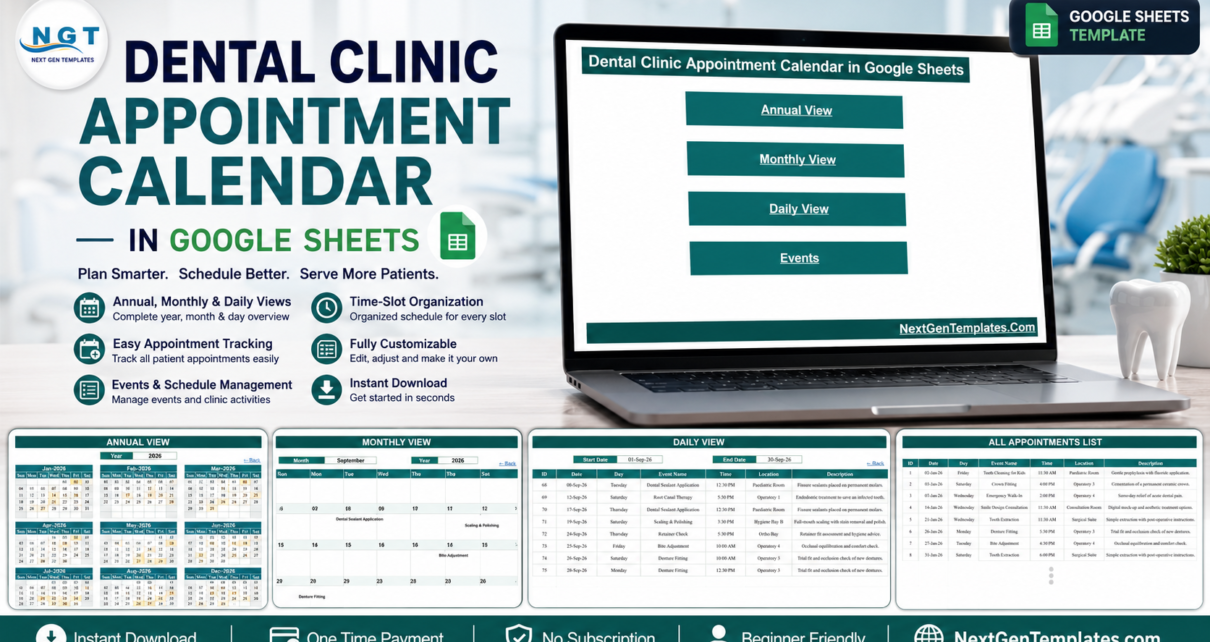
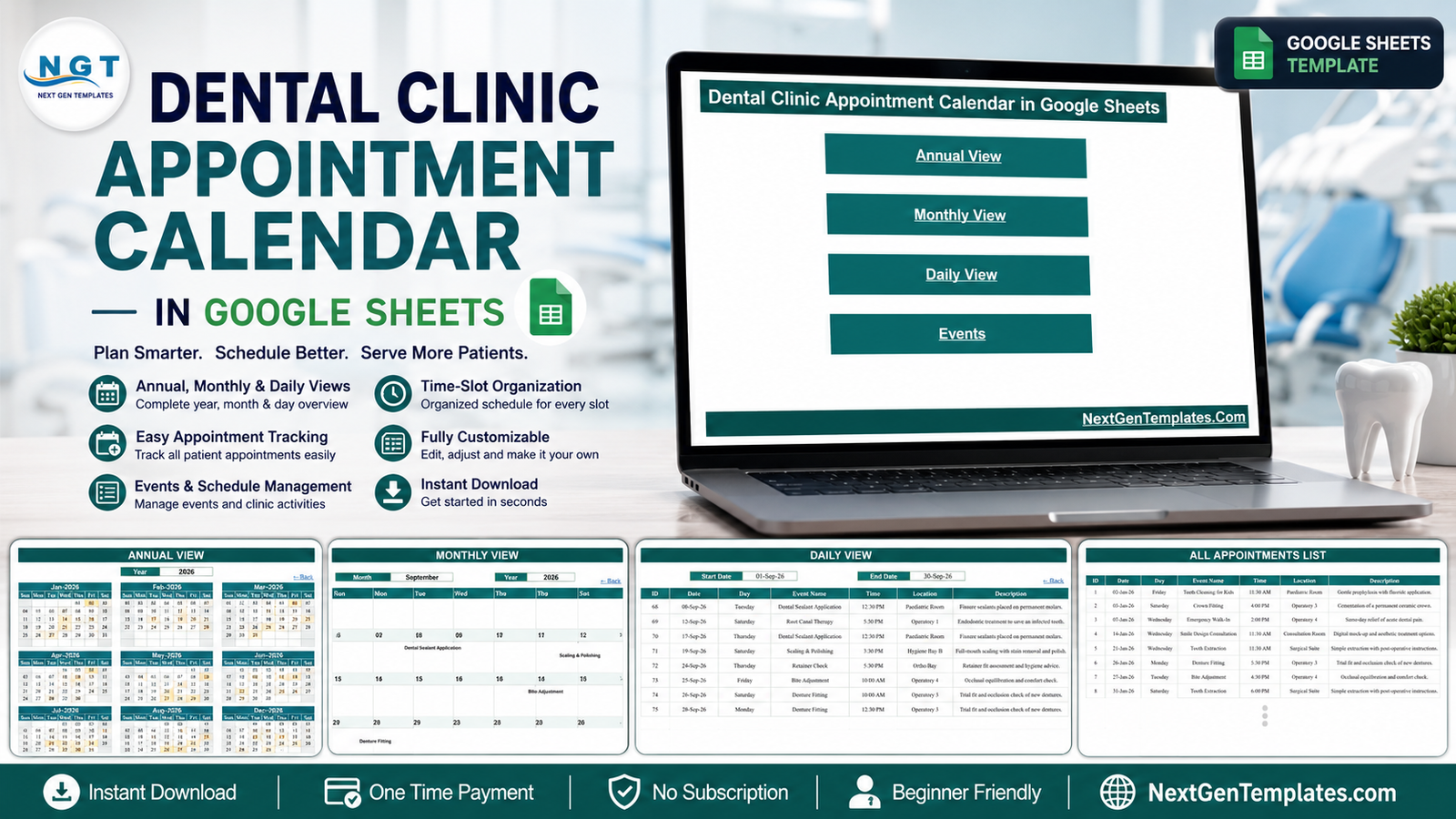
A small dental practice makes a surprising number of scheduling decisions in a week. Which chair is free on Thursday afternoon. Whether the hygienist’s Saturday is already full. When the next quiet fortnight falls so the surgery can be deep-cleaned. The Dental Clinic Appointment Calendar in Google Sheets answers all three from one shared file: 5 working tabs carrying 4 linked views, pre-loaded with 100 sample appointments that run from 2 January to 30 December 2026, covering 33 distinct dental procedures across 12 named treatment rooms. Every view is built from ordinary Google Sheets formulas – no add-ons, no Apps Script, no macros – so it opens on any browser or phone with a free Google account.Dental Clinic Appointment Calendar in Google Sheets
Before anything else, the honest boundary: this is a scheduling spreadsheet. It is not an EHR, an EMR or a practice-management system, it holds no clinical record, it sends no reminders, and it carries no HIPAA, GDPR or other certification. What it does is show the diary clearly, to everyone who needs it, for a one-time $4.99.Dental Clinic Appointment Calendar in Google Sheets
Get the Dental Clinic Appointment Calendar in Google Sheets
Key Features of the Dental Clinic Appointment Calendar in Google Sheets
- A Home menu with four buttons – Annual View, Monthly View, Daily View and Events, each jumping straight to its tab. Useful on a shared machine where the receptionist should not have to hunt through tab strips.
- An Annual View driven by a single Year cell – change one number and all twelve month grids rebuild. Days that carry a booking are shaded, so a year of chair load reads at a glance.Dental Clinic Appointment Calendar in Google Sheets
- A Monthly View driven by Month and Year dropdowns – each date cell pulls the procedure name straight out of the Events tab, so the grid is never out of date with the underlying list.Dental Clinic Appointment Calendar in Google Sheets
- A Daily View driven by a start and an end date – one FILTER formula returns every appointment in the range with its ID, date, day, procedure, time, room and description.
- An Events tab as the single source of truth – seven columns and formulas that already reach row 999, so a busy list can grow well past the 100 sample rows.
- Dental sample data that is actually dental – Root Canal Therapy, Scaling & Polishing, Dental Sealant Application, Wisdom Tooth Removal, Invisalign Review, Denture Fitting, Bite Adjustment, Oral Cancer Screening, Emergency Walk-In and 24 more.
- Room-level scheduling – Operatory 1 to 4, Hygiene Bay A and B, Ortho Bay, Paediatric Room, Surgical Suite, Recovery Room, Consultation Room and X-Ray Room.
- A hidden List tab holding the month names and a year list running 2021 to 2032, so the dropdowns never need maintaining by hand.
Sheet-by-Sheet Walkthrough
Home
A plain title banner and four linked buttons. That is deliberate – the file is meant to be opened by whoever is on the desk that morning, not only by the person who built it.
Annual View
Twelve month grids for a single year, laid out three across. One Year cell at the top drives every grid through a chain of DATE formulas, so switching from 2026 to 2027 is a one-cell edit. Shading marks the dates that appear in the Events tab. In the sample file January’s eight bookings and September’s eight sit side by side, and the sparse stretches between them are just as visible – which is the point when you are planning leave, a locum, or a marketing push into a quiet month.
Monthly View
Two dropdowns – Month and Year – and a seven-column week grid underneath. Under each date the sheet prints the appointment booked that day: Dental Sealant Application on the 8th of September, Root Canal Therapy on the 12th, Scaling & Polishing on the 19th, Retainer Check on the 24th, Bite Adjustment on the 25th. This is the view most front desks will leave open all day.
Daily View
A start date, an end date, and a table of everything in between. For 1 to 30 September 2026 the sample file returns eight rows, each with the appointment ID, the date, the weekday, the procedure, the time, the treatment room and a one-line description such as “Full-mouth scaling with stain removal and polish”. It prints cleanly, which makes it the natural sheet for a morning huddle sheet on the wall.
Events
The master table: ID, Date, Day, Event Name, Time, Location, Description. Add a row here and all three views pick it up on the next recalculation. Note what is not a column – there is no patient name and no patient ID. The file schedules by procedure, time and room, which is exactly how it should be used.
Google Sheets vs. Excel vs. Paid Practice-Management Software – Feature Comparison
| This template (Google Sheets) | Excel calendar template | Paid dental practice-management software | |
|---|---|---|---|
| Cost | $4.99 one-time | One-time template purchase | Recurring subscription, usually per provider |
| Platform | Any browser, Android, iOS | Excel for Windows or Mac | Vendor web app, sometimes a desktop client |
| Setup time | Minutes – open the copy link and type | Minutes – download and open | Days to weeks, usually with onboarding |
| Real-time team collaboration | Yes, native | Only via OneDrive co-authoring | Yes |
| Mobile access | Google Sheets app | Excel mobile app | Vendor mobile app |
| Customisable fields | Yes – it is your spreadsheet | Yes | Limited to what the vendor exposes |
| Share with a link | Yes | File must be sent or synced | Named user accounts only |
| Year-1 cost for a 5-person front desk | $4.99 total | One template price | Recurring – varies by vendor and seat count |
| Automated SMS or email reminders | No | No | Yes |
| Charting, treatment plans, billing, insurance claims | No | No | Yes |
| Access control, encryption, audit trail | Only what Google Drive sharing provides | Only file-level protection | Yes, role-based |
Who Should Use This Template
It suits a single-chair or two-chair practice still running the diary on paper, a practice manager who wants one file the whole front desk can see rather than three conflicting copies, a new clinic that needs a working schedule this week while a larger system is being chosen, and an orthodontic or hygiene room that wants its own room-level diary alongside the main book.
It does not suit a practice that needs automated patient recall, clinical charting, insurance claims or a regulated record. It also does not suit anyone who wants to keep patient names in it – which brings us to the limitations section, because that is a boundary worth stating twice.
Real-World Use Cases
A two-chair clinic replacing the paper day book. The practice manager prints the Daily View for a two-day range each morning and pins it in the staff room. Because Location sits on every row, the hygienist can see that Hygiene Bay B is hers from 3:30pm without asking anyone.
An orthodontist on a satellite day. Working one day a week from a shared surgery, he filters the Daily View to his Ortho Bay dates and spots that retainer checks and Invisalign reviews are stacking on the same afternoons – so he redistributes two of them before the week starts.
A clinic in its first month. The practice-management software will not go live for eight weeks. The Annual View blocks out the launch month, the first patients go into the Events tab, and the receptionist has a working diary on day one. When the real system arrives, the Events tab exports to CSV.
Advantages of the Dental Clinic Appointment Calendar in Google Sheets
- Nothing to install and nothing to learn. Anyone who has used a spreadsheet can add a row.
- One file, one truth. Three views read from the same Events table, so the year, the month and the day can never disagree.
- Genuinely shared. Google’s own sharing gives the front desk edit access and everyone else view access, on any device, with no per-seat licence.
- Yours to change. Room names, colours, column widths, the month and year lists – all ordinary cells.
- No lock-in. Export to CSV or Excel whenever a bigger system arrives.
- One-time cost. $4.99, no subscription, unlimited re-downloads.
Opportunities for Improvement
Stating these plainly is more useful than pretending they do not exist.
- The Monthly View shows one procedure per date. The grid pulls the first matching row from the Events tab, so where a day carries several bookings only one name appears. Use the Daily View for a complete day-by-day list – it returns every row in the range.
- It sends nothing. No SMS, no email, no push notification, no confirmation link. Patient contact stays with whatever process you already run.
- There is no booking form and no integration. Appointments are typed in by hand; the file does not talk to dental software or to an online booking widget.
- There is no double-booking check. Nothing stops two rows claiming Operatory 3 at 10:00 AM – the sheet will display both quite happily.
- Security is Google’s, not the template’s. There is no access control, encryption or audit trail beyond the Google Drive sharing settings you choose, and the file carries no certification of any kind. Whatever you type lives in your own Google account. Identifying patient data should not be stored in it. Schedule by procedure, time and room, and keep names and clinical detail in your practice software.
Best Practices
- Make your own copy first. The download is a PDF carrying the Google Sheets copy link; use File > Make a copy so the original stays clean and you can start over if you need to.
- Set the sharing before you set the schedule. Decide who edits and who only views, and check the link setting is not “anyone with the link” unless you mean it.
- Rename the rooms on day one. Location is free text – swap Operatory 1 to 4 for your own chair or surgery names before anyone else starts typing.
- Keep the Events tab in date order. The views work either way, but a sorted table is far easier to scan when you are correcting an entry.
- Use the description column for the room-facing note – “Archwire change and bracket check” – not for anything that identifies a person.
- Duplicate the file at year end rather than overwriting, so last year’s diary stays available for reference.
Explore Relevant Templates
- Medical Appointment Calendar in Google Sheets – the same four-view build for a general clinic.
- Dental Practice Dashboard in Google Sheets – the reporting side of a practice rather than the diary.
- Dental Clinic Management System web app – the step up when a calendar alone is not enough.
- Chiropractic Clinic Management System Tracker in Google Sheets – a fuller clinic tracker on the same platform.
Want to build skills like this step by step? The NextGenTemplates Academy learning paths take you from spreadsheet basics to calendars and trackers like this one, with practice files.
Get the Dental Clinic Appointment Calendar in Google Sheets
Frequently Asked Questions
Is this a patient-records system, and is it HIPAA or GDPR compliant?
No. It is a Google Sheets scheduling file. It is not an EHR, EMR or practice-management system, it stores no clinical record, and it holds no HIPAA, GDPR or other certification. It offers no access control, encryption or audit trail beyond your own Google Drive sharing settings, and identifying patient data should not be typed into it.
Does it send appointment reminders?
No. The file sends nothing at all – no SMS, no email, no notification – and it does not integrate with dental practice software or with an online booking system.
What do I actually download?
A PDF containing the Google Sheets copy link. Open it, click the link, then use File > Make a copy to create your own editable copy in Google Drive. There is no .xlsx or .zip to unpack.
Do I need a paid Google Workspace account?
No. A free Google account is enough. The template uses only built-in Google Sheets formulas.
How many appointments will it hold?
The formulas already reach row 999 on the Events tab, so roughly 996 appointments without touching a formula – and more if you extend the ranges. It ships with 100 sample rows across 2026.Dental Clinic Appointment Calendar in Google Sheets
Can I use it for a clinic that is not dental?
Yes. The structure is procedure-agnostic; change the Event Name and Location values and it works for any appointment-based practice. If you would rather start from a general-clinic version, the Medical Appointment Calendar in Google Sheets is the same build with general healthcare sample data.Dental Clinic Appointment Calendar in Google Sheets
About the Author
Built by PK – Microsoft Certified Professional with 15+ years of Excel, Google Sheets, and Power BI experience. Founder of NextGenTemplates, reaching 300K+ subscribers across YouTube channels. Every template is hand-built and tested before release.Dental Clinic Appointment Calendar in Google Sheets
Conclusion
Most small dental practices do not need practice-management software to fix their diary – they need everyone looking at the same diary. The Dental Clinic Appointment Calendar in Google Sheets does that in one shared file with a year view, a month view, a date-range view and a single events table behind all three, for a one-time $4.99 with no subscription. Use it for the schedule, keep patient records where they belong, and it will earn its place at the front desk within a week.Dental Clinic Appointment Calendar in Google Sheets
Get the Dental Clinic Appointment Calendar in Google Sheets – instant download, unlimited re-downloads, no subscription.Dental Clinic Appointment Calendar in Google Sheets