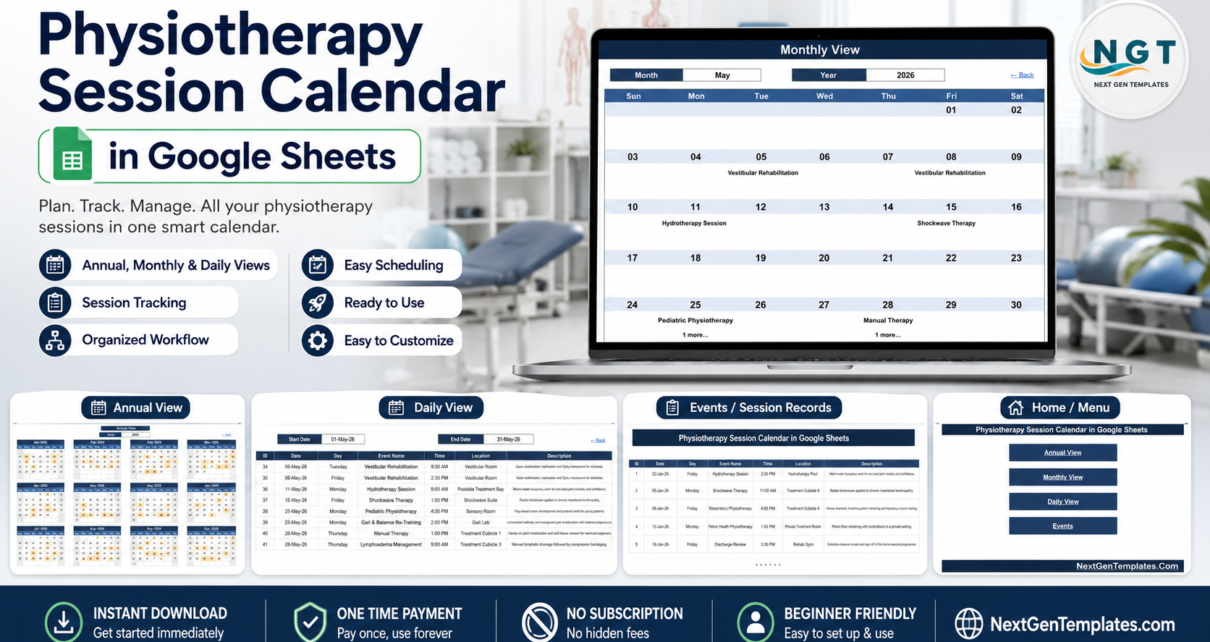
A physiotherapy diary is not a simple list. A single week can hold a hydrotherapy block that needs the pool, a gait re-training slot that needs the Gait Lab, a shockwave appointment that needs the Shockwave Suite, and four one-to-one sessions that only need a cubicle. Miss the room clash and the session does not happen. The Physiotherapy Session Calendar in Google Sheets is a small, honest tool for exactly that problem: six tabs, three linked calendar views and 100 sample sessions already written in across 21 session types and 30 named treatment locations, dated 02-Jan-2026 through 30-Dec-2026.Physiotherapy Session Calendar in Google Sheets
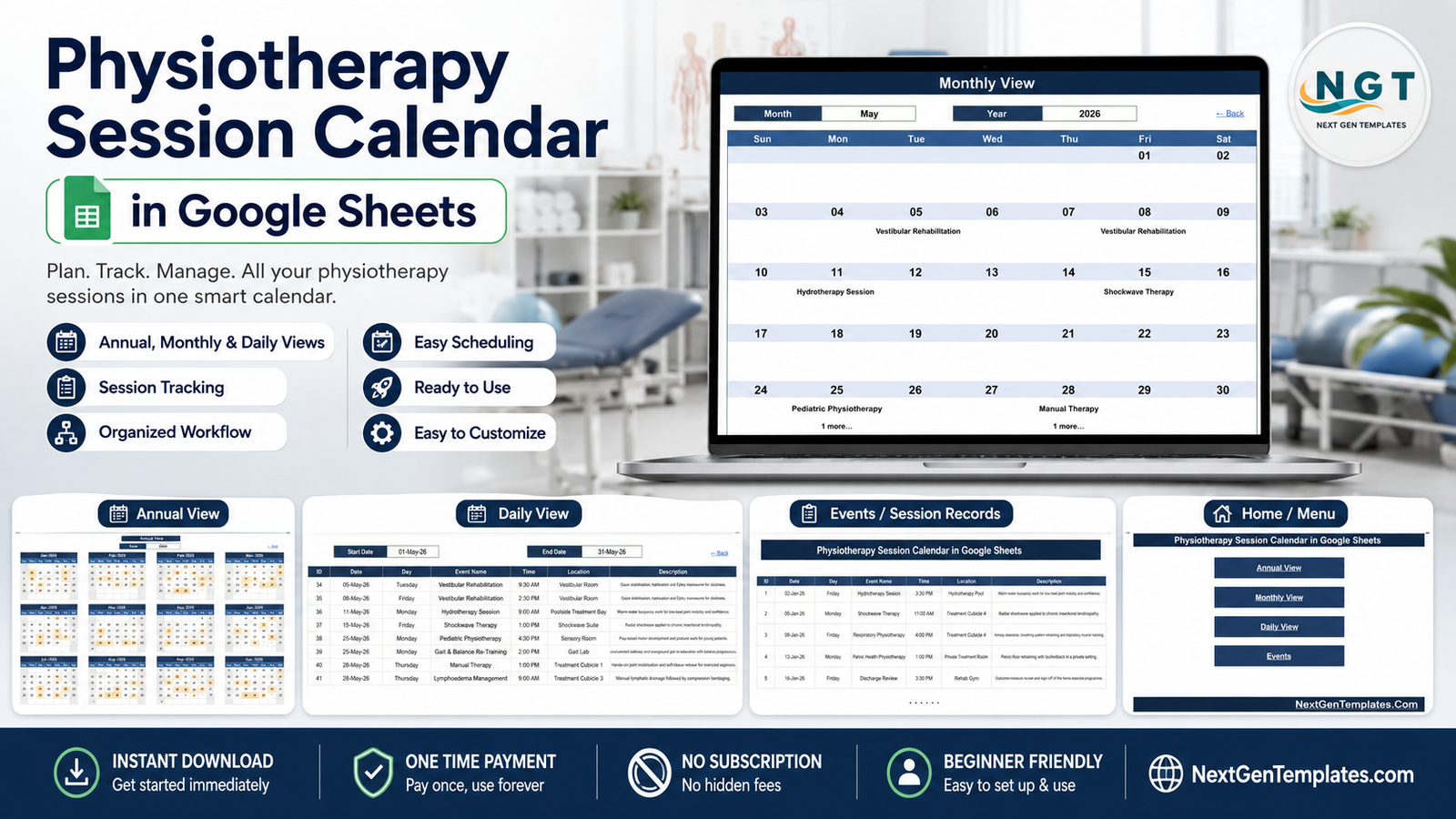
Before anything else, one point that shapes the whole review: this is a scheduling spreadsheet, not a clinical system. It is not an EHR or EMR, it is not practice-management software, it makes no HIPAA or GDPR compliance claim, and it sends nothing to anybody. What it does is show you what is booked, when, and in which room – across a day, a month or a whole year.Physiotherapy Session Calendar in Google Sheets
Get the Physiotherapy Session Calendar in Google Sheets
Key Features of Physiotherapy Session Calendar in Google Sheets
- Six tabs, five of them visible. Home, Annual View, Monthly View, Daily View and Events, plus one hidden List tab that supplies the month and year dropdowns.
- Four navigation buttons. The Home tab is a menu of four links, and each view carries a “Back” link so you never hunt through tab strips.Physiotherapy Session Calendar in Google Sheets
- One cell drives the whole year. Annual View builds twelve month grids from a single Year value through
DATE()formulas.Physiotherapy Session Calendar in Google Sheets - Dropdown-driven month grid. Monthly View uses Month and Year dropdowns and a
VLOOKUPinto the Events table to place session names on their dates.Physiotherapy Session Calendar in Google Sheets - Date-range filtering. Daily View runs a
FILTERoverEvents!A4:G999between a Start Date and an End Date and returns all seven columns. - 100 sample sessions in seven columns. ID, Date, Day, Event Name, Time, Location, Description – numbered 1 to 100, with roughly 900 spare rows already inside the formula ranges.
- 21 session types and 30 locations, written for a real rehab setting rather than as filler.
- A year list that does not expire. The hidden List tab starts from
=YEAR(TODAY())-5, so the year dropdown rolls forward on its own. - No scripts, macros or add-ons. Native Google Sheets formulas only – nothing asks for account permissions.Physiotherapy Session Calendar in Google Sheets
Calendar Sheets Explanation
Home Sheet
A dark title banner reading “Physiotherapy Session Calendar in Google Sheets” sits above four stacked buttons – Annual View, Monthly View, Daily View and Events – with a NextGenTemplates footer beneath. That is the whole sheet. It is a menu, not a dashboard, and there are deliberately no counters or charts on it.Physiotherapy Session Calendar in Google Sheets
Annual View Sheet
Twelve month grids arranged three across and four down, each running Sun to Sat, under a single Year box. Change the year and every grid rebuilds. Days that carry at least one session are shaded, which turns the page into a quick load map. The 2026 sample is deliberately even – eight or nine sessions in every month – so the shading shows you the mechanism rather than a pattern; once your own bookings are in, the busy and quiet weeks separate immediately.Physiotherapy Session Calendar in Google Sheets
Monthly View Sheet
Month and Year dropdowns sit above a seven-column week grid. Each day cell shows the date, with the session booked that day printed underneath – in the May 2026 sample, Vestibular Rehabilitation on the 5th and the 8th, Hydrotherapy Session on the 11th, Shockwave Therapy on the 15th. Where a day holds more than one session, the first name shows with a “1 more…” note below it – four of the 96 booked days in the sample do this, including 25 and 28 May. That is worth knowing before you rely on this page: it is a summary grid, and the complete list for a busy day lives in Daily View.Physiotherapy Session Calendar in Google Sheets
Daily View Sheet
Start Date and End Date boxes over a seven-column table. Set them to 01-May-26 and 31-May-26 and the sheet returns that month’s eight sessions – IDs 34 to 41 – complete with day name, time, location and a one-line description such as “Warm-water buoyancy work for low-load joint mobility and confidence.” This is the page to print for the week ahead.Physiotherapy Session Calendar in Google Sheets
Events Sheet
The single source table behind all three views, with the same seven columns and 100 rows of sample data from row 4 to row 103. Session names run from Initial Physio Consultation and Manual Therapy through Dry Needling, Neuro Rehab Session, Cardiac Rehab Circuit, Pelvic Health Physiotherapy, Post-Op Knee Rehab and Lymphoedema Management to Discharge Review. Locations range across Rehab Gym, Gait Lab, Hydrotherapy Pool, Vestibular Room, Needling Room, Splinting Room, Sensory Room and Treatment Cubicles 1 to 4. Add a row here and all three views pick it up.Physiotherapy Session Calendar in Google Sheets
List Sheet (hidden)
The twelve month names and the rolling year range that feed the dropdowns. You can unhide it if you want to widen the range, but you will rarely need to.Physiotherapy Session Calendar in Google Sheets
Physiotherapy Session Calendar in Google Sheets vs. Microsoft Excel Calendar vs. Paid Clinic Scheduling SaaS – Feature Comparison
| This Google Sheets calendar | Excel calendar file | Paid clinic scheduling SaaS | |
|---|---|---|---|
| Cost | One-time, $4.99 | One-off file price | Recurring subscription |
| Platform | Google Sheets in a browser | Desktop Excel | Vendor’s web app |
| Setup time | Copy link, about 2 minutes | Download and open | Onboarding, imports, training |
| Real-time team editing | Yes, native to Sheets | Only via OneDrive co-authoring | Yes |
| Mobile access | Google Sheets app | Excel mobile app | Vendor app |
| Customisable columns | Yes, it is your sheet | Yes | Usually fixed fields |
| Share with a link | Yes | File send or cloud link | Seat invitations |
| Year-1 cost for 5 people | $4.99 total – seats are free in Sheets | One file price | Scales with practitioner count |
| Room and location tracking | Yes, a Location column on every row | Yes | Yes |
| Automated patient reminders | No | No | Usually yes |
| Patient self-booking | No | No | Usually yes |
| Clinical notes, billing, claims | No | No | Usually yes |
Who Should Use This Template
It suits a small physiotherapy or rehabilitation practice that currently keeps the diary on paper or in an unstructured spreadsheet and wants three consistent views over the same data. It suits a hospital rehab department that wants a light planning layer for treatment rooms and equipment alongside whatever the hospital’s own system does. And it suits a sole practitioner who wants a shareable schedule without paying a monthly per-seat fee.Physiotherapy Session Calendar in Google Sheets
It does not suit anyone who needs automated SMS or email reminders, patient self-booking, treatment notes, outcome-measure or rehab progress tracking, invoicing, insurance claims, or an audit trail of who changed what. Those belong to practice-management and EHR systems, and this template neither does them nor pretends to.Physiotherapy Session Calendar in Google Sheets
On patient data. This workbook holds only what you type into a file in your own Google account. It offers no access control, encryption or audit trail beyond the sharing settings Google itself provides. The 100 sample rows carry session types, times and rooms and nothing else – there is no patient name, patient ID or notes column anywhere in it. Keep it that way and do not store identifying patient data in the sheet.Physiotherapy Session Calendar in Google Sheets
Real-World Use Cases
Private physiotherapy clinic with three treatment rooms
The owner records room allocation in the Location column and reviews Annual View each quarter. Weeks where hydrotherapy is overloaded and dry needling is idle show up as shading density, and the diary gets rebalanced before the term starts.
Hospital rehabilitation department
The senior physiotherapist sets Daily View to the coming week every Friday and prints the filtered list for the treatment-room noticeboard, so the team knows which sessions are in the Gait Lab and which are in the Neuro Rehab Suite.
Sole practitioner working across two sites
Each booking goes straight into Events. The Monthly View dropdowns confirm no Tuesday has been double-booked, and the clinic renting out the second room gets view-only access through a share link.
Advantages of Physiotherapy Session Calendar in Google Sheets
- One table, three views. You maintain the Events tab and nothing else; the annual, monthly and daily pages are all derived.
- Free collaboration. Google Sheets charges nothing per editor, so the whole team can work on the same schedule.
- Realistic starting data. The 21 session types and 30 locations are close enough to a working clinic that the sheet is usable before you change anything.
- Transparent formulas.
FILTER,VLOOKUPandDATEare visible in the cells – you can see exactly how each view is built and adapt it. - No lock-in. Export to Excel or CSV at any moment; it is your file in your Drive.
Opportunities for Improvement
- Monthly View shows one session per day. Extra sessions collapse into a “1 more…” note. If your days routinely hold three or four sessions, treat Daily View as the primary page.
- No practitioner column. The seven columns cover what and where, not who is treating. Adding a Practitioner column to Events is straightforward, but the Monthly grid will not display it without a formula edit.
- No conflict detection. Nothing warns you if two sessions land in the same room at the same time – you have to read for it, or add your own conditional-formatting rule.
- Formula ranges stop at row 999. Plenty for a year, but extend the ranges before you pass roughly 996 sessions.
- No reminders or notifications. Worth repeating: the sheet never contacts a patient. Reminders remain a manual or separate-system job.
Best Practices
- Keep Events as the only place you type. Editing a view directly overwrites a formula and quietly breaks that cell.
- Use real dates, not text. The views compare dates numerically; a date typed as text will silently vanish from every view.
- Keep session names short and consistent. The Monthly grid cells are narrow, and consistent names make the sheet sortable and countable later.
- Never enter patient names or identifiers. Record the session type, time and room. Identity belongs in your clinical system, not in a shared spreadsheet.
- Set sharing deliberately. Use Google’s own sharing controls – see Google’s guide to sharing files from Drive – and give view-only access wherever edit rights are not needed.
- Duplicate the sheet per year. A fresh copy each January keeps the Events table small and the filters fast.
Explore Relevant Templates
If you want the same layout for a general practice, the Medical Appointment Calendar in Google Sheets covers that ground. If you prefer a desktop workbook, the Physiotherapy Session Calendar in Excel is the same schedule in Excel. To record what happened in a session rather than only when it was booked, look at the Physiotherapy Session Data Entry System in Excel, and for staff rotas beside the treatment diary there is the Doctor Duty Roster Data Entry System in Excel. When a spreadsheet stops being enough, the Physiotherapy Clinic Management System Web App is the multi-user step up. The full range sits in the Google Sheets Calendar category.
Prefer to learn the spreadsheet skills behind calendars like this one? The NextGenTemplates Academy learning paths cover them step by step with practice files.
Get the Physiotherapy Session Calendar in Google Sheets
Frequently Asked Questions
Is this a replacement for practice-management or EHR software?
No. It is a scheduling calendar in Google Sheets. It holds no patient records, is not an EHR or EMR, and carries no HIPAA, GDPR or other compliance certification. It stores only what you type into your own Google account, with no access control, encryption or audit trail beyond Google’s own sharing settings.
Does it send automatic appointment reminders?
No. Nothing in the workbook sends an SMS, email or notification, and it does not integrate with any booking or clinic system.
Can patients book sessions themselves?
No. There is no booking form and no patient-facing page. Sessions are added by whoever edits the Events tab.
Does it track rehab progress or treatment plans?
No. There is no progress, outcome-measure or treatment-planning feature. The Description column is a one-line note on what the session type involves, not a clinical record.
Can I customise the session types and locations?
Yes. All 21 session names and 30 locations are ordinary cell values on the Events tab. Overwrite them and the three views follow automatically.
Can several staff use the calendar at once?
Yes. Google Sheets supports simultaneous editing at no extra cost, so the whole team can work in the same file.
What happens if I need more rows?
The view formulas already reach row 999, so roughly 996 sessions fit without any change. Beyond that, widen the ranges in the Daily and Monthly formulas.
Does the 2026 sample data expire?
No. The Year cell accepts any year, and the hidden List tab rebuilds its year range from =YEAR(TODAY())-5, so the dropdown keeps moving forward.
Do I need Apps Script or an add-on?
No. The template uses native Google Sheets formulas only – FILTER, VLOOKUP and DATE. Nothing requests permissions and nothing runs in the background.
About the Author
Built by PK – Microsoft Certified Professional with 15+ years of Excel, Google Sheets, and Power BI experience. Founder of NextGenTemplates, reaching 300K+ subscribers across YouTube channels. Every template is hand-built and tested before release.
Conclusion
The Physiotherapy Session Calendar in Google Sheets does one job and states its limits plainly. Six tabs, three views driven by a single 100-row Events table, 21 session types across 30 treatment locations, and no scripts to approve. For a clinic that needs to see room and session load across a day, a month and a year – and that keeps patient identity somewhere else, as it should – it is a two-minute setup for a one-time $4.99.
Get the Physiotherapy Session Calendar in Google Sheets from NextGenTemplates.