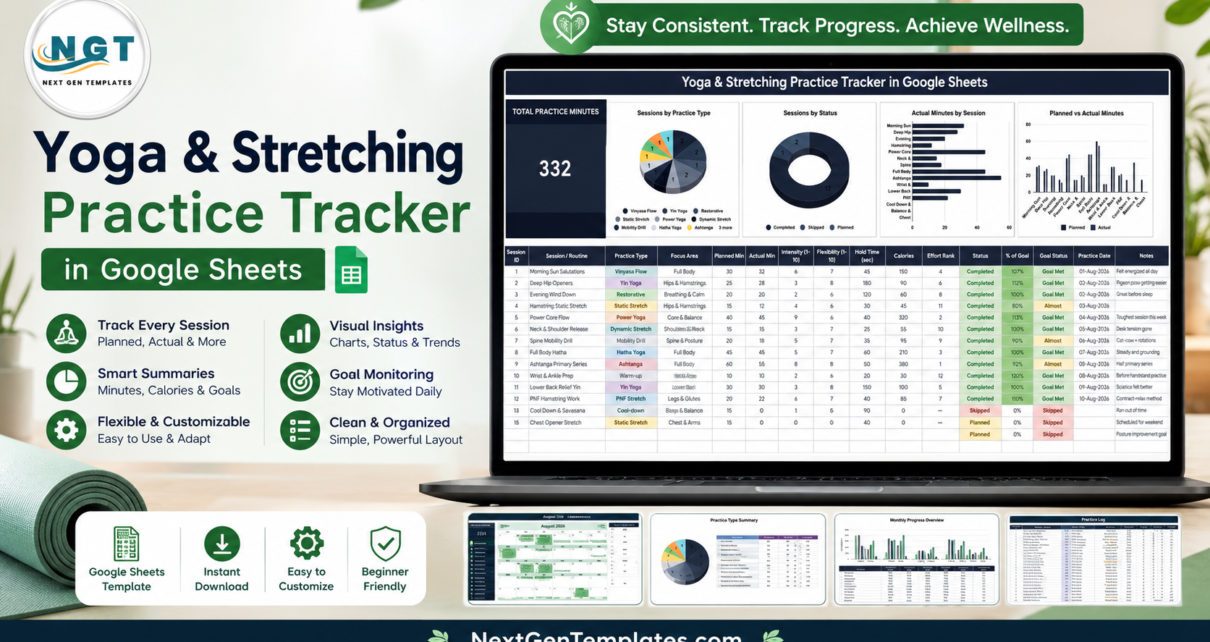
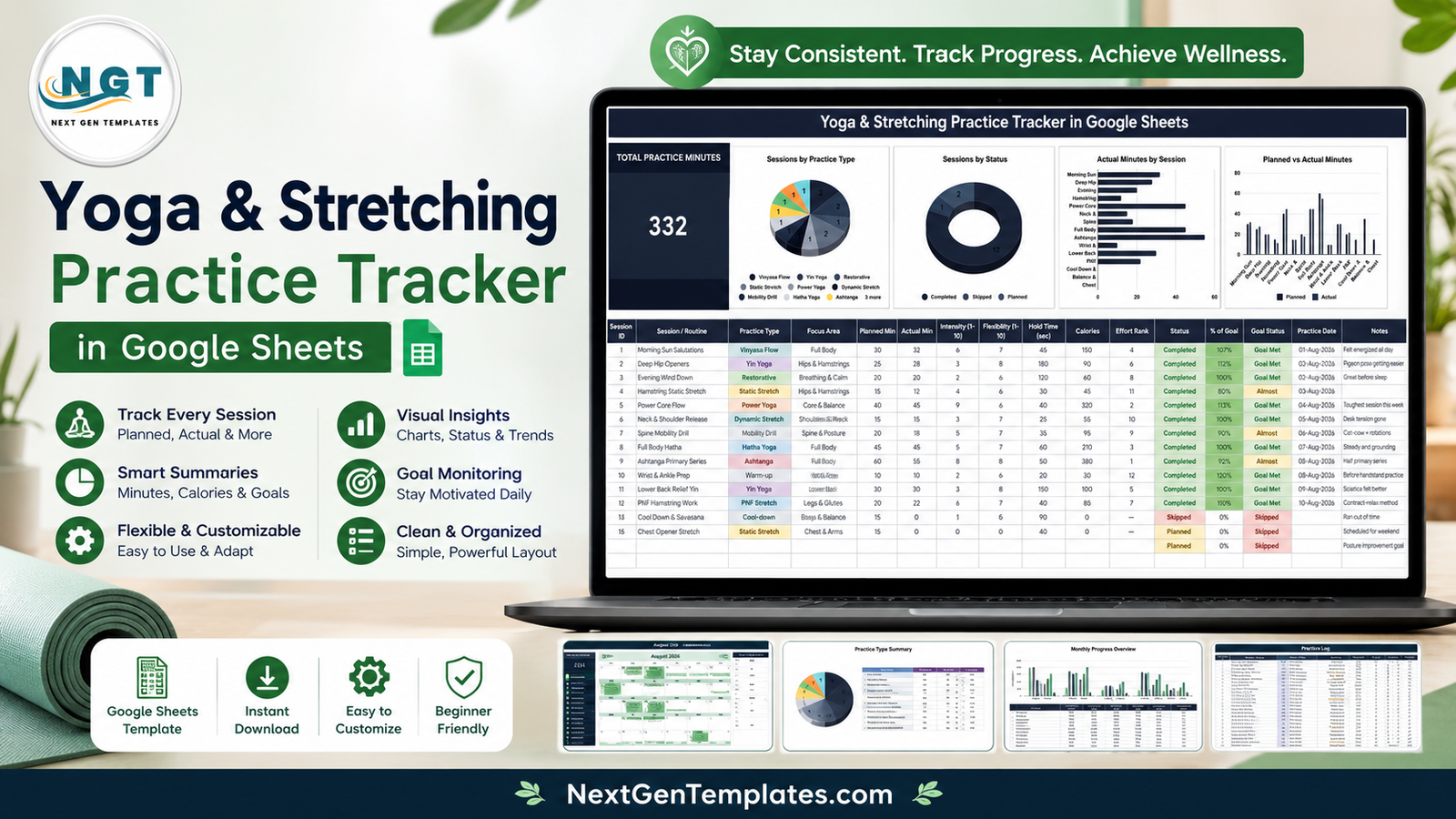
Almost everyone who starts a home yoga habit keeps it for two or three weeks and then loses the thread. Not because the practice is hard, but because there is no record of it. Was that four sessions last week or two? Did you actually hold the hamstring stretch for ninety seconds, or does it just feel like you did? The Yoga & Stretching Practice Tracker in Google Sheets answers that with one tab: a single KPI card, four charts and a 16-column session log, with 15 sample sessions and 332 practice minutes already filled in so you can see the whole thing working before you type anything.Yoga & Stretching Practice Tracker in Google Sheets
One thing up front: this is a personal practice log, not medical advice. It does not diagnose anything, it does not assess your mobility, and it does not prescribe how much you should practise. It records what you type and draws charts from it. If you are working around an injury or a health condition, that is a conversation for a doctor, physiotherapist or qualified teacher – the sheet is only there to keep the record.
Get the Yoga & Stretching Practice Tracker in Google Sheets
Key Features of the Yoga & Stretching Practice Tracker in Google Sheets
Everything sits on one page, in the order you actually read it: headline number first, charts second, the log underneath.Yoga & Stretching Practice Tracker in Google Sheets
- Total Practice Minutes card. One large figure summing the actual minutes of every session you have logged. The demo data shows 332.Yoga & Stretching Practice Tracker in Google Sheets
- Four charts that redraw as you type. Sessions by Practice Type, Sessions by Status, Actual Minutes by Session and Planned vs Actual Minutes.
- A 16-column session log. Session ID, Session / Routine, Practice Type, Focus Area, Planned Min, Actual Min, Intensity (1-10), Flexibility (1-10), Hold Time (sec), Calories, Effort Rank, Status, % of Goal, Goal Status, Practice Date and Notes.Yoga & Stretching Practice Tracker in Google Sheets
- Automatic grading. % of Goal divides actual minutes by planned minutes; Goal Status stamps each row Goal Met, Almost or Skipped and colours it green, amber or red.
- Effort Rank. A live ranking of your sessions by effort, so the two hardest practices in a month stand out without you hunting for them.Yoga & Stretching Practice Tracker in Google Sheets
- Twelve practice types out of the box. Vinyasa Flow, Yin Yoga, Restorative, Static Stretch, Power Yoga, Dynamic Stretch, Mobility Drill, Hatha Yoga, Ashtanga, Warm-up, PNF Stretch and Cool-down – each with its own colour in the log.
- Ten focus areas. Full Body, Hips & Hamstrings, Breathing & Calm, Core & Balance, Shoulders & Neck, Spine & Posture, Wrists & Ankles, Lower Back, Legs & Glutes and Chest & Arms.
- Dropdowns that expand. The lists live on a separate List sheet. Add Iyengar, Kundalini or foam rolling there and every dropdown in the log picks it up.Yoga & Stretching Practice Tracker in Google Sheets
Tracker Layout Explained
The KPI card
Top-left, on a dark panel: TOTAL PRACTICE MINUTES. It is the sum of the Actual Min column, so skipped and merely planned sessions contribute nothing to it. That is deliberate. The number only moves when you actually practise, which makes it the one figure worth glancing at on a Sunday evening.
Sessions by Practice Type
A pie chart counting sessions per practice type. It is the fastest honesty check in the sheet. Most people discover their practice is far less varied than they believed – in the sample data, Vinyasa Flow, Yin Yoga and Static Stretch each appear twice while Ashtanga, Hatha and PNF Stretch appear once, and the balance shifts the moment you log a real month.Yoga & Stretching Practice Tracker in Google Sheets
Sessions by Status
A donut splitting Completed, Skipped and Planned. The demo shows 12 completed, 1 skipped and 2 planned. Consistency stops being a feeling and becomes a ring you can read across the room.
Actual Minutes by Session
A horizontal bar chart, one bar per routine, sorted so the longest sessions are obvious. In the sample data the Ashtanga Primary Series and Power Core Flow bars run past 45 minutes while Wrist & Ankle Prep sits at 10 – which is exactly right for a prep drill, and exactly the sort of thing you want to see rather than guess.Yoga & Stretching Practice Tracker in Google Sheets
Planned vs Actual Minutes
A paired column chart putting intention next to outcome for every session. Two dark columns per routine: what you planned, what you did. A run of tall planned bars with short actual bars is not a discipline problem – it usually means the plan was written by an optimist and needs trimming.
The practice log
Below the charts, the log itself. Four of its columns are formula-driven and should be left alone – Effort Rank, % of Goal, Goal Status and the KPI total. Everything else you type. Intensity, Flexibility, Hold Time and Calories are your own subjective ratings or watch readings; the sheet stores and charts them but measures nothing itself. The Notes column is the one people underestimate: “Pigeon pose getting easier”, “Desk tension gone”, “Sciatica felt better” tell you more three months later than any of the numbers.Yoga & Stretching Practice Tracker in Google Sheets
Yoga & Stretching Practice Tracker vs. Excel vs. a Paid Yoga App – Feature Comparison
| This Google Sheets tracker | Excel workbook | Paid yoga / fitness app | |
|---|---|---|---|
| Cost | One payment, lifetime access | One payment, needs Excel | USD 12-20 per month, forever |
| Platform | Google Sheets, any browser | Desktop Excel or Microsoft 365 | Phone app on the vendor’s cloud |
| Setup time | About 2 minutes | 5-10 minutes plus a download | Account, profile and payment first |
| Real-time sharing with a teacher | Yes, send a link | Only through OneDrive co-authoring | Rarely, or on a paid tier |
| Mobile access | Free Google Sheets app | Excel mobile, charts are cramped | Yes, that is the whole product |
| Add your own practice types | Yes, edit the List sheet | Yes, edit the list range | Rarely – a fixed vendor library |
| Planned vs actual minutes together | Built in | Build it yourself | Usually actual minutes only |
| Your data belongs to you | Yes, a file in your Drive | Yes, a file on your disk | No, it lives in their account |
| Year-1 cost for a studio of 5 | One purchase, share the copy | One purchase plus Excel licences | Roughly USD 720-1,200 |
Who Should Use This Template
Home practitioners who follow YouTube or app-led classes and want a record the class provider never keeps. People rebuilding mobility after months at a desk, where the interesting number is hold time and hip focus frequency rather than calories. Teachers with private clients, who can hand each client a copy and open their link before a session. Runners and lifters who treat stretching as the part of training they always skip – the Sessions by Status donut is unusually good at making that visible.
It is not for you if you want guided classes or pose instruction; this records practice, it does not teach it. It is not a studio booking or membership system – that is a different tool entirely. And it is emphatically not a physiotherapy or medical record.
Real-World Use Cases
The 6am home practice. Priya plans 30 minutes before work and logs what really happened. After four weeks the practice-type pie shows almost no Yin, so she swaps two Power Yoga slots for Deep Hip Openers and Lower Back Relief Yin. Nothing about her routine changed except that she could finally see it.
A flexibility goal with a deadline. Daniel wants to reach the floor in a forward fold. He logs Hold Time and a Flexibility rating on every hamstring session. Twelve weeks of Actual Minutes by Session tells him honestly which routines he keeps and which he quietly avoids – and the avoided ones turn out to be the ones that were working.
Teaching private clients. Meera gives each client a copy of the sheet. Before a session she opens their link, reads the % of Goal column and the last three Notes entries, and adjusts the class to what actually happened rather than to what the client remembers.
Advantages of the Yoga & Stretching Practice Tracker
- No setup tax. The copy link puts a working file in your Drive; the demo rows show the formulas alive before you delete them.
- Planned and actual side by side. Most trackers record only what you did, which quietly hides the gap that matters.
- Grading you did not have to do. % of Goal and Goal Status are calculated, so consistency is measured the same way every week.
- It bends to your vocabulary. Practice types and focus areas are yours to rename on the List sheet.
- You own the file. Cancel nothing, export nothing – it is a spreadsheet in your Google Drive, shareable with a link when you want and private when you do not.
- Works on the phone. The free Google Sheets app is enough to log a session from the mat.
Opportunities for Improvement
Being straight about the limits: the tracker is a single tab, so there is no separate month-by-month history page – long-term trends mean reading the log itself or adding a pivot. Calories are whatever you type, and for yoga those numbers are rough at best; treat the column as a note, not a measurement. Intensity and Flexibility are subjective ratings, which makes them useful to you and meaningless to anyone else. There is no reminder or streak mechanic, so the habit still has to come from you. And there is no pose library or video – it records practice, it does not deliver it.
Best Practices
- Fill in Planned Min before you practise, not after. Otherwise the Planned vs Actual chart just flatters you.
- Log the skipped ones. A Skipped row is the most informative row in the sheet; deleting it is how the record becomes fiction.
- Trim the plan rather than abandon it. Three weeks of 60-minute plans finishing at 25 minutes means the plan is wrong, not you.
- Keep the focus areas honest. If Lower Back never appears and your back is what hurts, the pie chart has told you something.
- Write one line in Notes every time. Sensations are the data that numbers cannot hold.
- Review weekly, not daily. The charts are built for a week’s worth of rows; daily checking turns a practice log into a scoreboard.
- Leave the calculated columns alone. If a formula gets overwritten, undo it or re-copy the cell from the row above. Google’s own guide to formulas and functions is the place to look if you want to extend them.
Explore Relevant Templates
This tracker is part of a health and wellness set that shares the same one-page layout, so anything you learn on one applies to the rest:
- Workout Log Tracker in Google Sheets – strength and cardio sessions alongside your mat work.
- Body Measurements Tracker in Google Sheets – month-to-month change without a daily weigh-in.
- Sleep Tracker in Google Sheets – the recovery half of the picture.
- Water Intake Tracker in Google Sheets – a two-tap daily log.
- Cycling Training Log Tracker in Google Sheets – if your stretching exists to support the bike.
- Medication & Pill Tracker in Google Sheets – a personal dose log for anyone keeping several records at once.
Get the Yoga & Stretching Practice Tracker in Google Sheets
Want to build skills like this step by step? The NextGenTemplates Academy learning paths on NextGenTemplates Academy walk you through spreadsheet tracking skills with practice files.
Frequently Asked Questions
Do I need a paid Google account?
No. A free Google account is enough. The PDF in your download contains a “Make a copy” link; one click and the tracker is a normal file in your own Drive.
Is this medical or physiotherapy advice?
No. It is a personal practice log for your own record-keeping. It does not diagnose, treat or assess anything and it is not a substitute for a doctor, physiotherapist or qualified teacher. If you have an injury or a health condition, speak to a professional before changing your practice.
Can I add my own practice types and focus areas?
Yes. Edit the lists on the List sheet and every dropdown in the log updates. That is where you add Iyengar, Kundalini, foam rolling or your own naming for a routine.
Where do the Calories and Intensity numbers come from?
From you, or from your watch. The sheet stores and charts whatever you enter – it estimates nothing on its own, so treat those two columns as rough personal notes.
Will it work on my phone?
Yes. The free Google Sheets app opens it on Android and iOS. Logging takes a few taps; the charts are easier to read on a laptop or tablet.
Can I share it with my teacher?
Yes. Use Google’s ordinary Share button and send a view or edit link. Nothing is public unless you choose to share it.Yoga & Stretching Practice Tracker in Google Sheets
What exactly do I download?
A PDF holding your private copy link and a short guide. You are not downloading a spreadsheet file – clicking the copy link is what creates your editable version in Google Drive.Yoga & Stretching Practice Tracker in Google Sheets
About the Author
Built by PK – Microsoft Certified Professional with 15+ years of Excel, Google Sheets, and Power BI experience. Founder of NextGenTemplates, reaching 300K+ subscribers across YouTube channels. Every template is hand-built and tested before release.
Conclusion
The value of this tracker is how little it asks. One row per session, four columns filled in by formula, four charts that redraw as you type, and a file that lives in your Drive instead of aYoga & Stretching Practice Tracker in Google Sheets vendor’s. It will not tell you whether your practice is good, and it is not medical advice – it is a log and a set of charts. But a month of honest rows, skipped sessions included, is a far better basis for deciding what to change than a vague sense that this week went badly.Yoga & Stretching Practice Tracker in Google Sheets
Get the Yoga & Stretching Practice Tracker in Google Sheets and log tonight’s session.