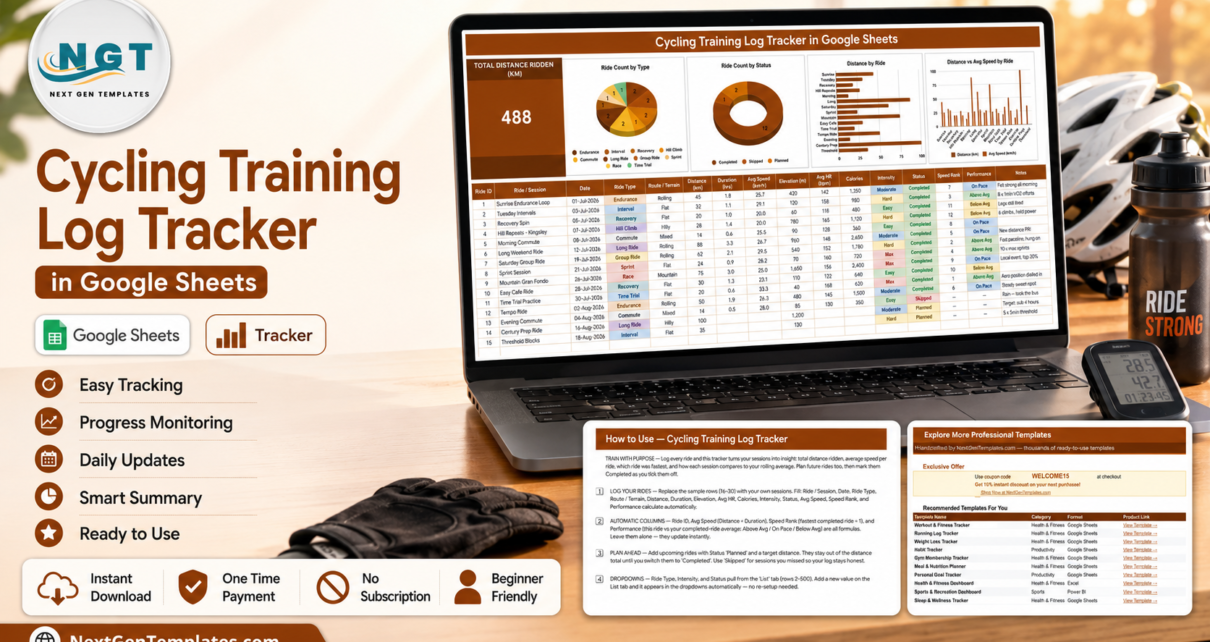
The Cycling Training Log Tracker in Google Sheets records 16 fields for every ride on a single page, calculates 4 of those columns by itself, and feeds 1 headline KPI card plus 4 live charts. It ships with 15 sample rides already entered, three built-in ride statuses, ten ride types and four intensity levels, so the whole thing is working before you type anything.Cycling Training Log Tracker in Google Sheets
Most cyclists end up with their ride history scattered across a bike computer, a phone app and a notebook. None of those give you a single sheet you own, can share with a ride partner, and can add your own columns to. This tracker is deliberately the opposite: one page, plain formulas, and a file that lives in your own Google Drive.
Please note: this is a logging and charting template, not medical or coaching advice. It records the ride data you enter and draws charts from it. It does not prescribe training, evaluate fitness, or make any claim about performance, recovery or injury.
Key Features of the Cycling Training Log Tracker
Everything below is in the file as shipped – nothing needs building.
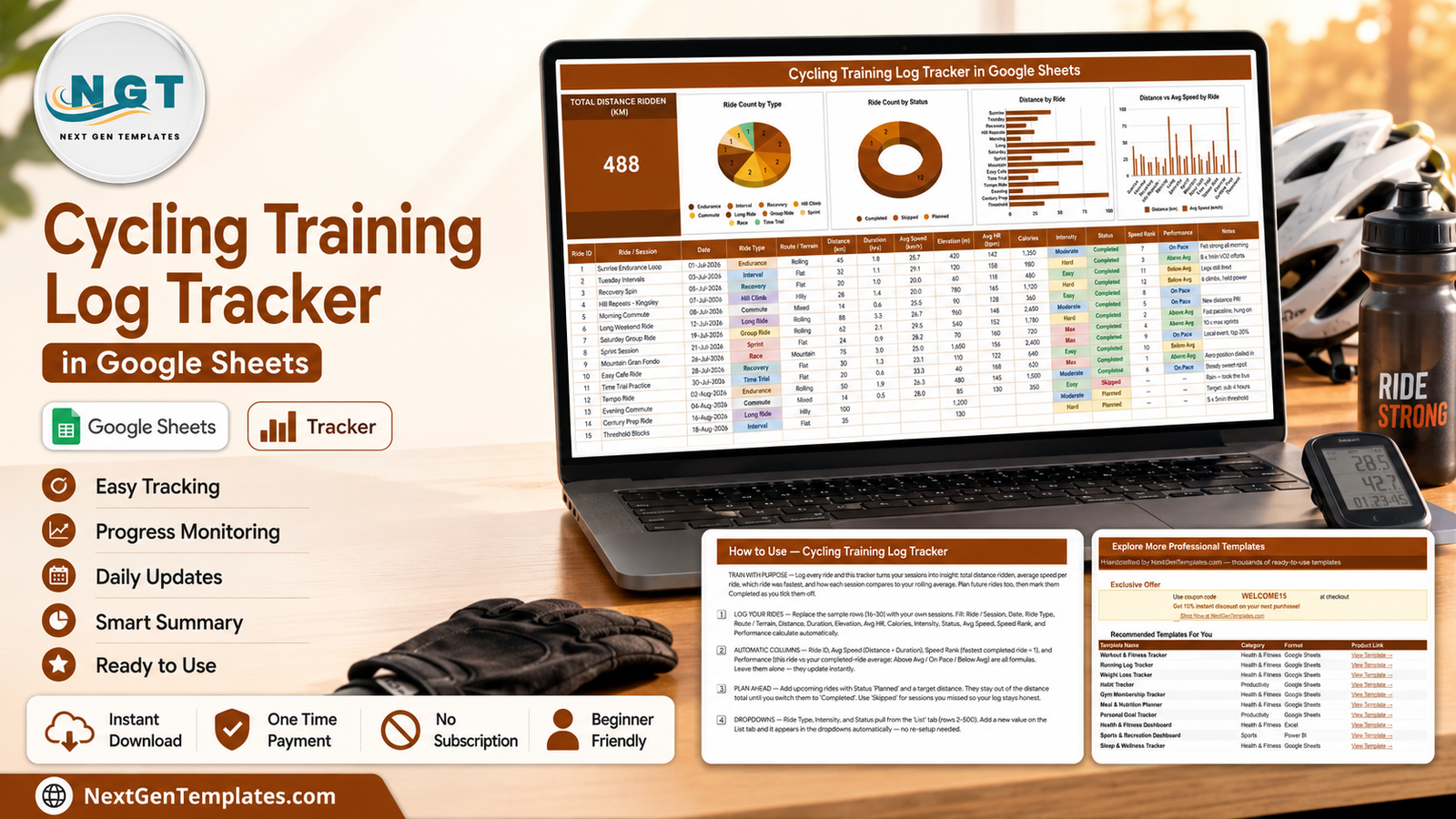
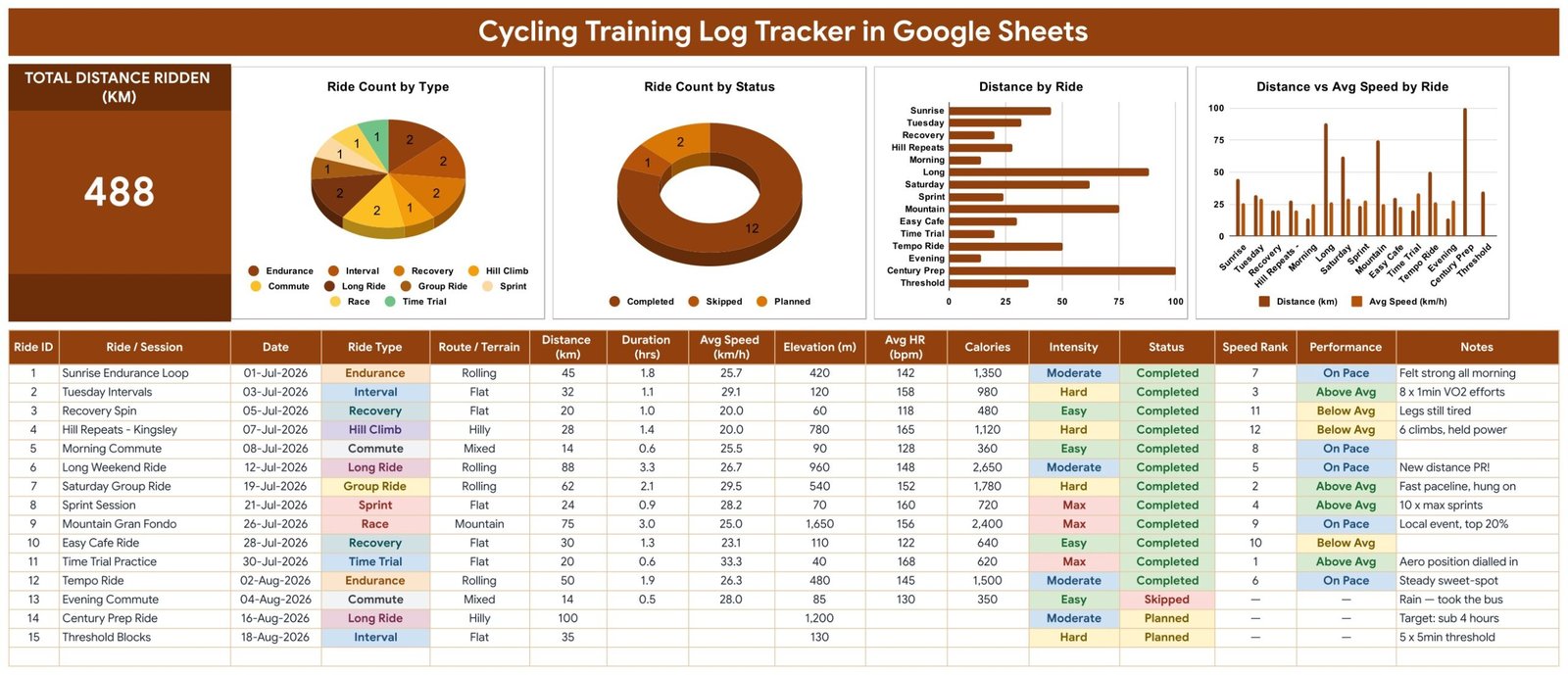
- A 16-column ride log. Ride ID, Ride / Session, Date, Ride Type, Route / Terrain, Distance (km), Duration (hrs), Avg Speed (km/h), Elevation (m), Avg HR (bpm), Calories, Intensity, Status, Speed Rank, Performance and Notes.Cycling Training Log Tracker in Google Sheets
- Four columns that fill themselves. Ride ID auto-numbers, Avg Speed is Distance divided by Duration, Speed Rank orders your completed rides fastest-first, and Performance returns Above Avg, On Pace or Below Avg by comparing each ride to your own completed-ride average.Cycling Training Log Tracker in Google Sheets
- One KPI card. Total Distance Ridden (km), counting completed rides only.
- Four live charts. Ride Count by Type, Ride Count by Status, Distance by Ride, and Distance vs Avg Speed by Ride.Cycling Training Log Tracker in Google Sheets
- Ten ride types out of the box. Endurance, Interval, Recovery, Hill Climb, Commute, Long Ride, Group Ride, Sprint, Race and Time Trial.
- Four intensity levels and three statuses. Easy, Moderate, Hard, Max; Completed, Skipped, Planned.
- Dropdowns driven by a List tab. Values live across rows 2-500 – add one and it appears in the dropdown immediately, with no re-setup.
- Charts that expand on their own. All four read the data columns directly across rows 16-1000 using the built-in Aggregate option. There are no hidden helper tables anywhere in the file.
Sheets Explanation
The Tracker page
This is where you live. A dark title banner runs across the top, with the Total Distance Ridden (km) card on the left and four charts beside it: Ride Count by Type, Ride Count by Status, Distance by Ride, and Distance vs Avg Speed by Ride. Underneath sits the full 16-column ride log, with Ride Type, Intensity, Status and Performance rendered as colour-coded cells so a season scans at a glance.
The How to Use page
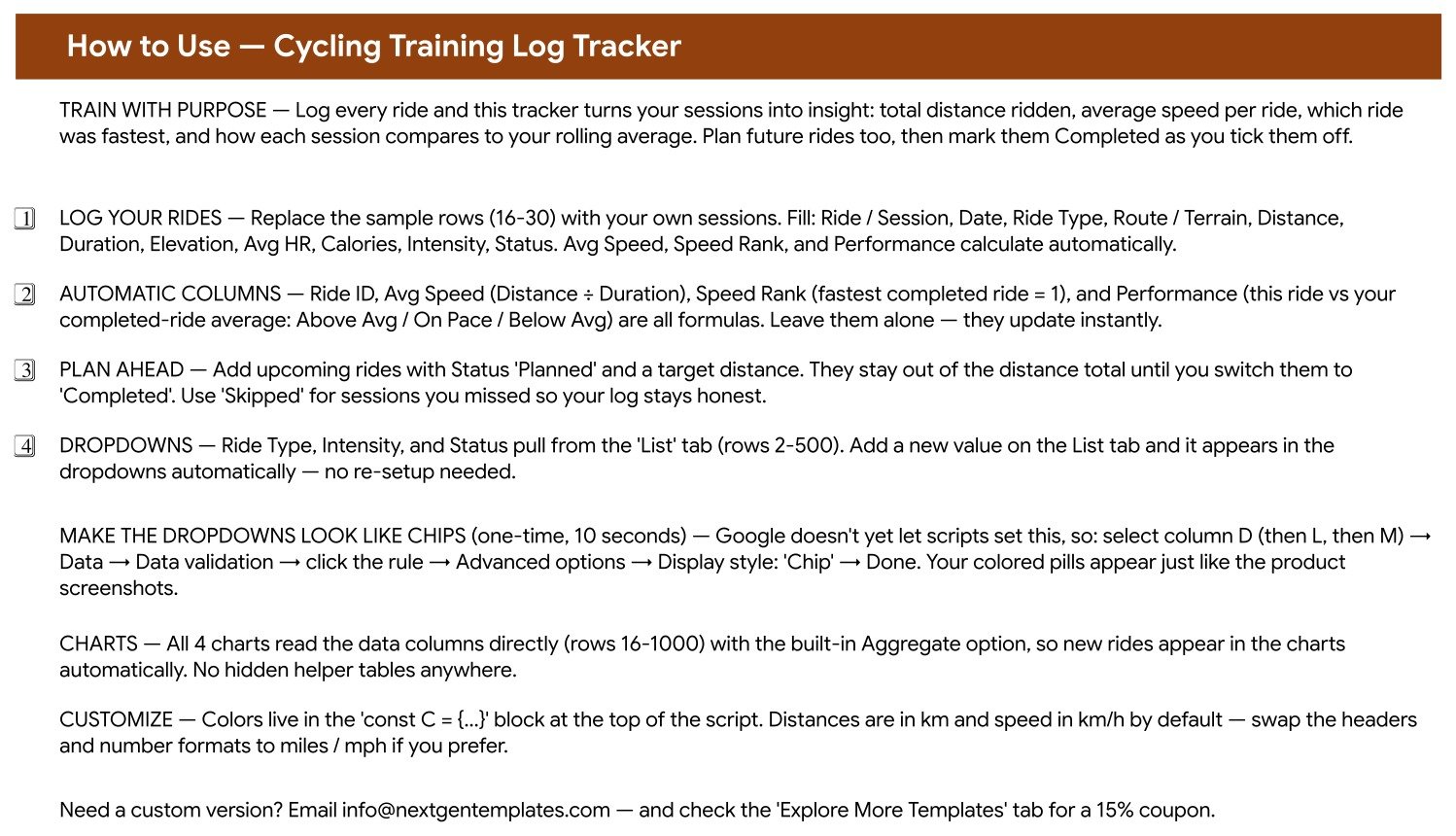
A short instructions tab written in plain English. It tells you which rows to overwrite, which four columns are formulas and must be left alone, how the Planned and Skipped statuses behave, how the List tab feeds the dropdowns, and how to turn the dropdowns into coloured chips with a one-time ten-second Data validation change.Cycling Training Log Tracker in Google Sheets
The Explore More Templates page
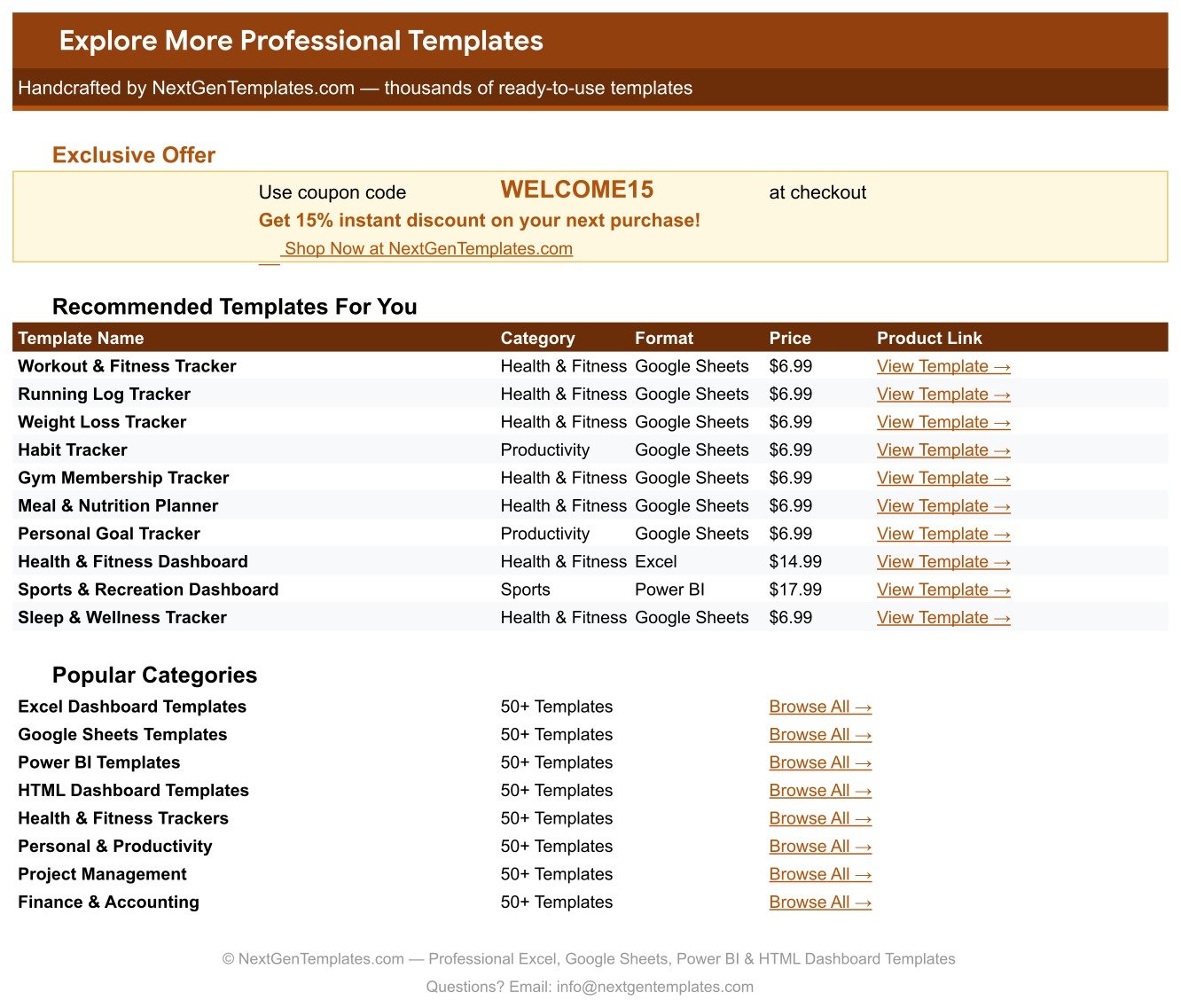
An in-file index of related NextGenTemplates products with a WELCOME15 coupon code and category browse links. It is there so you can find the matching running, steps or workout log without leaving the sheet.
The List page
The engine behind the three dropdowns. Ride Type, Intensity and Status each read a column here across rows 2-500. Add Gravel, Zwift or Bikepacking to the ride-type column and it is selectable in the log the moment you press Enter. If you want to understand the mechanism itself, Google documents it under data validation in Google Sheets.Cycling Training Log Tracker in Google Sheets
Cycling Training Log Tracker vs. a Microsoft Excel Ride Log vs. Strava Premium / TrainingPeaks – Feature Comparison
| Feature | Cycling Training Log Tracker in Google Sheets | Microsoft Excel ride log | Strava Premium / TrainingPeaks |
|---|---|---|---|
| Cost | $6.99 one-time ✅ | $6.99-$15 one-time, plus an Office licence | $12-$20 / user / month |
| Platform | Google Sheets – browser, nothing to install ✅ | Desktop Excel or Microsoft 365 | Vendor’s app and web portal |
| Setup time | Under 10 minutes ✅ | 10-20 minutes, plus macro trust prompts | Account, device pairing and permissions |
| Real-time sharing with a coach or ride partner | Share by link, edits appear live ✅ | File copies emailed back and forth | Yes, on paid tiers ✅ |
| Mobile access | Google Sheets app, free on iOS and Android ✅ | Excel mobile, limited formula editing | Yes ✅ |
| Add your own ride types and fields | Type them on the List tab – no limits ✅ | Yes, but you rebuild the validation rules | Fixed to the vendor’s schema |
| Your raw data stays yours | A file in your own Google Drive ✅ | A file on your own disk ✅ | Held on the vendor’s servers |
| Works without a GPS bike computer | Yes – type the numbers from any source ✅ | Yes ✅ | Mostly built around device uploads |
| Year-1 cost at 5 riders | $6.99 total ✅ | $6.99 + licences | $720-$1,200 |
For riders who want their own ride history in a file they control – without a monthly subscription or a device requirement – the Cycling Training Log Tracker sits in the sweet spot.Cycling Training Log Tracker in Google Sheets
Who Should Use This Template
Perfect for:
- Recreational and club cyclists keeping a season-long record of distance, speed and elevation
- Bike commuters who want to see how many of their planned rides actually happened
- Riders building toward an event, who want Planned rides listed alongside Completed ones
- Anyone whose numbers come from a bike computer, a phone or memory, and who wants them in one owned fileCycling Training Log Tracker in Google Sheets
- Ride partners or coaches who would rather share an editable sheet than swap screenshotsCycling Training Log Tracker in Google Sheets
Not a fit if:
- You want a training plan or workout prescription – this template records what you did, it does not tell you what to do
- You want medical, physiological or injury-related interpretation of your data – it offers none
- You want automatic Strava, Garmin or Wahoo sync – every row is typed by hand
- You need power-based analysis with FTP, TSS or normalised power – there are no power fields and no such calculationsCycling Training Log Tracker in Google Sheets
- You need user permissions, audit trails or an approval workflowCycling Training Log Tracker in Google Sheets
Real-World Use Cases
Marco, club rider. Three evenings a week he logs the session the same night: distance, duration, terrain, and a line in Notes about how the group ride went. Weeks later the Ride Count by Type chart tells him his season has leaned heavily on Group Rides – a plain fact about his own log, which is exactly what he wanted from it.Cycling Training Log Tracker in Google Sheets
Priya, riding toward a 100 km event. She keeps the next month of rides in the sheet as Planned with target distances, then flips each to Completed once it happens. Because the Total Distance Ridden card counts completed rides only, the headline number never flatters her by including rides she has not done yet.Cycling Training Log Tracker in Google Sheets
Dan, bike commuter. On wet mornings he takes the bus, and marks that day Skipped rather than deleting the row. Three months in, the Ride Count by Status donut gives him an honest completed-versus-skipped split he would not have guessed at.Cycling Training Log Tracker in Google Sheets
Advantages of the Cycling Training Log Tracker
It is one page. KPI, charts and log all live together, so there is no navigating between tabs to answer a simple question. Scroll down to type, scroll up to look.Cycling Training Log Tracker in Google Sheets
Nothing is hidden. The four charts read the data columns directly – no pivot caches, no helper tables tucked away in column Z. If a number looks wrong you can trace it in seconds.Cycling Training Log Tracker in Google Sheets
It costs $6.99 once. Five riders sharing one sheet still costs $6.99. The equivalent year on a paid training platform runs $720-$1,200 for the same five people.
It bends to your riding. Ride types, intensities and statuses are just text on the List tab. Gravel, Zwift, turbo sessions, bikepacking – add them and they are in the dropdown instantly.Cycling Training Log Tracker in Google Sheets
It works offline from any data source. No device requirement. If you can read a number off a computer, a phone or a road sign, you can log it.Cycling Training Log Tracker in Google Sheets
Opportunities for Improvement
Being straight about the limits is more useful than pretending there are none.
- No automatic sync. Every ride is entered by hand. If you ride daily and want zero-effort logging, a device-connected app will suit you better.
- No power metrics. There is no watts, FTP, TSS or normalised power column, and no field you could add that would make the existing charts understand them.
- Metric by default. Distances are km and speed is km/h. Switching to miles and mph means changing the headers and number formats yourself – a couple of minutes, but not automatic.
- The chip styling is manual. Google Apps Script cannot set the chip display style, so the coloured pills need one ten-second click-through per column the first time.
- Single-rider by design. There is no rider column, so a squad would need a copy each rather than one shared log.
Best Practices
Log the same day. Duration and average heart rate are the two figures that blur fastest. Entering them the evening of the ride keeps the log worth having.
Use Skipped, do not delete. A deleted row is a ride that never existed. A Skipped row is a ride you missed, and the Ride Count by Status chart is only honest if you mark them.
Keep Planned rides realistic. Planned rows sit in the log but stay out of the distance total, so there is no cost to planning ahead – and no reward for planning fiction.
Write in the Notes column. Six months later, “felt strong all morning” or “new distance PR” explains a data point that the numbers alone will not.
Extend the List tab early. Add your real ride types in the first week. Retagging three months of rides later is tedious.
Explore Relevant Templates
The closest sibling is the Running Log & Mileage Tracker in Google Sheets, which uses the same one-page layout and self-calculating columns but is built around pace and mileage. For the days off the bike there is the Daily Steps Tracker in Google Sheets, and for gym sessions the Workout Log Tracker in Google Sheets.
If you want multi-page analysis rather than one rider’s log, look at the Fitness and Wellness Dashboard in Google Sheets or the Sports and Recreation Dashboard in Google Sheets. On the admin side, the Gym Membership Tracker in Google Sheets handles members and renewals. The full range sits under Google Sheets Trackers.
Frequently Asked Questions
Is the Cycling Training Log Tracker medical or coaching advice?
No. The Cycling Training Log Tracker in Google Sheets is a logging and charting template. It stores the ride figures you type and draws charts from them. It gives no training prescription, no health interpretation, and makes no claim about performance, recovery or injury.
What does the Performance column actually compare?
Performance in the Cycling Training Log Tracker compares each completed ride’s average speed against the average of all your completed rides in the same sheet, returning Above Avg, On Pace or Below Avg. It is arithmetic against your own data – never a benchmark against other riders.
Can I use miles instead of kilometres?
Yes. The Cycling Training Log Tracker ships in km and km/h. The How to Use tab explains the swap: change the column headers and number formats to miles and mph. Every formula is unit-agnostic and keeps working unchanged.
Does it connect to Strava, Garmin or Wahoo?
No. The Cycling Training Log Tracker has no integrations – each ride is typed in by hand. The upside is that it works from any source, including a basic odometer or a phone note, with no device or account required.Cycling Training Log Tracker in Google Sheets
How long does setup take?
Under 10 minutes. Open the PDF, click the copy link, clear the 15 sample rides and start logging. The only optional extra is the ten-second Data validation step that turns the three dropdowns into coloured chips.
Will new rides show up in the charts automatically?
Yes. All four charts in the Cycling Training Log Tracker read the data columns directly across rows 16-1000 with the built-in Aggregate option, so rides appear as you add them. You never have to edit a chart range.Cycling Training Log Tracker in Google Sheets
How does this compare to a Strava Premium subscription?
Strava Premium runs $12-$20 a month and keeps your history on its servers. The Cycling Training Log Tracker is a one-time $6.99 file in your own Google Drive with no monthly fee and fully editable fields – but no GPS, no sync and no social feed.
About the Author
Built by PK – Microsoft Certified Professional with 15+ years of Excel, Google Sheets and Power BI experience. Founder of NextGenTemplates, reaching 300K+ subscribers across YouTube channels. Every template is hand-built and tested before release.Cycling Training Log Tracker in Google Sheets
Conclusion
The Cycling Training Log Tracker in Google Sheets does one job properly: it keeps an honest, readable record of the rides you actually did, with a Total Distance card, four charts and four columns that do their own arithmetic. It will not plan your season and it will not tell you what any of it means for your body – it is a log, and it says so.Cycling Training Log Tracker in Google Sheets
👉 Click here to Purchase the Cycling Training Log Tracker in Google Sheets
Instant download · One-time payment · No subscription
For walkthroughs of this and other Google Sheets templates, visit Youtube.com/@NeoTechNavigators.Cycling Training Log Tracker in Google Sheets
Last updated: August 2026