The Appliance Repair Service Management System Web App connects 17 operational and administration screens, 15 live dashboard cards, 2 management charts, and 10 settings areas in one Google Sheets-backed browser workspace. Instead of maintaining separate registers for bookings, technicians, parts, estimates, payments, warranties, and annual maintenance contracts, a repair business can follow one job from the first customer call through final delivery. The template is available from NextGenTemplates for a one-time $39.99 sale price.Appliance Repair Service Management System Web App
Appliance Repair Service Management System Web App
Get the Appliance Repair Service Management System Web App
🚀 Try the Live Demo Before You Buy
We have deployed this web app in our own Google account so you can test every page and every role — with real sample data — before purchasing. No signup, no email required.
🔑 Test Login Credentials
Sign in as Admin for full control over users, all modules, and settings — or try any of the six role logins below to see exactly what each team member can access, from the Service Manager assigning jobs to the Technician updating repairs and the Accounts/Cashier handling billing.
💡 What you get after purchase: The full source code (Code.gs + Index.html) plus a step-by-step deployment guide so you can deploy your own private instance in your own Google account in under 15 minutes.
Key Features of the Appliance Repair Service Management System Web App
- Connected service workflow: manage requests, job cards, diagnosis, estimates, approvals, repairs, invoices, and delivery without re-entering the same information in separate files.
- Dispatch visibility: schedule technician visits by day or week and filter work by technician and service mode.
- Asset-level history: connect each customer to registered appliances, models, serial numbers, warranty coverage, balances, and previous repairs.
- Parts control: monitor current stock, reservations, reorder points, costs, selling prices, bins, suppliers, and purchase receipts.Appliance Repair Service Management System Web App
- Revenue and collection tracking: compare invoiced revenue with payments received and follow outstanding customer balances.Appliance Repair Service Management System Web App
- After-service management: link warranty callbacks to original jobs and monitor AMC visits, balances, validity, and renewals.Appliance Repair Service Management System Web App
- Role-based administration: maintain users, branches, menu permissions, login activity, shared lists, and security settings.Appliance Repair Service Management System Web App
Dashboard Pages Explanation
1. Secure Login
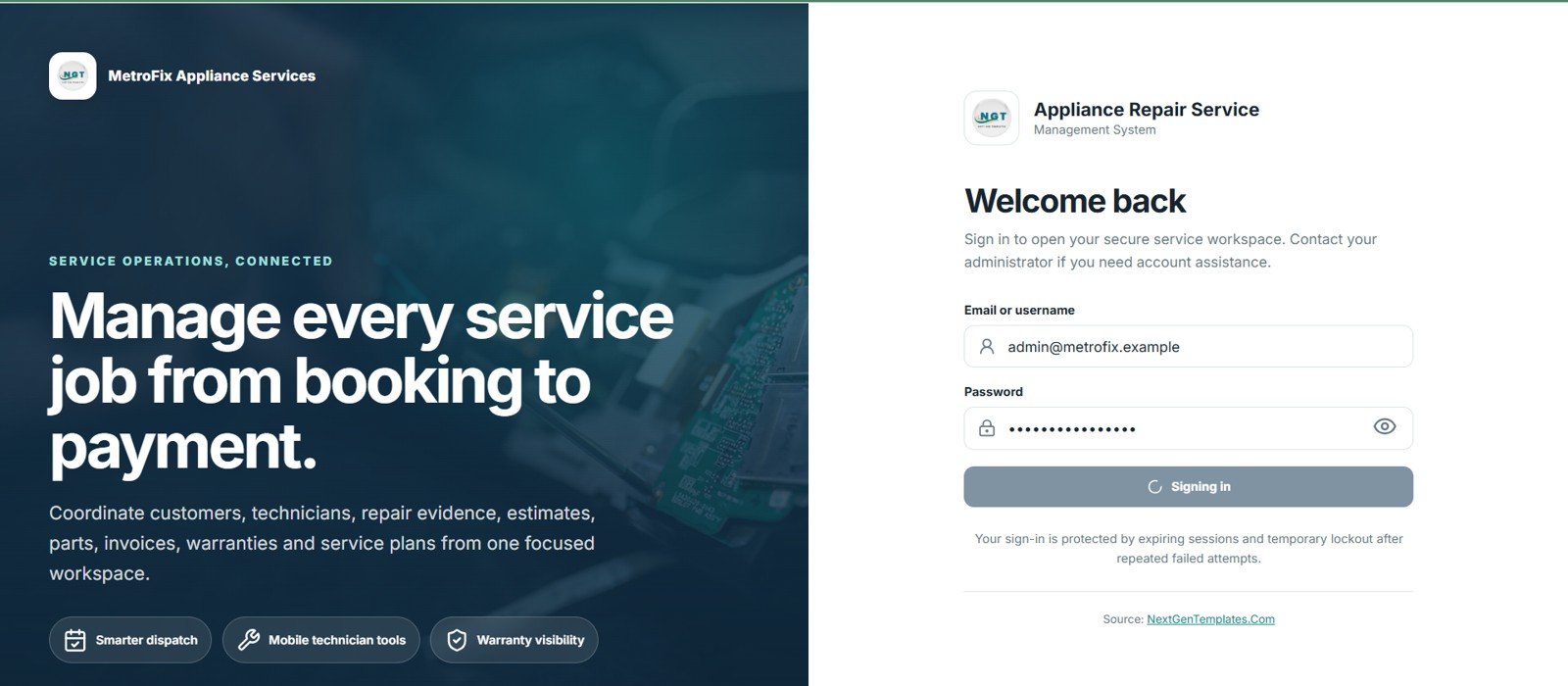
The app begins with an access-controlled sign-in screen where a user enters an email address or username and password. Expiring sessions reduce the risk of an abandoned browser remaining active, while temporary lockout after repeated failed attempts helps discourage automated guessing.
Secure Login
2. Service Operations Dashboard
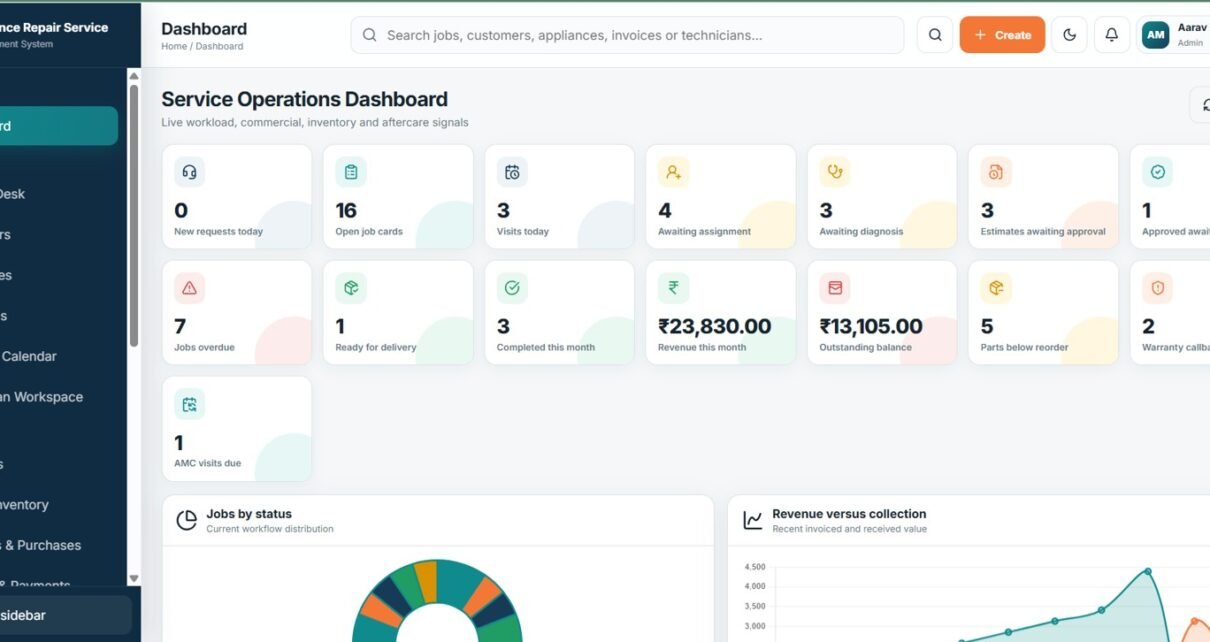
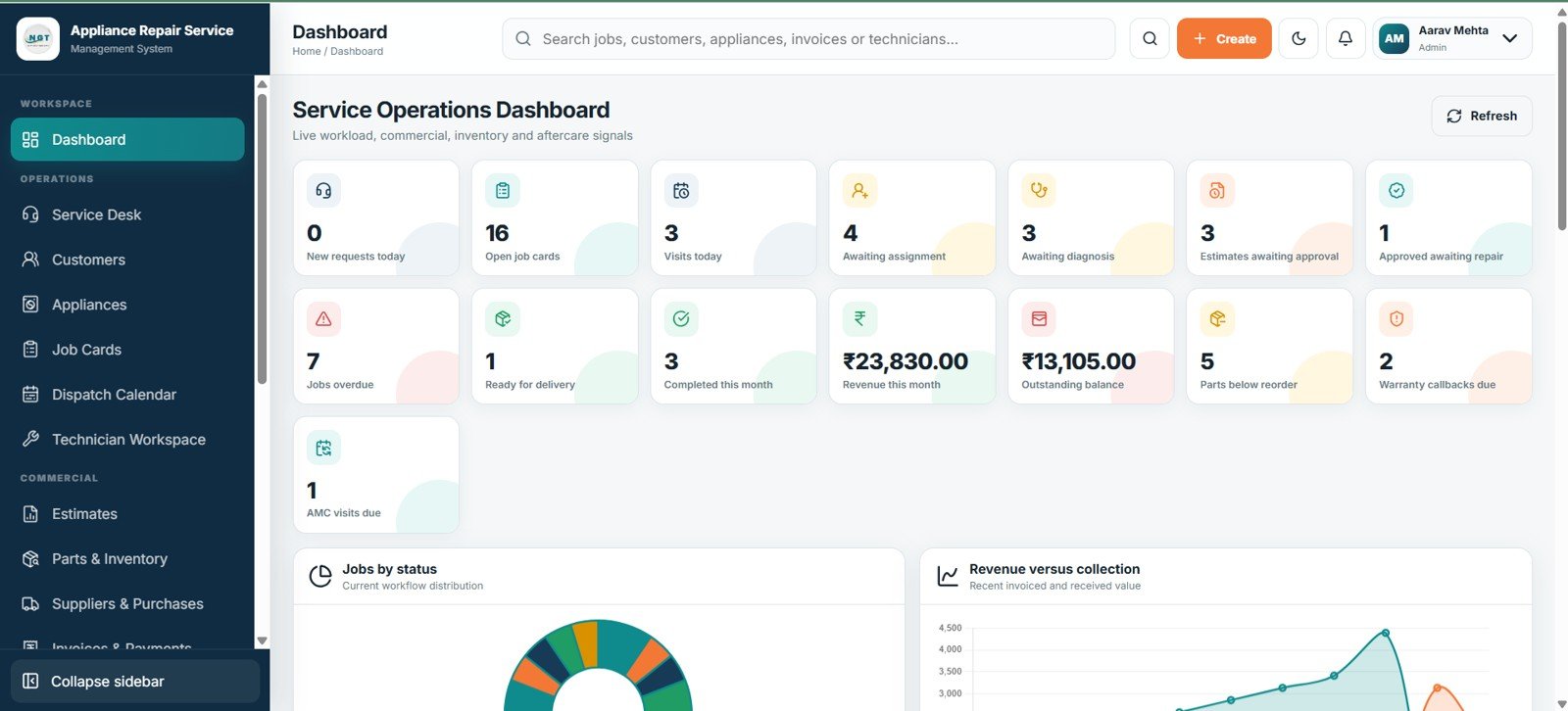
Fifteen KPI cards show new requests, open jobs, today’s visits, assignment and diagnosis queues, estimates awaiting approval, approved repairs, overdue work, ready jobs, monthly completions, revenue, balances, low-stock parts, warranty callbacks, and AMC visits. Jobs by Status explains how work is distributed across the repair pipeline, while Revenue versus Collection reveals whether billed sales are converting into cash.
Service Operations Dashboard
3. Service Desk
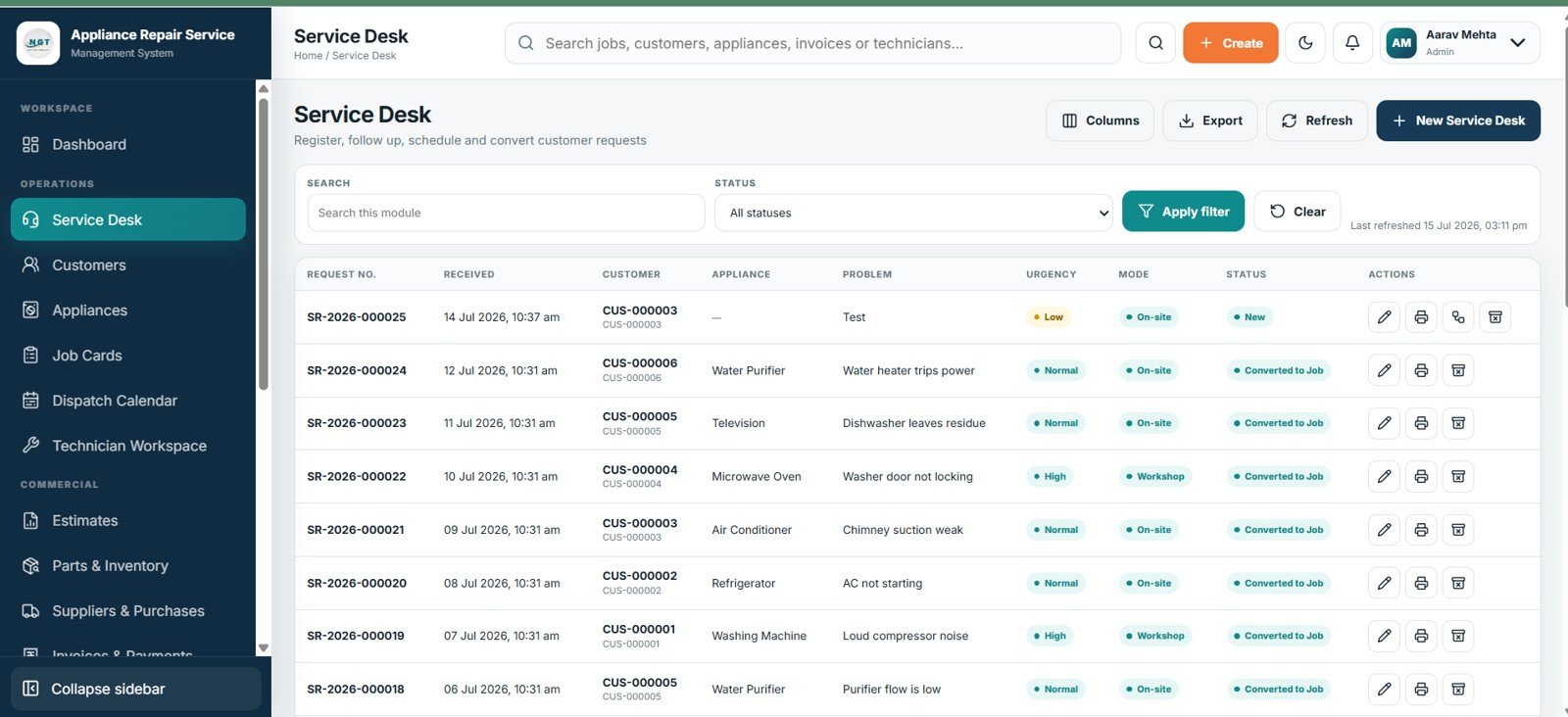
Service Desk is the intake queue for customer complaints and bookings. Request number and received date support traceability; customer, appliance, problem, urgency, contact mode, and status give coordinators enough context to follow up, schedule a visit, or convert the request into a job.
Service Desk
4. Customers
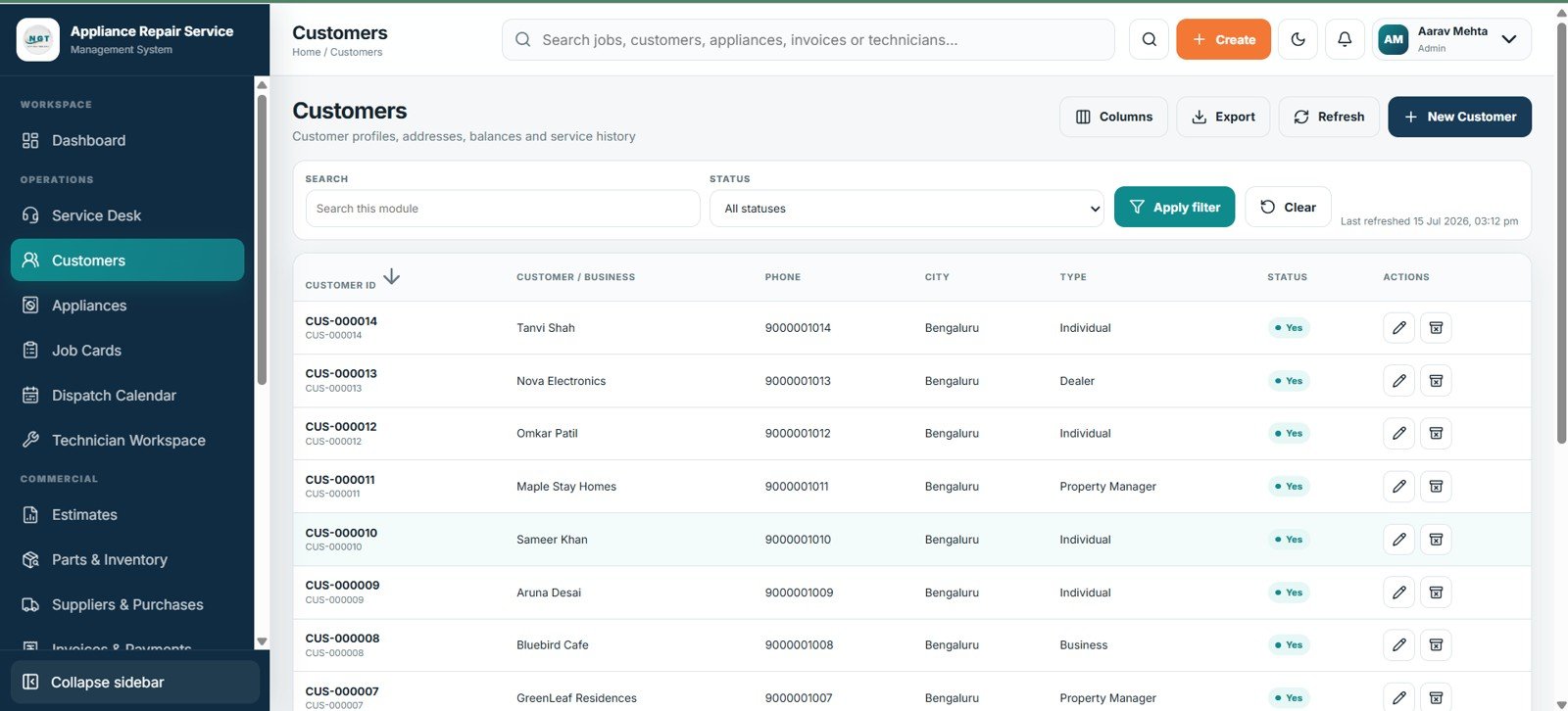
This master list supports both individual and business customers. It brings customer ID, name, phone, city, customer type, and status together with addresses, outstanding balance, and service history so staff can recognize repeat customers and retrieve past work quickly.
Customers
5. Appliances
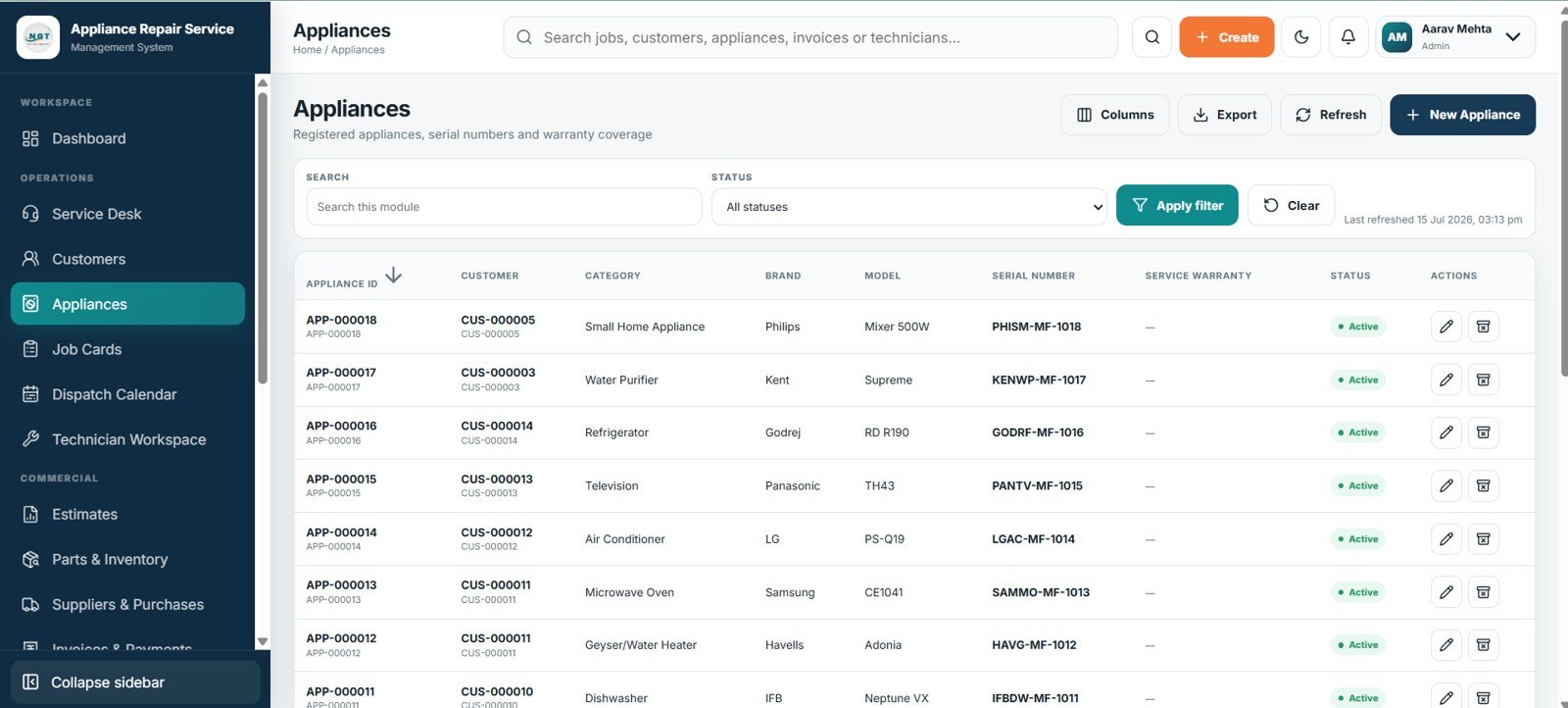
The appliance register identifies the exact unit being repaired rather than relying only on a customer name. Category, brand, model, serial number, service warranty, and status help teams distinguish multiple appliances at one address and review asset-specific repair history.
Appliances
6. Job Cards
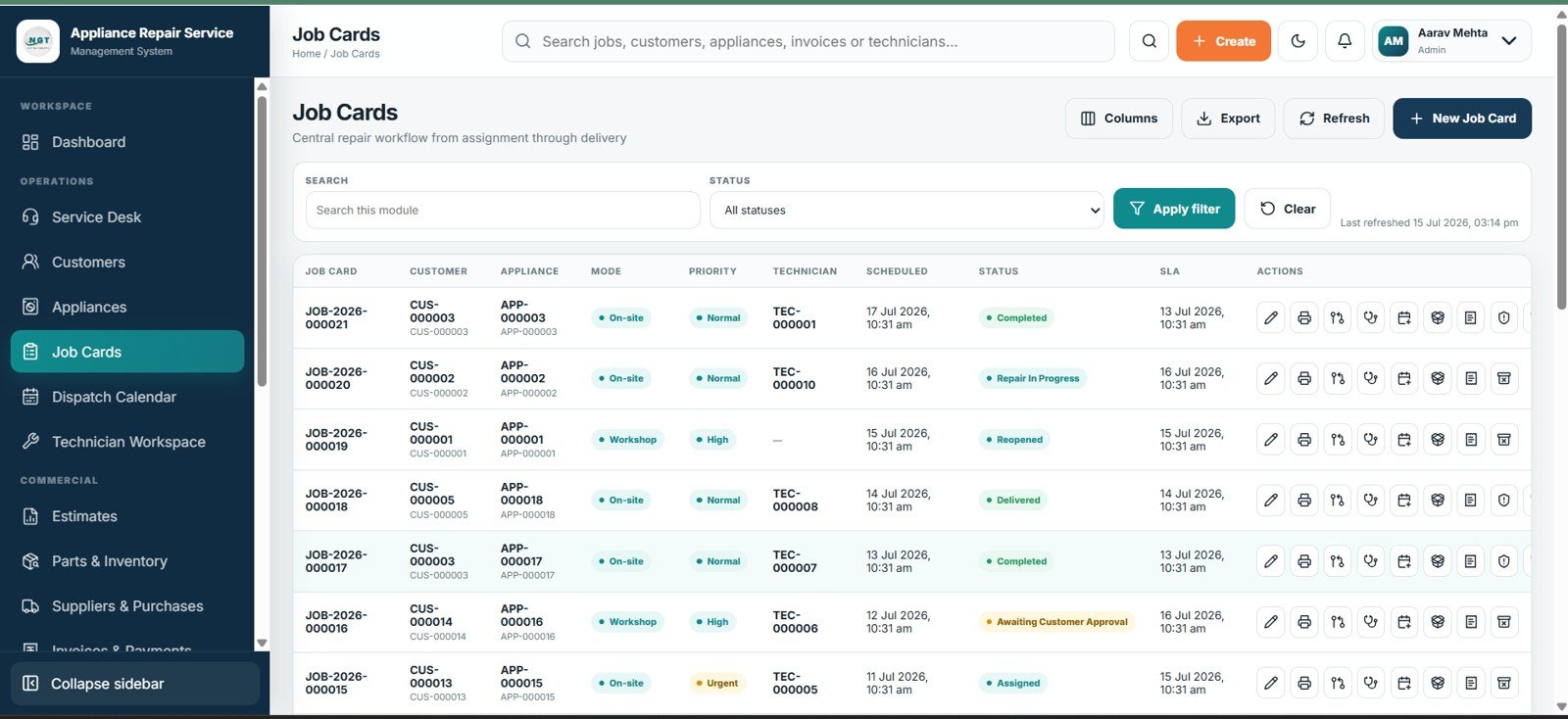
Job Cards form the center of the operational workflow. Each record combines customer and appliance information with service mode, priority, assigned technician, scheduled date, current status, and SLA, helping supervisors see what must happen next and which jobs are late.
Job Cards
7. Dispatch Calendar
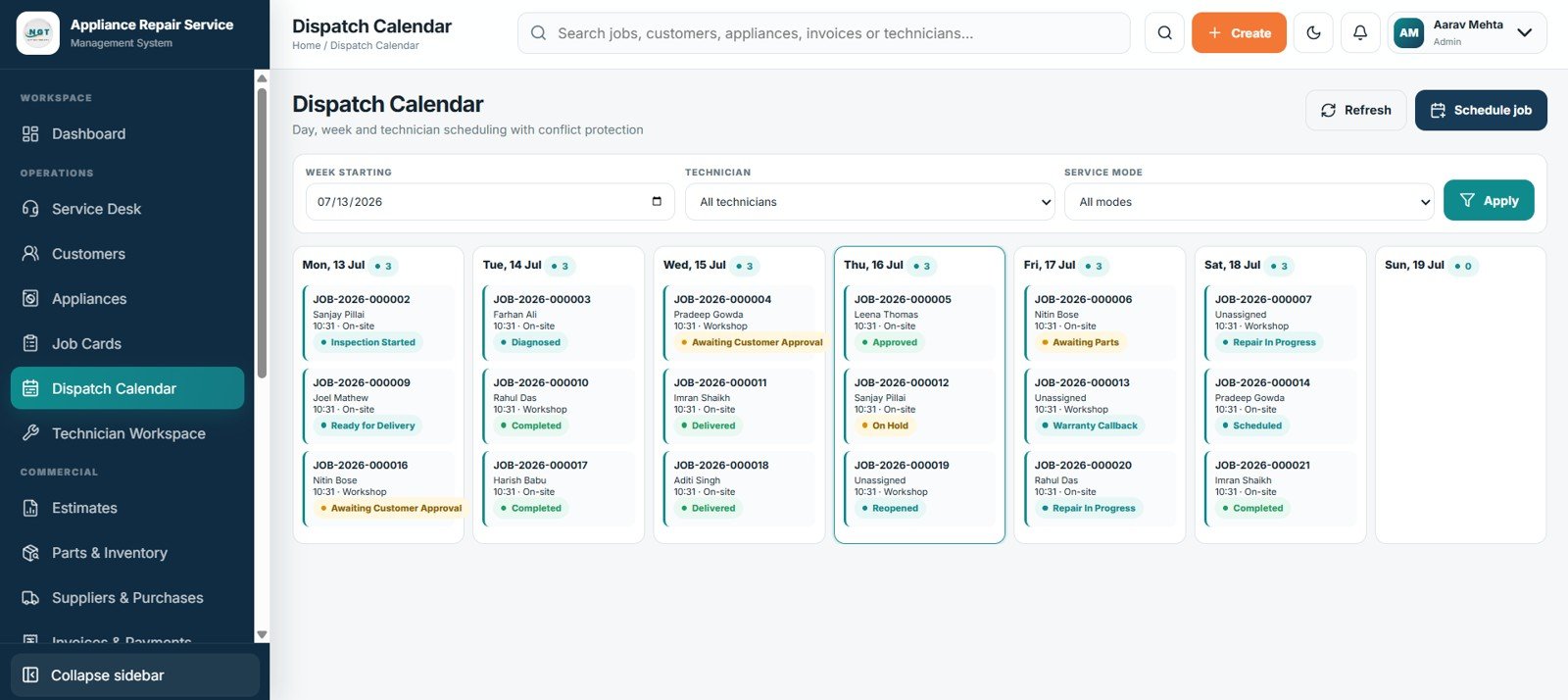
The calendar turns approved work into a practical field schedule. Users can select the week, narrow the view to a technician, and separate workshop from onsite work, then review day, week, or technician views while conflict protection reduces accidental double-booking.
Dispatch Calendar
8. Estimates
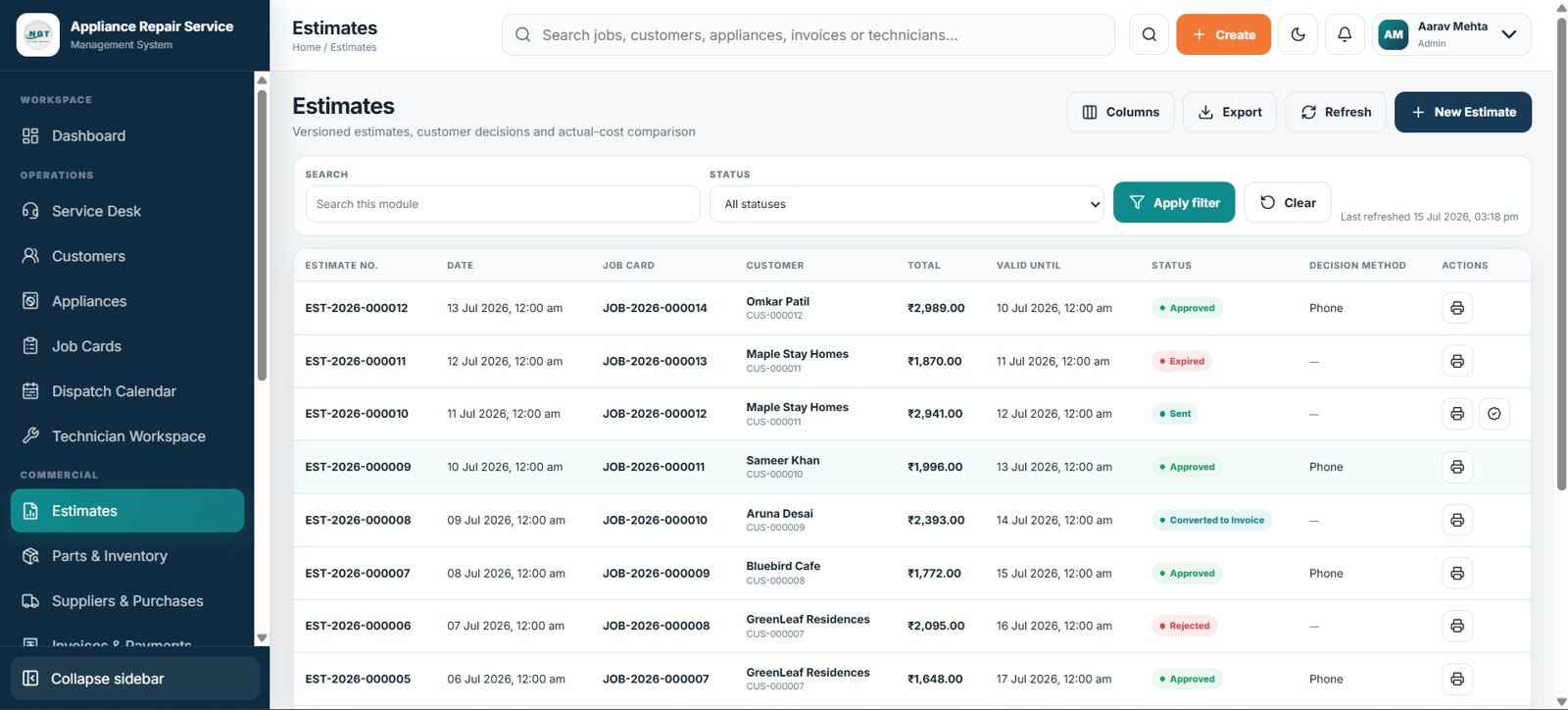
Estimates translates diagnosis into a customer decision. Estimate number, date, job card, customer, total, validity, status, and decision method create a documented approval trail, while version control supports revisions and actual-cost comparison helps review margin after the repair.
Estimates
9. Parts & Inventory
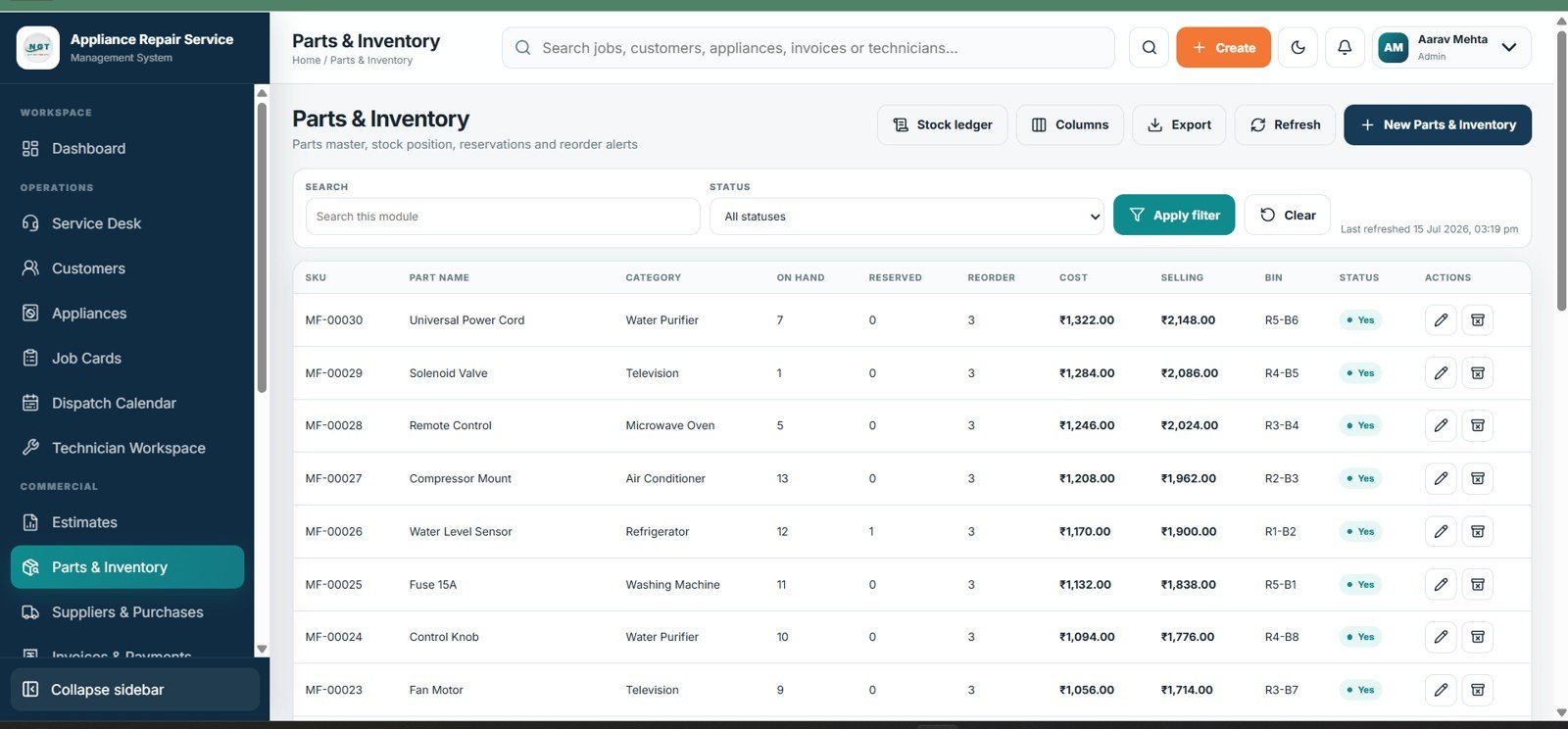
Parts & Inventory provides the stock position needed before promising a repair date. On-hand and reserved quantities distinguish physical stock from available stock, while SKU, category, reorder level, cost, selling price, bin, and status support purchasing and pricing decisions.
Parts & Inventory
10. Suppliers & Purchases
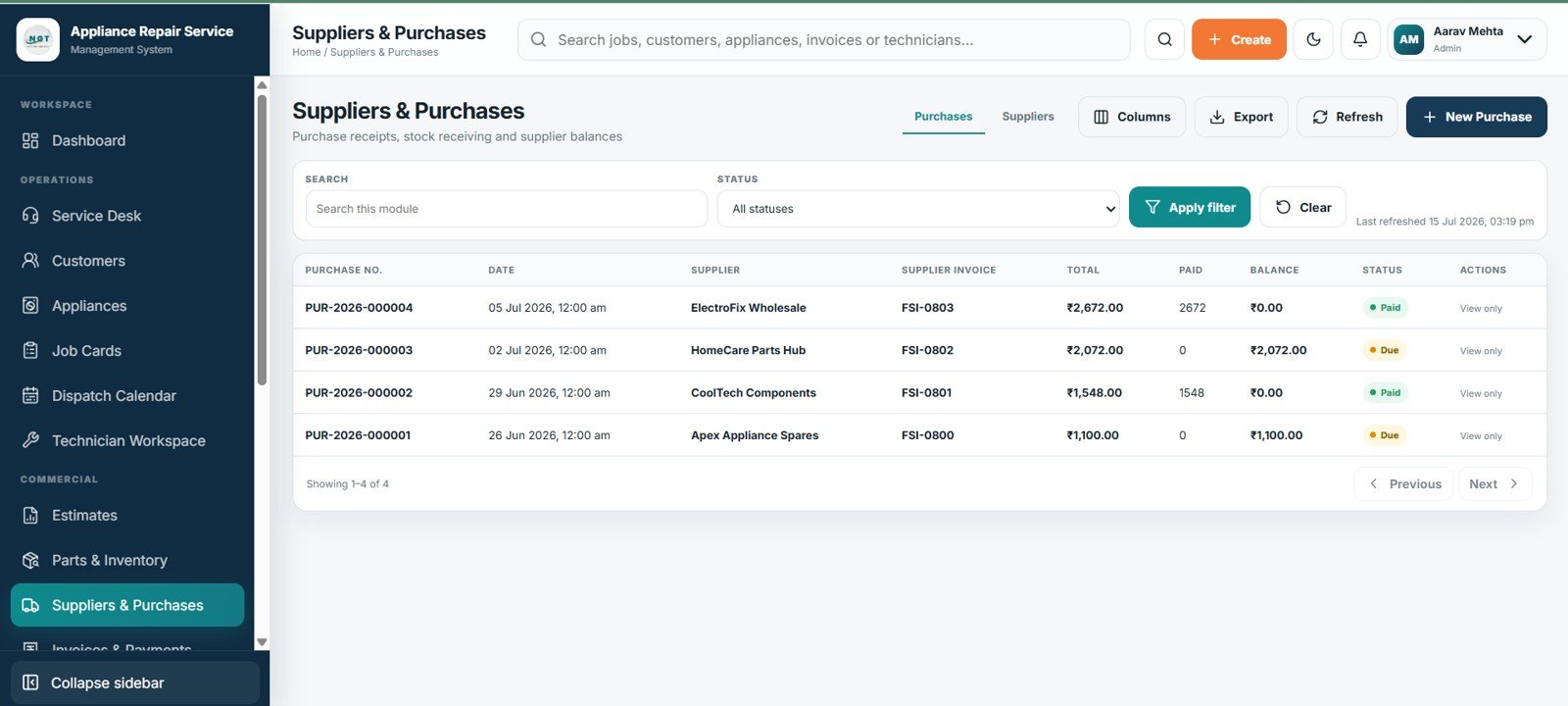
This module records supplier purchases and receiving activity. Purchase number, date, supplier, supplier invoice, total, paid amount, balance, and status provide a clear trail from receipt through settlement and help explain supplier liabilities.
Suppliers & Purchases
11. Invoices & Payments
Invoices are linked to the customer and repair job so billed work remains traceable. Total, paid amount, balance, payment method, and status let the service desk confirm whether delivery controls have been satisfied and identify accounts needing follow-up.
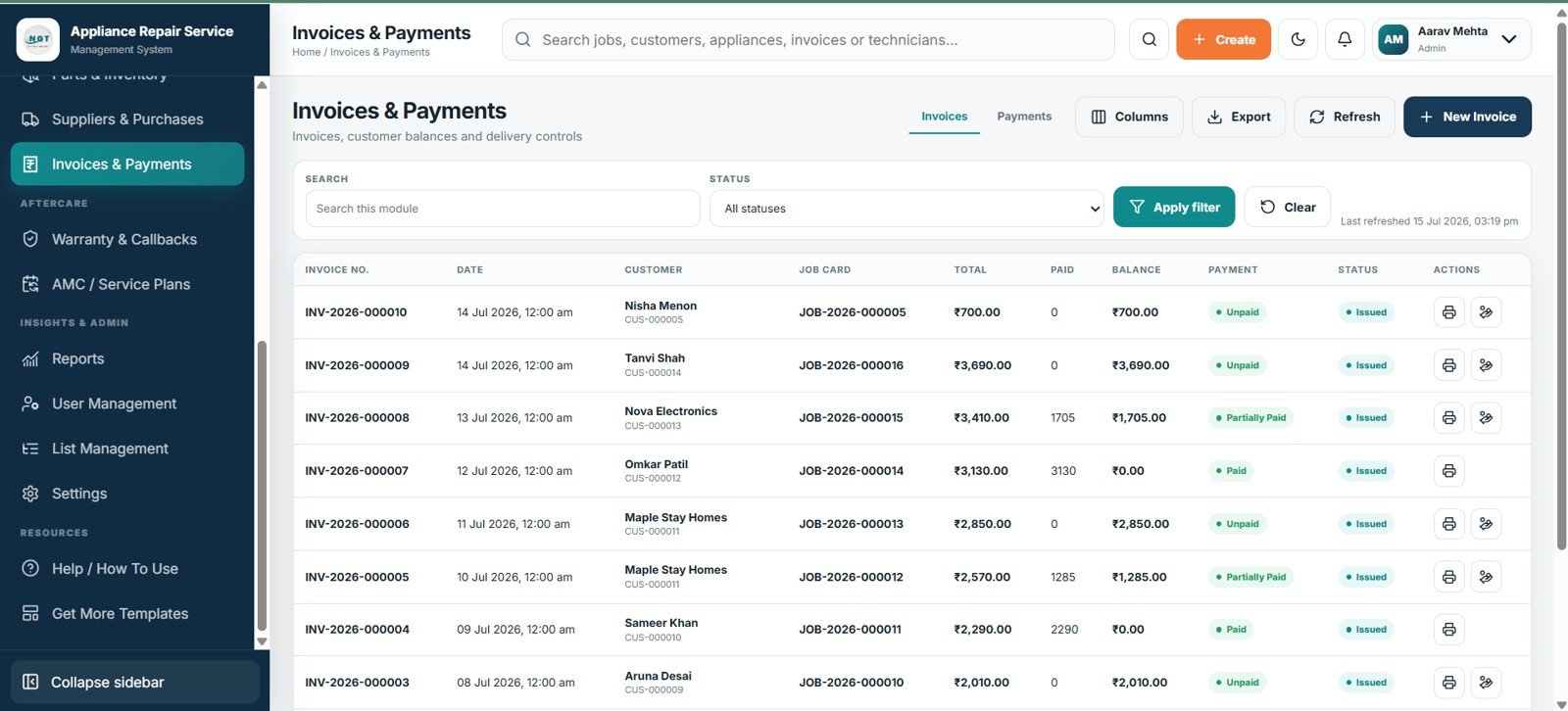
Invoices & Payments
12. Warranty & Callbacks
Warranty & Callbacks connects a repeat complaint to the original repair and identifies the callback job. Warranty end date, eligibility, chargeable status, and workflow status help staff apply consistent decisions and reveal recurring repair patterns.
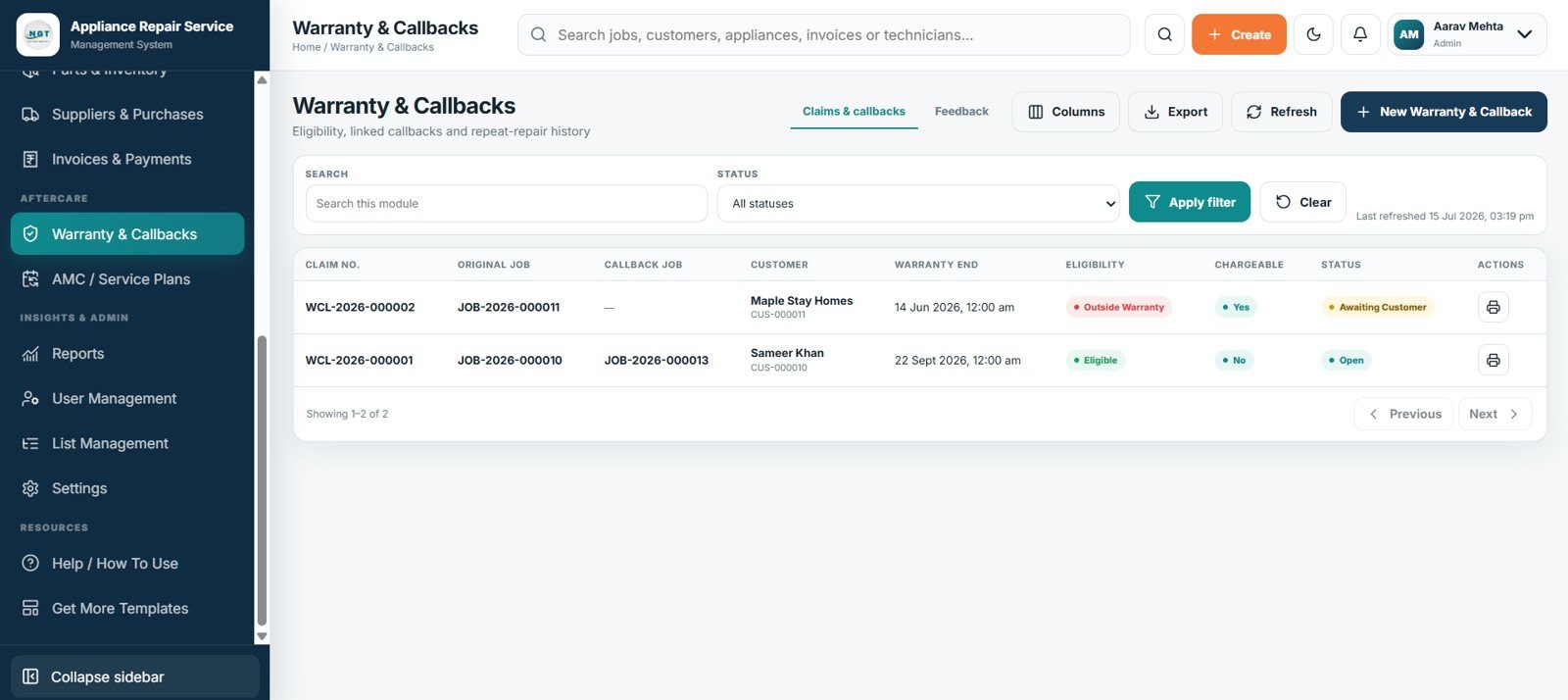
Warranty & Callbacks
13. AMC / Service Plans
Annual maintenance contracts are managed by customer, plan, start and end dates, visit allowance, used visits, next visit, balance, and status. This makes upcoming obligations and renewal opportunities visible before a covered customer is missed.
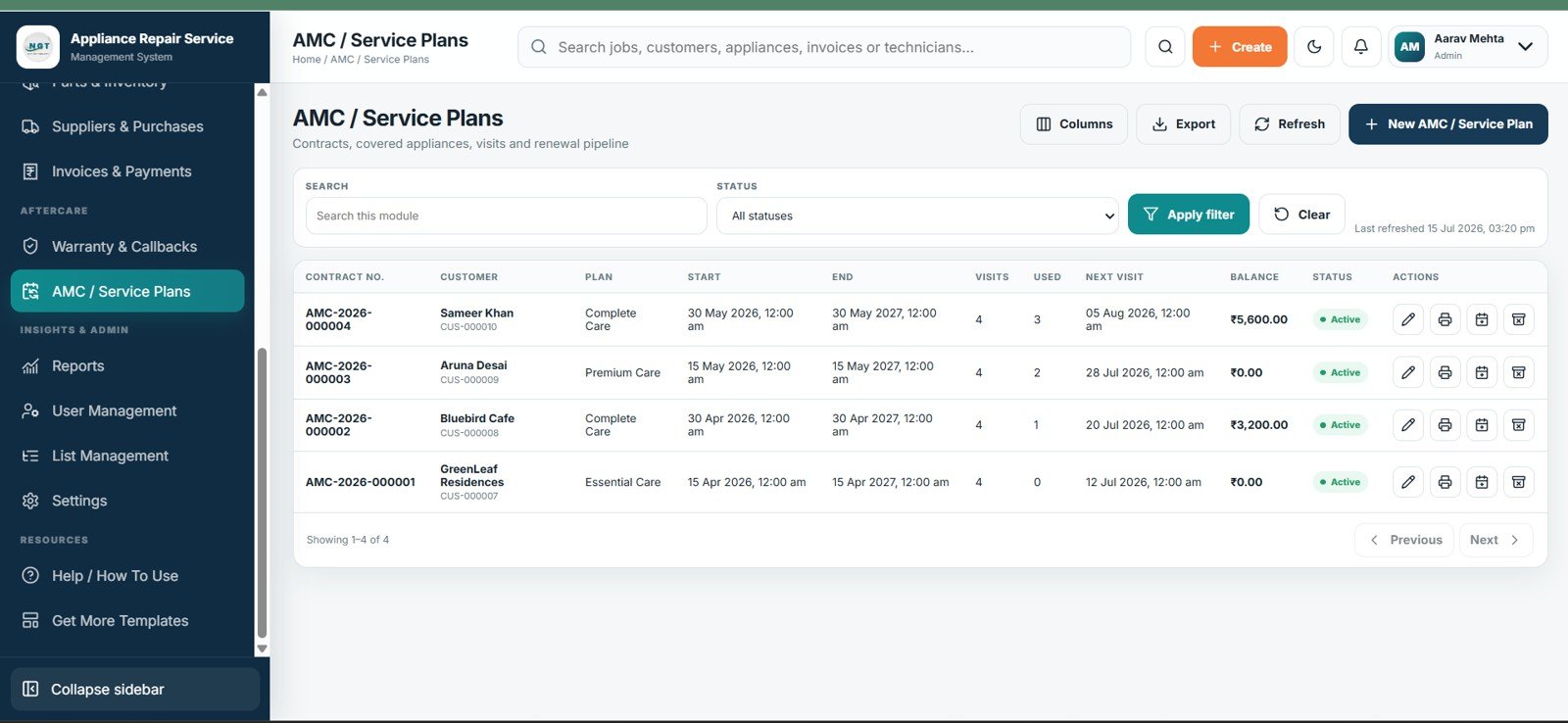
AMC / Service Plans
14. Reports
Reports brings operational, inventory, financial, AMC, and warranty analysis into one module. A report selector plus date-from, date-to, and customer filters lets managers narrow the output to a period or account before reviewing or exporting it.
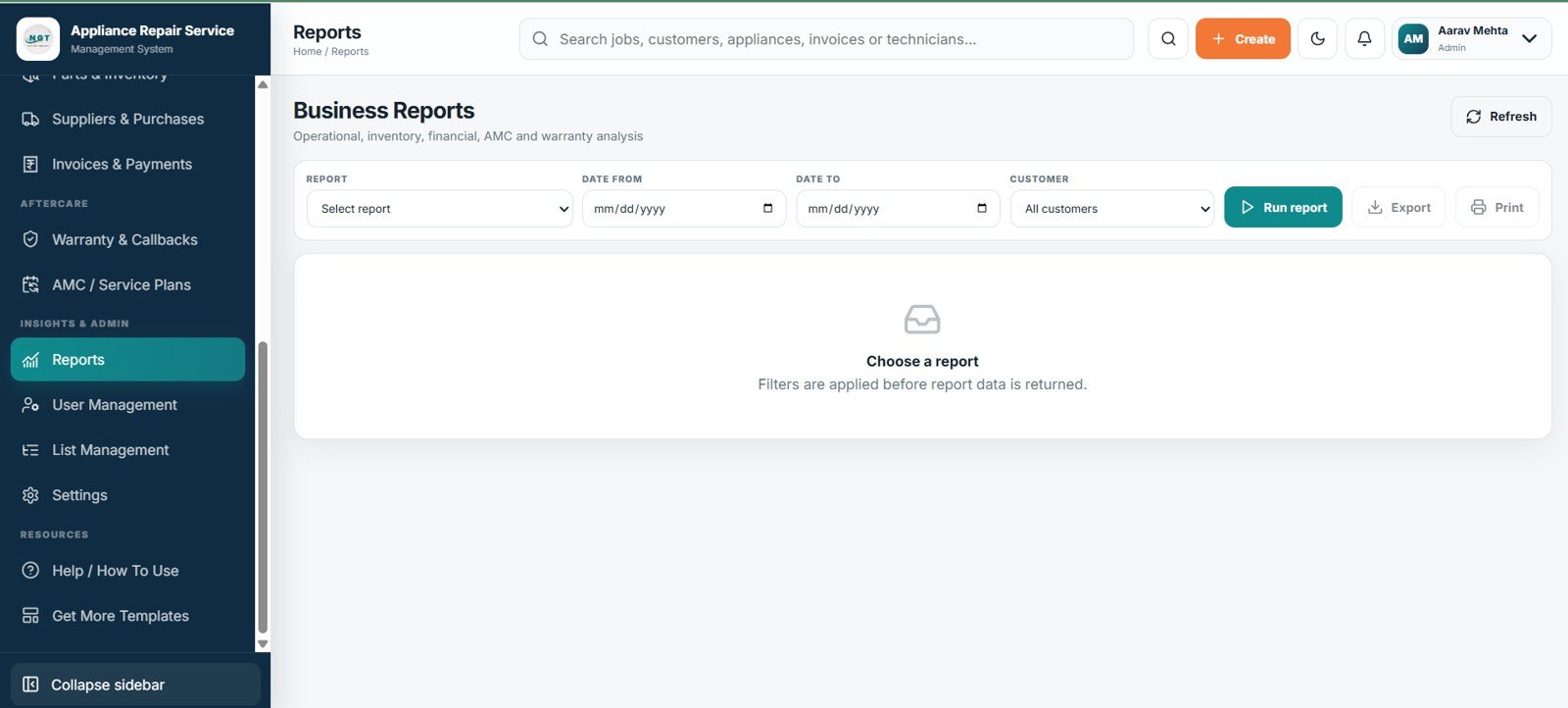
Business Reports
15. User Management
User Management controls who can enter the workspace and what they can see. Account name, username, role, branch, last login, and status support access reviews, while menu permissions and login activity help administrators separate operational responsibilities.
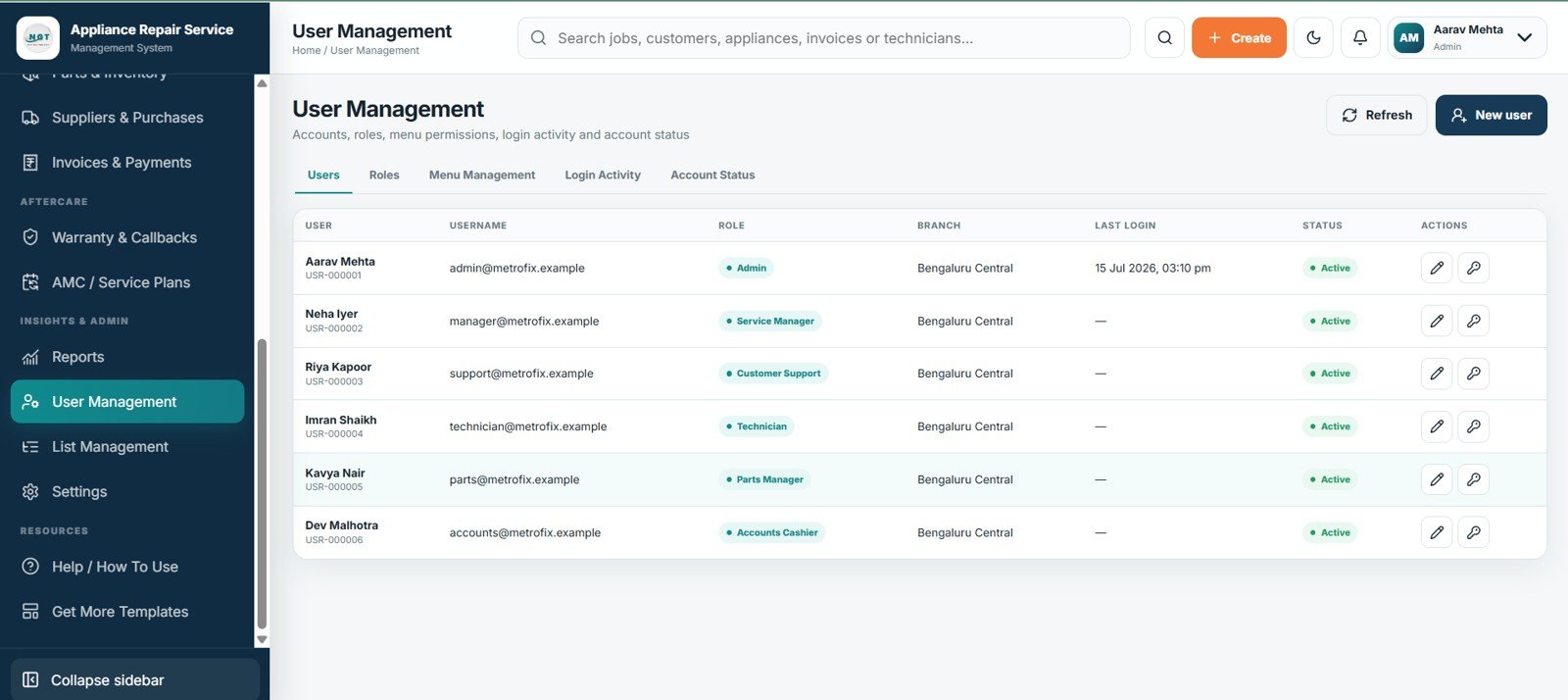
User Management
16. List Management
List Management centralizes the dropdown values used throughout the app. List type, value, parent, sort order, active flag, and protected flag allow administrators to standardize options without editing every form separately.
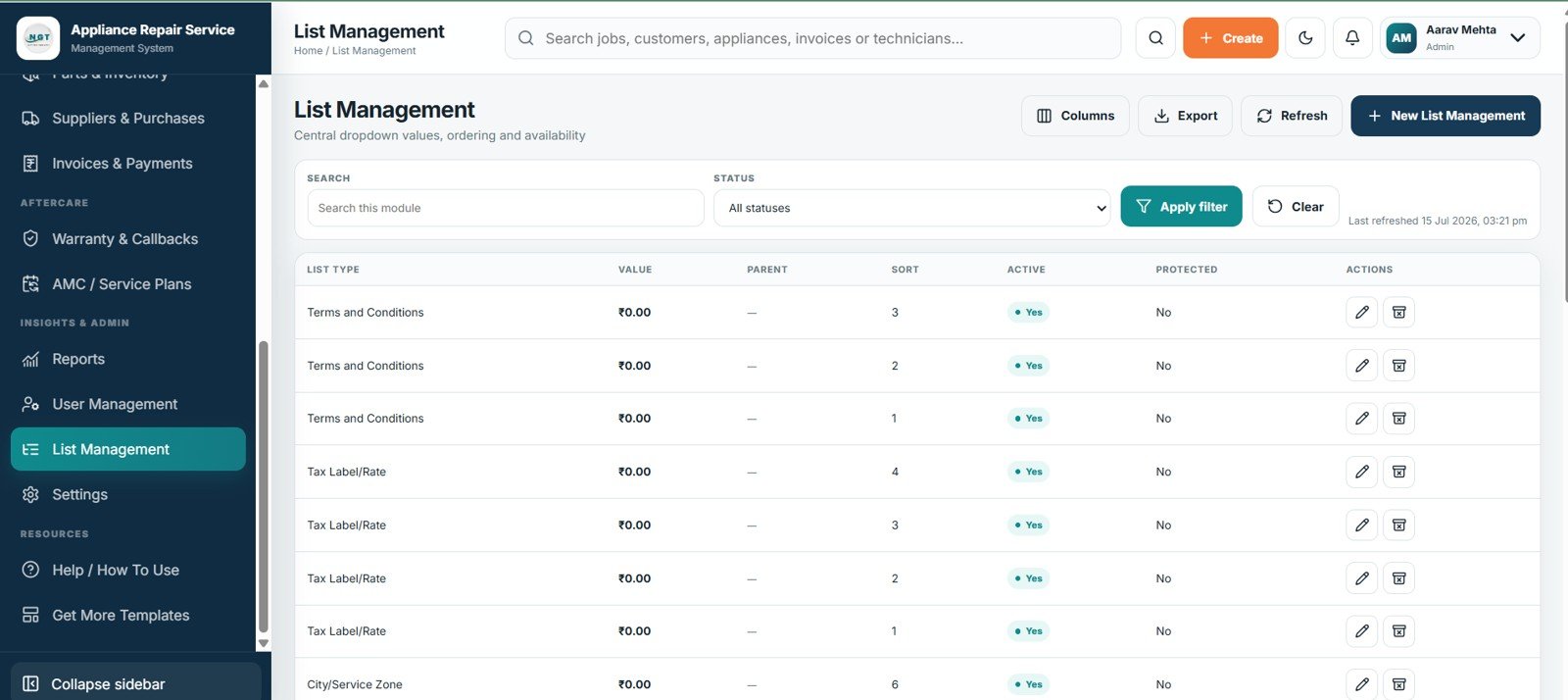
List Management
17. Settings
Settings adapts the system to the business through profile, regional, numbering, service and finance, printing, email and WhatsApp, Google Drive, archive, import/export, and security tabs. Keeping these controls together makes initial setup and later policy changes easier to review.
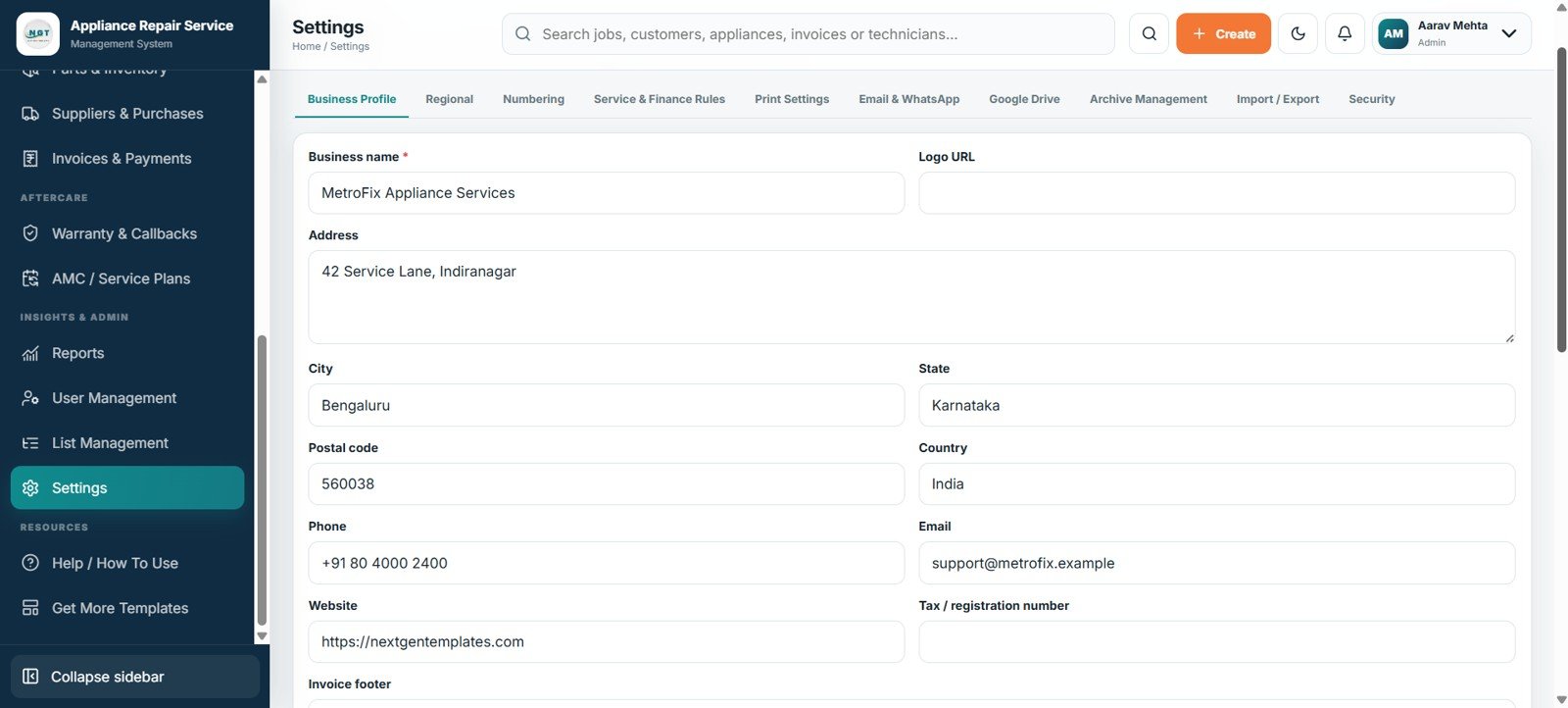
Settings
Appliance Repair Service Management System Web App vs. Google Sheets Tracker vs. Paid Repair SaaS – Feature Comparison
| Feature | This Web App | Basic Google Sheets Tracker | Paid Repair SaaS |
|---|---|---|---|
| Cost | $39.99 one-time sale price | Low software cost; internal build time | Recurring, plan-dependent fee |
| Platform | Google Sheets-backed browser app | Spreadsheet interface | Vendor-hosted platform |
| Setup | Deploy and configure | Build tables and formulas | Onboarding varies |
| Collaboration | Shared access with roles | Sheet permissions | Usually included |
| Mobile | Browser workflow | App or browser | Web or native app |
| Customization | Editable lists/settings | Flexible but manual | Plan-dependent |
| Share with link | Yes, after deployment | Yes | Yes |
| Year-1 cost, 5 users | $39.99 | Internal build effort | Vendor-dependent |
| Job cards/SLA | Built in | Custom build | Varies |
| Warranty/AMC | Built in | Linked sheets | Varies |
Who Should Use This Template
This appliance repair web app is designed for independent repair shops, home-service companies, authorized service centers, maintenance contractors, and small multi-technician teams. It is especially useful when bookings, job cards, stock, invoices, warranties, and AMC registers currently live in separate files. It is not positioned as an enterprise field-service platform for large franchises, and the supplied screens do not show an integrated card-payment gateway or customer-facing mobile application.
Real-World Use Cases
Ravi, repair-shop owner: reviews new requests, overdue job cards, ready-for-delivery appliances, outstanding balances, and low-stock parts before assigning the day’s work.
Meera, service coordinator: registers a refrigerator complaint, checks the customer’s appliance history, schedules a technician, records estimate approval, and contacts the customer once the job is ready.
Daniel, AMC manager: filters contracts by next visit, checks covered appliances and used visits, follows balances, and contacts customers approaching renewal.
Advantages of the Appliance Repair Service Management System Web App
- One request can remain connected to the customer, appliance, job card, estimate, invoice, warranty, and callback records.
- Managers receive a concise operational view without assembling daily totals from multiple registers.
- Technician scheduling, SLA status, estimate approval, and parts availability become visible before a missed commitment turns into a complaint.
- Editable lists and settings help the system match local service types, numbering rules, communication preferences, and security policies.
- A one-time template price may suit smaller teams that do not want another recurring software subscription.
Opportunities for Improvement
The template still depends on disciplined data entry, clear ownership, and regular backups. A business may also want to extend it with customer self-service booking, technician GPS tracking, barcode scanning, automated payment links, tax integrations, or API connections to accounting software. Those capabilities are not visible in the supplied screens and should be evaluated separately before purchase.
Best Practices
- Define request, job, estimate, invoice, warranty, and AMC statuses before importing live records.
- Use one customer and one appliance master record instead of recreating them for every job.
- Review technician capacity, SLA dates, approval queues, and reserved parts during a short daily operations meeting.
- Limit menu access by role and review inactive accounts and last-login dates regularly.
- Test the deployment with sample records before moving production data, then keep a dated backup and documented owner.
- Follow Google’s official Apps Script web app deployment guidance when configuring access and sharing the app URL.
Explore Relevant Templates
You may also find the Service Center and Repair Shop Management System Web App, Car Wash Management System Web App, Universal Appointment Booking System Web App Template, and Appliance Service Data Entry System in Excel useful for adjacent workflows.
Interested in the spreadsheet skills behind systems like this? The NextGenTemplates Academy learning paths teach them with practice files.
Get the Appliance Repair Service Management System Web App
Frequently Asked Questions
What is included in the Appliance Repair Service Management System Web App?
It includes 17 screens spanning access, KPIs, requests, customers, appliances, jobs, dispatch, estimates, stock, billing, warranties, AMC plans, reports, users, lists, and settings.
Is the web app designed for Google Sheets?
Yes. The Web Apps category identifies these products as multi-user systems built on Google Sheets.
Can it manage onsite and workshop repair jobs?
Yes. Service mode distinguishes field visits from workshop repairs across requests, jobs, and dispatch.
Can the system track spare parts and supplier purchases?
Yes. Inventory tracks stock, reservations, reorder levels, costs, prices, and bins; Purchases tracks invoices, payments, balances, and receiving.
How does it handle warranty callbacks?
A claim links the original and callback jobs with warranty end date, eligibility, chargeable flag, and status.
Does it replace enterprise field-service software?
Not necessarily. It suits small and midsize teams; enterprises may need deeper integrations, multi-country controls, native apps, and support agreements.
About the Author
Built by PK – Microsoft Certified Professional with 15+ years of Excel, Google Sheets, and Power BI experience. Founder of NextGenTemplates, reaching 300K+ subscribers across YouTube channels. Every template is hand-built and tested before release.
Conclusion
The Appliance Repair Service Management System Web App gives a service business a structured path from customer request to job completion, while connecting technician scheduling, estimates, parts, billing, warranty callbacks, and AMC obligations. If those records are currently split across notebooks and spreadsheets, the template provides a practical starting point for one shared operating workflow.