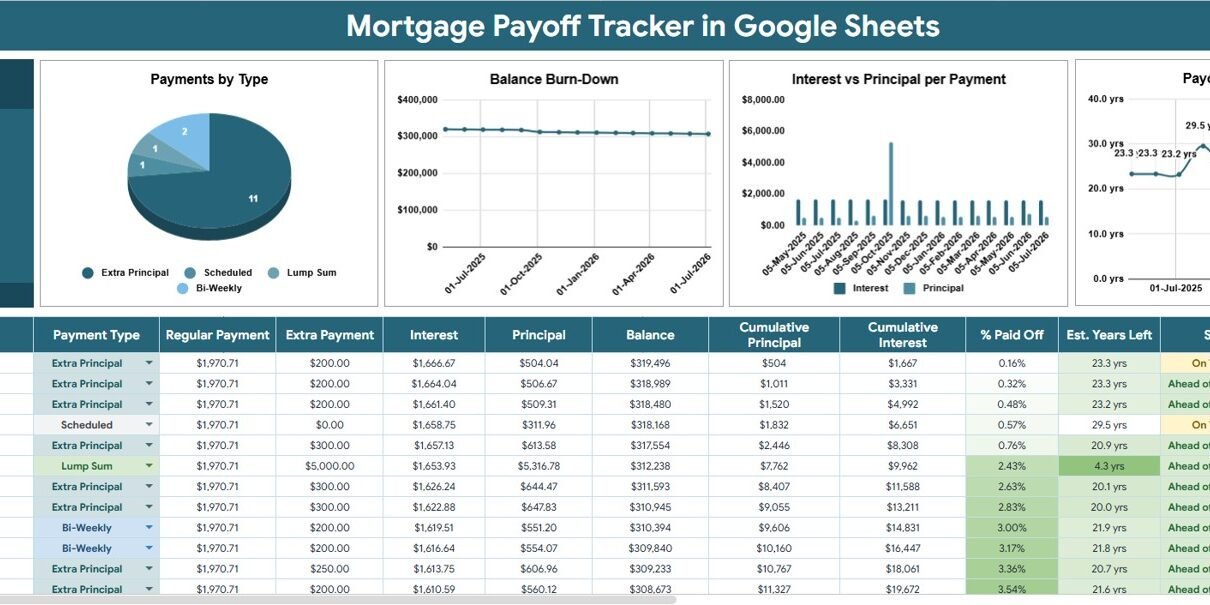
A standard 30-year mortgage contains 360 scheduled monthly payments. That is a long record to interpret from occasional lender statements, especially when you make extra payments or want to understand how much went to principal versus interest. The Mortgage Payoff Tracker in Google Sheets organizes the process into two practical tabs, one headline balance card, and four charts. It gives homeowners an editable planning view without a recurring software subscription. This guide explains each part, where the template fits, and how to use it responsibly alongside your official lender records.
Important: this spreadsheet supports personal planning and record-keeping. It is not a lender statement, tax calculation, refinancing recommendation, or substitute for professional financial advice.
Get the Mortgage Payoff Tracker in Google Sheets
Mortgage Payoff Tracker in Google Sheets
Key Features of Mortgage Payoff Tracker in Google Sheets
The template focuses on the questions most homeowners ask after a payment: What is the balance now? How much of the payment reduced principal? How much was interest? Are extra payments changing the expected payoff period?
- Balance summary: The top card displays the current outstanding balance produced from the loan settings and payment records.
- Payment-type analysis: Compare regular, extra, and other payment categories that you define in the settings.
- Balance timeline: Follow the remaining balance by payment date instead of reading isolated figures.
- Principal-interest split: Inspect how the composition of payments changes across the schedule.
- Estimated time remaining: See a planning trend for estimated years left as additional payments are recorded.
- Editable settings and lists: Maintain the original amount, APR, term, scheduled P and I payment, Payment Type list, and Status list.
- Google Sheets collaboration: Share the copy with a spouse, co-owner, or adviser using the permissions you choose in Google Drive.
Dashboard Pages Explanation
1. Overview Page
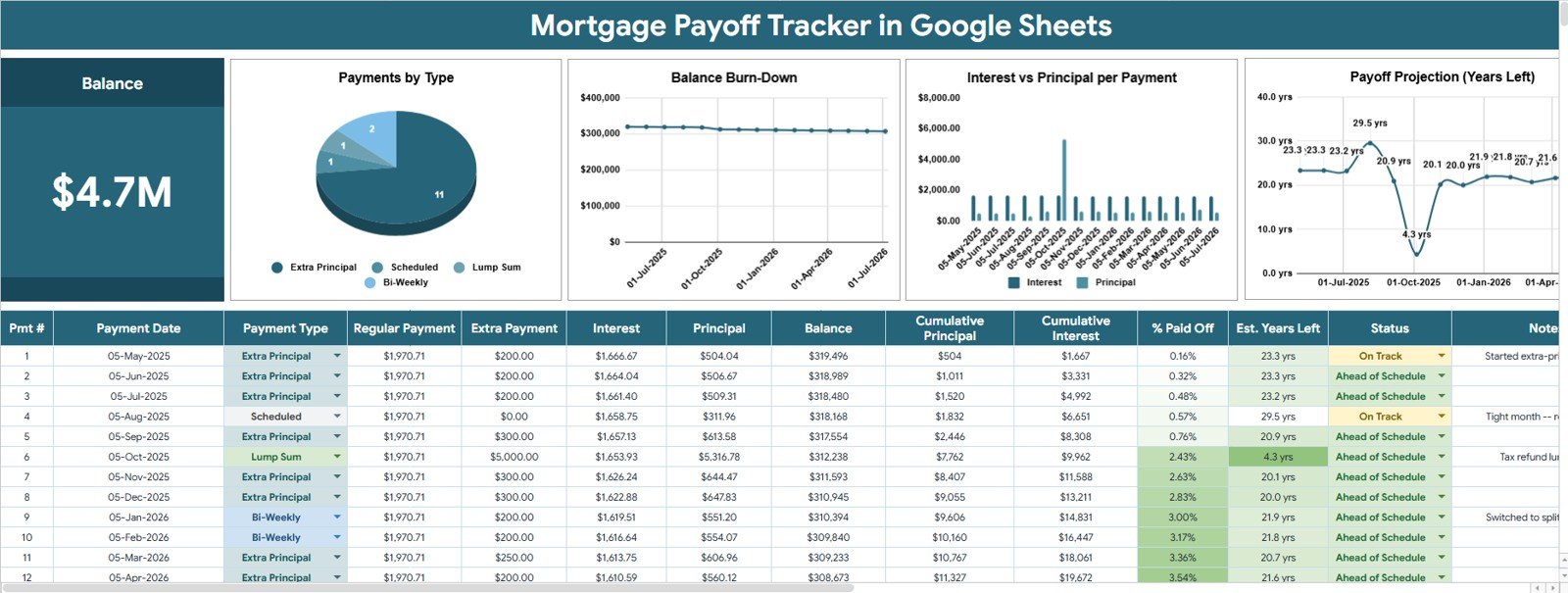
The Overview page is the main monitoring area. At the top, the Balance card provides the high-level number: the latest remaining mortgage balance. The analysis below turns individual payment entries into trends, making it easier to review direction and composition without scanning every row.
Payments by Type
This chart groups payments using the Payment Type list maintained in Settings and Lists. It helps you distinguish scheduled payments from extra principal or another custom category, so you can see the mix of activity over the period being reviewed.
Use the chart as a classification check as well as an analysis. If a payment appears in the wrong segment, review its selected type in the input data and correct the dropdown value.
Balance by Payment Date
This visual plots the outstanding balance across payment dates. The overall direction should make the pace of reduction visible, while plateaus or unexpected movements provide a prompt to check missing, duplicated, or incorrectly dated entries.
The line is a planning aid, not an official payoff quote. Interest posting rules, fees, escrow, and lender-specific adjustments may cause the lender’s figure to differ.
Interest and Principal by Payment
This chart compares the interest and principal components for each payment. Earlier amortizing-loan payments often allocate a larger share to interest, while later payments generally allocate more to principal when the rate and scheduled payment stay constant.
Google Sheets includes financial functions such as PMT and PPMT. Google advises using consistent time units for the rate and number of periods, which is why monthly calculations normally align an annual rate and term to monthly periods.
Estimated Years Left by Payment Date
This chart shows how the estimated remaining payoff period changes as payment records accumulate. It is especially useful when comparing the regular schedule with months that include additional principal.
Treat the result as an estimate. Before acting on it, request an official payoff statement from the lender and confirm whether prepayment rules, fees, or daily interest apply.
2. Settings and Lists Tab
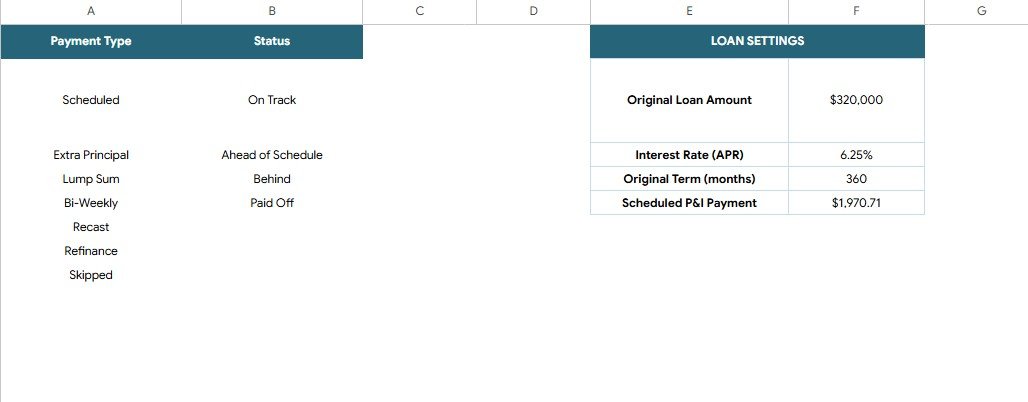
The Settings and Lists tab centralizes the inputs that drive the tracker. Enter the Original Loan Amount, Interest Rate (APR), Original Term (months), and Scheduled P and I Payment. The same tab stores the Payment Type and Status lists used in dropdown fields.
Keeping these inputs in one location makes the file easier to audit. When a chart looks wrong, first confirm the four loan settings and then check whether payment records use valid type and status values.
Settings and Lists tab
Mortgage Payoff Tracker in Google Sheets vs. Excel vs. Paid Finance SaaS – Feature Comparison
| Feature | Google Sheets tracker | Excel alternative | Paid finance SaaS |
|---|---|---|---|
| Cost model | $6.99 one-time sale price | Workbook plus any Excel licensing | Recurring subscription |
| Platform | Browser and Google Sheets app | Microsoft Excel desktop or web | Vendor app or website |
| Setup time | Four core loan inputs plus payment records | Depends on workbook design | Account creation and possible connections |
| Real-time collaboration | Native Google Drive sharing | Depends on cloud setup | Often plan-dependent |
| Mobile access | Sheets app or browser | Excel app | Vendor app |
| Customizable fields | Editable cells and lists | Usually editable | May be restricted |
| Share with link | Yes, with selected permissions | Cloud storage required | Plan-dependent |
| Year-1 cost at 5 users | $6.99 total for the template | Depends on Microsoft licensing | Recurring fee; confirm vendor pricing |
| Mortgage-specific charts | Four included | Build or purchase separately | Varies by service |
| Automatic bank feed | No | No unless separately connected | May be available |
The Google Sheets option fits users who value editability, simple sharing, and a one-time purchase. A paid service may fit better if automatic account connections, institution-grade security controls, or multi-account aggregation are essential.
Who Should Use This Template
- Homeowners who want one editable record of mortgage payments and balance movement.
- Couples or co-owners who review payoff progress together.
- People testing the visible effect of occasional extra payments.
- Financial coaches who need a simple, client-friendly discussion aid.
- Google Sheets users who prefer formulas and charts they can inspect.
It is not designed for mortgage servicers, property portfolios with many loans, automatic bank synchronization, adjustable-rate schedules that change repeatedly, escrow reconciliation, or legal and tax reporting.
Real-World Use Cases
Maya: first-time homeowner
Maya records each scheduled payment and checks Balance by Payment Date once a month. When she sends additional principal, she assigns a separate payment type so the Payments by Type chart keeps the difference visible.
Rohan and Priya: shared household planning
They review the Interest and Principal by Payment chart before allocating a year-end bonus. The sheet gives them a common planning view, while their lender portal remains the source for the official balance and payoff quote.
Elena: independent financial coach
Elena makes a separate copy for a client session, confirms the loan assumptions, and uses Estimated Years Left as a conversation starter. She clearly labels the output as an estimate and asks the client to obtain lender confirmation before changing payment strategy.
Advantages of Mortgage Payoff Tracker in Google Sheets
The main advantage is transparency. You can see the settings, edit list values, inspect payment records, and observe how the visuals respond. Google Drive sharing also makes it practical for households that plan together but work from different devices.
The template keeps the scope focused. Instead of combining budgets, investments, credit scores, and insurance in one large application, it concentrates on mortgage payoff tracking. That narrower purpose can make monthly updates faster and errors easier to spot.
Opportunities for Improvement
Users with more advanced needs may choose to extend the workbook. Possible additions include an extra-payment scenario selector, an adjustable-rate table, escrow and fee columns, a lender-statement reconciliation flag, and separate views for multiple properties.
Automation is another opportunity. Experienced users could connect an approved data source or add notifications, but any connection should be assessed for privacy and security. The standard template intentionally relies on manual entry, which keeps the setup accessible and avoids requiring bank credentials.
Best Practices
- Confirm the four settings first. A wrong APR, term, amount, or scheduled payment can affect every downstream calculation.
- Use consistent dates and units. Match monthly rates with monthly periods and avoid mixing annual and monthly assumptions.
- Define payment types clearly. Use distinct labels for scheduled payments and extra principal.
- Reconcile monthly. Compare the sheet with the lender statement and investigate differences immediately.
- Protect sensitive data. Share only with people who need access and review Google Drive permissions regularly.
- Keep a clean original. Preserve an untouched copy before changing formulas, charts, or ranges.
- Request an official payoff quote. Do this before refinancing, selling, or making a final payment.
Explore Relevant Templates
- Loan EMI Repayment Tracker in Google Sheets for broader installment-loan tracking.
- Bill Payment Tracker in Google Sheets for recurring household obligations.
- Net Worth Tracker in Google Sheets for assets and liabilities.
- Emergency Fund Tracker in Google Sheets for liquidity planning.
- Mortgage Checklist in Google Sheets for organizing the mortgage process.
For a deeper grounding in the spreadsheet skills behind trackers like this, the NextGenTemplates Academy learning paths include practice files.
Get the Mortgage Payoff Tracker in Google Sheets
Frequently Asked Questions
What does the Balance card show?
It provides the high-level remaining balance generated from the settings and payment data in your tracker. Reconcile it with the lender’s balance regularly.
Can I track extra principal payments?
Yes. Maintain an extra-payment category in the Payment Type list and use it consistently when recording those transactions.
Can I customize payment status values?
Yes. The Status list is editable on the Settings and Lists tab, so you can use labels that match your workflow.
Does the tracker connect to my mortgage lender?
No. The template is manually maintained and does not request bank or lender credentials.
Can I share it with another person?
Yes. Use Google Drive permissions to share view or edit access with a spouse, co-owner, or adviser.
Does it replace an official amortization schedule?
No. It is a planning and tracking tool. Your note, lender statements, and official payoff quote remain authoritative.
Is the template suitable for adjustable-rate mortgages?
The standard settings use one APR. A changing rate may require customization and careful comparison with the lender’s schedule.
About the Author
Built by PK – Microsoft Certified Professional with 15+ years of Excel, Google Sheets, and Power BI experience. Founder of NextGenTemplates, reaching 300K+ subscribers across YouTube channels. Every template is hand-built and tested before release.
Conclusion
The Mortgage Payoff Tracker in Google Sheets turns a long mortgage history into a manageable routine: enter the loan settings, record payments, review the balance, and inspect four focused charts. It is best for homeowners who want a transparent spreadsheet and are comfortable verifying results against lender records.