Small pharmacies lose time when billing, batch stock, expiry dates, supplier payables, customer dues and reports live in separate files. The Pharmacy Inventory and Billing Management System Web App solves that problem with 24 connected screens, 10 dashboard KPI cards, 2 dashboard charts and modules for daily pharmacy work. It is built as a Google Sheets and Apps Script web app, so teams can work in a browser while keeping data inside their own Google account. Google describes Apps Script as a cloud-based JavaScript platform for extending Google Workspace.Pharmacy Inventory and Billing Management System Web App
Get the Pharmacy Inventory and Billing Management System Web App
Key Features of Pharmacy Inventory and Billing Management System Web App
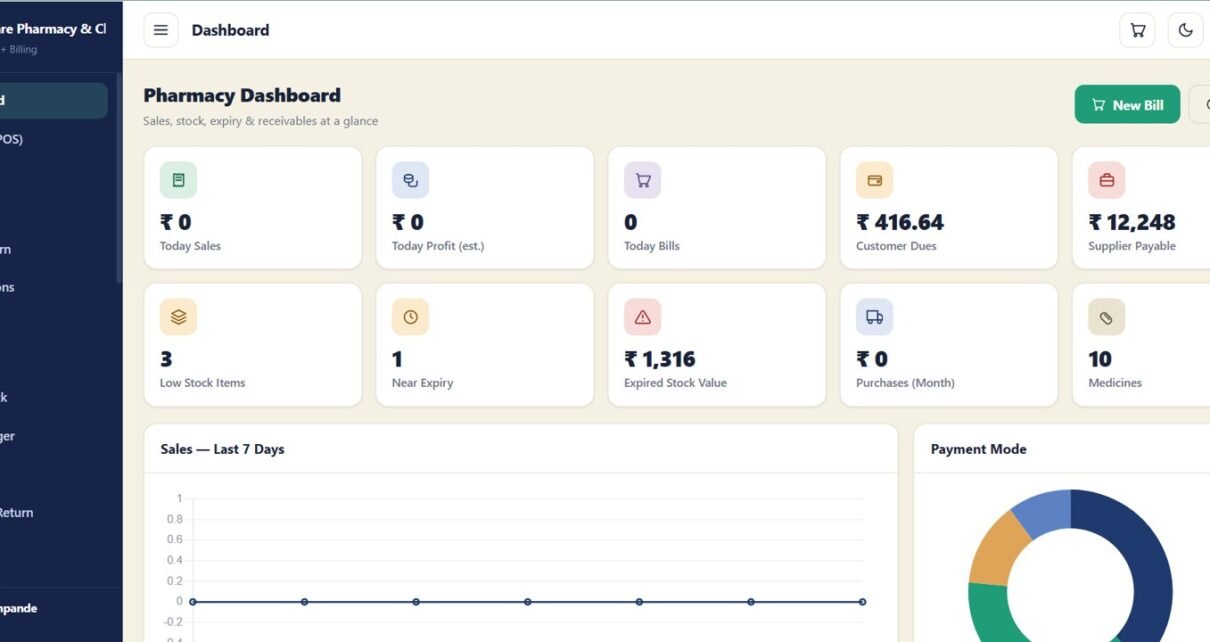
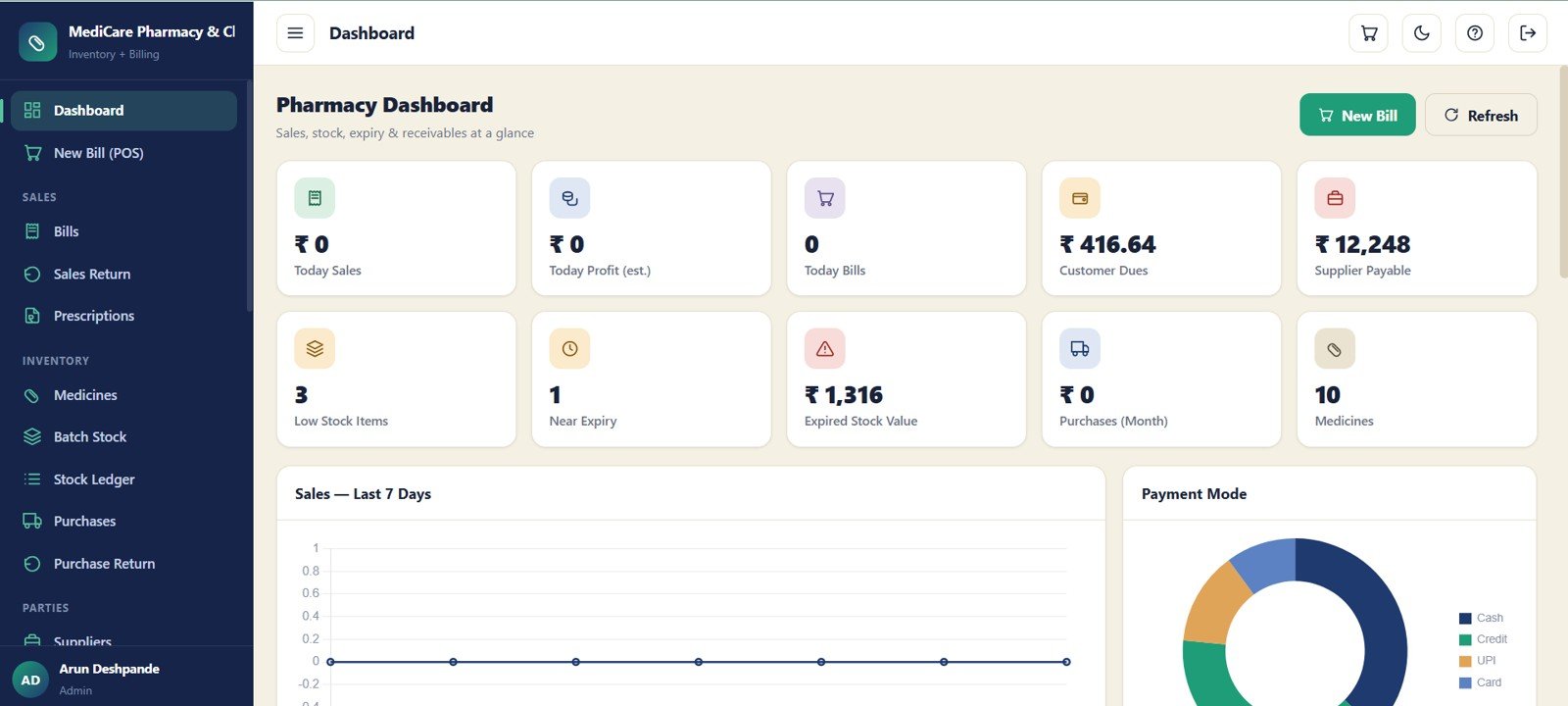
The system brings pharmacy billing, inventory, purchases and reporting into one workspace. The dashboard summarizes Today Sales, Today Profit, Today Bills, Customer Dues, Supplier Payable, Low Stock Items, Near Expiry, Expired Stock Value, Purchases for the month and Medicines. Staff can manage bills, returns, prescriptions, medicine master records, batch stock, ledger movements, payments, reports, users and audit history from structured screens instead of scattered spreadsheets.Pharmacy Inventory and Billing Management System Web App
Dashboard Pages Explanation
1 – Login Page
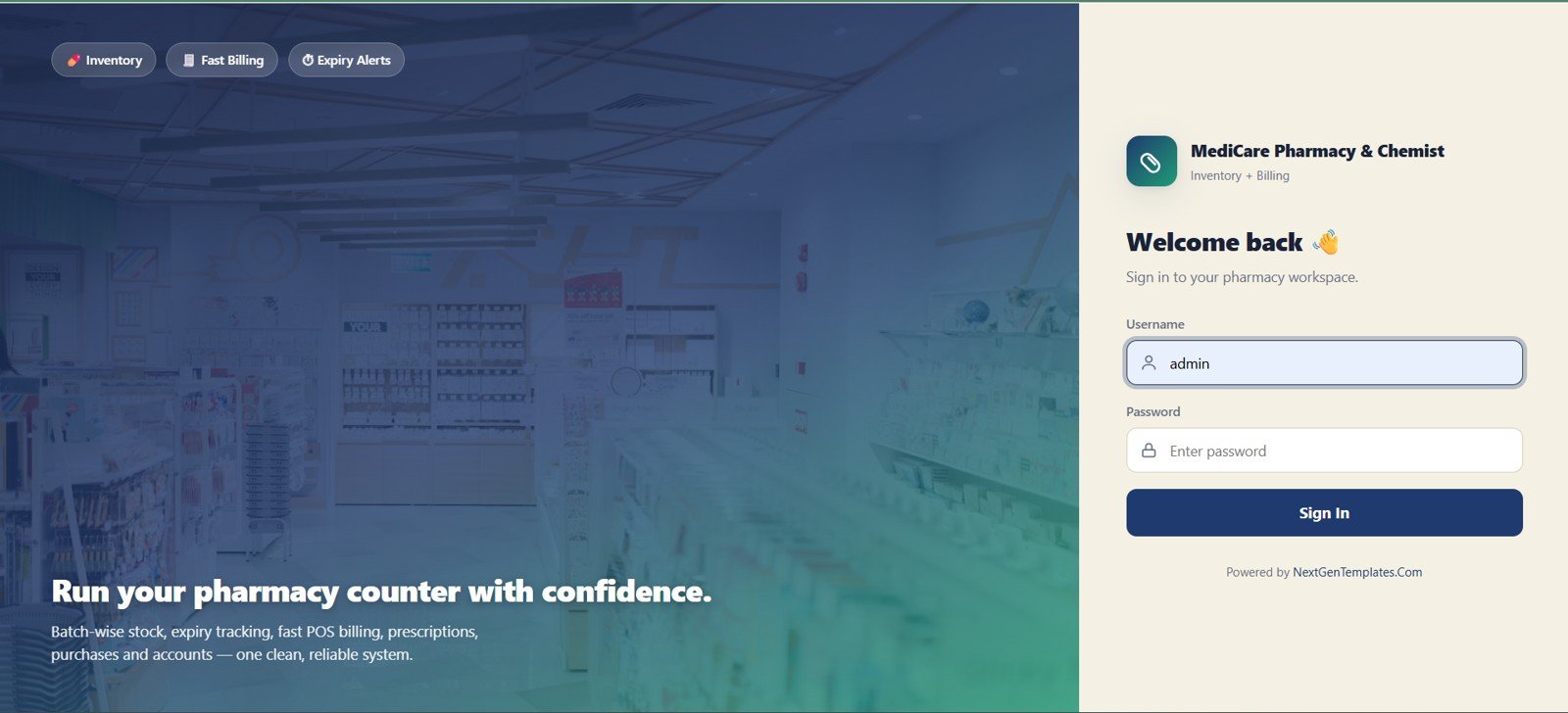
The login page protects the workspace with username and password fields. It also sets the tone with MediCare Pharmacy and Chemist branding, an inventory and billing label, and quick highlights for inventory, fast billing and expiry alerts.
🚀 Try the Live Demo Before You Buy
We have deployed the Pharmacy Inventory & Billing Management System in our own Google account so you can test every module, every role and every workflow — POS billing, batch & expiry tracking, purchases, returns, payments and reports — with real sample data, before purchasing. No signup, no email required.
🚀 Try the Live Demo Before You Buy
We have deployed the Pharmacy Inventory & Billing Management System in our own Google account so you can test every module, every role and every workflow — POS billing, batch & expiry tracking, purchases, returns, payments and reports — with real sample data, before purchasing. No signup, no email required.
🔑 Test Login Credentials (6 Roles)
Sign in as admin to unlock everything — all modules, settings, user management, archive database, import/export and the audit log — or log in with any role below to see exactly what that user sees. 💡 Tip: open the demo as pharmacist to run a counter sale end-to-end, then log in as inventory to watch the batch stock update.
💡 What you get after purchase: The full source code (Code.gs + Index.html) plus a step-by-step deployment guide so you can deploy your own private instance in your own Google account in under 15 minutes.
🔑 Test Login Credentials (6 Roles)
Sign in as admin to unlock everything — all modules, settings, user management, archive database, import/export and the audit log — or log in with any role below to see exactly what that user sees. 💡 Tip: open the demo as pharmacist to run a counter sale end-to-end, then log in as inventory to watch the batch stock update.
| Role | Username | Password | Access |
|---|---|---|---|
| 👨💼 Admin | admin | admin123 | Full access — all modules, settings, users, archive database, import/export, audit log. |
| 📊 Manager | manager | manager123 | Billing, purchases, stock, returns, reports, approvals, import/export. No system administration. |
| 💊 Pharmacist / Cashier | pharmacist | pharma123 | POS billing, prescription upload, customer sale, print receipt, sales returns, customers & doctors. |
| 📦 Inventory User | inventory | invent123 | Medicine master, batch stock, purchase inward, expiry, stock adjustment, suppliers. |
| 💰 Accounts User | accounts | account123 | Supplier payments, customer receipts & dues, expenses and financial reports. |
| 👁️ Viewer | viewer | viewer123 | Read-only dashboard, bills and reports. |
💡 What you get after purchase: The full source code (Code.gs + Index.html) plus a step-by-step deployment guide so you can deploy your own private instance in your own Google account in under 15 minutes.
2 – Pharmacy Dashboard
The dashboard gives the owner a quick operating pulse with sales, profit, bills, dues, payables, stock warnings, expiry value, purchase totals and medicine count. Sales by Day and Payments by Payment Mode charts help review revenue pattern and collection mix.
3 – Bills
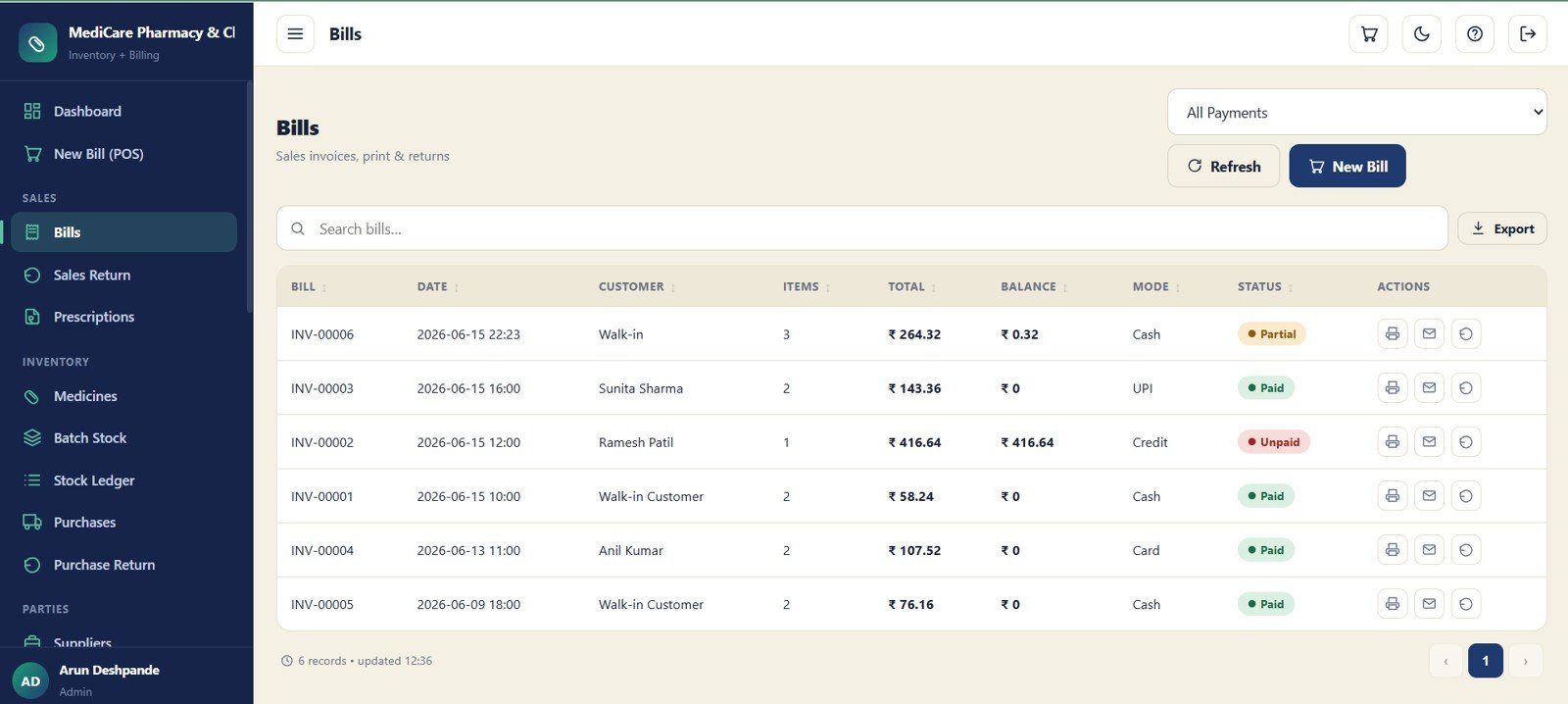
The Bills screen manages sales invoices with bill number, date, customer, item count, total, balance, payment mode, status and actions. It is the control point for checking completed bills, printing invoices and handling bill-related work.
4 – Sales Return
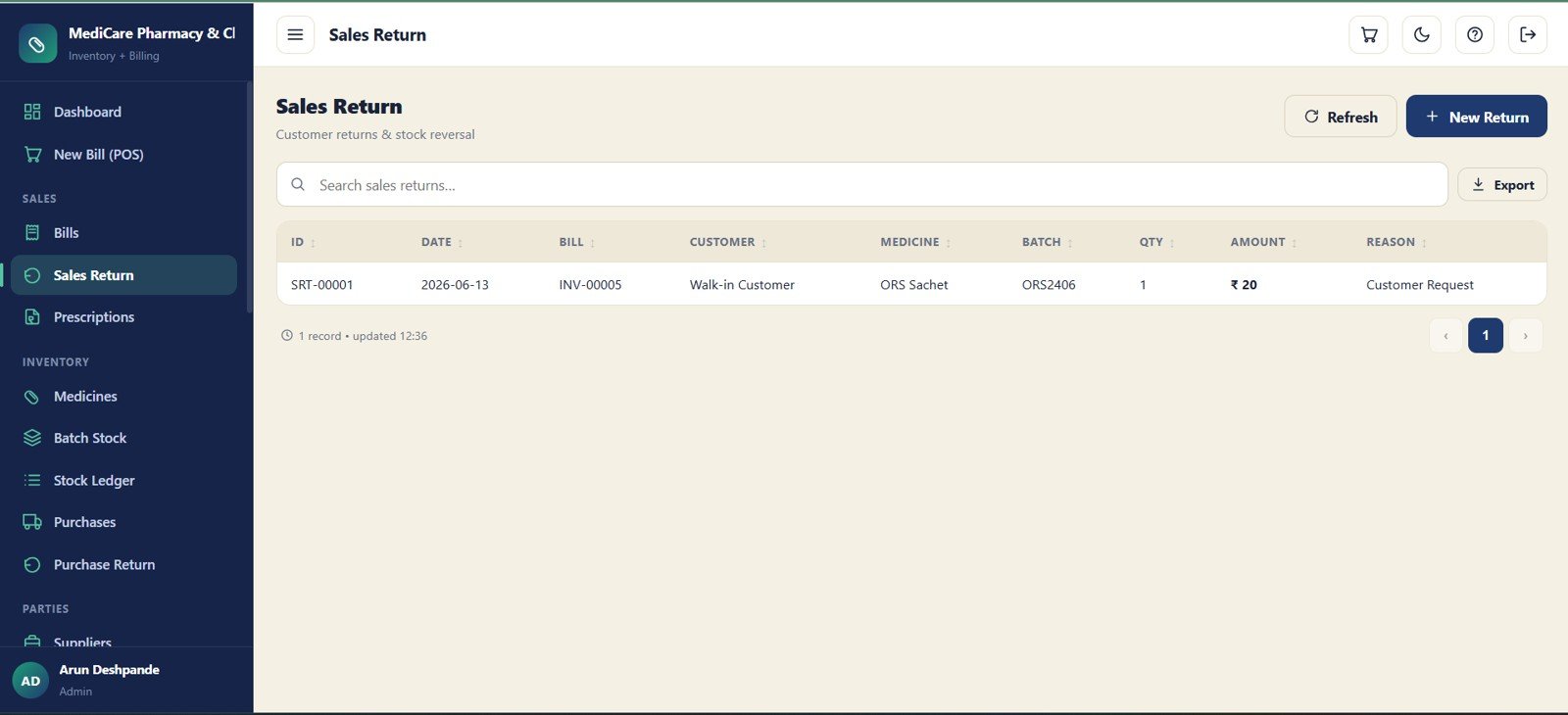
The Sales Return module records customer returns against the original bill. It captures ID, date, bill, customer, medicine, batch, quantity, amount and reason so returned stock and revenue adjustments stay traceable.
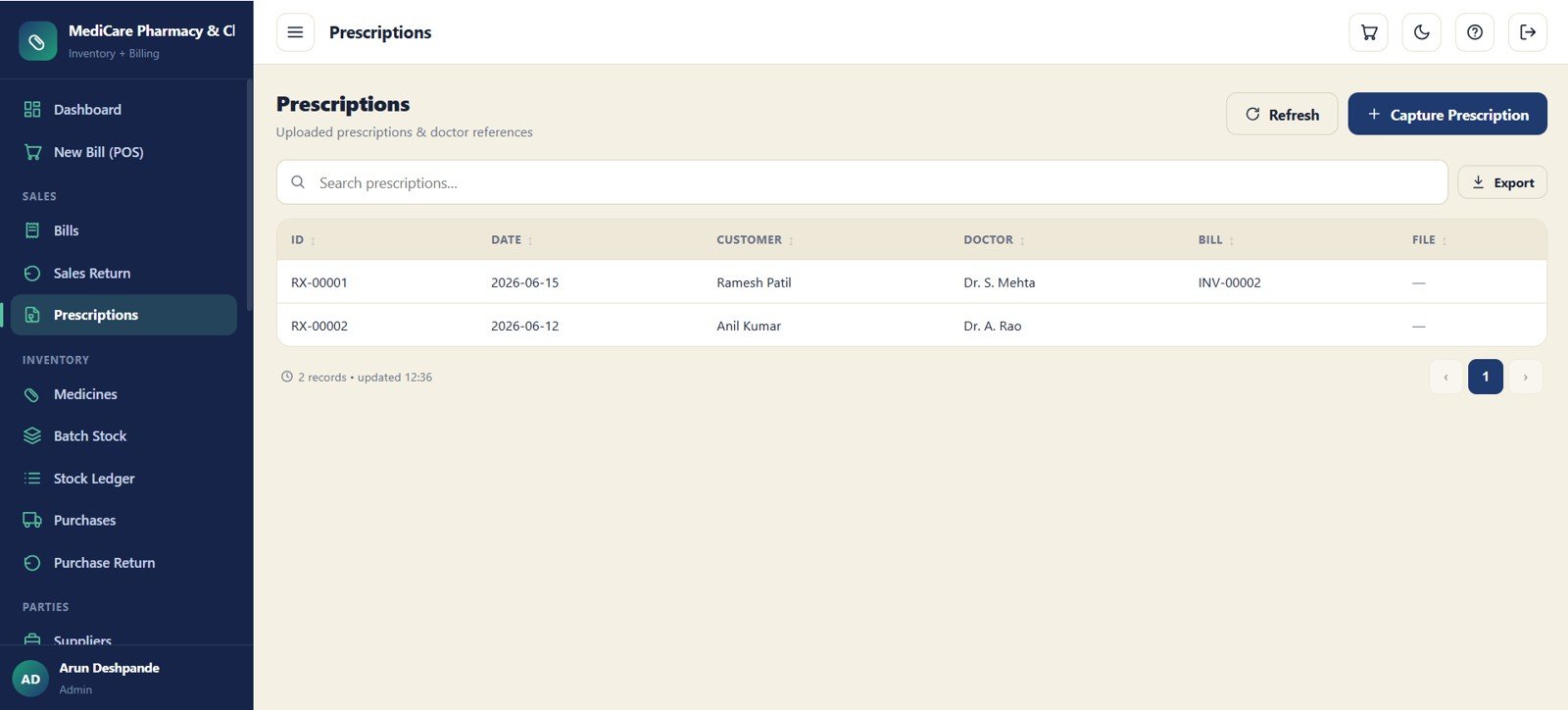
5 – Prescriptions
The Prescriptions screen stores uploaded prescription records and doctor references linked to billing. It keeps ID, date, customer, doctor, bill and file details available when staff need to verify a medicine sale.
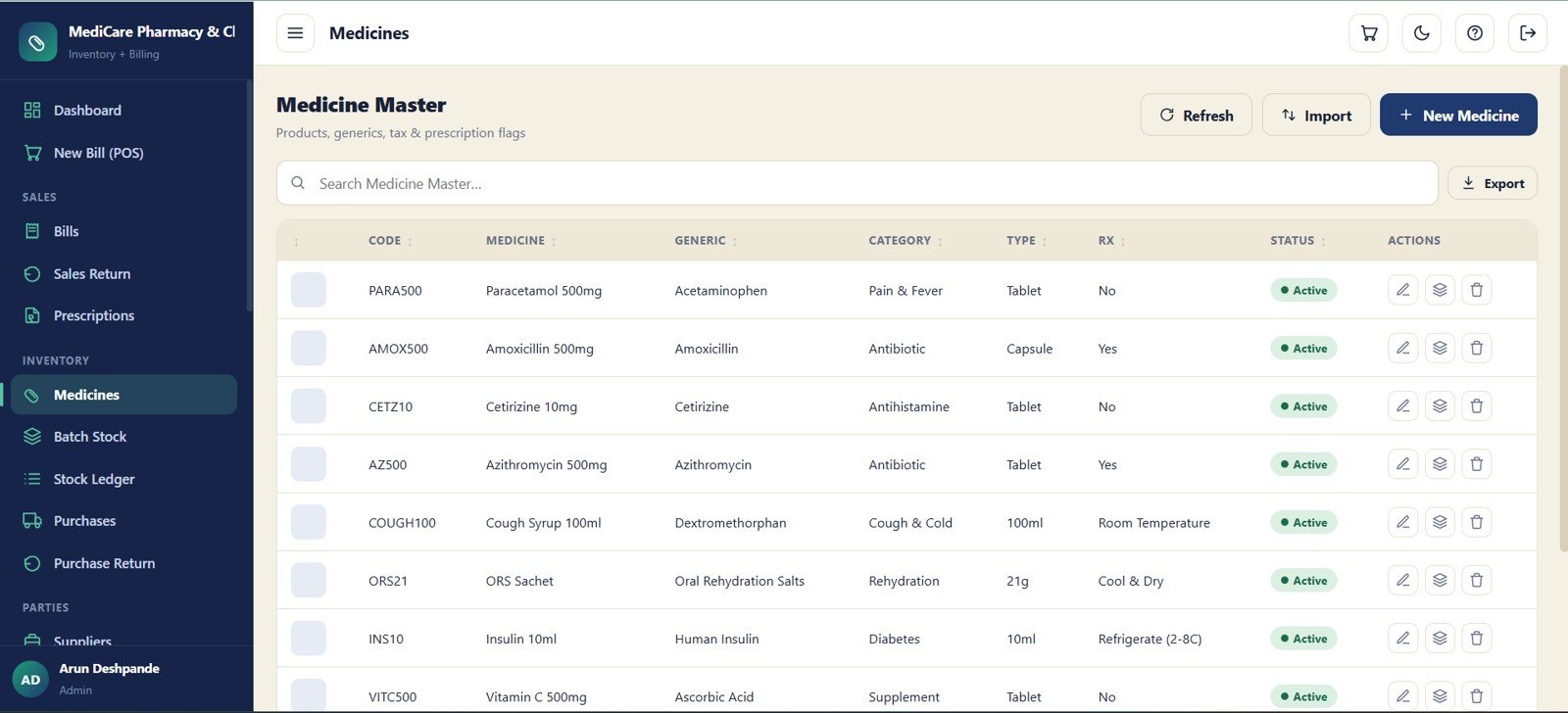
6 – Medicine Master
The Medicine Master screen is the main catalog for products. It stores code, medicine name, generic name, category, type, prescription flag, status and actions so staff can maintain clean master data.Pharmacy Inventory and Billing Management System Web App
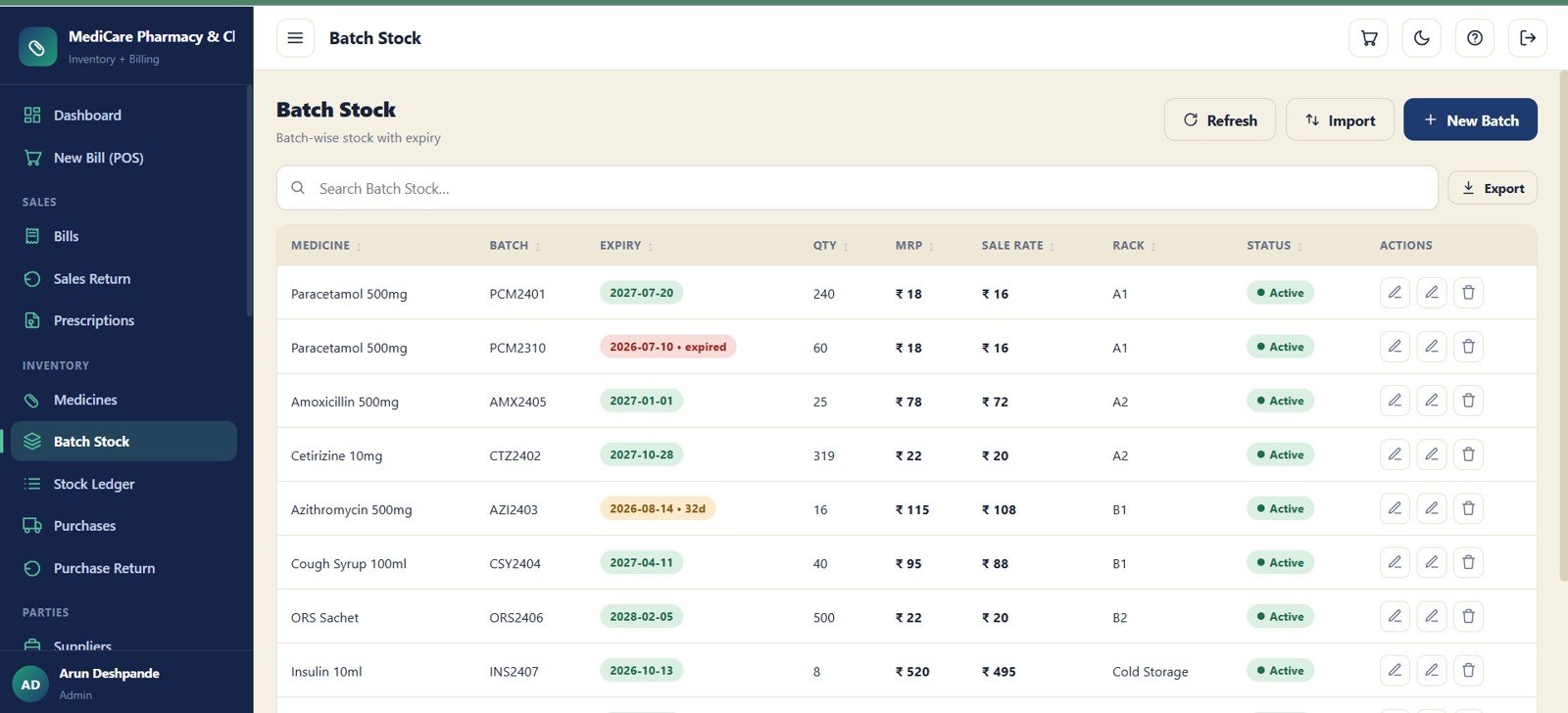
7 – Batch Stock
Batch Stock tracks medicine inventory at the batch level with expiry, quantity, MRP, sale rate, rack and status. This is critical for pharmacy operations because the same medicine can have multiple batches and different expiry dates.
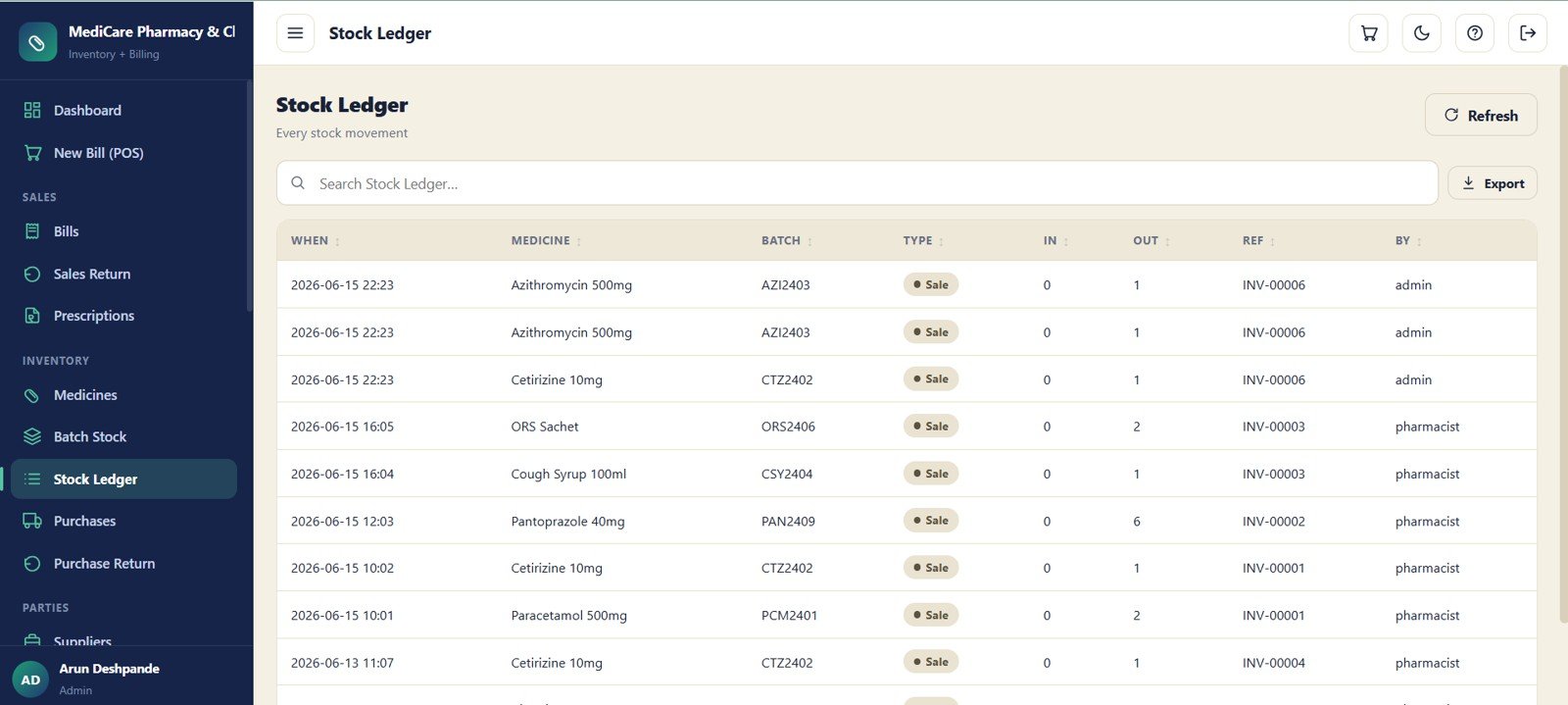
8 – Stock Ledger
The Stock Ledger records every inward and outward stock movement. Fields such as when, medicine, batch, movement type, in, out, reference and user make it easier to investigate discrepancies.Pharmacy Inventory and Billing Management System Web App
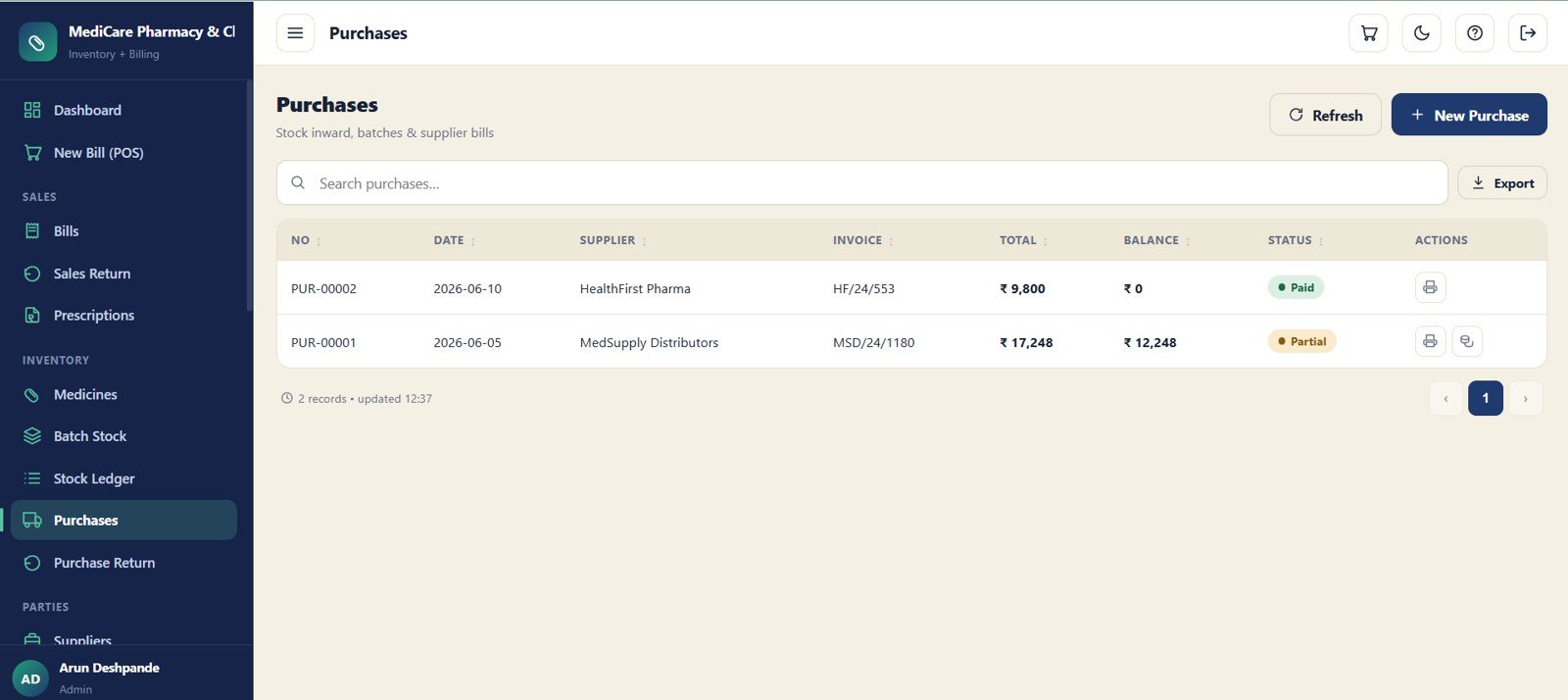
9 – Purchases
The Purchases module manages stock inward entries, supplier invoices and payable status. It includes purchase number, date, supplier, invoice, total, balance, status and actions for purchase follow-up.
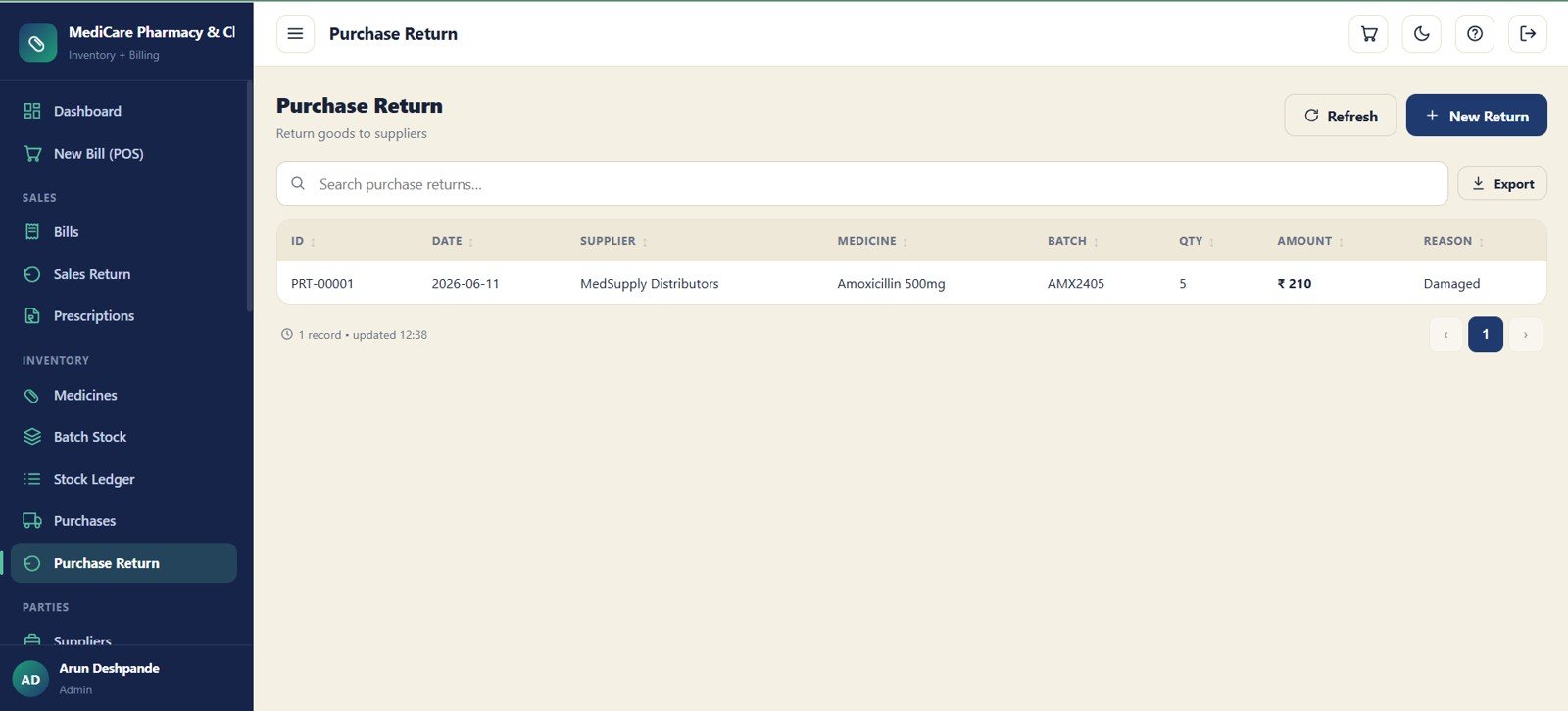
10 – Purchase Return
The Purchase Return screen records items returned to suppliers. It captures supplier, medicine, batch, quantity, amount and reason, giving the pharmacy a cleaner view of stock reversal and vendor adjustments.Pharmacy Inventory and Billing Management System Web App
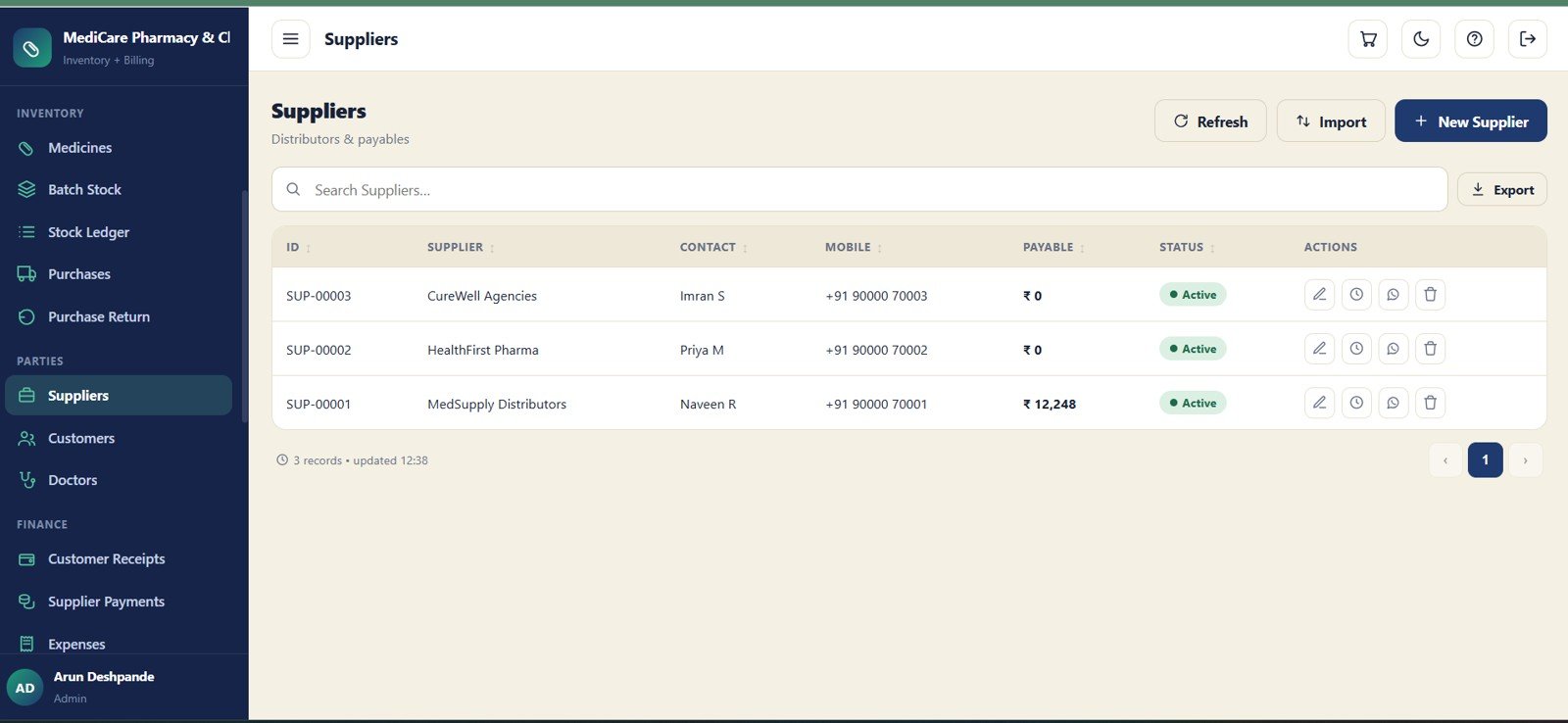
11 – Suppliers
The Suppliers module maintains distributor and supplier records. It tracks supplier ID, contact, mobile, payable amount, status and actions so purchase and payment work stays connected.
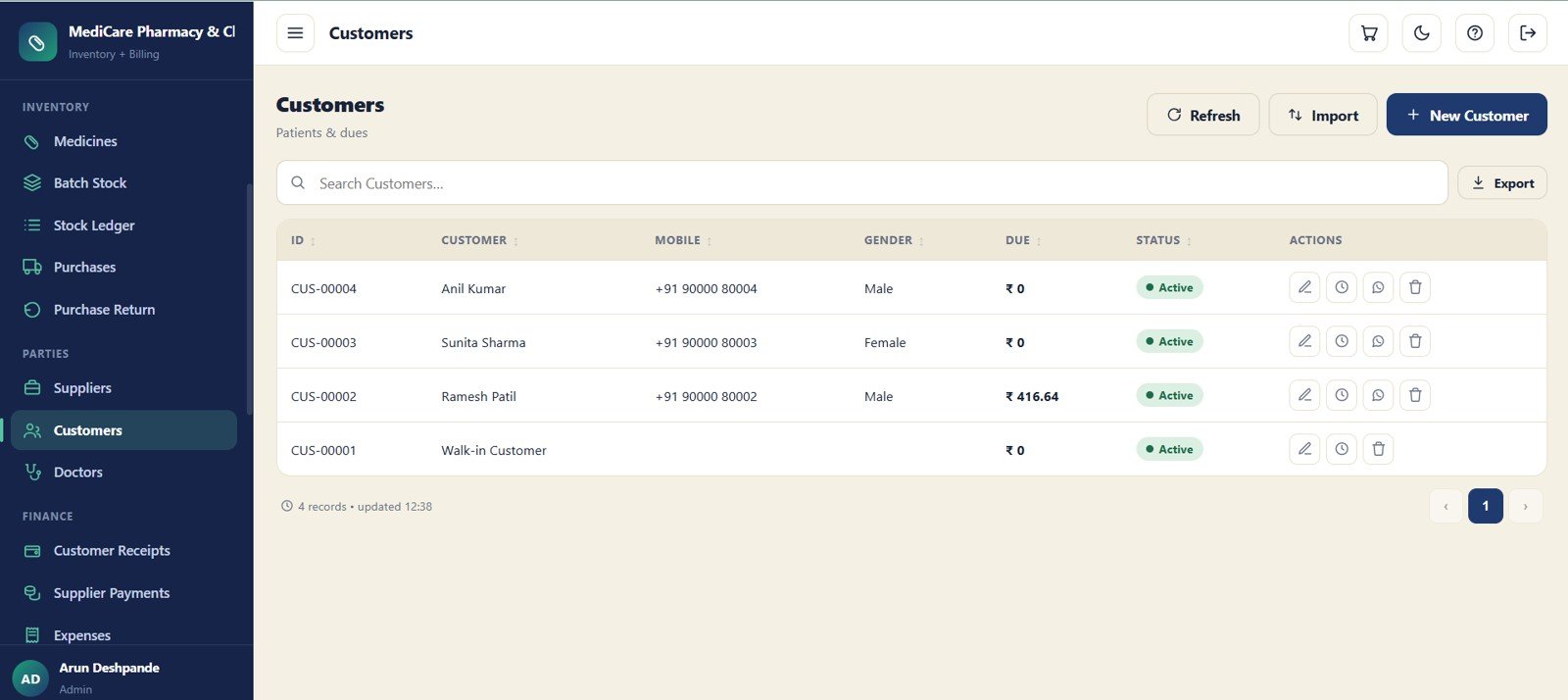
12 – Customers
The Customers screen stores patient and customer details with outstanding dues. It includes ID, customer, mobile, gender, due, status and actions for follow-up and receipt collection.
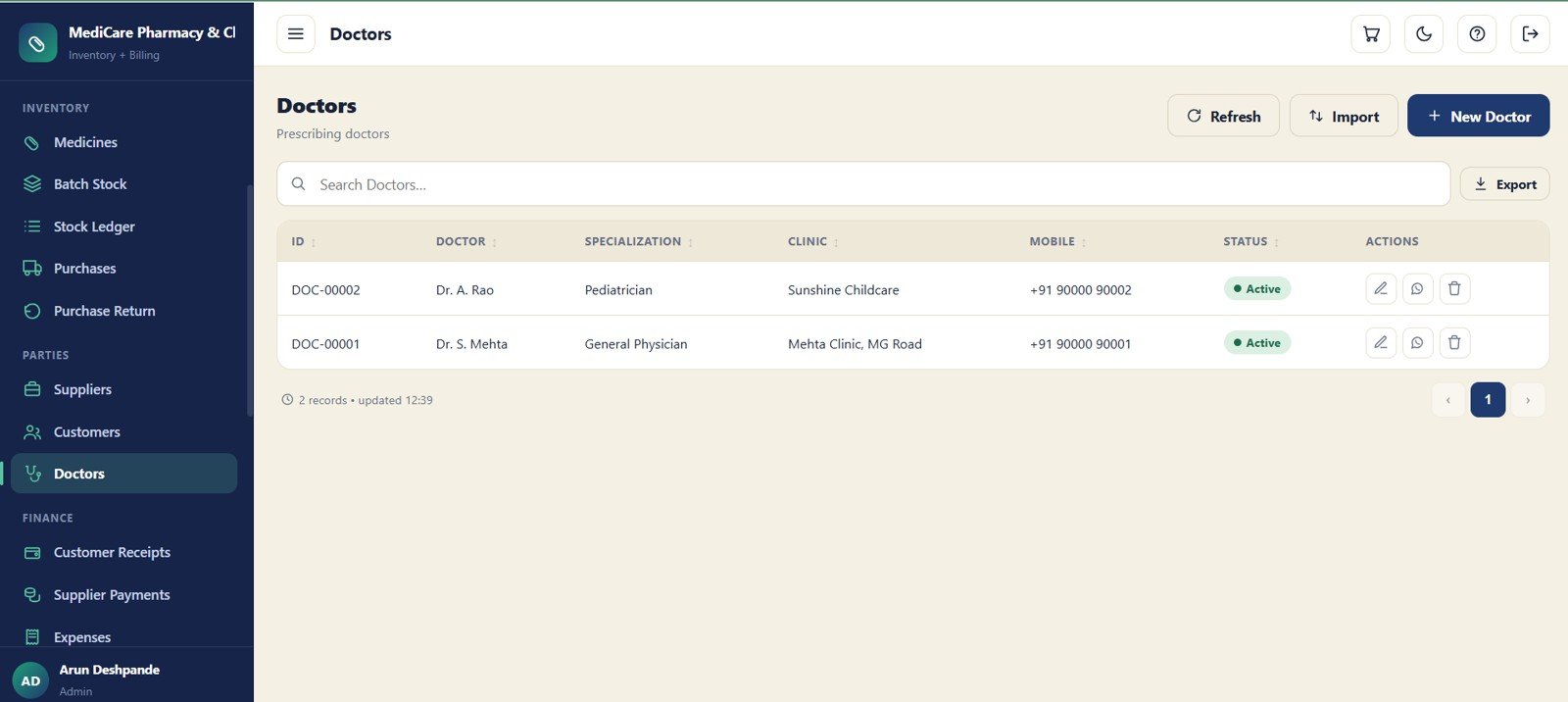
13 – Doctors
The Doctors module maintains prescribing doctor details for prescription-based sales. Staff can record doctor ID, specialization, clinic, mobile, status and actions for reference lookup.Pharmacy Inventory and Billing Management System Web App
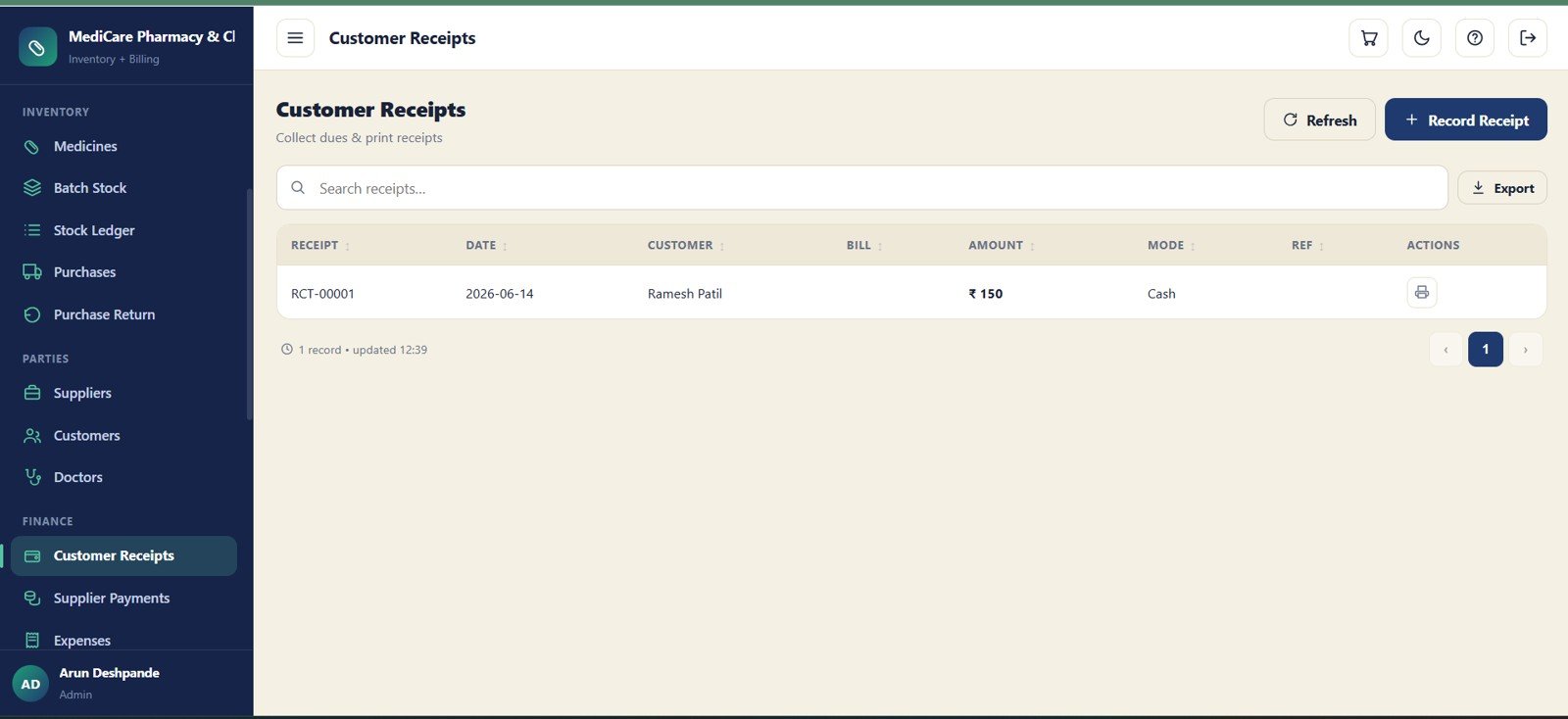
14 – Customer Receipts
Customer Receipts helps collect customer dues and print receipt records. It stores receipt number, date, customer, bill, amount, mode, reference and actions for clean cash collection tracking.Pharmacy Inventory and Billing Management System Web App
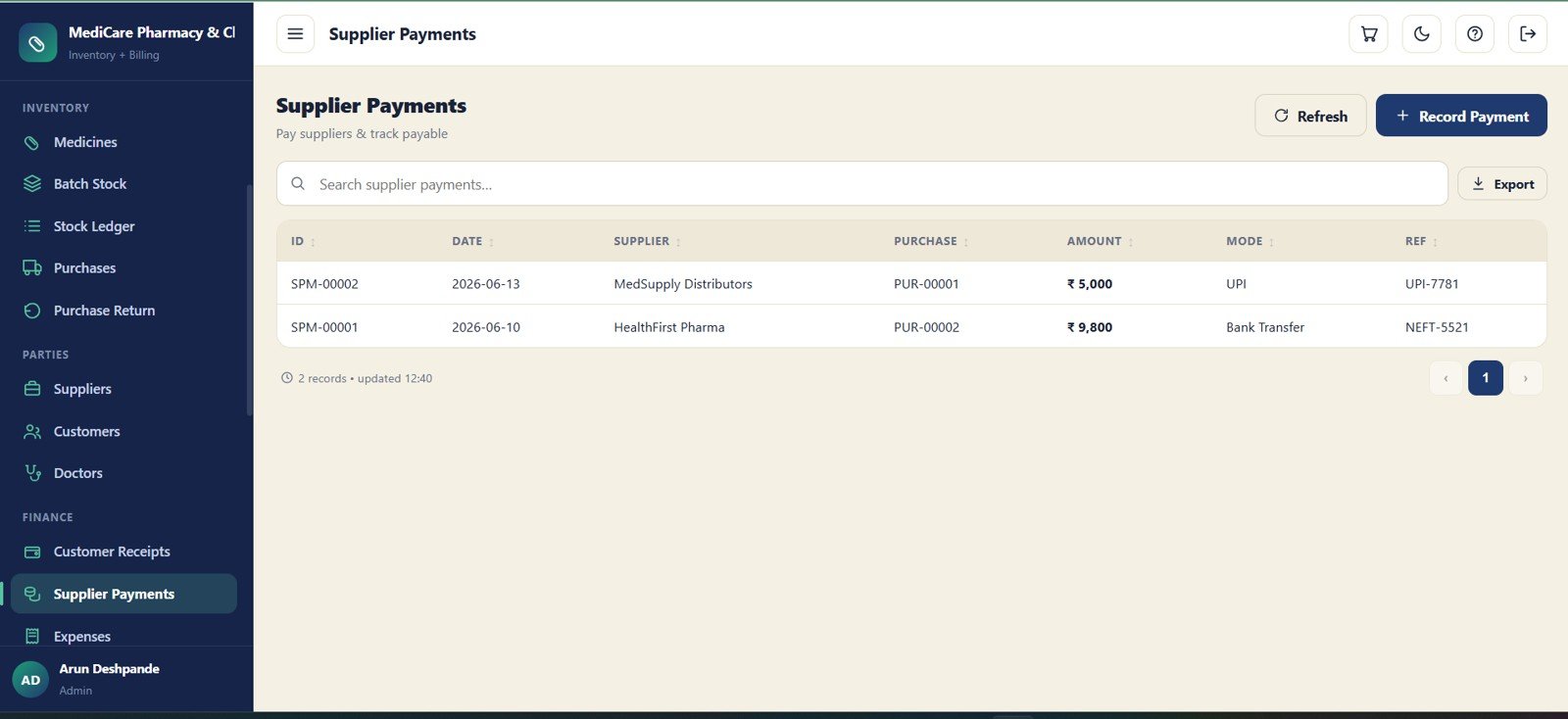
15 – Supplier Payments
Supplier Payments records payable settlements against purchase bills. The screen captures supplier, purchase reference, amount, payment mode and reference number for vendor account tracking.
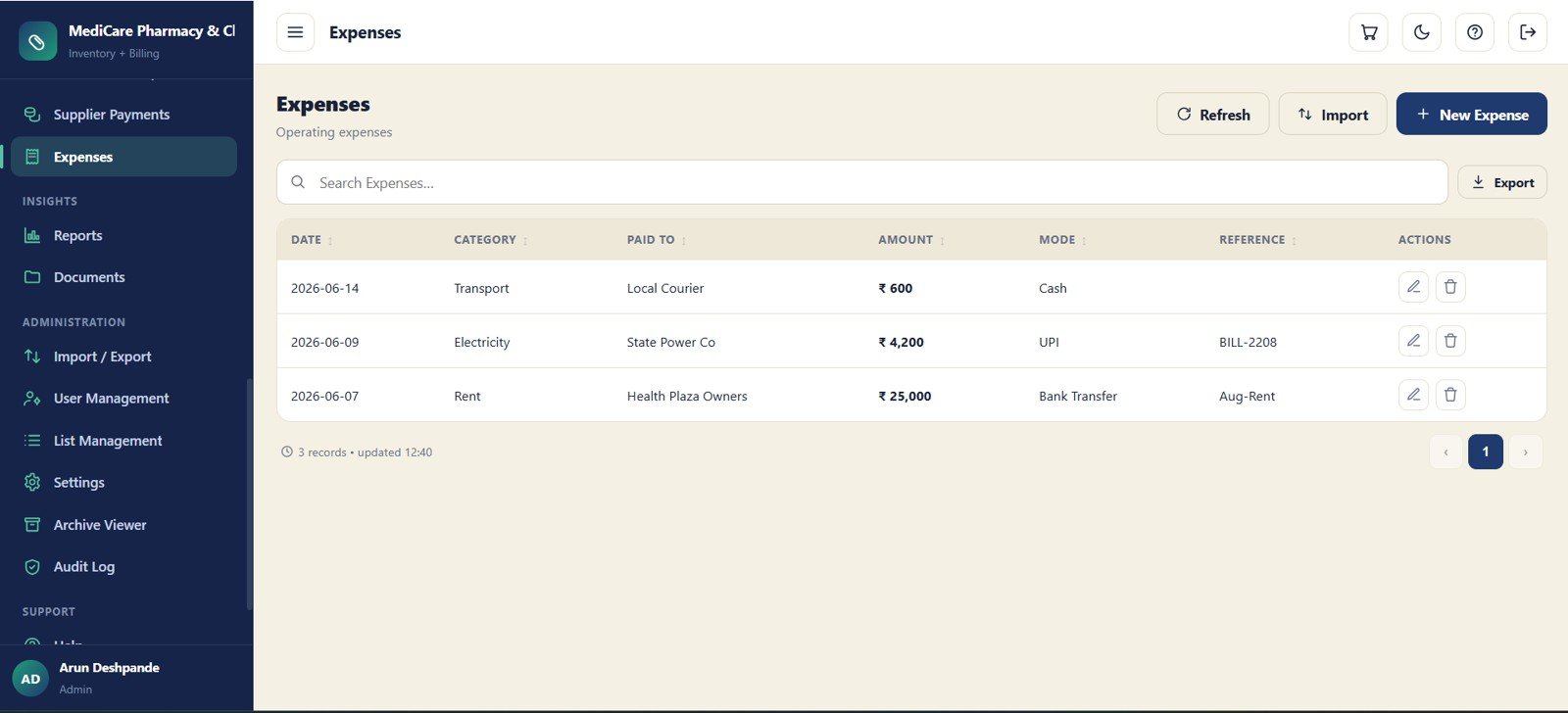
16 – Expenses
The Expenses module records operating spend for the pharmacy. Date, category, paid-to name, amount, mode, reference and actions help owners separate daily expenses from medicine purchases.
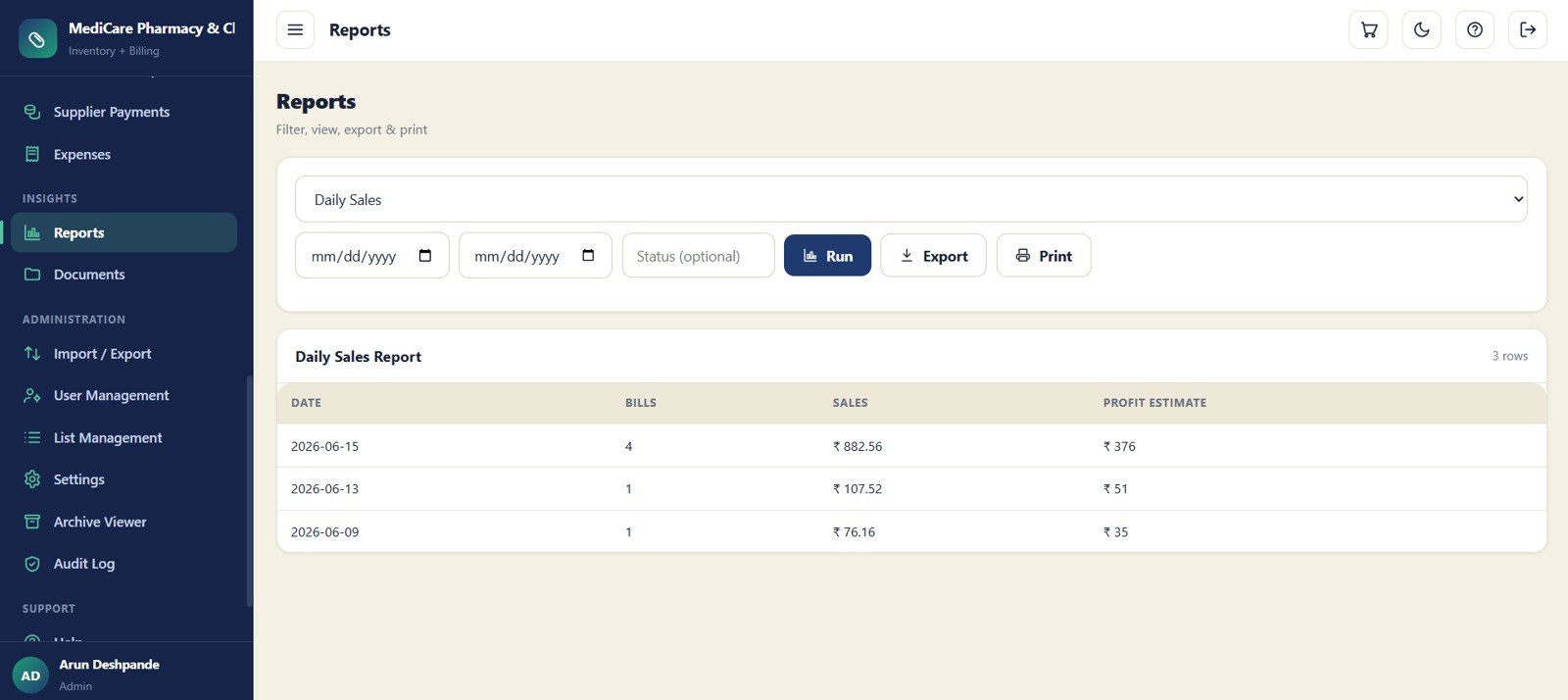
17 – Reports
The Reports screen filters, runs, exports and prints pharmacy reports. It includes report type, date range, status filter and output actions, with daily sales report fields for date, bills, sales and estimated profit.Pharmacy Inventory and Billing Management System Web App
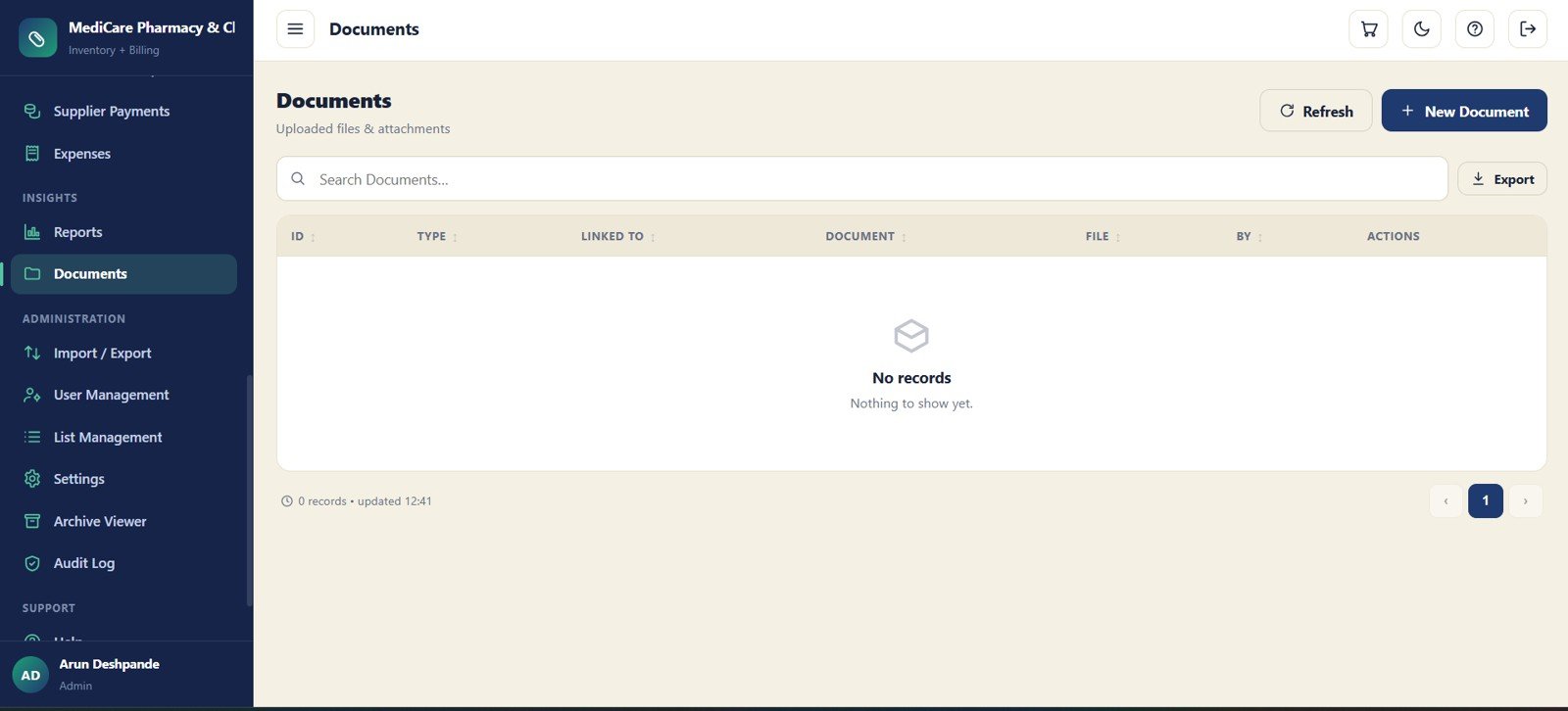
18 – Documents
The Documents module stores files and attachments linked to pharmacy records. It tracks ID, type, linked record, document name, file, uploader and actions for document control.
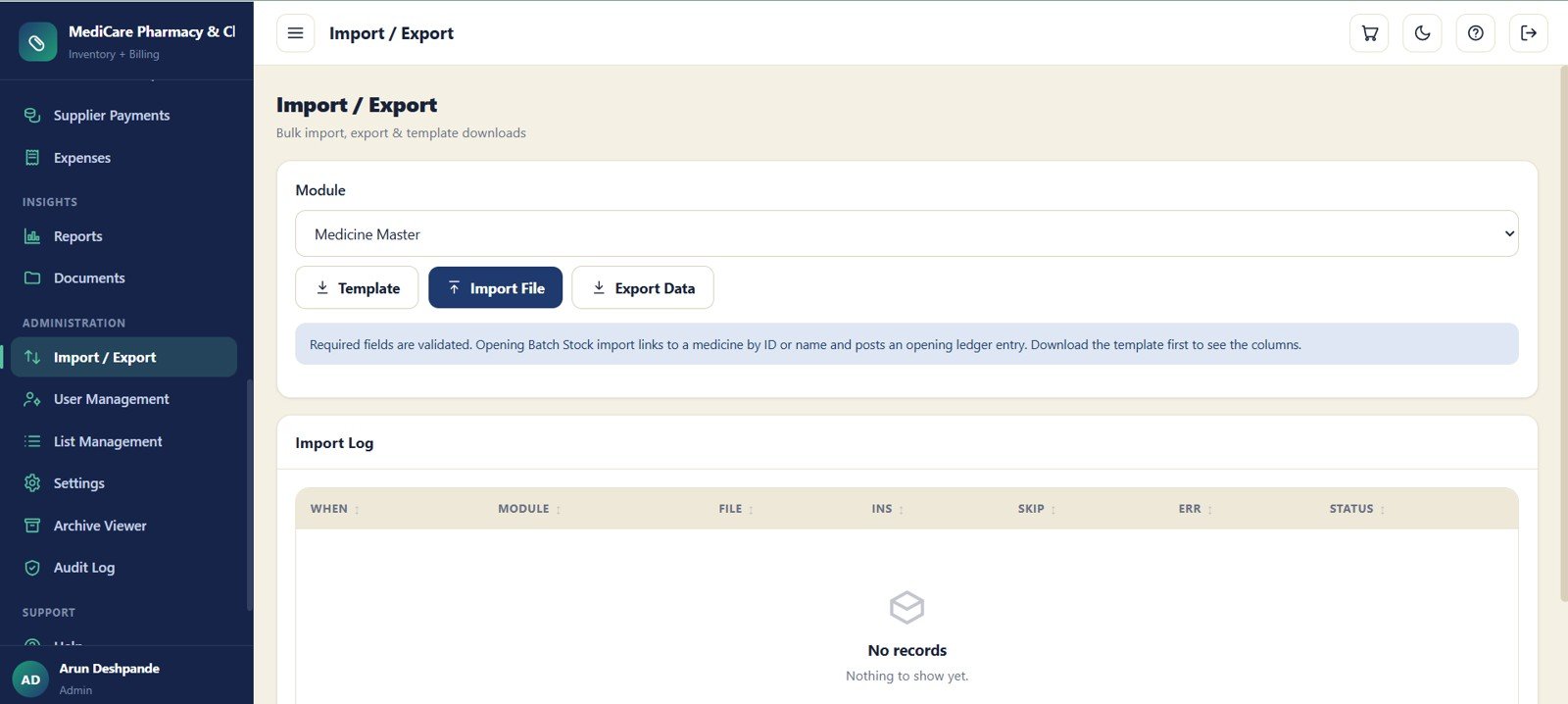
19 – Import / Export
Import / Export speeds up setup and data maintenance. Users can select a module, download templates, import files, export data, see required-field validation messages and review import log counts.
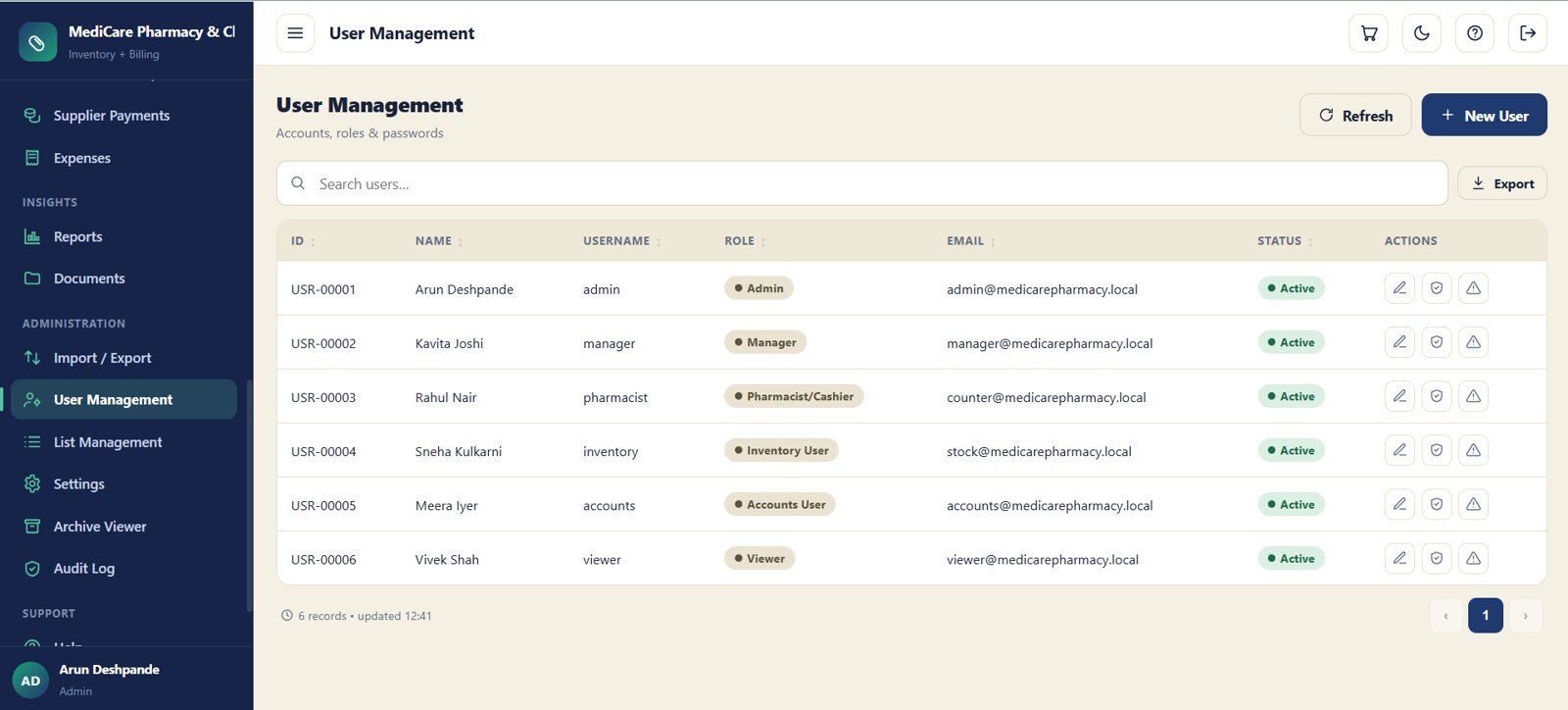
20 – User Management
User Management controls account records, roles, email, status and actions. It gives the admin a central place to manage who can access the pharmacy web app.
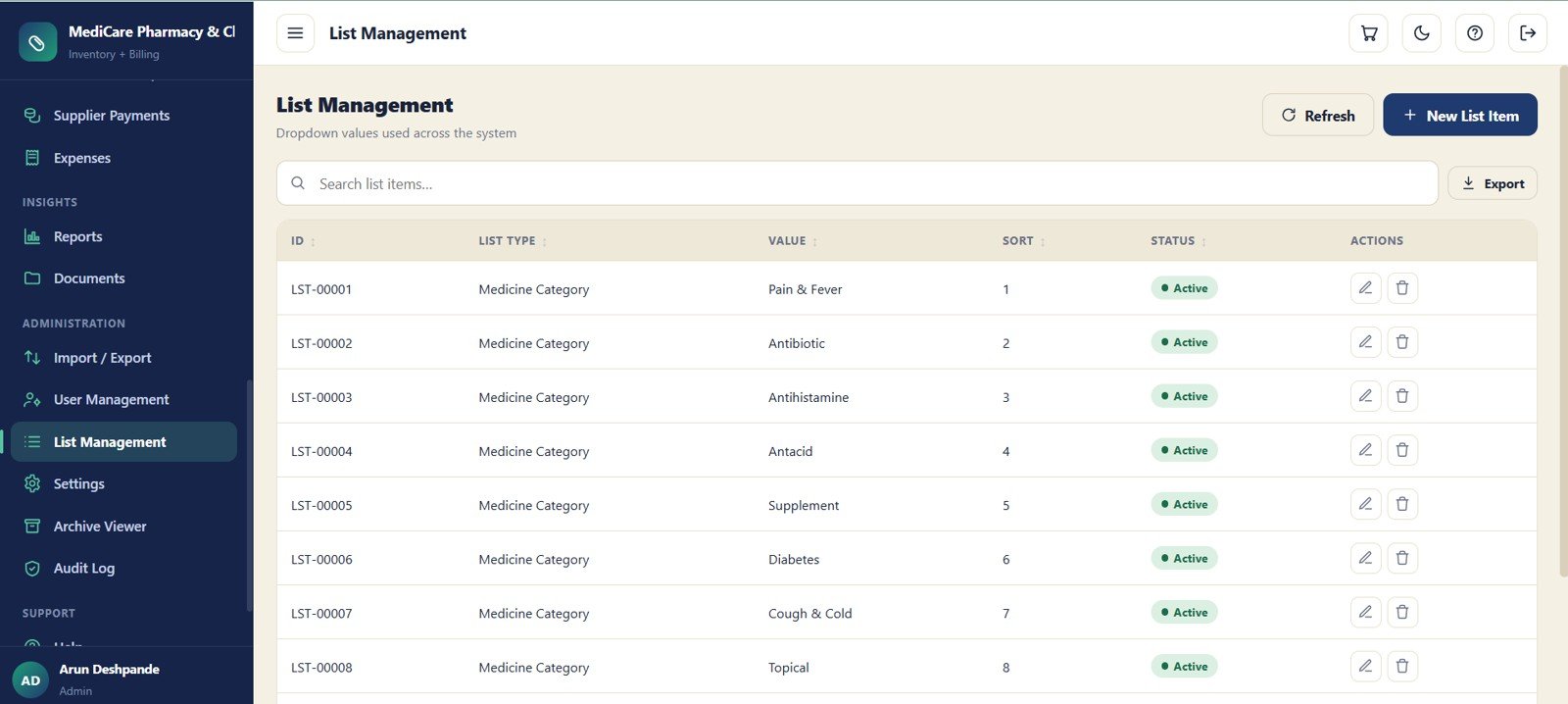
21 – List Management
List Management controls dropdown values used across the system. List type, value, sort order, status and actions help keep categories and lookup values consistent.
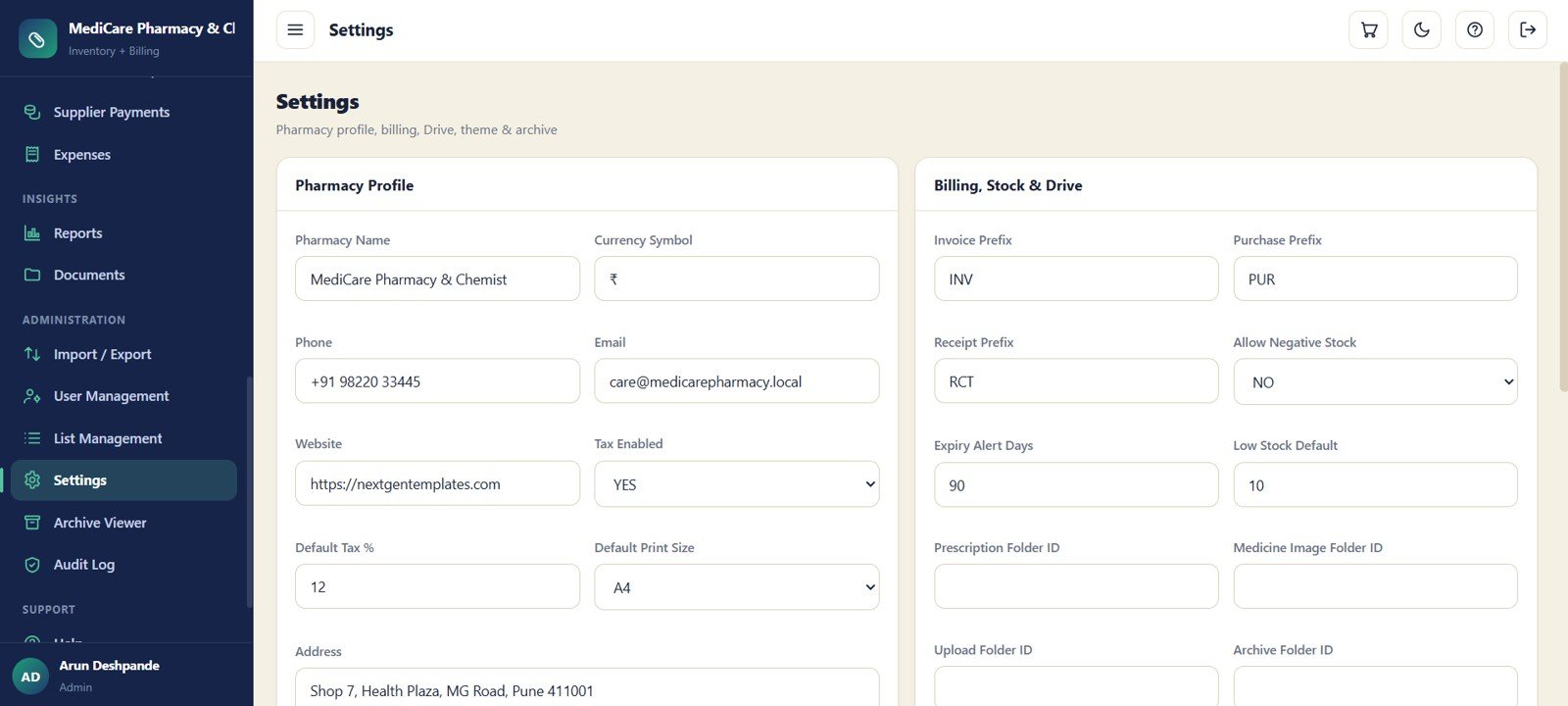
22 – Settings
Settings manages pharmacy profile, billing, stock, Drive, theme and archive configuration. It includes pharmacy name, currency, contact details, tax, print size, prefixes, low stock defaults and folder IDs.
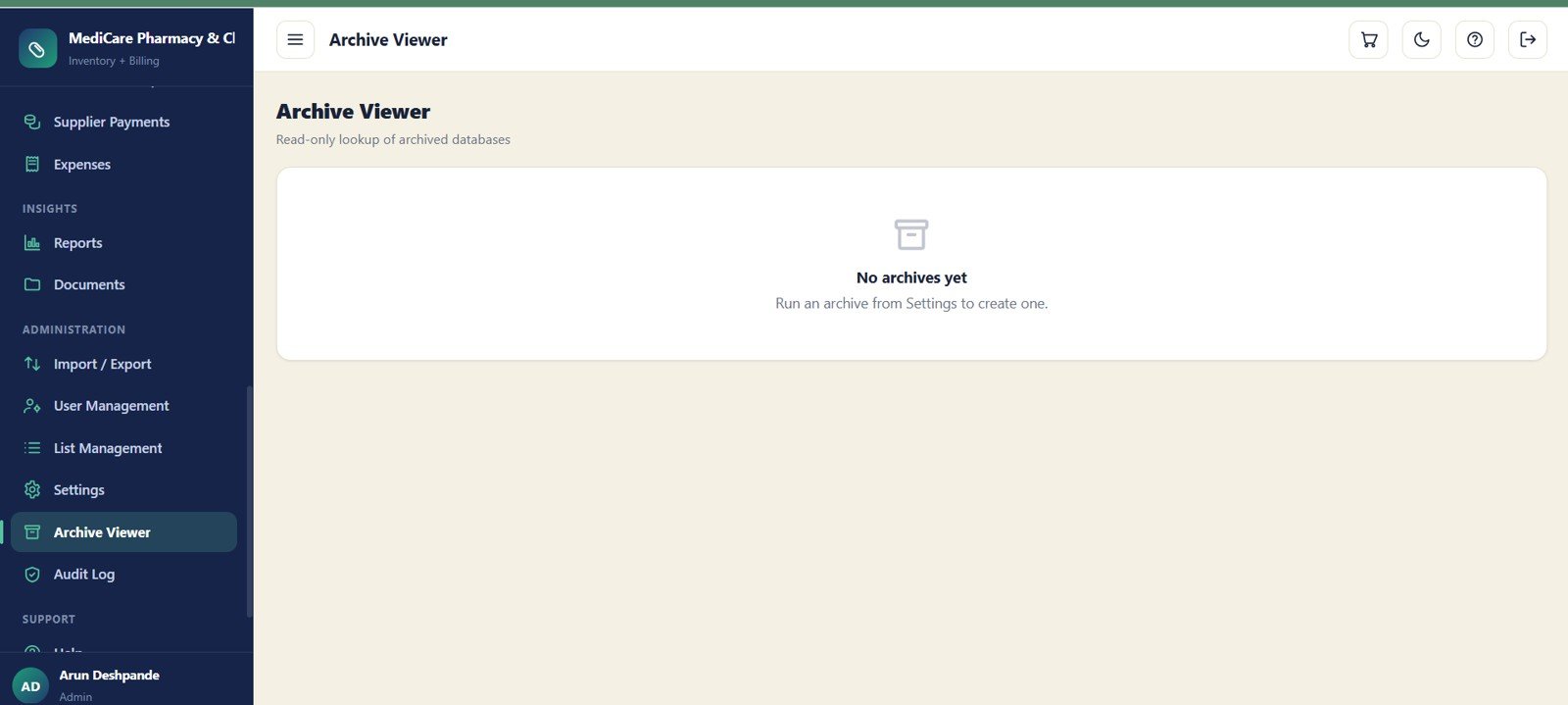
23 – Archive Viewer
The Archive Viewer lets the admin look up archived databases in read-only mode. It includes archive list and record lookup areas, with a clear message when no archives are available yet.
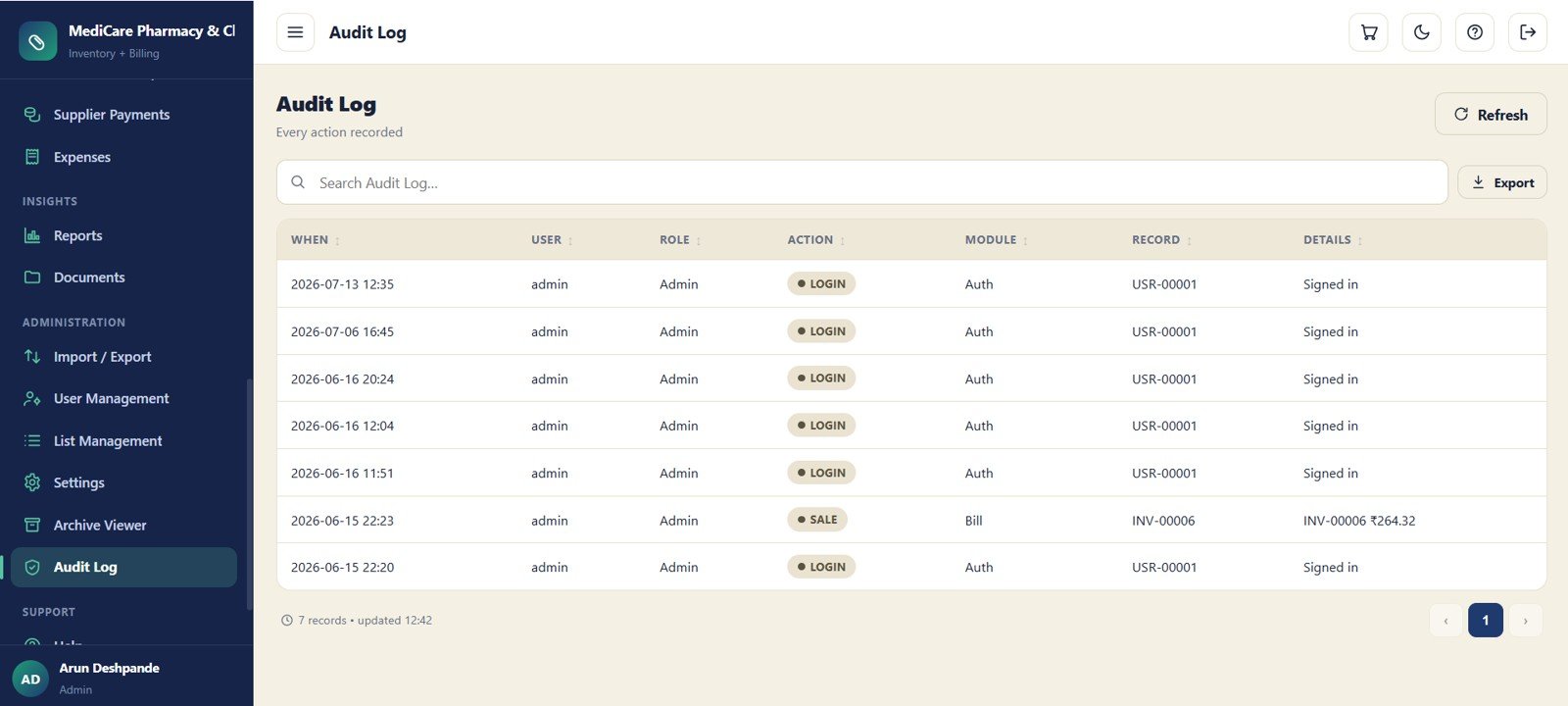
24 – Audit Log
The Audit Log records login, sale, create, update and system events. Time, user, role, action, module, record and details fields give the owner a traceable activity history.
Pharmacy Inventory and Billing Management System Web App vs. Excel Tracker vs. Paid Pharmacy SaaS – Feature Comparison
| Feature | This template | Excel tracker | Paid pharmacy SaaS |
|---|---|---|---|
| Cost | One-time purchase | Low one-time file cost | Recurring or quote-based subscription |
| Platform | Google Sheets plus Apps Script | Microsoft Excel | Vendor cloud system |
| Setup time | Copy, deploy, configure and import | Open file and enter records | Often needs onboarding |
| Real-time team collaboration | Designed for browser-based team use | Limited for counter workflows | Usually included |
| Mobile access | Browser access after deployment | Limited | Usually supported |
| Customizable fields | Editable lists, settings and backend | Editable but formula-sensitive | Depends on plan |
| Share with link | Controlled through Google access and deployment | Possible, but not ideal for billing | Vendor user invites |
| Year-1 cost at 5 users | Template price only | Template price only | Usually recurring monthly cost |
| Batch and expiry workflow | Dedicated batch stock, near expiry and expired value controls | Manual columns | Usually available |
| Audit history | Dedicated audit log | Manual notes or file history | Usually available |
Who Should Use This Template
This template is best for independent pharmacies, chemist shops, clinic pharmacies and local medical businesses that need billing and inventory control without enterprise software complexity.
Real-World Use Cases
Daily owner review: Check sales, profit, low stock, near-expiry items and supplier payable before calling distributors.
Counter billing: Use Bills and Sales Return screens to manage invoice records and reverse returned quantities.
Stock control: Review Batch Stock, Stock Ledger and Reports to trace discrepancies and prioritize near-expiry stock.
Advantages of Pharmacy Inventory and Billing Management System Web App
The biggest advantage is structure. Instead of separate files for billing, stock, purchases, suppliers and expenses, the pharmacy gets one workflow with consistent fields. The Google Sheets backend remains under the buyer’s account, and the template model avoids per-user subscriptions.
Opportunities for Improvement
Large pharmacies may still need barcode hardware, e-prescription integrations, insurance processing, regulatory reporting and accounting sync. Buyers should test deployment permissions, user access and backups before going live.
Best Practices
Start with clean medicine master records, consistent generic names and correct batch opening stock. Set expiry alert days and low-stock defaults before billing begins. Review the audit log, restrict admin access and use Import / Export for controlled bulk updates. Google also provides guidance for sharing Sheets with specific people or by link.
Explore Relevant Templates
For similar workflows, explore these NextGenTemplates resources:
- Pharmacy POS Web App for pharmacy point-of-sale billing and stock workflows.
- General Store POS Web App for a related Google Sheets POS and inventory web app structure.
- Pharmaceutical Dashboard in Google Sheets for pharmaceutical sales and inventory reporting.
- Multi-Location Inventory Management in Google Sheets for stock tracking across locations.
- Web-based Advanced Inventory Management System for broader inventory control.
Curious how systems like this are put together? The NextGenTemplates Academy learning paths cover the spreadsheet skills behind them, with practice files.
Get the Pharmacy Inventory and Billing Management System Web App
Frequently Asked Questions
What is the Pharmacy Inventory and Billing Management System Web App?
It is a 24-screen Google Sheets and Apps Script web app template for pharmacy billing, medicine inventory, batch stock, expiry tracking, purchases, dues, reports and audit history.
Does it include expiry tracking?
Yes. The dashboard includes near-expiry and expired stock value cards, while Batch Stock tracks medicine, batch, expiry, quantity, MRP, sale rate, rack and status.
Can I manage customers, doctors and prescriptions?
Yes. The system includes Customers, Doctors and Prescriptions modules, so patient records, doctor references and uploaded prescription files can stay connected to billing work.
Can I track supplier payments and customer receipts?
Yes. Customer Receipts and Supplier Payments are separate finance modules, and the dashboard also shows customer dues and supplier payable balances.
Can I import existing pharmacy data?
Yes. The Import / Export module includes template download, import file, export data, validation message and import log areas.
Is this suitable for a large chain pharmacy?
It is better for small and mid-sized operations. Large chains needing enterprise compliance, specialized dispensing integrations or hardware-heavy checkout should evaluate dedicated pharmacy software.
About the Author
Built by PK – Microsoft Certified Professional with 15+ years of Excel, Google Sheets, and Power BI experience. Founder of NextGenTemplates, reaching 300K+ subscribers across YouTube channels. Every template is hand-built and tested before release.
Conclusion
The Pharmacy Inventory and Billing Management System Web App brings billing, batch stock, expiry control, purchases, dues, reports and audit history into one practical workspace. If your pharmacy needs a structured browser-based system without starting with monthly software fees, get the template from NextGenTemplates.com and set up your own editable pharmacy management system.