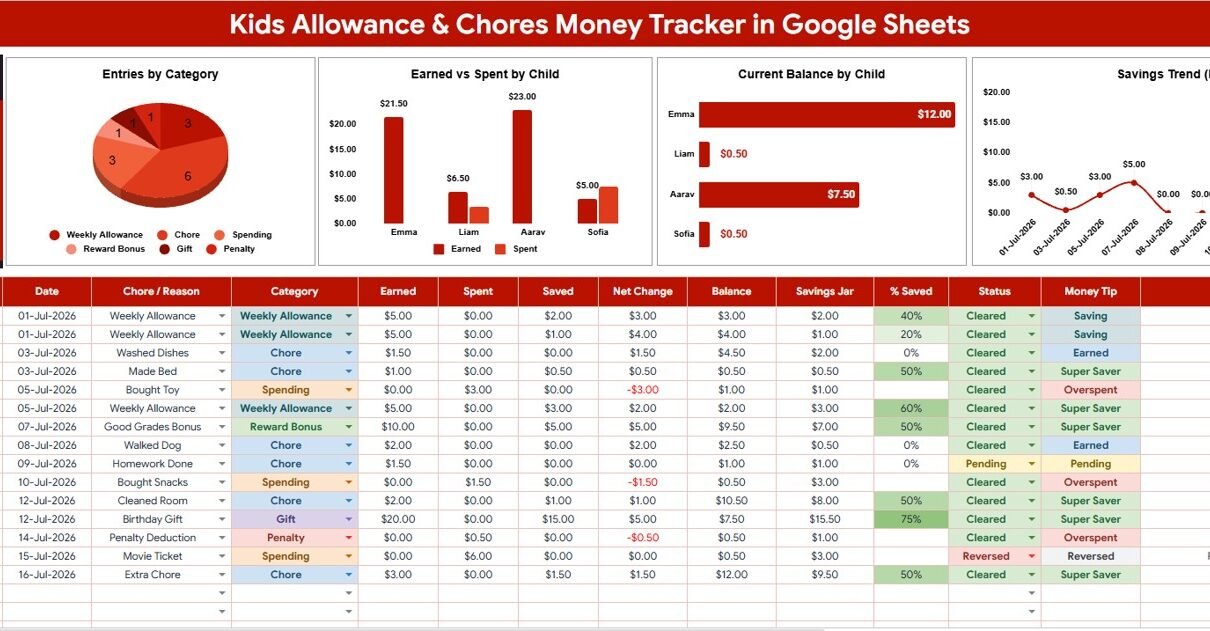
Kids Allowance and Chores Money Tracker in Google Sheets is built for parents who want a clear, repeatable way to track chores, allowance, earned money, spending, and savings without opening a paid family finance app. The template includes 2 focused sheet tabs, 1 Total Saved – All Kids card, 4 overview charts, 4 menu-option analyses, and slicers for quick filtering. For families, the real value is consistency: every child, chore reason, category, and status can use clean dropdown values instead of scattered notes or mental math.Kids Allowance and Chores Money Tracker in Google Sheets
Allowance tracking is not only about paying children for tasks. It is also a simple way to teach earning, spending, saving, responsibility, and delayed gratification. This Google Sheets tracker gives parents a lightweight system they can copy into Google Drive, update weekly, and review together as a family. Because Google Sheets supports charts, filters, and sharing, it works well for household workflows where two parents, guardians, or older children may need visibility into the same file. For more on chart options inside Sheets, see Google’s official Google Sheets chart help.
Get the Kids Allowance and Chores Money Tracker in Google Sheets
Key Features of Kids Allowance and Chores Money Tracker in Google Sheets
- Total Saved – All Kids card: See the family-level saved amount before drilling into charts.Kids Allowance and Chores Money Tracker in Google Sheets
- Earned vs Spent by Child: Compare allowance earned and money spent for each child in one view.
- Current Balance by Child: Review the latest balance for every child without recalculating rows manually.Kids Allowance and Chores Money Tracker in Google Sheets
- Savings Trend by Date: Track whether savings are growing or shrinking across time.
- Entries by Category: Understand where allowance records are being grouped, such as chores, rewards, savings, or spending.Kids Allowance and Chores Money Tracker in Google Sheets
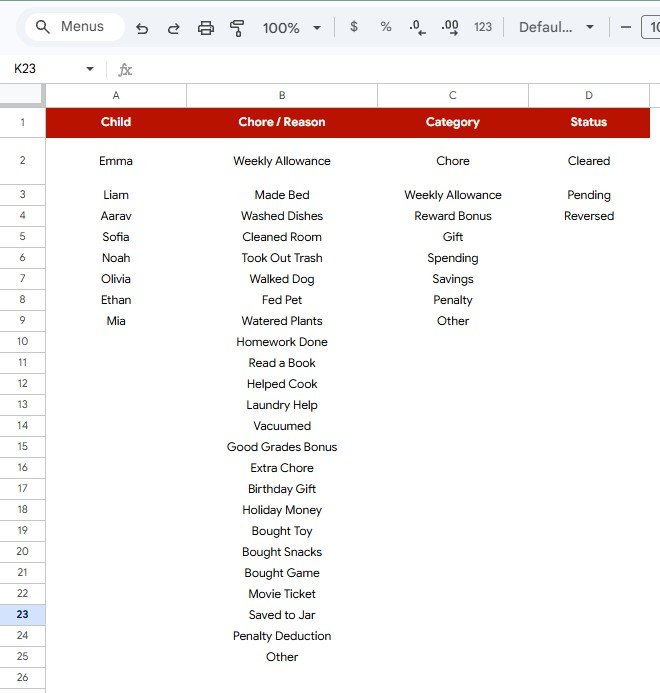
- Editable Menus sheet: Manage child names, chore reasons, categories, and status values in one setup tab.
- Slicers for quick filtering: Filter the dashboard by selected values during weekly or monthly reviews.
- Google Sheets format: Copy the tracker into Google Drive and share controlled access with another parent or guardian.
Dashboard Pages Explanation
1 – Overview Page
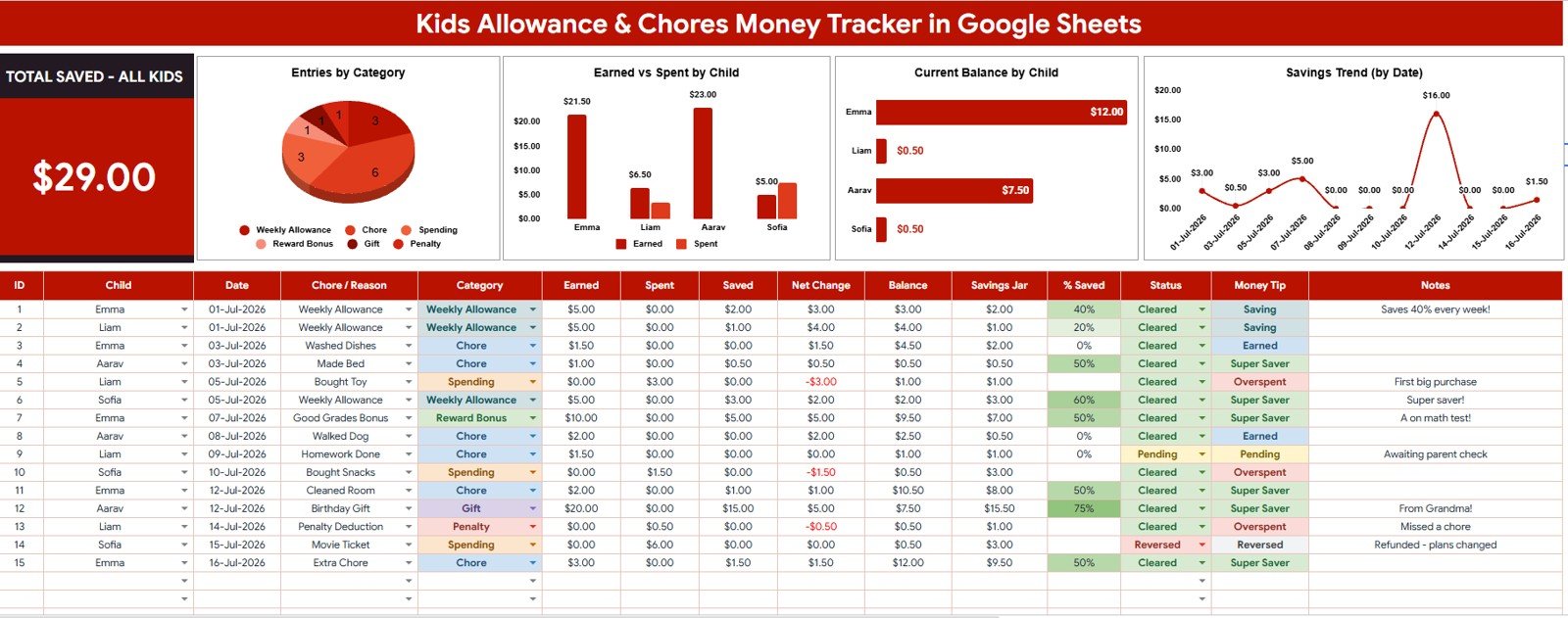
The Overview Page is the main dashboard tab. At the top, the Total Saved – All Kids card gives a quick snapshot of how much has been saved across the family.
Entries by Category: This chart groups all allowance and money records by category. It helps parents understand whether the tracker is mostly capturing chores, rewards, savings deposits, spending activity, or other custom categories.
Earned vs Spent by Child: This chart compares the money each child has earned against the amount spent. It is useful for family conversations because every child can see how completed chores and spending choices affect their money position.
Current Balance by Child: This chart shows the current balance for each child in the tracker. Parents can quickly answer who has money available and who may need to complete more chores or pause spending.
Savings Trend by Date: This chart tracks savings movement over time. It helps families see whether savings are improving steadily or whether spending is pulling balances down.
2 – Menus
The Menus sheet stores the dropdown options used by the tracker. Keeping these options in one tab helps avoid duplicate labels, spelling differences, and messy slicer values as more records are added.Kids Allowance and Chores Money Tracker in Google Sheets
Child by Menu Option: This analysis shows the child names available for tracker entries. Parents can update the list whenever they need to add a child, remove an old option, or adjust how names appear in reports.Kids Allowance and Chores Money Tracker in Google Sheets
Chore Reason by Menu Option: This analysis shows the chore or allowance reasons available in the tracker. Families can standardize recurring reasons such as room cleaning, homework help, reading, pet care, dishwashing, or bonus reward entries.
Category by Menu Option: This analysis shows the categories used to group money records. Clear category names make the Overview charts easier to read and help children understand where money is earned, saved, or spent.Kids Allowance and Chores Money Tracker in Google Sheets
Status by Menu Option: This analysis shows the status values available for entries. Parents can adapt status options for their workflow, such as planned, completed, paid, saved, spent, approved, or pending.
Kids Allowance and Chores Money Tracker in Google Sheets vs. Microsoft Excel Tracker vs. Paid Family Finance App – Feature Comparison
| Feature | This Google Sheets tracker | Microsoft Excel tracker | Paid family finance app |
|---|---|---|---|
| Cost | $6.99 one-time sale price | Template cost plus possible Microsoft access | Often monthly or annual subscription |
| Platform | Google Sheets in Google Drive | Excel desktop or Excel Online | Vendor-hosted app |
| Setup time | Copy the file, edit menus, enter records | Download workbook and customize formulas | Create account and configure family profiles |
| Real-time team collaboration | Native Google sharing | Requires OneDrive or SharePoint | Usually included, plan dependent |
| Mobile access | Google Sheets app or browser | Excel app or browser | Vendor app |
| Customizable fields | Edit menus, labels, records, and formulas | Editable if workbook is unlocked | Limited by app settings |
| Share with link | Yes, with Drive permissions | Yes, with cloud storage | Usually requires account login |
| Year-1 cost at 5 users | $6.99 before any Google Workspace costs | Template plus Microsoft access | Often recurring household plan pricing |
| Allowance charting | Entries by Category, Earned vs Spent, Balance, and Savings Trend included | Must be built or customized | Depends on app features |
| Bank connection | No bank connection required | No bank connection required | May require account setup or linked services |
Who Should Use This Template
This template is ideal for parents, guardians, homeschool families, family finance coaches, tutors, and household managers who want a simple, editable system for allowance and chores. It is especially useful when more than one child is being tracked and when parents want a quick dashboard instead of a long list of transactions.Kids Allowance and Chores Money Tracker in Google Sheets
It is also a good fit for families who want to introduce money lessons gradually. Children can see the connection between completed tasks, money earned, spending choices, and remaining balance. Parents keep control of the rules while giving children a visual way to understand progress.Kids Allowance and Chores Money Tracker in Google Sheets
Real-World Use Cases
Weekly allowance review: A parent updates the tracker every Friday, reviews earned vs spent by child, and decides what should be paid, saved, or discussed.Kids Allowance and Chores Money Tracker in Google Sheets
Savings goal practice: A child saving for a toy, book, trip, or activity can watch the Savings Trend by Date chart move over time.Kids Allowance and Chores Money Tracker in Google Sheets
Two-parent household tracking: One parent enters completed chores, while another reviews balances later from the same shared Google Sheet.
Homeschool money lesson: A homeschool parent uses the tracker as a practical spreadsheet exercise for categories, dates, charts, and basic money habits.
Advantages of Kids Allowance and Chores Money Tracker in Google Sheets
The biggest advantage is ownership. The copied Google Sheet stays in your Drive, and you can edit labels, formulas, menus, and records to match your family’s rules. There is no need to fit your allowance system into a fixed app workflow.Kids Allowance and Chores Money Tracker in Google Sheets
The second advantage is visibility. Instead of a parent remembering scattered payments, the dashboard gives a clear view of total saved, entries by category, earned versus spent, current balance, and savings movement by date.
The third advantage is simplicity. The Menus sheet keeps dropdown values clean, while the Overview Page keeps the charts easy to read. Families can start with a small number of categories and expand later as children get older.Kids Allowance and Chores Money Tracker in Google Sheets
Opportunities for Improvement
This is a manual Google Sheets tracker, so it does not transfer money, send reminders, connect to bank accounts, or issue debit cards. Families that want automatic payments, card controls, or app notifications may still prefer a dedicated allowance app.
The template also depends on consistent data entry. If parents skip updates for several weeks, the dashboard will not reflect the latest money activity. A short weekly update routine helps keep the tracker useful.
Best Practices
- Keep child names consistent by using the Menus sheet instead of typing new labels directly into the data area.
- Use simple categories at first, such as Chores, Bonus, Spending, Saving, Gift, and Adjustment.
- Review balances weekly so children connect the numbers with real choices.
- Use status values to separate planned chores from completed and paid entries.
- Do not store bank passwords, card numbers, or private account details in the tracker.
- Make a backup copy before major formula or chart edits.Kids Allowance and Chores Money Tracker in Google Sheets
Explore Relevant Templates
If you want related household and finance workflows, explore the Savings Goal Tracker in Google Sheets, Budget Tracking Calendar in Google Sheets, Complete Wedding Budget Tracker Dashboard in Google Sheets, Retirement Savings Tracker in Google Sheets, and FIRE Progress Tracker in Google Sheets.
You can also browse more Google Sheets tracker templates and Google Sheets financial tools.
Teaching kids about money pairs well with learning spreadsheets yourself, and the NextGenTemplates Academy learning paths are a friendly place to start, with practice files included.
Get the Kids Allowance and Chores Money Tracker in Google Sheets
Frequently Asked Questions
What does this kids allowance tracker measure?
It tracks allowance and chore money records by child, category, chore reason, status, and date. The dashboard then summarizes total saved, entries by category, earned versus spent, current balance, and savings trend.Kids Allowance and Chores Money Tracker in Google Sheets
Can I customize the children and chores?
Yes. The Menus sheet is designed so you can edit child names, chore reasons, categories, and status options.
Does this Google Sheets tracker move money?
No. It is a manual tracking and reporting template. It does not connect to bank accounts, debit cards, or payment systems.Kids Allowance and Chores Money Tracker in Google Sheets
Can both parents use the tracker?
Yes. After copying the file into Google Drive, you can share it with another parent or guardian using Google Sheets sharing permissions.
Is this template suitable for younger children?
Yes, with parent guidance. Younger children can use the dashboard visuals to understand earning and saving, while parents handle data entry and payment decisions.Kids Allowance and Chores Money Tracker in Google Sheets
Can I use it for a classroom reward system?
You can adapt it for small classroom reward tracking, but it is primarily designed for family allowance and chore money workflows.
About the Author
Built by PK – Microsoft Certified Professional with 15+ years of Excel, Google Sheets, and Power BI experience. Founder of NextGenTemplates, reaching 300K+ subscribers across YouTube channels. Every template is hand-built and tested before release.Kids Allowance and Chores Money Tracker in Google Sheets
Conclusion
The Kids Allowance and Chores Money Tracker in Google Sheets gives families a practical way to turn chores, allowance, spending, and saving into a visible routine. It is simple enough for weekly updates, flexible enough for custom categories, and clear enough for children to understand how their choices affect their balance.Kids Allowance and Chores Money Tracker in Google Sheets
Download the Kids Allowance and Chores Money Tracker in Google Sheets and start managing allowance, chores, savings, and child balances from one editable family tracker.