The Art Supply Store Management System Web App is a ready-to-use operating system for art supply retailers that need POS billing, live stock, purchases, suppliers, customers, sales returns, expenses, staff users, list values, settings, reports, and audit logs in one browser-based workflow.Art Supply Store Management System Web App
FRED’s U.S. Census retail series reported USD 2.123 billion in May 2026 hobby, toy, and game store sales, and Fortune Business Insights valued the global art and craft materials market at USD 23.56 billion in 2025. For a store carrying paints, brushes, canvas, drawing supplies, markers, pens, paper pads, clay, and craft supplies, the hard part is not only selling products. The real control problem is matching POS transactions to inventory, supplier buying, customer records, expenses, reports, and staff access.
Get the Art Supply Store Management System Web App
🚀 Try the Live Demo Before You Buy
We have deployed this web app in our own Google account so you can test every page, every role and every permission level — with real sample data — before purchasing. No signup, no email required.
🔑 Test Login Credentials
Sign in as admin for full access to every module and setting, as manager for all operations and reports, or as cashier for the front-counter POS workflow. Role-based access is enforced in the UI and on the server.
💡 What you get after purchase: The full source code (Code.gs + Index.html) plus a step-by-step deployment guide so you can deploy your own private instance in your own Google account in under 15 minutes.
Key Features of Art Supply Store Management System Web App
- Secure staff login: username and password access with password visibility and a branded entry screen.
- Dashboard overview: sales, revenue, transactions, products, customers, low stock, purchase orders, and profit in one view.
- POS / New Sale: product search, category filters, cart totals, discount, tax, held bills, notes, and charge controls.
- Sales and returns: invoice history, payment badges, reprint, email, return records, refund methods, and return reasons.
- Inventory workflow: products, stock status, reorder points, stock movements, adjustments, purchase orders, receiving, and suppliers.
- Customer and expense management: retail, artist, and school or institution customer records plus daily expenses and receipts.
- Reports: sales, profit, inventory, low stock, stock movement, purchase, supplier payables, and customer reports.
- Admin controls: user management, dropdown list management, settings, low-stock alerts, archive setup, and audit log.
Dashboard Pages Explanation
1. Login Page
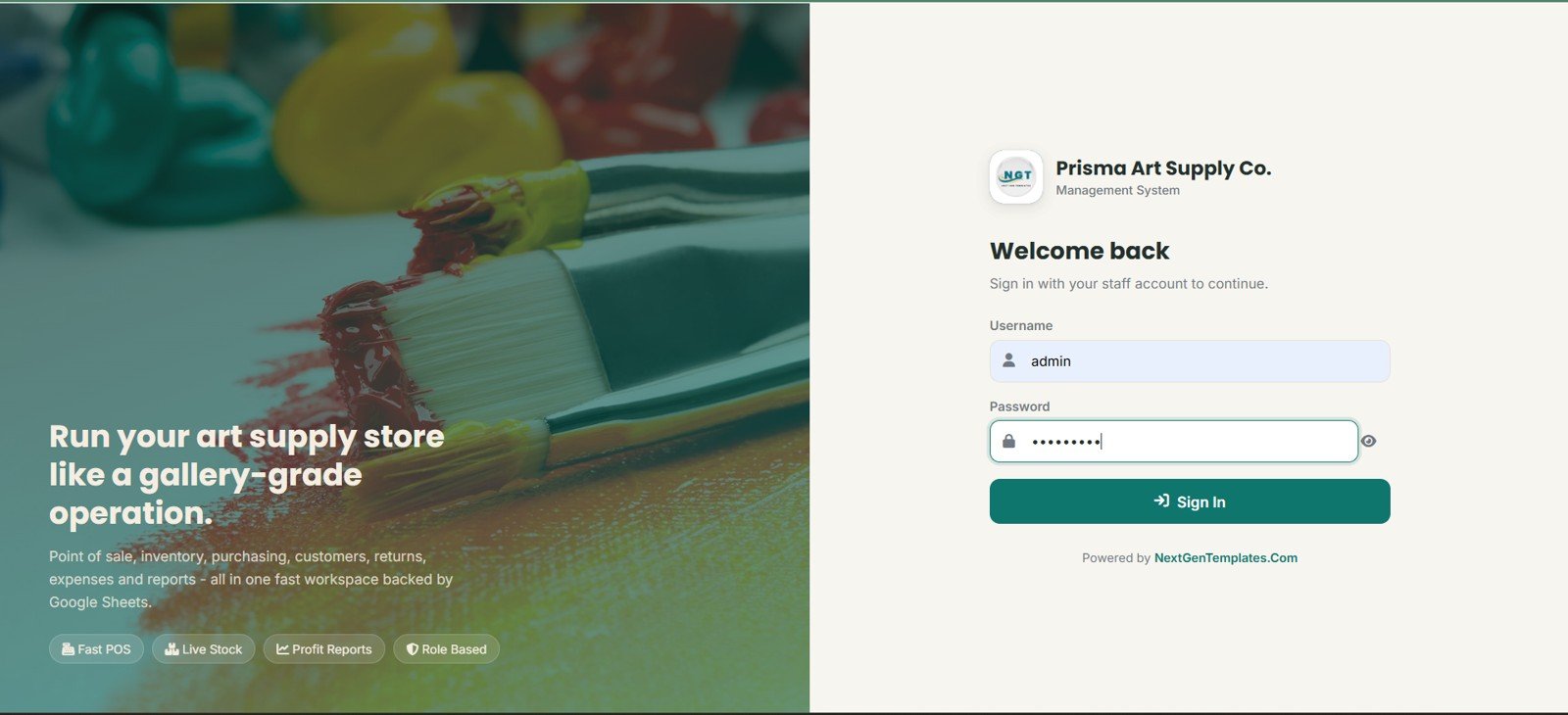
The Login Page gives authorized staff a secure entry point with username, password, password visibility, and NextGenTemplates branding. It also reinforces the main workflow areas, including fast POS, live stock, profit reports, and role-based features.
2. Dashboard Overview
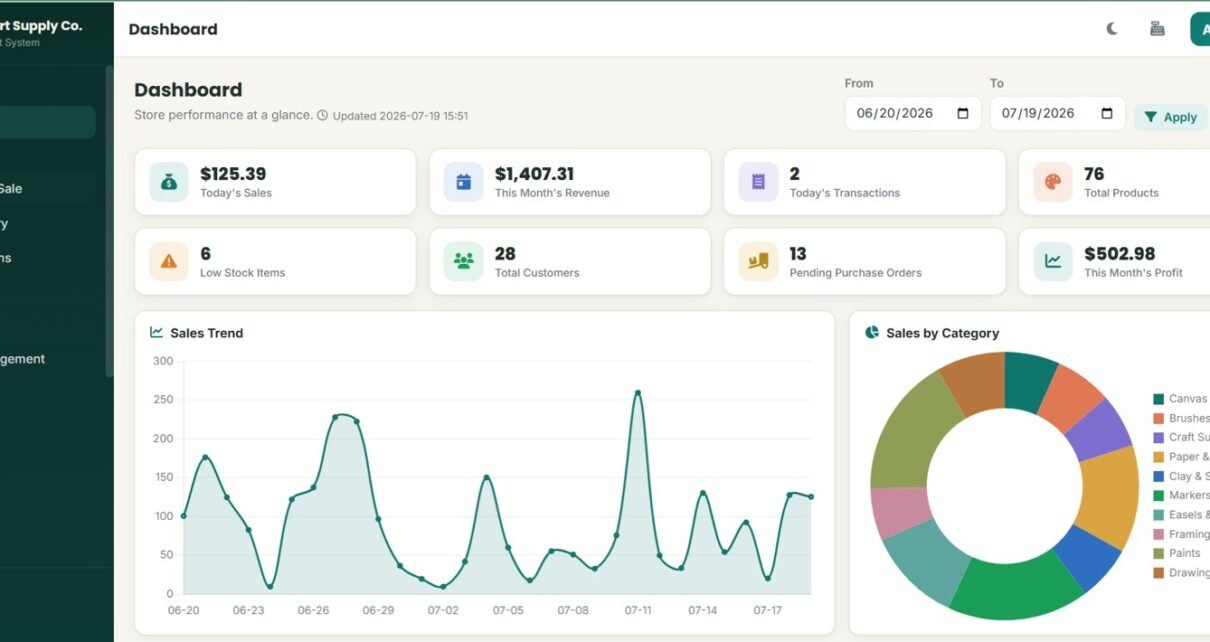
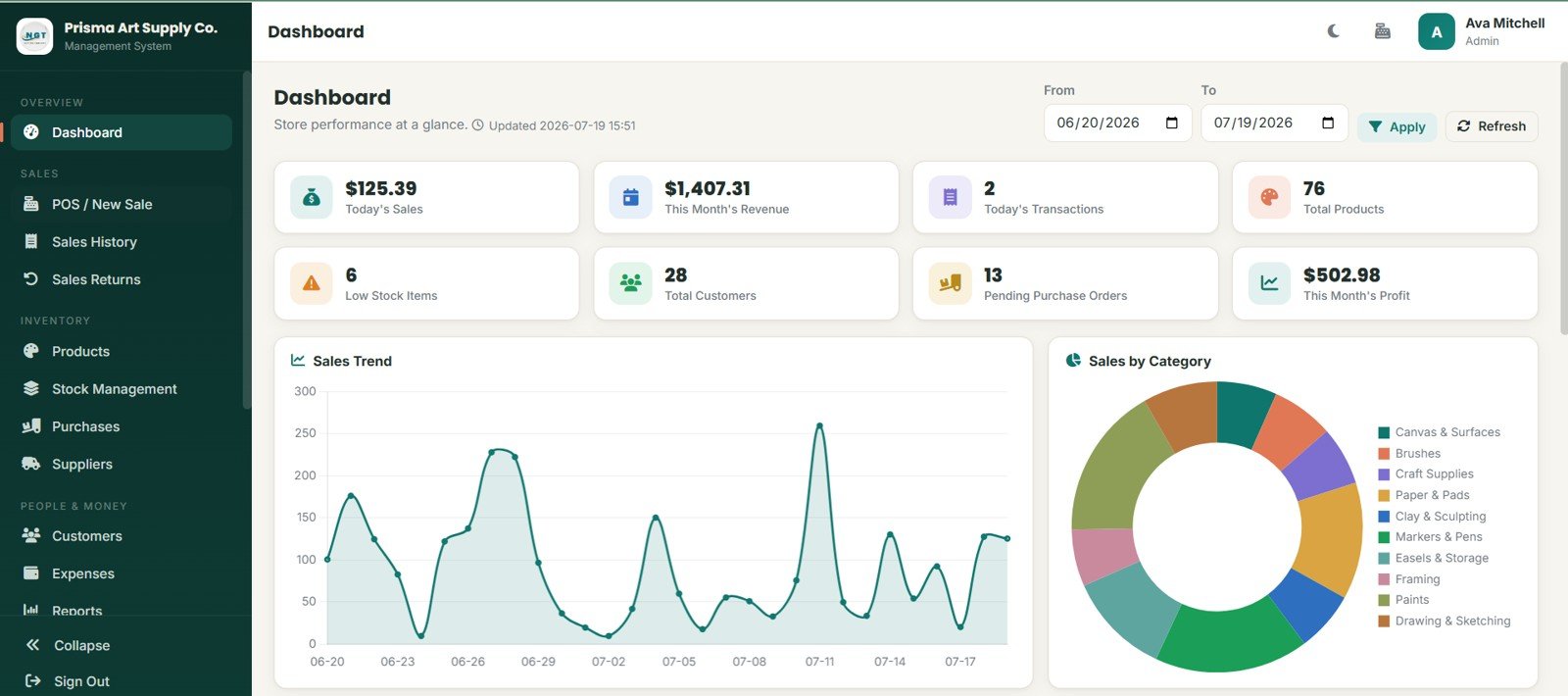
The Dashboard Overview is the manager’s first stop for daily control. Cards show Today’s Sales, This Month’s Revenue, Today’s Transactions, Total Products, Low Stock Items, Total Customers, Pending Purchase Orders, and This Month’s Profit.
Sales Trend by Date: This chart shows how sales are moving day by day. It helps store managers spot busy periods, slower days, and changes after promotions or class events.
Sales by Category: This chart compares sales across art supply categories. It helps identify whether paints, brushes, canvas, paper, markers, or other categories are driving the store’s revenue.
3. POS / New Sale
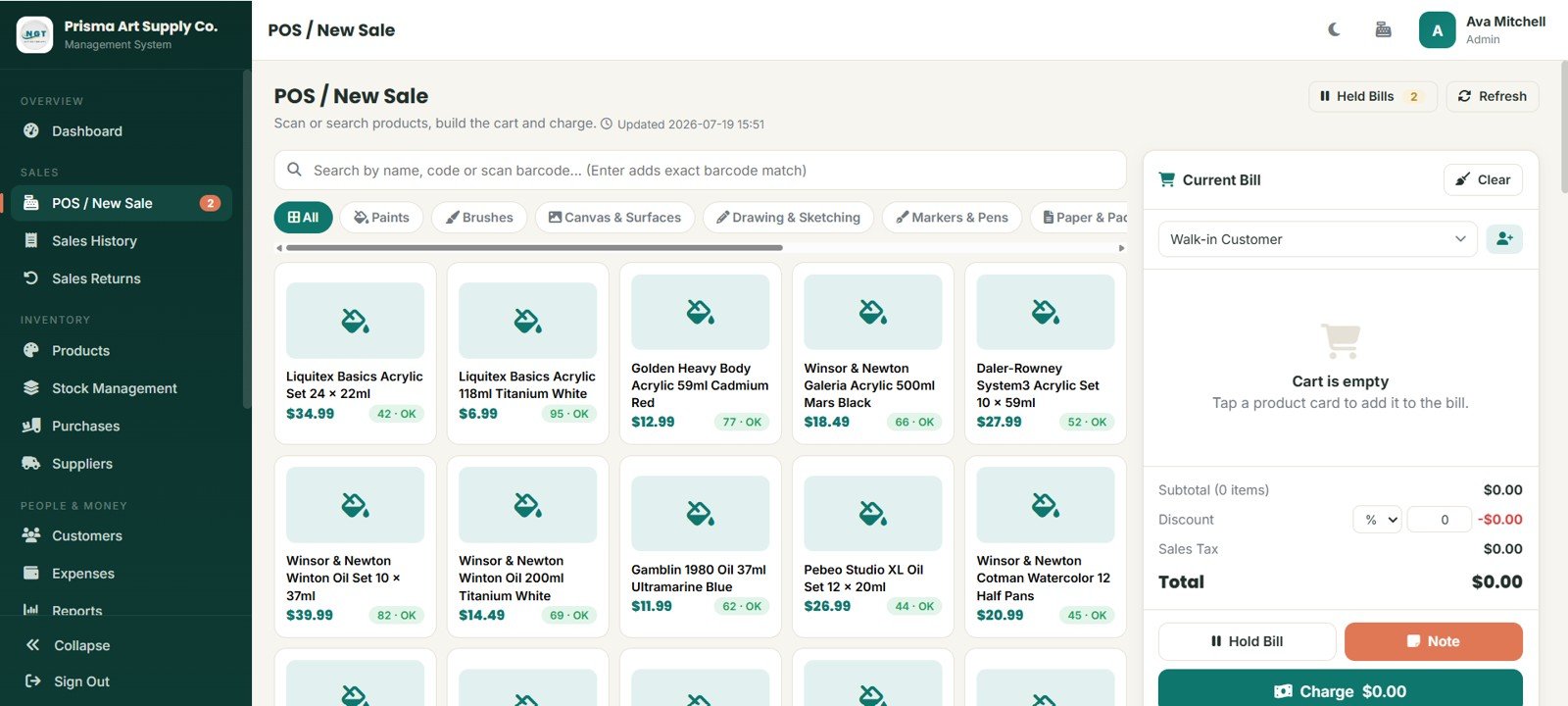
The POS / New Sale page supports product search by name, code, or barcode. Staff can filter by All, Paints, Brushes, Canvas and Surfaces, Drawing and Sketching, Markers and Pens, and Paper and Pads.
The Current Bill panel includes customer selection, cart items, subtotal, discount, sales tax, total, Hold Bill, Note, and Charge options. A held bills counter and refresh action support busy counter workflows.
4. Sales History
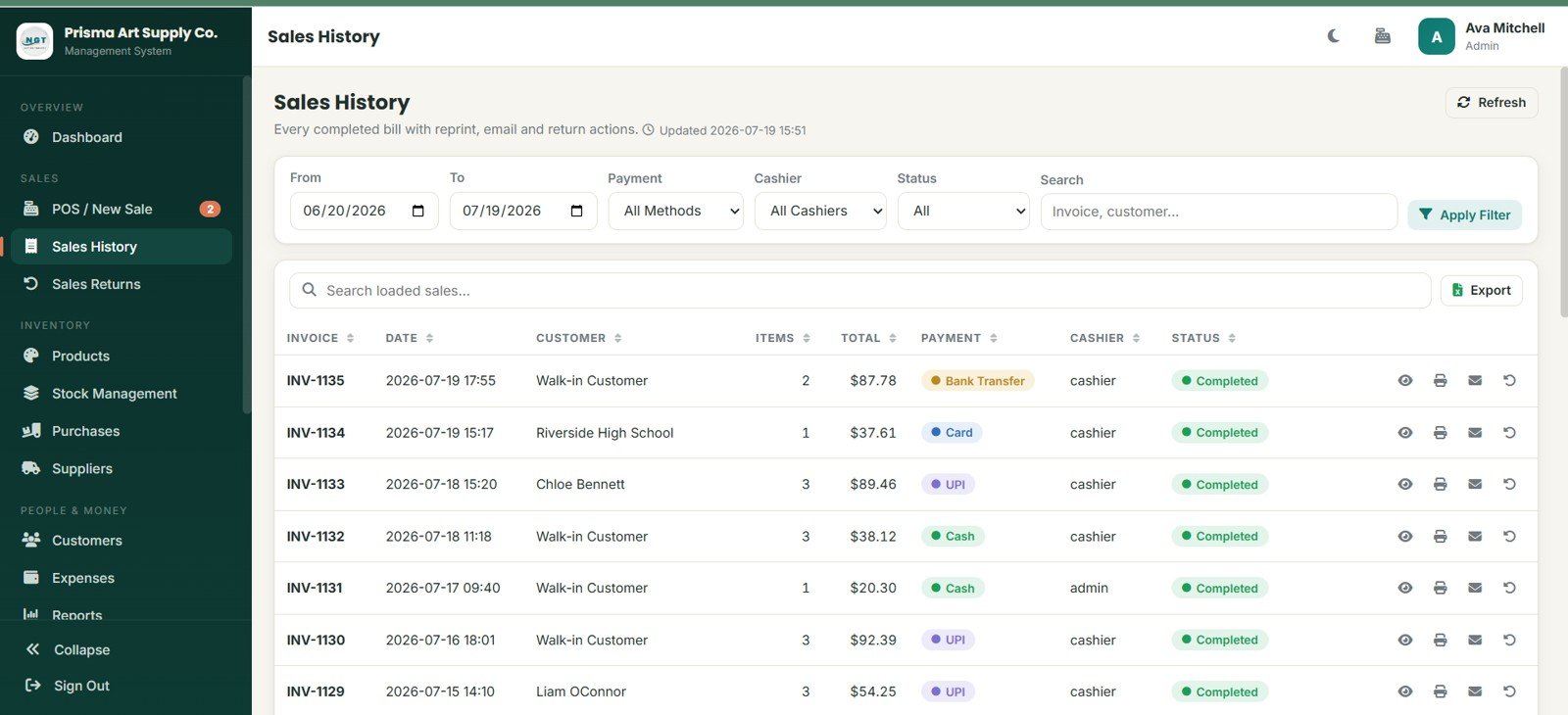
Sales History gives staff filters for date range, payment, cashier, status, and search. Completed bill records include invoice, date, customer, items, total, payment, cashier, and status.
Actions for view, reprint, email, and process returns help the team handle customer questions without searching through loose receipts or separate files.
5. Sales Returns
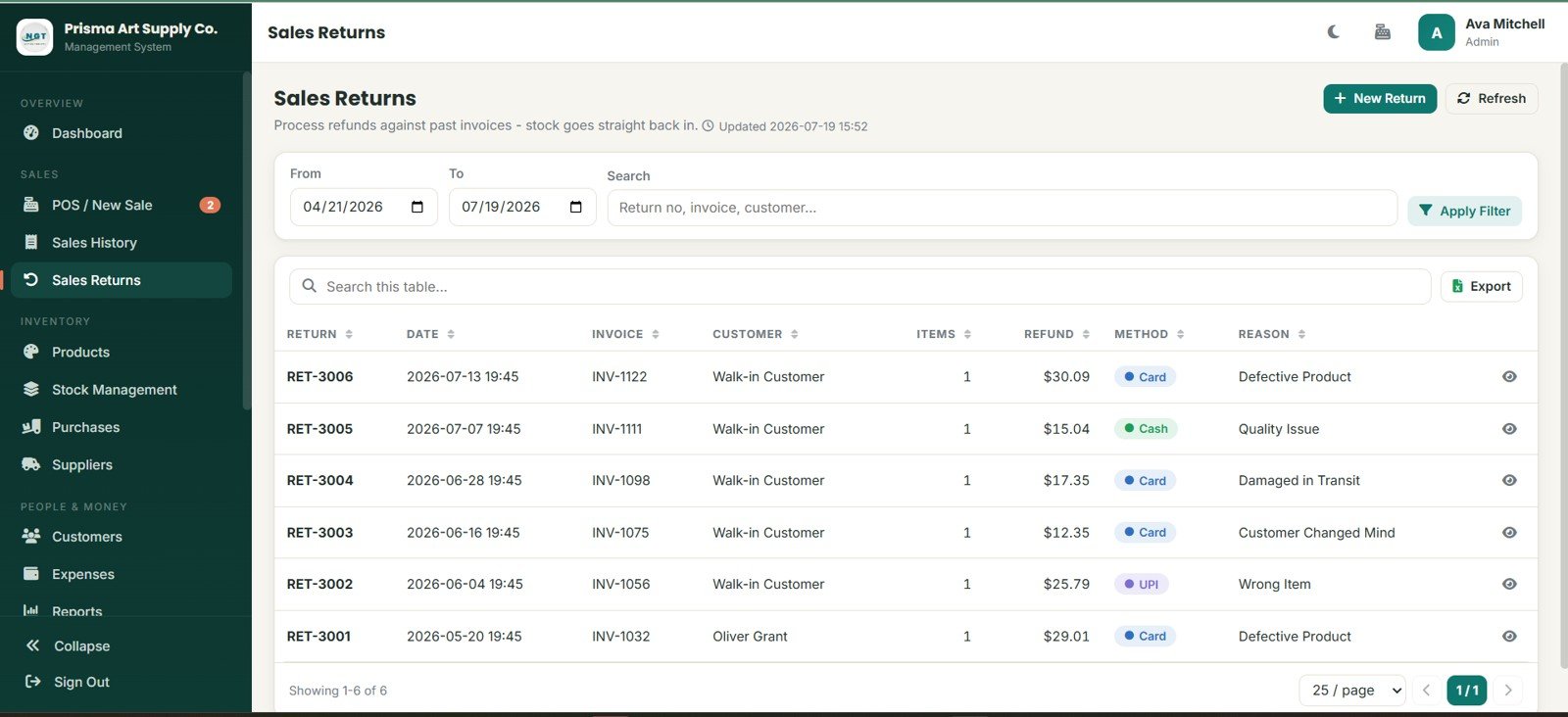
Sales Returns tracks return number, date, invoice, customer, items, refund amount, method, and reason. Return reasons include Defective Product, Quality Issue, Damaged in Transit, Customer Changed Mind, and Wrong Item.
The module is useful when art materials come back due to quality concerns, delivery damage, or customer selection mistakes.
6. Products
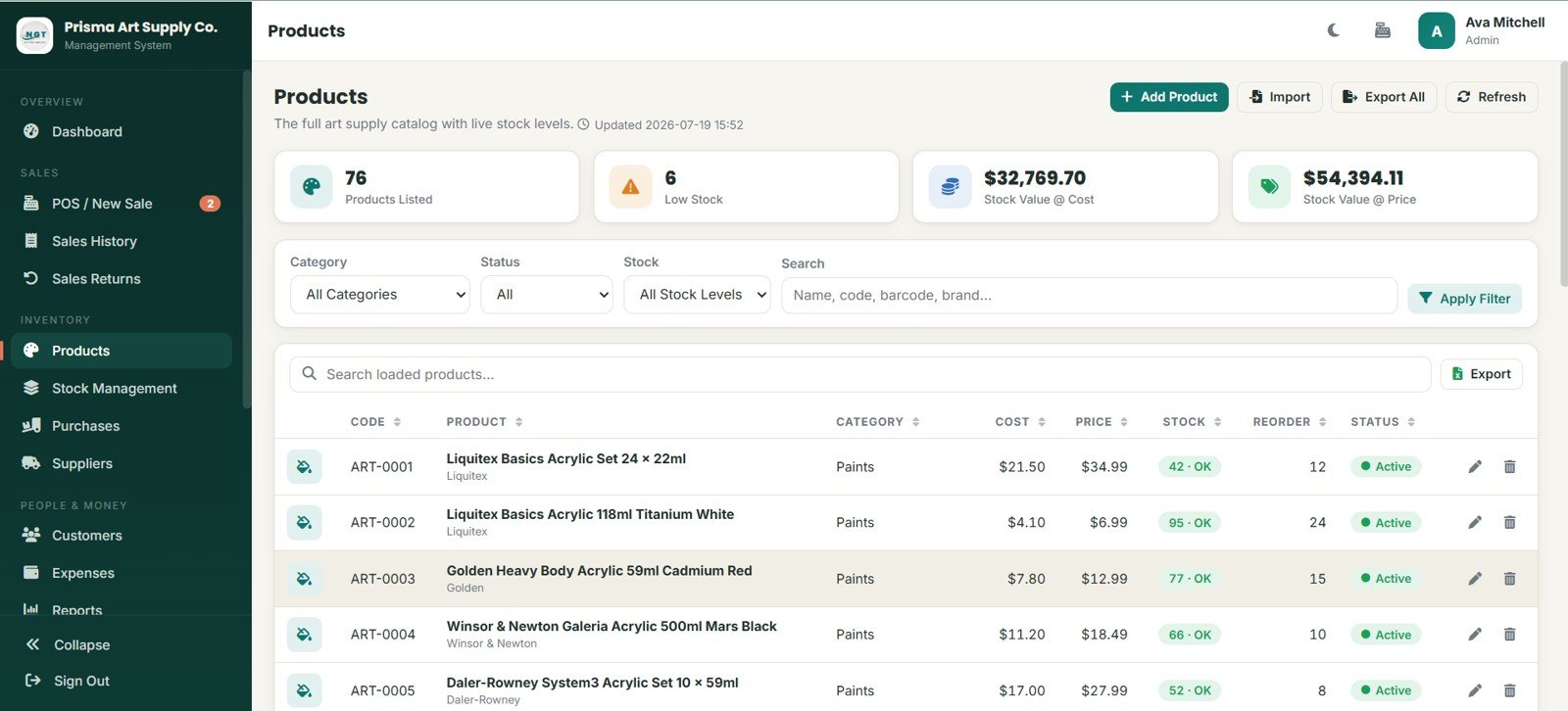
The Products page shows product summary cards for Products Listed, Low Stock, Stock Value at Cost, and Stock Value at Price. The product table includes code, product, category, cost, price, stock, reorder, and status.
Filters for category, status, stock, and search make it easier to maintain a large SKU list across paints, brushes, canvas, drawing tools, markers, pens, paper, pads, clay, and craft supplies.
7. Stock Management
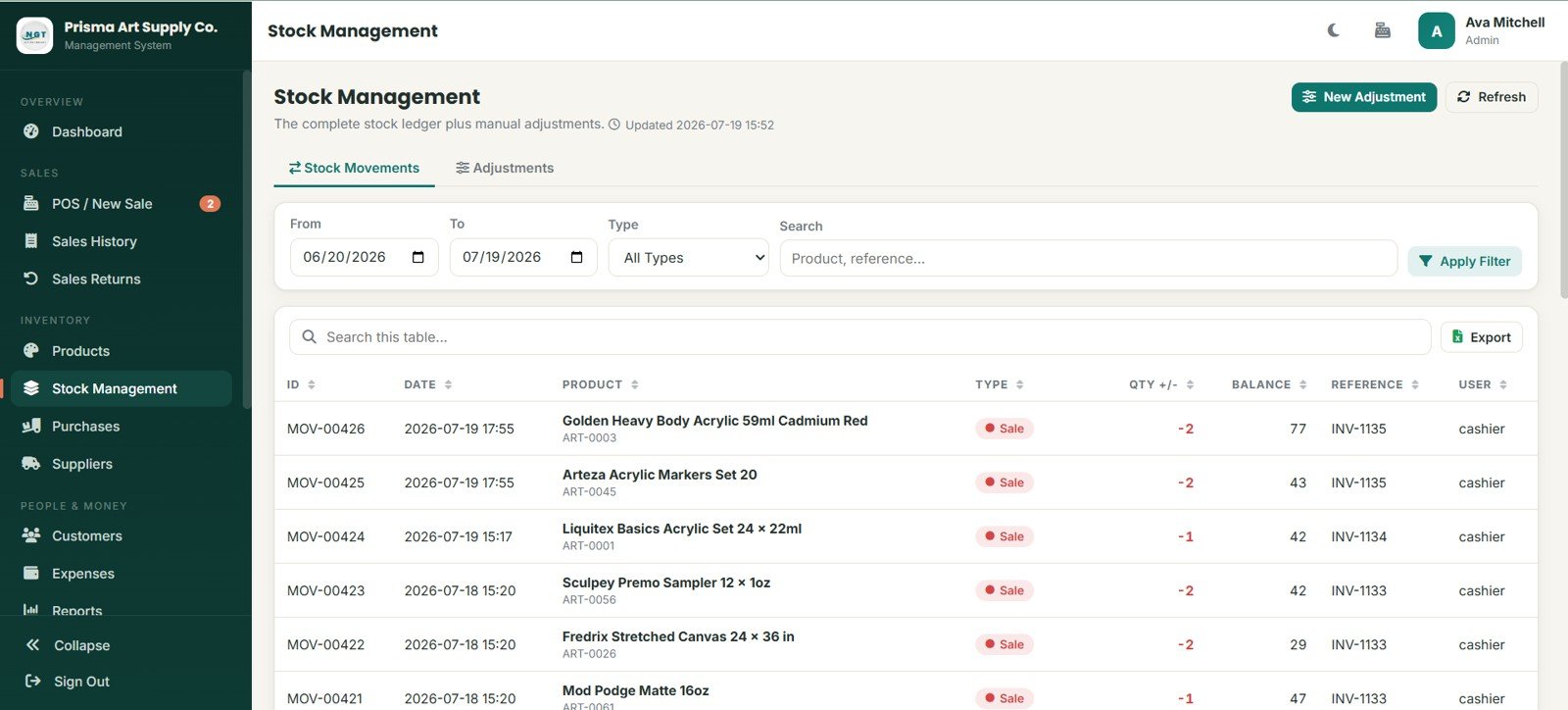
Stock Management separates Stock Movements and Adjustments. Records include ID, date, product, type, quantity change, balance, reference, and user.
Sale movements can be tracked with invoice references and cashier user details, which helps the store trace stock changes back to the transaction that caused them.
8. Purchases
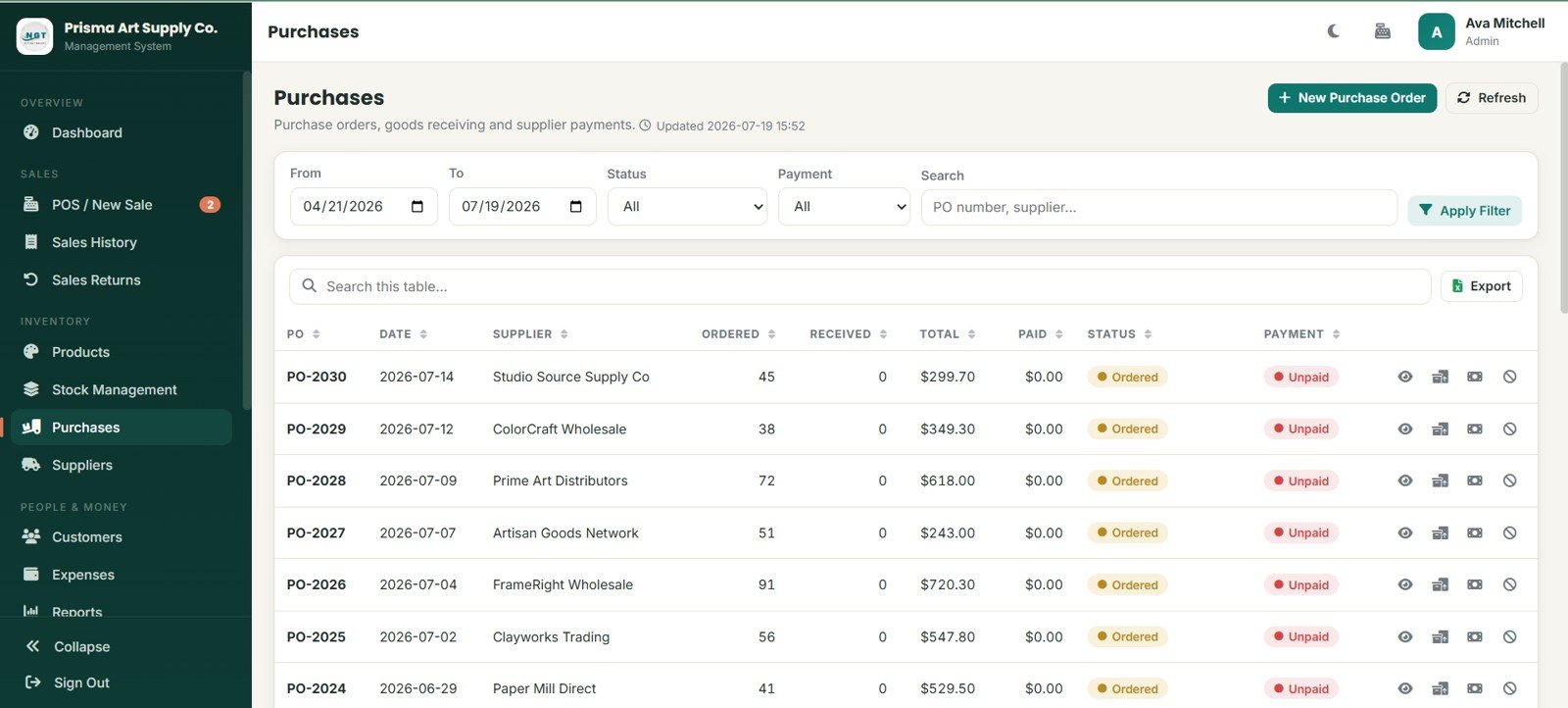
The Purchases page manages purchase orders with supplier, ordered quantity, received quantity, total, paid amount, status, and payment. Supplier examples include Studio Source Supply Co, ColorCraft Wholesale, and Prime Art Distributors.
Actions for viewing, receiving goods, recording supplier payment, and cancelling orders help link supplier buying to live inventory control.
9. Suppliers
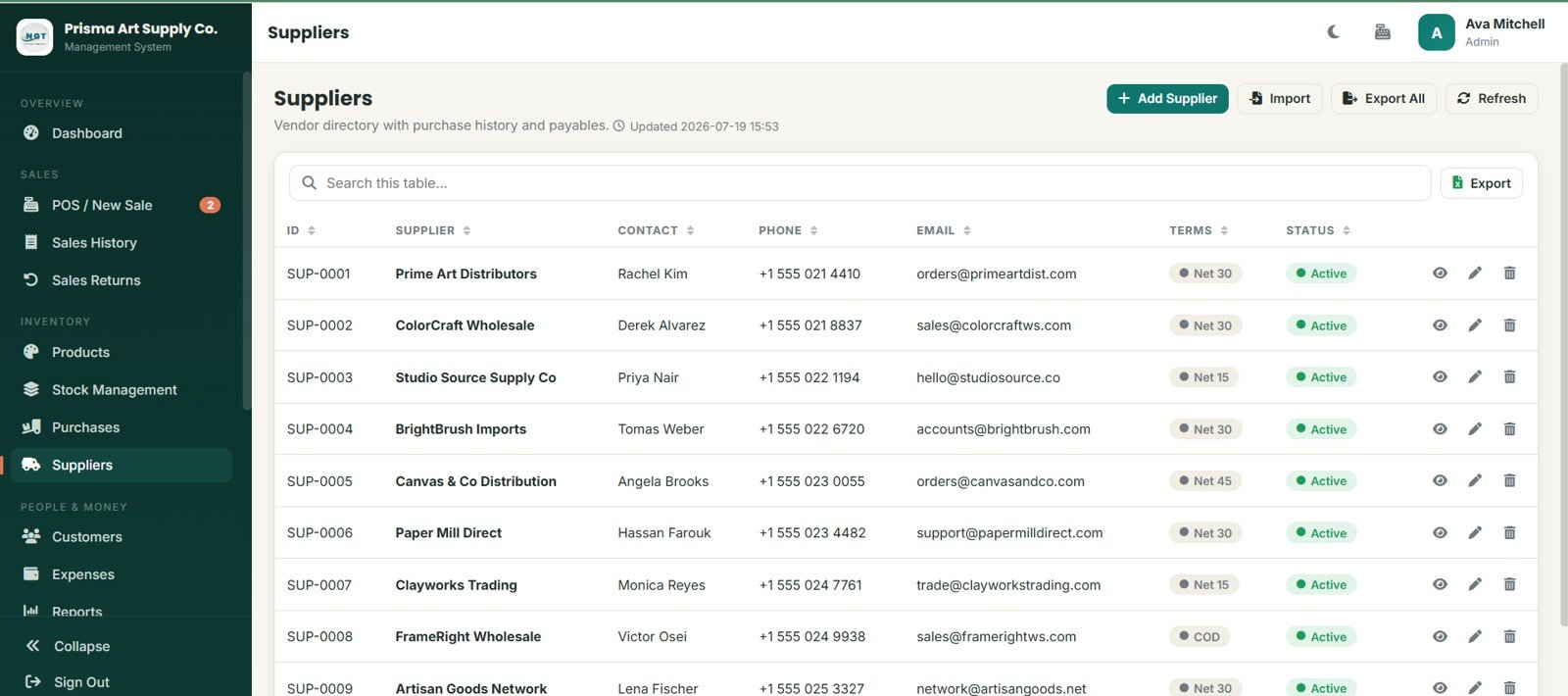
Suppliers keeps a vendor directory with purchase history and payables. Supplier records include ID, supplier, contact, phone, email, terms, and status.
Payment terms such as Net 30, Net 15, Net 45, and COD help the store review obligations before placing additional purchase orders.
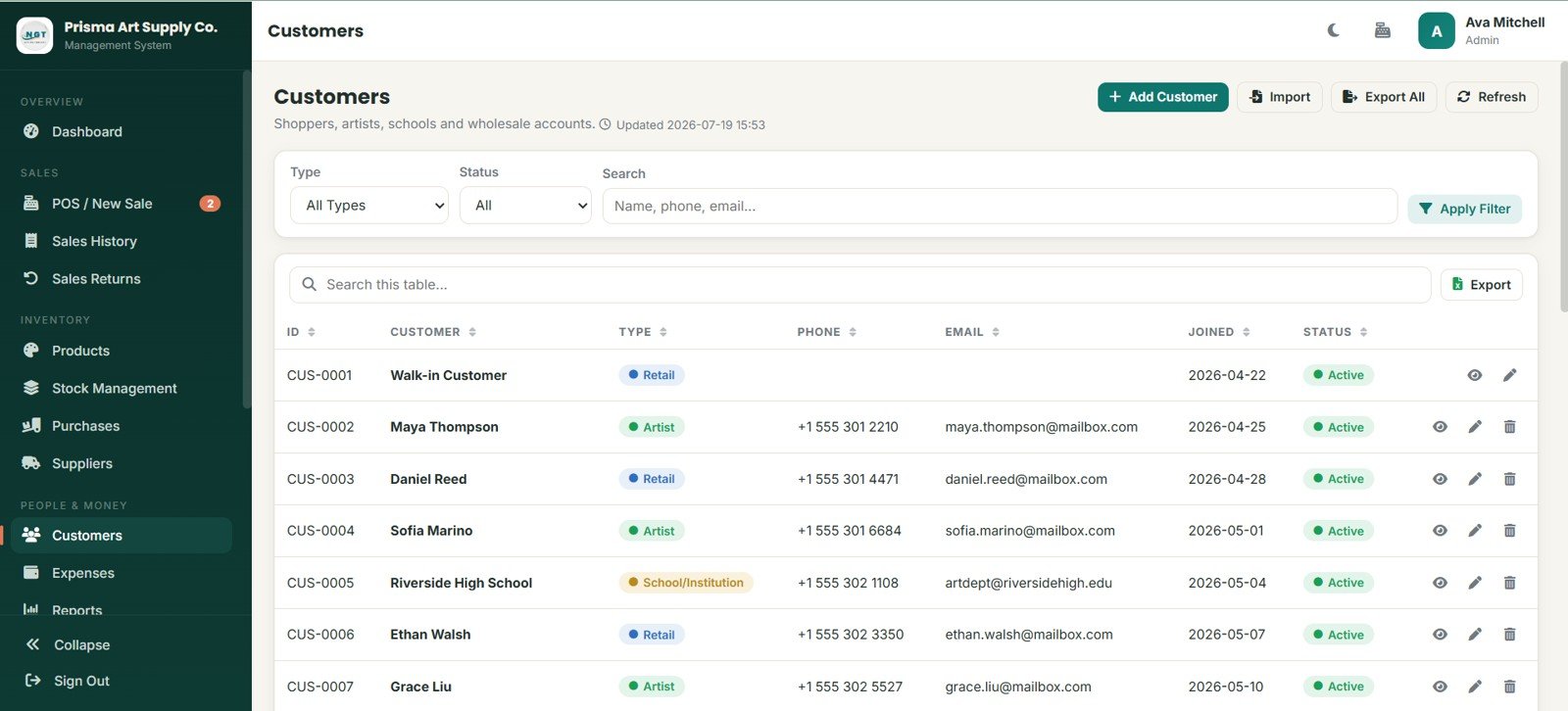
10. Customers
The Customers page stores ID, customer, type, phone, email, joined date, and status. Customer types include Retail, Artist, and School/Institution.
This is useful for art stores that serve walk-in buyers, recurring artists, and bulk school or institution buyers from the same shop.
11. Expenses
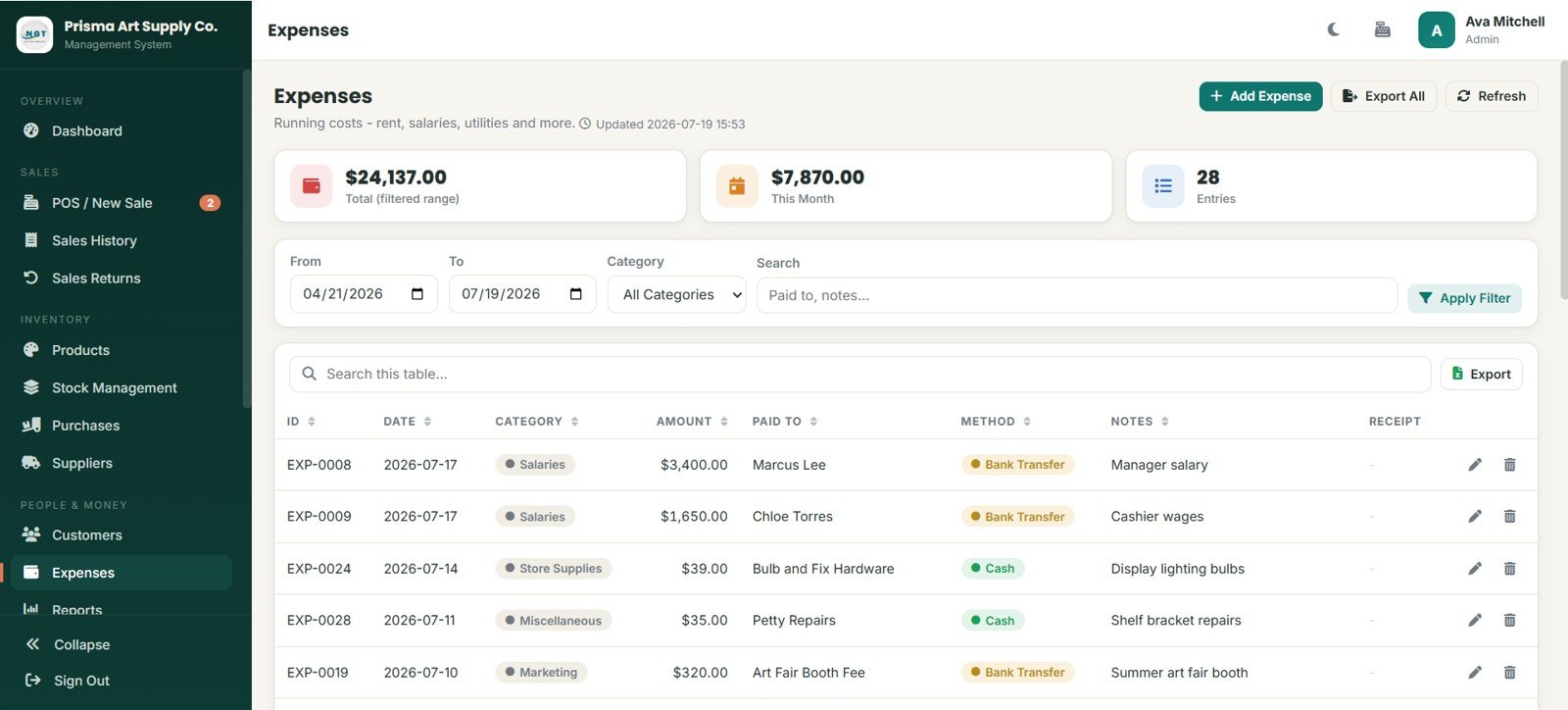
Expenses includes summary cards for Total Filtered Range, This Month, and Entries. Records include ID, date, category, amount, paid to, method, notes, and receipt.
Expense categories such as Salaries, Store Supplies, Miscellaneous, and Marketing help the owner understand store costs beyond product purchases.
12. Reports
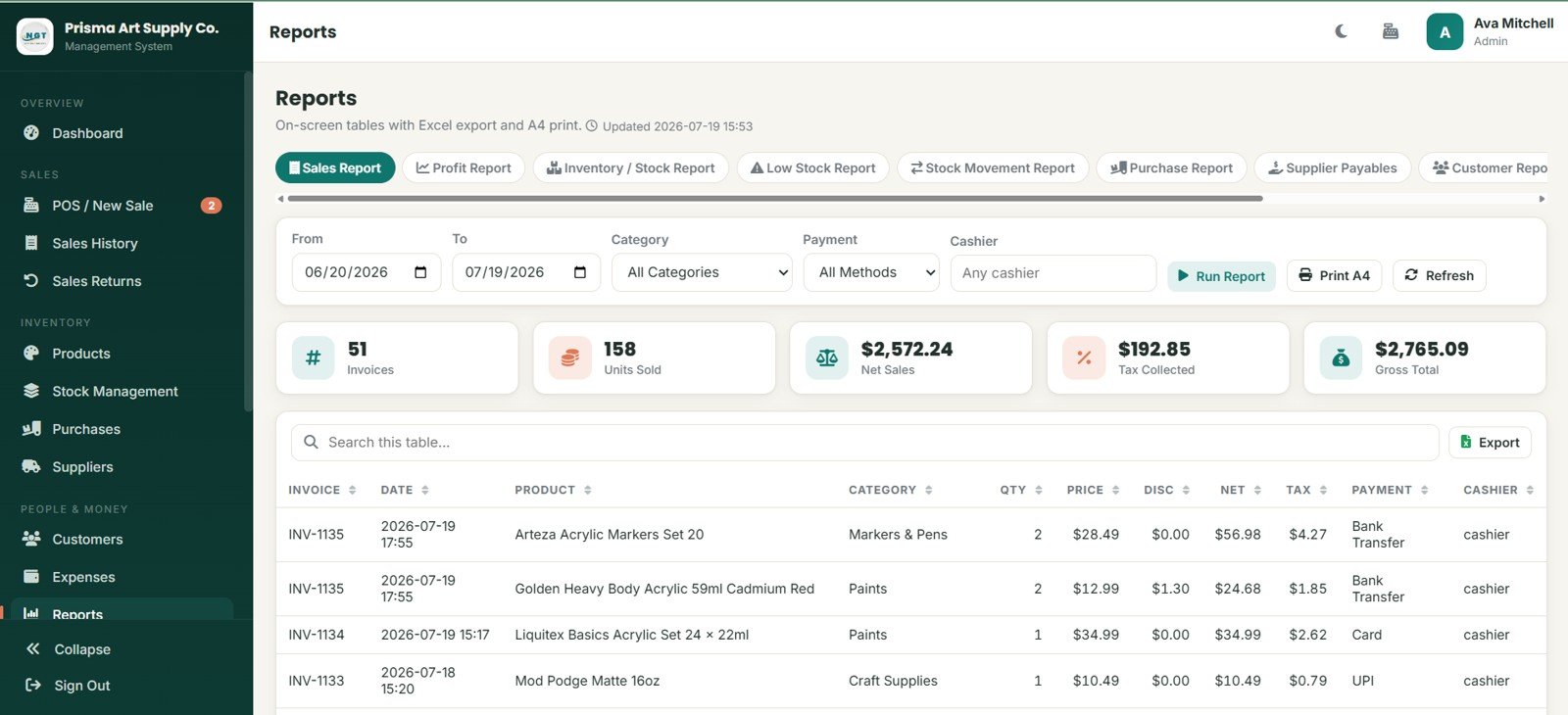
Reports includes tabs for Sales Report, Profit Report, Inventory / Stock Report, Low Stock Report, Stock Movement Report, Purchase Report, Supplier Payables, and Customer Report.
Filters for From, To, Category, Payment, and Cashier let managers run targeted reports before printing A4 output, refreshing data, or exporting results.
13. User Management
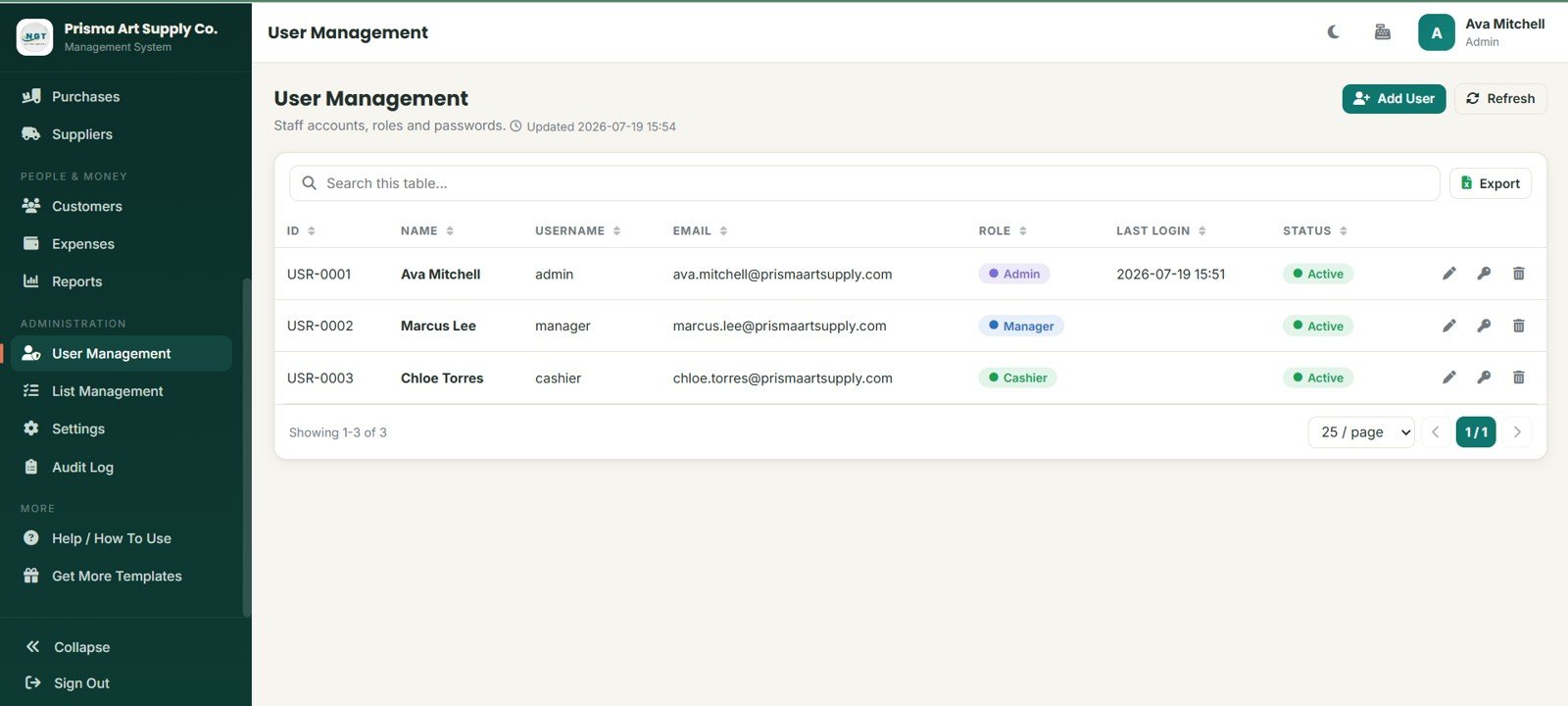
User Management stores staff ID, name, username, email, role, last login, and status. Roles include Admin, Manager, and Cashier.
The page supports add user, refresh, export, search, edit, password, and delete actions for account control.
14. List Management
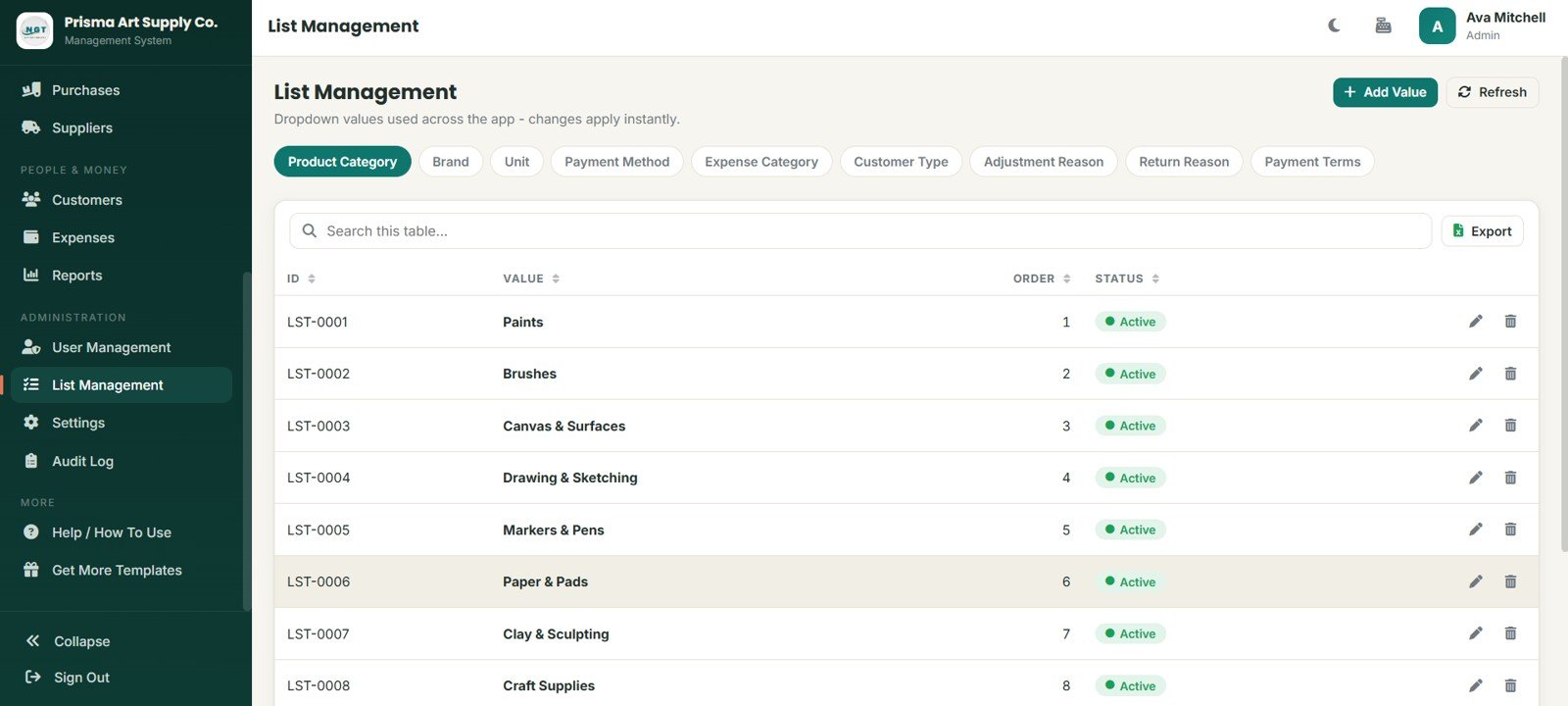
List Management controls dropdown values used across the app. Tabs include Product Category, Brand, Unit, Payment Method, Expense Category, Customer Type, Adjustment Reason, Return Reason, and Payment Terms.
Values such as Paints, Brushes, Canvas and Surfaces, Drawing and Sketching, Markers and Pens, Paper and Pads, Clay and Sculpting, and Craft Supplies can be maintained from one place.
15. Settings
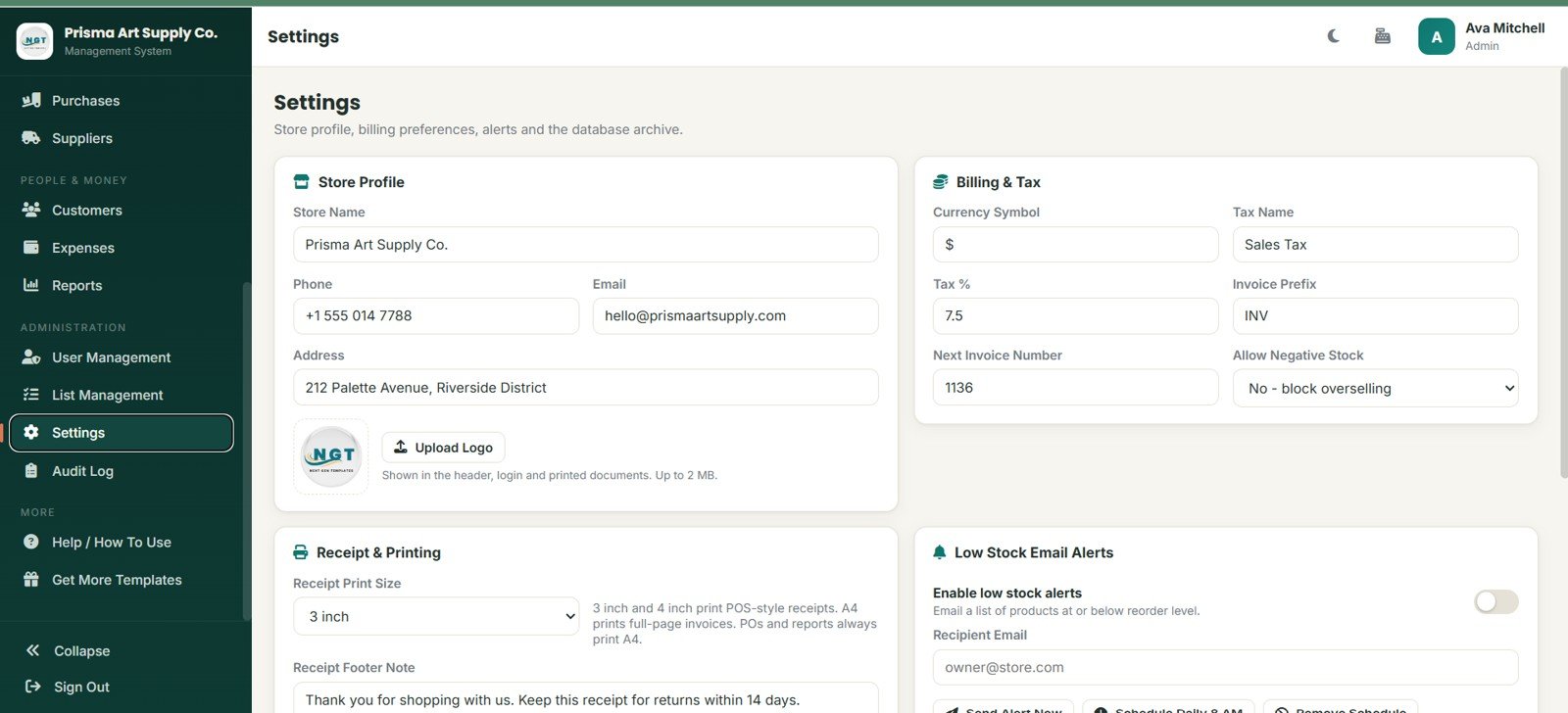
Settings stores the store name, phone, email, address, logo upload, currency symbol, tax name, tax percentage, invoice prefix, next invoice number, and negative stock control.
It also includes receipt print size, receipt footer note, low-stock email alerts, alert scheduling, and database archive setup.
16. Audit Log
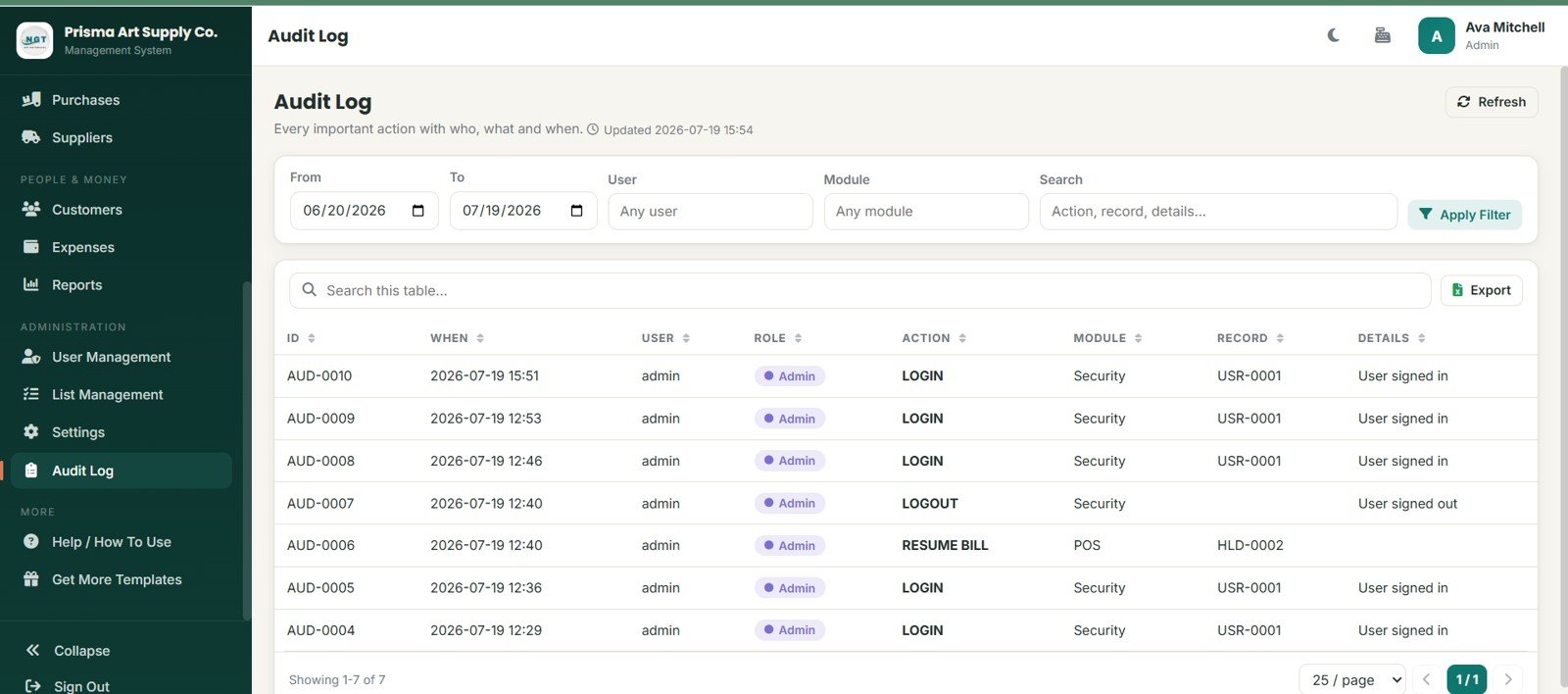
Audit Log records ID, when, user, role, action, module, record, and details. Filters for date, user, module, and search help review activity by area.
LOGIN, LOGOUT, and RESUME BILL actions give visibility into staff activity and POS usage patterns.
Art Supply Store Management System Web App vs. Google Sheets Workbook vs. Paid Retail POS SaaS – Feature Comparison
| Feature | This template | Google Sheets workbook | Paid retail POS SaaS |
|---|---|---|---|
| Cost | $39.99 one-time sale price | Low cash cost but more build effort | Monthly or annual subscription |
| Platform | Browser-based web app after deployment | Spreadsheet tabs | Vendor-hosted cloud app |
| Setup time | Start from 16 prepared pages | Build formulas, forms, and reports manually | Onboarding and configuration |
| Real-time team collaboration | Role-based multi-user workflow after setup | Shared sheet editing | Usually available by plan |
| Mobile access | Browser access after deployment | Sheets app or browser | Vendor app or browser |
| Customizable fields | Editable lists, labels, pages, and data structure | Editable columns and formulas | Depends on vendor permissions |
| Share with link | Possible after deployment and access setup | Yes | Account-based access |
| Year-1 cost at 5 users | $39.99 template cost | Template cost plus setup time | Can rise with seats, terminals, and add-ons |
| Art supply category control | Paints, brushes, canvas, drawing, markers, paper, clay, and craft supplies | Manual setup | Vendor catalog setup |
| Audit visibility | Dedicated audit log page | Limited unless built separately | Usually included on business plans |
Who Should Use This Template
- Independent art supply store owners who need POS and stock tracking together.
- Studio shops selling class materials, canvas, brushes, paints, and drawing tools.
- School supply counters that serve retail, artist, and institution customers.
- Retail consultants creating a starter workflow for a creative-products shop.
- Small teams that want browser-based access without jumping straight to recurring POS SaaS.
It is not the best choice if the business needs integrated payment terminals, automated tax filing, marketplace sync, barcode hardware drivers, direct accounting integrations, or enterprise-grade retail support out of the box.Art Supply Store Management System Web App
Real-World Use Cases
Maya runs an independent art supply store. She uses POS, Products, Low Stock Items, Purchases, and Suppliers to know which paints, brushes, and paper pads need restocking before the weekend.
Leo manages a studio retail counter. He uses Customers, Sales History, Sales Returns, and Reports to separate walk-in buyers from art class accounts and school purchases.
Anika supports a school art program. She uses Purchase Orders, Supplier Payables, Expenses, and Profit Reports to keep budget discussions grounded in actual store records.
Advantages of Art Supply Store Management System Web App
- It connects POS billing with product stock, returns, purchases, expenses, and reporting.
- It includes art-supply-specific categories instead of starting from a blank retail database.
- It supports staff roles, list values, settings, and audit logs for better control.
- It is a one-time download, which can be easier for small stores than recurring per-user SaaS.
- It gives managers screenshots and page structure they can understand before customization.
Opportunities for Improvement
This is a template-based web app, not a certified retail POS platform. Stores may still need custom work for payment hardware, barcode scanners, receipt printers, tax compliance, accounting sync, marketplace integrations, and live database scaling.
Teams should test the deployed app with sample transactions before using it for live sales. Staff permissions, backup routines, and product naming rules matter as much as the interface.
Best Practices
- Set store profile, tax, invoice prefix, receipt footer, and low-stock alert settings before entering live transactions.
- Clean product categories, brands, units, payment methods, customer types, return reasons, and payment terms in List Management.
- Enter supplier and product records before recording purchases or POS sales.
- Use consistent product codes and barcode values to make POS search reliable.
- Review Low Stock Items and Pending Purchase Orders at least weekly.
- Use the Audit Log when reviewing staff activity or unusual bill changes.
- Follow Google’s official Apps Script web app guidance when deploying and managing web app access.
Explore Relevant Templates
- Art Supply Store Management System Web App – the product download for this 16-page system.
- Art and Craft Class Management System Web App – useful for class-based art and craft operations.
- E-commerce Order Fulfillment Tracking System Web App – related order and fulfillment workflow.
- Pharmacy Inventory and Billing Management System Web App – another inventory and billing web app structure.
- Web-based Advanced Inventory Management System – useful when stock control is the main requirement.
- Browse all Web Apps on NextGenTemplates.
Interested in the spreadsheet skills behind systems like this? The NextGenTemplates Academy learning paths cover them step by step, with practice files.
Get the Art Supply Store Management System Web App
Frequently Asked Questions
What does the Art Supply Store Management System Web App include?
It includes 16 pages covering login, dashboard, POS, sales history, returns, products, stock management, purchases, suppliers, customers, expenses, reports, user management, list management, settings, and audit log.Art Supply Store Management System Web App
Is this template only for art supply stores?
It is designed around art supply store workflows, including paints, brushes, canvas, drawing supplies, markers, paper pads, clay, and craft supplies. A similar retail store could customize the lists, labels, and product categories.
Does it include POS checkout?
Yes. The POS / New Sale page includes product search, category filters, current bill panel, customer selector, cart items, subtotal, discount, tax, total, held bill, notes, and charge controls.
Can it track suppliers and purchase orders?
Yes. The Purchases and Suppliers pages track supplier records, purchase orders, receiving, payments, status, payment terms, and payables.
Does it replace a full POS SaaS platform?
No. It is a web app template. Stores needing certified payment processing, tax filing integrations, hardware support, and live vendor support should review dedicated POS systems.
Can staff roles be managed?
Yes. The User Management page supports Admin, Manager, and Cashier role concepts with user records, status, last login, password action, edit, and delete controls.
About the Author
Built by PK – Microsoft Certified Professional with 15+ years of Excel, Google Sheets, and Power BI experience. Founder of NextGenTemplates, reaching 300K+ subscribers across YouTube channels. Every template is hand-built and tested before release.
Conclusion
The Art Supply Store Management System Web App gives creative retail teams a structured way to manage daily sales, live stock, product categories, supplier purchases, returns, expenses, customers, staff users, reports, settings, list values, and audit history. It is best for small stores that need more control than a spreadsheet and a lower-cost starting point than recurring retail SaaS.Art Supply Store Management System Web App
Download the Art Supply Store Management System Web App from NextGenTemplates.
Last updated: July 19, 2026.