The Chiropractic Clinic Management System Tracker in Google Sheets runs an entire practice from 7 connected sheets. It tracks 8 headline KPIs, renders 4 auto-updating charts, filters through 2 dashboard slicers, and pulls every dropdown in the workbook from 7 editable lists on a single Setup sheet. Setup takes under 10 minutes.
Most small chiropractic practices end up running on three disconnected things: a paper or Google Calendar diary, a folder of clinical notes, and a separate invoice book or accounting app. Nothing talks to anything else, so nobody can answer the two questions that actually matter — how much did we bill last month, and how much of it has actually landed in the bank? This tracker closes that gap by putting scheduling, session notes, invoicing and insurance claim status into one Google Sheets file where every number feeds the same dashboard.
Get the Chiropractic Clinic Management System Tracker in Google Sheets
Key Features of the Chiropractic Clinic Management System Tracker
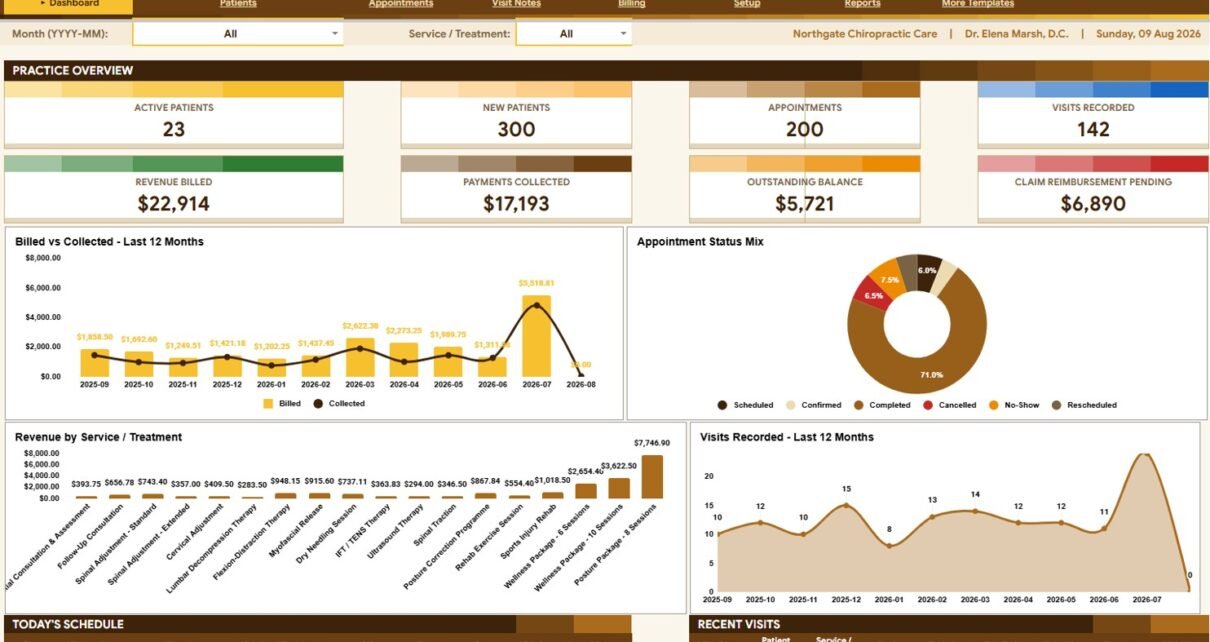
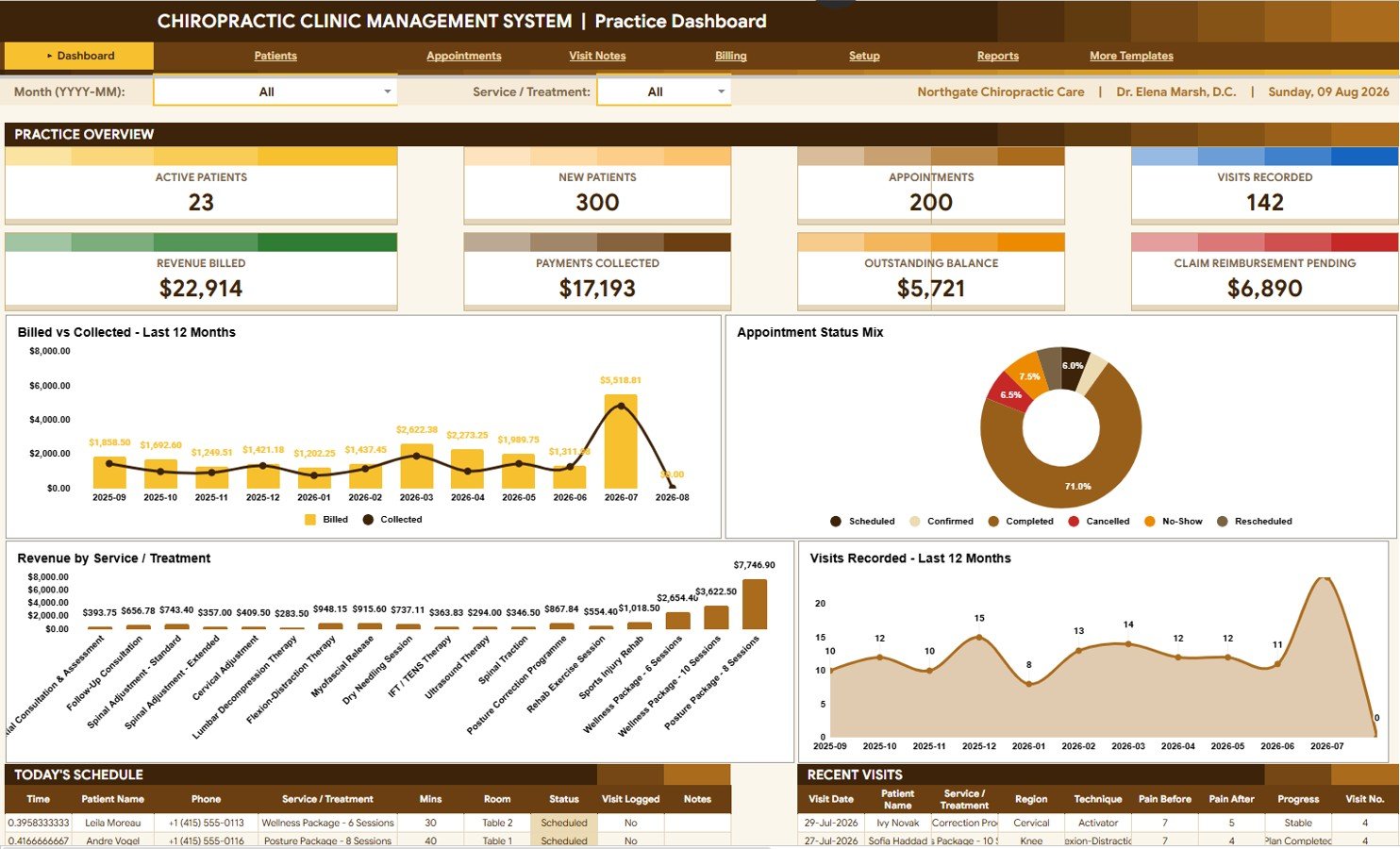
8 practice KPIs, recalculated live. The Practice Dashboard carries Active Patients, New Patients, Appointments, Visits Recorded, Revenue Billed, Payments Collected, Outstanding Balance and Claim Reimbursement Pending. Log an appointment or a payment anywhere in the workbook and every card updates on its own.
4 charts chosen for clinic decisions, not decoration. Billed vs Collected by Month shows the gap between what you invoiced and what you were paid. Appointments by Appointment Status surfaces no-shows and cancellations. Revenue by Service / Treatment ranks which adjustments and packages actually earn. Visits Recorded by Month tracks clinical throughput.
2 slicers re-cut everything at once. Pick a Month (YYYY-MM) and a Service / Treatment at the top of the dashboard, and all 8 cards, all 4 charts and both bottom tables refilter together.
Outcome tracking is built into the clinical record. Every row on Visit Notes captures Pain Before, Pain After and a calculated Pain Change, alongside Region Treated, Technique Used, Practitioner Findings and Progress. That is the evidence trail insurers and referring GPs ask for, and it is a strong retention tool when a patient can see their own pain score falling across a treatment plan.
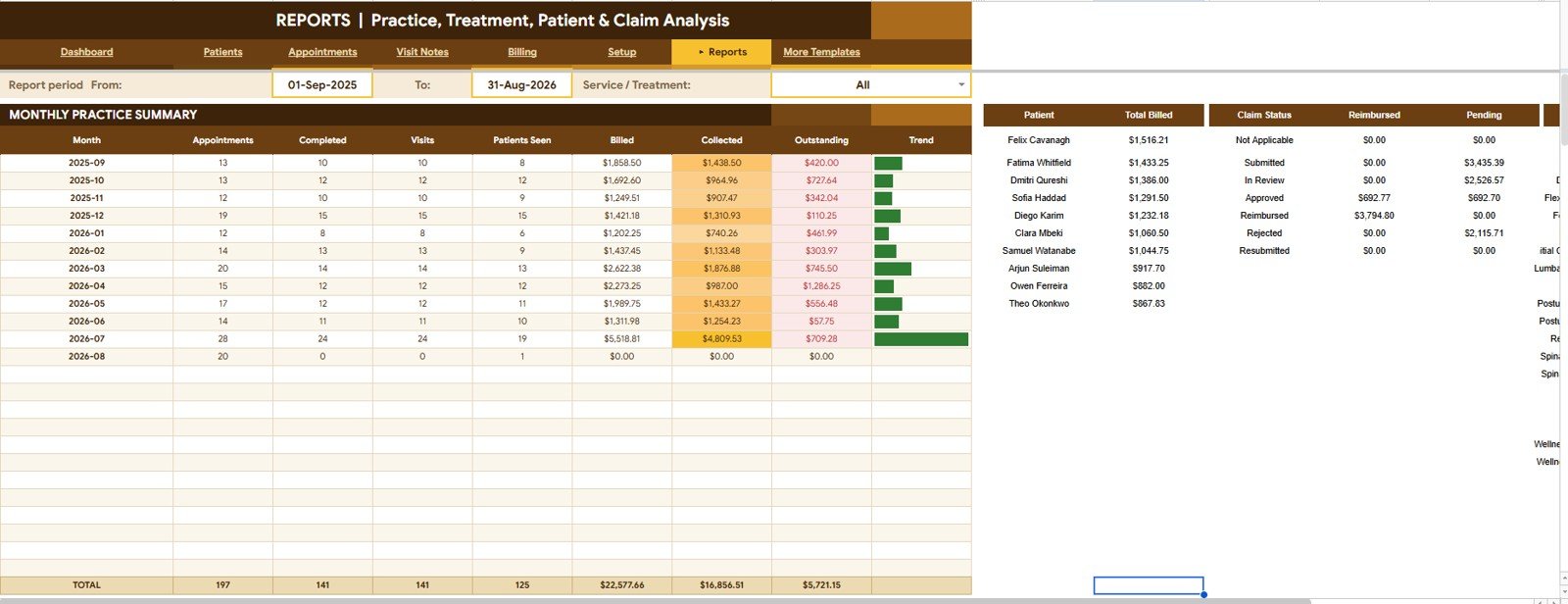
Insurance is tracked as money, not as a note. The Reports sheet splits Reimbursed and Pending Amount by Claim Status so you know exactly how much is sitting with insurers rather than with patients.
Sheets Explanation: What Each Tab Does
1. Practice Dashboard — Clinic Overview
Eight KPI cards sit across the top: Active Patients, New Patients, Appointments, Visits Recorded, Revenue Billed, Payments Collected, Outstanding Balance and Claim Reimbursement Pending. Below them are Billed vs Collected by Month, Appointments by Appointment Status, Revenue by Service / Treatment and Visits Recorded by Month, all controlled by the Month and Service / Treatment slicers. The bottom of the page holds two working tables — Today’s Schedule and Recent Visits — so the front desk never has to leave this tab.
2. Patients — Patient Master Register
The master list of everyone on your books. Analyses include Patient ID by Registration Date, Patient Name by Gender, Age by Date of Birth, Patients by City, Patients by Referral Source and Patients by Primary Complaint. Insurance is captured here too through Patients by Insurance Provider and Policy Number by Patient, with Practitioner Notes by Patient for anything that needs carrying forward between visits.
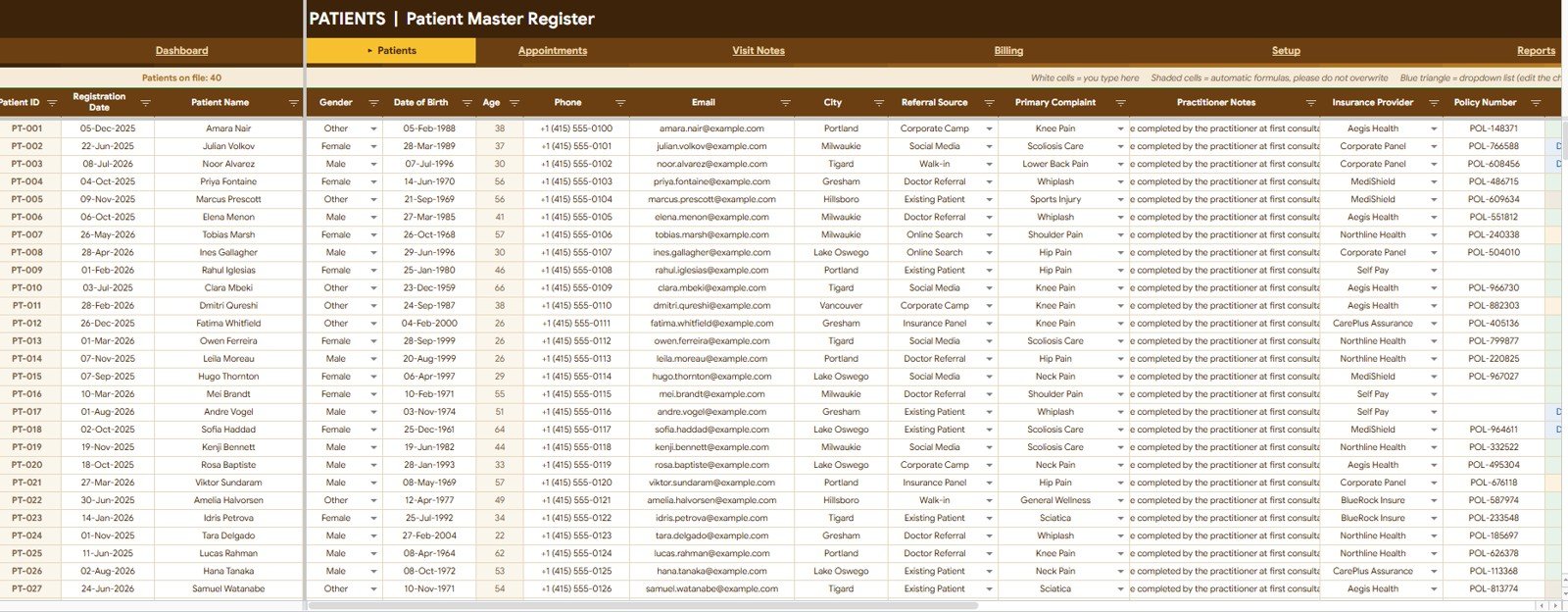
Referral Source is the quietly valuable column here. Once you have a few months of data, Patients by Referral Source tells you whether your new patients come from GP referrals, word of mouth, or your website — which is usually the difference between marketing spend that works and marketing spend that does not.
3. Appointments — Booking Diary
The diary covers Appointments by Date and Time, Appointments by Patient Name, Appointments by Service / Treatment, Duration (Min) by Appointment and Appointments by Room / Table. Operational tracking runs through Appointments by Status, Reminder Sent by Appointment, Visit Logged by Appointment, Days To Go by Appointment and Appointments by Month.
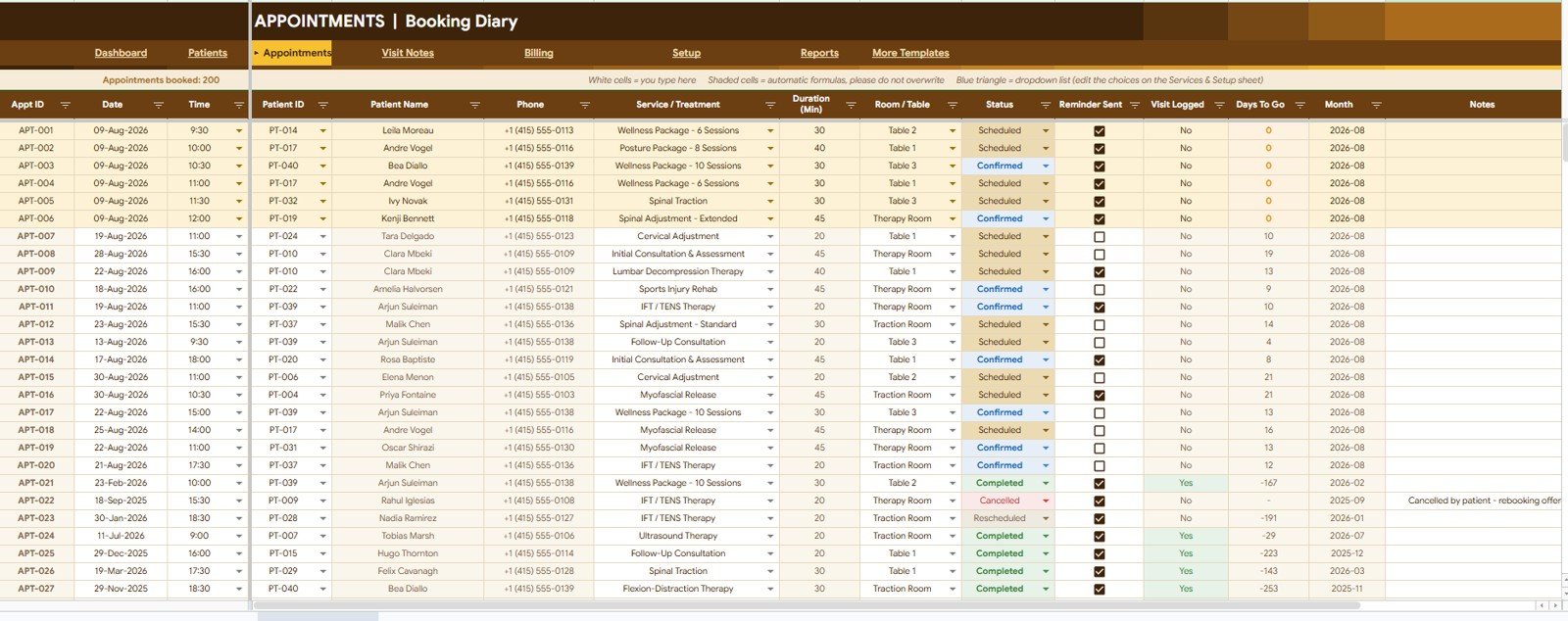
The Reminder Sent and Visit Logged flags are what stop bookings falling through the cracks. Reminder Sent gives reception a simple daily filter; Visit Logged shows which completed appointments still need a clinical note written up.
4. Visit Notes — Session Record
The clinical log holds Visits by Visit Date, Visit No. by Patient Name, Visits by Service / Treatment, Visits by Region Treated and Visits by Technique Used. Outcomes are recorded through Practitioner Findings by Visit, Pain Before by Visit, Pain After by Visit, Pain Change by Visit and Visits by Progress.
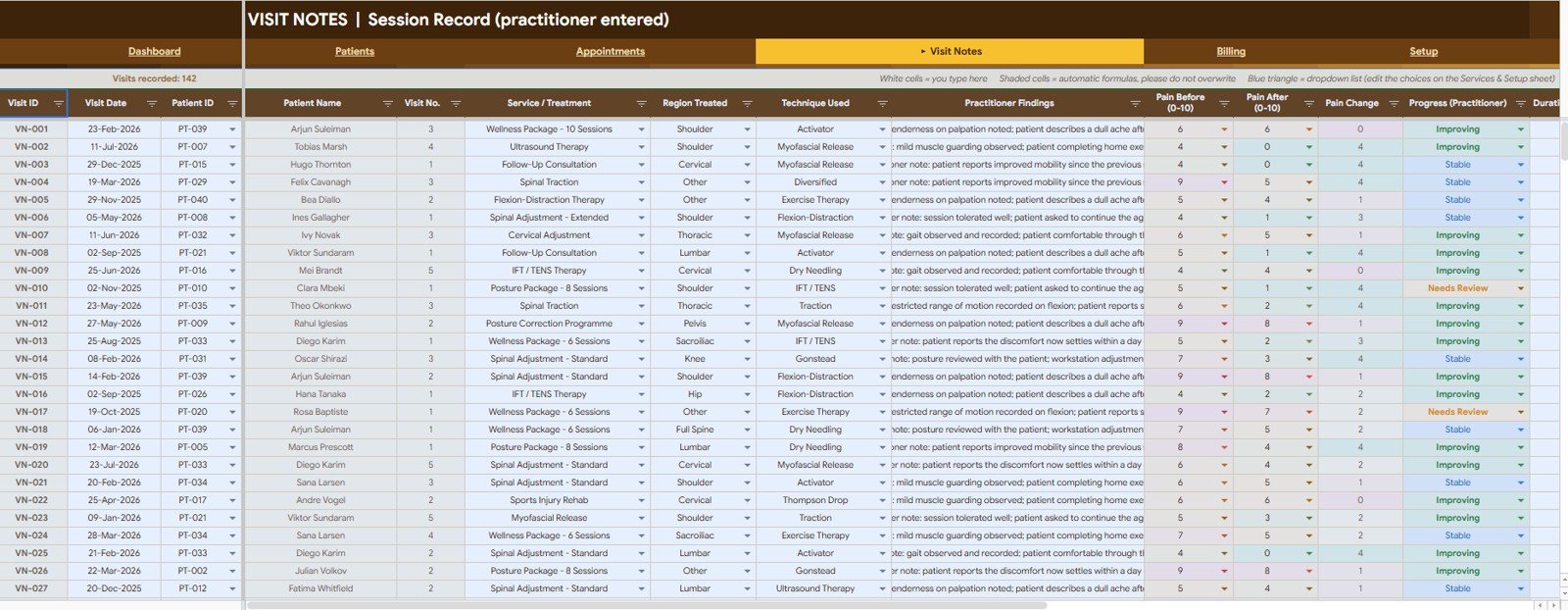
Because Visit No. is tracked per patient, you can see at a glance whether someone is on visit 2 of a 6-session package or has quietly stopped attending after visit 3 — the single best early warning for a drop-off in your treatment plans.
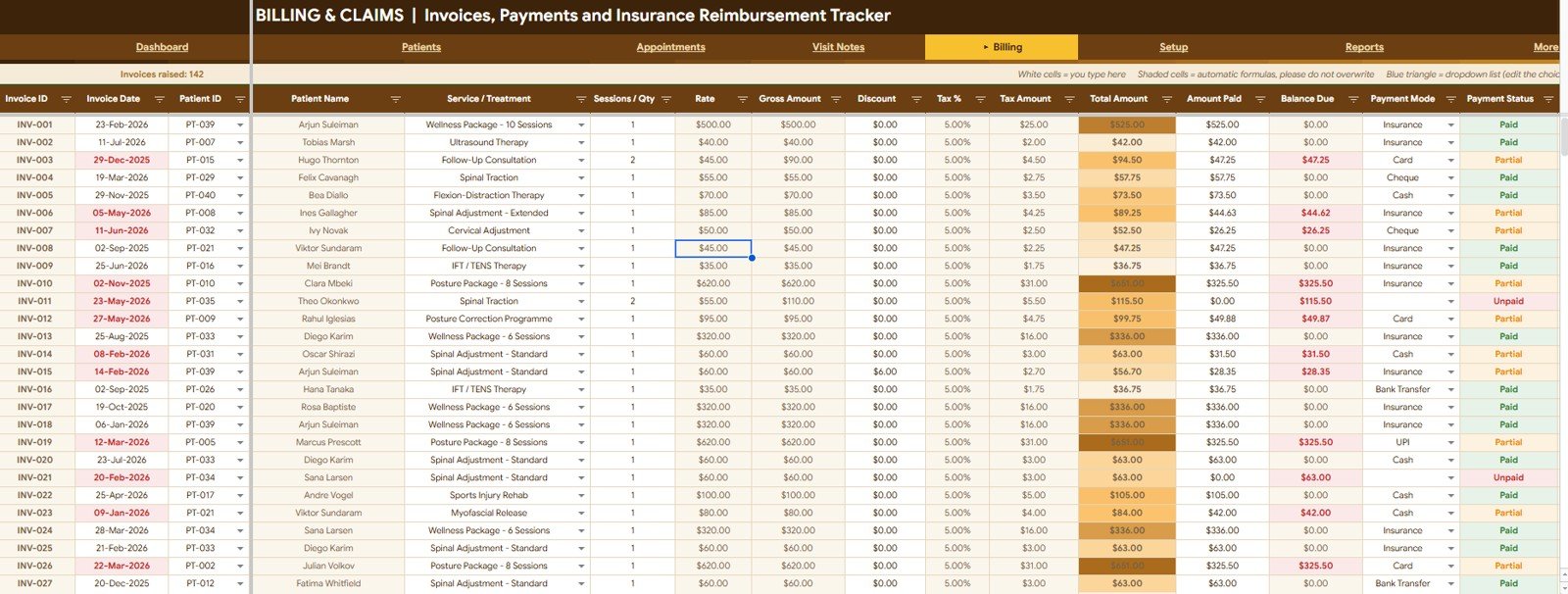
5. Billing & Claims — Invoices, Payments and Insurance Reimbursement
Every invoice lives here: Invoices by Invoice Date, Invoices by Patient Name, Invoices by Service / Treatment and Sessions / Qty by Invoice. The money columns run Gross Amount by Invoice, Discount and Tax Amount by Invoice, Total Amount by Invoice, Amount Paid by Invoice and Balance Due by Invoice, finishing with Invoices by Payment Mode and Invoices by Payment Status.
6. Services & Setup — Price List, Dropdown Lists and Clinic Profile
This is the control panel, and it is the only sheet you need to touch before going live. Clinic Profile stores Clinic Name, Practitioner Name, Registration / Licence No., Phone, Email, Clinic Address, Currency Symbol, Default Tax / Service Charge % and Default Session Duration (Min). The Service & Treatment Price List holds Service / Treatment, Category, Duration (Min), Rate, Sessions in Package, Active status and Times Booked. Seven dropdown lists cover Gender, Patient Status, Referral Source, Primary Complaint, Insurance Provider, Appointment Status and Room / Table.
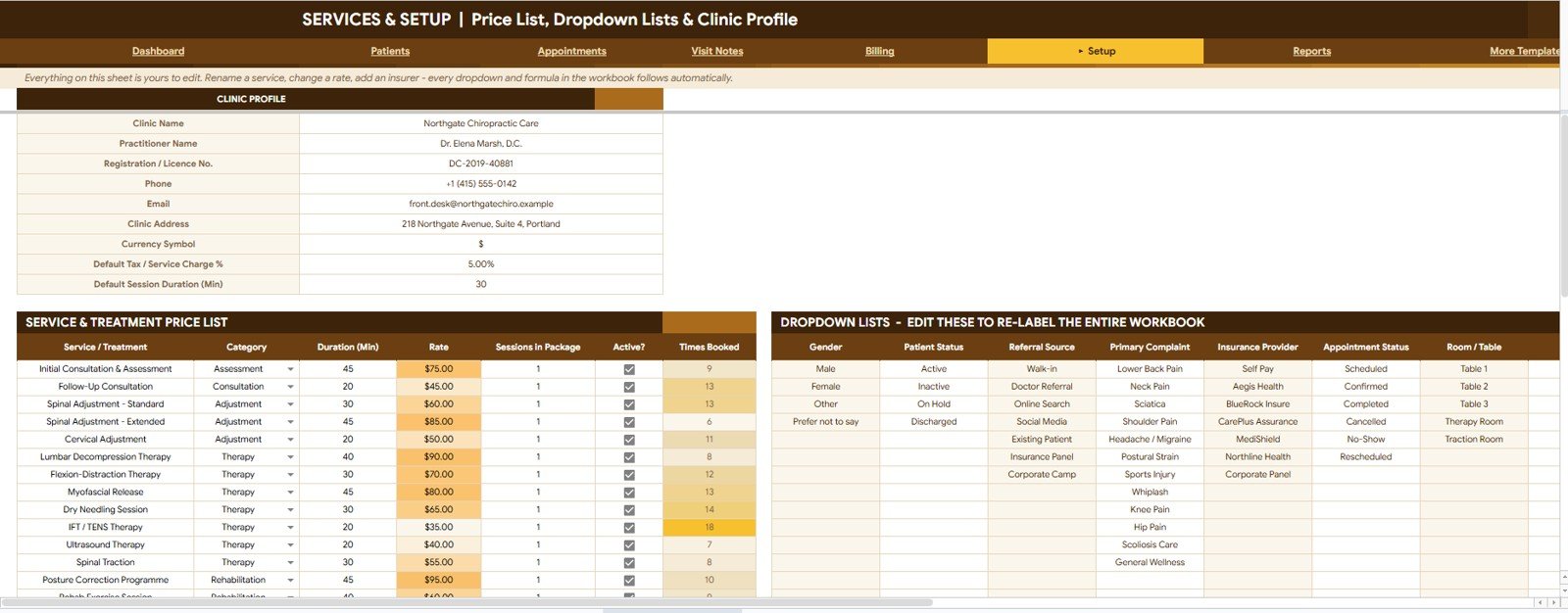
Everything on this sheet is editable, and every dropdown and formula in the workbook follows automatically. If you want to understand how the underlying dropdown lists work, the Google Docs Editors Help Center covers data validation in detail.
7. Reports — Practice, Treatment, Patient and Claim Analysis
Select a report period and a treatment, and the summary generates itself: Appointments by Month, Completed Appointments by Month, Visits by Month, Patients Seen by Month, Billed Amount by Month, Collected Amount by Month and Outstanding Amount by Month. Two further views — Total Billed by Patient and Reimbursed and Pending Amount by Claim Status — close out revenue and insurance.
Chiropractic Clinic Tracker vs. Microsoft Excel vs. Paid Chiropractic EHR — Feature Comparison
| Feature | Chiropractic Clinic Management System Tracker (Google Sheets) | Microsoft Excel clinic workbook | Paid chiropractic EHR (ChiroTouch / Jane App type) |
|---|---|---|---|
| Cost | $9.99 one-time | $10-40 one-time, plus a Microsoft 365 licence | Typically $80-$400 per month, per clinic |
| Platform | Google Sheets — any browser | Desktop Excel, Windows or Mac | Vendor web app plus mobile app |
| Setup time | Under 10 minutes | 15-30 minutes | Days to weeks, often with paid onboarding |
| Real-time team collaboration | Yes — native multi-user editing | Only via OneDrive co-authoring | Yes |
| Mobile access | Google Sheets app | Limited on the Excel mobile app | Yes |
| Customisable fields and dropdowns | Fully editable Setup sheet | Editable | Restricted to vendor-defined fields |
| Share with a link | Yes | File attachment or OneDrive link | Seat-based logins only |
| Year-1 cost at 5 users | $9.99 total | $10-40 plus licences | Roughly $1,000-$4,800 |
| Pain Before / After outcome tracking | Built in | Manual build | Usually included |
| Electronic claim submission | No — status tracking only | No | Yes |
For clinics that want appointment, visit and claim visibility without a per-seat monthly bill, the Chiropractic Clinic Management System Tracker sits in the sweet spot.
Who Should Use This Template
Perfect for:
- Solo chiropractors and 2-5 practitioner clinics running roughly 20-200 appointments a week
- Clinic managers who want billed-versus-collected visibility without committing to a full EHR
- Physiotherapy, osteopathy, sports therapy and rehab practices with the same appointment-visit-invoice shape
- New practices in their first year that need structure now and cannot justify a monthly platform
- Front-desk staff who want Today’s Schedule and Recent Visits on a single screen
Not a fit if:
- You need HIPAA-certified hosting, audit logs or a signed business associate agreement — a spreadsheet is not a certified EHR
- You submit electronic claims directly to payers through a clearinghouse
- You run a multi-site group with 10+ practitioners and role-based permissions per location
- You want the system itself to send automated SMS or email reminders
Real-World Use Cases
Dr. Meera runs a solo chiropractic practice with around 60 appointments a week. Every Friday she opens the Practice Dashboard, checks Outstanding Balance and Claim Reimbursement Pending, and chases the two or three invoices that have drifted past their date. It takes her about ten minutes, and it costs her nothing per month to do it.
Tom manages the front desk at a three-practitioner sports and spinal clinic. He works almost entirely from Today’s Schedule on the dashboard, ticks Reminder Sent and Visit Logged on the Appointments sheet as the day goes on, and uses the Room / Table dropdown to keep two treatment rooms from being double-booked during the evening rush.
Priya owns two rehab studios and reviews performance monthly. She sets the Reports sheet to the previous month, compares Billed Amount by Month against Collected Amount by Month to spot collection slippage early, and uses Revenue by Service / Treatment to decide which packages to promote in the next quarter.
Advantages of the Chiropractic Clinic Management System Tracker
It removes the reconciliation step. When appointments, visits and invoices live in one file, you never have to cross-check a diary against an invoice book. The Billed vs Collected by Month chart is doing that reconciliation for you continuously.
Cost predictability. A paid chiropractic platform at even $150 a month is $1,800 in year one and $9,000 across five years. This is a one-time purchase with unlimited users, so adding a second practitioner or a part-time receptionist costs nothing extra.
You keep your own data. The file lives in your Google Drive. There is no export request, no vendor lock-in and no risk of losing access to your patient history if you stop paying a subscription.
Outcome evidence comes free. Pain Before, Pain After and Pain Change are captured as part of normal note-taking, so the data you need for insurer justification or a patient progress conversation already exists.
Opportunities for Improvement
It is worth being clear about what this tracker does not do. It does not submit electronic claims — it tracks their status, but the actual submission still happens through your existing channel. It does not send SMS or email reminders automatically; the Reminder Sent column is a manual flag, though you could layer Google Apps Script on top if you wanted automation.
It also is not a certified electronic health record. If your jurisdiction requires certified storage, audit trails or a signed BAA for patient data, a Google Sheets file will not satisfy that requirement regardless of how you configure sharing. And at very high volumes — say beyond a few thousand appointment rows — Google Sheets will start to feel slow, at which point a proper web app is the better answer.
Best Practices
Fill in the Services & Setup sheet completely before you enter a single patient. Every dropdown in the workbook reads from it, so getting the price list and the 7 lists right first saves re-work later.
Keep Referral Source disciplined. Use a short fixed list rather than free text, otherwise Patients by Referral Source becomes noise instead of a marketing signal.
Log the visit the same day. The Visit Logged flag on the Appointments sheet exists precisely so unwritten notes are visible; letting them pile up for a week is how clinical records go stale.
Review Billed vs Collected by Month once a month, not once a quarter. Collection problems compound, and the chart is designed to make a widening gap obvious immediately.
Restrict edit access on the Setup sheet. Give reception edit rights on Patients, Appointments and Billing, but keep the price list under one person’s control so rates do not drift.
Explore Relevant Templates
If you want the same practice model as a full web application with logins and role-based access, look at the Therapy Center Management System Web App. For claims and policy administration alongside this tracker, the Insurance Policy and Premium Tracker in Google Sheets is the natural companion.
Clinics that also need rota planning and patient logs often add the Doctor Duty Roster Data Entry System in Excel and the Dental Patient Log Data Entry System in Excel.
If you are exploring the tracker format for other service businesses, we have written up the Car Wash Management System Tracker in Google Sheets and the Catering Business Management Tracker in Google Sheets, both of which use the same dashboard-plus-registers architecture. For financial tracking, see the Insurance Policy and Premium Tracker and the Charitable Giving and Tithe Tracker.
Want to build trackers like this yourself? The NextGenTemplates Academy learning paths teach the underlying spreadsheet skills with practice files.
Frequently Asked Questions
What does the Chiropractic Clinic Management System Tracker actually track?
The Chiropractic Clinic Management System Tracker tracks 8 KPIs — Active Patients, New Patients, Appointments, Visits Recorded, Revenue Billed, Payments Collected, Outstanding Balance and Claim Reimbursement Pending — across 7 linked sheets covering patients, appointments, visit notes, billing, setup and reports.
How long does setup take?
Setup takes under 10 minutes. Copy the sheet to your Google Drive, fill in the Clinic Profile, replace the sample price list with your own treatments, and adjust the 7 dropdown lists. Every formula, dropdown and chart in the Chiropractic Clinic Management System Tracker updates automatically from there.
How does this compare to a paid chiropractic EHR like ChiroTouch or Jane App?
A paid EHR typically costs $80-$400 per month and adds electronic claims, certified hosting and automated reminders. The Chiropractic Clinic Management System Tracker is a one-time $9.99 purchase covering scheduling, clinical notes, billing and claim status — the right fit for small clinics not yet ready for a monthly platform.
Can multiple staff use it at the same time?
Yes. Because the Chiropractic Clinic Management System Tracker runs in Google Sheets, you can share it with your whole team and everyone edits simultaneously. There are no per-user fees and no seat limits, and you can set view-only access on the Setup sheet if you want rates locked down.
Does it track insurance claims and reimbursements?
Yes. The Billing & Claims sheet records payment mode, payment status and balance due per invoice, and the Reports sheet summarises Reimbursed and Pending Amount by Claim Status so you can see which insurer payments are still outstanding.
Can I use it for physiotherapy or osteopathy instead?
Yes. The Chiropractic Clinic Management System Tracker is fully editable. Rename the price list entries and change the Primary Complaint and Technique Used dropdowns, and the same appointment, visit and invoice structure works for physiotherapy, osteopathy, sports therapy and rehab practices.
Do I need Excel or any software to use it?
No. The Chiropractic Clinic Management System Tracker runs entirely in Google Sheets in any modern browser, on desktop, tablet or phone. You only need a free Google account — no Excel licence, no installation and no add-ons.
About the Author
Built by PK — Microsoft Certified Professional with 15+ years of Excel, Google Sheets, and Power BI experience. Founder of NextGenTemplates, reaching 300K+ subscribers across YouTube channels. Every template is hand-built and tested before release.
Conclusion
If your clinic currently runs on a diary, a notes folder and a separate invoice book, this tracker replaces all three with one file that answers the questions those three cannot: what did we bill, what did we collect, and what is still sitting with an insurer. Seven sheets, 8 KPIs, and under ten minutes of setup.
Get the Chiropractic Clinic Management System Tracker in Google Sheets
Instant download · One-time payment · No subscription
Last updated: August 2026